This is a continuation of my previous post, which can be found here.
Let us recap the key takaways from our previous post –
The Model Context Protocol (MCP) standardizes how AI agents use tools and data. Instead of fragile, custom connectors (N×M problem), teams build one MCP server per system; any MCP-compatible agent can use it, reducing cost and breakage. Unlike RAG, which retrieves static, unstructured documents for context, MCP enables live, structured, and actionable operations (e.g., query databases, create tickets). Compared with proprietary plugins, MCP is open, model-agnostic (JSON-RPC 2.0), and minimizes vendor lock-in. Cloud patterns: Azure “agent factory,” AWS “serverless agents,” and GCP “unified workbench”—each hosting agents with MCP servers securely fronting enterprise services.
Today, we’ll try to understand some of the popular pattern from the world of cloud & we’ll explore them in this post & the next post.
Agent Factory Pattern (Azure):
The Azure “agent factory” pattern leverages the Azure AI Foundry to serve as a secure, managed hub for creating and orchestrating multiple specialized AI agents. This pattern emphasizes enterprise-grade security, governance, and seamless integration with the Microsoft ecosystem, making it ideal for organizations that use Microsoft products extensively.
Let’s explore the following diagram based on this –
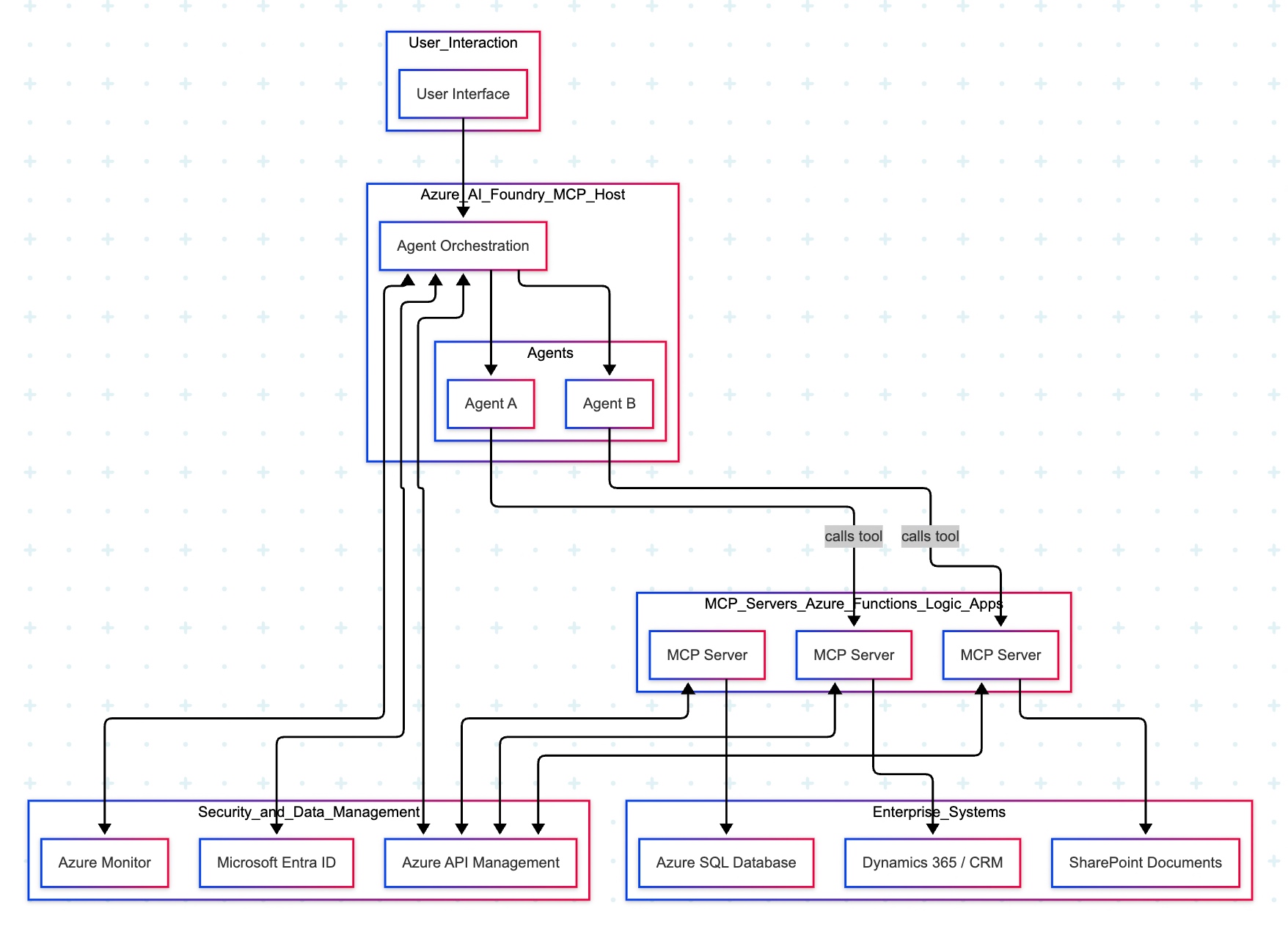
Imagine you ask a question in Microsoft Teams—“Show me the latest HR policy” or “What is our current sales pipeline?” Your message is sent to Azure AI Foundry, which acts as an expert dispatcher. Foundry chooses a specialist AI agent—for example, an HR agent for policies or a Sales agent for the pipeline.
That agent does not rummage through your systems directly. Instead, it uses a safe, preapproved tool (an “MCP Server”) that knows how to talk to one system—such as Dynamics 365/CRM, SharePoint, or an Azure SQL database. The tool gets the information, sends it back to the agent, who then explains the answer clearly to you in Teams.
Throughout the process, three guardrails keep everything safe and reliable:
- Microsoft Entra ID checks identity and permissions.
- Azure API Management (APIM) is the controlled front door for all tool calls.
- Azure Monitor watches performance and creates an audit trail.
Let us now understand the technical events that is going on underlying this request –
- Control plane: Azure AI Foundry (MCP Host) orchestrates intent, tool selection, and multi-agent flows.
- Execution plane: Agents invoke MCP Servers (Azure Functions/Logic Apps) via APIM; each server encapsulates a single domain integration (CRM, SharePoint, SQL).
- Data plane:
MCP Server (CRM) ↔ Dynamics 365/CRMMCP Server (SharePoint) ↔ SharePointMCP Server (SQL) ↔ Azure SQL Database
- Identity & access: Entra ID issues tokens and enforces least-privilege access; Foundry, APIM, and MCP Servers validate tokens.
- Observability: Azure Monitor for metrics, logs, distributed traces, and auditability across agents and tool calls.
- Traffic pattern in diagram:
- User → Foundry → Agent (Sales/HR).
- Agent —tool call→ MCP Server (CRM/SharePoint/SQL).
- MCP Server → Target system; response returns along the same path.
Note: The SQL MCP Server is shown connected to Azure SQL; agents can call it in the same fashion as CRM/SharePoint when a use case requires relational data.
Why does this design work?
- Safety by design: Agents never directly touch back-end systems; MCP Servers mediate access with APIM and Entra ID.
- Clarity & maintainability: Each tool maps to one system; changes are localized and testable.
- Scalability: Add new agents or systems by introducing another MCP Server behind APIM.
- Auditability: Every action is observable in Azure Monitor for compliance and troubleshooting.
AWS MCP Architecture:
The AWS “composable serverless agent” pattern focuses on building lightweight, modular, and event-driven AI agents using Bedrock and serverless technologies. It prioritizes customization, scalability, and leveraging AWS’s deep service portfolio, making it a strong choice for enterprises that value flexibility and granular control.
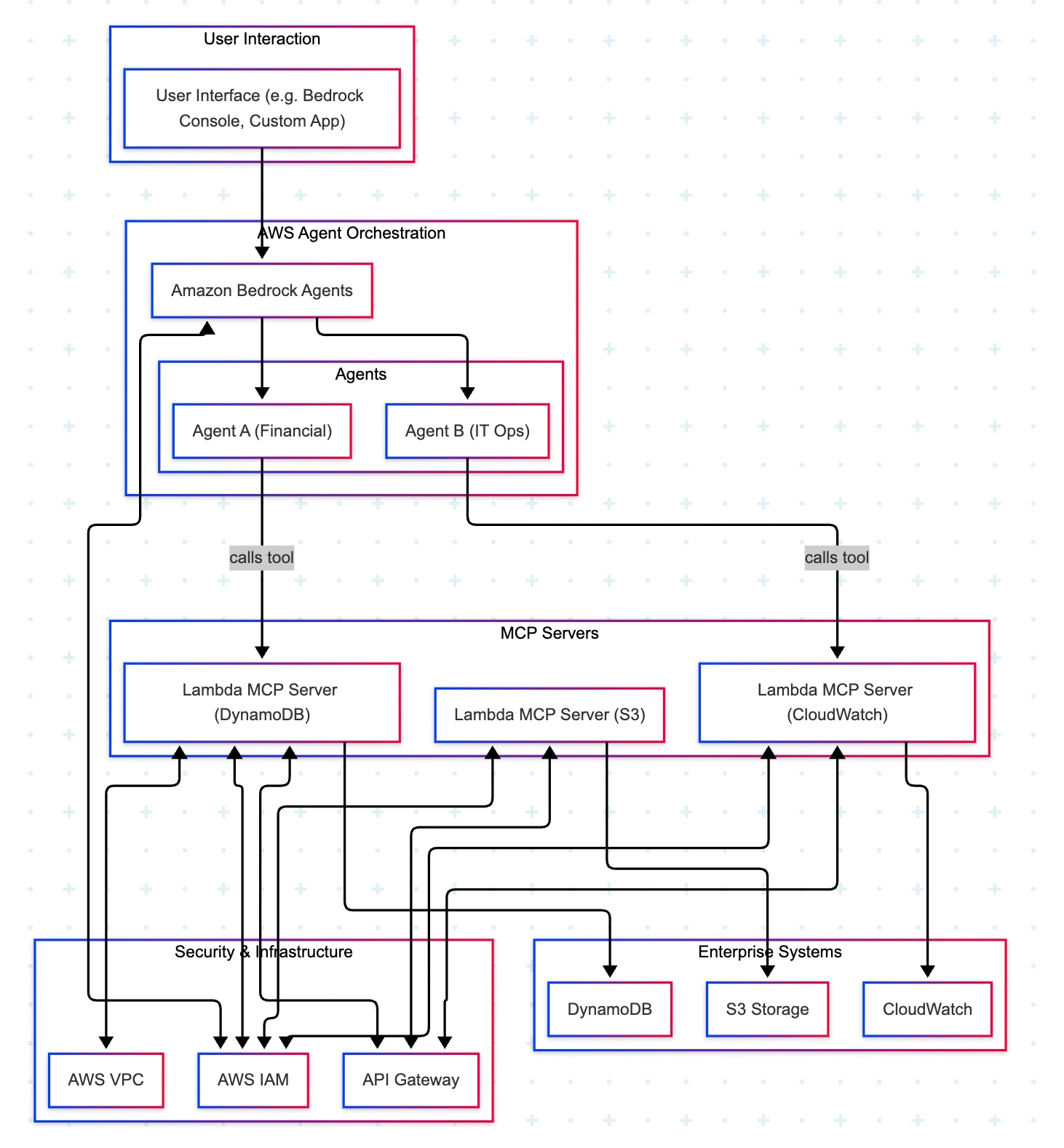
A manager opens a familiar app (the Bedrock console or a simple web app) and types, “Show me last quarter’s approved purchase requests.” The request goes to Amazon Bedrock Agents, which acts like an intelligent dispatcher. It chooses the Financial Agent—a specialist in finance tasks. That agent uses a safe, pre-approved tool to fetch data from the company’s DynamoDB records. Moments later, the manager sees a clear summary, without ever touching databases or credentials.
Actors & guardrails. UI (Bedrock console or custom app) → Amazon Bedrock Agents (MCP host/orchestrator) → Domain Agents (Financial, IT Ops) → MCP Servers on AWS Lambda (one tool per AWS service) → Enterprise Services (DynamoDB, S3, CloudWatch). Access is governed by IAM (least-privilege roles, agent→tool→service), ingress/policy by API Gateway (front door to each Lambda tool), and network isolation by VPC where required.
Agent–tool mappings:
- Agent A (Financial) → Lambda MCP (DynamoDB)
- Agent B (IT Ops) → Lambda MCP (CloudWatch)
- Optional: Lambda MCP (S3) for file/object operations
End-to-end sequence:
- UI → Bedrock Agents: User submits a prompt.
- Agent selection: Bedrock dispatches to the appropriate domain agent (Financial or IT Ops).
- Tool invocation: The agent calls the required Lambda MCP Server via API Gateway.
- Authorization: The tool executes only permitted actions under its IAM role (least privilege).
- Data access:
- DynamoDB tool → DynamoDB (query/scan/update)
- S3 tool → S3 (get/put/list objects)
- CloudWatch tool → CloudWatch (logs/metrics queries)
- Response path: Service → tool → agent → Bedrock → UI (final answer rendered).
Why does this design work?
- Safer by default: Agents never handle raw credentials; tools enforce least privilege with IAM.
- Clear boundaries: Each tool maps to one service, making audits and changes simpler.
- Scalable & maintainable: Lambda and API Gateway scale on demand; adding a new tool (e.g., a Cost Explorer tool) does not require changing the UI or existing agents.
- Faster delivery: Specialists (agents) focus on logic; tools handle system specifics.
In the next post, we’ll conclude the final thread on this topic.
Till then, Happy Avenging! 🙂
Note: All the data & scenarios posted here are representational data & scenarios & available over the internet & for educational purposes only. There is always room for improvement in this kind of model & the solution associated with it. I’ve shown the basic ways to achieve the same for educational purposes only.

One thought on “AGENTIC AI IN THE ENTERPRISE: STRATEGY, ARCHITECTURE, AND IMPLEMENTATION – PART 4”