AGENTIC AI IN THE ENTERPRISE: STRATEGY, ARCHITECTURE, AND IMPLEMENTATION – PART 5

This is a continuation of my previous post, which can be found here. This will be our last post of this series.

Let us recap the key takaways from our previous post –

Two cloud patterns show how MCP standardizes safe AI-to-system work. Azure “agent factory”: You ask in Teams; Azure AI Foundry dispatches a specialist agent (HR/Sales). The agent calls a specific MCP server (Functions/Logic Apps) for CRM, SharePoint, or SQL via API Management. Entra ID enforces access; Azure Monitor audits. AWS “composable serverless agents”: In Bedrock, domain agents (Financial/IT Ops) invoke Lambda-based MCP tools for DynamoDB, S3, or CloudWatch through API Gateway with IAM and optional VPC. In both, agents never hold credentials; tools map one-to-one to systems, improving security, clarity, scalability, and compliance.

In this post, we’ll discuss the GCP factory pattern.

The GCP “unified workbench” pattern prioritizes a unified, data-centric platform for AI development, integrating seamlessly with Vertex AI and Google’s expertise in AI and data analytics. This approach is well-suited for AI-first companies and data-intensive organizations that want to build agents that leverage cutting-edge research tools.

Let’s explore the following diagram based on this –

Imagine Mia, a clinical operations lead, opens a simple app and asks: “Which clinics had the longest wait times this week? Give me a quick summary I can share.”

  • The app quietly sends Mia’s request to Vertex AI Agent Builder—think of it as the switchboard operator.
  • Vertex AI picks the Data Analysis agent (the “specialist” for questions like Mia’s).
  • That agent doesn’t go rummaging through databases. Instead, it uses a safe, preapproved tool—an MCP Server—to query BigQuery, where the data lives.
  • The tool fetches results and returns them to Mia—no passwords in the open, no risky shortcuts—just the answer, fast and safely.

Now meet Ravi, a developer who asks: “Show me the latest app metrics and confirm yesterday’s patch didn’t break the login table.”

  • The app routes Ravi’s request to Vertex AI.
  • Vertex AI chooses the Developer agent.
  • That agent calls a different tool—an MCP Server designed for Cloud SQL—to check the login table and run a safe query.
  • Results come back with guardrails intact. If the agent ever needs files, there’s also a Cloud Storage tool ready to fetch or store documents.

Let us understand how the underlying flow of activities took place –

  • User Interface:
    • Entry point: Vertex AI console or a custom app.
    • Sends a single request; no direct credentials or system access exposed to the user.
  • Orchestration: Vertex AI Agent Builder (MCP Host)
    • Routes the request to the most suitable agent:
      • Agent A (Data Analysis) for analytics/BI-style questions.
      • Agent B (Developer) for application/data-ops tasks.
  • Tooling via MCP Servers on Cloud Run
    • Each MCP Server is a purpose-built adapter with least-privilege access to exactly one service:
      • Server1 → BigQuery (analytics/warehouse) — used by Agent A in this diagram.
      • Server2 → Cloud Storage (GCS) (files/objects) — available when file I/O is needed.
      • Server3 → Cloud SQL (relational DB) — used by Agent B in this diagram.
    • Agents never hold database credentials; they request actions from the right tool.
  • Enterprise Systems
    • BigQueryCloud Storage, and Cloud SQL are the systems of record that the tools interact with.
  • Security, Networking, and Observability
    • GCP IAM: AuthN/AuthZ for Vertex AI and each MCP Server (fine-grained roles, least privilege).
    • GCP VPC: Private network paths for all Cloud Run MCP Servers (isolation, egress control).
    • Cloud Monitoring: Metrics, logs, and alerts across agents and tools (auditability, SLOs).
  • Return Path
    • Results flow back from the service → MCP Server → Agent → Vertex AI → UI.
    • Policies and logs track who requested what, when, and how.
  • One entry point for questions.
  • Clear accountability: specialists (agents) act within guardrails.
  • Built-in safety (IAM/VPC) and visibility (Monitoring) for trust.
  • Separation of concerns: agents decide what to do; tools (MCP Servers) decide how to do it.
  • Scalable: add a new tool (e.g., Pub/Sub or Vertex AI Feature Store) without changing the UI or agents.
  • Auditable & maintainable: each tool maps to one service with explicit IAM and VPC controls.

So, we’ve concluded the series with the above post. I hope you like it.

I’ll bring some more exciting topics in the coming days from the new advanced world of technology.

Till then, Happy Avenging! 🙂

AGENTIC AI IN THE ENTERPRISE: STRATEGY, ARCHITECTURE, AND IMPLEMENTATION – PART 4

This is a continuation of my previous post, which can be found here.

Let us recap the key takaways from our previous post –

The Model Context Protocol (MCP) standardizes how AI agents use tools and data. Instead of fragile, custom connectors (N×M problem), teams build one MCP server per system; any MCP-compatible agent can use it, reducing cost and breakage. Unlike RAG, which retrieves static, unstructured documents for context, MCP enables live, structured, and actionable operations (e.g., query databases, create tickets). Compared with proprietary plugins, MCP is open, model-agnostic (JSON-RPC 2.0), and minimizes vendor lock-in. Cloud patterns: Azure “agent factory,” AWS “serverless agents,” and GCP “unified workbench”—each hosting agents with MCP servers securely fronting enterprise services.

Today, we’ll try to understand some of the popular pattern from the world of cloud & we’ll explore them in this post & the next post.

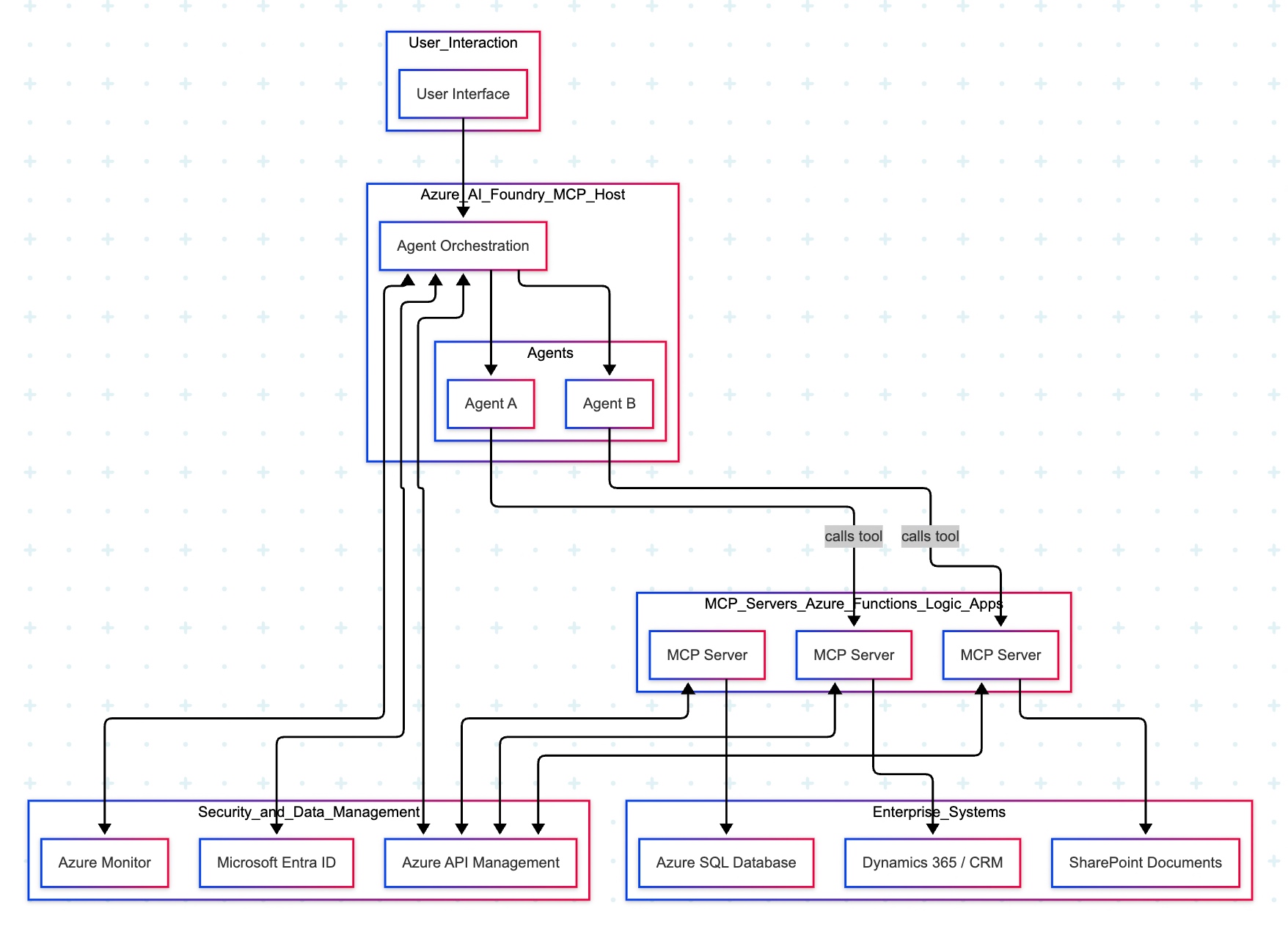
The Azure “agent factory” pattern leverages the Azure AI Foundry to serve as a secure, managed hub for creating and orchestrating multiple specialized AI agents. This pattern emphasizes enterprise-grade security, governance, and seamless integration with the Microsoft ecosystem, making it ideal for organizations that use Microsoft products extensively.

Let’s explore the following diagram based on this –

Imagine you ask a question in Microsoft Teams—“Show me the latest HR policy” or “What is our current sales pipeline?” Your message is sent to Azure AI Foundry, which acts as an expert dispatcher. Foundry chooses a specialist AI agent—for example, an HR agent for policies or a Sales agent for the pipeline.

That agent does not rummage through your systems directly. Instead, it uses a safe, preapproved tool (an “MCP Server”) that knows how to talk to one system—such as Dynamics 365/CRMSharePoint, or an Azure SQL database. The tool gets the information, sends it back to the agent, who then explains the answer clearly to you in Teams.

Throughout the process, three guardrails keep everything safe and reliable:

  • Microsoft Entra ID checks identity and permissions.
  • Azure API Management (APIM) is the controlled front door for all tool calls.
  • Azure Monitor watches performance and creates an audit trail.

Let us now understand the technical events that is going on underlying this request –

  • Control plane: Azure AI Foundry (MCP Host) orchestrates intent, tool selection, and multi-agent flows.
  • Execution plane: Agents invoke MCP Servers (Azure Functions/Logic Apps) via APIM; each server encapsulates a single domain integration (CRM, SharePoint, SQL).
  • Data plane:
    • MCP Server (CRM) ↔ Dynamics 365/CRM
    • MCP Server (SharePoint) ↔ SharePoint
    • MCP Server (SQL) ↔ Azure SQL Database
  • Identity & access: Entra ID issues tokens and enforces least-privilege access; Foundry, APIM, and MCP Servers validate tokens.
  • Observability: Azure Monitor for metrics, logs, distributed traces, and auditability across agents and tool calls.
  • Traffic pattern in diagram:
    • User → Foundry → Agent (Sales/HR).
    • Agent —tool call→ MCP Server (CRM/SharePoint/SQL).
    • MCP Server → Target system; response returns along the same path.

Note: The SQL MCP Server is shown connected to Azure SQL; agents can call it in the same fashion as CRM/SharePoint when a use case requires relational data.

  • Safety by design: Agents never directly touch back-end systems; MCP Servers mediate access with APIM and Entra ID.
  • Clarity & maintainability: Each tool maps to one system; changes are localized and testable.
  • Scalability: Add new agents or systems by introducing another MCP Server behind APIM.
  • Auditability: Every action is observable in Azure Monitor for compliance and troubleshooting.

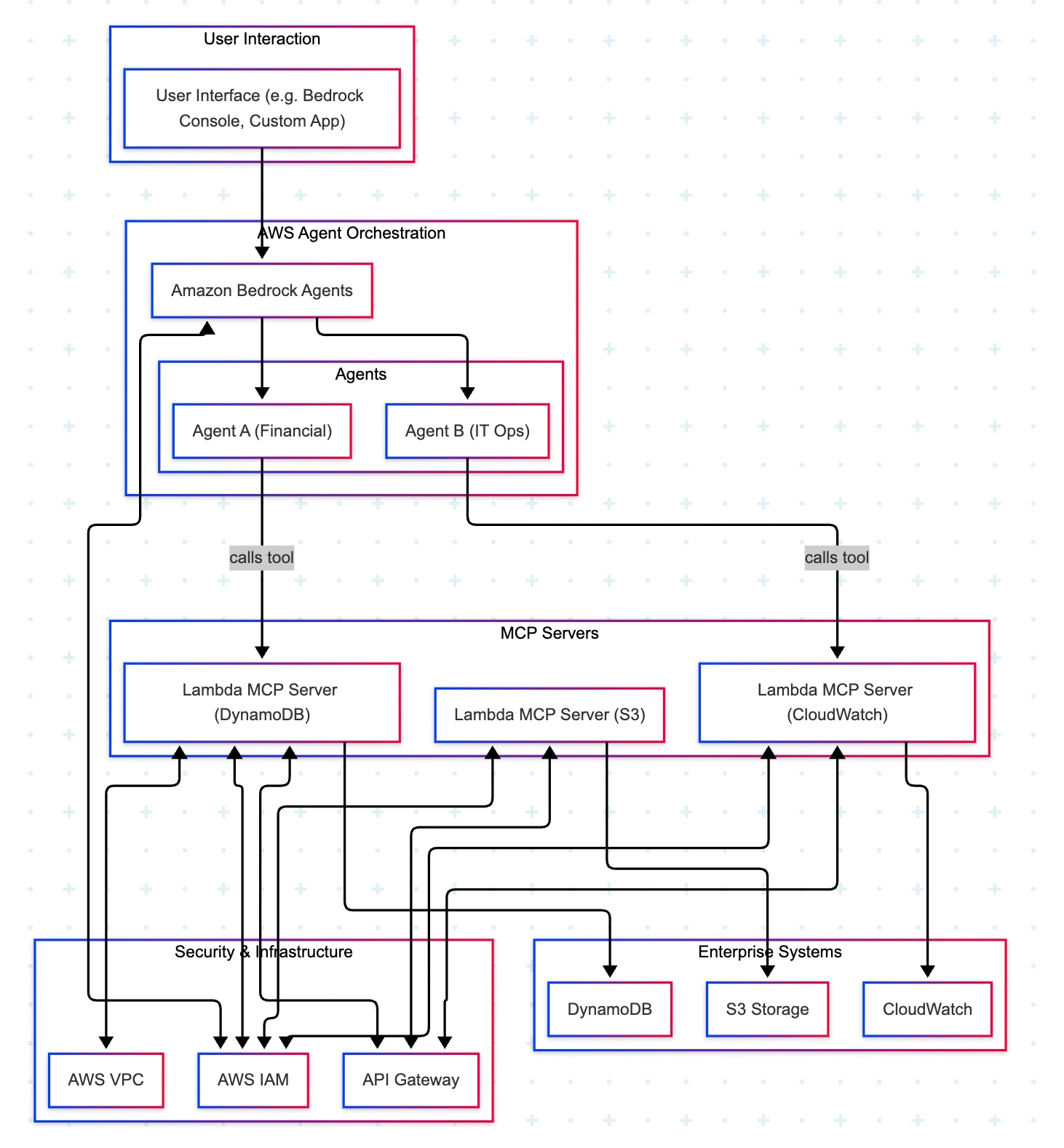
The AWS “composable serverless agent” pattern focuses on building lightweight, modular, and event-driven AI agents using Bedrock and serverless technologies. It prioritizes customization, scalability, and leveraging AWS’s deep service portfolio, making it a strong choice for enterprises that value flexibility and granular control.

A manager opens a familiar app (the Bedrock console or a simple web app) and types, “Show me last quarter’s approved purchase requests.” The request goes to Amazon Bedrock Agents, which acts like an intelligent dispatcher. It chooses the Financial Agent—a specialist in finance tasks. That agent uses a safe, pre-approved tool to fetch data from the company’s DynamoDB records. Moments later, the manager sees a clear summary, without ever touching databases or credentials.

Actors & guardrails. UI (Bedrock console or custom app) → Amazon Bedrock Agents (MCP host/orchestrator) → Domain Agents (Financial, IT Ops) → MCP Servers on AWS Lambda (one tool per AWS service) → Enterprise Services (DynamoDBS3CloudWatch). Access is governed by IAM (least-privilege roles, agent→tool→service), ingress/policy by API Gateway (front door to each Lambda tool), and network isolation by VPC where required.

Agent–tool mappings:

  • Agent A (Financial) → Lambda MCP (DynamoDB)
  • Agent B (IT Ops) → Lambda MCP (CloudWatch)
  • Optional: Lambda MCP (S3) for file/object operations

End-to-end sequence:

  • UI → Bedrock Agents: User submits a prompt.
  • Agent selection: Bedrock dispatches to the appropriate domain agent (Financial or IT Ops).
  • Tool invocation: The agent calls the required Lambda MCP Server via API Gateway.
  • Authorization: The tool executes only permitted actions under its IAM role (least privilege).
  • Data access:
    • DynamoDB tool → DynamoDB (query/scan/update)
    • S3 tool → S3 (get/put/list objects)
    • CloudWatch tool → CloudWatch (logs/metrics queries)
  • Response path: Service → tool → agent → Bedrock → UI (final answer rendered).
  • Safer by default: Agents never handle raw credentials; tools enforce least privilege with IAM.
  • Clear boundaries: Each tool maps to one service, making audits and changes simpler.
  • Scalable & maintainable: Lambda and API Gateway scale on demand; adding a new tool (e.g., a Cost Explorer tool) does not require changing the UI or existing agents.
  • Faster delivery: Specialists (agents) focus on logic; tools handle system specifics.

In the next post, we’ll conclude the final thread on this topic.

Till then, Happy Avenging! 🙂

AGENTIC AI IN THE ENTERPRISE: STRATEGY, ARCHITECTURE, AND IMPLEMENTATION – PART 3

This is a continuation of my previous post, which can be found here.

Let us recap the key takaways from our previous post –

Enterprise AI, utilizing the Model Context Protocol (MCP), leverages an open standard that enables AI systems to securely and consistently access enterprise data and tools. MCP replaces brittle “N×M” integrations between models and systems with a standardized client–server pattern: an MCP host (e.g., IDE or chatbot) runs an MCP client that communicates with lightweight MCP servers, which wrap external systems via JSON-RPC. Servers expose three assets—Resources (data), Tools (actions), and Prompts (templates)—behind permissions, access control, and auditability. This design enables real-time context, reduces hallucinations, supports model- and cloud-agnostic interoperability, and accelerates “build once, integrate everywhere” deployment. A typical flow (e.g., retrieving a customer’s latest order) encompasses intent parsing, authorized tool invocation, query translation/execution, and the return of a normalized JSON result to the model for natural-language delivery. Performance introduces modest overhead (RPC hops, JSON (de)serialization, network transit) and scale considerations (request volume, significant results, context-window pressure). Mitigations include in-memory/semantic caching, optimized SQL with indexing, pagination, and filtering, connection pooling, and horizontal scaling with load balancing. In practice, small latency costs are often outweighed by the benefits of higher accuracy, stronger governance, and a decoupled, scalable architecture.

Compared to other approaches, the Model Context Protocol (MCP) offers a uniquely standardized and secure framework for AI-tool integration, shifting from brittle, custom-coded connections to a universal plug-and-play model. It is not a replacement for underlying systems, such as APIs or databases, but instead acts as an intelligent, secure abstraction layer designed explicitly for AI agents.

This approach was the traditional method for AI integration before standards like MCP emerged.

  • Custom API integrations (traditional): Each AI application requires a custom-built connector for every external system it needs to access, leading to an N x M integration problem (the number of connectors grows exponentially with the number of models and systems). This approach is resource-intensive, challenging to maintain, and prone to breaking when underlying APIs change.
  • MCP: The standardized protocol eliminates the N x M problem by creating a universal interface. Tool creators build a single MCP server for their system, and any MCP-compatible AI agent can instantly access it. This process decouples the AI model from the underlying implementation details, drastically reducing integration and maintenance costs.

For more detailed information, please refer to the following link.

RAG is a technique that retrieves static documents to augment an LLM’s knowledge, while MCP focuses on live interactions. They are complementary, not competing. 

  • RAG:
    • Focus: Retrieving and summarizing static, unstructured data, such as documents, manuals, or knowledge bases.
    • Best for: Providing background knowledge and general information, as in a policy lookup tool or customer service bot.
    • Data type: Unstructured, static knowledge.
  • MCP:
    • Focus: Accessing and acting on real-time, structured, and dynamic data from databases, APIs, and business systems.
    • Best for: Agentic use cases involving real-world actions, like pulling live sales reports from a CRM or creating a ticket in a project management tool.
    • Data type: Structured, real-time, and dynamic data.

Before MCP, platforms like OpenAI offered proprietary plugin systems to extend LLM capabilities.

  • LLM plugins:
    • Proprietary: Tied to a specific AI vendor (e.g., OpenAI).
    • Limited: Rely on the vendor’s API function-calling mechanism, which focuses on call formatting but not standardized execution.
    • Centralized: Managed by the AI vendor, creating a risk of vendor lock-in.
  • MCP:
    • Open standard: Based on a public, interoperable protocol (JSON-RPC 2.0), making it model-agnostic and usable across different platforms.
    • Infrastructure layer: Provides a standardized infrastructure for agents to discover and use any compliant tool, regardless of the underlying LLM.
    • Decentralized: Promotes a flexible ecosystem and reduces the risk of vendor lock-in. 

The “agent factory” pattern: Azure focuses on providing managed services for building and orchestrating AI agents, tightly integrated with its enterprise security and governance features. The MCP architecture is a core component of the Azure AI Foundry, serving as a secure, managed “agent factory.” 

  • AI orchestration layer: The Azure AI Agent Service, within Azure AI Foundry, acts as the central host and orchestrator. It provides the control plane for creating, deploying, and managing multiple specialized agents, and it natively supports the MCP standard.
  • AI model layer: Agents in the Foundry can be powered by various models, including those from Azure OpenAI Service, commercial models from partners, or open-source models.
  • MCP server and tool layer: MCP servers are deployed using serverless functions, such as Azure Functions or Azure Logic Apps, to wrap existing enterprise systems. These servers expose tools for interacting with enterprise data sources like SharePoint, Azure AI Search, and Azure Blob Storage.
  • Data and security layer: Data is secured using Microsoft Entra ID (formerly Azure AD) for authentication and access control, with robust security policies enforced via Azure API Management. Access to data sources, such as databases and storage, is managed securely through private networks and Managed Identity. 

The “composable serverless agent” pattern: AWS emphasizes a modular, composable, and serverless approach, leveraging its extensive portfolio of services to build sophisticated, flexible, and scalable AI solutions. The MCP architecture here aligns with the principle of creating lightweight, event-driven services that AI agents can orchestrate. 

  • The AI orchestration layer, which includes Amazon Bedrock Agents or custom agent frameworks deployed via AWS Fargate or Lambda, acts as the MCP hosts. Bedrock Agents provide built-in orchestration, while custom agents offer greater flexibility and customization options.
  • AI model layer: The models are sourced from Amazon Bedrock, which provides a wide selection of foundation models.
  • MCP server and tool layer: MCP servers are deployed as serverless AWS Lambda functions. AWS offers pre-built MCP servers for many of its services, including the AWS Serverless MCP Server for managing serverless applications and the AWS Lambda Tool MCP Server for invoking existing Lambda functions as tools.
  • Data and security layer: Access is tightly controlled using AWS Identity and Access Management (IAM) roles and policies, with fine-grained permissions for each MCP server. Private data sources like databases (Amazon DynamoDB) and storage (Amazon S3) are accessed securely within a Virtual Private Cloud (VPC). 

The “unified workbench” pattern: GCP focuses on providing a unified, open, and data-centric platform for AI development. The MCP architecture on GCP integrates natively with the Vertex AI platform, treating MCP servers as first-class tools that can be dynamically discovered and used within a single workbench. 

  • AI orchestration layer: The Vertex AI Agent Builder serves as the central environment for building and managing conversational AI and other agents. It orchestrates workflows and manages tool invocation for agents.
  • AI model layer: Agents use foundation models available through the Vertex AI Model Garden or the Gemini API.
  • MCP server and tool layer: MCP servers are deployed as containerized microservices on Cloud Run or managed by services like App Engine. These servers contain tools that interact with GCP services, such as BigQueryCloud Storage, and Cloud SQL. GCP offers pre-built MCP server implementations, such as the GCP MCP Toolbox, for integration with its databases.
  • Data and security layer: Vertex AI Vector Search and other data sources are encapsulated within the MCP server tools to provide contextual information. Access to these services is managed by Identity and Access Management (IAM) and secured through virtual private clouds. The MCP server can leverage Vertex AI Context Caching for improved performance.

Note that all the native technology is referred to in each respective cloud. Hence, some of the better technologies can be used in place of the tool mentioned here. This is more of a concept-level comparison rather than industry-wise implementation approaches.


We’ll go ahead and conclude this post here & continue discussing on a further deep dive in the next post.

Till then, Happy Avenging! 🙂

AGENTIC AI IN THE ENTERPRISE: STRATEGY, ARCHITECTURE, AND IMPLEMENTATION – PART 2

This is a continuation of my previous post, which can be found here.

Let us recap the key takaways from our previous post –

Agentic AI refers to autonomous systems that pursue goals with minimal supervision by planning, reasoning about next steps, utilizing tools, and maintaining context across sessions. Core capabilities include goal-directed autonomy, interaction with tools and environments (e.g., APIs, databases, devices), multi-step planning and reasoning under uncertainty, persistence, and choiceful decision-making.

Architecturally, three modules coordinate intelligent behavior: Sensing (perception pipelines that acquire multimodal data, extract salient patterns, and recognize entities/events); Observation/Deliberation (objective setting, strategy formation, and option evaluation relative to resources and constraints); and Action (execution via software interfaces, communications, or physical actuation to deliver outcomes). These functions are enabled by machine learning, deep learning, computer vision, natural language processing, planning/decision-making, uncertainty reasoning, and simulation/modeling.

At enterprise scale, open standards align autonomy with governance: the Model Context Protocol (MCP) grants an agent secure, principled access to enterprise tools and data (vertical integration), while Agent-to-Agent (A2A) enables specialized agents to coordinate, delegate, and exchange information (horizontal collaboration). Together, MCP and A2A help organizations transition from isolated pilots to scalable programs, delivering end-to-end automation, faster integration, enhanced security and auditability, vendor-neutral interoperability, and adaptive problem-solving that responds to real-time context.

Great! Let’s dive into this topic now.

Enterprise AI with MCP refers to the application of the Model Context Protocol (MCP), an open standard, to enable AI systems to securely and consistently access external enterprise data and applications. 

Before MCP, enterprise AI integration was characterized by a “many-to-many” or “N x M” problem. Companies had to build custom, fragile, and costly integrations between each AI model and every proprietary data source, which was not scalable. These limitations left AI agents with limited, outdated, or siloed information, restricting their potential impact. 
MCP addresses this by offering a standardized architecture for AI and data systems to communicate with each other.

The MCP framework uses a client-server architecture to enable communication between AI models and external tools and data sources. 

  • MCP Host: The AI-powered application or environment, such as an AI-enhanced IDE or a generative AI chatbot like Anthropic’s Claude or OpenAI’s ChatGPT, where the user interacts.
  • MCP Client: A component within the host application that manages the connection to MCP servers.
  • MCP Server: A lightweight service that wraps around an external system (e.g., a CRM, database, or API) and exposes its capabilities to the AI client in a standardized format, typically using JSON-RPC 2.0. 

An MCP server provides AI clients with three key resources: 

  • Resources: Structured or unstructured data that an AI can access, such as files, documents, or database records.
  • Tools: The functionality to perform specific actions within an external system, like running a database query or sending an email.
  • Prompts: Pre-defined text templates or workflows to help guide the AI’s actions. 
  • Standardized integration: Developers can build integrations against a single, open standard, which dramatically reduces the complexity and time required to deploy and scale AI initiatives.
  • Enhanced security and governance: MCP incorporates native support for security and compliance measures. It provides permission models, access control, and auditing capabilities to ensure AI systems only access data and tools within specified boundaries.
  • Real-time contextual awareness: By connecting AI agents to live enterprise data sources, MCP ensures they have access to the most current and relevant information, which reduces hallucinations and improves the accuracy of AI outputs.
  • Greater interoperability: MCP is model-agnostic & can be used with a variety of AI models (e.g., Anthropic’s Claude or OpenAI’s models) and across different cloud environments. This approach helps enterprises avoid vendor lock-in.
  • Accelerated development: The “build once, integrate everywhere” approach enables internal teams to focus on innovation instead of writing custom connectors for every system.

Let us understand one sample case & the flow of activities.

A customer support agent uses an AI assistant to get information about a customer’s recent orders. The AI assistant utilizes an MCP-compliant client to communicate with an MCP server, which is connected to the company’s PostgreSQL database.

1. User request: The support agent asks the AI assistant, “What was the most recent order placed by Priyanka Chopra Jonas?”

2. AI model processes intent: The AI assistant, running on an MCP host, analyzes the natural language query. It recognizes that to answer this question, it needs to perform a database query. It then identifies the appropriate tool from the MCP server’s capabilities. 

3. Client initiates tool call: The AI assistant’s MCP client sends a JSON-RPC request to the MCP server connected to the PostgreSQL database. The request specifies the tool to be used, such as get_customer_orders, and includes the necessary parameters: 

{
  "jsonrpc": "2.0",
  "method": "db_tools.get_customer_orders",
  "params": {
    "customer_name": "Priyanka Chopra Jonas",
    "sort_by": "order_date",
    "sort_order": "desc",
    "limit": 1
  },
  "id": "12345"
}

4. Server handles the request: The MCP server receives the request and performs several key functions: 

  • Authentication and authorization: The server verifies that the AI client and the user have permission to query the database.
  • Query translation: The server translates the standardized MCP request into a specific SQL query for the PostgreSQL database.
  • Query execution: The server executes the SQL query against the database.
SELECT order_id, order_date, total_amount
FROM orders
WHERE customer_name = 'Priyanka Chopra Jonas'
ORDER BY order_date DESC
LIMIT 1;

5. Database returns data: The PostgreSQL database executes the query and returns the requested data to the MCP server. 

6. Server formats the response: The MCP server receives the raw database output and formats it into a standardized JSON response that the MCP client can understand.

{
  "jsonrpc": "2.0",
  "result": {
    "data": [
      {
        "order_id": "98765",
        "order_date": "2025-08-25",
        "total_amount": 11025.50
      }
    ]
  },
  "id": "12345"
}

7. Client returns data to the model: The MCP client receives the JSON response and passes it back to the AI assistant’s language model. 

8. AI model generates final response: The language model incorporates this real-time data into its response and presents it to the user in a natural, conversational format. 

“Priyanka Chopra Jonas’s most recent order was placed on August 25, 2025, with an order ID of 98765, for a total of $11025.50.”

Using the Model Context Protocol (MCP) for database access introduces a layer of abstraction that affects performance in several ways. While it adds some latency and processing overhead, strategic implementation can mitigate these effects. For AI applications, the benefits often outweigh the costs, particularly in terms of improved accuracy, security, and scalability.

The MCP architecture introduces extra communication steps between the AI agent and the database, each adding a small amount of latency. 

  • RPC overhead: The JSON-RPC call from the AI’s client to the MCP server adds a small processing and network delay. This is an out-of-process request, as opposed to a simple local function call.
  • JSON serialization: Request and response data must be serialized and deserialized into JSON format, which requires processing time.
  • Network transit: For remote MCP servers, the data must travel over the network, adding latency. However, for a local or on-premise setup, this is minimal. The physical location of the MCP server relative to the AI model and the database is a significant factor.

The performance impact scales with the complexity and volume of the AI agent’s interactions. 

  • High request volume: A single AI agent working on a complex task might issue dozens of parallel database queries. In high-traffic scenarios, managing numerous simultaneous connections can strain system resources and require robust infrastructure.
  • Excessive data retrieval: A significant performance risk is an AI agent retrieving a massive dataset in a single query. This process can consume a large number of tokens, fill the AI’s context window, and cause bottlenecks at the database and client levels.
  • Context window usage: Tool definitions and the results of tool calls consume space in the AI’s context window. If a large number of tools are in use, this can limit the AI’s “working memory,” resulting in slower and less effective reasoning. 

Caching is a crucial strategy for mitigating the performance overhead of MCP. 

  • In-memory caching: The MCP server can cache results from frequent or expensive database queries in memory (e.g., using Redis or Memcached). This approach enables repeat requests to be served almost instantly without requiring a database hit.
  • Semantic caching: Advanced techniques can cache the results of previous queries and serve them for semantically similar future requests, reducing token consumption and improving speed for conversational applications. 

Designing the MCP server and its database interactions for efficiency is critical. 

  • Optimized SQL: The MCP server should generate optimized SQL queries. Database indexes should be utilized effectively to expedite lookups and minimize load.
  • Pagination and filtering: To prevent a single query from overwhelming the system, the MCP server should implement pagination. The AI agent can be prompted to use filtering parameters to retrieve only the necessary data.
  • Connection pooling: This technique reuses existing database connections instead of opening a new one for each request, thereby reducing latency and database load. 

For large-scale enterprise deployments, scaling is essential for maintaining performance. 

  • Multiple servers: The workload can be distributed across various MCP servers. One server could handle read requests, and another could handle writes.
  • Load balancing: A reverse proxy or other load-balancing solution can distribute incoming traffic across MCP server instances. Autoscaling can dynamically add or remove servers in response to demand.

For AI-driven tasks, a slight increase in latency for database access is often a worthwhile trade-off for significant gains. 

  • Improved accuracy: Accessing real-time, high-quality data through MCP leads to more accurate and relevant AI responses, reducing “hallucinations”.
  • Scalable ecosystem: The standardization of MCP reduces development overhead and allows for a more modular, scalable ecosystem, which saves significant engineering resources compared to building custom integrations.
  • Decoupled architecture: The MCP server decouples the AI model from the database, allowing each to be optimized and scaled independently. 

We’ll go ahead and conclude this post here & continue discussing on a further deep dive in the next post.

Till then, Happy Avenging! 🙂

Agentic AI in the Enterprise: Strategy, Architecture, and Implementation – Part 1

Today, we won’t be discussing any solutions. Today, we’ll be discussing the Agentic AI & its implementation in the Enterprise landscape in a series of upcoming posts.

So, hang tight! We’re about to launch a new venture as part of our knowledge drive.

Agentic AI refers to artificial intelligence systems that can act autonomously to achieve goals, making decisions and taking actions without constant human oversight. Unlike traditional AI, which responds to prompts, agentic AI can plan, reason about next steps, utilize tools, and work toward objectives over extended periods of time.

Key characteristics of agentic AI include:

  • Autonomy and Goal-Directed Behavior: These systems can pursue objectives independently, breaking down complex tasks into smaller steps and executing them sequentially.
  • Tool Use and Environment Interaction: Agentic AI can interact with external systems, APIs, databases, and software tools to gather information and perform actions in the real world.
  • Planning and Reasoning: They can develop multi-step strategies, adapt their approach based on feedback, and reason through problems to find solutions.
  • Persistence: Unlike single-interaction AI, agentic systems can maintain context and continue working on tasks across multiple interactions or sessions.
  • Decision Making: They can evaluate options, weigh trade-offs, and make choices about how to proceed when faced with uncertainty.

Agentic AI systems have several interconnected components that work together to enable intelligent behaviour. Each element plays a crucial role in the overall functioning of the AI system, and they must interact seamlessly to achieve desired outcomes. Let’s explore each of these components in more detail.

The sensing module serves as the AI’s eyes and ears, enabling it to understand its surroundings and make informed decisions. Think of it as the system that helps the AI “see” and “hear” the world around it, much like how humans use their senses.

  • Gathering Information: The system collects data from multiple sources, including cameras for visual information, microphones for audio, sensors for physical touch, and digital systems for data. This step provides the AI with a comprehensive understanding of what’s happening.
  • Making Sense of Data: Raw information from sensors can be messy and overwhelming. This component processes the data to identify the essential patterns and details that actually matter for making informed decisions.
  • Recognizing What’s Important: Utilizing advanced techniques such as computer vision (for images), natural language processing (for text and speech), and machine learning (for data patterns), the system identifies and understands objects, people, events, and situations within the environment.

This sensing capability enables AI systems to transition from merely following pre-programmed instructions to genuinely understanding their environment and making informed decisions based on real-world conditions. It’s the difference between a basic automated system and an intelligent agent that can adapt to changing situations.

The observation module serves as the AI’s decision-making center, where it sets objectives, develops strategies, and selects the most effective actions to take. This step is where the AI transforms what it perceives into purposeful action, much like humans think through problems and devise plans.

  • Setting Clear Objectives: The system establishes specific goals and desired outcomes, giving the AI a clear sense of direction and purpose. This approach helps ensure all actions are working toward meaningful results rather than random activity.
  • Strategic Planning: Using information about its own capabilities and the current situation, the AI creates step-by-step plans to reach its goals. It considers potential obstacles, available resources, and different approaches to find the most effective path forward.
  • Intelligent Decision-Making: When faced with multiple options, the system evaluates each choice against the current circumstances, established goals, and potential outcomes. It then selects the action most likely to move the AI closer to achieving its objectives.

This observation capability is what transforms an AI from a simple tool that follows commands into an intelligent system that can work independently toward business goals. It enables the AI to handle complex, multi-step tasks and adapt its approach when conditions change, making it valuable for a wide range of applications, from customer service to project management.

The action module serves as the AI’s hands and voice, turning decisions into real-world results. This step is where the AI actually puts its thinking and planning into action, carrying out tasks that make a tangible difference in the environment.

  • Control Systems: The system utilizes various tools to interact with the world, including motors for physical movement, speakers for communication, network connections for digital tasks, and software interfaces for system operation. These serve as the AI’s means of reaching out and making adjustments.
  • Task Implementation: Once the cognitive module determines the action to take, this component executes the actual task. Whether it’s sending an email, moving a robotic arm, updating a database, or scheduling a meeting, this module handles the execution from start to finish.

This action capability is what makes AI systems truly useful in business environments. Without it, an AI could analyze data and make significant decisions, but it couldn’t help solve problems or complete tasks. The action module bridges the gap between artificial intelligence and real-world impact, enabling AI to automate processes, respond to customers, manage systems, and deliver measurable business value.

Technology that is primarily involved in the Agentic AI is as follows –

1. Machine Learning
2. Deep Learning
3. Computer Vision
4. Natural Language Processing (NLP)
5. Planning and Decision-Making
6. Uncertainty and Reasoning
7. Simulation and Modeling

In an enterprise setting, agentic AI systems utilize the Model Context Protocol (MCP) and the Agent-to-Agent (A2A) protocol as complementary, open standards to achieve autonomous, coordinated, and secure workflows. An MCP-enabled agent gains the ability to access and manipulate enterprise tools and data. At the same time, A2A allows a network of these agents to collaborate on complex tasks by delegating and exchanging information.

This combined approach allows enterprises to move from isolated AI experiments to strategic, scalable, and secure AI programs.

ProtocolFunction in Agentic AIFocusExample use case
Model Context Protocol (MCP)Equips a single AI agent with the tools and data it needs to perform a specific job.Vertical integration: connecting agents to enterprise systems like databases, CRMs, and APIs.A sales agent uses MCP to query the company CRM for a client’s recent purchase history.
Agent-to-Agent (A2A)Enables multiple specialized agents to communicate, delegate tasks, and collaborate on a larger, multi-step goal.Horizontal collaboration: allowing agents from different domains to work together seamlessly.An orchestrating agent uses A2A to delegate parts of a complex workflow to specialized HR, IT, and sales agents.
  • End-to-end automation: Agents can handle tasks from start to finish, including complex, multi-step workflows, autonomously.
  • Greater agility and speed: Enterprise-wide adoption of these protocols reduces the cost and complexity of integrating AI, accelerating deployment timelines for new applications.
  • Enhanced security and governance: Enterprise AI platforms built on these open standards incorporate robust security policies, centralized access controls, and comprehensive audit trails.
  • Vendor neutrality and interoperability: As open standards, MCP and A2A allow AI agents to work together seamlessly, regardless of the underlying vendor or platform.
  • Adaptive problem-solving: Agents can dynamically adjust their strategies and collaborate based on real-time data and contextual changes, leading to more resilient and efficient systems.

We will discuss this topic further in our upcoming posts.

Till then, Happy Avenging! 🙂

Building & deploying a RAG architecture rapidly using Langflow & Python

I’ve been looking for a solution that can help deploy any RAG solution involving Python faster. It would be more effective if an available UI helped deliver the solution faster. And, here comes the solution that does exactly what I needed – “LangFlow.”

Before delving into the details, I strongly recommend taking a look at the demo. It’s a great way to get a comprehensive understanding of LangFlow and its capabilities in deploying RAG architecture rapidly.

Demo

This describes the entire architecture; hence, I’ll share the architecture components I used to build the solution.

To know more about RAG-Architecture, please refer to the following link.

As we all know, we can parse the data from the source website URL (in this case, I’m referring to my photography website to extract the text of one of my blogs) and then embed it into the newly created Astra DB & new collection, where I will be storing the vector embeddings.

As you can see from the above diagram, the flow that I configured within 5 minutes and the full functionality of writing a complete solution (underlying Python application) within no time that extracts chunks, converts them into embeddings, and finally stores them inside the Astra DB.

Now, let us understand the next phase, where, based on the ask from a chatbot, I need to convert that question into Vector DB & then find the similarity search to bring the relevant vectors as shown below –

You need to configure this entire flow by dragging the necessary widgets from the left-side panel as marked in the Blue-Box shown below –

For this specific use case, we’ve created an instance of Astra DB & then created an empty vector collection. Also, we need to ensure that we generate the API-Key & and provide the right roles assigned with the token. After successfully creating the token, you need to copy the endpoint, token & collection details & paste them into the desired fields of the Astra-DB components inside the LangFlow. Think of it as a framework where one needs to provide all the necessary information to build & run the entire flow successfully.

Following are some of the important snapshots from the Astra-DB –

Step – 1

Step – 2

Once you run the vector DB population, this will insert extracted text & then convert it into vectors, which will show in the following screenshot –

You can see the sample vectors along with the text chunks inside the Astra DB data explorer as shown below –

Some of the critical components are highlighted in the Blue-box which is important for us to monitor the vector embeddings.

Now, here is how you can modify the current Python code of any available widgets or build your own widget by using the custom widget.

The first step is to click the code button highlighted in the Red-box as shown below –

The next step is when you click that button, which will open the detailed Python code representing the entire widget build & its functionality. This button is the place where you can add, modify, or keep it as it is depending upon your need, which will shown below –

Once one builds the entire solution, you must click the final compile button (shown in the red box), which will eventually compile all the individual widgets. However, you can build the compile button for the individual widgets as soon as you make the solution. So you can pinpoint any potential problems at that very step.

Let us understand one sample code of a widget. In this case, we will take vector embedding insertion into the Astra DB. Let us see the code –

from typing import List, Optional, Union
from langchain_astradb import AstraDBVectorStore
from langchain_astradb.utils.astradb import SetupMode

from langflow.custom import CustomComponent
from langflow.field_typing import Embeddings, VectorStore
from langflow.schema import Record
from langchain_core.retrievers import BaseRetriever


class AstraDBVectorStoreComponent(CustomComponent):
    display_name = "Astra DB"
    description = "Builds or loads an Astra DB Vector Store."
    icon = "AstraDB"
    field_order = ["token", "api_endpoint", "collection_name", "inputs", "embedding"]

    def build_config(self):
        return {
            "inputs": {
                "display_name": "Inputs",
                "info": "Optional list of records to be processed and stored in the vector store.",
            },
            "embedding": {"display_name": "Embedding", "info": "Embedding to use"},
            "collection_name": {
                "display_name": "Collection Name",
                "info": "The name of the collection within Astra DB where the vectors will be stored.",
            },
            "token": {
                "display_name": "Token",
                "info": "Authentication token for accessing Astra DB.",
                "password": True,
            },
            "api_endpoint": {
                "display_name": "API Endpoint",
                "info": "API endpoint URL for the Astra DB service.",
            },
            "namespace": {
                "display_name": "Namespace",
                "info": "Optional namespace within Astra DB to use for the collection.",
                "advanced": True,
            },
            "metric": {
                "display_name": "Metric",
                "info": "Optional distance metric for vector comparisons in the vector store.",
                "advanced": True,
            },
            "batch_size": {
                "display_name": "Batch Size",
                "info": "Optional number of records to process in a single batch.",
                "advanced": True,
            },
            "bulk_insert_batch_concurrency": {
                "display_name": "Bulk Insert Batch Concurrency",
                "info": "Optional concurrency level for bulk insert operations.",
                "advanced": True,
            },
            "bulk_insert_overwrite_concurrency": {
                "display_name": "Bulk Insert Overwrite Concurrency",
                "info": "Optional concurrency level for bulk insert operations that overwrite existing records.",
                "advanced": True,
            },
            "bulk_delete_concurrency": {
                "display_name": "Bulk Delete Concurrency",
                "info": "Optional concurrency level for bulk delete operations.",
                "advanced": True,
            },
            "setup_mode": {
                "display_name": "Setup Mode",
                "info": "Configuration mode for setting up the vector store, with options likeSync,Async, orOff”.",
                "options": ["Sync", "Async", "Off"],
                "advanced": True,
            },
            "pre_delete_collection": {
                "display_name": "Pre Delete Collection",
                "info": "Boolean flag to determine whether to delete the collection before creating a new one.",
                "advanced": True,
            },
            "metadata_indexing_include": {
                "display_name": "Metadata Indexing Include",
                "info": "Optional list of metadata fields to include in the indexing.",
                "advanced": True,
            },
            "metadata_indexing_exclude": {
                "display_name": "Metadata Indexing Exclude",
                "info": "Optional list of metadata fields to exclude from the indexing.",
                "advanced": True,
            },
            "collection_indexing_policy": {
                "display_name": "Collection Indexing Policy",
                "info": "Optional dictionary defining the indexing policy for the collection.",
                "advanced": True,
            },
        }

    def build(
        self,
        embedding: Embeddings,
        token: str,
        api_endpoint: str,
        collection_name: str,
        inputs: Optional[List[Record]] = None,
        namespace: Optional[str] = None,
        metric: Optional[str] = None,
        batch_size: Optional[int] = None,
        bulk_insert_batch_concurrency: Optional[int] = None,
        bulk_insert_overwrite_concurrency: Optional[int] = None,
        bulk_delete_concurrency: Optional[int] = None,
        setup_mode: str = "Sync",
        pre_delete_collection: bool = False,
        metadata_indexing_include: Optional[List[str]] = None,
        metadata_indexing_exclude: Optional[List[str]] = None,
        collection_indexing_policy: Optional[dict] = None,
    ) -> Union[VectorStore, BaseRetriever]:
        try:
            setup_mode_value = SetupMode[setup_mode.upper()]
        except KeyError:
            raise ValueError(f"Invalid setup mode: {setup_mode}")
        if inputs:
            documents = [_input.to_lc_document() for _input in inputs]

            vector_store = AstraDBVectorStore.from_documents(
                documents=documents,
                embedding=embedding,
                collection_name=collection_name,
                token=token,
                api_endpoint=api_endpoint,
                namespace=namespace,
                metric=metric,
                batch_size=batch_size,
                bulk_insert_batch_concurrency=bulk_insert_batch_concurrency,
                bulk_insert_overwrite_concurrency=bulk_insert_overwrite_concurrency,
                bulk_delete_concurrency=bulk_delete_concurrency,
                setup_mode=setup_mode_value,
                pre_delete_collection=pre_delete_collection,
                metadata_indexing_include=metadata_indexing_include,
                metadata_indexing_exclude=metadata_indexing_exclude,
                collection_indexing_policy=collection_indexing_policy,
            )
        else:
            vector_store = AstraDBVectorStore(
                embedding=embedding,
                collection_name=collection_name,
                token=token,
                api_endpoint=api_endpoint,
                namespace=namespace,
                metric=metric,
                batch_size=batch_size,
                bulk_insert_batch_concurrency=bulk_insert_batch_concurrency,
                bulk_insert_overwrite_concurrency=bulk_insert_overwrite_concurrency,
                bulk_delete_concurrency=bulk_delete_concurrency,
                setup_mode=setup_mode_value,
                pre_delete_collection=pre_delete_collection,
                metadata_indexing_include=metadata_indexing_include,
                metadata_indexing_exclude=metadata_indexing_exclude,
                collection_indexing_policy=collection_indexing_policy,
            )

        return vector_store

Method: build_config:

  • This method defines the configuration options for the component.
  • Each configuration option includes a display_name and info, which provides details about the option.
  • Some options are marked as advanced, indicating they are optional and more complex.

Method: build:

  • This method is used to create an instance of the Astra DB Vector Store.
  • It takes several parameters, including embedding, token, api_endpoint, collection_name, and various optional parameters.
  • It converts the setup_mode string to an enum value.
  • If inputs are provided, they are converted to a format suitable for storing in the vector store.
  • Depending on whether inputs are provided, a new vector store from documents can be created, or an empty vector store can be initialized with the given configurations.
  • Finally, it returns the created vector store instance.

And, here is the the screenshot of your run –

And, this is the last steps to run the Integrated Chatbot as shown below –

As one can see the left side highlighted shows the reference text & chunks & the right side actual response.


So, we’ve done it. And, you know the fun fact. I did this entire workflow within 35 minutes alone. 😛

I’ll bring some more exciting topics in the coming days from the Python verse.

To learn more about LangFlow, please click here.

To learn about Astra DB, you need to click the following link.

To learn about my blog & photography, you can click the following url.

Till then, Happy Avenging!  🙂