This site mainly deals with various use cases demonstrated using Python, Data Science, Cloud basics, SQL Server, Oracle, Teradata along with SQL & their implementation. Expecting yours active participation & time. This blog can be access from your TP, Tablet & mobile also. Please provide your feedback.
Welcome back! As you have now understood our objectives for the new initiative that we have explored in the other two posts, this post will show the actual implementation of the framework in a simple step-by-step process. But before that, why don’t you see the final LLM environment and the response from it?
But before that, here are the previous two posts in case you directly land on this page –
6. Download the preconverted model directly to the external SSD
I would use the project’s currently recommended preconverted GLM-5.2 model instead of downloading the approximately 756 GB FP8 source and converting it unless you specifically want to experiment with quantization.
Colibrì currently recommends:
mastouri/GLM-5.2-colibri-int4-g64-with-int8-mtp
and specifically recommends its group-scaled gs64 configuration. For more information, you can refer to the following link.
Create an optional Python environment on the external SSD:
python3-mvenv"$COLI_DRIVE/AI/venv"
Activate it:
source"$COLI_DRIVE/AI/venv/bin/activate"
Install the Hugging Face client:
pipinstall-Uhuggingface_hub
Now keep Hugging Face’s standard cache on the external drive too:
exportHF_HOME="$COLI_DRIVE/AI/huggingface"
HF_HOME controls the root of Hugging Face’s cache; otherwise, it normally defaults to your user cache on the internal drive.
Now, we are in a position to start downloading the model with the given command –
As you can see, those models that are already downloaded won’t show the model size beside their name. Otherwise, it will show the name of the model along with its size, as shown below –
The --ram parameter is explicitly Colibrì’s RAM budget for the expert working set; leaving it at 0 lets the software choose an automatic value based on available memory. For more information, you can refer to the following link.
Therefore, you can also start more safely with:
COLI_METAL=1 \./colichat \--model"$COLI_MODEL"
However, I’ll use some of the more advanced options to get the best performance out of this. “chat” means you will be triggering the chat interface.
9. Let Colibrì measure your external SSD
This part is particularly useful on a Mac.
On Metal/macOS, Colibrì automatically performs an F_NOCACHE storage test against the model volume and writes the result into:
$COLI_MODEL/.coli_ssd
The file contains the measured throughput and volume identity. Colibrì uses this information when selecting caching behavior.
You can inspect it after the first successful startup:
cat"$COLI_MODEL/.coli_ssd"
would represent a measured storage throughput value used by Colibrì.
This is particularly useful because an external enclosure advertised as “10 Gbps” or “40 Gbps” does not guarantee that the actual SSD delivers that performance under Colibrì’s workload.
10. Run Colibrì as a local AI server
For your applications, I recommend running Colibrì as a server rather than launching the model separately for every script.
And you would see & then ask some questions to get your answer, which should look like this –
Now, let us ask some questions & validate the response –
The performance is quite better. Now, based on your external SSD’s USB speed, you can get close to your MacBook Pro’s SSD speed.
In the next post, we’ll explore a more advanced combination to explore even better & faster response with the introduction of a custom script. And there will be some upgraded architecture that follows it. However, in this post, we conclude the basic concept of the Colibri framework.
The screenshot below shows the successful run without any GPU on an old legacy MacBook that has Intel Core processors. And you can see the LLM framework is utilizing the CPU cores extensively rather than relying on the GPU.
Below is the command to run Colibri on an Intel MacBook –
./coli chat \--model "$COLI_MODEL"\--ram 64
Now, if you want to use the legacy MacBook’s GPU, then you need to run the following command –
The first command will rebuild Colibri & optimize it & then you can run the chat interface.
So, we’ve done it. 🙂
I hope you all like this effort & let me know your feedback. I’ll be back with another topic. Until then, Happy Avenging!
Note: All the data & scenarios posted here are representative of data & scenarios available on the internet for educational purposes only. There is always room for improvement in this kind of model & the solution associated with it. This article is for educational purposes only. The techniques described should only be used for authorized security testing and research. Unauthorized access to computer systems is illegal and unethical & not encouraged.
In the part – 1, we’ve discussed the details on the basic concept of this enw LLM frame work & how it enables the similar capability without the need for accelerated GPUs or specific hardwares. In this post, we’ll further discuss this & explore more details on top of that.
The engine records routing activity and can keep frequently used experts in faster memory. It combines mechanisms such as:
The project describes this as analogous to a JIT compiler for weights: instead of compiling frequently executed code, it learns which model experts are frequently requested and moves those experts into faster storage tiers.
This is why repeated workloads can behave differently from completely cold inference.
Colibrì can also distribute expert reads across two storage devices.
Because disk bandwidth is frequently the limiting factor, the engine supports a second model mirror and routes reads across the drives according to measured or configured bandwidth.
And, we’ll be also exploring this appraoch to reduce the load in our MacBook Pro.
This can increase the effective streaming bandwidth.
That is a fairly distinctive capability compared with conventional local LLM runtimes.
A major architecture strategy:
The API also supports persistent KV contexts.
Colibrì can save KV state to .coli_kv files and reuse the common prefix when a conversation continues. For more information please refer the following link.
That can matter enormously for huge models because repeatedly processing a long conversation history could otherwise be extremely expensive.
Multiple isolated KV slots are also supported, currently up to 16 according to the API documentation. Refer the below link to know more on this.
Limitation:
Colibrì demonstrates that enormous models can run on modest hardware.
That does not mean they run at cloud-API speeds. The project’s own benchmark documentation is unusually transparent about this.
For the 744B GLM model, documented examples include roughly:
25 GB development machine, cold: 0.05–0.1 tokens/s
128 GB CPU-only system, warm: ~1.8 tokens/s
RTX 5070 Ti system: ~1.07 tokens/s in one documented configuration
Large six-RTX-5090 configuration: several tokens per second with experts resident rather than coming from disk.
In Colibri, the coding agent might send 10,000–20,000 tokens before the user’s first message, and disk-streamed prefill could therefore take an extremely long time.
Colibrì’s innovation is primarily accessibility and heterogeneous resource utilization, not magically eliminating the physics of memory bandwidth.
Why this initiative is interesting?
The key contribution is not simply “running an LLM locally.” Tools such as Ollama already make that common.
Colibrì is exploring a different question:
What if model size no longer had to be constrained by available RAM or VRAM?
The repository treats storage, memory, caching, routing patterns, speculative decoding, quantization, NUMA, CPU/GPU overlap, and expert placement as parts of the inference system itself.
That could make it valuable for four broad areas:
Local/private inference, particularly when sending data to an external inference provider is undesirable.
AI systems research, especially research into MoE routing, caching, memory hierarchy, quantization, and heterogeneous computing.
Low-cost experimentation with frontier-scale open models, where owning several data-center GPUs would otherwise be required.
Building local AI services, because its OpenAI/Anthropic-compatible APIs can sit underneath applications, RAG systems, coding tools, or agent frameworks.
One qualification is important: local execution can improve control over where prompts and model execution occur, but “local” by itself should not be interpreted as an automatic security or privacy guarantee. Network exposure, APIs, applications connected to the server, file access, and logging still need to be configured appropriately. Colibrì defaults the server to localhost and recommends setting an API key before exposing it beyond the machine.
Now, let us understand how we want to proceed with our architecture implementation locally even further reducing the need for the SSD memories of my Macbook Pro.
Colibrì supports a useful feature called a partial model mirror. You can retain the complete model on your external drive like mine (SD_BLACK) and copy a selected portion of frequently used model shards onto your Mac’s much faster internal SSD. Colibrì then reads from both locations. Its official documentation provides commands to plan, stage and verify these partial mirrors. I tried both the options, partially, stored in Macbook & partially stored in my high speed SSD USB. And, alo test by placing the complete model in my MacBook Pro to understand the implications of the performance for storing them in different places.
Now, what my external drive will tell us about the performance –
I’ve used a faster SSD USB from SanDisk to get the better response, while storing the Colibri library over there. That way I can get the almost similar response from the external SSD USB like my internal Macbook Pro’s SSD.
SanDisk officially specifies the Extreme Portable SSD at up to 1,050 MB/s sequential read and 1,000 MB/s sequential write, using USB 3.2 Gen 2. For more on this device, you can refer the following link.
Let us understand, how the cache works for us –
From thje above image, you can see that by default, the main models stays in the faster SanDisk SSD USB. However, 100 GB of the mirror models are kept inside the main laptop’s SSD for even better performance. So, it is a mid-level tradeoff againsts the lapotp’s memory utilization Vs performance.
Using the following way, you can configure the model endpoint ->
These commands are supported by the current repository; an older local Colibrì executable may need updating if it does not recognize coli mirror. Staging preserves the original external model and verifies copied shards. For more information on this, please refer to the following link.
After successful verification, start the server with the mirror enabled:
Now, in the next thread we’ll understand the entire step-by-step setup of this initiative & explian one more complex combinations to get even better resolution with custom twists.
Till then, Happy Avenging! 😀
Note: All the data & scenarios posted here are representative of data & scenarios available on the internet for educational purposes only. There is always room for improvement in this kind of model & the solution associated with it. This article is for educational purposes only. The techniques described should only be used for authorized security testing and research. Unauthorized access to computer systems is illegal and unethical & not encouraged.
If Parts 1, 2, and 3 were the horror movie showing you all the ways things can go wrong, Part 3 is the training montage where humanity fights back. Spoiler alert: We’re not winning yet, but at least we’re no longer bringing knife emojis to a prompt injection fight.
The State of Defense: A Reality Check:
Let’s start with some hard truths from 2025’s research –
• 90%+ of current defenses fail against adaptive attacks • Static defenses are obsolete before deployment • No single solution exists for prompt injection • The attacker moves second and usually wins
But before you unplug your AI and go back to using carrier pigeons, there’s hope. The same research teaching us about vulnerabilities is also pointing toward solutions.
The Defense Architecture: Layers Upon Layers:
The Swiss Cheese Model for AI Security:
No single layer is perfect (hence the holes in the Swiss cheese), but multiple imperfect layers create robust defense.
import reimport torchfrom transformers import AutoTokenizer, AutoModelimport numpy as npclassAdvancedInputValidator:def__init__(self,model_name='sentence-transformers/all-MiniLM-L6-v2'):self.tokenizer = AutoTokenizer.from_pretrained(model_name)self.model = AutoModel.from_pretrained(model_name)self.baseline_embeddings =self.load_baseline_embeddings()self.threat_patterns =self.compile_threat_patterns()defvalidateInput(self,user_input):""" Multi-layer input validation"""# Layer 1: Syntactic checksifnotself.syntacticValidation(user_input):returnFalse,"Failed syntactic validation"# Layer 2: Semantic analysis semantic_score =self.semanticAnalysis(user_input)if semantic_score >0.8:# High risk thresholdreturnFalse,f"Semantic risk score: {semantic_score}"# Layer 3: Embedding similarityifself.isAdversarialEmbedding(user_input):returnFalse,"Detected adversarial pattern in embedding"# Layer 4: Entropy analysisifself.entropyCheck(user_input)>4.5:returnFalse,"Unusual entropy detected"# Layer 5: Known attack patterns pattern_match =self.checkThreatPatterns(user_input)if pattern_match:returnFalse,f"Matched threat pattern: {pattern_match}"returnTrue,"Validation passed"defsemanticAnalysis(self,text):""" Analyzes semantic intent using embedding similarity"""# Generate embedding for input inputs =self.tokenizer(text,return_tensors='pt',truncation=True)with torch.no_grad(): embeddings =self.model(**inputs).last_hidden_state.mean(dim=1)# Compare against known malicious embeddings max_similarity =0for malicious_emb inself.baseline_embeddings['malicious']: similarity = torch.cosine_similarity(embeddings, malicious_emb) max_similarity =max(max_similarity, similarity.item())return max_similaritydefentropyCheck(self,text):""" Calculates Shannon entropy to detect obfuscation"""# Calculate character frequency freq ={}for char in text: freq[char]= freq.get(char,0)+1# Calculate entropy entropy =0 total =len(text)for count in freq.values():if count >0: probability = count / total entropy -= probability * np.log2(probability)return entropydefcompile_threat_patterns(self):""" Compiles regex patterns for known threats""" patterns ={'injection':r'(ignore|disregard|forget).{0,20}(previous|prior|above)','extraction':r'(system|initial).{0,20}(prompt|instruction)','jailbreak':r'(act as|pretend|roleplay).{0,20}(no limits|unrestricted)','encoding':r'(base64|hex|rot13|decode)','escalation':r'(debug|admin|sudo|root).{0,20}(mode|access)',}return{k: re.compile(v, re.IGNORECASE)for k, v in patterns.items()}
This code creates an advanced system that checks whether user input is safe before processing it. It uses multiple layers of validation, including basic syntax checks, meaning-based analysis with AI embeddings, similarity detection to known malicious examples, entropy measurements to spot obfuscated text, and pattern matching for common attack behaviors such as jailbreaks or prompt injections. If any layer finds a risk—high semantic similarity, unusual entropy, or a threat pattern—the input is rejected. If all checks pass, the system marks the input as safe.
Architectural Defense Patterns (The Secure Prompt Architecture):
classSecurePromptArchitecture:def__init__(self):self.system_prompt =self.load_immutable_system_prompt()self.contextWindowBudget ={'system':0.3,# 30% reserved for system'history':0.2,# 20% for conversation history'user':0.4,# 40% for user input'buffer':0.1# 10% safety buffer}defconstructPrompt(self,user_input,conversation_history=None):""" Builds secure prompt with proper isolation"""# Calculate token budgets total_tokens =4096# Model's context window budgets ={k:int(v * total_tokens)for k, v inself.contextWindowBudget.items()}# Build prompt with clear boundaries prompt_parts =[]# System section (immutable) prompt_parts.append(f"<|SYSTEM|>{self.systemPrompt[:budgets['system']]}<|/SYSTEM|>")# History section (sanitized)if conversation_history: sanitized_history =self.sanitizeHistory(conversation_history) prompt_parts.append(f"<|HISTORY|>{sanitized_history[:budgets['history']]}<|/HISTORY|>")# User section (contained) sanitized_input =self.sanitizeUserInput(user_input) prompt_parts.append(f"<|USER|>{sanitized_input[:budgets['user']]}<|/USER|>")# Combine with clear delimiters final_prompt ="\n<|BOUNDARY|>\n".join(prompt_parts)return final_promptdefsanitizeUserInput(self,input_text):""" Removes potentially harmful content while preserving intent"""# Remove system-level commands sanitized = re.sub(r'<\|.*?\|>','', input_text)# Escape special characters sanitized = sanitized.replace('\\','\\\\') sanitized = sanitized.replace('"','\\"')# Remove null bytes and control characters sanitized =''.join(char for char in sanitized iford(char)>=32or char =='\n')return sanitized
This code establishes a secure framework for creating and sending prompts to an AI model. It divides the model’s context window into fixed sections for system instructions, conversation history, user input, and a safety buffer. Each section is clearly separated with boundaries to prevent user input from altering system rules. Before adding anything, the system cleans both history and user text by removing harmful commands and unsafe characters. The final prompt ensures isolation, protects system instructions, and reduces the risk of prompt injection or manipulation.
Behavioral Monitoring and Anomaly Detection (Real-time Behavioral Analysis):
import picklefrom sklearn.ensemble import IsolationForestfrom collections import dequeclassBehavioralMonitor:def__init__(self,window_size=100):self.behaviorHistory =deque(maxlen=window_size)self.anomalyDetector =IsolationForest(contamination=0.1)self.baselineBehaviors =self.load_baseline_behaviors()self.alertThreshold =0.85defanalyzeInteraction(self,user_id,prompt,response,metadata):""" Performs comprehensive behavioral analysis"""# Extract behavioral features features =self.extractFeatures(prompt, response, metadata)# Add to historyself.behavior_history.append({'user_id': user_id,'timestamp': metadata['timestamp'],'features': features})# Check for anomalies anomaly_score =self.detectAnomaly(features)# Pattern detection patterns =self.detectPatterns()# Risk assessment risk_level =self.assessRisk(anomaly_score, patterns)return{'anomaly_score': anomaly_score,'patterns_detected': patterns,'risk_level': risk_level,'action_required': risk_level >self.alertThreshold}defextractFeatures(self,prompt,response,metadata):""" Extracts behavioral features for analysis""" features ={# Temporal features'time_of_day': metadata['timestamp'].hour,'day_of_week': metadata['timestamp'].weekday(),'request_frequency':self.calculateFrequency(metadata['user_id']),# Content features'prompt_length':len(prompt),'response_length':len(response),'prompt_complexity':self.calculateComplexity(prompt),'topic_consistency':self.calculateTopicConsistency(prompt),# Interaction features'question_type':self.classifyQuestionType(prompt),'sentiment_score':self.analyzeSentiment(prompt),'urgency_indicators':self.detectUrgency(prompt),# Security features'encoding_present':self.detectEncoding(prompt),'injection_keywords':self.countInjectionKeywords(prompt),'system_references':self.countSystemReferences(prompt),}return featuresdefdetectPatterns(self):""" Identifies suspicious behavioral patterns""" patterns =[]# Check for velocity attacksifself.detectVelocityAttack(): patterns.append('velocity_attack')# Check for reconnaissance patternsifself.detectReconnaissance(): patterns.append('reconnaissance')# Check for escalation patternsifself.detectPrivilegeEscalation(): patterns.append('privilege_escalation')return patternsdefdetectVelocityAttack(self):""" Detects rapid-fire attack attempts"""iflen(self.behaviorHistory)<10:returnFalse recent =list(self.behaviorHistory)[-10:] time_diffs =[]for i inrange(1,len(recent)): diff =(recent[i]['timestamp']- recent[i-1]['timestamp']).seconds time_diffs.append(diff)# Check if requests are too rapid avg_diff = np.mean(time_diffs)return avg_diff <2# Less than 2 seconds average
This code monitors user behavior when interacting with an AI system to detect unusual or risky activity. It collects features such as timing, prompt length, sentiment, complexity, and security-related keywords. An Isolation Forest model checks whether the behavior is normal or suspicious. It also looks for specific attack patterns, such as very rapid requests, probing for system details, or attempts to escalate privileges. The system then assigns a risk level, and if the risk is high, it signals that immediate action may be required.
Output Filtering and Sanitization (Multi-Stage Output Pipeline):
classOutputSanitizer:def__init__(self):self.sensitive_patterns =self.load_sensitive_patterns()self.pii_detector =self.initialize_pii_detector()defsanitizeOutput(self,raw_output,context):""" Multi-stage output sanitization pipeline"""# Stage 1: Remove sensitive data output =self.removeSensitiveData(raw_output)# Stage 2: PII detection and masking output =self.maskPii(output)# Stage 3: URL and email sanitization output =self.sanitizeUrlsEmails(output)# Stage 4: Code injection prevention output =self.preventCodeInjection(output)# Stage 5: Context-aware filtering output =self.contextFilter(output, context)# Stage 6: Final validationifnotself.finalValidation(output):return"[Output blocked due to security concerns]"return outputdefremoveSensitiveData(self,text):""" Removes potentially sensitive information""" sensitive_patterns =[r'\b[A-Za-z0-9+/]{40}\b',# API keysr'\b[0-9]{3}-[0-9]{2}-[0-9]{4}\b',# SSNr'\b[0-9]{16}\b',# Credit card numbersr'password\s*[:=]\s*\S+',# Passwordsr'BEGIN RSA PRIVATE KEY.*END RSA PRIVATE KEY',# Private keys]for pattern in sensitive_patterns: text = re.sub(pattern,'[REDACTED]', text,flags=re.DOTALL)return textdefmaskPii(self,text):""" Masks personally identifiable information"""# This would use a proper NER model in production pii_entities =self.piiDetector.detect(text)for entity in pii_entities:if entity['type']in['PERSON','EMAIL','PHONE','ADDRESS']: mask =f"[{entity['type']}]" text = text.replace(entity['text'], mask)return textdefpreventCodeInjection(self,text):""" Prevents code injection in output"""# Escape HTML/JavaScript text = text.replace('<','<').replace('>','>') text = re.sub(r'<script.*?</script>','[SCRIPT REMOVED]', text,flags=re.DOTALL)# Remove potential SQL injection sql_keywords =['DROP','DELETE','INSERT','UPDATE','EXEC','UNION']for keyword in sql_keywords: pattern =rf'\b{keyword}\b.*?(;|$)' text = re.sub(pattern,'[SQL REMOVED]', text,flags=re.IGNORECASE)return text
This code cleans and secures the AI’s output before it is shown to a user. It removes sensitive data such as API keys, credit card numbers, passwords, or private keys. It then detects and masks personal information, including names, emails, phone numbers, and addresses. The system also sanitizes URLs and emails, blocks possible code or script injections, and applies context-aware filters to prevent unsafe content. Finally, a validation step checks that the cleaned output meets safety rules. If any issues remain, the output is blocked for security reasons.
The Human-in-the-Loop Framework (When Machines Need Human Judgment):
classHumanInTheLoop:def__init__(self):self.review_queue =[]self.risk_thresholds ={'low':0.3,'medium':0.6,'high':0.8,'critical':0.95}defevaluateForReview(self,interaction):""" Determines if human review is needed""" risk_score = interaction['risk_score']# Always require human review for critical risksif risk_score >=self.risk_thresholds['critical']:returnself.escalateToHuman(interaction,priority='URGENT')# Check specific triggers triggers =['financial_transaction','data_export','system_modification','user_data_access','code_generation',]for trigger in triggers:if trigger in interaction['categories']:returnself.escalateToHuman(interaction,priority='HIGH')# Probabilistic review for medium risksif risk_score >=self.risk_thresholds['medium']:if random.random()< risk_score:returnself.escalateToHuman(interaction,priority='NORMAL')returnNonedefescalateToHuman(self,interaction,priority='NORMAL'):""" Adds interaction to human review queue""" review_item ={'id':str(uuid.uuid4()),'timestamp': datetime.utcnow(),'priority': priority,'interaction': interaction,'status':'PENDING','reviewer':None,'decision':None}self.review_queue.append(review_item)# Send notification based on priorityif priority =='URGENT':self.sendUrgentAlert(review_item)return review_item['id']
This code decides when an AI system should involve a human reviewer to ensure safety and accuracy. It evaluates each interaction’s risk score and automatically escalates high-risk or critical cases for human review. It also flags interactions involving sensitive actions, such as financial transactions, data access, or system changes. Medium-risk cases may be reviewed based on probability. When escalation is needed, the system creates a review task with a priority level, adds it to a queue, and sends alerts for urgent issues. This framework ensures human judgment is used whenever machine decisions may not be sufficient.
So, in this post, we’ve discussed some of the defensive mechanisms & we’ll deep dive more about this in the next & final post.
We’ll meet again in our next instalment. Till then, Happy Avenging! 🙂
Note: All the data & scenarios posted here are representative of data & scenarios available on the internet for educational purposes only. There is always room for improvement in this kind of model & the solution associated with it. This article is for educational purposes only. The techniques described should only be used for authorized security testing and research. Unauthorized access to computer systems is illegal and unethical & not encouraged.
As a continuation of the previous post, I would like to continue my discussion about the implementation of MCP protocols among agents. But before that, I want to add the quick demo one more time to recap our objectives.
Let us recap the process flow –
Also, understand the groupings of scripts by each group as posted in the previous post –
Great! Now, we’ll continue with the main discussion.
CODE:
clsYouTubeVideoProcessor.py (This class processes the transcripts from YouTube. It may also translate them into English for non-native speakers.)
defextract_youtube_id(youtube_url):"""Extract YouTube video ID from URL""" youtube_id_match = re.search(r'(?:v=|\/)([0-9A-Za-z_-]{11}).*', youtube_url)if youtube_id_match:return youtube_id_match.group(1)returnNonedefget_youtube_transcript(youtube_url):"""Get transcript from YouTube video""" video_id =extract_youtube_id(youtube_url)ifnot video_id:return{"error":"Invalid YouTube URL or ID"}try: transcript_list = YouTubeTranscriptApi.list_transcripts(video_id)# First try to get manual transcriptstry: transcript = transcript_list.find_manually_created_transcript(["en"]) transcript_data = transcript.fetch()print(f"Debug - Manual transcript format: {type(transcript_data)}")if transcript_data andlen(transcript_data)>0:print(f"Debug - First item type: {type(transcript_data[0])}")print(f"Debug - First item sample: {transcript_data[0]}")return{"text": transcript_data,"language":"en","auto_generated":False}exceptExceptionas e:print(f"Debug - No manual transcript: {str(e)}")# If no manual English transcript, try any available transcripttry: available_transcripts =list(transcript_list)if available_transcripts: transcript = available_transcripts[0]print(f"Debug - Using transcript in language: {transcript.language_code}") transcript_data = transcript.fetch()print(f"Debug - Auto transcript format: {type(transcript_data)}")if transcript_data andlen(transcript_data)>0:print(f"Debug - First item type: {type(transcript_data[0])}")print(f"Debug - First item sample: {transcript_data[0]}")return{"text": transcript_data,"language": transcript.language_code,"auto_generated": transcript.is_generated}else:return{"error":"No transcripts available for this video"}exceptExceptionas e:return{"error":f"Error getting transcript: {str(e)}"}exceptExceptionas e:return{"error":f"Error getting transcript list: {str(e)}"}# ----------------------------------------------------------------------------------# YouTube Video Processor# ----------------------------------------------------------------------------------classclsYouTubeVideoProcessor:"""Process YouTube videos using the agent system"""def__init__(self,documentation_agent,translation_agent,research_agent):self.documentation_agent = documentation_agentself.translation_agent = translation_agentself.research_agent = research_agentdefprocess_youtube_video(self,youtube_url):"""Process a YouTube video"""print(f"Processing YouTube video: {youtube_url}")# Extract transcript transcript_result =get_youtube_transcript(youtube_url)if"error"in transcript_result:return{"error": transcript_result["error"]}# Start a new conversation conversation_id =self.documentation_agent.start_processing()# Process transcript segments transcript_data = transcript_result["text"] transcript_language = transcript_result["language"]print(f"Debug - Type of transcript_data: {type(transcript_data)}")# For each segment, detect language and translate if needed processed_segments =[]try:# Make sure transcript_data is a list of dictionaries with text and start fieldsifisinstance(transcript_data,list):for idx, segment inenumerate(transcript_data):print(f"Debug - Processing segment {idx}, type: {type(segment)}")# Extract text properly based on the typeifisinstance(segment,dict)and"text"in segment: text = segment["text"] start = segment.get("start",0)else:# Try to access attributes for non-dict typestry: text = segment.text start =getattr(segment,"start",0)exceptAttributeError:# If all else fails, convert to string text =str(segment) start = idx *5# Arbitrary timestampprint(f"Debug - Extracted text: {text[:30]}...")# Create a standardized segment std_segment ={"text": text,"start": start}# Process through translation agent translation_result =self.translation_agent.process_text(text, conversation_id)# Update segment with translation information segment_with_translation ={**std_segment,"translation_info": translation_result}# Use translated text for documentationif"final_text"in translation_result and translation_result["final_text"]!= text: std_segment["processed_text"]= translation_result["final_text"]else: std_segment["processed_text"]= text processed_segments.append(segment_with_translation)else:# If transcript_data is not a list, treat it as a single text blockprint(f"Debug - Transcript is not a list, treating as single text") text =str(transcript_data) std_segment ={"text": text,"start":0} translation_result =self.translation_agent.process_text(text, conversation_id) segment_with_translation ={**std_segment,"translation_info": translation_result}if"final_text"in translation_result and translation_result["final_text"]!= text: std_segment["processed_text"]= translation_result["final_text"]else: std_segment["processed_text"]= text processed_segments.append(segment_with_translation)exceptExceptionas e:print(f"Debug - Error processing transcript: {str(e)}")return{"error":f"Error processing transcript: {str(e)}"}# Process the transcript with the documentation agent documentation_result =self.documentation_agent.process_transcript( processed_segments, conversation_id)return{"youtube_url": youtube_url,"transcript_language": transcript_language,"processed_segments": processed_segments,"documentation": documentation_result,"conversation_id": conversation_id}
Let us understand this step-by-step:
Part 1: Getting the YouTube Transcript
defextract_youtube_id(youtube_url): ...
This extracts the unique video ID from any YouTube link.
defget_youtube_transcript(youtube_url): ...
This gets the actual spoken content of the video.
It tries to get a manual transcript first (created by humans).
If not available, it falls back to an auto-generated version (created by YouTube’s AI).
If nothing is found, it gives back an error message like: “Transcript not available.”
Part 2: Processing the Video with Agents
classclsYouTubeVideoProcessor: ...
This is like the control center that tells each intelligent agent what to do with the transcript. Here are the detailed steps:
1. Start the Process
defprocess_youtube_video(self,youtube_url): ...
The system starts with a YouTube video link.
It prints a message like: “Processing YouTube video: [link]”
2. Extract the Transcript
The system runs the get_youtube_transcript() function.
If it fails, it returns an error (e.g., invalid link or no subtitles available).
3. Start a “Conversation”
The documentation agent begins a new session, tracked by a unique conversation ID.
Think of this like opening a new folder in a shared team workspace to store everything related to this video.
4. Go Through Each Segment of the Transcript
The spoken text is often broken into small parts (segments), like subtitles.
For each part:
It checks the text.
It finds out the time that part was spoken.
It sends it to the translation agent to clean up or translate the text.
5. Translate (if needed)
If the translation agent finds a better or translated version, it replaces the original.
Otherwise, it keeps the original.
6. Prepare for Documentation
After translation, the segment is passed to the documentation agent.
This agent might:
Summarize the content,
Highlight important terms,
Structure it into a readable format.
7. Return the Final Result
The system gives back a structured package with:
The video link
The original language
The transcript in parts (processed and translated)
A documentation summary
The conversation ID (for tracking or further updates)
clsDocumentationAgent.py (This is the main class that will be part of the document agents.)
classclsDocumentationAgent:"""Documentation Agent built with LangChain"""def__init__(self,agent_id:str,broker: clsMCPBroker):self.agent_id = agent_idself.broker = brokerself.broker.register_agent(agent_id)# Initialize LangChain componentsself.llm =ChatOpenAI(model="gpt-4-0125-preview",temperature=0.1,api_key=OPENAI_API_KEY)# Create toolsself.tools =[clsSendMessageTool(sender_id=self.agent_id,broker=self.broker)]# Set up LLM with toolsself.llm_with_tools =self.llm.bind(tools=[tool.tool_config for tool inself.tools])# Setup memoryself.memory =ConversationBufferMemory(memory_key="chat_history",return_messages=True)# Create promptself.prompt = ChatPromptTemplate.from_messages([("system","""You are a Documentation Agent for YouTube video transcripts. Your responsibilities include: 1. Process YouTube video transcripts 2. Identify key points, topics, and main ideas 3. Organize content into a coherent and structured format 4. Create concise summaries 5. Request research information when necessary When you need additional context or research, send a request to the Research Agent. Always maintain a professional tone and ensure your documentation is clear and organized."""),MessagesPlaceholder(variable_name="chat_history"),("human","{input}"),MessagesPlaceholder(variable_name="agent_scratchpad"),])# Create agentself.agent =({"input":lambdax: x["input"],"chat_history":lambdax:self.memory.load_memory_variables({})["chat_history"],"agent_scratchpad":lambdax:format_to_openai_tool_messages(x["intermediate_steps"]),}|self.prompt|self.llm_with_tools|OpenAIToolsAgentOutputParser())# Create agent executorself.agent_executor =AgentExecutor(agent=self.agent,tools=self.tools,verbose=True,memory=self.memory)# Video dataself.current_conversation_id =Noneself.video_notes ={}self.key_points =[]self.transcript_segments =[]defstart_processing(self)->str:"""Start processing a new video"""self.current_conversation_id =str(uuid.uuid4())self.video_notes ={}self.key_points =[]self.transcript_segments =[]returnself.current_conversation_iddefprocess_transcript(self,transcript_segments,conversation_id=None):"""Process a YouTube transcript"""ifnot conversation_id: conversation_id =self.start_processing()self.current_conversation_id = conversation_id# Store transcript segmentsself.transcript_segments = transcript_segments# Process segments processed_segments =[]for segment in transcript_segments: processed_result =self.process_segment(segment) processed_segments.append(processed_result)# Generate summary summary =self.generate_summary()return{"processed_segments": processed_segments,"summary": summary,"conversation_id": conversation_id}defprocess_segment(self,segment):"""Process individual transcript segment""" text = segment.get("text","") start = segment.get("start",0)# Use LangChain agent to process the segment result =self.agent_executor.invoke({"input":f"Process this video transcript segment at timestamp {start}s: {text}. If research is needed, send a request to the research_agent."})# Update video notes timestamp = startself.video_notes[timestamp]={"text": text,"analysis": result["output"]}return{"timestamp": timestamp,"text": text,"analysis": result["output"]}defhandle_mcp_message(self,message: clsMCPMessage)-> Optional[clsMCPMessage]:"""Handle an incoming MCP message"""if message.message_type =="research_response":# Process research information received from Research Agent research_info = message.content.get("text","") result =self.agent_executor.invoke({"input":f"Incorporate this research information into video analysis: {research_info}"})# Send acknowledgment back to Research Agent response =clsMCPMessage(sender=self.agent_id,receiver=message.sender,message_type="acknowledgment",content={"text":"Research information incorporated into video analysis."},reply_to=message.id,conversation_id=message.conversation_id)self.broker.publish(response)return responseelif message.message_type =="translation_response":# Process translation response from Translation Agent translation_result = message.content# Process the translated textif"final_text"in translation_result: text = translation_result["final_text"] original_text = translation_result.get("original_text","") language_info = translation_result.get("language",{}) result =self.agent_executor.invoke({"input":f"Process this translated text: {text}\nOriginal language: {language_info.get('language','unknown')}\nOriginal text: {original_text}"})# Update notes with translation informationfor timestamp, note inself.video_notes.items():if note["text"]== original_text: note["translated_text"]= text note["language"]= language_infobreakreturnNonereturnNonedefrun(self):"""Run the agent to listen for MCP messages"""print(f"Documentation Agent {self.agent_id} is running...")whileTrue: message =self.broker.get_message(self.agent_id,timeout=1)if message:self.handle_mcp_message(message) time.sleep(0.1)defgenerate_summary(self)->str:"""Generate a summary of the video"""ifnotself.video_notes:return"No video data available to summarize." all_notes ="\n".join([f"{ts}: {note['text']}"for ts, note inself.video_notes.items()]) result =self.agent_executor.invoke({"input":f"Generate a concise summary of this YouTube video, including key points and topics:\n{all_notes}"})return result["output"]
Let us understand the key methods in a step-by-step manner:
The Documentation Agent is like a smart assistant that watches a YouTube video, takes notes, pulls out important ideas, and creates a summary — almost like a professional note-taker trained to help educators, researchers, and content creators. It works with a team of other assistants, like a Translator Agent and a Research Agent, and they all talk to each other through a messaging system.
1. Starting to Work on a New Video
defstart_processing(self)->str
When a new video is being processed:
A new project ID is created.
Old notes and transcripts are cleared to start fresh.
2. Processing the Whole Transcript
defprocess_transcript(...)
This is where the assistant:
Takes in the full transcript (what was said in the video).
Breaks it into small parts (like subtitles).
Sends each part to the smart brain for analysis.
Collects the results.
Finally, a summary of all the main ideas is created.
3. Processing One Transcript Segment at a Time
defprocess_segment(self,segment)
For each chunk of the video:
The assistant reads the text and timestamp.
It asks GPT-4 to analyze it and suggest important insights.
It saves that insight along with the original text and timestamp.
4. Handling Incoming Messages from Other Agents
defhandle_mcp_message(self,message)
The assistant can also receive messages from teammates (other agents):
If the message is from the Research Agent:
It reads new information and adds it to its notes.
It replies with a thank-you message to say it got the research.
If the message is from the Translation Agent:
It takes the translated version of a transcript.
Updates its notes to reflect the translated text and its language.
This is like a team of assistants emailing back and forth to make sure the notes are complete and accurate.
5. Summarizing the Whole Video
defgenerate_summary(self)
After going through all the transcript parts, the agent asks GPT-4 to create a short, clean summary — identifying:
Main ideas
Key talking points
Structure of the content
The final result is clear, professional, and usable in learning materials or documentation.
clsResearchAgent.py (This is the main class that implements the research agent.)
classclsResearchAgent:"""Research Agent built with AutoGen"""def__init__(self,agent_id:str,broker: clsMCPBroker):self.agent_id = agent_idself.broker = brokerself.broker.register_agent(agent_id)# Configure AutoGen directly with API keyifnot OPENAI_API_KEY:print("Warning: OPENAI_API_KEY not set for ResearchAgent")# Create config list directly instead of loading from file config_list =[{"model":"gpt-4-0125-preview","api_key": OPENAI_API_KEY}]# Create AutoGen assistant for researchself.assistant =AssistantAgent(name="research_assistant",system_message="""You are a Research Agent for YouTube videos. Your responsibilities include: 1. Research topics mentioned in the video 2. Find relevant information, facts, references, or context 3. Provide concise, accurate information to support the documentation 4. Focus on delivering high-quality, relevant information Respond directly to research requests with clear, factual information.""",llm_config={"config_list": config_list,"temperature":0.1})# Create user proxy to handle message passingself.user_proxy =UserProxyAgent(name="research_manager",human_input_mode="NEVER",code_execution_config={"work_dir":"coding","use_docker":False},default_auto_reply="Working on the research request...")# Current conversation trackingself.current_requests ={}defhandle_mcp_message(self,message: clsMCPMessage)-> Optional[clsMCPMessage]:"""Handle an incoming MCP message"""if message.message_type =="request":# Process research request from Documentation Agent request_text = message.content.get("text","")# Use AutoGen to process the research requestdefresearch_task():self.user_proxy.initiate_chat(self.assistant,message=f"Research request for YouTube video content: {request_text}. Provide concise, factual information.")# Return last assistant messagereturnself.assistant.chat_messages[self.user_proxy.name][-1]["content"]# Execute research task research_result =research_task()# Send research results back to Documentation Agent response =clsMCPMessage(sender=self.agent_id,receiver=message.sender,message_type="research_response",content={"text": research_result},reply_to=message.id,conversation_id=message.conversation_id)self.broker.publish(response)return responsereturnNonedefrun(self):"""Run the agent to listen for MCP messages"""print(f"Research Agent {self.agent_id} is running...")whileTrue: message =self.broker.get_message(self.agent_id,timeout=1)if message:self.handle_mcp_message(message) time.sleep(0.1)
Let us understand the key methods in detail.
1. Receiving and Responding to Research Requests
defhandle_mcp_message(self,message)
When the Research Agent gets a message (like a question or request for info), it:
Reads the message to see what needs to be researched.
Asks GPT-4 to find helpful, accurate info about that topic.
Sends the answer back to whoever asked the question (usually the Documentation Agent).
clsTranslationAgent.py (This is the main class that represents the translation agent)
classclsTranslationAgent:"""Agent for language detection and translation"""def__init__(self,agent_id:str,broker: clsMCPBroker):self.agent_id = agent_idself.broker = brokerself.broker.register_agent(agent_id)# Initialize language detectorself.language_detector =clsLanguageDetector()# Initialize translation serviceself.translation_service =clsTranslationService()defprocess_text(self,text,conversation_id=None):"""Process text: detect language and translate if needed, handling mixed language content"""ifnot conversation_id: conversation_id =str(uuid.uuid4())# Detect language with support for mixed language content language_info =self.language_detector.detect(text)# Decide if translation is needed needs_translation =True# Pure English content doesn't need translationif language_info["language_code"]=="en-IN"or language_info["language_code"]=="unknown": needs_translation =False# For mixed language, check if it's primarily Englishif language_info.get("is_mixed",False)and language_info.get("languages",[]): english_langs =[ lang for lang in language_info.get("languages",[])if lang["language_code"]=="en-IN"or lang["language_code"].startswith("en-")]# If the highest confidence language is English and > 60% confident, don't translateif english_langs and english_langs[0].get("confidence",0)>0.6: needs_translation =Falseif needs_translation:# Translate using the appropriate service based on language detection translation_result =self.translation_service.translate(text, language_info)return{"original_text": text,"language": language_info,"translation": translation_result,"final_text": translation_result.get("translated_text", text),"conversation_id": conversation_id}else:# Already English or unknown language, return as isreturn{"original_text": text,"language": language_info,"translation":{"provider":"none"},"final_text": text,"conversation_id": conversation_id}defhandle_mcp_message(self,message: clsMCPMessage)-> Optional[clsMCPMessage]:"""Handle an incoming MCP message"""if message.message_type =="translation_request":# Process translation request from Documentation Agent text = message.content.get("text","")# Process the text result =self.process_text(text, message.conversation_id)# Send translation results back to requester response =clsMCPMessage(sender=self.agent_id,receiver=message.sender,message_type="translation_response",content=result,reply_to=message.id,conversation_id=message.conversation_id)self.broker.publish(response)return responsereturnNonedefrun(self):"""Run the agent to listen for MCP messages"""print(f"Translation Agent {self.agent_id} is running...")whileTrue: message =self.broker.get_message(self.agent_id,timeout=1)if message:self.handle_mcp_message(message) time.sleep(0.1)
Let us understand the key methods in step-by-step manner:
1. Understanding and Translating Text:
defprocess_text(...)
This is the core job of the agent. Here’s what it does with any piece of text:
Step 1: Detect the Language
It tries to figure out the language of the input text.
It can handle cases where more than one language is mixed together, which is common in casual speech or subtitles.
Step 2: Decide Whether to Translate
If the text is clearly in English, or it’s unclear what the language is, it decides not to translate.
If the text is mostly in another language or has less than 60% confidence in being English, it will translate it into English.
Step 3: Translate (if needed)
If translation is required, it uses the translation service to do the job.
Then it packages all the information: the original text, detected language, the translated version, and a unique conversation ID.
Step 4: Return the Results
If no translation is needed, it returns the original text and a note saying “no translation was applied.”
2. Receiving Messages and Responding
defhandle_mcp_message(...)
The agent listens for messages from other agents. When someone asks it to translate something:
It takes the text from the message.
Runs it through the process_text function (as explained above).
Sends the translated (or original) result to the person who asked.
clsTranslationService.py (This is the actual work process of translation by the agent)
classclsTranslationService:"""Translation service using multiple providers with support for mixed languages"""def__init__(self):# Initialize Sarvam AI clientself.sarvam_api_key = SARVAM_API_KEYself.sarvam_url ="https://api.sarvam.ai/translate"# Initialize Google Cloud Translation client using simple HTTP requestsself.google_api_key = GOOGLE_API_KEYself.google_translate_url ="https://translation.googleapis.com/language/translate/v2"deftranslate_with_sarvam(self,text,source_lang,target_lang="en-IN"):"""Translate text using Sarvam AI (for Indian languages)"""ifnotself.sarvam_api_key:return{"error":"Sarvam API key not set"} headers ={"Content-Type":"application/json","api-subscription-key":self.sarvam_api_key} payload ={"input": text,"source_language_code": source_lang,"target_language_code": target_lang,"speaker_gender":"Female","mode":"formal","model":"mayura:v1"}try: response = requests.post(self.sarvam_url,headers=headers,json=payload)if response.status_code ==200:return{"translated_text": response.json().get("translated_text",""),"provider":"sarvam"}else:return{"error":f"Sarvam API error: {response.text}","provider":"sarvam"}exceptExceptionas e:return{"error":f"Error calling Sarvam API: {str(e)}","provider":"sarvam"}deftranslate_with_google(self,text,target_lang="en"):"""Translate text using Google Cloud Translation API with direct HTTP request"""ifnotself.google_api_key:return{"error":"Google API key not set"}try:# Using the translation API v2 with API key params ={"key":self.google_api_key,"q": text,"target": target_lang} response = requests.post(self.google_translate_url,params=params)if response.status_code ==200: data = response.json() translation = data.get("data",{}).get("translations",[{}])[0]return{"translated_text": translation.get("translatedText",""),"detected_source_language": translation.get("detectedSourceLanguage",""),"provider":"google"}else:return{"error":f"Google API error: {response.text}","provider":"google"}exceptExceptionas e:return{"error":f"Error calling Google Translation API: {str(e)}","provider":"google"}deftranslate(self,text,language_info):"""Translate text to English based on language detection info"""# If already English or unknown language, return as isif language_info["language_code"]=="en-IN"or language_info["language_code"]=="unknown":return{"translated_text": text,"provider":"none"}# Handle mixed language contentif language_info.get("is_mixed",False)and language_info.get("languages",[]):# Strategy for mixed language: # 1. If one of the languages is English, don't translate the entire text, as it might distort English portions# 2. If no English but contains Indian languages, use Sarvam as it handles code-mixing better# 3. Otherwise, use Google Translate for the primary detected language has_english =False has_indian =Falsefor lang in language_info.get("languages",[]):if lang["language_code"]=="en-IN"or lang["language_code"].startswith("en-"): has_english =Trueif lang.get("is_indian",False): has_indian =Trueif has_english:# Contains English - use Google for full text as it handles code-mixing wellreturnself.translate_with_google(text)elif has_indian:# Contains Indian languages - use Sarvam# Use the highest confidence Indian language as source indian_langs =[lang for lang in language_info.get("languages",[])if lang.get("is_indian",False)]if indian_langs:# Sort by confidence indian_langs.sort(key=lambdax: x.get("confidence",0),reverse=True) source_lang = indian_langs[0]["language_code"]returnself.translate_with_sarvam(text, source_lang)else:# Fallback to primary languageif language_info["is_indian"]:returnself.translate_with_sarvam(text, language_info["language_code"])else:returnself.translate_with_google(text)else:# No English, no Indian languages - use Google for primary languagereturnself.translate_with_google(text)else:# Not mixed language - use standard approachif language_info["is_indian"]:# Use Sarvam AI for Indian languagesreturnself.translate_with_sarvam(text, language_info["language_code"])else:# Use Google for other languagesreturnself.translate_with_google(text)
This Translation Service is like a smart translator that knows how to:
Detect what language the text is written in,
Choose the best translation provider depending on the language (especially for Indian languages),
And then translate the text into English.
It supports mixed-language content (such as Hindi-English in one sentence) and uses either Google Translate or Sarvam AI, a translation service designed for Indian languages.
Now, let us understand the key methods in a step-by-step manner:
1. Translating Using Google Translate
deftranslate_with_google(...)
This function uses Google Translate:
It sends the text, asks for English as the target language, and gets a translation back.
It also detects the source language automatically.
If successful, it returns the translated text and the detected original language.
If there’s an error, it returns a message saying what went wrong.
Best For: Non-Indian languages (like Spanish, French, Chinese) and content that is not mixed with English.
2. Main Translation Logic
deftranslate(self,text,language_info)
This is the decision-maker. Here’s how it works:
Case 1: No Translation Needed
If the text is already in English or the language is unknown, it simply returns the original text.
Case 2: Mixed Language (e.g., Hindi + English)
If the text contains more than one language:
✅ If one part is English → use Google Translate (it’s good with mixed languages).
✅ If it includes Indian languages only → use Sarvam AI (better at handling Indian content).
✅ If it’s neither English nor Indian → use Google Translate.
The service checks how confident it is about each language in the mix and chooses the most likely one to translate from.
Case 3: Single Language
If the text is only in one language:
✅ If it’s an Indian language (like Bengali, Tamil, or Marathi), use Sarvam AI.
✅ If it’s any other language, use Google Translate.
So, we’ve done it.
I’ve included the complete working solutions for you in the GitHub Link.
We’ll cover the detailed performance testing, Optimized configurations & many other useful details in our next post.
Till then, Happy Avenging! 🙂
Note: All the data & scenarios posted here are representational data & scenarios & available over the internet & for educational purposes only. There is always room for improvement in this kind of model & the solution associated with it. I’ve shown the basic ways to achieve the same for educational purposes only.
Today, we’ll discuss another topic in our two-part series. We will understand the importance of the MCP protocol for communicating between agents.
This will be an in-depth highly technical as well as depicting using easy-to-understand visuals.
But, before that, let us understand the demo first.
Isn’t it exciting?
MCP Protocol:
Let us first understand in easy language about the MCP protocol.
MCP (Multi-Agent Communication Protocol) is a custom message exchange system that facilitates structured and scalable communication among multiple AI agents operating within an application. These agents collaborate asynchronously or in real-time to complete complex tasks by sharing results, context, and commands through a common messaging layer.
How MCP Protocol Helps:
Feature
Benefit
Agent-Oriented Architecture
Each agent handles a focused task, improving modularity and scalability.
Event-Driven Message Passing
Agents communicate based on triggers, not polling—leading to faster and efficient responses.
Structured Communication Format
All messages follow a standard format (e.g., JSON) with metadata for sender, recipient, type, and payload.
State Preservation
Agents maintain context across messages using memory (e.g., ConversationBufferMemory) to ensure coherence.
How It Works (Step-by-Step):
📥 User uploads or streams a video.
🧑💻 MCP Protocol triggers the Transcription Agent to start converting audio into text.
🌐 Translation Agent receives this text (if a different language is needed).
🧾 Summarization Agent receives the translated or original transcript and generates a concise summary.
📚 Research Agent checks for references or terminology used in the video.
📄 Documentation Agent compiles the output into a structured report.
🔁 All communication between agents flows through MCP, ensuring consistent message delivery and coordination.
Now, let us understand the solution that we intend to implement for our solutions:
This app provides live summarization and contextual insights from videos such as webinars, interviews, or YouTube recordings using multiple cooperating AI agents. These agents may include:
Transcription Agent: Converts spoken words to text.
Translation Agent: Translates text to different languages (if needed).
Summarization Agent: Generates concise summaries.
Research Agent: Finds background or supplementary data related to the discussion.
Documentation Agent: Converts outputs into structured reports or learning materials.
We need to understand one more thing before deep diving into the code. Part of your conversation may be mixed, like part Hindi & part English. So, in that case, it will break the sentences into chunks & then convert all of them into the same language. Hence, the following rules are applied while translating the sentences –
Now, we will go through the basic frame of the system & try to understand how it fits all the principles that we discussed above for this particular solution mapped against the specific technology –
Documentation Agent built with the LangChain framework
Research Agent built with the AutoGen framework
MCP Broker for seamless communication between agents
Process Flow:
Let us understand from the given picture the flow of the process that our app is trying to implement –
Great! So, now, we’ll focus on some of the key Python scripts & go through their key features.
But, before that, we share the group of scripts that belong to specific tasks.
Message-Chaining Protocol (MCP) Implementation:
clsMCPMessage.py
clsMCPBroker.py
YouTube Transcript Extraction:
clsYouTubeVideoProcessor.py
Language Detection:
clsLanguageDetector.py
Translation Services & Agents:
clsTranslationAgent.py
clsTranslationService.py
Documentation Agent:
clsDocumentationAgent.py
Research Agent:
clsResearchAgent.py
Now, we’ll review some of the script in this post, along with the next post, as a continuation from this post.
CODE:
clsMCPMessage.py (This is one of the main or key scripts that will help enable implementation of the MCP protocols)
classclsMCPMessage(BaseModel):"""Message format for MCP protocol"""id:str=Field(default_factory=lambda:str(uuid.uuid4())) timestamp:float=Field(default_factory=time.time) sender:str receiver:str message_type:str# "request", "response", "notification" content: Dict[str, Any] reply_to: Optional[str]=None conversation_id:str metadata: Dict[str, Any]={}classclsMCPBroker:"""Message broker for MCP protocol communication between agents"""def__init__(self):self.message_queues: Dict[str, queue.Queue]={}self.subscribers: Dict[str, List[str]]={}self.conversation_history: Dict[str, List[clsMCPMessage]]={}defregister_agent(self,agent_id:str)->None:"""Register an agent with the broker"""if agent_id notinself.message_queues:self.message_queues[agent_id]= queue.Queue()self.subscribers[agent_id]=[]defsubscribe(self,subscriber_id:str,publisher_id:str)->None:"""Subscribe an agent to messages from another agent"""if publisher_id inself.subscribers:if subscriber_id notinself.subscribers[publisher_id]:self.subscribers[publisher_id].append(subscriber_id)defpublish(self,message: clsMCPMessage)->None:"""Publish a message to its intended receiver"""# Store in conversation historyif message.conversation_id notinself.conversation_history:self.conversation_history[message.conversation_id]=[]self.conversation_history[message.conversation_id].append(message)# Deliver to direct receiverif message.receiver inself.message_queues:self.message_queues[message.receiver].put(message)# Deliver to subscribers of the senderfor subscriber inself.subscribers.get(message.sender,[]):if subscriber != message.receiver:# Avoid duplicatesself.message_queues[subscriber].put(message)defget_message(self,agent_id:str,timeout: Optional[float]=None)-> Optional[clsMCPMessage]:"""Get a message for the specified agent"""try:returnself.message_queues[agent_id].get(timeout=timeout)except(queue.Empty,KeyError):returnNonedefget_conversation_history(self,conversation_id:str)-> List[clsMCPMessage]:"""Get the history of a conversation"""returnself.conversation_history.get(conversation_id,[])
Imagine a system where different virtual agents (like robots or apps) need to talk to each other. To do that, they send messages back and forth—kind of like emails or text messages. This code is responsible for:
Making sure those messages are properly written (like filling out all parts of a form).
Making sure messages are delivered to the right people.
Keeping a record of conversations so you can go back and review what was said.
This part (clsMCPMessage) is like a template or a form that every message needs to follow. Each message has:
ID: A unique number so every message is different (like a serial number).
Time Sent: When the message was created.
Sender & Receiver: Who sent the message and who is supposed to receive it.
Type of Message: Is it a request, a response, or just a notification?
Content: The actual information or question the message is about.
Reply To: If this message is answering another one, this tells which one.
Conversation ID: So we know which group of messages belongs to the same conversation.
Extra Info (Metadata): Any other small details that might help explain the message.
This (clsMCPBroker) is the system (or “post office”) that makes sure messages get to where they’re supposed to go. Here’s what it does:
1. Registering an Agent
Think of this like signing up a new user in the system.
Each agent gets their own personal mailbox (called a “message queue”) so others can send them messages.
2. Subscribing to Another Agent
If Agent A wants to receive copies of messages from Agent B, they can “subscribe” to B.
This is like signing up for B’s newsletter—whenever B sends something, A gets a copy.
3. Sending a Message
When someone sends a message:
It is saved into a conversation history (like keeping emails in your inbox).
It is delivered to the main person it was meant for.
And, if anyone subscribed to the sender, they get a copy too—unless they’re already the main receiver (to avoid sending duplicates).
4. Receiving Messages
Each agent can check their personal mailbox to see if they got any new messages.
If there are no messages, they’ll either wait for some time or move on.
5. Viewing Past Conversations
You can look up all messages that were part of a specific conversation.
This is helpful for remembering what was said earlier.
In systems where many different smart tools or services need to work together and communicate, this kind of communication system makes sure everything is:
Organized
Delivered correctly
Easy to trace back when needed
So, in this post, we’ll finish it here. We’ll cover the rest of the post in the next post.
I’ll bring some more exciting topics in the coming days from the Python verse.
Till then, Happy Avenging! 🙂
Note: All the data & scenarios posted here are representational data & scenarios & available over the internet & for educational purposes only. There is always room for improvement in this kind of model & the solution associated with it. I’ve shown the basic ways to achieve the same for educational purposes only.
As we’re leaping more & more into the field of Generative AI, one of the frequent questions or challenges people are getting more & more is the performance & other evaluation factors. These factors will eventually bring the fruit of this technology; otherwise, you will end up in technical debt.
This post will discuss the key snippets of the monitoring app based on the Python-based AI app. But before that, let us first view the demo.
Isn’t it exciting?
Let us deep dive into it. But, here is the flow this solution will follow.
So, the current application will invoke the industry bigshots and some relatively unknown or new LLMs.
In this case, we’ll evaluate Anthropic, Open AI, DeepSeek, and Bharat GPT’s various models. However, Bharat GPT is open source, so we’ll use the Huggingface library and execute it locally against my MacBook Pro M4 Max.
The following are the KPIs we’re going to evaluate:
Package Installation:
Here are the lists of dependant python packages that is require to run this application –
clsComprehensiveLLMEvaluator.py (This is the main Python class that will apply all the logic to collect stats involving important KPIs. Note that we’re only going to discuss a few important functions here.)
reference: The correct or expected version of the text.
Calculating BERTScore:
Converts the generated and reference texts into numerical embeddings (mathematical representations) using a pre-trained model (self.sentence_model.encode).
Measures the similarity between the two embeddings using cosine similarity. This gives the bert_score, which ranges from -1 (completely different) to 1 (very similar).
Calculating BLEU Score:
Breaks the generated and reference texts into individual words (tokens) using word_tokenize.
Converts both texts to lowercase for consistent comparison.
Calculates the BLEU Score (sentence_bleu), which checks how many words or phrases in the generated text overlap with the reference. BLEU values range from 0 (no match) to 1 (perfect match).
Calculating METEOR Score:
Also uses the tokenized versions of generated and reference texts.
Calculates the METEOR Score (meteor_score), which considers exact matches, synonyms, and word order. Scores range from 0 (no match) to 1 (perfect match).
Returning the Results:
Combines the three scores into a dictionary with the keys 'bert_score', 'bleu_score', and 'meteor_score'.
Similarly, other functions are developed.
defrun_comprehensive_evaluation(self,evaluation_data: List[Dict]) ->pd.DataFrame:"""Run comprehensive evaluation on all metrics"""results= []foritemin evaluation_data:prompt=item['prompt']reference=item['reference']task_criteria=item.get('task_criteria',{})formodel_nameinself.model_configs.keys(): # Getmultipleresponsestoevaluatereliabilityresponses= [self.get_model_response(model_name,prompt)for_inrange(3) # Get3responsesforreliabilitytesting ] # Usethebestresponseforotherevaluationsbest_response=max(responses,key=lambdax: len(x.content) ifnotx.errorelse0)ifbest_response.error:logging.error(f"Error in model {model_name}: {best_response.error}")continue # Gatherallmetricsmetrics={'model':model_name,'prompt':prompt,'response':best_response.content, **self.evaluate_text_quality(best_response.content, reference), **self.evaluate_factual_accuracy(best_response.content, reference), **self.evaluate_task_performance(best_response.content, task_criteria), **self.evaluate_technical_performance(best_response), **self.evaluate_reliability(responses), **self.evaluate_safety(best_response.content)} # Addbusinessimpactmetricsusingtask performancemetrics.update(self.evaluate_business_impact(best_response,metrics['task_completion'] ))results.append(metrics)returnpd.DataFrame(results)
Input:
evaluation_data: A list of test cases, where each case is a dictionary containing:
prompt: The question or input to the AI model.
reference: The ideal or expected answer.
task_criteria (optional): Additional rules or requirements for the task.
Initialize Results:
An empty list results is created to store the evaluation metrics for each model and test case.
Iterate Through Test Cases:
For each item in the evaluation_data:
Extract the prompt, reference, and task_criteria.
Evaluate Each Model:
Loop through all available AI models (self.model_configs.keys()).
Generate three responses for each model to test reliability.
Select the Best Response:
Out of the three responses, pick the one with the most content (best_response), ignoring responses with errors.
Handle Errors:
If a response has an error, log the issue and skip further evaluation for that model.
Evaluate Metrics:
Using the best_response, calculate a variety of metrics, including:
Text Quality: How similar the response is to the reference.
Factual Accuracy: Whether the response is factually correct.
Task Performance: How well it meets task-specific criteria.
Technical Performance: Evaluate time, memory, or other system-related metrics.
Reliability: Check consistency across multiple responses.
Safety: Ensure the response is safe and appropriate.
Evaluate Business Impact:
Add metrics for business impact (e.g., how well the task was completed, using task_completion as a key factor).
Store Results:
Add the calculated metrics for this model and prompt to the results list.
Return Results as a DataFrame:
Convert the results list into a structured table (a pandas DataFrame) for easy analysis and visualization.
Great! So, now, we’ve explained the code.
Observation from the result:
Let us understand the final outcome of this run & what we can conclude from that.
BERT Score (Semantic Understanding):
GPT4 leads slightly at 0.8322 (83.22%)
Bharat-GPT close second at 0.8118 (81.18%)
Claude-3 at 0.8019 (80.19%)
DeepSeek-Chat at 0.7819 (78.19%) Think of this like a “comprehension score” – how well the models understand the context. All models show strong understanding, with only a 5% difference between best and worst.
BLEU Score (Word-for-Word Accuracy):
Bharat-GPT leads at 0.0567 (5.67%)
Claude-3 at 0.0344 (3.44%)
GPT4 at 0.0306 (3.06%)
DeepSeek-Chat lowest at 0.0189 (1.89%) These low scores suggest models use different wording than references, which isn’t necessarily bad.
METEOR Score (Meaning Preservation):
Bharat-GPT leads at 0.4684 (46.84%)
Claude-3 close second at 0.4507 (45.07%)
GPT4 at 0.2960 (29.60%)
DeepSeek-Chat at 0.2652 (26.52%) This shows how well models maintain meaning while using different words.
Response Time (Speed):
Claude-3 fastest: 4.40 seconds
Bharat-GPT: 6.35 seconds
GPT4: 6.43 seconds
DeepSeek-Chat slowest: 8.52 seconds
Safety and Reliability:
Error Rate: Perfect 0.0 for all models
Toxicity: All very safe (below 0.15%)
Claude-3 safest at 0.0007GPT4 at 0.0008Bharat-GPT at 0.0012
DeepSeek-Chat at 0.0014
Cost Efficiency:
Claude-3 most economical: $0.0019 per response
Bharat-GPT close: $0.0021
GPT4: $0.0038
DeepSeek-Chat highest: $0.0050
Key Takeaways by Model:
Claude-3: ✓ Fastest responses ✓ Most cost-effective ✓ Excellent meaning preservation ✓ Lowest toxicity
Bharat-GPT: ✓ Best BLEU and METEOR scores ✓ Strong semantic understanding ✓ Cost-effective ✗ Moderate response time
GPT4: ✓ Best semantic understanding ✓ Good safety metrics ✗ Higher cost ✗ Moderate response time
These statistics provide reliable comparative data but should be part of a broader decision-making process that includes your specific needs, budget, and use cases.
For the Bharat GPT model, we’ve tested this locally on my MacBook Pro 4 Max. And, the configuration is as follows –
I’ve tried the API version locally, & it provided a similar performance against the stats that we received by running locally. Unfortunately, they haven’t made the API version public yet.
So, apart from the Anthropic & Open AI, I’ll watch this new LLM (Bharat GPT) for overall stats in the coming days.
So, we’ve done it.
You can find the detailed code at the GitHub link.
I’ll bring some more exciting topics in the coming days from the Python verse.
Till then, Happy Avenging! 🙂
Note: All the data & scenarios posted here are representational data & scenarios & available over the internet & for educational purposes only. There is always room for improvement in this kind of model & the solution associated with it. I’ve shown the basic ways to achieve the same for educational purposes only.
Starts by clearing GPU memory and running garbage collection.
Loads the init_image, resizes it to 1024×1024 pixels, and converts it to RGB format.
Iteratively applies the pipeline to transform the image:
Uses the prompt and specified parameters like strength, guidance_scale, and num_inference_steps.
Stores the resulting frames in a list.
Interpolates between consecutive frames to create smooth transitions:
Uses linear blending for smooth animation across a specified duration and frame rate (24 fps for 10 segments).
Returns the final list of generated frames or an empty list if an error occurs.
Always clears memory after execution.
3. genVideo(prompt, inputImage, targetVideo, fps)
This is the main function for creating a video from an image and text prompt:
Logs the start of the animation generation process.
Calls generate_frames() with the given pipeline, inputImage, and prompt to create frames.
Saves the generated frames as a video using the imageio library, setting the specified frame rate (fps).
Logs a success message and returns 0 if the process is successful.
On error, logs the issue and returns 1.
Now, let us understand the performance. But, before that let us explore the device on which we’ve performed these stress test that involves GPU & CPUs as well.
And, here is the performance stats –
From the above snapshot, we can clearly communicate that the GPU is 100% utilized. However, the CPU has shown a significant % of availability.
As you can see, the first pass converts the input prompt to intermediate images within 1 min 30 sec. However, the second pass constitutes multiple hops (11 hops) on an avg 22 seconds. Overall, the application will finish in 5 minutes 36 seconds for a 10-second video clip.
So, we’ve done it.
You can find the detailed code at the GitHub link.
I’ll bring some more exciting topics in the coming days from the Python verse.
Till then, Happy Avenging! 🙂
Note: All the data & scenarios posted here are representational data & scenarios & available over the internet & for educational purposes only. There is always room for improvement in this kind of model & the solution associated with it. I’ve shown the basic ways to achieve the same for educational purposes only.
In today’s post, we’ll discuss another approach, where we built the custom Python-based SDK solution that consumes HuggingFace Library, which generates video out of the supplied prompt.
But, before that, let us view the demo generated from a custom solution.
Isn’t it exciting? Let us dive deep into the details.
FLOW:
Let us understand basic flow of events for the custom solution –
So, the application will interact with the python-sdk like “stable-diffusion-3.5-large” & “dreamshaper-xl-1-0”, which is available in HuggingFace. As part of the process, these libraries will load all the large models inside the local laptop that require some time depend upon the bandwidth of your internet.
Before we even deep dive into the code, let us understand the flow of Python scripts as shown below:
From the above diagram, we can understand that the main application will be triggered by “generateText2Video.py”. As you can see that “clsConfigClient.py” has all the necessary parameter information that will be supplied to all the scripts.
“generateText2Video.py” will trigger the main class named “clsText2Video.py”, which then calls all the subsequent classes.
Great! Since we now have better visibility of the script flow, let’s examine the key snippets individually.
CODE:
clsText2Video.py (The main class that initiates the fellow classes to convert from prompt to video):
Note: All the data & scenarios posted here are representational data & scenarios & available over the internet & for educational purposes only. There is always room for improvement in this kind of model & the solution associated with it. I’ve shown the basic ways to achieve the same for educational purposes only.
For, reference, we’ll share the demo before deep dive into the actual follow-up analysis in the below section –
In this post, we will understand the initial code generated & then the revised code to compare them for a better understanding of the impact of revised prompts.
But, before that let us broadly understand the communication types between the agents.
Direct Communication:
Agents Involved: Agent1, Agent2
Flow:
Agent1 sends a request directly to Agent2.
Agent2 processes the request and sends the response back to Agent1.
Use Case: Simple query-response interactions without intermediaries.
Use Case: Systems that need to respond to asynchronous events or changes in the environment.
Since, we now understand the basic communication types. Let us understand the AutoGen generated first code & the last code (That satisfies our need) –
# filename: simple_snake.py (Generated by AutoGen)import pygameimport timeimport randomsnake_speed =15# Window colorwhite = pygame.Color(255,255,255)# Snake colorgreen = pygame.Color(0,255,0)snake_position =[100,50]# defining first 4 blocks # of snake bodysnake_body =[[100,50],[90,50],[80,50],[70,50]]# fruit positionfruit_position =[random.randrange(1,(1000//10))*10, random.randrange(1,(600//10))*10]fruit_spawn =Truedirection ='RIGHT'change_to = directionscore =0# Initialising pygamepygame.init()# Initialise game windowwin = pygame.display.set_mode((1000,600))pygame.display.set_caption("Snake game for kids")# FPS (frames per second) controllerfps_controller = pygame.time.Clock()whileTrue:# handling key eventsfor event in pygame.event.get():if event.type == pygame.KEYDOWN:if event.key == pygame.K_UP: change_to ='UP'if event.key == pygame.K_DOWN: change_to ='DOWN'if event.key == pygame.K_LEFT: change_to ='LEFT'if event.key == pygame.K_RIGHT: change_to ='RIGHT'# If two keys pressed simultaneously# we don't want snake to move into two# directions simultaneouslyif change_to =='UP'and direction !='DOWN': direction ='UP'if change_to =='DOWN'and direction !='UP': direction ='DOWN'if change_to =='LEFT'and direction !='RIGHT': direction ='LEFT'if change_to =='RIGHT'and direction !='LEFT': direction ='RIGHT'# Moving the snakeif direction =='UP': snake_position[1]-=10if direction =='DOWN': snake_position[1]+=10if direction =='LEFT': snake_position[0]-=10if direction =='RIGHT': snake_position[0]+=10# Snake body growing mechanism# if fruits and snakes collide then scores# will increase by 10 snake_body.insert(0,list(snake_position))if snake_position[0]== fruit_position[0]and snake_position[1]== fruit_position[1]: score +=10 fruit_spawn =Falseelse: snake_body.pop()ifnot fruit_spawn: fruit_position =[random.randrange(1,(1000//10))*10, random.randrange(1,(600//10))*10] fruit_spawn =True win.fill(white)for pos in snake_body: pygame.draw.rect(win, green, pygame.Rect(pos[0], pos[1],10,10)) pygame.draw.rect(win, white, pygame.Rect( fruit_position[0], fruit_position[1],10,10))# Game Over conditionsif snake_position[0]<0or snake_position[0]>1000-10:breakif snake_position[1]<0or snake_position[1]>600-10:break# Touching the snake bodyfor block in snake_body[1:]:if snake_position[0]== block[0]and snake_position[1]== block[1]:break# refresh game screen pygame.display.update()# Frame Per Second /Refresh rate fps_controller.tick(snake_speed)# displaying final score after game overprint(f"You scored {score} in the game.")
Now, let us remember the prompt refinement that we’ve done (We’ve already posted that in our last post as well) –
I want to place the snake within the boundary of the visual wall & it should bounce each wall & then hit the target. And, it should increase the size. And, every time when it hits the target it will increase the score by 10. And, the application will run for 2 minutes, which will be displayed on the screen. This will exit once 2 minute is over.
# filename: simple_snake.py (Generated by AutoGen)import pygameimport timeimport randomimport mathpygame.init()white =(255,255,255)yellow =(255,255,102)green =(0,255,0)red =(255,0,0)black =(0,0,0)blue =(0,0,255)dis_width =800dis_height =600dis = pygame.display.set_mode((dis_width, dis_height))pygame.display.set_caption('Snake Game')clock = pygame.time.Clock()snake_block =10snake_speed =30font_style = pygame.font.SysFont(None,50)score_font = pygame.font.SysFont(None,35)defour_snake(snake_block,snake_List):for x in snake_List: pygame.draw.rect(dis, green,[x[0], x[1], snake_block, snake_block])defmessage(msg,color): mesg = font_style.render(msg,True, color) dis.blit(mesg,[dis_width /3, dis_height /3])defgameLoop():# creating a function game_over =False game_close =False# snake starting coordinates x1 = dis_width /2 y1 = dis_height /2# snake initial movement direction x1_change =0 y1_change =0# initialize snake length and list of coordinates snake_List =[] Length_of_snake =1# random starting point for the food foodx =round(random.randrange(0, dis_width - snake_block)/10.0)*10.0 foody =round(random.randrange(0, dis_height - snake_block)/10.0)*10.0# initialize score score =0# store starting time start_time = time.time()whilenot game_over:# Remaining time elapsed_time = time.time()- start_time remaining_time =120- elapsed_time # 2 minutes gameif remaining_time <=0: game_over =True# event handling loopfor event in pygame.event.get():if event.type == pygame.QUIT: game_over =True# when closing windowif event.type == pygame.MOUSEBUTTONUP:# get mouse click coordinates pos = pygame.mouse.get_pos()# calculate new direction vector from snake to click position x1_change = pos[0]- x1 y1_change = pos[1]- y1# normalize direction vector norm = math.sqrt(x1_change **2+ y1_change **2)if norm !=0: x1_change /= norm y1_change /= norm# multiply direction vector by step size x1_change *= snake_block y1_change *= snake_block x1 += x1_change y1 += y1_change dis.fill(white) pygame.draw.rect(dis, red,[foodx, foody, snake_block, snake_block]) pygame.draw.rect(dis, green,[x1, y1, snake_block, snake_block]) snake_Head =[] snake_Head.append(x1) snake_Head.append(y1) snake_List.append(snake_Head)iflen(snake_List)> Length_of_snake:del snake_List[0]our_snake(snake_block, snake_List)# Bounces the snake back if it hits the edgeif x1 <0or x1 > dis_width: x1_change *=-1if y1 <0or y1 > dis_height: y1_change *=-1# Display score value = score_font.render("Your Score: "+str(score),True, black) dis.blit(value,[0,0])# Display remaining time time_value = score_font.render("Remaining Time: "+str(int(remaining_time)),True, blue) dis.blit(time_value,[0,30]) pygame.display.update()# Increase score and length of snake when snake gets the foodifabs(x1 - foodx)< snake_block andabs(y1 - foody)< snake_block: foodx =round(random.randrange(0, dis_width - snake_block)/10.0)*10.0 foody =round(random.randrange(0, dis_height - snake_block)/10.0)*10.0 Length_of_snake +=1 score +=10# Snake movement speed clock.tick(snake_speed) pygame.quit()quit()gameLoop()
Now, let us understand the difference here –
The first program is a snake game controlled by arrow keys that end if the Snake hits a wall or itself. The second game uses mouse clicks for control, bounces off walls instead of ending, includes a 2-minute timer, and displays the remaining time.
So, we’ve done it. 🙂
You can find the detailed code in the following Github link.
I’ll bring some more exciting topics in the coming days from the Python verse.
Till then, Happy Avenging! 🙂
Note: All the data & scenarios posted here are representational data & scenarios & available over the internet & for educational purposes only. There is always room for improvement in this kind of model & the solution associated with it. I’ve shown the basic ways to achieve the same for educational purposes only.
As we discover in our previous post about the Sarvam AI basic capabilities & a glimpse of code review. Today, we’ll finish the rest of the part & some of the matrices comparing against other popular LLMs.
Before that, you can refer to the previous post for a recap, which is available here.
Also, we’re providing the demo here –
Now, let us jump into the rest of the code –
Code:
clsSarvamAI.py (This script will capture the audio input in Indic languages & then provide an LLM response in the form of audio in Indic languages. In this post, we’ll discuss part of the code. In the next part, we’ll be discussing the next important methods. Note that we’re only going to discuss a few important functions here.)
This method saves recorded audio data into a WAV file format.
What it Does:
Takes raw audio data and converts it into bytes.
Gets the original sample rate of the audio.
Opens a new WAV file in write mode.
Sets the parameters for the audio file (like the number of channels, sample width, and frame rate).
Writes the audio data into the file in small chunks to manage memory usage.
Logs the current time to keep track of when the audio was saved.
Returns 0 on success or 1 if there was an error.
The “createWavFile” method takes the recorded audio and saves it as a WAV file on your computer. It converts the audio into bytes and writes them into small file parts. If something goes wrong, it prints an error message.
This method breaks down a large piece of text (in Bengali) into smaller, manageable chunks.
What it Does:
Initializes an empty list to store the chunks of text.
It uses a regular expression to split the text based on punctuation marks like full stops (।), question marks (?), and exclamation points (!).
Iterates through the split sentences to form chunks that do not exceed a specified maximum length (max_length).
Adds each chunk to the list until the entire text is processed.
Returns the list of chunks or an empty string if an error occurs.
The chunkBengaliResponse method takes a long Bengali text and splits it into smaller, easier-to-handle parts. It uses punctuation marks to determine where to split. If there’s a problem while splitting, it prints an error message.
This method plays audio data stored in a WAV file format.
What it Does:
Reads the audio data from a WAV file object.
Extracts parameters like the number of channels, sample width, and frame rate.
Converts the audio data into a format that the sound device can process.
If the audio is stereo (two channels), it reshapes the data for playback.
Plays the audio through the speakers.
Returns 0 on success or 1 if there was an error.
The playWav method takes audio data from a WAV file and plays it through your computer’s speakers. It reads the data and converts it into a format your speakers can understand. If there’s an issue playing the audio, it prints an error message.
This method continuously plays audio from a queue until there is no more audio to play.
What it Does:
It enters an infinite loop to keep checking for audio data in the queue.
Retrieves audio data from the queue and plays it using the “playWav”-method.
Logs the current time each time an audio response is played.
It breaks the loop if it encounters a None value, indicating no more audio to play.
Returns 0 on success or 1 if there was an error.
The audioPlayerWorker method keeps checking a queue for new audio to play. It plays each piece of audio as it comes in and stops when there’s no more audio. If there’s an error during playback, it prints an error message.
This asynchronous method processes a chunk of text to generate audio using an external API.
What it Does:
Cleans up the text chunk by removing unwanted characters.
Prepares a payload with the cleaned text and other parameters required for text-to-speech conversion.
Sends a POST request to an external API to generate audio from the text.
Decodes the audio data received from the API (in base64 format) into raw audio bytes.
Returns the audio bytes or an empty byte string if there is an error.
The processChunk method takes a text, sends it to an external service to be converted into speech, and returns the audio data. If something goes wrong, it prints an error message.
This asynchronous method handles the complete audio processing workflow, including speech recognition, translation, and audio playback.
What it Does:
Initializes various configurations and headers required for processing.
Sends the recorded audio to an API to get the transcript and detected language.
Translates the transcript into another language using another API.
Splits the translated text into smaller chunks using the chunkBengaliResponse method.
Starts an audio playback thread to play each processed audio chunk.
Sends each text chunk to the processChunk method to convert to speech and adds the audio data to the queue for playback.
Waits for all audio chunks to be processed and played before finishing.
Logs the current time when the process is complete.
Returns 0 on success or 1 if there was an error.
The “processAudio”-method takes recorded audio, recognizes what was said, translates it into another language, splits the translated text into parts, converts each part into speech, and plays it back. It uses different services to do this; if there’s a problem at any step, it prints an error message.
And, here is the performance stats (Captured from Sarvam AI website) –
So, finally, we’ve done it. You can view the complete code in this GitHub link.
I’ll bring some more exciting topics in the coming days from the Python verse.
Till then, Happy Avenging! 🙂
Note: All the data & scenarios posted here are representational data & scenarios & available over the internet & for educational purposes only. There is always room for improvement in this kind of model & the solution associated with it. I’ve shown the basic ways to achieve the same for educational purposes only.





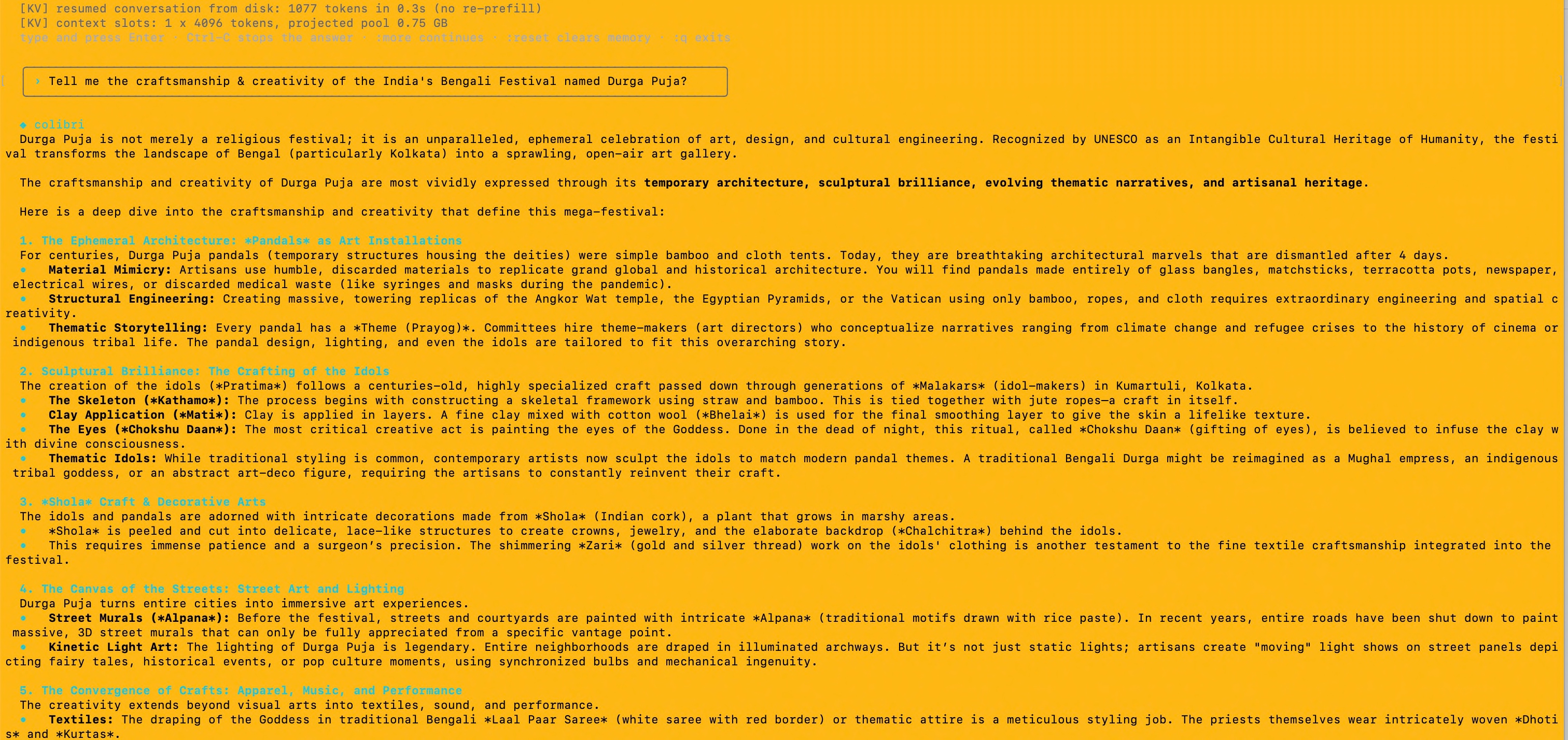


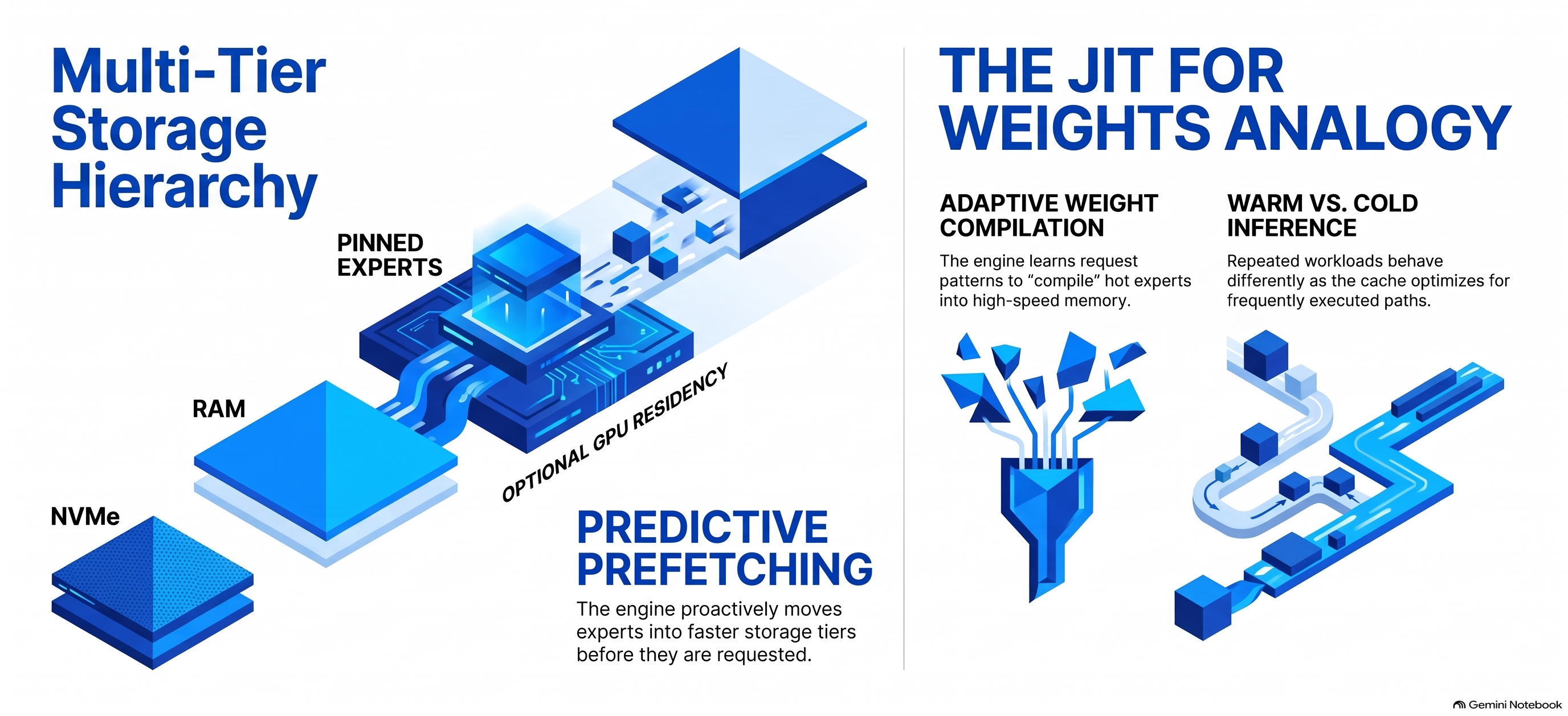


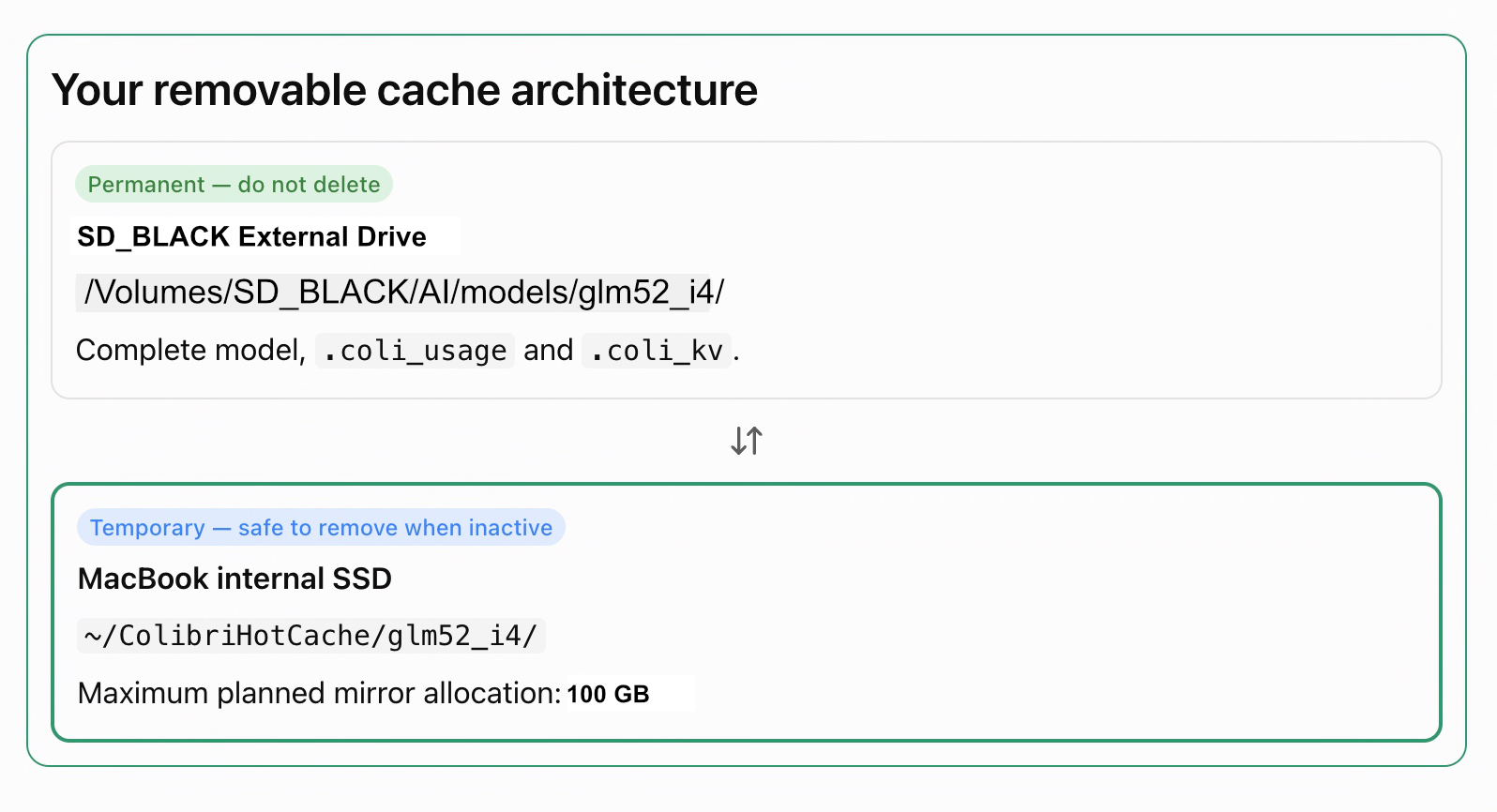


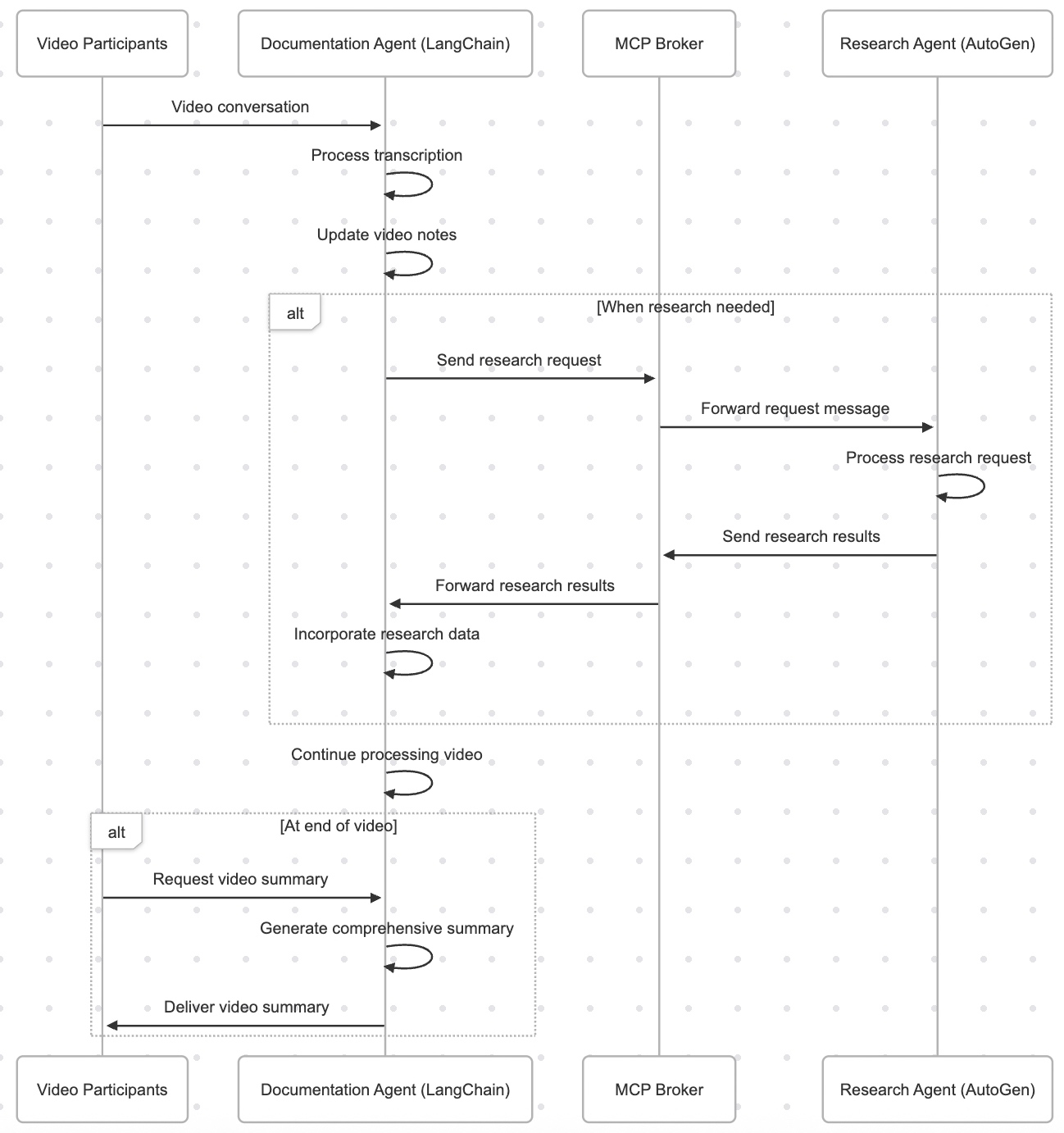


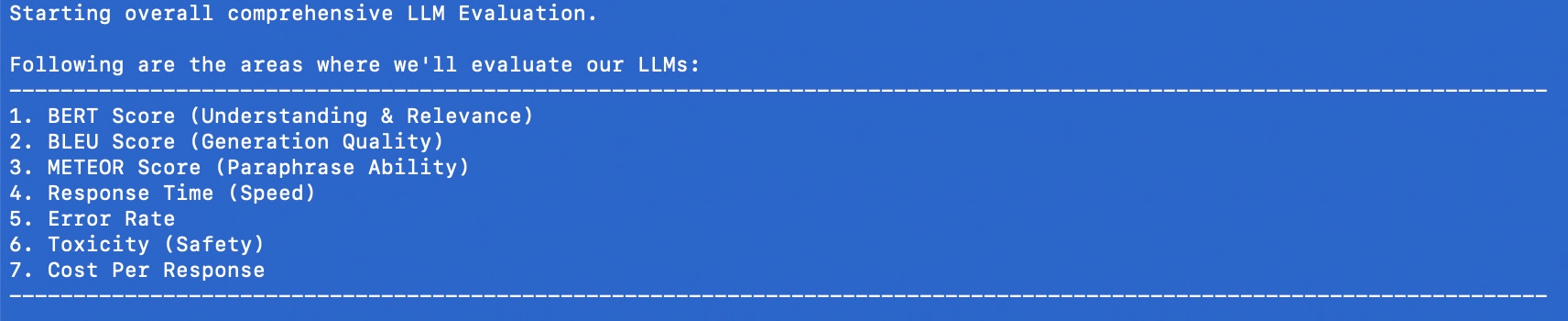


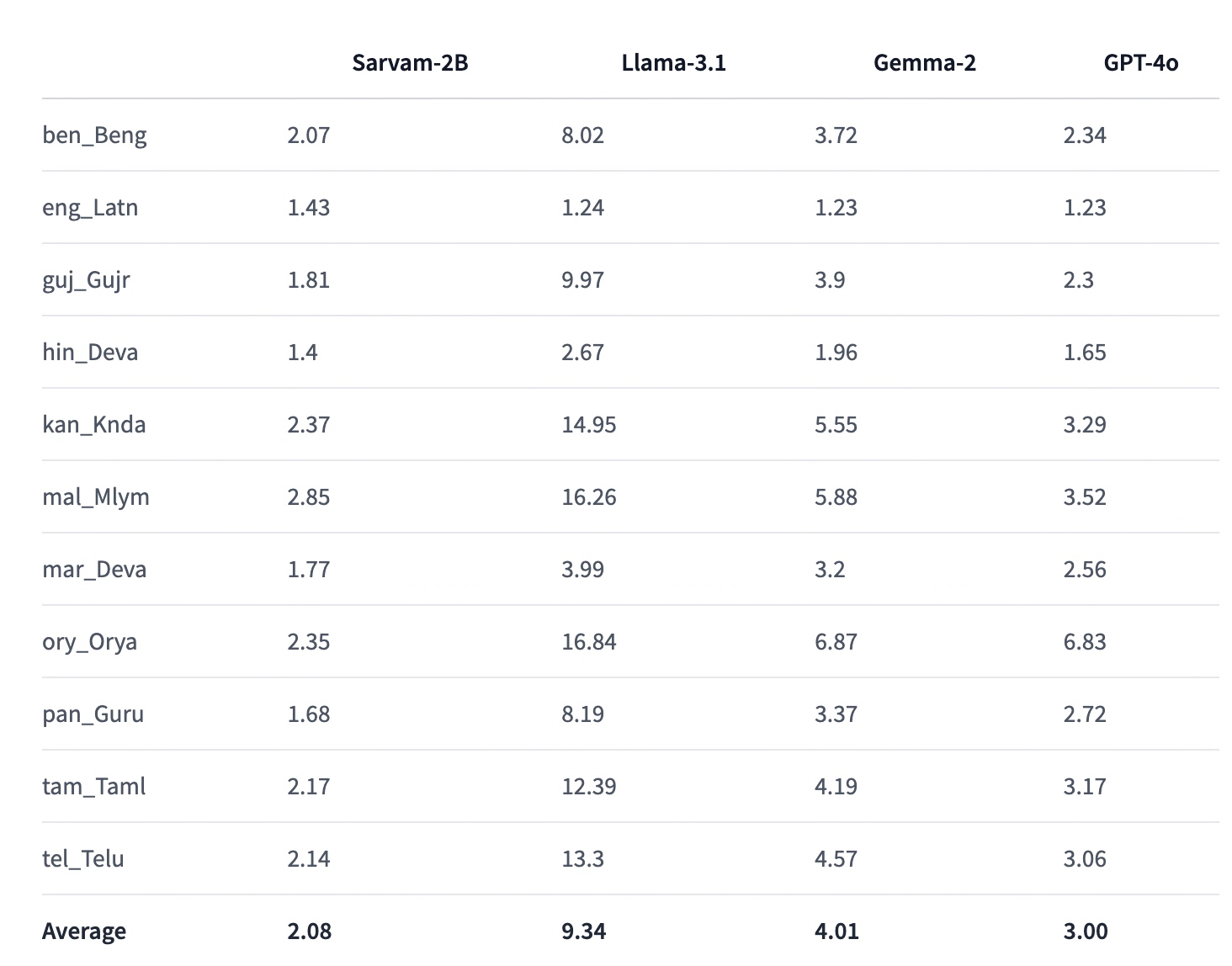
You must be logged in to post a comment.