As we’re leaping more & more into the field of Generative AI, one of the frequent questions or challenges people are getting more & more is the performance & other evaluation factors. These factors will eventually bring the fruit of this technology; otherwise, you will end up in technical debt.
This post will discuss the key snippets of the monitoring app based on the Python-based AI app. But before that, let us first view the demo.
Isn’t it exciting?
Let us deep dive into it. But, here is the flow this solution will follow.

So, the current application will invoke the industry bigshots and some relatively unknown or new LLMs.
In this case, we’ll evaluate Anthropic, Open AI, DeepSeek, and Bharat GPT’s various models. However, Bharat GPT is open source, so we’ll use the Huggingface library and execute it locally against my MacBook Pro M4 Max.
The following are the KPIs we’re going to evaluate:
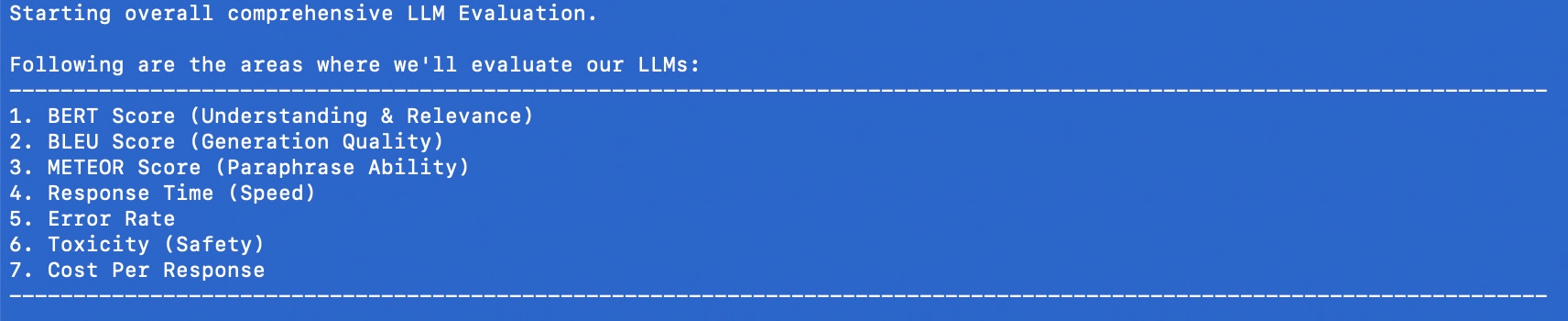
Package Installation:
Here are the lists of dependant python packages that is require to run this application –
pip install certifi==2024.8.30
pip install anthropic==0.42.0
pip install huggingface-hub==0.27.0
pip install nltk==3.9.1
pip install numpy==2.2.1
pip install moviepy==2.1.1
pip install numpy==2.1.3
pip install openai==1.59.3
pip install pandas==2.2.3
pip install pillow==11.1.0
pip install pip==24.3.1
pip install psutil==6.1.1
pip install requests==2.32.3
pip install rouge_score==0.1.2
pip install scikit-learn==1.6.0
pip install setuptools==70.2.0
pip install tokenizers==0.21.0
pip install torch==2.6.0.dev20250104
pip install torchaudio==2.6.0.dev20250104
pip install torchvision==0.22.0.dev20250104
pip install tqdm==4.67.1
pip install transformers==4.47.1
CODE:
clsComprehensiveLLMEvaluator.py (This is the main Python class that will apply all the logic to collect stats involving important KPIs. Note that we’re only going to discuss a few important functions here.)
    @retry(stop=stop_after_attempt(3), wait=wait_exponential(multiplier=1, min=4, max=10))
    def get_claude_response(self, prompt: str) -> str:
        response = self.anthropic_client.messages.create(
            model=anthropic_model,
            max_tokens=maxToken,
            messages=[{"role": "user", "content": prompt}]
        )
return response.content[0].text- The Retry Mechanism
- The
@retryline means this function will automatically try again if it fails. - It will stop retrying after 3 attempts (
stop_after_attempt(3)). - It will wait longer between retries, starting at 4 seconds and increasing up to 10 seconds (
wait_exponential(multiplier=1, min=4, max=10)).
- The
- The Function Purpose
- The function takes a message, called
prompt, as input (a string of text). - It uses a service (likely an AI system like Claude) to generate a response to this prompt.
- The function takes a message, called
- Sending the Message
- Inside the function, the code
self.anthropic_client.messages.createis the part that actually sends the prompt to the AI. - It specifies:Which AI model to use (e.g.,
anthropic_model). - The maximum length of the response (controlled by
maxToken). - The input message for the AI has a “role” (user), as well as the content of the prompt.
- Inside the function, the code
- Getting the Response
- Once the AI generates a response, it’s saved as
response. - The code retrieves the first part of the response (
response.content[0].text) and sends it back to whoever called the function.
- Once the AI generates a response, it’s saved as
Similarly, it will work for Open AI as well.
    @retry(stop=stop_after_attempt(3), wait=wait_exponential(multiplier=1, min=4, max=10))
    def get_deepseek_response(self, prompt: str) -> tuple:
        deepseek_api_key = self.deepseek_api_key

        headers = {
            "Authorization": f"Bearer {deepseek_api_key}",
            "Content-Type": "application/json"
            }

        payload = {
            "model": deepseek_model,
            "messages": [{"role": "user", "content": prompt}],
            "max_tokens": maxToken
            }

        response = requests.post(DEEPSEEK_API_URL, headers=headers, json=payload)

        if response.status_code == 200:
            res = response.json()["choices"][0]["message"]["content"]
        else:
            res = "API request failed with status code " + str(response.status_code) + ":" + str(response.text)

return res- Retry Mechanism:
- The
@retryline ensures the function will try again if it fails. - It will stop retrying after 3 attempts (
stop_after_attempt(3)). - It waits between retries, starting at 4 seconds and increasing up to 10 seconds (
wait_exponential(multiplier=1, min=4, max=10)).
- The
- What the Function Does:
- The function takes one input,
prompt, which is the message or question you want to send to the AI. - It returns the AI’s response or an error message.
- The function takes one input,
- Preparing to Communicate with the API:
- API Key: It gets the API key for the DeepSeek service from
self.deepseek_api_key. - Headers: These tell the API that the request will use the API key (for security) and that the data format is JSON (structured text).
- Payload: This is the information sent to the AI. It includes:
- Model: Specifies which version of the AI to use (
deepseek_model). - Messages: The input message with the role “user” and your
prompt. - Max Tokens: Defines the maximum size of the AI’s response (
maxToken).
- Model: Specifies which version of the AI to use (
- API Key: It gets the API key for the DeepSeek service from
- Sending the Request:
- It uses the
requests.post()method to send the payload and headers to the DeepSeek API using the URLDEEPSEEK_API_URL.
- It uses the
- Processing the Response:
- If the API responds successfully (
status_code == 200):- It extracts the AI’s reply from the response data.
- Specifically, it gets the first choice’s message content:
response.json()["choices"][0]["message"]["content"].
- If there’s an error:
- It constructs an error message with the status code and detailed error text from the API.
- If the API responds successfully (
- Returning the Result:
- The function outputs either the AI’s response or the error message.
    @retry(stop=stop_after_attempt(3), wait=wait_exponential(multiplier=1, min=4, max=10))
    def get_bharatgpt_response(self, prompt: str) -> tuple:
        try:
            messages = [[{"role": "user", "content": prompt}]]

            response = pipe(messages, max_new_tokens=maxToken,)

            # Extract 'content' field safely
            res = next((entry.get("content", "")
                        for entry in response[0][0].get("generated_text", [])
                        if isinstance(entry, dict) and entry.get("role") == "assistant"
                        ),
                        None,
                        )

            return res
        except Exception as e:
            x = str(e)
            print('Error: ', x)

return ""- Retry Mechanism:The
@retryensures the function will try again if it fails.- It will stop retrying after 3 attempts (
stop_after_attempt(3)). - The waiting time between retries starts at 4 seconds and increases exponentially up to 10 seconds (
wait_exponential(multiplier=1, min=4, max=10)).
- It will stop retrying after 3 attempts (
- What the Function Does:The function takes one input,
prompt, which is the message or question you want to send to BharatGPT.- It returns the AI’s response or an empty string if something goes wrong.
- Sending the Prompt:Messages Structure: The function wraps the user’s prompt in a format that the BharatGPT AI understands:
messages = [[{"role": "user", "content": prompt}]]- This tells the AI that the prompt is coming from the “user.”
- Pipe Function: It uses a
pipe()method to send themessagesto the AI system.max_new_tokens=maxToken: Limits how long the AI’s response can be.
- Extracting the Response:The response from the AI is in a structured format. The code looks for the first piece of text where:
- The role is “assistant” (meaning it’s the AI’s reply).
- The text is in the “content” field.
- The
next()function safely extracts this “content” field or returnsNoneif it can’t find it.
- Error Handling:If something goes wrong (e.g., the AI doesn’t respond or there’s a technical issue), the code:
- Captures the error message in
e. - Prints the error message:
print('Error: ', x). - Returns an empty string (
"") instead of crashing.
- Captures the error message in
- Returning the Result:If everything works, the function gives you the AI’s response as plain text.
- If there’s an error, it gives you an empty string, indicating no response was received.
    def get_model_response(self, model_name: str, prompt: str) -> ModelResponse:
        """Get response from specified model with metrics"""
        start_time = time.time()
        start_memory = psutil.Process(os.getpid()).memory_info().rss / 1024 / 1024

        try:
            if model_name == "claude-3":
                response_content = self.get_claude_response(prompt)
            elif model_name == "gpt4":
                response_content = self.get_gpt4_response(prompt)
            elif model_name == "deepseek-chat":
                response_content = self.get_deepseek_response(prompt)
            elif model_name == "bharat-gpt":
                response_content = self.get_bharatgpt_response(prompt)

            # Model-specific API calls
            token_count = len(self.bert_tokenizer.encode(response_content))

            end_memory = psutil.Process(os.getpid()).memory_info().rss / 1024 / 1024
            memory_usage = end_memory - start_memory

            return ModelResponse(
                content=response_content,
                response_time=time.time() - start_time,
                token_count=token_count,
                memory_usage=memory_usage
            )
        except Exception as e:
            logging.error(f"Error getting response from {model_name}: {str(e)}")
            return ModelResponse(
                content="",
                response_time=0,
                token_count=0,
                memory_usage=0,
                error=str(e)
            )
Start Tracking Time and Memory:
- The function starts a timer (
start_time) to measure how long it takes to get a response. - It also checks how much memory is being used at the beginning (
start_memory).
Choose the AI Model:
- Based on the
model_nameprovided, the function selects the appropriate method to get a response:"claude-3"→ Callsget_claude_response(prompt)."gpt4"→ Callsget_gpt4_response(prompt)."deepseek-chat"→ Callsget_deepseek_response(prompt)."bharat-gpt"→ Callsget_bharatgpt_response(prompt).
Process the Response:
- Once the response is received, the function calculates:
- Token Count: The number of tokens (small chunks of text) in the response using a tokenizer.
- Memory Usage: The difference between memory usage after the response (
end_memory) and before it (start_memory).
Return the Results:
- The function bundles all the information into a
ModelResponseobject:- The AI’s reply (
content). - How long the response took (
response_time). - The number of tokens in the reply (
token_count). - How much memory was used (
memory_usage).
- The AI’s reply (
Handle Errors:
- If something goes wrong (e.g., the AI doesn’t respond), the function:
- Logs the error message.
- Returns an empty response with default values and the error message.
    def evaluate_text_quality(self, generated: str, reference: str) -> Dict[str, float]:
        """Evaluate text quality metrics"""
        # BERTScore
        gen_embedding = self.sentence_model.encode([generated])
        ref_embedding = self.sentence_model.encode([reference])
        bert_score = cosine_similarity(gen_embedding, ref_embedding)[0][0]

        # BLEU Score
        generated_tokens = word_tokenize(generated.lower())
        reference_tokens = word_tokenize(reference.lower())
        bleu = sentence_bleu([reference_tokens], generated_tokens)

        # METEOR Score
        meteor = meteor_score([reference_tokens], generated_tokens)

        return {
            'bert_score': bert_score,
            'bleu_score': bleu,
            'meteor_score': meteor
}Inputs:
generated: The text produced by the AI.reference: The correct or expected version of the text.
Calculating BERTScore:
- Converts the
generatedandreferencetexts into numerical embeddings (mathematical representations) using a pre-trained model (self.sentence_model.encode). - Measures the similarity between the two embeddings using cosine similarity. This gives the
bert_score, which ranges from -1 (completely different) to 1 (very similar).
Calculating BLEU Score:
- Breaks the
generatedandreferencetexts into individual words (tokens) usingword_tokenize. - Converts both texts to lowercase for consistent comparison.
- Calculates the BLEU Score (
sentence_bleu), which checks how many words or phrases in thegeneratedtext overlap with thereference. BLEU values range from 0 (no match) to 1 (perfect match).
Calculating METEOR Score:
- Also uses the tokenized versions of
generatedandreferencetexts. - Calculates the METEOR Score (
meteor_score), which considers exact matches, synonyms, and word order. Scores range from 0 (no match) to 1 (perfect match).
Returning the Results:
- Combines the three scores into a dictionary with the keys
'bert_score','bleu_score', and'meteor_score'.
Similarly, other functions are developed.
    def run_comprehensive_evaluation(self, evaluation_data: List[Dict]) -> pd.DataFrame:
        """Run comprehensive evaluation on all metrics"""
        results = []

        for item in evaluation_data:
            prompt = item['prompt']
            reference = item['reference']
            task_criteria = item.get('task_criteria', {})

            for model_name in self.model_configs.keys():
                # Get multiple responses to evaluate reliability
                responses = [
                    self.get_model_response(model_name, prompt)
                    for _ in range(3)  # Get 3 responses for reliability testing
                ]

                # Use the best response for other evaluations
                best_response = max(responses, key=lambda x: len(x.content) if not x.error else 0)

                if best_response.error:
                    logging.error(f"Error in model {model_name}: {best_response.error}")
                    continue

                # Gather all metrics
                metrics = {
                    'model': model_name,
                    'prompt': prompt,
                    'response': best_response.content,
                    **self.evaluate_text_quality(best_response.content, reference),
                    **self.evaluate_factual_accuracy(best_response.content, reference),
                    **self.evaluate_task_performance(best_response.content, task_criteria),
                    **self.evaluate_technical_performance(best_response),
                    **self.evaluate_reliability(responses),
                    **self.evaluate_safety(best_response.content)
                }

                # Add business impact metrics using task performance
                metrics.update(self.evaluate_business_impact(
                    best_response,
                    metrics['task_completion']
                ))

                results.append(metrics)

return pd.DataFrame(results)- Input:
evaluation_data: A list of test cases, where each case is a dictionary containing:prompt: The question or input to the AI model.reference: The ideal or expected answer.task_criteria(optional): Additional rules or requirements for the task.
- Initialize Results:
- An empty list
resultsis created to store the evaluation metrics for each model and test case.
- An empty list
- Iterate Through Test Cases:
- For each item in the
evaluation_data:- Extract the
prompt,reference, andtask_criteria.
- Extract the
- For each item in the
- Evaluate Each Model:
- Loop through all available AI models (
self.model_configs.keys()). - Generate three responses for each model to test reliability.
- Loop through all available AI models (
- Select the Best Response:
- Out of the three responses, pick the one with the most content (
best_response), ignoring responses with errors.
- Out of the three responses, pick the one with the most content (
- Handle Errors:
- If a response has an error, log the issue and skip further evaluation for that model.
- Evaluate Metrics:
- Using the
best_response, calculate a variety of metrics, including:- Text Quality: How similar the response is to the reference.
- Factual Accuracy: Whether the response is factually correct.
- Task Performance: How well it meets task-specific criteria.
- Technical Performance: Evaluate time, memory, or other system-related metrics.
- Reliability: Check consistency across multiple responses.
- Safety: Ensure the response is safe and appropriate.
- Using the
- Evaluate Business Impact:
- Add metrics for business impact (e.g., how well the task was completed, using
task_completionas a key factor).
- Add metrics for business impact (e.g., how well the task was completed, using
- Store Results:
- Add the calculated metrics for this model and prompt to the
resultslist.
- Add the calculated metrics for this model and prompt to the
- Return Results as a DataFrame:
- Convert the
resultslist into a structured table (a pandas DataFrame) for easy analysis and visualization.
- Convert the
Great! So, now, we’ve explained the code.
Observation from the result:
Let us understand the final outcome of this run & what we can conclude from that.

- BERT Score (Semantic Understanding):
- GPT4 leads slightly at 0.8322 (83.22%)
- Bharat-GPT close second at 0.8118 (81.18%)
- Claude-3 at 0.8019 (80.19%)
- DeepSeek-Chat at 0.7819 (78.19%) Think of this like a “comprehension score” – how well the models understand the context. All models show strong understanding, with only a 5% difference between best and worst.
- BLEU Score (Word-for-Word Accuracy):
- Bharat-GPT leads at 0.0567 (5.67%)
- Claude-3 at 0.0344 (3.44%)
- GPT4 at 0.0306 (3.06%)
- DeepSeek-Chat lowest at 0.0189 (1.89%) These low scores suggest models use different wording than references, which isn’t necessarily bad.
- METEOR Score (Meaning Preservation):
- Bharat-GPT leads at 0.4684 (46.84%)
- Claude-3 close second at 0.4507 (45.07%)
- GPT4 at 0.2960 (29.60%)
- DeepSeek-Chat at 0.2652 (26.52%) This shows how well models maintain meaning while using different words.
- Response Time (Speed):
- Claude-3 fastest: 4.40 seconds
- Bharat-GPT: 6.35 seconds
- GPT4: 6.43 seconds
- DeepSeek-Chat slowest: 8.52 seconds
- Safety and Reliability:
- Error Rate: Perfect 0.0 for all models
- Toxicity: All very safe (below 0.15%)
- Claude-3 safest at 0.0007GPT4 at 0.0008Bharat-GPT at 0.0012
- DeepSeek-Chat at 0.0014
- Cost Efficiency:
- Claude-3 most economical: $0.0019 per response
- Bharat-GPT close: $0.0021
- GPT4: $0.0038
- DeepSeek-Chat highest: $0.0050
Key Takeaways by Model:
- Claude-3: ✓ Fastest responses ✓ Most cost-effective ✓ Excellent meaning preservation ✓ Lowest toxicity
- Bharat-GPT: ✓ Best BLEU and METEOR scores ✓ Strong semantic understanding ✓ Cost-effective ✗ Moderate response time
- GPT4: ✓ Best semantic understanding ✓ Good safety metrics ✗ Higher cost ✗ Moderate response time
- DeepSeek-Chat: ✗ Generally lower performance ✗ Slowest responses ✗ Highest cost ✗ Slightly higher toxicity
Reliability of These Statistics:
Strong Points:
- Comprehensive metric coverage
- Consistent patterns across evaluations
- Zero error rates show reliability
- Clear differentiation between models
Limitations:
- BLEU scores are quite low across all models
- Doesn’t measure creative or innovative responses
- May not reflect specific use case performance
- Single snapshot rather than long-term performance
Final Observation:
- Best Overall Value: Claude-3
- Fast, cost-effective, safe, good performance
- Best for Accuracy: Bharat-GPT
- Highest meaning preservation and precision
- Best for Understanding: GPT4
- Strongest semantic comprehension
- Consider Your Priorities:
- Speed → Choose Claude-3
- Cost → Choose Claude-3 or Bharat-GPT
- Accuracy → Choose Bharat-GPT
- Understanding → Choose GPT4
These statistics provide reliable comparative data but should be part of a broader decision-making process that includes your specific needs, budget, and use cases.
For the Bharat GPT model, we’ve tested this locally on my MacBook Pro 4 Max. And, the configuration is as follows –

I’ve tried the API version locally, & it provided a similar performance against the stats that we received by running locally. Unfortunately, they haven’t made the API version public yet.
So, apart from the Anthropic & Open AI, I’ll watch this new LLM (Bharat GPT) for overall stats in the coming days.
So, we’ve done it.
You can find the detailed code at the GitHub link.
I’ll bring some more exciting topics in the coming days from the Python verse.
Till then, Happy Avenging! 🙂
Note: All the data & scenarios posted here are representational data & scenarios & available over the internet & for educational purposes only. There is always room for improvement in this kind of model & the solution associated with it. I’ve shown the basic ways to achieve the same for educational purposes only.
