Real-time video summary assistance App – Part 2

As a continuation of the previous post, I would like to continue my discussion about the implementation of MCP protocols among agents. But before that, I want to add the quick demo one more time to recap our objectives.

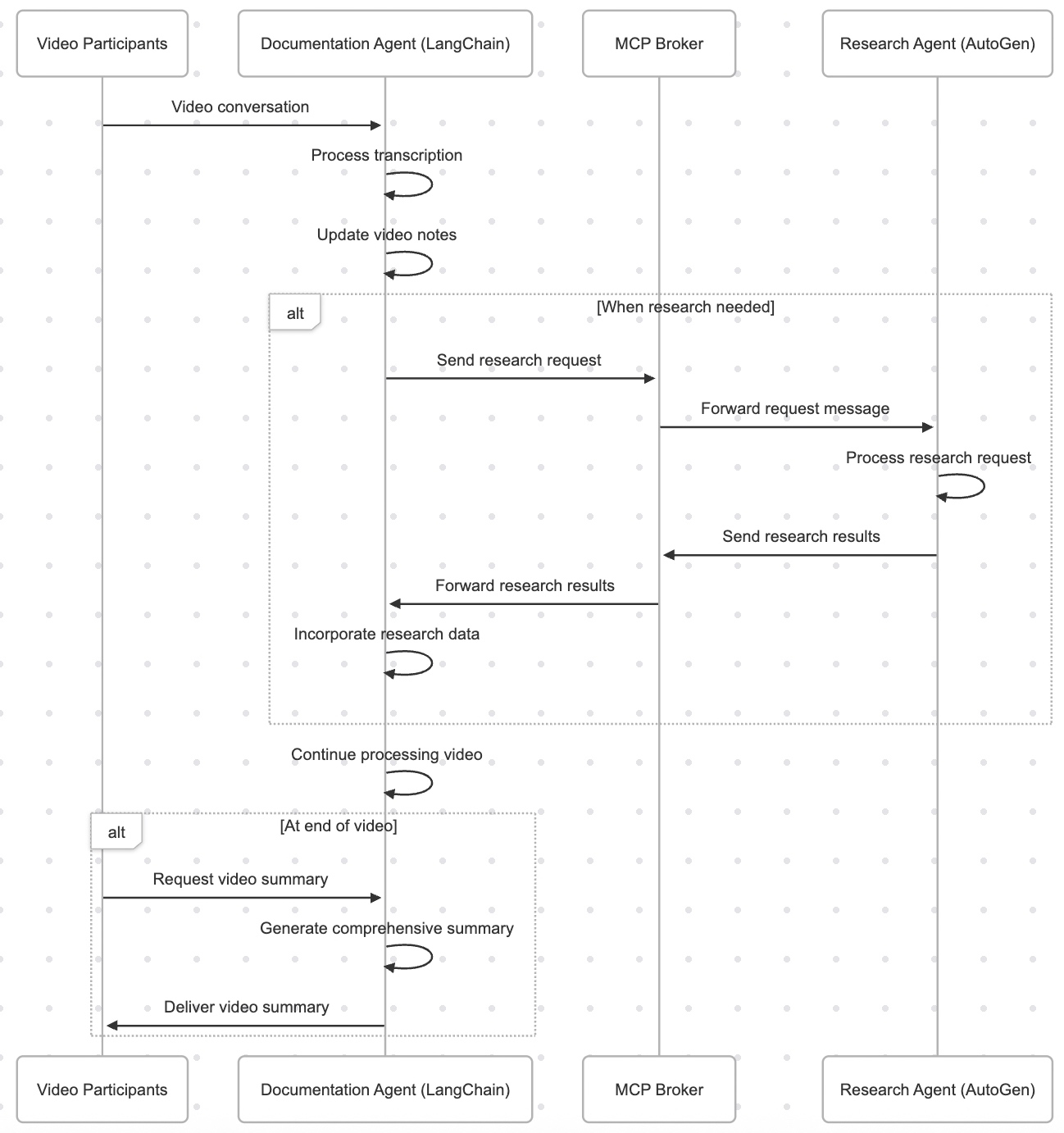
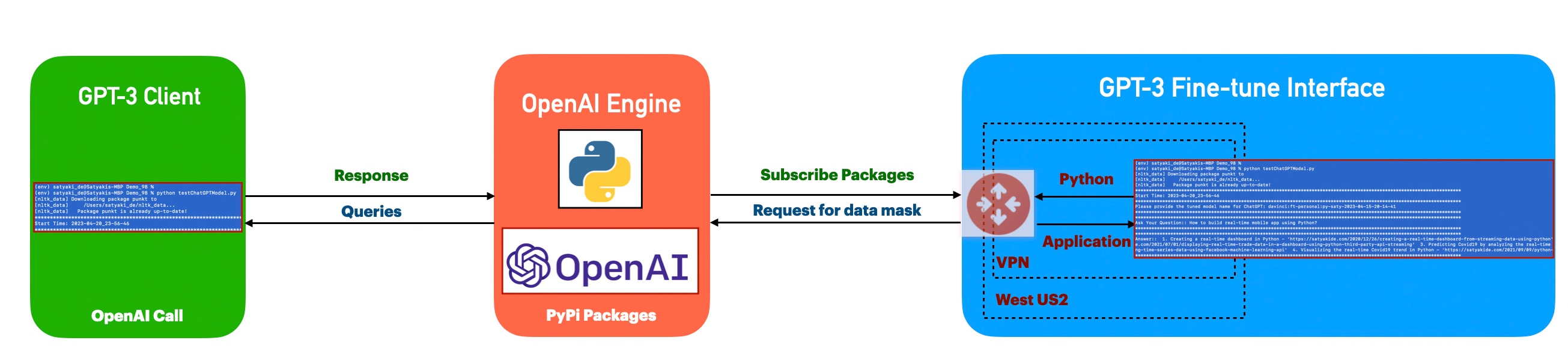
Let us recap the process flow –

Also, understand the groupings of scripts by each group as posted in the previous post –

Message-Chaining Protocol (MCP) Implementation:

    clsMCPMessage.py
    clsMCPBroker.py

YouTube Transcript Extraction:

    clsYouTubeVideoProcessor.py

Language Detection:

    clsLanguageDetector.py

Translation Services & Agents:

    clsTranslationAgent.py
    clsTranslationService.py

Documentation Agent:

    clsDocumentationAgent.py
    
Research Agent:

    clsDocumentationAgent.py

Great! Now, we’ll continue with the main discussion.


def extract_youtube_id(youtube_url):
    """Extract YouTube video ID from URL"""
    youtube_id_match = re.search(r'(?:v=|\/)([0-9A-Za-z_-]{11}).*', youtube_url)
    if youtube_id_match:
        return youtube_id_match.group(1)
    return None

def get_youtube_transcript(youtube_url):
    """Get transcript from YouTube video"""
    video_id = extract_youtube_id(youtube_url)
    if not video_id:
        return {"error": "Invalid YouTube URL or ID"}
    
    try:
        transcript_list = YouTubeTranscriptApi.list_transcripts(video_id)
        
        # First try to get manual transcripts
        try:
            transcript = transcript_list.find_manually_created_transcript(["en"])
            transcript_data = transcript.fetch()
            print(f"Debug - Manual transcript format: {type(transcript_data)}")
            if transcript_data and len(transcript_data) > 0:
                print(f"Debug - First item type: {type(transcript_data[0])}")
                print(f"Debug - First item sample: {transcript_data[0]}")
            return {"text": transcript_data, "language": "en", "auto_generated": False}
        except Exception as e:
            print(f"Debug - No manual transcript: {str(e)}")
            # If no manual English transcript, try any available transcript
            try:
                available_transcripts = list(transcript_list)
                if available_transcripts:
                    transcript = available_transcripts[0]
                    print(f"Debug - Using transcript in language: {transcript.language_code}")
                    transcript_data = transcript.fetch()
                    print(f"Debug - Auto transcript format: {type(transcript_data)}")
                    if transcript_data and len(transcript_data) > 0:
                        print(f"Debug - First item type: {type(transcript_data[0])}")
                        print(f"Debug - First item sample: {transcript_data[0]}")
                    return {
                        "text": transcript_data, 
                        "language": transcript.language_code, 
                        "auto_generated": transcript.is_generated
                    }
                else:
                    return {"error": "No transcripts available for this video"}
            except Exception as e:
                return {"error": f"Error getting transcript: {str(e)}"}
    except Exception as e:
        return {"error": f"Error getting transcript list: {str(e)}"}

# ----------------------------------------------------------------------------------
# YouTube Video Processor
# ----------------------------------------------------------------------------------

class clsYouTubeVideoProcessor:
    """Process YouTube videos using the agent system"""
    
    def __init__(self, documentation_agent, translation_agent, research_agent):
        self.documentation_agent = documentation_agent
        self.translation_agent = translation_agent
        self.research_agent = research_agent
    
    def process_youtube_video(self, youtube_url):
        """Process a YouTube video"""
        print(f"Processing YouTube video: {youtube_url}")
        
        # Extract transcript
        transcript_result = get_youtube_transcript(youtube_url)
        
        if "error" in transcript_result:
            return {"error": transcript_result["error"]}
        
        # Start a new conversation
        conversation_id = self.documentation_agent.start_processing()
        
        # Process transcript segments
        transcript_data = transcript_result["text"]
        transcript_language = transcript_result["language"]
        
        print(f"Debug - Type of transcript_data: {type(transcript_data)}")
        
        # For each segment, detect language and translate if needed
        processed_segments = []
        
        try:
            # Make sure transcript_data is a list of dictionaries with text and start fields
            if isinstance(transcript_data, list):
                for idx, segment in enumerate(transcript_data):
                    print(f"Debug - Processing segment {idx}, type: {type(segment)}")
                    
                    # Extract text properly based on the type
                    if isinstance(segment, dict) and "text" in segment:
                        text = segment["text"]
                        start = segment.get("start", 0)
                    else:
                        # Try to access attributes for non-dict types
                        try:
                            text = segment.text
                            start = getattr(segment, "start", 0)
                        except AttributeError:
                            # If all else fails, convert to string
                            text = str(segment)
                            start = idx * 5  # Arbitrary timestamp
                    
                    print(f"Debug - Extracted text: {text[:30]}...")
                    
                    # Create a standardized segment
                    std_segment = {
                        "text": text,
                        "start": start
                    }
                    
                    # Process through translation agent
                    translation_result = self.translation_agent.process_text(text, conversation_id)
                    
                    # Update segment with translation information
                    segment_with_translation = {
                        **std_segment,
                        "translation_info": translation_result
                    }
                    
                    # Use translated text for documentation
                    if "final_text" in translation_result and translation_result["final_text"] != text:
                        std_segment["processed_text"] = translation_result["final_text"]
                    else:
                        std_segment["processed_text"] = text
                    
                    processed_segments.append(segment_with_translation)
            else:
                # If transcript_data is not a list, treat it as a single text block
                print(f"Debug - Transcript is not a list, treating as single text")
                text = str(transcript_data)
                std_segment = {
                    "text": text,
                    "start": 0
                }
                
                translation_result = self.translation_agent.process_text(text, conversation_id)
                segment_with_translation = {
                    **std_segment,
                    "translation_info": translation_result
                }
                
                if "final_text" in translation_result and translation_result["final_text"] != text:
                    std_segment["processed_text"] = translation_result["final_text"]
                else:
                    std_segment["processed_text"] = text
                
                processed_segments.append(segment_with_translation)
                
        except Exception as e:
            print(f"Debug - Error processing transcript: {str(e)}")
            return {"error": f"Error processing transcript: {str(e)}"}
        
        # Process the transcript with the documentation agent
        documentation_result = self.documentation_agent.process_transcript(
            processed_segments,
            conversation_id
        )
        
        return {
            "youtube_url": youtube_url,
            "transcript_language": transcript_language,
            "processed_segments": processed_segments,
            "documentation": documentation_result,
            "conversation_id": conversation_id
        }

Let us understand this step-by-step:

Part 1: Getting the YouTube Transcript

def extract_youtube_id(youtube_url):
    ...

This extracts the unique video ID from any YouTube link. 

def get_youtube_transcript(youtube_url):
    ...
  • This gets the actual spoken content of the video.
  • It tries to get a manual transcript first (created by humans).
  • If not available, it falls back to an auto-generated version (created by YouTube’s AI).
  • If nothing is found, it gives back an error message like: “Transcript not available.”

Part 2: Processing the Video with Agents

class clsYouTubeVideoProcessor:
    ...

This is like the control center that tells each intelligent agent what to do with the transcript. Here are the detailed steps:

1. Start the Process

def process_youtube_video(self, youtube_url):
    ...
  • The system starts with a YouTube video link.
  • It prints a message like: “Processing YouTube video: [link]”

2. Extract the Transcript

  • The system runs the get_youtube_transcript() function.
  • If it fails, it returns an error (e.g., invalid link or no subtitles available).

3. Start a “Conversation”

  • The documentation agent begins a new session, tracked by a unique conversation ID.
  • Think of this like opening a new folder in a shared team workspace to store everything related to this video.

4. Go Through Each Segment of the Transcript

  • The spoken text is often broken into small parts (segments), like subtitles.
  • For each part:
    • It checks the text.
    • It finds out the time that part was spoken.
    • It sends it to the translation agent to clean up or translate the text.

5. Translate (if needed)

  • If the translation agent finds a better or translated version, it replaces the original.
  • Otherwise, it keeps the original.

6. Prepare for Documentation

  • After translation, the segment is passed to the documentation agent.
  • This agent might:
    • Summarize the content,
    • Highlight important terms,
    • Structure it into a readable format.

7. Return the Final Result

The system gives back a structured package with:

  • The video link
  • The original language
  • The transcript in parts (processed and translated)
  • A documentation summary
  • The conversation ID (for tracking or further updates)

class clsDocumentationAgent:
    """Documentation Agent built with LangChain"""
    
    def __init__(self, agent_id: str, broker: clsMCPBroker):
        self.agent_id = agent_id
        self.broker = broker
        self.broker.register_agent(agent_id)
        
        # Initialize LangChain components
        self.llm = ChatOpenAI(
            model="gpt-4-0125-preview",
            temperature=0.1,
            api_key=OPENAI_API_KEY
        )
        
        # Create tools
        self.tools = [
            clsSendMessageTool(sender_id=self.agent_id, broker=self.broker)
        ]
        
        # Set up LLM with tools
        self.llm_with_tools = self.llm.bind(
            tools=[tool.tool_config for tool in self.tools]
        )
        
        # Setup memory
        self.memory = ConversationBufferMemory(
            memory_key="chat_history",
            return_messages=True
        )
        
        # Create prompt
        self.prompt = ChatPromptTemplate.from_messages([
            ("system", """You are a Documentation Agent for YouTube video transcripts. Your responsibilities include:
                1. Process YouTube video transcripts
                2. Identify key points, topics, and main ideas
                3. Organize content into a coherent and structured format
                4. Create concise summaries
                5. Request research information when necessary
                
                When you need additional context or research, send a request to the Research Agent.
                Always maintain a professional tone and ensure your documentation is clear and organized.
            """),
            MessagesPlaceholder(variable_name="chat_history"),
            ("human", "{input}"),
            MessagesPlaceholder(variable_name="agent_scratchpad"),
        ])
        
        # Create agent
        self.agent = (
            {
                "input": lambda x: x["input"],
                "chat_history": lambda x: self.memory.load_memory_variables({})["chat_history"],
                "agent_scratchpad": lambda x: format_to_openai_tool_messages(x["intermediate_steps"]),
            }
            | self.prompt
            | self.llm_with_tools
            | OpenAIToolsAgentOutputParser()
        )
        
        # Create agent executor
        self.agent_executor = AgentExecutor(
            agent=self.agent,
            tools=self.tools,
            verbose=True,
            memory=self.memory
        )
        
        # Video data
        self.current_conversation_id = None
        self.video_notes = {}
        self.key_points = []
        self.transcript_segments = []
        
    def start_processing(self) -> str:
        """Start processing a new video"""
        self.current_conversation_id = str(uuid.uuid4())
        self.video_notes = {}
        self.key_points = []
        self.transcript_segments = []
        
        return self.current_conversation_id
    
    def process_transcript(self, transcript_segments, conversation_id=None):
        """Process a YouTube transcript"""
        if not conversation_id:
            conversation_id = self.start_processing()
        self.current_conversation_id = conversation_id
        
        # Store transcript segments
        self.transcript_segments = transcript_segments
        
        # Process segments
        processed_segments = []
        for segment in transcript_segments:
            processed_result = self.process_segment(segment)
            processed_segments.append(processed_result)
        
        # Generate summary
        summary = self.generate_summary()
        
        return {
            "processed_segments": processed_segments,
            "summary": summary,
            "conversation_id": conversation_id
        }
    
    def process_segment(self, segment):
        """Process individual transcript segment"""
        text = segment.get("text", "")
        start = segment.get("start", 0)
        
        # Use LangChain agent to process the segment
        result = self.agent_executor.invoke({
            "input": f"Process this video transcript segment at timestamp {start}s: {text}. If research is needed, send a request to the research_agent."
        })
        
        # Update video notes
        timestamp = start
        self.video_notes[timestamp] = {
            "text": text,
            "analysis": result["output"]
        }
        
        return {
            "timestamp": timestamp,
            "text": text,
            "analysis": result["output"]
        }
    
    def handle_mcp_message(self, message: clsMCPMessage) -> Optional[clsMCPMessage]:
        """Handle an incoming MCP message"""
        if message.message_type == "research_response":
            # Process research information received from Research Agent
            research_info = message.content.get("text", "")
            
            result = self.agent_executor.invoke({
                "input": f"Incorporate this research information into video analysis: {research_info}"
            })
            
            # Send acknowledgment back to Research Agent
            response = clsMCPMessage(
                sender=self.agent_id,
                receiver=message.sender,
                message_type="acknowledgment",
                content={"text": "Research information incorporated into video analysis."},
                reply_to=message.id,
                conversation_id=message.conversation_id
            )
            
            self.broker.publish(response)
            return response
        
        elif message.message_type == "translation_response":
            # Process translation response from Translation Agent
            translation_result = message.content
            
            # Process the translated text
            if "final_text" in translation_result:
                text = translation_result["final_text"]
                original_text = translation_result.get("original_text", "")
                language_info = translation_result.get("language", {})
                
                result = self.agent_executor.invoke({
                    "input": f"Process this translated text: {text}\nOriginal language: {language_info.get('language', 'unknown')}\nOriginal text: {original_text}"
                })
                
                # Update notes with translation information
                for timestamp, note in self.video_notes.items():
                    if note["text"] == original_text:
                        note["translated_text"] = text
                        note["language"] = language_info
                        break
            
            return None
        
        return None
    
    def run(self):
        """Run the agent to listen for MCP messages"""
        print(f"Documentation Agent {self.agent_id} is running...")
        while True:
            message = self.broker.get_message(self.agent_id, timeout=1)
            if message:
                self.handle_mcp_message(message)
            time.sleep(0.1)
    
    def generate_summary(self) -> str:
        """Generate a summary of the video"""
        if not self.video_notes:
            return "No video data available to summarize."
        
        all_notes = "\n".join([f"{ts}: {note['text']}" for ts, note in self.video_notes.items()])
        
        result = self.agent_executor.invoke({
            "input": f"Generate a concise summary of this YouTube video, including key points and topics:\n{all_notes}"
        })
        
        return result["output"]

Let us understand the key methods in a step-by-step manner:

The Documentation Agent is like a smart assistant that watches a YouTube video, takes notes, pulls out important ideas, and creates a summary — almost like a professional note-taker trained to help educators, researchers, and content creators. It works with a team of other assistants, like a Translator Agent and a Research Agent, and they all talk to each other through a messaging system.

1. Starting to Work on a New Video

    def start_processing(self) -> str
    

    When a new video is being processed:

    • A new project ID is created.
    • Old notes and transcripts are cleared to start fresh.

    2. Processing the Whole Transcript

    def process_transcript(...)
    

    This is where the assistant:

    • Takes in the full transcript (what was said in the video).
    • Breaks it into small parts (like subtitles).
    • Sends each part to the smart brain for analysis.
    • Collects the results.
    • Finally, a summary of all the main ideas is created.

    3. Processing One Transcript Segment at a Time

    def process_segment(self, segment)
    

    For each chunk of the video:

    • The assistant reads the text and timestamp.
    • It asks GPT-4 to analyze it and suggest important insights.
    • It saves that insight along with the original text and timestamp.

    4. Handling Incoming Messages from Other Agents

    def handle_mcp_message(self, message)
    

    The assistant can also receive messages from teammates (other agents):

    If the message is from the Research Agent:

    • It reads new information and adds it to its notes.
    • It replies with a thank-you message to say it got the research.

    If the message is from the Translation Agent:

    • It takes the translated version of a transcript.
    • Updates its notes to reflect the translated text and its language.

    This is like a team of assistants emailing back and forth to make sure the notes are complete and accurate.

    5. Summarizing the Whole Video

    def generate_summary(self)
    

    After going through all the transcript parts, the agent asks GPT-4 to create a short, clean summary — identifying:

    • Main ideas
    • Key talking points
    • Structure of the content

    The final result is clear, professional, and usable in learning materials or documentation.


    class clsResearchAgent:
        """Research Agent built with AutoGen"""
        
        def __init__(self, agent_id: str, broker: clsMCPBroker):
            self.agent_id = agent_id
            self.broker = broker
            self.broker.register_agent(agent_id)
            
            # Configure AutoGen directly with API key
            if not OPENAI_API_KEY:
                print("Warning: OPENAI_API_KEY not set for ResearchAgent")
                
            # Create config list directly instead of loading from file
            config_list = [
                {
                    "model": "gpt-4-0125-preview",
                    "api_key": OPENAI_API_KEY
                }
            ]
            # Create AutoGen assistant for research
            self.assistant = AssistantAgent(
                name="research_assistant",
                system_message="""You are a Research Agent for YouTube videos. Your responsibilities include:
                    1. Research topics mentioned in the video
                    2. Find relevant information, facts, references, or context
                    3. Provide concise, accurate information to support the documentation
                    4. Focus on delivering high-quality, relevant information
                    
                    Respond directly to research requests with clear, factual information.
                """,
                llm_config={"config_list": config_list, "temperature": 0.1}
            )
            
            # Create user proxy to handle message passing
            self.user_proxy = UserProxyAgent(
                name="research_manager",
                human_input_mode="NEVER",
                code_execution_config={"work_dir": "coding", "use_docker": False},
                default_auto_reply="Working on the research request..."
            )
            
            # Current conversation tracking
            self.current_requests = {}
        
        def handle_mcp_message(self, message: clsMCPMessage) -> Optional[clsMCPMessage]:
            """Handle an incoming MCP message"""
            if message.message_type == "request":
                # Process research request from Documentation Agent
                request_text = message.content.get("text", "")
                
                # Use AutoGen to process the research request
                def research_task():
                    self.user_proxy.initiate_chat(
                        self.assistant,
                        message=f"Research request for YouTube video content: {request_text}. Provide concise, factual information."
                    )
                    # Return last assistant message
                    return self.assistant.chat_messages[self.user_proxy.name][-1]["content"]
                
                # Execute research task
                research_result = research_task()
                
                # Send research results back to Documentation Agent
                response = clsMCPMessage(
                    sender=self.agent_id,
                    receiver=message.sender,
                    message_type="research_response",
                    content={"text": research_result},
                    reply_to=message.id,
                    conversation_id=message.conversation_id
                )
                
                self.broker.publish(response)
                return response
            
            return None
        
        def run(self):
            """Run the agent to listen for MCP messages"""
            print(f"Research Agent {self.agent_id} is running...")
            while True:
                message = self.broker.get_message(self.agent_id, timeout=1)
                if message:
                    self.handle_mcp_message(message)
                time.sleep(0.1)
    

    Let us understand the key methods in detail.

    1. Receiving and Responding to Research Requests

      def handle_mcp_message(self, message)
      

      When the Research Agent gets a message (like a question or request for info), it:

      1. Reads the message to see what needs to be researched.
      2. Asks GPT-4 to find helpful, accurate info about that topic.
      3. Sends the answer back to whoever asked the question (usually the Documentation Agent).

      class clsTranslationAgent:
          """Agent for language detection and translation"""
          
          def __init__(self, agent_id: str, broker: clsMCPBroker):
              self.agent_id = agent_id
              self.broker = broker
              self.broker.register_agent(agent_id)
              
              # Initialize language detector
              self.language_detector = clsLanguageDetector()
              
              # Initialize translation service
              self.translation_service = clsTranslationService()
          
          def process_text(self, text, conversation_id=None):
              """Process text: detect language and translate if needed, handling mixed language content"""
              if not conversation_id:
                  conversation_id = str(uuid.uuid4())
              
              # Detect language with support for mixed language content
              language_info = self.language_detector.detect(text)
              
              # Decide if translation is needed
              needs_translation = True
              
              # Pure English content doesn't need translation
              if language_info["language_code"] == "en-IN" or language_info["language_code"] == "unknown":
                  needs_translation = False
              
              # For mixed language, check if it's primarily English
              if language_info.get("is_mixed", False) and language_info.get("languages", []):
                  english_langs = [
                      lang for lang in language_info.get("languages", []) 
                      if lang["language_code"] == "en-IN" or lang["language_code"].startswith("en-")
                  ]
                  
                  # If the highest confidence language is English and > 60% confident, don't translate
                  if english_langs and english_langs[0].get("confidence", 0) > 0.6:
                      needs_translation = False
              
              if needs_translation:
                  # Translate using the appropriate service based on language detection
                  translation_result = self.translation_service.translate(text, language_info)
                  
                  return {
                      "original_text": text,
                      "language": language_info,
                      "translation": translation_result,
                      "final_text": translation_result.get("translated_text", text),
                      "conversation_id": conversation_id
                  }
              else:
                  # Already English or unknown language, return as is
                  return {
                      "original_text": text,
                      "language": language_info,
                      "translation": {"provider": "none"},
                      "final_text": text,
                      "conversation_id": conversation_id
                  }
          
          def handle_mcp_message(self, message: clsMCPMessage) -> Optional[clsMCPMessage]:
              """Handle an incoming MCP message"""
              if message.message_type == "translation_request":
                  # Process translation request from Documentation Agent
                  text = message.content.get("text", "")
                  
                  # Process the text
                  result = self.process_text(text, message.conversation_id)
                  
                  # Send translation results back to requester
                  response = clsMCPMessage(
                      sender=self.agent_id,
                      receiver=message.sender,
                      message_type="translation_response",
                      content=result,
                      reply_to=message.id,
                      conversation_id=message.conversation_id
                  )
                  
                  self.broker.publish(response)
                  return response
              
              return None
          
          def run(self):
              """Run the agent to listen for MCP messages"""
              print(f"Translation Agent {self.agent_id} is running...")
              while True:
                  message = self.broker.get_message(self.agent_id, timeout=1)
                  if message:
                      self.handle_mcp_message(message)
                  time.sleep(0.1)

      Let us understand the key methods in step-by-step manner:

      1. Understanding and Translating Text:

      def process_text(...)
      

      This is the core job of the agent. Here’s what it does with any piece of text:

      Step 1: Detect the Language

      • It tries to figure out the language of the input text.
      • It can handle cases where more than one language is mixed together, which is common in casual speech or subtitles.

      Step 2: Decide Whether to Translate

      • If the text is clearly in English, or it’s unclear what the language is, it decides not to translate.
      • If the text is mostly in another language or has less than 60% confidence in being English, it will translate it into English.

      Step 3: Translate (if needed)

      • If translation is required, it uses the translation service to do the job.
      • Then it packages all the information: the original text, detected language, the translated version, and a unique conversation ID.

      Step 4: Return the Results

      • If no translation is needed, it returns the original text and a note saying “no translation was applied.”

      2. Receiving Messages and Responding

      def handle_mcp_message(...)
      

      The agent listens for messages from other agents. When someone asks it to translate something:

      • It takes the text from the message.
      • Runs it through the process_text function (as explained above).
      • Sends the translated (or original) result to the person who asked.
      class clsTranslationService:
          """Translation service using multiple providers with support for mixed languages"""
          
          def __init__(self):
              # Initialize Sarvam AI client
              self.sarvam_api_key = SARVAM_API_KEY
              self.sarvam_url = "https://api.sarvam.ai/translate"
              
              # Initialize Google Cloud Translation client using simple HTTP requests
              self.google_api_key = GOOGLE_API_KEY
              self.google_translate_url = "https://translation.googleapis.com/language/translate/v2"
          
          def translate_with_sarvam(self, text, source_lang, target_lang="en-IN"):
              """Translate text using Sarvam AI (for Indian languages)"""
              if not self.sarvam_api_key:
                  return {"error": "Sarvam API key not set"}
              
              headers = {
                  "Content-Type": "application/json",
                  "api-subscription-key": self.sarvam_api_key
              }
              
              payload = {
                  "input": text,
                  "source_language_code": source_lang,
                  "target_language_code": target_lang,
                  "speaker_gender": "Female",
                  "mode": "formal",
                  "model": "mayura:v1"
              }
              
              try:
                  response = requests.post(self.sarvam_url, headers=headers, json=payload)
                  if response.status_code == 200:
                      return {"translated_text": response.json().get("translated_text", ""), "provider": "sarvam"}
                  else:
                      return {"error": f"Sarvam API error: {response.text}", "provider": "sarvam"}
              except Exception as e:
                  return {"error": f"Error calling Sarvam API: {str(e)}", "provider": "sarvam"}
          
          def translate_with_google(self, text, target_lang="en"):
              """Translate text using Google Cloud Translation API with direct HTTP request"""
              if not self.google_api_key:
                  return {"error": "Google API key not set"}
              
              try:
                  # Using the translation API v2 with API key
                  params = {
                      "key": self.google_api_key,
                      "q": text,
                      "target": target_lang
                  }
                  
                  response = requests.post(self.google_translate_url, params=params)
                  if response.status_code == 200:
                      data = response.json()
                      translation = data.get("data", {}).get("translations", [{}])[0]
                      return {
                          "translated_text": translation.get("translatedText", ""),
                          "detected_source_language": translation.get("detectedSourceLanguage", ""),
                          "provider": "google"
                      }
                  else:
                      return {"error": f"Google API error: {response.text}", "provider": "google"}
              except Exception as e:
                  return {"error": f"Error calling Google Translation API: {str(e)}", "provider": "google"}
          
          def translate(self, text, language_info):
              """Translate text to English based on language detection info"""
              # If already English or unknown language, return as is
              if language_info["language_code"] == "en-IN" or language_info["language_code"] == "unknown":
                  return {"translated_text": text, "provider": "none"}
              
              # Handle mixed language content
              if language_info.get("is_mixed", False) and language_info.get("languages", []):
                  # Strategy for mixed language: 
                  # 1. If one of the languages is English, don't translate the entire text, as it might distort English portions
                  # 2. If no English but contains Indian languages, use Sarvam as it handles code-mixing better
                  # 3. Otherwise, use Google Translate for the primary detected language
                  
                  has_english = False
                  has_indian = False
                  
                  for lang in language_info.get("languages", []):
                      if lang["language_code"] == "en-IN" or lang["language_code"].startswith("en-"):
                          has_english = True
                      if lang.get("is_indian", False):
                          has_indian = True
                  
                  if has_english:
                      # Contains English - use Google for full text as it handles code-mixing well
                      return self.translate_with_google(text)
                  elif has_indian:
                      # Contains Indian languages - use Sarvam
                      # Use the highest confidence Indian language as source
                      indian_langs = [lang for lang in language_info.get("languages", []) if lang.get("is_indian", False)]
                      if indian_langs:
                          # Sort by confidence
                          indian_langs.sort(key=lambda x: x.get("confidence", 0), reverse=True)
                          source_lang = indian_langs[0]["language_code"]
                          return self.translate_with_sarvam(text, source_lang)
                      else:
                          # Fallback to primary language
                          if language_info["is_indian"]:
                              return self.translate_with_sarvam(text, language_info["language_code"])
                          else:
                              return self.translate_with_google(text)
                  else:
                      # No English, no Indian languages - use Google for primary language
                      return self.translate_with_google(text)
              else:
                  # Not mixed language - use standard approach
                  if language_info["is_indian"]:
                      # Use Sarvam AI for Indian languages
                      return self.translate_with_sarvam(text, language_info["language_code"])
                  else:
                      # Use Google for other languages
                      return self.translate_with_google(text)

      This Translation Service is like a smart translator that knows how to:

      • Detect what language the text is written in,
      • Choose the best translation provider depending on the language (especially for Indian languages),
      • And then translate the text into English.

      It supports mixed-language content (such as Hindi-English in one sentence) and uses either Google Translate or Sarvam AI, a translation service designed for Indian languages.

      Now, let us understand the key methods in a step-by-step manner:

      1. Translating Using Google Translate

      def translate_with_google(...)
      

      This function uses Google Translate:

      • It sends the text, asks for English as the target language, and gets a translation back.
      • It also detects the source language automatically.
      • If successful, it returns the translated text and the detected original language.
      • If there’s an error, it returns a message saying what went wrong.

      Best For: Non-Indian languages (like Spanish, French, Chinese) and content that is not mixed with English.

      2. Main Translation Logic

      def translate(self, text, language_info)
      

      This is the decision-maker. Here’s how it works:

      Case 1: No Translation Needed

      If the text is already in English or the language is unknown, it simply returns the original text.

      Case 2: Mixed Language (e.g., Hindi + English)

      If the text contains more than one language:

      • ✅ If one part is English → use Google Translate (it’s good with mixed languages).
      • ✅ If it includes Indian languages only → use Sarvam AI (better at handling Indian content).
      • ✅ If it’s neither English nor Indian → use Google Translate.

      The service checks how confident it is about each language in the mix and chooses the most likely one to translate from.

      Case 3: Single Language

      If the text is only in one language:

      • ✅ If it’s an Indian language (like Bengali, Tamil, or Marathi), use Sarvam AI.
      • ✅ If it’s any other language, use Google Translate.

      So, we’ve done it.

      I’ve included the complete working solutions for you in the GitHub Link.

      We’ll cover the detailed performance testing, Optimized configurations & many other useful details in our next post.

      Till then, Happy Avenging! 🙂

      Real-time video summary assistance App – Part 1

      Today, we’ll discuss another topic in our two-part series. We will understand the importance of the MCP protocol for communicating between agents.

      This will be an in-depth highly technical as well as depicting using easy-to-understand visuals.

      But, before that, let us understand the demo first.

      Isn’t it exciting?


      Let us first understand in easy language about the MCP protocol.

      MCP (Multi-Agent Communication Protocol) is a custom message exchange system that facilitates structured and scalable communication among multiple AI agents operating within an application. These agents collaborate asynchronously or in real-time to complete complex tasks by sharing results, context, and commands through a common messaging layer.

      How MCP Protocol Helps:

      FeatureBenefit
      Agent-Oriented ArchitectureEach agent handles a focused task, improving modularity and scalability.
      Event-Driven Message PassingAgents communicate based on triggers, not polling—leading to faster and efficient responses.
      Structured Communication FormatAll messages follow a standard format (e.g., JSON) with metadata for sender, recipient, type, and payload.
      State PreservationAgents maintain context across messages using memory (e.g., ConversationBufferMemory) to ensure coherence.

      How It Works (Step-by-Step):

      • 📥 User uploads or streams a video.
      • 🧑‍💻 MCP Protocol triggers the Transcription Agent to start converting audio into text.
      • 🌐 Translation Agent receives this text (if a different language is needed).
      • 🧾 Summarization Agent receives the translated or original transcript and generates a concise summary.
      • 📚 Research Agent checks for references or terminology used in the video.
      • 📄 Documentation Agent compiles the output into a structured report.
      • 🔁 All communication between agents flows through MCP, ensuring consistent message delivery and coordination.

      Now, let us understand the solution that we intend to implement for our solutions:

      This app provides live summarization and contextual insights from videos such as webinars, interviews, or YouTube recordings using multiple cooperating AI agents. These agents may include:

      • Transcription Agent: Converts spoken words to text.
      • Translation Agent: Translates text to different languages (if needed).
      • Summarization Agent: Generates concise summaries.
      • Research Agent: Finds background or supplementary data related to the discussion.
      • Documentation Agent: Converts outputs into structured reports or learning materials.

      We need to understand one more thing before deep diving into the code. Part of your conversation may be mixed, like part Hindi & part English. So, in that case, it will break the sentences into chunks & then convert all of them into the same language. Hence, the following rules are applied while translating the sentences –


      Now, we will go through the basic frame of the system & try to understand how it fits all the principles that we discussed above for this particular solution mapped against the specific technology –

      1. Documentation Agent built with the LangChain framework
      2. Research Agent built with the AutoGen framework
      3. MCP Broker for seamless communication between agents

      Let us understand from the given picture the flow of the process that our app is trying to implement –


      Great! So, now, we’ll focus on some of the key Python scripts & go through their key features.

      But, before that, we share the group of scripts that belong to specific tasks.

      • clsMCPMessage.py
      • clsMCPBroker.py
      • clsYouTubeVideoProcessor.py
      • clsLanguageDetector.py
      • clsTranslationAgent.py
      • clsTranslationService.py
      • clsDocumentationAgent.py
      • clsResearchAgent.py

      Now, we’ll review some of the script in this post, along with the next post, as a continuation from this post.

      class clsMCPMessage(BaseModel):
          """Message format for MCP protocol"""
          id: str = Field(default_factory=lambda: str(uuid.uuid4()))
          timestamp: float = Field(default_factory=time.time)
          sender: str
          receiver: str
          message_type: str  # "request", "response", "notification"
          content: Dict[str, Any]
          reply_to: Optional[str] = None
          conversation_id: str
          metadata: Dict[str, Any] = {}
          
      class clsMCPBroker:
          """Message broker for MCP protocol communication between agents"""
          
          def __init__(self):
              self.message_queues: Dict[str, queue.Queue] = {}
              self.subscribers: Dict[str, List[str]] = {}
              self.conversation_history: Dict[str, List[clsMCPMessage]] = {}
          
          def register_agent(self, agent_id: str) -> None:
              """Register an agent with the broker"""
              if agent_id not in self.message_queues:
                  self.message_queues[agent_id] = queue.Queue()
                  self.subscribers[agent_id] = []
          
          def subscribe(self, subscriber_id: str, publisher_id: str) -> None:
              """Subscribe an agent to messages from another agent"""
              if publisher_id in self.subscribers:
                  if subscriber_id not in self.subscribers[publisher_id]:
                      self.subscribers[publisher_id].append(subscriber_id)
          
          def publish(self, message: clsMCPMessage) -> None:
              """Publish a message to its intended receiver"""
              # Store in conversation history
              if message.conversation_id not in self.conversation_history:
                  self.conversation_history[message.conversation_id] = []
              self.conversation_history[message.conversation_id].append(message)
              
              # Deliver to direct receiver
              if message.receiver in self.message_queues:
                  self.message_queues[message.receiver].put(message)
              
              # Deliver to subscribers of the sender
              for subscriber in self.subscribers.get(message.sender, []):
                  if subscriber != message.receiver:  # Avoid duplicates
                      self.message_queues[subscriber].put(message)
          
          def get_message(self, agent_id: str, timeout: Optional[float] = None) -> Optional[clsMCPMessage]:
              """Get a message for the specified agent"""
              try:
                  return self.message_queues[agent_id].get(timeout=timeout)
              except (queue.Empty, KeyError):
                  return None
          
          def get_conversation_history(self, conversation_id: str) -> List[clsMCPMessage]:
              """Get the history of a conversation"""
              return self.conversation_history.get(conversation_id, [])

      Imagine a system where different virtual agents (like robots or apps) need to talk to each other. To do that, they send messages back and forth—kind of like emails or text messages. This code is responsible for:

      • Making sure those messages are properly written (like filling out all parts of a form).
      • Making sure messages are delivered to the right people.
      • Keeping a record of conversations so you can go back and review what was said.

      This part (clsMCPMessage) is like a template or a form that every message needs to follow. Each message has:

      • ID: A unique number so every message is different (like a serial number).
      • Time Sent: When the message was created.
      • Sender & Receiver: Who sent the message and who is supposed to receive it.
      • Type of Message: Is it a request, a response, or just a notification?
      • Content: The actual information or question the message is about.
      • Reply To: If this message is answering another one, this tells which one.
      • Conversation ID: So we know which group of messages belongs to the same conversation.
      • Extra Info (Metadata): Any other small details that might help explain the message.

      This (clsMCPBroker) is the system (or “post office”) that makes sure messages get to where they’re supposed to go. Here’s what it does:

      1. Registering an Agent

      • Think of this like signing up a new user in the system.
      • Each agent gets their own personal mailbox (called a “message queue”) so others can send them messages.

      2. Subscribing to Another Agent

      • If Agent A wants to receive copies of messages from Agent B, they can “subscribe” to B.
      • This is like signing up for B’s newsletter—whenever B sends something, A gets a copy.

      3. Sending a Message

      • When someone sends a message:
        • It is saved into a conversation history (like keeping emails in your inbox).
        • It is delivered to the main person it was meant for.
        • And, if anyone subscribed to the sender, they get a copy too—unless they’re already the main receiver (to avoid sending duplicates).

      4. Receiving Messages

      • Each agent can check their personal mailbox to see if they got any new messages.
      • If there are no messages, they’ll either wait for some time or move on.

      5. Viewing Past Conversations

      • You can look up all messages that were part of a specific conversation.
      • This is helpful for remembering what was said earlier.

      In systems where many different smart tools or services need to work together and communicate, this kind of communication system makes sure everything is:

      • Organized
      • Delivered correctly
      • Easy to trace back when needed

      So, in this post, we’ll finish it here. We’ll cover the rest of the post in the next post.

      I’ll bring some more exciting topics in the coming days from the Python verse.

      Till then, Happy Avenging!  🙂

      Building a real-time Gen AI Improvement Matrices (GAIIM) using Python, UpTrain, Open AI & React

      How does the RAG work better for various enterprise-level Gen AI use cases? What needs to be there to make the LLM model work more efficiently & able to check the response & validate their response, including the bias, hallucination & many more?

      This is my post (after a slight GAP), which will capture and discuss some of the burning issues that many AI architects are trying to explore. In this post, I’ve considered a newly formed AI start-up from India, which developed an open-source framework that can easily evaluate all the challenges that one is facing with their LLMs & easily integrate with your existing models for better understanding including its limitations. You will get plenty of insights about it.

      But, before we dig deep, why not see the demo first –

      Isn’t it exciting? Let’s deep dive into the flow of events.


      Let’s explore the broad-level architecture/flow –

      Let us understand the steps of the above architecture. First, our Python application needs to trigger and enable the API, which will interact with the Open AI and UpTrain AI to fetch all the LLM KPIs based on the input from the React app named “Evaluation.”

      Once the response is received from UpTrain AI, the Python application then organizes the results in a better readable manner without changing the core details coming out from their APIs & then shares that back with the react interface.

      Let’s examine the react app’s sample inputs to better understand the input that will be passed to the Python-based API solution, which is wrapper capability to call multiple APIs from the UpTrain & then accumulate them under one response by parsing the data & reorganizing the data with the help of Open AI & sharing that back.

      Highlighted in RED are some of the critical inputs you need to provide to get most of the KPIs. And, here are the sample text inputs for your reference –

      Q. Enter input question.
      A. What are the four largest moons of Jupiter?
      Q. Enter the context document.
      A. Jupiter, the largest planet in our solar system, boasts a fascinating array of moons. Among these, the four largest are collectively known as the Galilean moons, named after the renowned astronomer Galileo Galilei, who first observed them in 1610. These four moons, Io, Europa, Ganymede, and Callisto, hold significant scientific interest due to their unique characteristics and diverse geological features.
      Q. Enter LLM response.
      A. The four largest moons of Jupiter, known as the Galilean moons, are Io, Europa, Ganymede, and Marshmello.
      Q. Enter the persona response.
      A. strict and methodical teacher
      Q. Enter the guideline.
      A. Response shouldn’t contain any specific numbers
      Q. Enter the ground truth.
      A. The Jupiter is the largest & gaseous planet in the solar system.
      Q. Choose the evaluation method.
      A. llm

      Once you fill in the App should look like this –

      Once you fill in, the app should look like the below screenshot –


      Let us understand the sample packages that are required for this task.

      pip install Flask==3.0.3
      pip install Flask-Cors==4.0.0
      pip install numpy==1.26.4
      pip install openai==1.17.0
      pip install pandas==2.2.2
      pip install uptrain==0.6.13

      Note that, we’re not going to discuss the entire script here. Only those parts are relevant. However, you can get the complete scripts in the GitHub repository.

      def askFeluda(context, question):
          try:
              # Combine the context and the question into a single prompt.
              prompt_text = f"{context}\n\n Question: {question}\n Answer:"
      
              # Retrieve conversation history from the session or database
              conversation_history = []
      
              # Add the new message to the conversation history
              conversation_history.append(prompt_text)
      
              # Call OpenAI API with the updated conversation
              response = client.with_options(max_retries=0).chat.completions.create(
                  messages=[
                      {
                          "role": "user",
                          "content": prompt_text,
                      }
                  ],
                  model=cf.conf['MODEL_NAME'],
                  max_tokens=150,  # You can adjust this based on how long you expect the response to be
                  temperature=0.3,  # Adjust for creativity. Lower values make responses more focused and deterministic
                  top_p=1,
                  frequency_penalty=0,
                  presence_penalty=0
              )
      
              # Extract the content from the first choice's message
              chat_response = response.choices[0].message.content
      
              # Print the generated response text
              return chat_response.strip()
          except Exception as e:
              return f"An error occurred: {str(e)}"

      This function will ask the supplied questions with contexts or it will supply the UpTrain results to summarize the JSON into more easily readable plain texts. For our test, we’ve used “gpt-3.5-turbo”.

      def evalContextRelevance(question, context, resFeluda, personaResponse):
          try:
              data = [{
                  'question': question,
                  'context': context,
                  'response': resFeluda
              }]
      
              results = eval_llm.evaluate(
                  data=data,
                  checks=[Evals.CONTEXT_RELEVANCE, Evals.FACTUAL_ACCURACY, Evals.RESPONSE_COMPLETENESS, Evals.RESPONSE_RELEVANCE, CritiqueTone(llm_persona=personaResponse), Evals.CRITIQUE_LANGUAGE, Evals.VALID_RESPONSE, Evals.RESPONSE_CONCISENESS]
              )
      
              return results
          except Exception as e:
              x = str(e)
      
              return x

      The above methods initiate the model from UpTrain to get all the stats, which will be helpful for your LLM response. In this post, we’ve captured the following KPIs –

      - Context Relevance Explanation
      - Factual Accuracy Explanation
      - Guideline Adherence Explanation
      - Response Completeness Explanation
      - Response Fluency Explanation
      - Response Relevance Explanation
      - Response Tonality Explanation
      # Function to extract and print all the keys and their values
      def extractPrintedData(data):
          for entry in data:
              print("Parsed Data:")
              for key, value in entry.items():
      
      
                  if key == 'score_context_relevance':
                      s_1_key_val = value
                  elif key == 'explanation_context_relevance':
                      cleaned_value = preprocessParseData(value)
                      print(f"{key}: {cleaned_value}\n")
                      s_1_val = cleaned_value
                  elif key == 'score_factual_accuracy':
                      s_2_key_val = value
                  elif key == 'explanation_factual_accuracy':
                      cleaned_value = preprocessParseData(value)
                      print(f"{key}: {cleaned_value}\n")
                      s_2_val = cleaned_value
                  elif key == 'score_response_completeness':
                      s_3_key_val = value
                  elif key == 'explanation_response_completeness':
                      cleaned_value = preprocessParseData(value)
                      print(f"{key}: {cleaned_value}\n")
                      s_3_val = cleaned_value
                  elif key == 'score_response_relevance':
                      s_4_key_val = value
                  elif key == 'explanation_response_relevance':
                      cleaned_value = preprocessParseData(value)
                      print(f"{key}: {cleaned_value}\n")
                      s_4_val = cleaned_value
                  elif key == 'score_critique_tone':
                      s_5_key_val = value
                  elif key == 'explanation_critique_tone':
                      cleaned_value = preprocessParseData(value)
                      print(f"{key}: {cleaned_value}\n")
                      s_5_val = cleaned_value
                  elif key == 'score_fluency':
                      s_6_key_val = value
                  elif key == 'explanation_fluency':
                      cleaned_value = preprocessParseData(value)
                      print(f"{key}: {cleaned_value}\n")
                      s_6_val = cleaned_value
                  elif key == 'score_valid_response':
                      s_7_key_val = value
                  elif key == 'score_response_conciseness':
                      s_8_key_val = value
                  elif key == 'explanation_response_conciseness':
                      print('Raw Value: ', value)
                      cleaned_value = preprocessParseData(value)
                      print(f"{key}: {cleaned_value}\n")
                      s_8_val = cleaned_value
      
          print('$'*200)
      
          results = {
              "Factual_Accuracy_Score": s_2_key_val,
              "Factual_Accuracy_Explanation": s_2_val,
              "Context_Relevance_Score": s_1_key_val,
              "Context_Relevance_Explanation": s_1_val,
              "Response_Completeness_Score": s_3_key_val,
              "Response_Completeness_Explanation": s_3_val,
              "Response_Relevance_Score": s_4_key_val,
              "Response_Relevance_Explanation": s_4_val,
              "Response_Fluency_Score": s_6_key_val,
              "Response_Fluency_Explanation": s_6_val,
              "Response_Tonality_Score": s_5_key_val,
              "Response_Tonality_Explanation": s_5_val,
              "Guideline_Adherence_Score": s_8_key_val,
              "Guideline_Adherence_Explanation": s_8_val,
              "Response_Match_Score": s_7_key_val
              # Add other evaluations similarly
          }
      
          return results

      The above method parsed the initial data from UpTrain before sending it to OpenAI for a better summary without changing any text returned by it.

      @app.route('/evaluate', methods=['POST'])
      def evaluate():
          data = request.json
      
          if not data:
              return {jsonify({'error': 'No data provided'}), 400}
      
          # Extracting input data for processing (just an example of logging received data)
          question = data.get('question', '')
          context = data.get('context', '')
          llmResponse = ''
          personaResponse = data.get('personaResponse', '')
          guideline = data.get('guideline', '')
          groundTruth = data.get('groundTruth', '')
          evaluationMethod = data.get('evaluationMethod', '')
      
          print('question:')
          print(question)
      
          llmResponse = askFeluda(context, question)
          print('='*200)
          print('Response from Feluda::')
          print(llmResponse)
          print('='*200)
      
          # Getting Context LLM
          cLLM = evalContextRelevance(question, context, llmResponse, personaResponse)
      
          print('&'*200)
          print('cLLM:')
          print(cLLM)
          print(type(cLLM))
          print('&'*200)
      
          results = extractPrintedData(cLLM)
      
          print('JSON::')
          print(results)
      
          resJson = jsonify(results)
      
          return resJson

      The above function is the main method, which first receives all the input parameters from the react app & then invokes one-by-one functions to get the LLM response, and LLM performance & finally summarizes them before sending it to react-app.

      For any other scripts, please refer to the above-mentioned GitHub link.


      Let us see some of the screenshots of the test run –


      So, we’ve done it.

      I’ll bring some more exciting topics in the coming days from the Python verse.

      Till then, Happy Avenging! 🙂

      Text2SQL Data Extractor (T2SDE) using Python & Open AI LLM

      Today, I will share a new post that will contextualize the source files & then read the data into the pandas data frame, and then dynamically create the SQL & execute it. Then, fetch the data from the sources based on the query generated dynamically. This project is for the advanced Python developer and data Science Newbie.

      In this post, I’ve directly subscribed to OpenAI & I’m not using OpenAI from Azure. However, I’ll explore that in the future as well.

      Before I explain the process to invoke this new library, why not view the demo first & then discuss it?

      Demo

      Let us look at the flow diagram as it captures the sequence of events that unfold as part of the process.


      The application will take the metadata captured from source data dynamically. It blends the metadata and enhances the prompt to pass to the Flask server. The Flask server has all the limits of contexts.

      Once the application receives the correct generated SQL, it will then apply the SQL using the SQLAlchemy package to get the desired results.

      The following are the important packages that are essential to this project –

      pip install openai==1.6.1
      pip install pandas==2.1.4
      pip install Flask==3.0.0
      pip install SQLAlchemy==2.0.23

      We’ll have both the server and the main application. Today, we’ll be going in reverse mode. We first discuss the main script & then explain all the other class scripts.

      • 1_invokeSQLServer.py (This is the main calling Python script to invoke the OpenAI-Server.)

      Please find some of the key snippet from this discussion –

      @app.route('/message', methods=['POST'])
      def message():
          input_text = request.json.get('input_text', None)
          session_id = request.json.get('session_id', None)
      
          print('*' * 240)
          print('User Input:')
          print(str(input_text))
          print('*' * 240)
      
          # Retrieve conversation history from the session or database
          conversation_history = session.get(session_id, [])
      
          # Add the new message to the conversation history
          conversation_history.append(input_text)
      
          # Call OpenAI API with the updated conversation
          response = client.with_options(max_retries=0).chat.completions.create(
              messages=[
                  {
                      "role": "user",
                      "content": input_text,
                  }
              ],
              model=cf.conf['MODEL_NAME'],
          )
      
          # Extract the content from the first choice's message
          chat_response = response.choices[0].message.content
          print('*' * 240)
          print('Resposne::')
          print(chat_response)
          print('*' * 240)
      
          conversation_history.append(chat_response)
      
          # Store the updated conversation history in the session or database
          session[session_id] = conversation_history
      
          return chat_response

      This code defines a web application route that handles POST requests sent to the /message endpoint:

      1. Route Declaration: The @app.route('/message', methods=['POST']) part specifies that the function message() is executed when the server receives a POST request at the /message URL.
      2. Function Definition: Inside the message() function:
        • It retrieves two pieces of data from the request’s JSON body: input_text (the user’s input message) and session_id (a unique identifier for the user’s session).
        • It prints the user’s input message, surrounded by lines of asterisks for emphasis.
      3. Conversation History Management:
        • The code retrieves the conversation history associated with the given session_id. This history is a list of messages.
        • It then adds the new user message (input_text) to this conversation history.
      4. OpenAI API Call:
        • The function makes a call to the OpenAI API, passing the user’s message. It specifies not to retry the request if it fails (max_retries=0).
        • The model used for the OpenAI API call is taken from some configurations (cf.conf['MODEL_NAME']).
      5. Processing API Response:
        • The response from the OpenAI API is processed to extract the content of the chat response.
        • This chat response is printed.
      6. Updating Conversation History:
        • The chat response is added to the conversation history.
        • The updated conversation history is then stored back in the session or database, associated with the session_id.
      7. Returning the Response: Finally, the function returns the chat response.

      • clsDynamicSQLProcess.py (This Python class generates the SQL & then executes the flask server to invoke the OpenAI-Server.)

      Now, let us understand the few important piece of snippet –

      def text2SQLBegin(self, DBFileNameList, fileDBPath, srcQueryPrompt, joinCond, debugInd='N'):
      
              question = srcQueryPrompt
              create_table_statement = ''
              jStr = ''
      
              print('DBFileNameList::', DBFileNameList)
              print('prevSessionDBFileNameList::', self.prevSessionDBFileNameList)
      
              if set(self.prevSessionDBFileNameList) == set(DBFileNameList):
                  self.flag = 'Y'
              else:
                  self.flag = 'N'
      
              if self.flag == 'N':
      
                  for i in DBFileNameList:
                      DBFileName = i
      
                      FullDBname = fileDBPath + DBFileName
                      print('File: ', str(FullDBname))
      
                      tabName, _ = DBFileName.split('.')
      
                      # Reading the source data
                      df = pd.read_csv(FullDBname)
      
                      # Convert all string columns to lowercase
                      df = df.apply(lambda x: x.str.lower() if x.dtype == "object" else x)
      
                      # Convert DataFrame to SQL table
                      df.to_sql(tabName, con=engine, index=False)
      
                      # Create a MetaData object and reflect the existing database
                      metadata = MetaData()
                      metadata.reflect(bind=engine)
      
                      # Access the 'users' table from the reflected metadata
                      table = metadata.tables[tabName]
      
                      # Generate the CREATE TABLE statement
                      create_table_statement = create_table_statement + str(CreateTable(table)) + '; \n'
      
                      tabName = ''
      
                  for joinS in joinCond:
                      jStr = jStr + joinS + '\n'
      
                  self.prevSessionDBFileNameList = DBFileNameList
                  self.prev_create_table_statement = create_table_statement
      
                  masterSessionDBFileNameList = self.prevSessionDBFileNameList
                  mast_create_table_statement = self.prev_create_table_statement
      
              else:
                  masterSessionDBFileNameList = self.prevSessionDBFileNameList
                  mast_create_table_statement = self.prev_create_table_statement
      
              inputPrompt = (templateVal_1 + mast_create_table_statement + jStr + templateVal_2).format(question=question)
      
              if debugInd == 'Y':
                  print('INPUT PROMPT::')
                  print(inputPrompt)
      
              print('*' * 240)
              print('Find the Generated SQL:')
              print()
      
              DBFileNameList = []
              create_table_statement = ''
      
              return inputPrompt
      1. Function Overview: The text2SQLBegin function processes a list of database file names (DBFileNameList), a file path (fileDBPath), a query prompt (srcQueryPrompt), join conditions (joinCond), and a debug indicator (debugInd) to generate SQL commands.
      2. Initial Setup: It starts by initializing variables for the question, the SQL table creation statement, and a string for join conditions.
      3. Debug Prints: The function prints the current and previous session database file names for debugging purposes.
      4. Flag Setting: A flag is set to ‘Y’ if the current session’s database file names match the previous session’s; otherwise, it’s set to ‘N’.
      5. Processing New Session Data: If the flag is ‘N’, indicating new session data:
        • For each database file, it reads the data, converts string columns to lowercase, and creates a corresponding SQL table in a database using the pandas library.
        • Metadata is generated for each table and a CREATE TABLE SQL statement is created.
      6. Join Conditions and Statement Aggregation: Join conditions are concatenated, and previous session information is updated with the current session’s data.
      7. Handling Repeated Sessions: If the session data is repeated (flag is ‘Y’), it uses the previous session’s SQL table creation statements and database file names.
      8. Final Input Prompt Creation: It constructs the final input prompt by combining template values with the create table statement, join conditions, and the original question.
      9. Debug Printing: If debug mode is enabled, it prints the final input prompt.
      10. Conclusion: The function clears the DBFileNameList and create_table_statement variables, and returns the constructed input prompt.
        def text2SQLEnd(self, srcContext, debugInd='N'):
            url = self.url
      
            payload = json.dumps({"input_text": srcContext,"session_id": ""})
            headers = {'Content-Type': 'application/json', 'Cookie': cf.conf['HEADER_TOKEN']}
      
            response = requests.request("POST", url, headers=headers, data=payload)
      
            return response.text

      The text2SQLEnd function sends an HTTP POST request to a specified URL and returns the response. It takes two parameters: srcContext which contains the input text, and an optional debugInd for debugging purposes. The function constructs the request payload by converting the input text and an empty session ID to JSON format. It sets the request headers, including a content type of ‘application/json’ and a token from the configuration file. The function then sends the POST request using the requests library and returns the text content of the response.

        def sql2Data(self, srcSQL):
            # Executing the query on top of your data
            resultSQL = pd.read_sql_query(srcSQL, con=engine)
      
            return resultSQL

      The sql2Data function is designed to execute a SQL query on a database and return the result. It takes a single parameter, srcSQL, which contains the SQL query to be executed. The function uses the pandas library to run the provided SQL query (srcSQL) against a database connection (engine). It then returns the result of this query, which is typically a DataFrame object containing the data retrieved from the database.

      def genData(self, srcQueryPrompt, fileDBPath, DBFileNameList, joinCond, debugInd='N'):
          try:
              authorName = self.authorName
              website = self.website
              var = datetime.now().strftime("%Y-%m-%d_%H-%M-%S")
      
              print('*' * 240)
              print('SQL Start Time: ' + str(var))
              print('*' * 240)
      
              print('*' * 240)
              print()
      
              if debugInd == 'Y':
                  print('Author Name: ', authorName)
                  print('For more information, please visit the following Website: ', website)
                  print()
      
                  print('*' * 240)
              print('Your Data for Retrieval:')
              print('*' * 240)
      
              if debugInd == 'Y':
      
                  print()
                  print('Converted File to Dataframe Sample:')
                  print()
      
              else:
                  print()
      
              context = self.text2SQLBegin(DBFileNameList, fileDBPath, srcQueryPrompt, joinCond, debugInd)
              srcSQL = self.text2SQLEnd(context, debugInd)
      
              print(srcSQL)
              print('*' * 240)
              print()
              resDF = self.sql2Data(srcSQL)
      
              print('*' * 240)
              print('SQL End Time: ' + str(var))
              print('*' * 240)
      
              return resDF
      
          except Exception as e:
              x = str(e)
              print('Error: ', x)
      
              df = pd.DataFrame()
      
              return df
      1. Initialization and Debug Information: The function begins by initializing variables like authorName, website, and a timestamp (var). It then prints the start time of the SQL process. If the debug indicator (debugInd) is ‘Y’, it prints additional information like the author’s name and website.
      2. Generating SQL Context and Query: The function calls text2SQLBegin with various parameters (file paths, database file names, query prompt, join conditions, and the debug indicator) to generate an SQL context. Then it calls text2SQLEnd with this context and the debug indicator to generate the actual SQL query.
      3. Executing the SQL Query: It prints the generated SQL query for visibility, especially in debug mode. The query is then executed by calling sql2Data, which returns the result as a data frame (resDF).
      4. Finalization and Error Handling: After executing the query, it prints the SQL end time. In case of any exceptions during the process, it catches the error, prints it, and returns an empty DataFrame.
      5. Return Value: The function returns the DataFrame (resDF) containing the results of the executed SQL query. If an error occurs, it returns an empty DataFrame instead.

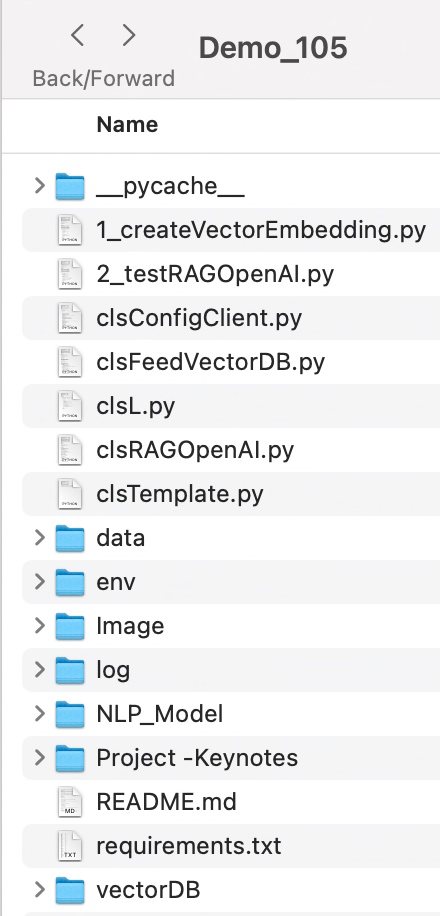
      Let us explore the directory structure starting from the parent to some of the important child folder should look like this –

      Let us understand the important screenshots of this entire process –


      So, finally, we’ve done it.

      You will get the complete codebase in the following GitHub link.

      I’ll bring some more exciting topics in the coming days from the Python verse. Please share & subscribe to my post & let me know your feedback.

      Till then, Happy Avenging! 🙂

      Validating source data against RAG-response using Open AI, GloVe, FAISS using Python

      Today, I’ll be presenting another exciting capability of architecture in the world of LLMs, where you need to answer one crucial point & that is how valid the response generated by these LLMs is against your data. This response is critical when discussing business growth & need to take the right action at the right time.

      Why not view the demo before going through it?

      Demo

      Isn’t it exciting? Great! Let us understand this in detail.

      The first dotted box (extreme-left) represents the area that talks about the data ingestion from different sources, including third-party PDFs. It is expected that organizations should have ready-to-digest data sources. Examples: Data Lake, Data Mart, One Lake, or any other equivalent platforms. Those PDFs will provide additional insights beyond the conventional advanced analytics.

      You need to have some kind of OCR solution that will extract all the relevant information in the form of text from the documents. 

      The next important part is how you define the chunking & embedding of data chunks into Vector DB. Chunking & indexing strategies, along with the overlapping chain, play a crucial importance in tying that segregated piece of context into a single context that will be fed into the source for your preferred LLMs.

      This system employs a vector similarity search to browse through unstructured information and concurrently accesses the database to retrieve the context, ensuring that the responses are not only comprehensive but also anchored in validated knowledge.

      This approach is particularly vital for addressing multi-hop questions, where a single query can be broken down into multiple sub-questions and may require information from numerous documents to generate an accurate answer.


      pip install openai==0.27.8
      pip install pandas==2.0.3
      pip install tensorflow==2.11.1
      pip install faiss-cpu==1.7.4
      pip install gensim==4.3.2

      Let us understand the key class & snippets.

      • clsFeedVectorDB.py (This is the main class that will invoke the Faiss framework to contextualize the docs inside the vector DB with the source file name to validate the answer from Gen AI using Globe.6B embedding models.)

      Let us understand some of the key snippets from the above script (Full scripts will be available in the GitHub Repo) –

      # Sample function to convert text to a vector
      def text2Vector(self, text):
          # Encode the text using the tokenizer
          words = [word for word in text.lower().split() if word in self.model]
      
          # If no words in the model, return a zero vector
          if not words:
              return np.zeros(self.model.vector_size)
      
          # Compute the average of the word vectors
          vector = np.mean([self.model[word] for word in words], axis=0)
          return vector.reshape(1, -1)

      This code is for a function called “text2Vector” that takes some text as input and converts it into a numerical vector. Let me break it down step by step:

      • It starts by taking some text as input, and this text is expected to be a sentence or a piece of text.
      • The text is then split into individual words, and each word is converted to lowercase.
      • It checks if each word is present in a pre-trained language model (probably a word embedding model like Word2Vec or GloVe). If a word is not in the model, it’s ignored.
      • If none of the words from the input text are found in the model, the function returns a vector filled with zeros. This vector has the same size as the word vectors in the model.
      • If there are words from the input text in the model, the function calculates the average vector of these words. It does this by taking the word vectors for each word found in the model and computing their mean (average). This results in a single vector that represents the input text.
      • Finally, the function reshapes this vector into a 2D array with one row and as many columns as there are elements in the vector. The reason for this reshaping is often related to compatibility with other parts of the code or libraries used in the project.

      So, in simple terms, this function takes a piece of text, looks up the word vectors for the words in that text, and calculates the average of those vectors to create a single numerical representation of the text. If none of the words are found in the model, it returns a vector of zeros.

          def genData(self):
              try:
                  basePath = self.basePath
                  modelFileName = self.modelFileName
                  vectorDBPath = self.vectorDBPath
                  vectorDBFileName = self.vectorDBFileName
      
                  # Create a FAISS index
                  dimension = int(cf.conf['NO_OF_MODEL_DIM'])  # Assuming 100-dimensional vectors 
                  index = faiss.IndexFlatL2(dimension)
      
                  print('*' * 240)
                  print('Vector Index Your Data for Retrieval:')
                  print('*' * 240)
      
                  FullVectorDBname = vectorDBPath + vectorDBFileName
                  indexFile = str(vectorDBPath) + str(vectorDBFileName) + '.index'
      
                  print('File: ', str(indexFile))
      
                  data = {}
                  # List all files in the specified directory
                  files = os.listdir(basePath)
      
                  # Filter out files that are not text files
                  text_files = [file for file in files if file.endswith('.txt')]
      
                  # Read each text file
                  for file in text_files:
                      file_path = os.path.join(basePath, file)
                      print('*' * 240)
                      print('Processing File:')
                      print(str(file_path))
                      try:
                          # Attempt to open with utf-8 encoding
                          with open(file_path, 'r', encoding='utf-8') as file:
                              for line_number, line in enumerate(file, start=1):
                                  # Assume each line is a separate document
                                  vector = self.text2Vector(line)
                                  vector = vector.reshape(-1)
                                  index_id = index.ntotal
      
                                  index.add(np.array([vector]))  # Adding the vector to the index
                                  data[index_id] = {'text': line, 'line_number': line_number, 'file_name': file_path}  # Storing the line and file name
                      except UnicodeDecodeError:
                          # If utf-8 fails, try a different encoding
                          try:
                              with open(file_path, 'r', encoding='ISO-8859-1') as file:
                                  for line_number, line in enumerate(file, start=1):
                                      # Assume each line is a separate document
                                      vector = self.text2Vector(line)
                                      vector = vector.reshape(-1)
                                      index_id = index.ntotal
                                      index.add(np.array([vector]))  # Adding the vector to the index
                                      data[index_id] = {'text': line, 'line_number': line_number, 'file_name': file_path}  # Storing the line and file name
                          except Exception as e:
                              print(f"Could not read file {file}: {e}")
                              continue
      
                      print('*' * 240)
      
                  # Save the data dictionary using pickle
                  dataCache = vectorDBPath + modelFileName
                  with open(dataCache, 'wb') as f:
                      pickle.dump(data, f)
      
                  # Save the index and data for later use
                  faiss.write_index(index, indexFile)
      
                  print('*' * 240)
      
                  return 0
      
              except Exception as e:
                  x = str(e)
                  print('Error: ', x)
      
                  return 1
      • This code defines a function called genData, and its purpose is to prepare and store data for later retrieval using a FAISS index. Let’s break down what it does step by step:
      • It starts by assigning several variables, such as basePath, modelFileName, vectorDBPath, and vectorDBFileName. These variables likely contain file paths and configuration settings.
      • It creates a FAISS index with a specified dimension (assuming 100-dimensional vectors in this case) using faiss.IndexFlatL2. FAISS is a library for efficient similarity search and clustering of high-dimensional data.
      • It prints the file name and lines where the index will be stored. It initializes an empty dictionary called data to store information about the processed text data.
      • It lists all the files in a directory specified by basePath. It filters out only the files that have a “.txt” extension as text files.
      • It then reads each of these text files one by one. For each file:
      1. It attempts to open the file with UTF-8 encoding.
        • It reads the file line by line.
        • For each line, it calls a function text2Vector to convert the text into a numerical vector representation. This vector is added to the FAISS index.
        • It also stores some information about the line, such as the line number and the file name, in the data dictionary.
        • If there is an issue with UTF-8 encoding, it tries to open the file with a different encoding, “ISO-8859-1”. The same process of reading and storing data continues.
      • If there are any exceptions (errors) during this process, it prints an error message but continues processing other files.
      • Once all the files are processed, it saves the data dictionary using the pickle library to a file specified by dataCache.
      • It also saves the FAISS index to a file specified by indexFile.
      • Finally, it returns 0 if the process completes successfully or 1 if there was an error during execution.

      In summary, this function reads text files, converts their contents into numerical vectors, and builds a FAISS index for efficient similarity search. It also saves the processed data and the index for later use. If there are any issues during the process, it prints error messages but continues processing other files.

      • clsRAGOpenAI.py (This is the main class that will invoke the RAG class, which will get the contexts with references including source files, line numbers, and source texts. This will help the customer to validate the source against the OpenAI response to understand & control the data bias & other potential critical issues.)

      Let us understand some of the key snippets from the above script (Full scripts will be available in the GitHub Repo) –

      def ragAnswerWithHaystackAndGPT3(self, queryVector, k, question):
          modelName = self.modelName
          maxToken = self.maxToken
          temp = self.temp
      
          # Assuming getTopKContexts is a method that returns the top K contexts
          contexts = self.getTopKContexts(queryVector, k)
          messages = []
      
          # Add contexts as system messages
          for file_name, line_number, text in contexts:
              messages.append({"role": "system", "content": f"Document: {file_name} \nLine Number: {line_number} \nContent: {text}"})
      
          prompt = self.generateOpenaiPrompt(queryVector, k)
          prompt = prompt + "Question: " + str(question) + ". \n Answer based on the above documents."
      
          # Add user question
          messages.append({"role": "user", "content": prompt})
      
          # Create chat completion
          completion = client.chat.completions.create(
          model=modelName,
          messages=messages,
          temperature = temp,
          max_tokens = maxToken
          )
      
          # Assuming the last message in the response is the answer
          last_response = completion.choices[0].message.content
          source_refernces = ['FileName: ' + str(context[0]) + ' - Line Numbers: ' + str(context[1]) + ' - Source Text (Reference): ' + str(context[2]) for context in contexts]
      
          return last_response, source_refernces
      • This code defines a function called ragAnswerWithHaystackAndGPT3. Its purpose is to use a combination of the Haystack search method and OpenAI’s GPT-3 model to generate an answer to a user’s question. Let’s break down what it does step by step:
      • It starts by assigning several variables, such as modelName, maxToken, and temp. These variables likely contain model-specific information and settings for GPT-3.
      • It calls a method getTopKContexts to retrieve the top K contexts (which are likely documents or pieces of text) related to the user’s query. These contexts are stored in the contexts variable.
      • It initializes an empty list called messages to store messages that will be used in the conversation with the GPT-3 model.
      • It iterates through each context and adds them as system messages to the messages list. These system messages provide information about the documents or sources being used in the conversation.
      • It creates a prompt that combines the query, retrieved contexts, and the user’s question. This prompt is then added as a user message to the messages list. It effectively sets up the conversation for GPT-3, where the user’s question is followed by context.
      • It makes a request to the GPT-3 model using the client.chat.completions.create method, passing in the model name, the constructed messages, and other settings such as temperature and maximum tokens.
      • After receiving a response from GPT-3, it assumes that the last message in the response contains the answer generated by the model.
      • It also constructs source_references, which is a list of references to the documents or sources used in generating the answer. This information includes the file name, line numbers, and source text for each context.
      • Finally, it returns the generated answer (last_response) and the source references to the caller.

      In summary, this function takes a user’s query, retrieves relevant contexts or documents, sets up a conversation with GPT-3 that includes the query and contexts, and then uses GPT-3 to generate an answer. It also provides references to the sources used in generating the answer.

          def getTopKContexts(self, queryVector, k):
              try:
                  distances, indices = index.search(queryVector, k)
                  resDict = [(data[i]['file_name'], data[i]['line_number'], data[i]['text']) for i in indices[0]]
                  return resDict
              except Exception as e:
                  x = str(e)
                  print('Error: ', x)
      
                  return x

      This code defines a function called getTopKContexts. Its purpose is to retrieve the top K relevant contexts or pieces of information from a pre-built index based on a query vector. Here’s a breakdown of what it does:

      1. It takes two parameters as input: queryVector, which is a numerical vector representing a query, and k, which specifies how many relevant contexts to retrieve.
      2. Inside a try-except block, it attempts the following steps:
        • It uses the index.search method to find the top K closest contexts to the given queryVector. This method returns two arrays: distances (measuring how similar the contexts are to the query) and indices (indicating the positions of the closest contexts in the data).
        • It creates a list called “resDict", which contains tuples for each of the top K contexts. Each tuple contains three pieces of information: the file name (file_name), the line number (line_number), and the text content (text) of the context. These details are extracted from a data dictionary.
      3. If the process completes successfully, it returns the list of top K contexts (resDict) to the caller.
      4. If there’s an exception (an error) during this process, it captures the error message as a string (x), prints the error message, and then returns the error message itself.

      In summary, this function takes a query vector and finds the K most relevant contexts or pieces of information based on their similarity to the query. It returns these contexts as a list of tuples containing file names, line numbers, and text content. If there’s an error, it prints an error message and returns the error message string.

      def generateOpenaiPrompt(self, queryVector, k):
          contexts = self.getTopKContexts(queryVector, k)
          template = ct.templateVal_1
          prompt = template
          for file_name, line_number, text in contexts:
              prompt += f"Document: {file_name}\n Line Number: {line_number} \n Content: {text}\n\n"
          return prompt

      This code defines a function called generateOpenaiPrompt. Its purpose is to create a prompt or a piece of text that combines a template with information from the top K relevant contexts retrieved earlier. Let’s break down what it does:

      1. It starts by calling the getTopKContexts function to obtain the top K relevant contexts based on a given queryVector.
      2. It initializes a variable called template with a predefined template value (likely defined elsewhere in the code).
      3. It sets the prompt variable to the initial template.
      4. Then, it enters a loop where it iterates through each of the relevant contexts retrieved earlier (contexts are typically documents or text snippets).
      5. For each context, it appends information to the prompt. Specifically, it adds lines to the prompt that include:
        • The document’s file name (Document: [file_name]).
        • The line number within the document (Line Number: [line_number]).
        • The content of the context itself (Content: [text]).
      6. It adds some extra spacing (newlines) between each context to ensure readability.
      7. Finally, it returns the complete – prompt, which is a combination of the template and information from the relevant contexts.

      In summary, this function takes a query vector, retrieves relevant contexts, and creates a prompt by combining a template with information from these contexts. This prompt can then be used as input for an AI model or system, likely for generating responses or answers based on the provided context.

      Let us understand the directory structure of this entire application –


      To learn more about this package, please visit the following GitHub link.

      So, finally, we’ve done it. I know that this post is relatively smaller than my earlier post. But, I think, you can get a good hack to improve some of your long-running jobs by applying this trick.

      I’ll bring some more exciting topics in the coming days from the Python verse. Please share & subscribe to my post & let me know your feedback.

      Till then, Happy Avenging! 🙂

      RAG implementation of LLMs by using Python, Haystack & React (Part – 1)

      Today, I will share a new post in a part series about creating end-end LLMs that feed source data with RAG implementation. I’ll also use OpenAI python-based SDK and Haystack embeddings in this case.

      In this post, I’ve directly subscribed to OpenAI & I’m not using OpenAI from Azure. However, I’ll explore that in the future as well.

      Before I explain the process to invoke this new library, why not view the demo first & then discuss it?

      Demo

      Let us look at the flow diagram as it captures the sequence of events that unfold as part of the process.

      As you can see, to enable this large & complex solution, we must first establish the capabilities to build applications powered by LLMs, Transformer models, vector search, and more. You can use state-of-the-art NLP models to perform question-answering, answer generation, semantic document search, or build tools capable of complex decision-making and query resolution. Hence, steps no. 1 & 2 showcased the data embedding & creating that informed repository. We’ll be discussing that in our second part.

      Once you have the informed repository, the system can interact with the end-users. As part of the query (shown in step 3), the prompt & the question are shared with the process engine, which then turned to reduce the volume & get relevant context from our informed repository & get the tuned context as part of the response (Shown in steps 4, 5 & 6).

      Then, this tuned context is shared with the OpenAI for better response & summary & concluding remarks that are very user-friendly & easier to understand for end-users (Shown in steps 8 & 9).

      The following are the important packages that are essential to this project –

      pip install farm-haystack==1.19.0
      pip install Flask==2.2.5
      pip install Flask-Cors==4.0.0
      pip install Flask-JWT-Extended==4.5.2
      pip install Flask-Session==0.5.0
      pip install openai==0.27.8
      pip install pandas==2.0.3
      pip install tensorflow==2.11.1

      We’ve both the front-end using react & back-end APIs with Python-flask and the Open AI to create this experience.

      Today, we’ll be going in reverse mode. We first discuss the main script & then explain all the other class scripts.

      • flaskServer.py (This is the main calling Python script to invoke the RAG-Server.)
      #########################################################
      #### Written By: SATYAKI DE                          ####
      #### Written On: 27-Jun-2023                         ####
      #### Modified On 28-Jun-2023                         ####
      ####                                                 ####
      #### Objective: This is the main calling             ####
      #### python script that will invoke the              ####
      #### shortcut application created inside MAC         ####
      #### enviornment including MacBook, IPad or IPhone.  ####
      ####                                                 ####
      #########################################################
      
      from flask import Flask, jsonify, request, session
      from flask_cors import CORS
      from werkzeug.security import check_password_hash, generate_password_hash
      from flask_jwt_extended import JWTManager, jwt_required, create_access_token
      import pandas as pd
      from clsConfigClient import clsConfigClient as cf
      import clsL as log
      import clsContentScrapper as csc
      import clsRAGOpenAI as crao
      import csv
      from datetime import timedelta
      import os
      import re
      import json
      
      ########################################################
      ################    Global Area   ######################
      ########################################################
      #Initiating Logging Instances
      clog = log.clsL()
      
      admin_key = cf.conf['ADMIN_KEY']
      secret_key = cf.conf['SECRET_KEY']
      session_path = cf.conf['SESSION_PATH']
      sessionFile = cf.conf['SESSION_CACHE_FILE']
      
      app = Flask(__name__)
      CORS(app)  # This will enable CORS for all routes
      app.config['JWT_SECRET_KEY'] = admin_key  # Change this!
      app.secret_key = secret_key
      
      jwt = JWTManager(app)
      
      users = cf.conf['USER_NM']
      passwd = cf.conf['USER_PWD']
      
      cCScrapper = csc.clsContentScrapper()
      cr = crao.clsRAGOpenAI()
      
      # Disbling Warning
      def warn(*args, **kwargs):
          pass
      
      import warnings
      warnings.warn = warn
      
      # Define the aggregation functions
      def join_unique(series):
          unique_vals = series.drop_duplicates().astype(str)
          return ', '.join(filter(lambda x: x != 'nan', unique_vals))
      
      # Building the preaggregate cache
      def groupImageWiki():
          try:
              base_path = cf.conf['OUTPUT_PATH']
              inputFile = cf.conf['CLEANED_FILE']
              outputFile = cf.conf['CLEANED_FILE_SHORT']
              subdir = cf.conf['SUBDIR_OUT']
              Ind = cf.conf['DEBUG_IND']
      
              inputCleanedFileLookUp = base_path + inputFile
      
              #Opening the file in dataframe
              df = pd.read_csv(inputCleanedFileLookUp)
              hash_values = df['Total_Hash'].unique()
      
              dFin = df[['primaryImage','Wiki_URL','Total_Hash']]
      
              # Ensure columns are strings and not NaN
              # Convert columns to string and replace 'nan' with an empty string
              dFin['primaryImage'] = dFin['primaryImage'].astype(str).replace('nan', '')
              dFin['Wiki_URL'] = dFin['Wiki_URL'].astype(str).replace('nan', '')
      
              dFin.drop_duplicates()
      
              # Group by 'Total_Hash' and aggregate
              dfAgg = dFin.groupby('Total_Hash').agg({'primaryImage': join_unique,'Wiki_URL': join_unique}).reset_index()
      
              return dfAgg
      
          except Exception as e:
              x = str(e)
              print('Error: ', x)
      
              df = pd.DataFrame()
      
              return df
      
      resDf = groupImageWiki()
      
      ########################################################
      ################  End  Global Area  ####################
      ########################################################
      
      def extractRemoveUrls(hash_value):
          image_urls = ''
          wiki_urls = ''
          # Parse the inner message JSON string
          try:
      
              resDf['Total_Hash'] = resDf['Total_Hash'].astype(int)
              filtered_df = resDf[resDf['Total_Hash'] == int(hash_value)]
      
              if not filtered_df.empty:
                  image_urls = filtered_df['primaryImage'].values[0]
                  wiki_urls = filtered_df['Wiki_URL'].values[0]
      
              return image_urls, wiki_urls
      
          except Exception as e:
              x = str(e)
              print('extractRemoveUrls Error: ', x)
              return image_urls, wiki_urls
      
      def isIncomplete(line):
          """Check if a line appears to be incomplete."""
      
          # Check if the line ends with certain patterns indicating it might be incomplete.
          incomplete_patterns = [': [Link](', ': Approximately ', ': ']
          return any(line.endswith(pattern) for pattern in incomplete_patterns)
      
      def filterData(data):
          """Return only the complete lines from the data."""
      
          lines = data.split('\n')
          complete_lines = [line for line in lines if not isIncomplete(line)]
      
          return '\n'.join(complete_lines)
      
      def updateCounter(sessionFile):
          try:
              counter = 0
      
              # Check if the CSV file exists
              if os.path.exists(sessionFile):
                  with open(sessionFile, 'r') as f:
                      reader = csv.reader(f)
                      for row in reader:
                          # Assuming the counter is the first value in the CSV
                          counter = int(row[0])
      
              # Increment counter
              counter += 1
      
              # Write counter back to CSV
              with open(sessionFile, 'w', newline='') as f:
                  writer = csv.writer(f)
                  writer.writerow([counter])
      
              return counter
          except Exception as e:
              x = str(e)
              print('Error: ', x)
      
              return 1
      
      def getPreviousResult():
          try:
              fullFileName = session_path + sessionFile
              newCounterValue = updateCounter(fullFileName)
      
              return newCounterValue
          except Exception as e:
              x = str(e)
              print('Error: ', x)
      
              return 1
      
      @app.route('/login', methods=['POST'])
      def login():
          username = request.json.get('username', None)
          password = request.json.get('password', None)
      
          print('User Name: ', str(username))
          print('Password: ', str(password))
      
          #if username not in users or not check_password_hash(users.get(username), password):
          if ((username not in users) or (password not in passwd)):
              return jsonify({'login': False}), 401
      
          access_token = create_access_token(identity=username)
          return jsonify(access_token=access_token)
      
      @app.route('/chat', methods=['POST'])
      def get_chat():
          try:
              #session["key"] = "1D98KI"
              #session_id = session.sid
              #print('Session Id: ', str(session_id))
      
              cnt = getPreviousResult()
              print('Running Session Count: ', str(cnt))
      
              username = request.json.get('username', None)
              message = request.json.get('message', None)
      
              print('User: ', str(username))
              print('Content: ', str(message))
      
              if cnt == 1:
                  retList = cCScrapper.extractCatalog()
              else:
                  hashValue, cleanedData = cr.getData(str(message))
                  print('Main Hash Value:', str(hashValue))
      
                  imageUrls, wikiUrls = extractRemoveUrls(hashValue)
                  print('Image URLs: ', str(imageUrls))
                  print('Wiki URLs: ', str(wikiUrls))
                  print('Clean Text:')
                  print(str(cleanedData))
                  retList = '{"records":[{"Id":"' + str(cleanedData) + '", "Image":"' + str(imageUrls) + '", "Wiki": "' + str(wikiUrls) + '"}]}'
      
              response = {
                  'message': retList
              }
      
              print('JSON: ', str(response))
              return jsonify(response)
      
          except Exception as e:
              x = str(e)
      
              response = {
                  'message': 'Error: ' + x
              }
              return jsonify(response)
      
      @app.route('/api/data', methods=['GET'])
      @jwt_required()
      def get_data():
          response = {
              'message': 'Hello from Flask!'
          }
          return jsonify(response)
      
      if __name__ == '__main__':
          app.run(debug=True)
      

      Let us understand some of the important sections of the above script –

      Function – login():

      The login function retrieves a ‘username’ and ‘password’ from a JSON request and prints them. It checks if the provided credentials are missing from users or password lists, returning a failure JSON response if so. It creates and returns an access token in a JSON response if valid.

      Function – get_chat():

      The get_chat function retrieves the running session count and user input from a JSON request. Based on the session count, it extracts catalog data or processes the user’s message from the RAG framework that finally receives the refined response from the OpenAI, extracting hash values, image URLs, and wiki URLs. If an error arises, the function captures and returns the error as a JSON message.

      Function – updateCounter():

      The updateCounter function checks if a given CSV file exists and retrieves its counter value. It then increments the counter and writes it back to the CSV. If any errors occur, an error message is printed, and the function returns a value of 1.

      Function – extractRemoveUrls():

      The extractRemoveUrls function attempts to filter a data frame, resDf, based on a provided hash value to extract image and wiki URLs. If the data frame contains matching entries, it retrieves the corresponding URLs. Any errors encountered are printed, but the function always returns the image and wiki URLs, even if they are empty.

      • clsContentScrapper.py (This is the main class that brings the default options for the users if they agree with the initial prompt by the bot.)
      #####################################################
      #### Written By: SATYAKI DE                      ####
      #### Written On: 27-May-2023                     ####
      #### Modified On 28-May-2023                     ####
      ####                                             ####
      #### Objective: This is the main calling         ####
      #### python class that will invoke the           ####
      #### LangChain of package to extract             ####
      #### the transcript from the YouTube videos &    ####
      #### then answer the questions based on the      ####
      #### topics selected by the users.               ####
      ####                                             ####
      #####################################################
      
      from langchain.document_loaders import YoutubeLoader
      from langchain.text_splitter import RecursiveCharacterTextSplitter
      from langchain.embeddings.openai import OpenAIEmbeddings
      from langchain.vectorstores import FAISS
      from langchain.chat_models import ChatOpenAI
      from langchain.chains import LLMChain
      
      from langchain.prompts.chat import (
          ChatPromptTemplate,
          SystemMessagePromptTemplate,
          HumanMessagePromptTemplate,
      )
      
      from googleapiclient.discovery import build
      
      import clsTemplate as ct
      from clsConfigClient import clsConfigClient as cf
      
      import os
      
      from flask import jsonify
      import requests
      
      ###############################################
      ###           Global Section                ###
      ###############################################
      open_ai_Key = cf.conf['OPEN_AI_KEY']
      os.environ["OPENAI_API_KEY"] = open_ai_Key
      embeddings = OpenAIEmbeddings(openai_api_key=open_ai_Key)
      
      YouTube_Key = cf.conf['YOUTUBE_KEY']
      youtube = build('youtube', 'v3', developerKey=YouTube_Key)
      
      # Disbling Warning
      def warn(*args, **kwargs):
          pass
      
      import warnings
      warnings.warn = warn
      
      ###############################################
      ###    End of Global Section                ###
      ###############################################
      
      class clsContentScrapper:
          def __init__(self):
              self.model_name = cf.conf['MODEL_NAME']
              self.temp_val = cf.conf['TEMP_VAL']
              self.max_cnt = int(cf.conf['MAX_CNT'])
              self.url = cf.conf['BASE_URL']
              self.header_token = cf.conf['HEADER_TOKEN']
      
          def extractCatalog(self):
              try:
                  base_url = self.url
                  header_token = self.header_token
      
                  url = base_url + '/departments'
      
                  print('Full URL: ', str(url))
      
                  payload={}
                  headers = {'Cookie': header_token}
      
                  response = requests.request("GET", url, headers=headers, data=payload)
      
                  x = response.text
      
                  return x
              except Exception as e:
                  discussedTopic = []
                  x = str(e)
                  print('Error: ', x)
      
                  return x
      

      Let us understand the the core part that require from this class.

      Function – extractCatalog():

      The extractCatalog function uses specific headers to make a GET request to a constructed URL. The URL is derived by appending ‘/departments’ to a base_url, and a header token is used in the request headers. If successful, it returns the text of the response; if there’s an exception, it prints the error and returns the error message.

      • clsRAGOpenAI.py (This is the main class that brings the RAG-enabled context that is fed to OpenAI for fine-tuned response with less cost.)
      #########################################################
      #### Written By: SATYAKI DE                          ####
      #### Written On: 27-Jun-2023                         ####
      #### Modified On 28-Jun-2023                         ####
      ####                                                 ####
      #### Objective: This is the main calling             ####
      #### python script that will invoke the              ####
      #### shortcut application created inside MAC         ####
      #### enviornment including MacBook, IPad or IPhone.  ####
      ####                                                 ####
      #########################################################
      
      from haystack.document_stores.faiss import FAISSDocumentStore
      from haystack.nodes import DensePassageRetriever
      import openai
      
      from clsConfigClient import clsConfigClient as cf
      import clsL as log
      
      # Disbling Warning
      def warn(*args, **kwargs):
          pass
      
      import warnings
      warnings.warn = warn
      
      import os
      import re
      ###############################################
      ###           Global Section                ###
      ###############################################
      Ind = cf.conf['DEBUG_IND']
      queryModel = cf.conf['QUERY_MODEL']
      passageModel = cf.conf['PASSAGE_MODEL']
      
      #Initiating Logging Instances
      clog = log.clsL()
      
      os.environ["TOKENIZERS_PARALLELISM"] = "false"
      
      vectorDBFileName = cf.conf['VECTORDB_FILE_NM']
      
      indexFile = "vectorDB/" + str(vectorDBFileName) + '.faiss'
      indexConfig = "vectorDB/" + str(vectorDBFileName) + ".json"
      
      print('File: ', str(indexFile))
      print('Config: ', str(indexConfig))
      
      # Also, provide `config_path` parameter if you set it when calling the `save()` method:
      new_document_store = FAISSDocumentStore.load(index_path=indexFile, config_path=indexConfig)
      
      # Initialize Retriever
      retriever = DensePassageRetriever(document_store=new_document_store,
                                        query_embedding_model=queryModel,
                                        passage_embedding_model=passageModel,
                                        use_gpu=False)
      
      
      ###############################################
      ###    End of Global Section                ###
      ###############################################
      
      class clsRAGOpenAI:
          def __init__(self):
              self.basePath = cf.conf['DATA_PATH']
              self.fileName = cf.conf['FILE_NAME']
              self.Ind = cf.conf['DEBUG_IND']
              self.subdir = str(cf.conf['OUT_DIR'])
              self.base_url = cf.conf['BASE_URL']
              self.outputPath = cf.conf['OUTPUT_PATH']
              self.vectorDBPath = cf.conf['VECTORDB_PATH']
              self.openAIKey = cf.conf['OPEN_AI_KEY']
              self.temp = cf.conf['TEMP_VAL']
              self.modelName = cf.conf['MODEL_NAME']
              self.maxToken = cf.conf['MAX_TOKEN']
      
          def extractHash(self, text):
              try:
                  # Regular expression pattern to match 'Ref: {' followed by a number and then '}'
                  pattern = r"Ref: \{'(\d+)'\}"
                  match = re.search(pattern, text)
      
                  if match:
                      return match.group(1)
                  else:
                      return None
              except Exception as e:
                  x = str(e)
                  print('Error: ', x)
      
                  return None
      
          def removeSentencesWithNaN(self, text):
              try:
                  # Split text into sentences using regular expression
                  sentences = re.split('(?<!\w\.\w.)(?<![A-Z][a-z]\.)(?<=\.|\?)\s', text)
                  # Filter out sentences containing 'nan'
                  filteredSentences = [sentence for sentence in sentences if 'nan' not in sentence]
                  # Rejoin the sentences
                  return ' '.join(filteredSentences)
              except Exception as e:
                  x = str(e)
                  print('Error: ', x)
      
                  return ''
      
          def retrieveDocumentsReader(self, question, top_k=9):
              return retriever.retrieve(question, top_k=top_k)
      
          def generateAnswerWithGPT3(self, retrieved_docs, question):
              try:
                  openai.api_key = self.openAIKey
                  temp = self.temp
                  modelName = self.modelName
                  maxToken = self.maxToken
      
                  documentsText = " ".join([doc.content for doc in retrieved_docs])
      
                  filteredDocs = self.removeSentencesWithNaN(documentsText)
                  hashValue = self.extractHash(filteredDocs)
      
                  print('RAG Docs:: ')
                  print(filteredDocs)
                  #prompt = f"Given the following documents: {documentsText}, answer the question accurately based on the above data with the supplied http urls: {question}"
      
                  # Set up a chat-style prompt with your data
                  messages = [
                      {"role": "system", "content": "You are a helpful assistant, answer the question accurately based on the above data with the supplied http urls. Only relevant content needs to publish. Please do not provide the facts or the texts that results crossing the max_token limits."},
                      {"role": "user", "content": filteredDocs}
                  ]
      
                  # Chat style invoking the latest model
                  response = openai.ChatCompletion.create(
                      model=modelName,
                      messages=messages,
                      temperature = temp,
                      max_tokens=maxToken
                  )
                  return hashValue, response.choices[0].message['content'].strip().replace('\n','\\n')
              except Exception as e:
                  x = str(e)
                  print('failed to get from OpenAI: ', x)
                  return 'Not Available!'
      
          def ragAnswerWithHaystackAndGPT3(self, question):
              retrievedDocs = self.retrieveDocumentsReader(question)
              return self.generateAnswerWithGPT3(retrievedDocs, question)
      
          def getData(self, strVal):
              try:
                  print('*'*120)
                  print('Index Your Data for Retrieval:')
                  print('*'*120)
      
                  print('Response from New Docs: ')
                  print()
      
                  hashValue, answer = self.ragAnswerWithHaystackAndGPT3(strVal)
      
                  print('GPT3 Answer::')
                  print(answer)
                  print('Hash Value:')
                  print(str(hashValue))
      
                  print('*'*240)
                  print('End Of Use RAG to Generate Answers:')
                  print('*'*240)
      
                  return hashValue, answer
              except Exception as e:
                  x = str(e)
                  print('Error: ', x)
                  answer = x
                  hashValue = 1
      
                  return hashValue, answer
      

      Let us understand some of the important block –

      Function – ragAnswerWithHaystackAndGPT3():

      The ragAnswerWithHaystackAndGPT3 function retrieves relevant documents for a given question using the retrieveDocumentsReader method. It then generates an answer for the query using GPT-3 with the retrieved documents via the generateAnswerWithGPT3 method. The final response is returned.

      Function – generateAnswerWithGPT3():

      The generateAnswerWithGPT3 function, given a list of retrieved documents and a question, communicates with OpenAI’s GPT-3 to generate an answer. It first processes the documents, filtering and extracting a hash value. Using a chat-style format, it prompts GPT-3 with the processed documents and captures its response. If an error occurs, an error message is printed, and “Not Available!” is returned.

      Function – retrieveDocumentsReader():

      The retrieveDocumentsReader function takes in a question and an optional parameter, top_k (defaulted to 9). It is called the retriever.retrieve method with the given parameters. The result of the retrieval will generate at max nine responses from the RAG engine, which will be fed to OpenAI.

      • App.js (This is the main react script, that will create the interface & parse the data apart from the authentication)
      // App.js
      import React, { useState } from 'react';
      import axios from 'axios';
      import './App.css';
      
      const App = () => {
        const [isLoggedIn, setIsLoggedIn] = useState(false);
        const [username, setUsername] = useState('');
        const [password, setPassword] = useState('');
        const [message, setMessage] = useState('');
        const [chatLog, setChatLog] = useState([{ sender: 'MuBot', message: 'Welcome to MuBot! Please explore the world of History from our brilliant collections! Do you want to proceed to see the catalog?'}]);
      
        const handleLogin = async (e) => {
          e.preventDefault();
          try {
            const response = await axios.post('http://localhost:5000/login', { username, password });
            if (response.status === 200) {
              setIsLoggedIn(true);
            }
          } catch (error) {
            console.error('Login error:', error);
          }
        };
      
        const sendMessage = async (username) => {
          if (message.trim() === '') return;
      
          // Create a new chat entry
          const newChatEntry = {
            sender: 'user',
            message: message.trim(),
          };
      
          // Clear the input field
          setMessage('');
      
          try {
            // Make API request to Python-based API
            const response = await axios.post('http://localhost:5000/chat', { message: newChatEntry.message }); // Replace with your API endpoint URL
            const responseData = response.data;
      
            // Print the response to the console for debugging
            console.log('API Response:', responseData);
      
            // Parse the nested JSON from the 'message' attribute
            const jsonData = JSON.parse(responseData.message);
      
            // Check if the data contains 'departments'
            if (jsonData.departments) {
      
              // Extract the 'departments' attribute from the parsed data
              const departments = jsonData.departments;
      
              // Extract the department names and create a single string with line breaks
              const botResponseText = departments.reduce((acc, department) => {return acc + department.departmentId + ' ' + department.displayName + '\n';}, '');
      
              // Update the chat log with the bot's response
              setChatLog((prevChatLog) => [...prevChatLog, { sender: 'user', message: message }, { sender: 'bot', message: botResponseText },]);
            }
            else if (jsonData.records)
            {
              // Data structure 2: Artwork information
              const records = jsonData.records;
      
              // Prepare chat entries
              const chatEntries = [];
      
              // Iterate through records and extract text, image, and wiki information
              records.forEach((record) => {
                const textInfo = Object.entries(record).map(([key, value]) => {
                  if (key !== 'Image' && key !== 'Wiki') {
                    return `${key}: ${value}`;
                  }
                  return null;
                }).filter((info) => info !== null).join('\n');
      
                const imageLink = record.Image;
                //const wikiLinks = JSON.parse(record.Wiki.replace(/'/g, '"'));
                //const wikiLinks = record.Wiki;
                const wikiLinks = record.Wiki.split(',').map(link => link.trim());
      
                console.log('Wiki:', wikiLinks);
      
                // Check if there is a valid image link
                const hasValidImage = imageLink && imageLink !== '[]';
      
                const imageElement = hasValidImage ? (
                  <img src={imageLink} alt="Artwork" style={{ maxWidth: '100%' }} />
                ) : null;
      
                // Create JSX elements for rendering the wiki links (if available)
                const wikiElements = wikiLinks.map((link, index) => (
                  <div key={index}>
                    <a href={link} target="_blank" rel="noopener noreferrer">
                      Wiki Link {index + 1}
                    </a>
                  </div>
                ));
      
                if (textInfo) {
                  chatEntries.push({ sender: 'bot', message: textInfo });
                }
      
                if (imageElement) {
                  chatEntries.push({ sender: 'bot', message: imageElement });
                }
      
                if (wikiElements.length > 0) {
                  chatEntries.push({ sender: 'bot', message: wikiElements });
                }
              });
      
              // Update the chat log with the bot's response
              setChatLog((prevChatLog) => [...prevChatLog, { sender: 'user', message }, ...chatEntries, ]);
            }
      
          } catch (error) {
            console.error('Error sending message:', error);
          }
        };
      
        if (!isLoggedIn) {
          return (
            <div className="login-container">
              <h2>Welcome to the MuBot</h2>
              <form onSubmit={handleLogin} className="login-form">
                <input
                  type="text"
                  placeholder="Enter your name"
                  value={username}
                  onChange={(e) => setUsername(e.target.value)}
                  required
                />
                <input
                  type="password"
                  placeholder="Enter your password"
                  value={password}
                  onChange={(e) => setPassword(e.target.value)}
                  required
                />
                <button type="submit">Login</button>
              </form>
            </div>
          );
        }
      
        return (
          <div className="chat-container">
            <div className="chat-header">
              <h2>Hello, {username}</h2>
              <h3>Chat with MuBot</h3>
            </div>
            <div className="chat-log">
              {chatLog.map((chatEntry, index) => (
                <div
                  key={index}
                  className={`chat-entry ${chatEntry.sender === 'user' ? 'user' : 'bot'}`}
                >
                  <span className="user-name">{chatEntry.sender === 'user' ? username : 'MuBot'}</span>
                  <p className="chat-message">{chatEntry.message}</p>
                </div>
              ))}
            </div>
            <div className="chat-input">
              <input
                type="text"
                placeholder="Type your message..."
                value={message}
                onChange={(e) => setMessage(e.target.value)}
                onKeyPress={(e) => {
                  if (e.key === 'Enter') {
                    sendMessage();
                  }
                }}
              />
              <button onClick={sendMessage}>Send</button>
            </div>
          </div>
        );
      };
      
      export default App;
      

      Please find some of the important logic –

      Function – handleLogin():

      The handleLogin asynchronous function responds to an event by preventing its default action. It attempts to post a login request with a username and password to a local server endpoint. If the response is successful with a status of 200, it updates a state variable to indicate a successful login; otherwise, it logs any encountered errors.

      Function – sendMessage():

      The sendMessage asynchronous function is designed to handle the user’s chat interaction:

      1. If the message is empty (after trimming spaces), the function exits without further action.
      2. A chat entry object is created with the sender set as ‘user’ and the trimmed message.
      3. The input field’s message is cleared, and an API request is made to a local server endpoint with the chat message.
      4. If the API responds with a ‘departments’ attribute in its JSON, a bot response is crafted by iterating over department details.
      5. If the API responds with ‘records’ indicating artwork information, the bot crafts responses for each record, extracting text, images, and wiki links, and generating JSX elements for rendering them.
      6. After processing the API response, the chat log state is updated with the user’s original message and the bot’s responses.
      7. Errors, if encountered, are logged to the console.

      This function enables interactive chat with bot responses that vary based on the nature of the data received from the API.


      Let us explore the directory structure starting from the parent to some of the important child folder should look like this –


      So, finally, we’ve done it.

      I know that this post is relatively bigger than my earlier post. But, I think, you can get all the details once you go through it.

      You will get the complete codebase in the following GitHub link.

      I’ll bring some more exciting topics in the coming days from the Python verse. Please share & subscribe to my post & let me know your feedback.

      Till then, Happy Avenging! 🙂

      Enabling OpenAI-based NLP engine with SIRI (MacBook/iPad/iPhone) through a proxy-driven restricted API using Python.

      Today, I’m very excited to demonstrate an effortless & new way to integrate SIRI with a controlled Open-AI exposed through a proxy API. So, why this is important; this will give you options to control your ChatGPT environment as per your principles & then you can use a load-balancer (if you want) & exposed that through proxy.

      In this post, I’ve directly subscribed to OpenAI & I’m not using OpenAI from Azure. However, I’ll explore that in the future as well.


      Before I explain the process to invoke this new library, why not view the demo first & then discuss it?

      Demo

      Isn’t it fascinating? This approach will lead to a whole new ballgame, where you can add SIRI with an entirely new world of knowledge as per your requirements & expose them in a controlled way.

      FLOW OF EVENTS:

      Let us look at the flow diagram as it captures the sequence of events that unfold as part of the process.

      As you can see, Apple Shortcuts triggered the requests through its voice app, which then translates the question to text & then it will invoke the ngrok proxy API, which will eventually trigger the controlled custom API built using Flask & Python to start the Open AI API.


      CODE:

      Why don’t we go through the code made accessible due to this new library for this particular use case?

      • clsConfigClient.py (This is the main calling Python script for the input parameters.)


      ################################################
      #### Written By: SATYAKI DE ####
      #### Written On: 15-May-2020 ####
      #### Modified On: 27-Jun-2023 ####
      #### ####
      #### Objective: This script is a config ####
      #### file, contains all the keys for ####
      #### personal OpenAI-based MAC-shortcuts ####
      #### enable bot. ####
      #### ####
      ################################################
      import os
      import platform as pl
      class clsConfigClient(object):
      Curr_Path = os.path.dirname(os.path.realpath(__file__))
      os_det = pl.system()
      if os_det == "Windows":
      sep = '\\'
      else:
      sep = '/'
      conf = {
      'APP_ID': 1,
      'ARCH_DIR': Curr_Path + sep + 'arch' + sep,
      'PROFILE_PATH': Curr_Path + sep + 'profile' + sep,
      'LOG_PATH': Curr_Path + sep + 'log' + sep,
      'DATA_PATH': Curr_Path + sep + 'data' + sep,
      'MODEL_PATH': Curr_Path + sep + 'model' + sep,
      'TEMP_PATH': Curr_Path + sep + 'temp' + sep,
      'MODEL_DIR': 'model',
      'APP_DESC_1': 'LangChain Demo!',
      'DEBUG_IND': 'N',
      'INIT_PATH': Curr_Path,
      'FILE_NAME': 'Output.csv',
      'MODEL_NAME': 'gpt-3.5-turbo',
      'OPEN_AI_KEY': "sk-Jdhfdyruru9383474HHFJFJFJO6jrlxPKbv6Bgvv",
      'TITLE': "LangChain Demo!",
      'TEMP_VAL': 0.2,
      'PATH' : Curr_Path,
      'MAX_TOKEN' : 60,
      'OUT_DIR': 'data'
      }

      Some of the important entries from the above snippet are as follows –

              'MODEL_NAME': 'gpt-3.5-turbo',
              'OPEN_AI_KEY': "sk-Jdhfdyruru9383474HHFJFJFJO6jrlxPKbv6Bgvv",
              'TEMP_VAL': 0.2,

      TEMP_VAL will help you to control the response in a more authentic manner. It varies between 0 to 1.

      • clsJarvis.py (This is the main calling Python script for the input parameters.)


      #####################################################
      #### Written By: SATYAKI DE ####
      #### Written On: 27-Jun-2023 ####
      #### Modified On 28-Jun-2023 ####
      #### ####
      #### Objective: This is the main calling ####
      #### python class that will invoke the ####
      #### Flask framework to expose the OpenAI ####
      #### API with more control & encapsulate the ####
      #### server IPs with proxy layers. ####
      #### ####
      #####################################################
      import openai
      from flask import request, jsonify
      from clsConfigClient import clsConfigClient as cf
      import os
      import clsTemplate as ct
      ###############################################
      ### Global Section ###
      ###############################################
      open_ai_Key = cf.conf['OPEN_AI_KEY']
      openai.api_key = open_ai_Key
      # Disbling Warning
      def warn(*args, **kwargs):
      pass
      import warnings
      warnings.warn = warn
      ###############################################
      ### End of Global Section ###
      ###############################################
      class clsJarvis:
      def __init__(self):
      self.model_name = cf.conf['MODEL_NAME']
      self.max_token = cf.conf['MAX_TOKEN']
      self.temp_val = cf.conf['TEMP_VAL']
      def extractContentInText(self, query):
      try:
      model_name = self.model_name
      max_token = self.max_token
      temp_val = self.temp_val
      template = ct.templateVal_1
      response = openai.ChatCompletion.create(model=model_name, temperature=temp_val, messages=[{"role": "system", "content": template},{"role": "user", "content": query}])
      inputJson = {"text": response['choices'][0]['message']['content']}
      return jsonify(inputJson)
      except Exception as e:
      discussedTopic = []
      x = str(e)
      print('Error: ', x)
      template = ct.templateVal_2
      inputJson = {"text": template}
      return jsonify(inputJson)

      view raw

      clsJarvis.py

      hosted with ❤ by GitHub

      The key snippets from the above script are as follows –

      def extractContentInText(self, query):
          try:
              model_name = self.model_name
              max_token = self.max_token
              temp_val = self.temp_val
      
              template = ct.templateVal_1
      
              response = openai.ChatCompletion.create(model=model_name, temperature=temp_val, messages=[{"role": "system", "content": template},{"role": "user", "content": query}])
              inputJson = {"text": response['choices'][0]['message']['content']}
      
              return jsonify(inputJson)
          except Exception as e:
              discussedTopic = []
              x = str(e)
              print('Error: ', x)
              template = ct.templateVal_2
      
              inputJson = {"text": template}
      
              return jsonify(inputJson)

      The provided Python code snippet defines a method extractContentInText, which interacts with OpenAI’s API to generate a response from OpenAI’s chat model to a user’s query. Here’s a summary of what it does:

      1. It fetches some predefined model configurations (model_name, max_token, temp_val). These are class attributes defined elsewhere.
      2. It sets a system message template (initial instruction for the AI model) using ct.templateVal_1. The ct object isn’t defined within this snippet but is likely another predefined object or module in the more extensive program.
      3. It then calls openai.ChatCompletion.create() to send messages to the AI model and generate a response. The statements include an initial system message and a user’s query.
      4. The model’s response is extracted and formatted into a JSON object inputJson where the ‘text’ field holds the AI’s response.
      5. The input JSON object returns a JSON response.

      If an error occurs at any stage of this process (caught in the except block), it prints the error, sets a fallback message template using ct.templateVal_2, formats this into a JSON object, and returns it as a JSON response.

      Note: The max_token variable is fetched but not used within the function; it might be a remnant of previous code or meant to be used in further development. The code also assumes a predefined ct object and a method called jsonify(), possibly from Flask, for formatting Python dictionaries into JSON format.

      • testJarvis.py (This is the main calling Python script.)


      #########################################################
      #### Written By: SATYAKI DE ####
      #### Written On: 27-Jun-2023 ####
      #### Modified On 28-Jun-2023 ####
      #### ####
      #### Objective: This is the main calling ####
      #### python script that will invoke the ####
      #### shortcut application created inside MAC ####
      #### enviornment including MacBook, IPad or IPhone. ####
      #### ####
      #########################################################
      import clsL as cl
      from clsConfigClient import clsConfigClient as cf
      import clsJarvis as jv
      import datetime
      from flask import Flask, request, jsonify
      app = Flask(__name__)
      # Disbling Warning
      def warn(*args, **kwargs):
      pass
      import warnings
      warnings.warn = warn
      ######################################
      ### Get your global values ####
      ######################################
      debug_ind = 'Y'
      # Initiating Logging Instances
      clog = cl.clsL()
      cJarvis = jv.clsJarvis()
      ######################################
      #### Global Flag ########
      ######################################
      @app.route('/openai', methods=['POST'])
      def openai_call():
      try:
      var = datetime.datetime.now().strftime("%Y-%m-%d_%H-%M-%S")
      print('*'*120)
      print('Start Time: ' + str(var))
      print('*'*120)
      data = request.get_json()
      print('Data::')
      print(data)
      prompt = data.get('prompt', '')
      print('Prompt::')
      print(prompt)
      res = cJarvis.extractContentInText(str(prompt))
      return res
      print('*'*120)
      var1 = datetime.datetime.now().strftime("%Y-%m-%d_%H-%M-%S")
      print('End Time: ' + str(var1))
      except Exception as e:
      x = str(e)
      print('Error: ', x)
      if __name__ == "__main__":
      app.run(host='0.0.0.0')

      view raw

      testJarvis.py

      hosted with ❤ by GitHub

      Please find the key snippets –

      @app.route('/openai', methods=['POST'])
      def openai_call():
          try:
              var = datetime.datetime.now().strftime("%Y-%m-%d_%H-%M-%S")
              print('*'*120)
              print('Start Time: ' + str(var))
              print('*'*120)
      
              data = request.get_json()
              print('Data::')
              print(data)
              prompt = data.get('prompt', '')
      
              print('Prompt::')
              print(prompt)
      
              res = cJarvis.extractContentInText(str(prompt))
      
              return res
      
              print('*'*120)
              var1 = datetime.datetime.now().strftime("%Y-%m-%d_%H-%M-%S")
              print('End Time: ' + str(var1))
      
          except Exception as e:
              x = str(e)
              print('Error: ', x)

      The provided Python code defines a route in a Flask web server that listens for POST requests at the ‘/openai’ endpoint. Here’s what it does in detail:

      1. It records and prints the current time, marking the start of the request handling.
      2. It retrieves the incoming data from the POST request as JSON with the request.get_json().
      3. It then extracts the ‘prompt’ from the JSON data. The request defaults to an empty string if no ‘prompt’ is provided in the request.
      4. The prompt is passed as an argument to the method extractContentInText() object cJarvis. This method is expected to use OpenAI’s API to generate a response from a model given the prompt (as discussed in your previous question). The result of this method call is stored in the variable res.
      5. The res variable (the model’s response) returns the answer to the client requesting the POST.
      6. It prints the current time again, marking the end of the request handling (However, this part of the code will never be executed as it places after a return statement).
      7. If an error occurs during this process, it catches the exception, converts it to a string, and prints the error message.

      The cJarvis object used in the cJarvis.extractContentInText(str(prompt)) call is not defined within this code snippet. It is a global object likely defined elsewhere in the more extensive program. The extractContentInText method is the one you shared in your previous question.

      Apple Shortcuts:

      Now, let us understand the steps in Apple Shortcuts.

      You can now set up a Siri Shortcut to call the URL provided by ngrok:

      1. Open the Shortcuts app on your iPhone.
      2. Tap the ‘+’ to create a new Shortcut.
      3. Add an action, search for “URL,” and select the URL action. Enter your ngrok URL here, with the /openai endpoint.
      4. Add another action, search for “Get Contents of URL.” This step will send a POST request to the URL from the previous activity. Set the method to POST and add a request body with type ‘JSON,’ containing a key ‘prompt’ and a value being the input you want to send to your OpenAI model.
      5. Optionally, you can add another action, “Show Result” or “Speak Text” to see/hear the result returned from your server.
      6. Save your Shortcut and give it a name.

      You should now be able to activate Siri and say the name of your Shortcut to have it send a request to your server, which will then send a prompt to the OpenAI API and return the response.

      Let us understand the “Get contents of” with easy postman screenshots –

      As you can see that the newly exposed proxy-API will receive an input named prompt, which will be passed from “Dictate Text.”


      So, finally, we’ve done it.

      I know that this post is relatively bigger than my earlier post. But, I think, you can get all the details once you go through it.

      You will get the complete codebase in the following GitHub link.

      I’ll bring some more exciting topics in the coming days from the Python verse. Please share & subscribe to my post & let me know your feedback.

      Till then, Happy Avenging! 🙂

      Note: All the data & scenarios posted here are representational data & scenarios & available over the internet & for educational purposes only. Some of the images (except my photo) we’ve used are available over the net. We don’t claim ownership of these images. There is always room for improvement & especially in the prediction quality.

      Enable OpenAI chatbot with the selected YouTube video content using LangChain, FAISS & YouTube data-API.

      Today, I’m very excited to demonstrate an effortless & new way to extract the transcript from YouTube videos & then answer the questions based on the topics selected by the users. In this post, I plan to deal with the user inputs to consider the case first & then it can summarize the video content through useful advanced analytics with the help of the LangChain & OpenAI-based model.

      In this post, I’ve directly subscribed to OpenAI & I’m not using OpenAI from Azure. However, I’ll explore that in the future as well.
      Before I explain the process to invoke this new library, why not view the demo first & then discuss it?

      Demo

      Isn’t it very exciting? This will lead to a whole new ballgame, where one can get critical decision-making information from these human sources along with their traditional advanced analytical data.

      How will it help?

      Let’s say as per your historical data & analytics, the dashboard is recommending prod-A, prod-B & prod-C as the top three products for potential top-performing brands. Whereas, you are getting some alerts from the TV news on prod-B due to the recent incidents. So, in that case, you don’t want to continue with the prod-B investment. You may find a new product named prod-Z. That may reduce the risk of your investment.


      What is LangChain?

      LangChain is a framework for developing applications powered by language models. We believe that the most powerful and differentiated applications will not only call out to a language model but will also be:

      1. Data-aware: connect a language model to other sources of data
      2. Agentic: allow a language model to interact with its environment

      The LangChain framework works around these principles.

      To know more about this, please click the following link.

      As you can see, this is one of the critical components in our solution, which will bind the OpenAI bot & it will feed the necessary data to provide the correct response.


      What is FAISS?

      Faiss is a library for efficient similarity search and clustering of dense vectors. It contains algorithms that search in sets of vectors of any size, up to ones that do not fit in RAM. It also has supporting code for evaluation and parameter tuning.

      Faiss developed using C++ with complete wrappers for Python—some of the most beneficial algorithms available both on CPU & in GPU as well. Facebook AI Research develops it.

      To know more about this, please click the following link.


      FLOW OF EVENTS:

      Let us look at the flow diagram as it captures the sequence of events that unfold as part of the process.

      Here are the steps that will follow in sequence –

      • The application will first get the topic on which it needs to look from YouTube & find the top 5 videos using the YouTube data-API.
      • Once the application returns a list of websites from the above step, LangChain will drive the application will extract the transcripts from the video & then optimize the response size in smaller chunks to address the costly OpenAI calls. During this time, it will invoke FAISS to create document DBs.
      • Finally, it will send those chunks to OpenAI for the best response based on your supplied template that performs the final analysis with small data required for your query & gets the appropriate response with fewer costs.

      CODE:

      Why don’t we go through the code made accessible due to this new library for this particular use case?

      • clsConfigClient.py (This is the main calling Python script for the input parameters.)


      ################################################
      #### Written By: SATYAKI DE ####
      #### Written On: 15-May-2020 ####
      #### Modified On: 28-May-2023 ####
      #### ####
      #### Objective: This script is a config ####
      #### file, contains all the keys for ####
      #### personal OpenAI-based video content ####
      #### enable bot. ####
      #### ####
      ################################################
      import os
      import platform as pl
      class clsConfigClient(object):
      Curr_Path = os.path.dirname(os.path.realpath(__file__))
      os_det = pl.system()
      if os_det == "Windows":
      sep = '\\'
      else:
      sep = '/'
      conf = {
      'APP_ID': 1,
      'ARCH_DIR': Curr_Path + sep + 'arch' + sep,
      'PROFILE_PATH': Curr_Path + sep + 'profile' + sep,
      'LOG_PATH': Curr_Path + sep + 'log' + sep,
      'DATA_PATH': Curr_Path + sep + 'data' + sep,
      'MODEL_PATH': Curr_Path + sep + 'model' + sep,
      'TEMP_PATH': Curr_Path + sep + 'temp' + sep,
      'MODEL_DIR': 'model',
      'APP_DESC_1': 'LangChain Demo!',
      'DEBUG_IND': 'N',
      'INIT_PATH': Curr_Path,
      'FILE_NAME': 'Output.csv',
      'MODEL_NAME': 'gpt-3.5-turbo',
      'OPEN_AI_KEY': "sk-kfrjfijdrkidjkfjd9474nbfjfkfjfhfhf84i84hnfhjdbv6Bgvv",
      'YOUTUBE_KEY': "AIjfjfUYGe64hHJ-LOFO5u-mkso9pPOJGFU",
      'TITLE': "LangChain Demo!",
      'TEMP_VAL': 0.2,
      'PATH' : Curr_Path,
      'MAX_CNT' : 5,
      'OUT_DIR': 'data'
      }

      Some of the key entries from the above scripts are as follows –

      'MODEL_NAME': 'gpt-3.5-turbo',
      'OPEN_AI_KEY': "sk-kfrjfijdrkidjkfjd9474nbfjfkfjfhfhf84i84hnfhjdbv6Bgvv",
      'YOUTUBE_KEY': "AIjfjfUYGe64hHJ-LOFO5u-mkso9pPOJGFU",
      'TEMP_VAL': 0.2,

      From the above code snippet, one can understand that we need both the API keys for YouTube & OpenAI. And they have separate costs & usage, which I’ll share later in the post. Also, notice that the temperature sets to 0.2 ( range between 0 to 1). That means our AI bot will be consistent in response. And our application will use the GPT-3.5-turbo model for its analytic response.

      • clsTemplate.py (Contains all the templates for OpenAI.)


      ################################################
      #### Written By: SATYAKI DE ####
      #### Written On: 27-May-2023 ####
      #### Modified On: 28-May-2023 ####
      #### ####
      #### Objective: This script is a config ####
      #### file, contains all the template for ####
      #### OpenAI prompts to get the correct ####
      #### response. ####
      #### ####
      ################################################
      # Template to use for the system message prompt
      templateVal_1 = """
      You are a helpful assistant that that can answer questions about youtube videos
      based on the video's transcript: {docs}
      Only use the factual information from the transcript to answer the question.
      If you feel like you don't have enough information to answer the question, say "I don't know".
      Your answers should be verbose and detailed.
      """

      view raw

      clsTemplate.py

      hosted with ❤ by GitHub

      The above code is self-explanatory. Here, we’re keeping the correct instructions for our OpenAI to respond within these guidelines.

      • clsVideoContentScrapper.py (Main class to extract the transcript from the YouTube videos & then answer the questions based on the topics selected by the users.)


      #####################################################
      #### Written By: SATYAKI DE ####
      #### Written On: 27-May-2023 ####
      #### Modified On 28-May-2023 ####
      #### ####
      #### Objective: This is the main calling ####
      #### python class that will invoke the ####
      #### LangChain of package to extract ####
      #### the transcript from the YouTube videos & ####
      #### then answer the questions based on the ####
      #### topics selected by the users. ####
      #### ####
      #####################################################
      from langchain.document_loaders import YoutubeLoader
      from langchain.text_splitter import RecursiveCharacterTextSplitter
      from langchain.embeddings.openai import OpenAIEmbeddings
      from langchain.vectorstores import FAISS
      from langchain.chat_models import ChatOpenAI
      from langchain.chains import LLMChain
      from langchain.prompts.chat import (
      ChatPromptTemplate,
      SystemMessagePromptTemplate,
      HumanMessagePromptTemplate,
      )
      from googleapiclient.discovery import build
      import clsTemplate as ct
      from clsConfigClient import clsConfigClient as cf
      import os
      ###############################################
      ### Global Section ###
      ###############################################
      open_ai_Key = cf.conf['OPEN_AI_KEY']
      os.environ["OPENAI_API_KEY"] = open_ai_Key
      embeddings = OpenAIEmbeddings(openai_api_key=open_ai_Key)
      YouTube_Key = cf.conf['YOUTUBE_KEY']
      youtube = build('youtube', 'v3', developerKey=YouTube_Key)
      # Disbling Warning
      def warn(*args, **kwargs):
      pass
      import warnings
      warnings.warn = warn
      ###############################################
      ### End of Global Section ###
      ###############################################
      class clsVideoContentScrapper:
      def __init__(self):
      self.model_name = cf.conf['MODEL_NAME']
      self.temp_val = cf.conf['TEMP_VAL']
      self.max_cnt = int(cf.conf['MAX_CNT'])
      def createDBFromYoutubeVideoUrl(self, video_url):
      try:
      loader = YoutubeLoader.from_youtube_url(video_url)
      transcript = loader.load()
      text_splitter = RecursiveCharacterTextSplitter(chunk_size=1000, chunk_overlap=100)
      docs = text_splitter.split_documents(transcript)
      db = FAISS.from_documents(docs, embeddings)
      return db
      except Exception as e:
      x = str(e)
      print('Error: ', x)
      return ''
      def getResponseFromQuery(self, db, query, k=4):
      try:
      """
      gpt-3.5-turbo can handle up to 4097 tokens. Setting the chunksize to 1000 and k to 4 maximizes
      the number of tokens to analyze.
      """
      mod_name = self.model_name
      temp_val = self.temp_val
      docs = db.similarity_search(query, k=k)
      docs_page_content = " ".join([d.page_content for d in docs])
      chat = ChatOpenAI(model_name=mod_name, temperature=temp_val)
      # Template to use for the system message prompt
      template = ct.templateVal_1
      system_message_prompt = SystemMessagePromptTemplate.from_template(template)
      # Human question prompt
      human_template = "Answer the following question: {question}"
      human_message_prompt = HumanMessagePromptTemplate.from_template(human_template)
      chat_prompt = ChatPromptTemplate.from_messages(
      [system_message_prompt, human_message_prompt]
      )
      chain = LLMChain(llm=chat, prompt=chat_prompt)
      response = chain.run(question=query, docs=docs_page_content)
      response = response.replace("\n", "")
      return response, docs
      except Exception as e:
      x = str(e)
      print('Error: ', x)
      return '', ''
      def topFiveURLFromYouTube(self, service, **kwargs):
      try:
      video_urls = []
      channel_list = []
      results = service.search().list(**kwargs).execute()
      for item in results['items']:
      print("Title: ", item['snippet']['title'])
      print("Description: ", item['snippet']['description'])
      channel = item['snippet']['channelId']
      print("Channel Id: ", channel)
      # Fetch the channel name using the channel ID
      channel_response = service.channels().list(part='snippet',id=item['snippet']['channelId']).execute()
      channel_title = channel_response['items'][0]['snippet']['title']
      print("Channel Title: ", channel_title)
      channel_list.append(channel_title)
      print("Video Id: ", item['id']['videoId'])
      vidURL = "https://www.youtube.com/watch?v=&quot; + item['id']['videoId']
      print("Video URL: " + vidURL)
      video_urls.append(vidURL)
      print("\n")
      return video_urls, channel_list
      except Exception as e:
      video_urls = []
      channel_list = []
      x = str(e)
      print('Error: ', x)
      return video_urls, channel_list
      def extractContentInText(self, topic, query):
      try:
      discussedTopic = []
      strKeyText = ''
      cnt = 0
      max_cnt = self.max_cnt
      urlList, channelList = self.topFiveURLFromYouTube(youtube, q=topic, part='id,snippet',maxResults=max_cnt,type='video')
      print('Returned List: ')
      print(urlList)
      print()
      for video_url in urlList:
      print('Processing Video: ')
      print(video_url)
      db = self.createDBFromYoutubeVideoUrl(video_url)
      response, docs = self.getResponseFromQuery(db, query)
      if len(response) > 0:
      strKeyText = 'As per the topic discussed in ' + channelList[cnt] + ', '
      discussedTopic.append(strKeyText + response)
      cnt += 1
      return discussedTopic
      except Exception as e:
      discussedTopic = []
      x = str(e)
      print('Error: ', x)
      return discussedTopic

      Let us understand the key methods step by step in detail –

      def topFiveURLFromYouTube(self, service, **kwargs):
          try:
              video_urls = []
              channel_list = []
              results = service.search().list(**kwargs).execute()
      
              for item in results['items']:
                  print("Title: ", item['snippet']['title'])
                  print("Description: ", item['snippet']['description'])
                  channel = item['snippet']['channelId']
                  print("Channel Id: ", channel)
      
                  # Fetch the channel name using the channel ID
                  channel_response = service.channels().list(part='snippet',id=item['snippet']['channelId']).execute()
                  channel_title = channel_response['items'][0]['snippet']['title']
                  print("Channel Title: ", channel_title)
                  channel_list.append(channel_title)
      
                  print("Video Id: ", item['id']['videoId'])
                  vidURL = "https://www.youtube.com/watch?v=" + item['id']['videoId']
                  print("Video URL: " + vidURL)
                  video_urls.append(vidURL)
                  print("\n")
      
              return video_urls, channel_list
      
          except Exception as e:
              video_urls = []
              channel_list = []
              x = str(e)
              print('Error: ', x)
      
              return video_urls, channel_list

      The above code will fetch the most relevant YouTube URLs & bind them into a list along with the channel names & then share the lists with the main functions.

      def createDBFromYoutubeVideoUrl(self, video_url):
          try:
              loader = YoutubeLoader.from_youtube_url(video_url)
              transcript = loader.load()
      
              text_splitter = RecursiveCharacterTextSplitter(chunk_size=1000, chunk_overlap=100)
              docs = text_splitter.split_documents(transcript)
      
              db = FAISS.from_documents(docs, embeddings)
              return db
      
          except Exception as e:
              x = str(e)
              print('Error: ', x)
              return ''

      The provided Python code defines a function createDBFromYoutubeVideoUrl which appears to create a database of text documents from the transcript of a YouTube video. Here’s the explanation in simple English:

      1. The function createDBFromYoutubeVideoUrl has defined with one argument: video_url.
      2. The function uses a try-except block to handle any potential exceptions or errors that may occur.
      3. Inside the try block, the following steps are going to perform:
      • First, it creates a YoutubeLoader object from the provided video_url. This object is likely responsible for interacting with the YouTube video specified by the URL.
      • The loader object then loads the transcript of the video. This object is the text version of everything spoken in the video.
      • It then creates a RecursiveCharacterTextSplitter object with a specified chunk_size of 1000 and chunk_overlap of 100. This object may split the transcript into smaller chunks (documents) of text for easier processing or analysis. Each piece will be around 1000 characters long, and there will overlap of 100 characters between consecutive chunks.
      • The split_documents method of the text_splitter object will split the transcript into smaller documents. These documents are stored in the docs variable.
      • The FAISS.from_documents method is then called with docs and embeddings as arguments to create a FAISS (Facebook AI Similarity Search) index. This index is a database used for efficient similarity search and clustering of high-dimensional vectors, which in this case, are the embeddings of the documents. The FAISS index is stored in the db variable.
      • Finally, the db variable is returned, representing the created database from the video transcript.

      4. If an exception occurs during the execution of the try block, the code execution moves to the except block:

      • Here, it first converts the exception e to a string x.
      • Then it prints an error message.
      • Finally, it returns an empty string as an indication of the error.

      def getResponseFromQuery(self, db, query, k=4):
            try:
                """
                gpt-3.5-turbo can handle up to 4097 tokens. Setting the chunksize to 1000 and k to 4 maximizes
                the number of tokens to analyze.
                """
      
                mod_name = self.model_name
                temp_val = self.temp_val
      
                docs = db.similarity_search(query, k=k)
                docs_page_content = " ".join([d.page_content for d in docs])
      
                chat = ChatOpenAI(model_name=mod_name, temperature=temp_val)
      
                # Template to use for the system message prompt
                template = ct.templateVal_1
      
                system_message_prompt = SystemMessagePromptTemplate.from_template(template)
      
                # Human question prompt
                human_template = "Answer the following question: {question}"
                human_message_prompt = HumanMessagePromptTemplate.from_template(human_template)
      
                chat_prompt = ChatPromptTemplate.from_messages(
                    [system_message_prompt, human_message_prompt]
                )
      
                chain = LLMChain(llm=chat, prompt=chat_prompt)
      
                response = chain.run(question=query, docs=docs_page_content)
                response = response.replace("\n", "")
                return response, docs
      
            except Exception as e:
                x = str(e)
                print('Error: ', x)
      
                return '', ''

      The Python function getResponseFromQuery is designed to search a given database (db) for a specific query and then generate a response using a language model (possibly GPT-3.5-turbo). The answer is based on the content found and the particular question. Here is a simple English summary:

      1. The function getResponseFromQuery takes three parameters: db, query, and k. The k parameter is optional and defaults to 4 if not provided. db is the database to search, the query is the question or prompts to analyze, and k is the number of similar items to return.
      2. The function initiates a try-except block for handling any errors that might occur.
      3. Inside the try block:
      • The function retrieves the model name and temperature value from the instance of the class this function is a part of.
      • The function then searches the db database for documents similar to the query and saves these in docs.
      • It concatenates the content of the returned documents into a single string docs_page_content.
      • It creates a ChatOpenAI object with the model name and temperature value.
      • It creates a system message prompt from a predefined template.
      • It creates a human message prompt, which is the query.
      • It combines these two prompts to form a chat prompt.
      • An LLMChain object is then created using the ChatOpenAI object and the chat prompt.
      • This LLMChain object is used to generate a response to the query using the content of the documents found in the database. The answer is then formatted by replacing all newline characters with empty strings.
      • Finally, the function returns this response along with the original documents.
      1. If any error occurs during these operations, the function goes to the except block where:
      • The error message is printed.
      • The function returns two empty strings to indicate an error occurred, and no response or documents could be produced.

      def extractContentInText(self, topic, query):
          try:
              discussedTopic = []
              strKeyText = ''
              cnt = 0
              max_cnt = self.max_cnt
      
              urlList, channelList = self.topFiveURLFromYouTube(youtube, q=topic, part='id,snippet',maxResults=max_cnt,type='video')
              print('Returned List: ')
              print(urlList)
              print()
      
              for video_url in urlList:
                  print('Processing Video: ')
                  print(video_url)
                  db = self.createDBFromYoutubeVideoUrl(video_url)
      
                  response, docs = self.getResponseFromQuery(db, query)
      
                  if len(response) > 0:
                      strKeyText = 'As per the topic discussed in ' + channelList[cnt] + ', '
                      discussedTopic.append(strKeyText + response)
      
                  cnt += 1
      
              return discussedTopic
          except Exception as e:
              discussedTopic = []
              x = str(e)
              print('Error: ', x)
      
              return discussedTopic

      This Python function, extractContentInText, is aimed to extract relevant content from the transcripts of top YouTube videos on a specific topic and generate responses to a given query. Here’s a simple English translation:

      1. The function extractContentInText is defined with topic and query as parameters.
      2. It begins with a try-except block to catch and handle any possible exceptions.
      3. In the try block:
      • It initializes several variables: an empty list discussedTopic to store the extracted information, an empty string strKeyText to keep specific parts of the content, a counter cnt initialized at 0, and max_cnt retrieved from the self-object to specify the maximum number of YouTube videos to consider.
      • It calls the topFiveURLFromYouTube function (defined previously) to get the URLs of the top videos on the given topic from YouTube. It also retrieves the list of channel names associated with these videos.
      • It prints the returned list of URLs.
      • Then, it starts a loop over each URL in the urlList.
        • For each URL, it prints the URL, then creates a database from the transcript of the YouTube video using the function createDBFromYoutubeVideoUrl.
        • It then uses the getResponseFromQuery function to get a response to the query based on the content of the database.
        • If the length of the response is greater than 0 (meaning there is a response), it forms a string strKeyText to indicate the channel that the topic was discussed on and then appends the answer to this string. This entire string is then added to the discussedTopic list.
        • It increments the counter cnt by one after each iteration.
        • Finally, it returns the discussedTopic list, which now contains relevant content extracted from the videos.
      1. If any error occurs during these operations, the function goes into the except block:
      • It first resets discussedTopic to an empty list.
      • Then it converts the exception e to a string and prints the error message.
      • Lastly, it returns the empty discussedTopic list, indicating that no content could be extracted due to the error.
      • testLangChain.py (Main Python script to extract the transcript from the YouTube videos & then answer the questions based on the topics selected by the users.)


      #####################################################
      #### Written By: SATYAKI DE ####
      #### Written On: 27-May-2023 ####
      #### Modified On 28-May-2023 ####
      #### ####
      #### Objective: This is the main calling ####
      #### python script that will invoke the ####
      #### clsVideoContentScrapper class to extract ####
      #### the transcript from the YouTube videos. ####
      #### ####
      #####################################################
      import clsL as cl
      from clsConfigClient import clsConfigClient as cf
      import datetime
      import textwrap
      import clsVideoContentScrapper as cvsc
      # Disbling Warning
      def warn(*args, **kwargs):
      pass
      import warnings
      warnings.warn = warn
      ######################################
      ### Get your global values ####
      ######################################
      debug_ind = 'Y'
      # Initiating Logging Instances
      clog = cl.clsL()
      data_path = cf.conf['DATA_PATH']
      data_file_name = cf.conf['FILE_NAME']
      cVCScrapper = cvsc.clsVideoContentScrapper()
      ######################################
      #### Global Flag ########
      ######################################
      def main():
      try:
      var = datetime.datetime.now().strftime("%Y-%m-%d_%H-%M-%S")
      print('*'*120)
      print('Start Time: ' + str(var))
      print('*'*120)
      #query = "What are they saying about Microsoft?"
      print('Please share your topic!')
      inputTopic = input('User: ')
      print('Please ask your questions?')
      inputQry = input('User: ')
      print()
      retList = cVCScrapper.extractContentInText(inputTopic, inputQry)
      cnt = 0
      for discussedTopic in retList:
      finText = str(cnt + 1) + ') ' + discussedTopic
      print()
      print(textwrap.fill(finText, width=150))
      cnt += 1
      r1 = len(retList)
      if r1 > 0:
      print()
      print('Successfully Scrapped!')
      else:
      print()
      print('Failed to Scrappe!')
      print('*'*120)
      var1 = datetime.datetime.now().strftime("%Y-%m-%d_%H-%M-%S")
      print('End Time: ' + str(var1))
      except Exception as e:
      x = str(e)
      print('Error: ', x)
      if __name__ == "__main__":
      main()

      Please find the key snippet –

      def main():
          try:
              var = datetime.datetime.now().strftime("%Y-%m-%d_%H-%M-%S")
              print('*'*120)
              print('Start Time: ' + str(var))
              print('*'*120)
      
              #query = "What are they saying about Microsoft?"
              print('Please share your topic!')
              inputTopic = input('User: ')
              print('Please ask your questions?')
              inputQry = input('User: ')
              print()
      
              retList = cVCScrapper.extractContentInText(inputTopic, inputQry)
              cnt = 0
      
              for discussedTopic in retList:
                  finText = str(cnt + 1) + ') ' + discussedTopic
                  print()
                  print(textwrap.fill(finText, width=150))
      
                  cnt += 1
      
              r1 = len(retList)
      
              if r1 > 0:
                  print()
                  print('Successfully Scrapped!')
              else:
                  print()
                  print('Failed to Scrappe!')
      
              print('*'*120)
              var1 = datetime.datetime.now().strftime("%Y-%m-%d_%H-%M-%S")
              print('End Time: ' + str(var1))
      
          except Exception as e:
              x = str(e)
              print('Error: ', x)
      
      if __name__ == "__main__":
          main()

      The above main application will capture the topics from the user & then will give the user a chance to ask specific questions on the topics, invoking the main class to extract the transcript from YouTube & then feed it as a source using ChainLang & finally deliver the response. If there is no response, then it will skip the overall options.

      USAGE & COST FACTOR:

      Please find the OpenAI usage –

      Please find the YouTube API usage –


      So, finally, we’ve done it.

      I know that this post is relatively bigger than my earlier post. But, I think, you can get all the details once you go through it.

      You will get the complete codebase in the following GitHub link.

      I’ll bring some more exciting topics in the coming days from the Python verse. Please share & subscribe to my post & let me know your feedback.

      Till then, Happy Avenging! 🙂

      Note: All the data & scenarios posted here are representational data & scenarios & available over the internet & for educational purposes only. Some of the images (except my photo) we’ve used are available over the net. We don’t claim ownership of these images. There is always room for improvement & especially in the prediction quality. Sample video taken from Santrel Media & you would find the link over here.

      Demonstration of GPT-3 model tuning using Python for an upcoming PyPi-package

      Today, I’m very excited to demonstrate an effortless & new way to fine-tune the GPT-3 model using Python with the help of my new build (unpublished) PyPi package. In this post, I plan to deal with the custom website link as a response from this website depending upon the user queries with the help of the OpenAI-based tuned model.

      In this post, I’ve directly subscribed to OpenAI & I’m not using OpenAI from Azure. However, I’ll explore that in the future as well.

      Before I explain the process to invoke this new library, why not view the demo first & then discuss it?

      Demo

      Isn’t it exciting? Finally, we can efficiently handle your custom website URL using OpenAI tuned model.


      What is ChatGPT?

      ChatGPT is an advanced artificial intelligence language model developed by OpenAI based on the GPT-4 architecture. As an AI model, it is designed to understand and generate human-like text-based on the input it receives. ChatGPT can engage in various tasks, such as answering questions, providing recommendations, creating content, and simulating conversation. While it is highly advanced and versatile, it’s important to note that ChatGPT’s knowledge is limited to the data it was trained on, with a cutoff date of September 2021.

      When to tune GPT model?

      Tuning a GPT or any AI model might be necessary for various reasons. Here are some common scenarios when you should consider adjusting or fine-tuning a GPT model:

      1. Domain-specific knowledge: If you need your model to have a deeper understanding of a specific domain or industry, you can fine-tune it with domain-specific data to improve its performance.
      2. New or updated data: If new or updated information is not part of the original training data, you should fine-tune the model to ensure it has the most accurate and up-to-date knowledge.
      3. Customization: If you require the model to have a specific style, tone, or focus, you can fine-tune it with data that reflects those characteristics.
      4. Ethical or safety considerations: To make the model safer and more aligned with human values, you should fine-tune it to reduce biased or harmful outputs.
      5. Improve performance: If the base model’s performance is unsatisfactory for a particular task or application, you can fine-tune it on a dataset more relevant to the job, often leading to better results.

      Remember that tuning or fine-tuning a GPT model requires access to appropriate data and computational resources and an understanding of the model’s architecture and training techniques. Additionally, monitoring and evaluating the model’s performance after fine-tuning is essential to ensure that the desired improvements have been achieved.


      FLOW OF EVENTS:

      Let us look at the flow diagram as it captures the sequence of events that unfold as part of the process.

      The initial Python-based client interacts with the tuned OpenAI models. This process enables it to get a precise response with custom data in a very convenient way. So that anyone can understand.


      SOURCE DATA:

      Let us understand how to feed the source data as it will deal with your website URL link.

      The first data that we are going to talk about is the one that contains the hyperlink. Let us explore the sample here.

      From the above diagram, one can easily understand that the application will interpret a unique hash number associated with a specific URL. This data will be used to look up the URL after the OpenAI response from the tuned model as a result of any user query.

      Now, let us understand the actual source data.

      If we closely check, we’ll see the source file contains two columns – prompt & completion. And the website reference is put inside the curly braces as shown – “{Hash Code that represents your URL}.”

      During the response, the newly created library replaces the hash value with the correct URL after the successful lookup & presents the complete answer.

      CODE:

      Why don’t we go through the code made accessible due to this new library for this particular use case?

      • clsConfigClient.py (This is the main calling Python script for the input parameters.)


      ################################################
      #### Written By: SATYAKI DE ####
      #### Written On: 15-May-2020 ####
      #### Modified On: 21-Feb-2023 ####
      #### ####
      #### Objective: This script is a config ####
      #### file, contains all the keys for ####
      #### OpenAI fine-tune projects. ####
      #### ####
      ################################################
      import os
      import platform as pl
      class clsConfigClient(object):
      Curr_Path = os.path.dirname(os.path.realpath(__file__))
      os_det = pl.system()
      if os_det == "Windows":
      sep = '\\'
      else:
      sep = '/'
      conf = {
      'APP_ID': 1,
      'ARCH_DIR': Curr_Path + sep + 'arch' + sep,
      'PROFILE_PATH': Curr_Path + sep + 'profile' + sep,
      'LOG_PATH': Curr_Path + sep + 'log' + sep,
      'DATA_PATH': Curr_Path + sep + 'data' + sep,
      'TEMP_PATH': Curr_Path + sep + 'temp' + sep,
      'MODEL_DIR': 'model',
      'APP_DESC_1': 'ChatGPT Training!',
      'DEBUG_IND': 'N',
      'INIT_PATH': Curr_Path,
      'FILE_NAME': '2023-4-14-WP.csv',
      'LKP_FILE_NAME': 'HyperDetails.csv',
      'TEMP_FILE_NAME': 'chatGPTData.jsonl',
      'TITLE': "GPT-3 Training!",
      'PATH' : Curr_Path,
      'OUT_DIR': 'data',
      'OPEN_API_KEY': 'sk-hdhrujfrkfjfjfjfhjfjfisososT&jsdgL6KIxx',
      'MODEL_CD':'davinci',
      'URL': 'https://api.openai.com/v1/fine-tunes/&#39;,
      'EPOCH': 10,
      'SUFFIX': 'py-saty',
      'EXIT_KEYWORD': 'bye'
      }

      Some of the important entries that will require later are as follows –

      'FILE_NAME': '2023-4-14-WP.csv',
      'LKP_FILE_NAME': 'HyperDetails.csv',
      'OPEN_API_KEY': 'sk-hdhrujfrkfjfjfjfhjfjfisososT&jsdgL6KIxx',
      'MODEL_CD':'davinci',
      'URL': 'https://api.openai.com/v1/fine-tunes/',
      'EXIT_KEYWORD': 'bye'

      We’ll discuss these entries later.

      • trainChatGPTModel.py (This is the main calling Python script that will invoke the newly created fine-tune GPT-3 enabler.)


      #####################################################
      #### Written By: SATYAKI DE ####
      #### Written On: 12-Feb-2023 ####
      #### Modified On 16-Feb-2023 ####
      #### ####
      #### Objective: This is the main calling ####
      #### python script that will invoke the ####
      #### newly created fine-tune GPT-3 enabler. ####
      #### ####
      #####################################################
      import pandas as p
      import clsL as cl
      from clsConfigClient import clsConfigClient as cf
      import datetime
      import clsTrainModel3 as tm
      # Disbling Warning
      def warn(*args, **kwargs):
      pass
      import warnings
      warnings.warn = warn
      ######################################
      ### Get your global values ####
      ######################################
      debug_ind = 'Y'
      #tModel = tm.clsTrainModel()
      tModel = tm.clsTrainModel3()
      # Initiating Logging Instances
      clog = cl.clsL()
      data_path = cf.conf['DATA_PATH']
      data_file_name = cf.conf['FILE_NAME']
      ######################################
      #### Global Flag ########
      ######################################
      ######################################
      ### Wrapper functions to invoke ###
      ### the desired class from newly ###
      ### built class. ###
      ######################################
      ######################################
      ### End of wrapper functions. ###
      ######################################
      def main():
      try:
      var = datetime.datetime.now().strftime("%Y-%m-%d_%H-%M-%S")
      print('*'*120)
      print('Start Time: ' + str(var))
      print('*'*120)
      FullFileName = data_path + data_file_name
      r1 = tModel.trainModel(FullFileName)
      if r1 == 0:
      print('Successfully Trained!')
      else:
      print('Failed to Train!')
      #clog.logr(OutPutFileName, debug_ind, df, subdir)
      print('*'*120)
      var1 = datetime.datetime.now().strftime("%Y-%m-%d_%H-%M-%S")
      print('End Time: ' + str(var1))
      except Exception as e:
      x = str(e)
      print('Error: ', x)
      if __name__ == "__main__":
      main()

      Following are the key snippet from the above script –

      data_path = cf.conf['DATA_PATH']
      data_file_name = cf.conf['FILE_NAME']

      And, then –

      tModel = tm.clsTrainModel3()
      FullFileName = data_path + data_file_name
      r1 = tModel.trainModel(FullFileName)

      As one can see, the package needs only the source data file to fine-tune GPT-3 model.

      • checkFineTuneChatGPTModelStat.py (This is the main Python script that will check the status of the tuned process that will happen inside the OpenAI-cloud environment.)


      #####################################################
      #### Written By: SATYAKI DE ####
      #### Written On: 12-Feb-2023 ####
      #### Modified On 16-Feb-2023 ####
      #### ####
      #### Objective: This is the main calling ####
      #### python script that will invoke the ####
      #### newly created fine-tune job status inside ####
      #### the OpenAI environment. ####
      #####################################################
      import clsL as cl
      from clsConfigClient import clsConfigClient as cf
      import datetime
      import clsTestModel3 as tm
      # Disbling Warning
      def warn(*args, **kwargs):
      pass
      import warnings
      warnings.warn = warn
      ######################################
      ### Get your global values ####
      ######################################
      debug_ind = 'Y'
      # Initiating Logging Instances
      clog = cl.clsL()
      tmodel = tm.clsTestModel3()
      url_part = cf.conf['URL']
      open_api_key = cf.conf['OPEN_API_KEY']
      ######################################
      #### Global Flag ########
      ######################################
      def main():
      try:
      var = datetime.datetime.now().strftime("%Y-%m-%d_%H-%M-%S")
      print('*'*120)
      print('Start Time: ' + str(var))
      print('*'*120)
      # Example usage
      input_text = str(input("Please provide the fine tune Id (Start with ft-*): "))
      url = url_part + input_text
      print('URL: ', url)
      r1 = tmodel.checkStat(url, open_api_key)
      if r1 == 0:
      print('Successfully checked the status of tuned GPT-3 model.')
      else:
      print('Failed to check the status of the tuned GPT-3 model.')
      print('*'*120)
      var1 = datetime.datetime.now().strftime("%Y-%m-%d_%H-%M-%S")
      print('End Time: ' + str(var1))
      except Exception as e:
      x = str(e)
      print('Error: ', x)
      if __name__ == "__main__":
      main()

      To check the status of the fine-tuned job inside the OpenAI environment, one needs to provide the fine tune id, which generally starts with -> “ft-*.” One would get this value after the train script’s successful run.

      Some of the other key snippets are –

      tmodel = tm.clsTestModel3()
      
      url_part = cf.conf['URL']
      open_api_key = cf.conf['OPEN_API_KEY']

      And, then –

      input_text = str(input("Please provide the fine tune Id (Start with ft-*): "))
      url = url_part + input_text
      print('URL: ', url)
      
      r1 = tmodel.checkStat(url, open_api_key)

      The above snippet is self-explanatory as one is passing the fine tune id along with the OpenAI API key.

      • testChatGPTModel.py (This is the main testing Python script that will invoke the newly created fine-tune GPT-3 enabler to get a response with custom data.)


      #####################################################
      #### Written By: SATYAKI DE ####
      #### Written On: 12-Feb-2023 ####
      #### Modified On 19-Apr-2023 ####
      #### ####
      #### Objective: This is the main calling ####
      #### python script that will invoke the ####
      #### newly created class that will test the ####
      #### tuned model output. ####
      #####################################################
      import clsL as cl
      from clsConfigClient import clsConfigClient as cf
      import datetime
      import pandas as p
      import clsTestModel3 as tm
      # Disbling Warning
      def warn(*args, **kwargs):
      pass
      import warnings
      warnings.warn = warn
      ######################################
      ### Get your global values ####
      ######################################
      debug_ind = 'Y'
      # Initiating Logging Instances
      clog = cl.clsL()
      tmodel = tm.clsTestModel3()
      open_api_key = cf.conf['OPEN_API_KEY']
      lkpDataPath = cf.conf['DATA_PATH']
      lkpFileName = cf.conf['LKP_FILE_NAME']
      ######################################
      #### Global Flag ########
      ######################################
      def main():
      try:
      var = datetime.datetime.now().strftime("%Y-%m-%d_%H-%M-%S")
      print('*' * 120)
      print('Start Time: ' + str(var))
      print('*' * 120)
      LookUpFileName = lkpDataPath + lkpFileName
      r1 = tmodel.testModel(LookUpFileName, open_api_key)
      if r1 == 0:
      print('Successfully tested the tuned GPT-3 model.')
      else:
      print('Failed to test the tuned GPT-3 model.')
      var1 = datetime.datetime.now().strftime("%Y-%m-%d_%H-%M-%S")
      print('End Time: ' + str(var1))
      except Exception as e:
      x = str(e)
      print('Error: ', x)
      if __name__ == "__main__":
      main()

      Some of the key entries from the above snippet are as follows –

      tmodel = tm.clsTestModel3()
      
      open_api_key = cf.conf['OPEN_API_KEY']
      lkpDataPath = cf.conf['DATA_PATH']
      lkpFileName = cf.conf['LKP_FILE_NAME']

      And, then –

      LookUpFileName = lkpDataPath + lkpFileName
      r1 = tmodel.testModel(LookUpFileName, open_api_key)

      In the above lines, the application gets the correct URL value from the look file we’ve prepared for this specific use case.

      • deleteChatGPTModel.py (This is the main Python script that will delete the old intended tuned model, which is no longer needed.)


      #####################################################
      #### Written By: SATYAKI DE ####
      #### Written On: 12-Feb-2023 ####
      #### Modified On 21-Feb-2023 ####
      #### ####
      #### Objective: This is the main calling ####
      #### python script that will invoke the ####
      #### newly created delete model methods for ####
      #### OpenAI. ####
      #####################################################
      import clsL as cl
      from clsConfigClient import clsConfigClient as cf
      import datetime
      import clsTestModel3 as tm
      # Disbling Warning
      def warn(*args, **kwargs):
      pass
      import warnings
      warnings.warn = warn
      ######################################
      ### Get your global values ####
      ######################################
      debug_ind = 'Y'
      # Initiating Logging Instances
      clog = cl.clsL()
      tmodel = tm.clsTestModel3()
      open_api_key = cf.conf['OPEN_API_KEY']
      ######################################
      #### Global Flag ########
      ######################################
      def main():
      try:
      var = datetime.datetime.now().strftime("%Y-%m-%d_%H-%M-%S")
      print('*' * 120)
      print('Start Time: ' + str(var))
      print('*' * 120)
      r1 = tmodel.delOldModel(open_api_key)
      if r1 == 0:
      print('Successfully checked the status of tuned GPT-3 model.')
      else:
      print('Failed to check the status of the tuned GPT-3 model.')
      var1 = datetime.datetime.now().strftime("%Y-%m-%d_%H-%M-%S")
      print('End Time: ' + str(var1))
      except Exception as e:
      x = str(e)
      print('Error: ', x)
      if __name__ == "__main__":
      main()

      Some of the key snippets from the above scripts are –

      tmodel = tm.clsTestModel3()
      
      open_api_key = cf.conf['OPEN_API_KEY']

      And, then –

      r1 = tmodel.delOldModel(open_api_key)

      We’ve demonstrated that using a straightforward method, one can delete any old tuned model from OpenAI that is no longer required.

      KEY FEATURES TO CONSIDER DURING TUNING:

      • Data quality: Ensure that the data used for fine-tuning is clean, relevant, and representative of the domain you want the model to understand. Check for biases, inconsistencies, and errors in the dataset.
      • Overfitting: Be cautious of overfitting, which occurs when the model performs exceptionally well on the training data but poorly on unseen data. You can address overfitting by using regularization techniques, early stopping, or cross-validation.
      • Model size and resource requirements: GPT models can be resource-intensive. Be mindful of the hardware limitations and computational resources available when selecting the model size and the time and cost associated with training.
      • Hyperparameter tuning: Select appropriate hyperparameters for your fine-tuning processes, such as learning rate, batch size, and the number of epochs. Experiment with different combinations to achieve the best results without overfitting.
      • Evaluation metrics: Choose suitable evaluation metrics to assess the performance of your fine-tuned model. Consider using multiple metrics to understand your model’s performance comprehensively.
      • Ethical considerations: Be aware of potential biases in your dataset and how the model’s predictions might impact users. Address ethical concerns during the fine-tuning process and consider using techniques such as data augmentation or adversarial training to mitigate these biases.
      • Monitoring and maintenance: Continuously monitor the model’s performance after deployment, and be prepared to re-tune or update it as needed. Regular maintenance ensures that the model remains relevant and accurate.
      • Documentation: Document your tuning process, including the data used, model architecture, hyperparameters, and evaluation metrics. This factor will facilitate easier collaboration, replication, and model maintenance.
      • Cost: OpenAI fine-tuning can be extremely expensive, even for a small volume of data. Hence, organization-wise, one needs to be extremely careful while using this feature.

      COST FACTOR:

      Before we discuss the actual spending, let us understand the tested data volume to train & tune the model.

      So, we’re talking about a total size of 500 KB (at max). And, we did 10 epochs during the training as you can see from the config file mentioned above.

      So, it is pretty expensive. Use it wisely.


      So, finally, we’ve done it.

      I know that this post is relatively bigger than my earlier post. But, I think, you can get all the details once you go through it.

      You will get the complete codebase in the following GitHub link.

      I’ll bring some more exciting topics in the coming days from the Python verse. Please share & subscribe to my post & let me know your feedback.

      Till then, Happy Avenging! 🙂

      Note: All the data & scenarios posted here are representational data & scenarios & available over the internet & for educational purposes only. Some of the images (except my photo) we’ve used are available over the net. We don’t claim ownership of these images. There is always room for improvement & especially in the prediction quality.

      Personal Virtual Assistant (SJ) implemented using python-based OpenAI, Rev_AI & PyTtSX3.

      Today, I will discuss our Virtual personal assistant (SJ) with a combination of AI-driven APIs, which is now operational in Python. We will use the three most potent APIs using OpenAI, Rev-AI & Pyttsx3. Why don’t we see the demo first?

      Great! Let us understand we can leverage this by writing a tiny snippet using this new AI model.

      Architecture:

      Let us understand the flow of events –

      The application first invokes the API to capture the audio spoken through the audio device & then translate that into text, which is later parsed & shared as input by the openai for the response of the posted queries. Once, OpenAI shares the response, the python-based engine will take the response & using pyttsx3 to convert them to voice.


      Python Packages:

      Following are the python packages that are necessary to develop this brilliant use case –

      pip install openai==0.25.0
      pip install PyAudio==0.2.13
      pip install playsound==1.3.0
      pip install pandas==1.5.2
      pip install rev-ai==2.17.1
      pip install six==1.16.0
      pip install websocket-client==0.59.0

      CODE:

      Let us now understand the code. For this use case, we will only discuss three python scripts. However, we need more than these three. However, we have already discussed them in some of the early posts. Hence, we will skip them here.

      • clsConfigClient.py (Main configuration file)


      ################################################
      #### Written By: SATYAKI DE ####
      #### Written On: 15-May-2020 ####
      #### Modified On: 31-Dec-2022 ####
      #### ####
      #### Objective: This script is a config ####
      #### file, contains all the keys for ####
      #### personal AI-driven voice assistant. ####
      #### ####
      ################################################
      import os
      import platform as pl
      class clsConfigClient(object):
      Curr_Path = os.path.dirname(os.path.realpath(__file__))
      os_det = pl.system()
      if os_det == "Windows":
      sep = '\\'
      else:
      sep = '/'
      conf = {
      'APP_ID': 1,
      'ARCH_DIR': Curr_Path + sep + 'arch' + sep,
      'PROFILE_PATH': Curr_Path + sep + 'profile' + sep,
      'LOG_PATH': Curr_Path + sep + 'log' + sep,
      'REPORT_PATH': Curr_Path + sep + 'output' + sep,
      'REPORT_DIR': 'output',
      'SRC_PATH': Curr_Path + sep + 'data' + sep,
      'CODE_PATH': Curr_Path + sep + 'Code' + sep,
      'APP_DESC_1': 'Personal Voice Assistant (SJ)!',
      'DEBUG_IND': 'N',
      'INIT_PATH': Curr_Path,
      'TITLE': "Personal Voice Assistant (SJ)!",
      'PATH' : Curr_Path,
      'OPENAI_API_KEY': "sk-aapwfMWDuFE5XXXUr2BH",
      'REVAI_API_KEY': "02ks6kFhEKjdhdure8474JJAJJ945958_h8P_DEKDNkK6DwNNNHU17aRtCw",
      'MODEL_NAME': "code-davinci-002",
      "speedSpeech": 170,
      "speedPitch": 0.8,
      "soundRate": 44100,
      "contentType": "audio/x-raw",
      "layout": "interleaved",
      "format": "S16LE",
      "channels": 1
      }

      A few of the essential entries from the above snippet, which one should be looked for, are –

      'OPENAI_API_KEY': "sk-aapwfMWDuFE5XXXUr2BH",
      'REVAI_API_KEY': "02ks6kFhEKjdhdure8474JJAJJ945958_h8P_DEKDNkK6DwNNNHU17aRtCw",
      'MODEL_NAME': "code-davinci-002",
      "speedSpeech": 170,
      "speedPitch": 0.8,
      "soundRate": 44100,
      "contentType": "audio/x-raw",
      "layout": "interleaved",
      "format": "S16LE",
      "channels": 1

      Note that, all the API-key are not real. You need to generate your own key.

      • clsText2Voice.py (The python script that will convert text to voice)


      ###############################################
      #### Written By: SATYAKI DE ####
      #### Written On: 27-Oct-2019 ####
      #### Modified On 28-Jan-2023 ####
      #### ####
      #### Objective: Main class converting ####
      #### text to voice using third-party API. ####
      ###############################################
      import pyttsx3
      from clsConfigClient import clsConfigClient as cf
      class clsText2Voice:
      def __init__(self):
      self.speedSpeech = cf.conf['speedSpeech']
      self.speedPitch = cf.conf['speedPitch']
      def getAudio(self, srcString):
      try:
      speedSpeech = self.speedSpeech
      speedPitch = self.speedPitch
      engine = pyttsx3.init()
      # Set the speed of the speech (in words per minute)
      engine.setProperty('rate', speedSpeech)
      # Set the pitch of the speech (1.0 is default)
      engine.setProperty('pitch', speedPitch)
      # Converting to MP3
      engine.say(srcString)
      engine.runAndWait()
      return 0
      except Exception as e:
      x = str(e)
      print('Error: ', x)
      return 1

      Some of the important snippet will be as follows –

      def getAudio(self, srcString):
          try:
              speedSpeech = self.speedSpeech
              speedPitch = self.speedPitch
              
              engine = pyttsx3.init()
      
              # Set the speed of the speech (in words per minute)
              engine.setProperty('rate', speedSpeech)
      
              # Set the pitch of the speech (1.0 is default)
              engine.setProperty('pitch', speedPitch)
      
              # Converting to MP3
              engine.say(srcString)
              engine.runAndWait()
      
              return 0

      The code is a function that generates speech audio from a given string using the Pyttsx3 library in Python. The function sets the speech rate and pitch using the “speedSpeech” and “speedPitch” properties of the calling object, initializes the Pyttsx3 engine, sets the speech rate and pitch on the engine, speaks the given string, and waits for the speech to finish. The function returns 0 after the speech is finished.


      • clsChatEngine.py (This python script will invoke the ChatGPT OpenAI class to initiate the response of the queries in python.)


      #####################################################
      #### Written By: SATYAKI DE ####
      #### Written On: 26-Dec-2022 ####
      #### Modified On 28-Jan-2023 ####
      #### ####
      #### Objective: This is the main calling ####
      #### python script that will invoke the ####
      #### ChatGPT OpenAI class to initiate the ####
      #### response of the queries in python. ####
      #####################################################
      import os
      import openai
      import json
      from clsConfigClient import clsConfigClient as cf
      import sys
      import errno
      # Disbling Warning
      def warn(*args, **kwargs):
      pass
      import warnings
      warnings.warn = warn
      ###############################################
      ### Global Section ###
      ###############################################
      CODE_PATH=str(cf.conf['CODE_PATH'])
      MODEL_NAME=str(cf.conf['MODEL_NAME'])
      ###############################################
      ### End of Global Section ###
      ###############################################
      class clsChatEngine:
      def __init__(self):
      self.OPENAI_API_KEY=str(cf.conf['OPENAI_API_KEY'])
      def findFromSJ(self, text):
      try:
      OPENAI_API_KEY = self.OPENAI_API_KEY
      # ChatGPT API_KEY
      openai.api_key = OPENAI_API_KEY
      print('22'*60)
      try:
      # Getting response from ChatGPT
      response = openai.Completion.create(
      engine=MODEL_NAME,
      prompt=text,
      max_tokens=64,
      top_p=1.0,
      n=3,
      temperature=0,
      frequency_penalty=0.0,
      presence_penalty=0.0,
      stop=["\"\"\""]
      )
      except IOError as e:
      if e.errno == errno.EPIPE:
      pass
      print('44'*60)
      res = response.choices[0].text
      return res
      except IOError as e:
      if e.errno == errno.EPIPE:
      pass
      except Exception as e:
      x = str(e)
      print(x)
      print('66'*60)
      return x

      Key snippets from the above-script are as follows –

      def findFromSJ(self, text):
            try:
                OPENAI_API_KEY = self.OPENAI_API_KEY
      
                # ChatGPT API_KEY
                openai.api_key = OPENAI_API_KEY
      
                print('22'*60)
      
                try:
                    # Getting response from ChatGPT
                    response = openai.Completion.create(
                    engine=MODEL_NAME,
                    prompt=text,
                    max_tokens=64,
                    top_p=1.0,
                    n=3,
                    temperature=0,
                    frequency_penalty=0.0,
                    presence_penalty=0.0,
                    stop=["\"\"\""]
                    )
                except IOError as e:
                    if e.errno == errno.EPIPE:
                        pass
      
                print('44'*60)
                res = response.choices[0].text
      
                return res
      
            except IOError as e:
                if e.errno == errno.EPIPE:
                    pass
      
            except Exception as e:
                x = str(e)
                print(x)
      
                print('66'*60)
      
                return x

      The code is a function that uses OpenAI’s ChatGPT model to generate text based on a given prompt text. The function takes the text to be completed as input and uses an API key stored in the OPENAI_API_KEY property of the calling object to request OpenAI’s API. If the request is successful, the function returns the top completion generated by the model, as stored in the text field of the first item in the choices list of the API response.

      The function includes error handling for IOError and Exception. If an IOError occurs, the function checks if the error number is errno.EPIPE and, if it is, returns without doing anything. If an Exception occurs, the function converts the error message to a string and prints it, then returns the string.


      • clsVoice2Text.py (This python script will invoke the Rev-AI class to initiate the transformation of audio into the text.)


      #####################################################
      #### Written By: SATYAKI DE ####
      #### Written On: 26-Dec-2022 ####
      #### Modified On 28-Jan-2023 ####
      #### ####
      #### Objective: This is the main calling ####
      #### python script that will invoke the ####
      #### Rev-AI class to initiate the transformation ####
      #### of audio into the text. ####
      #####################################################
      import pyaudio
      from rev_ai.models import MediaConfig
      from rev_ai.streamingclient import RevAiStreamingClient
      from six.moves import queue
      import ssl
      import json
      import pandas as p
      import clsMicrophoneStream as ms
      import clsL as cl
      from clsConfigClient import clsConfigClient as cf
      import datetime
      # Initiating Log class
      l = cl.clsL()
      # Bypassing SSL Authentication
      try:
      _create_unverified_https_context = ssl._create_unverified_context
      except AttributeError:
      # Legacy python that doesn't verify HTTPS certificates by default
      pass
      else:
      # Handle target environment that doesn't support HTTPS verification
      ssl._create_default_https_context = _create_unverified_https_context
      # Disbling Warning
      def warn(*args, **kwargs):
      pass
      import warnings
      warnings.warn = warn
      ######################################
      ### Insert your access token here ####
      ######################################
      debug_ind = 'Y'
      ################################################################
      ### Sampling rate of your microphone and desired chunk size ####
      ################################################################
      class clsVoice2Text:
      def __init__(self):
      self.OPENAI_API_KEY=str(cf.conf['OPENAI_API_KEY'])
      self.rate = cf.conf['soundRate']
      def processVoice(self, var):
      try:
      OPENAI_API_KEY = self.OPENAI_API_KEY
      accessToken = cf.conf['REVAI_API_KEY']
      rate = self.rate
      chunk = int(rate/10)
      ################################################################
      ### Creates a media config with the settings set for a raw ####
      ### microphone input ####
      ################################################################
      sampleMC = MediaConfig('audio/x-raw', 'interleaved', 44100, 'S16LE', 1)
      streamclient = RevAiStreamingClient(accessToken, sampleMC)
      #####################################################################
      ### Opens microphone input. The input will stop after a keyboard ####
      ### interrupt. ####
      #####################################################################
      with ms.clsMicrophoneStream(rate, chunk) as stream:
      #####################################################################
      ### Uses try method to enable users to manually close the stream ####
      #####################################################################
      try:
      response_gen = ''
      response = ''
      finalText = ''
      #########################################################################
      ### Starts the server connection and thread sending microphone audio ####
      #########################################################################
      response_gen = streamclient.start(stream.generator())
      ###################################################
      ### Iterates through responses and prints them ####
      ###################################################
      for response in response_gen:
      try:
      print('JSON:')
      print(response)
      r = json.loads(response)
      df = p.json_normalize(r["elements"])
      l.logr('1.df_' + var + '.csv', debug_ind, df, 'log')
      column_name = "confidence"
      if column_name in df.columns:
      print('DF:: ')
      print(df)
      finalText = "".join(df["value"])
      print("TEXT:")
      print(finalText)
      df = p.DataFrame()
      raise Exception
      except Exception as e:
      x = str(e)
      break
      streamclient.end()
      return finalText
      except Exception as e:
      x = str(e)
      #######################################
      ### Ends the WebSocket connection. ####
      #######################################
      streamclient.end()
      return ''
      except Exception as e:
      x = str(e)
      print('Error: ', x)
      streamclient.end()
      return x

      Here is the important snippet from the above code –

      def processVoice(self, var):
            try:
                OPENAI_API_KEY = self.OPENAI_API_KEY
                accessToken = cf.conf['REVAI_API_KEY']
                rate = self.rate
                chunk = int(rate/10)
      
                ################################################################
                ### Creates a media config with the settings set for a raw  ####
                ### microphone input                                        ####
                ################################################################
      
                sampleMC = MediaConfig('audio/x-raw', 'interleaved', 44100, 'S16LE', 1)
      
                streamclient = RevAiStreamingClient(accessToken, sampleMC)
      
                #####################################################################
                ### Opens microphone input. The input will stop after a keyboard ####
                ### interrupt.                                                   ####
                #####################################################################
      
                with ms.clsMicrophoneStream(rate, chunk) as stream:
      
                    #####################################################################
                    ### Uses try method to enable users to manually close the stream ####
                    #####################################################################
      
                    try:
                        response_gen = ''
                        response = ''
                        finalText = ''
                        
                        ############################################
                        ### Starts the server connection        ####
                        ### and thread sending microphone audio #### 
                        ############################################
      
                        response_gen = streamclient.start(stream.generator())
      
                        ###################################################
                        ### Iterates through responses and prints them ####
                        ###################################################
      
                        for response in response_gen:
                            try:
                                print('JSON:')
                                print(response)
      
                                r = json.loads(response)
      
                                df = p.json_normalize(r["elements"])
                                l.logr('1.df_' + var + '.csv', debug_ind, df, 'log')
                                column_name = "confidence"
      
                                if column_name in df.columns:
                                    print('DF:: ')
                                    print(df)
      
                                    finalText = "".join(df["value"])
                                    print("TEXT:")
                                    print(finalText)
      
                                    df = p.DataFrame()
      
                                    raise Exception
      
                            except Exception as e:
                                x = str(e)
                                break
      
                        streamclient.end()
      
                        return finalText
      
                    except Exception as e:
                        x = str(e)
                        #######################################
                        ### Ends the WebSocket connection. ####
                        #######################################
      
                        streamclient.end()
      
                        return ''
      
            except Exception as e:
                x = str(e)
                print('Error: ', x)
      
                streamclient.end()
      
                return x

      The code is a python function called processVoice() that processes a user’s voice input using the Rev.AI API. The function takes in one argument, “var,” which is not used in the code.

      1. Let us understand the code –
        • First, the function sets several variables, including the Rev.AI API access token, the sample rate, and the chunk size for the audio input.
        • Then, it creates a media configuration object for raw microphone input.
        • A RevAiStreamingClient object is created using the access token and the media configuration.
        • The code opens the microphone input using a statement and the microphone stream class.
        • Within the statement, the code starts the server connection and a thread that sends microphone audio to the server.
        • The code then iterates through the responses from the server, normalizing the JSON response and storing the values in a pandas data-frame.
        • If the “confidence” column exists in the data-frame, the code joins all the values to form the final text and raises an exception.
          • If there is an exception, the WebSocket connection is ended, and the final text is returned.
          • If there is any error, the WebSocket connection is also ended, and an empty string or the error message is returned.

      • clsMicrophoneStream.py (This python script invoke the rev_ai template to capture the chunk voice data & stream it to the service for text translation & return the response to app.)


      #####################################################
      #### Modified By: SATYAKI DE ####
      #### Modified On 28-Jan-2023 ####
      #### ####
      #### Objective: This is the main calling ####
      #### python script that will invoke the ####
      #### rev_ai template to capture the chunk voice ####
      #### data & stream it to the service for text ####
      #### translation & return the response to app. ####
      #####################################################
      import pyaudio
      from rev_ai.models import MediaConfig
      from six.moves import queue
      # Disbling Warning
      def warn(*args, **kwargs):
      pass
      import warnings
      warnings.warn = warn
      class clsMicrophoneStream(object):
      #############################################
      ### Opens a recording stream as a ####
      ### generator yielding the audio chunks. ####
      #############################################
      def __init__(self, rate, chunk):
      self._rate = rate
      self._chunk = chunk
      ##################################################
      ### Create a thread-safe buffer of audio data ####
      ##################################################
      self._buff = queue.Queue()
      self.closed = True
      def __enter__(self):
      self._audio_interface = pyaudio.PyAudio()
      self._audio_stream = self._audio_interface.open(
      format=pyaudio.paInt16,
      #########################################################
      ### The API currently only supports 1-channel (mono) ####
      ### audio. ####
      #########################################################
      channels=1, rate=self._rate,
      input=True, frames_per_buffer=self._chunk,
      ####################################################################
      ### Run the audio stream asynchronously to fill the buffer ####
      ### object. Run the audio stream asynchronously to fill the ####
      ### buffer object. This is necessary so that the input device's ####
      ### buffer doesn't overflow while the calling thread makes ####
      ### network requests, etc. ####
      ####################################################################
      stream_callback=self._fill_buffer,
      )
      self.closed = False
      return self
      def __exit__(self, type, value, traceback):
      self._audio_stream.stop_stream()
      self._audio_stream.close()
      self.closed = True
      ###############################################################
      ### Signal the generator to terminate so that the client's ####
      ### streaming_recognize method will not block the process ####
      ### termination. ####
      ###############################################################
      self._buff.put(None)
      self._audio_interface.terminate()
      def _fill_buffer(self, in_data, frame_count, time_info, status_flags):
      ##############################################################
      ### Continuously collect data from the audio stream, into ####
      ### the buffer. ####
      ##############################################################
      self._buff.put(in_data)
      return None, pyaudio.paContinue
      def generator(self):
      while not self.closed:
      ######################################################################
      ### Use a blocking get() to ensure there's at least one chunk of ####
      ### data, and stop iteration if the chunk is None, indicating the ####
      ### end of the audio stream. ####
      ######################################################################
      chunk = self._buff.get()
      if chunk is None:
      return
      data = [chunk]
      ##########################################################
      ### Now consume whatever other data's still buffered. ####
      ##########################################################
      while True:
      try:
      chunk = self._buff.get(block=False)
      if chunk is None:
      return
      data.append(chunk)
      except queue.Empty:
      break
      yield b''.join(data)

      The key snippet from the above script are as follows –

      def __enter__(self):
          self._audio_interface = pyaudio.PyAudio()
          self._audio_stream = self._audio_interface.open(
              format=pyaudio.paInt16,
      
              #########################################################
              ### The API currently only supports 1-channel (mono) ####
              ### audio.                                           ####
              #########################################################
      
              channels=1, rate=self._rate,
              input=True, frames_per_buffer=self._chunk,
      
              ####################################################################
              ### Run the audio stream asynchronously to fill the buffer      ####
              ### object. Run the audio stream asynchronously to fill the     ####
              ### buffer object. This is necessary so that the input device's ####
              ### buffer doesn't overflow while the calling thread makes      ####
              ### network requests, etc.                                      ####
              ####################################################################
      
              stream_callback=self._fill_buffer,
          )
      
          self.closed = False
      
          return self

      This code is a part of a context manager class (clsMicrophoneStream) and implements the __enter__ method of the class. The method sets up a PyAudio object and opens an audio stream using the PyAudio object. The audio stream is configured to have the following properties:

      • Format: 16-bit integer (paInt16)
      • Channels: 1 (mono)
      • Rate: The rate specified in the instance of the ms.clsMicrophoneStream class.
      • Input: True, meaning the audio stream is an input stream, not an output stream.
      • Frames per buffer: The chunk specified in the instance of the ms.clsMicrophoneStream class.
      • Stream callback: The method self._fill_buffer will be called when the buffer needs more data.

      The self.closed attribute is set to False to indicate that the stream is open. The method returns the instance of the class (self).

      def __exit__(self, type, value, traceback):
          self._audio_stream.stop_stream()
          self._audio_stream.close()
          self.closed = True
      
          ###############################################################
          ### Signal the generator to terminate so that the client's ####
          ### streaming_recognize method will not block the process  ####
          ### termination.                                           ####
          ###############################################################
      
          self._buff.put(None)
          self._audio_interface.terminate()

      The exit method implements the “exit” behavior of a Python context manager. It is automatically called when the context manager is exited using the statement.

      The method stops and closes the audio stream, sets the closed attribute to True, and places None in the buffer. The terminate method of the PyAudio interface is then called to release any resources used by the audio stream.

      def _fill_buffer(self, in_data, frame_count, time_info, status_flags):
      
          ##############################################################
          ### Continuously collect data from the audio stream, into ####
          ### the buffer.                                           ####
          ##############################################################
      
          self._buff.put(in_data)
          return None, pyaudio.paContinue

      The _fill_buffer method is a callback function that runs asynchronously to continuously collect data from the audio stream and add it to the buffer.

      The _fill_buffer method takes four arguments:

      • in_data: the raw audio data collected from the audio stream.
      • frame_count: the number of frames of audio data that was collected.
      • time_info: information about the timing of the audio data.
      • status_flags: flags that indicate the status of the audio stream.

      The method adds the collected in_data to the buffer using the put method of the buffer object. It returns a tuple of None and pyaudio.paContinue to indicate that the audio stream should continue.

      def generator(self):
          while not self.closed:
              ######################################################################
              ### Use a blocking get() to ensure there's at least one chunk of  ####
              ### data, and stop iteration if the chunk is None, indicating the ####
              ### end of the audio stream.                                      ####
              ######################################################################
      
              chunk = self._buff.get()
              if chunk is None:
                  return
              data = [chunk]
      
              ##########################################################
              ### Now consume whatever other data's still buffered. ####
              ##########################################################
      
              while True:
                  try:
                      chunk = self._buff.get(block=False)
                      if chunk is None:
                          return
                      data.append(chunk)
                  except queue.Empty:
                      break
      
              yield b''.join(data)

      The logic of the code “def generator(self):” is as follows:

      The function generator is an infinite loop that runs until self.closed is True. Within the loop, it uses a blocking get() method of the buffer object (self._buff) to retrieve a chunk of audio data. If the retrieved chunk is None, it means the end of the audio stream has been reached, and the function returns.

      If the retrieved chunk is not None, it appends it to the data list. The function then enters another inner loop that continues to retrieve chunks from the buffer using the non-blocking get() method until there are no more chunks left. Finally, the function yields the concatenated chunks of data as a single-byte string.


      • SJVoiceAssistant.py (Main calling python script)


      #####################################################
      #### Written By: SATYAKI DE ####
      #### Written On: 26-Dec-2022 ####
      #### Modified On 31-Jan-2023 ####
      #### ####
      #### Objective: This is the main calling ####
      #### python script that will invoke the ####
      #### multiple classes to initiate the ####
      #### AI-enabled personal assistant, which would ####
      #### display & answer the queries through voice. ####
      #####################################################
      import pyaudio
      from six.moves import queue
      import ssl
      import json
      import pandas as p
      import clsMicrophoneStream as ms
      import clsL as cl
      from clsConfigClient import clsConfigClient as cf
      import datetime
      import clsChatEngine as ce
      import clsText2Voice as tv
      import clsVoice2Text as vt
      #from signal import signal, SIGPIPE, SIG_DFL
      #signal(SIGPIPE,SIG_DFL)
      ###################################################
      ##### Adding the Instantiating Global classes #####
      ###################################################
      x2 = ce.clsChatEngine()
      x3 = tv.clsText2Voice()
      x4 = vt.clsVoice2Text()
      # Initiating Log class
      l = cl.clsL()
      ###################################################
      ##### End of Global Classes #######
      ###################################################
      # Bypassing SSL Authentication
      try:
      _create_unverified_https_context = ssl._create_unverified_context
      except AttributeError:
      # Legacy python that doesn't verify HTTPS certificates by default
      pass
      else:
      # Handle target environment that doesn't support HTTPS verification
      ssl._create_default_https_context = _create_unverified_https_context
      # Disbling Warning
      def warn(*args, **kwargs):
      pass
      import warnings
      warnings.warn = warn
      ######################################
      ### Insert your access token here ####
      ######################################
      debug_ind = 'Y'
      ######################################
      #### Global Flag ########
      ######################################
      def main():
      try:
      spFlag = True
      var = datetime.datetime.now().strftime("%Y-%m-%d_%H-%M-%S")
      print('*'*120)
      print('Start Time: ' + str(var))
      print('*'*120)
      exitComment = 'THANKS.'
      while True:
      try:
      finalText = ''
      if spFlag == True:
      finalText = x4.processVoice(var)
      else:
      pass
      val = finalText.upper().strip()
      print('Main Return: ', val)
      print('Exit Call: ', exitComment)
      print('Length of Main Return: ', len(val))
      print('Length of Exit Call: ', len(exitComment))
      if val == exitComment:
      break
      elif finalText == '':
      spFlag = True
      else:
      print('spFlag::',spFlag)
      print('Inside: ', finalText)
      resVal = x2.findFromSJ(finalText)
      print('ChatGPT Response:: ')
      print(resVal)
      resAud = x3.getAudio(resVal)
      spFlag = False
      except Exception as e:
      pass
      var1 = datetime.datetime.now().strftime("%Y-%m-%d_%H-%M-%S")
      print('*'*120)
      print('End Time: ' + str(var1))
      print('SJ Voice Assistant exited successfully!')
      print('*'*120)
      except Exception as e:
      x = str(e)
      print('Error: ', x)
      if __name__ == "__main__":
      main()

      And, the key snippet from the above script –

      def main():
          try:
              spFlag = True
      
              var = datetime.datetime.now().strftime("%Y-%m-%d_%H-%M-%S")
              print('*'*120)
              print('Start Time: ' + str(var))
              print('*'*120)
      
              exitComment = 'THANKS.'
      
              while True:
                  try:
                      finalText = ''
      
                      if spFlag == True:
                          finalText = x4.processVoice(var)
                      else:
                          pass
      
                      val = finalText.upper().strip()
      
                      print('Main Return: ', val)
                      print('Exit Call: ', exitComment)
                      print('Length of Main Return: ', len(val))
                      print('Length of Exit Call: ', len(exitComment))
      
                      if val == exitComment:
                          break
                      elif finalText == '':
                          spFlag = True
                      else:
                          print('spFlag::',spFlag)
                          print('Inside: ', finalText)
                          resVal = x2.findFromSJ(finalText)
      
                          print('ChatGPT Response:: ')
                          print(resVal)
      
                          resAud = x3.getAudio(resVal)
                          spFlag = False
                  except Exception as e:
                      pass
      
              var1 = datetime.datetime.now().strftime("%Y-%m-%d_%H-%M-%S")
              print('*'*120)
              print('End Time: ' + str(var1))
              print('SJ Voice Assistant exited successfully!')
              print('*'*120)
      
          except Exception as e:
              x = str(e)
              print('Error: ', x)

      The code is a Python script that implements a voice-based chatbot (likely named “SJ Voice Assistant”). The code performs the following operations:

      1. Initialize the string “exitComment” to “THANKS.” and set the “spFlag” to True.
      2. Start an infinite loop until a specific condition breaks the loop.
      3. In the loop, try to process the input voice with a function called “processVoice()” from an object “x4”. Store the result in “finalText.”
      4. Convert “finalText” to upper case, remove leading/trailing whitespaces, and store it in “val.” Print “Main Return” and “Exit Call” with their length.
      5. If “val” equals “exitComment,” break the loop. Suppose “finalText” is an empty string; set “spFlag” to True. Otherwise, perform further processing: a. Call the function “findFromSJ()” from an object “x2” with the input “finalText.” Store the result in “resVal.” b. Call the function “getAudio()” from an object “x3” with the input “resVal.” Store the result in “resAud.” Set “spFlag” to False.
      6. If an exception occurs, catch it and pass (do nothing).
      7. Finally the application will exit by displaying the following text – “SJ Voice Assistant exited successfully!”
      8. If an exception occurs outside the loop, catch it and print the error message.

      So, finally, we’ve done it.

      I know that this post is relatively bigger than my earlier post. But, I think, you can get all the details once you go through it.

      You will get the complete codebase in the following GitHub link.

      I’ll bring some more exciting topics in the coming days from the Python verse. Please share & subscribe to my post & let me know your feedback.

      Till then, Happy Avenging! 🙂

      Note: All the data & scenarios posted here are representational data & scenarios & available over the internet & for educational purposes only. Some of the images (except my photo) we’ve used are available over the net. We don’t claim ownership of these images. There is always room for improvement & especially in the prediction quality.