Validating source data against RAG-response using Open AI, GloVe, FAISS using Python

Today, I’ll be presenting another exciting capability of architecture in the world of LLMs, where you need to answer one crucial point & that is how valid the response generated by these LLMs is against your data. This response is critical when discussing business growth & need to take the right action at the right time.

Why not view the demo before going through it?

Demo

Isn’t it exciting? Great! Let us understand this in detail.

The first dotted box (extreme-left) represents the area that talks about the data ingestion from different sources, including third-party PDFs. It is expected that organizations should have ready-to-digest data sources. Examples: Data Lake, Data Mart, One Lake, or any other equivalent platforms. Those PDFs will provide additional insights beyond the conventional advanced analytics.

You need to have some kind of OCR solution that will extract all the relevant information in the form of text from the documents. 

The next important part is how you define the chunking & embedding of data chunks into Vector DB. Chunking & indexing strategies, along with the overlapping chain, play a crucial importance in tying that segregated piece of context into a single context that will be fed into the source for your preferred LLMs.

This system employs a vector similarity search to browse through unstructured information and concurrently accesses the database to retrieve the context, ensuring that the responses are not only comprehensive but also anchored in validated knowledge.

This approach is particularly vital for addressing multi-hop questions, where a single query can be broken down into multiple sub-questions and may require information from numerous documents to generate an accurate answer.


pip install openai==0.27.8
pip install pandas==2.0.3
pip install tensorflow==2.11.1
pip install faiss-cpu==1.7.4
pip install gensim==4.3.2

Let us understand the key class & snippets.

  • clsFeedVectorDB.py (This is the main class that will invoke the Faiss framework to contextualize the docs inside the vector DB with the source file name to validate the answer from Gen AI using Globe.6B embedding models.)

Let us understand some of the key snippets from the above script (Full scripts will be available in the GitHub Repo) –

# Sample function to convert text to a vector
def text2Vector(self, text):
    # Encode the text using the tokenizer
    words = [word for word in text.lower().split() if word in self.model]

    # If no words in the model, return a zero vector
    if not words:
        return np.zeros(self.model.vector_size)

    # Compute the average of the word vectors
    vector = np.mean([self.model[word] for word in words], axis=0)
    return vector.reshape(1, -1)

This code is for a function called “text2Vector” that takes some text as input and converts it into a numerical vector. Let me break it down step by step:

  • It starts by taking some text as input, and this text is expected to be a sentence or a piece of text.
  • The text is then split into individual words, and each word is converted to lowercase.
  • It checks if each word is present in a pre-trained language model (probably a word embedding model like Word2Vec or GloVe). If a word is not in the model, it’s ignored.
  • If none of the words from the input text are found in the model, the function returns a vector filled with zeros. This vector has the same size as the word vectors in the model.
  • If there are words from the input text in the model, the function calculates the average vector of these words. It does this by taking the word vectors for each word found in the model and computing their mean (average). This results in a single vector that represents the input text.
  • Finally, the function reshapes this vector into a 2D array with one row and as many columns as there are elements in the vector. The reason for this reshaping is often related to compatibility with other parts of the code or libraries used in the project.

So, in simple terms, this function takes a piece of text, looks up the word vectors for the words in that text, and calculates the average of those vectors to create a single numerical representation of the text. If none of the words are found in the model, it returns a vector of zeros.

    def genData(self):
        try:
            basePath = self.basePath
            modelFileName = self.modelFileName
            vectorDBPath = self.vectorDBPath
            vectorDBFileName = self.vectorDBFileName

            # Create a FAISS index
            dimension = int(cf.conf['NO_OF_MODEL_DIM'])  # Assuming 100-dimensional vectors 
            index = faiss.IndexFlatL2(dimension)

            print('*' * 240)
            print('Vector Index Your Data for Retrieval:')
            print('*' * 240)

            FullVectorDBname = vectorDBPath + vectorDBFileName
            indexFile = str(vectorDBPath) + str(vectorDBFileName) + '.index'

            print('File: ', str(indexFile))

            data = {}
            # List all files in the specified directory
            files = os.listdir(basePath)

            # Filter out files that are not text files
            text_files = [file for file in files if file.endswith('.txt')]

            # Read each text file
            for file in text_files:
                file_path = os.path.join(basePath, file)
                print('*' * 240)
                print('Processing File:')
                print(str(file_path))
                try:
                    # Attempt to open with utf-8 encoding
                    with open(file_path, 'r', encoding='utf-8') as file:
                        for line_number, line in enumerate(file, start=1):
                            # Assume each line is a separate document
                            vector = self.text2Vector(line)
                            vector = vector.reshape(-1)
                            index_id = index.ntotal

                            index.add(np.array([vector]))  # Adding the vector to the index
                            data[index_id] = {'text': line, 'line_number': line_number, 'file_name': file_path}  # Storing the line and file name
                except UnicodeDecodeError:
                    # If utf-8 fails, try a different encoding
                    try:
                        with open(file_path, 'r', encoding='ISO-8859-1') as file:
                            for line_number, line in enumerate(file, start=1):
                                # Assume each line is a separate document
                                vector = self.text2Vector(line)
                                vector = vector.reshape(-1)
                                index_id = index.ntotal
                                index.add(np.array([vector]))  # Adding the vector to the index
                                data[index_id] = {'text': line, 'line_number': line_number, 'file_name': file_path}  # Storing the line and file name
                    except Exception as e:
                        print(f"Could not read file {file}: {e}")
                        continue

                print('*' * 240)

            # Save the data dictionary using pickle
            dataCache = vectorDBPath + modelFileName
            with open(dataCache, 'wb') as f:
                pickle.dump(data, f)

            # Save the index and data for later use
            faiss.write_index(index, indexFile)

            print('*' * 240)

            return 0

        except Exception as e:
            x = str(e)
            print('Error: ', x)

            return 1
  • This code defines a function called genData, and its purpose is to prepare and store data for later retrieval using a FAISS index. Let’s break down what it does step by step:
  • It starts by assigning several variables, such as basePath, modelFileName, vectorDBPath, and vectorDBFileName. These variables likely contain file paths and configuration settings.
  • It creates a FAISS index with a specified dimension (assuming 100-dimensional vectors in this case) using faiss.IndexFlatL2. FAISS is a library for efficient similarity search and clustering of high-dimensional data.
  • It prints the file name and lines where the index will be stored. It initializes an empty dictionary called data to store information about the processed text data.
  • It lists all the files in a directory specified by basePath. It filters out only the files that have a “.txt” extension as text files.
  • It then reads each of these text files one by one. For each file:
  1. It attempts to open the file with UTF-8 encoding.
    • It reads the file line by line.
    • For each line, it calls a function text2Vector to convert the text into a numerical vector representation. This vector is added to the FAISS index.
    • It also stores some information about the line, such as the line number and the file name, in the data dictionary.
    • If there is an issue with UTF-8 encoding, it tries to open the file with a different encoding, “ISO-8859-1”. The same process of reading and storing data continues.
  • If there are any exceptions (errors) during this process, it prints an error message but continues processing other files.
  • Once all the files are processed, it saves the data dictionary using the pickle library to a file specified by dataCache.
  • It also saves the FAISS index to a file specified by indexFile.
  • Finally, it returns 0 if the process completes successfully or 1 if there was an error during execution.

In summary, this function reads text files, converts their contents into numerical vectors, and builds a FAISS index for efficient similarity search. It also saves the processed data and the index for later use. If there are any issues during the process, it prints error messages but continues processing other files.

  • clsRAGOpenAI.py (This is the main class that will invoke the RAG class, which will get the contexts with references including source files, line numbers, and source texts. This will help the customer to validate the source against the OpenAI response to understand & control the data bias & other potential critical issues.)

Let us understand some of the key snippets from the above script (Full scripts will be available in the GitHub Repo) –

def ragAnswerWithHaystackAndGPT3(self, queryVector, k, question):
    modelName = self.modelName
    maxToken = self.maxToken
    temp = self.temp

    # Assuming getTopKContexts is a method that returns the top K contexts
    contexts = self.getTopKContexts(queryVector, k)
    messages = []

    # Add contexts as system messages
    for file_name, line_number, text in contexts:
        messages.append({"role": "system", "content": f"Document: {file_name} \nLine Number: {line_number} \nContent: {text}"})

    prompt = self.generateOpenaiPrompt(queryVector, k)
    prompt = prompt + "Question: " + str(question) + ". \n Answer based on the above documents."

    # Add user question
    messages.append({"role": "user", "content": prompt})

    # Create chat completion
    completion = client.chat.completions.create(
    model=modelName,
    messages=messages,
    temperature = temp,
    max_tokens = maxToken
    )

    # Assuming the last message in the response is the answer
    last_response = completion.choices[0].message.content
    source_refernces = ['FileName: ' + str(context[0]) + ' - Line Numbers: ' + str(context[1]) + ' - Source Text (Reference): ' + str(context[2]) for context in contexts]

    return last_response, source_refernces
  • This code defines a function called ragAnswerWithHaystackAndGPT3. Its purpose is to use a combination of the Haystack search method and OpenAI’s GPT-3 model to generate an answer to a user’s question. Let’s break down what it does step by step:
  • It starts by assigning several variables, such as modelName, maxToken, and temp. These variables likely contain model-specific information and settings for GPT-3.
  • It calls a method getTopKContexts to retrieve the top K contexts (which are likely documents or pieces of text) related to the user’s query. These contexts are stored in the contexts variable.
  • It initializes an empty list called messages to store messages that will be used in the conversation with the GPT-3 model.
  • It iterates through each context and adds them as system messages to the messages list. These system messages provide information about the documents or sources being used in the conversation.
  • It creates a prompt that combines the query, retrieved contexts, and the user’s question. This prompt is then added as a user message to the messages list. It effectively sets up the conversation for GPT-3, where the user’s question is followed by context.
  • It makes a request to the GPT-3 model using the client.chat.completions.create method, passing in the model name, the constructed messages, and other settings such as temperature and maximum tokens.
  • After receiving a response from GPT-3, it assumes that the last message in the response contains the answer generated by the model.
  • It also constructs source_references, which is a list of references to the documents or sources used in generating the answer. This information includes the file name, line numbers, and source text for each context.
  • Finally, it returns the generated answer (last_response) and the source references to the caller.

In summary, this function takes a user’s query, retrieves relevant contexts or documents, sets up a conversation with GPT-3 that includes the query and contexts, and then uses GPT-3 to generate an answer. It also provides references to the sources used in generating the answer.

    def getTopKContexts(self, queryVector, k):
        try:
            distances, indices = index.search(queryVector, k)
            resDict = [(data[i]['file_name'], data[i]['line_number'], data[i]['text']) for i in indices[0]]
            return resDict
        except Exception as e:
            x = str(e)
            print('Error: ', x)

            return x

This code defines a function called getTopKContexts. Its purpose is to retrieve the top K relevant contexts or pieces of information from a pre-built index based on a query vector. Here’s a breakdown of what it does:

  1. It takes two parameters as input: queryVector, which is a numerical vector representing a query, and k, which specifies how many relevant contexts to retrieve.
  2. Inside a try-except block, it attempts the following steps:
    • It uses the index.search method to find the top K closest contexts to the given queryVector. This method returns two arrays: distances (measuring how similar the contexts are to the query) and indices (indicating the positions of the closest contexts in the data).
    • It creates a list called “resDict", which contains tuples for each of the top K contexts. Each tuple contains three pieces of information: the file name (file_name), the line number (line_number), and the text content (text) of the context. These details are extracted from a data dictionary.
  3. If the process completes successfully, it returns the list of top K contexts (resDict) to the caller.
  4. If there’s an exception (an error) during this process, it captures the error message as a string (x), prints the error message, and then returns the error message itself.

In summary, this function takes a query vector and finds the K most relevant contexts or pieces of information based on their similarity to the query. It returns these contexts as a list of tuples containing file names, line numbers, and text content. If there’s an error, it prints an error message and returns the error message string.

def generateOpenaiPrompt(self, queryVector, k):
    contexts = self.getTopKContexts(queryVector, k)
    template = ct.templateVal_1
    prompt = template
    for file_name, line_number, text in contexts:
        prompt += f"Document: {file_name}\n Line Number: {line_number} \n Content: {text}\n\n"
    return prompt

This code defines a function called generateOpenaiPrompt. Its purpose is to create a prompt or a piece of text that combines a template with information from the top K relevant contexts retrieved earlier. Let’s break down what it does:

  1. It starts by calling the getTopKContexts function to obtain the top K relevant contexts based on a given queryVector.
  2. It initializes a variable called template with a predefined template value (likely defined elsewhere in the code).
  3. It sets the prompt variable to the initial template.
  4. Then, it enters a loop where it iterates through each of the relevant contexts retrieved earlier (contexts are typically documents or text snippets).
  5. For each context, it appends information to the prompt. Specifically, it adds lines to the prompt that include:
    • The document’s file name (Document: [file_name]).
    • The line number within the document (Line Number: [line_number]).
    • The content of the context itself (Content: [text]).
  6. It adds some extra spacing (newlines) between each context to ensure readability.
  7. Finally, it returns the complete – prompt, which is a combination of the template and information from the relevant contexts.

In summary, this function takes a query vector, retrieves relevant contexts, and creates a prompt by combining a template with information from these contexts. This prompt can then be used as input for an AI model or system, likely for generating responses or answers based on the provided context.

Let us understand the directory structure of this entire application –
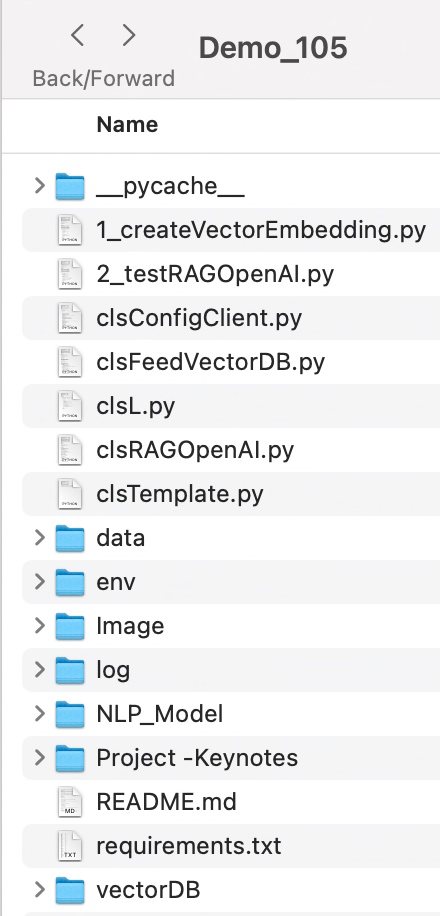

To learn more about this package, please visit the following GitHub link.

So, finally, we’ve done it. I know that this post is relatively smaller than my earlier post. But, I think, you can get a good hack to improve some of your long-running jobs by applying this trick.

I’ll bring some more exciting topics in the coming days from the Python verse. Please share & subscribe to my post & let me know your feedback.

Till then, Happy Avenging! 🙂

Exploring the new Polars library in Python

Today, I will present some valid Python packages where you can explore most of the complex SQLs by using this new package named “Polars,” which can be extremely handy on many occasions.

This post will be short posts where I’ll prepare something new on LLMs for the upcoming posts for the next month.

Why not view the demo before going through it?


Demo
pip install polars
pip install pandas

Let us understand the key class & snippets.

  • clsConfigClient.py (Key entries that will be discussed later)
################################################
#### Written By: SATYAKI DE                 ####
#### Written On:  15-May-2020               ####
#### Modified On: 28-Oct-2023               ####
####                                        ####
#### Objective: This script is a config     ####
#### file, contains all the keys for        ####
#### personal OpenAI-based MAC-shortcuts    ####
#### enable bot.                            ####
####                                        ####
################################################

import os
import platform as pl

class clsConfigClient(object):
    Curr_Path = os.path.dirname(os.path.realpath(__file__))

    os_det = pl.system()
    if os_det == "Windows":
        sep = '\\'
    else:
        sep = '/'

    conf = {
        'APP_ID': 1,
        'ARCH_DIR': Curr_Path + sep + 'arch' + sep,
        'LOG_PATH': Curr_Path + sep + 'log' + sep,
        'DATA_PATH': Curr_Path + sep + 'data' + sep,
        'TEMP_PATH': Curr_Path + sep + 'temp' + sep,
        'OUTPUT_DIR': 'model',
        'APP_DESC_1': 'Polars Demo!',
        'DEBUG_IND': 'Y',
        'INIT_PATH': Curr_Path,
        'TITLE': "Polars Demo!",
        'PATH' : Curr_Path,
        'OUT_DIR': 'data',
        'MERGED_FILE': 'mergedFile.csv',
        'ACCT_FILE': 'AccountAddress.csv',
        'ORDER_FILE': 'Orders.csv',
        'CUSTOMER_FILE': 'CustomerDetails.csv',
        'STATE_CITY_WISE_REPORT_FILE': 'StateCityWiseReport.csv'
    }
  • clsSQL.py (Main class file that contains how to use the SQL)
#####################################################
#### Written By: SATYAKI DE                      ####
#### Written On: 27-May-2023                     ####
#### Modified On 28-Oct-2023                     ####
####                                             ####
#### Objective: This is the main calling         ####
#### python class that will invoke the           ####
#### Polar class, which will enable SQL          ####
#### capabilitites.                              ####
####                                             ####
#####################################################

import polars as pl
import os
from clsConfigClient import clsConfigClient as cf
import pandas as p

###############################################
###           Global Section                ###
###############################################

# Disbling Warning
def warn(*args, **kwargs):
    pass

import warnings
warnings.warn = warn

###############################################
###    End of Global Section                ###
###############################################

class clsSQL:
    def __init__(self):
        self.acctFile = cf.conf['ACCT_FILE']
        self.orderFile = cf.conf['ORDER_FILE']
        self.stateWiseReport = cf.conf['STATE_CITY_WISE_REPORT_FILE']
        self.custFile = cf.conf['CUSTOMER_FILE']
        self.dataPath = cf.conf['DATA_PATH']

    def execSQL(self):
        try:
            dataPath = self.dataPath
            acctFile = self.acctFile
            orderFile = self.orderFile
            stateWiseReport = self.stateWiseReport
            custFile = self.custFile

            fullAcctFile = dataPath + acctFile
            fullOrderFile = dataPath + orderFile
            fullStateWiseReportFile = dataPath + stateWiseReport
            fullCustomerFile = dataPath + custFile

            ctx = pl.SQLContext(accountMaster = pl.scan_csv(fullAcctFile),
            orderMaster = pl.scan_csv(fullOrderFile),
            stateMaster = pl.scan_csv(fullStateWiseReportFile))

            querySQL = """
            SELECT orderMaster.order_id,
            orderMaster.total,
            stateMaster.state,
            accountMaster.Acct_Nbr,
            accountMaster.Name,
            accountMaster.Email,
            accountMaster.user_id,
            COUNT(*) TotalCount
            FROM orderMaster
            JOIN stateMaster USING (city)
            JOIN accountMaster USING (user_id)
            ORDER BY stateMaster.state
            """

            res = ctx.execute(querySQL, eager=True)
            res_Pandas = res.to_pandas()

            print('Result:')
            print(res_Pandas)
            print(type(res_Pandas))

            ctx_1 = pl.SQLContext(customerMaster = pl.scan_csv(fullCustomerFile),
            tempMaster=pl.from_pandas(res_Pandas))

            querySQL_1 = """
            SELECT tempMaster.order_id,
            tempMaster.total,
            tempMaster.state,
            tempMaster.Acct_Nbr,
            tempMaster.Name,
            tempMaster.Email,
            tempMaster.TotalCount,
            tempMaster.user_id,
            COUNT(*) OVER(PARTITION BY tempMaster.state ORDER BY tempMaster.state, tempMaster.Acct_Nbr) StateWiseCount,
            MAX(tempMaster.Acct_Nbr) OVER(PARTITION BY tempMaster.state ORDER BY tempMaster.state, tempMaster.Acct_Nbr) MaxAccountByState,
            MIN(tempMaster.Acct_Nbr) OVER(PARTITION BY tempMaster.state ORDER BY tempMaster.state, tempMaster.Acct_Nbr) MinAccountByState,
            CASE WHEN tempMaster.total < 70 THEN 'SILVER' ELSE 'GOLD' END CategoryStat,
            SUM(customerMaster.Balance) OVER(PARTITION BY tempMaster.state) SumBalance
            FROM tempMaster
            JOIN customerMaster USING (user_id)
            ORDER BY tempMaster.state
            """

            res_1 = ctx_1.execute(querySQL_1, eager=True)

            finDF = res_1.to_pandas()

            print('Result 2:')
            print(finDF)

            return 0
        except Exception as e:
            discussedTopic = []
            x = str(e)
            print('Error: ', x)

            return 1

If we go through some of the key lines, we will understand how this entire package works.

But, before that, let us understand the source data –

Let us understand the steps –

  1. Join orderMaster, stateMaster & accountMaster and fetch the selected attributes. Store this in a temporary data frame named tempMaster.
  2. Join tempMaster & customerMaster and fetch the relevant attributes with some more aggregation, which is required for the business KPIs.
ctx = pl.SQLContext(accountMaster = pl.scan_csv(fullAcctFile),
orderMaster = pl.scan_csv(fullOrderFile),
stateMaster = pl.scan_csv(fullStateWiseReportFile))

The above method will create three temporary tables by reading the source files – AccountAddress.csv, Orders.csv & StateCityWiseReport.csv.

And, let us understand the supported SQLs –

SELECT  orderMaster.order_id,
        orderMaster.total,
        stateMaster.state,
        accountMaster.Acct_Nbr,
        accountMaster.Name,
        accountMaster.Email,
        accountMaster.user_id,
        COUNT(*) TotalCount
FROM orderMaster
JOIN stateMaster USING (city)
JOIN accountMaster USING (user_id)
ORDER BY stateMaster.state

In this step, we’re going to store the output of the above query into a temporary view named – tempMaster data frame.

Since this is a polar data frame, we’re converting it to the pandas data frame.

res_Pandas = res.to_pandas()

Finally, let us understand the next part –

ctx_1 = pl.SQLContext(customerMaster = pl.scan_csv(fullCustomerFile),
tempMaster=pl.from_pandas(res_Pandas))

In the above section, one source is getting populated from the CSV file, whereas the other source is feeding from a pandas data frame populated in the previous step.

Now, let us understand the SQL supported by this package, which is impressive –

SELECT  tempMaster.order_id,
        tempMaster.total,
        tempMaster.state,
        tempMaster.Acct_Nbr,
        tempMaster.Name,
        tempMaster.Email,
        tempMaster.TotalCount,
        tempMaster.user_id,
        COUNT(*) OVER(PARTITION BY tempMaster.state ORDER BY tempMaster.state, tempMaster.Acct_Nbr) StateWiseCount,
        MAX(tempMaster.Acct_Nbr) OVER(PARTITION BY tempMaster.state ORDER BY tempMaster.state, tempMaster.Acct_Nbr) MaxAccountByState,
        MIN(tempMaster.Acct_Nbr) OVER(PARTITION BY tempMaster.state ORDER BY tempMaster.state, tempMaster.Acct_Nbr) MinAccountByState,
        CASE WHEN tempMaster.total < 70 THEN 'SILVER' ELSE 'GOLD' END CategoryStat,
        SUM(customerMaster.Balance) OVER(PARTITION BY tempMaster.state) SumBalance
FROM tempMaster
JOIN customerMaster USING (user_id)
ORDER BY tempMaster.state

As you can see it has the capability of all the advanced analytics SQL using partitions, and CASE statements.

The only problem with COUNT(*) with the partition is not working as expected. Not sure, whether that is related to any version issues or not.

COUNT(*) OVER(PARTITION BY tempMaster.state ORDER BY tempMaster.state, tempMaster.Acct_Nbr) StateWiseCount

I’m trying to get more information on this. Except for this statement, everything works perfectly.

  • 1_testSQL.py (Main class file that contains how to use the SQL)
#########################################################
#### Written By: SATYAKI DE                          ####
#### Written On: 27-Jun-2023                         ####
#### Modified On 28-Oct-2023                         ####
####                                                 ####
#### Objective: This is the main class that invokes  ####
#### advanced analytic SQL in python.                ####
####                                                 ####
#########################################################

from clsConfigClient import clsConfigClient as cf
import clsL as log
import clsSQL as ccl

from datetime import datetime, timedelta

# Disbling Warning
def warn(*args, **kwargs):
    pass

import warnings
warnings.warn = warn

###############################################
###           Global Section                ###
###############################################

#Initiating Logging Instances
clog = log.clsL()
cl = ccl.clsSQL()

var = datetime.now().strftime(".%H.%M.%S")

documents = []

###############################################
###    End of Global Section                ###
###############################################
def main():
    try:
        var = datetime.now().strftime("%Y-%m-%d_%H-%M-%S")
        print('*'*120)
        print('Start Time: ' + str(var))
        print('*'*120)

        r1 = cl.execSQL()

        if r1 == 0:
            print()
            print('Successfully SQL-enabled!')
        else:
            print()
            print('Failed to senable SQL!')

        print('*'*120)
        var1 = datetime.now().strftime("%Y-%m-%d_%H-%M-%S")
        print('End Time: ' + str(var1))

    except Exception as e:
        x = str(e)
        print('Error: ', x)

if __name__ == '__main__':
    main()

As this is extremely easy to understand & self-explanatory.

To learn more about this package, please visit the following link.


So, finally, we’ve done it. I know that this post is relatively smaller than my earlier post. But, I think, you can get a good hack to improve some of your long-running jobs by applying this trick.

I’ll bring some more exciting topics in the coming days from the Python verse. Please share & subscribe to my post & let me know your feedback.

Till then, Happy Avenging!  🙂

Enable OpenAI chatbot with the selected YouTube video content using LangChain, FAISS & YouTube data-API.

Today, I’m very excited to demonstrate an effortless & new way to extract the transcript from YouTube videos & then answer the questions based on the topics selected by the users. In this post, I plan to deal with the user inputs to consider the case first & then it can summarize the video content through useful advanced analytics with the help of the LangChain & OpenAI-based model.

In this post, I’ve directly subscribed to OpenAI & I’m not using OpenAI from Azure. However, I’ll explore that in the future as well.
Before I explain the process to invoke this new library, why not view the demo first & then discuss it?

Demo

Isn’t it very exciting? This will lead to a whole new ballgame, where one can get critical decision-making information from these human sources along with their traditional advanced analytical data.

How will it help?

Let’s say as per your historical data & analytics, the dashboard is recommending prod-A, prod-B & prod-C as the top three products for potential top-performing brands. Whereas, you are getting some alerts from the TV news on prod-B due to the recent incidents. So, in that case, you don’t want to continue with the prod-B investment. You may find a new product named prod-Z. That may reduce the risk of your investment.


What is LangChain?

LangChain is a framework for developing applications powered by language models. We believe that the most powerful and differentiated applications will not only call out to a language model but will also be:

  1. Data-aware: connect a language model to other sources of data
  2. Agentic: allow a language model to interact with its environment

The LangChain framework works around these principles.

To know more about this, please click the following link.

As you can see, this is one of the critical components in our solution, which will bind the OpenAI bot & it will feed the necessary data to provide the correct response.


What is FAISS?

Faiss is a library for efficient similarity search and clustering of dense vectors. It contains algorithms that search in sets of vectors of any size, up to ones that do not fit in RAM. It also has supporting code for evaluation and parameter tuning.

Faiss developed using C++ with complete wrappers for Python—some of the most beneficial algorithms available both on CPU & in GPU as well. Facebook AI Research develops it.

To know more about this, please click the following link.


FLOW OF EVENTS:

Let us look at the flow diagram as it captures the sequence of events that unfold as part of the process.

Here are the steps that will follow in sequence –

  • The application will first get the topic on which it needs to look from YouTube & find the top 5 videos using the YouTube data-API.
  • Once the application returns a list of websites from the above step, LangChain will drive the application will extract the transcripts from the video & then optimize the response size in smaller chunks to address the costly OpenAI calls. During this time, it will invoke FAISS to create document DBs.
  • Finally, it will send those chunks to OpenAI for the best response based on your supplied template that performs the final analysis with small data required for your query & gets the appropriate response with fewer costs.

CODE:

Why don’t we go through the code made accessible due to this new library for this particular use case?

  • clsConfigClient.py (This is the main calling Python script for the input parameters.)


################################################
#### Written By: SATYAKI DE ####
#### Written On: 15-May-2020 ####
#### Modified On: 28-May-2023 ####
#### ####
#### Objective: This script is a config ####
#### file, contains all the keys for ####
#### personal OpenAI-based video content ####
#### enable bot. ####
#### ####
################################################
import os
import platform as pl
class clsConfigClient(object):
Curr_Path = os.path.dirname(os.path.realpath(__file__))
os_det = pl.system()
if os_det == "Windows":
sep = '\\'
else:
sep = '/'
conf = {
'APP_ID': 1,
'ARCH_DIR': Curr_Path + sep + 'arch' + sep,
'PROFILE_PATH': Curr_Path + sep + 'profile' + sep,
'LOG_PATH': Curr_Path + sep + 'log' + sep,
'DATA_PATH': Curr_Path + sep + 'data' + sep,
'MODEL_PATH': Curr_Path + sep + 'model' + sep,
'TEMP_PATH': Curr_Path + sep + 'temp' + sep,
'MODEL_DIR': 'model',
'APP_DESC_1': 'LangChain Demo!',
'DEBUG_IND': 'N',
'INIT_PATH': Curr_Path,
'FILE_NAME': 'Output.csv',
'MODEL_NAME': 'gpt-3.5-turbo',
'OPEN_AI_KEY': "sk-kfrjfijdrkidjkfjd9474nbfjfkfjfhfhf84i84hnfhjdbv6Bgvv",
'YOUTUBE_KEY': "AIjfjfUYGe64hHJ-LOFO5u-mkso9pPOJGFU",
'TITLE': "LangChain Demo!",
'TEMP_VAL': 0.2,
'PATH' : Curr_Path,
'MAX_CNT' : 5,
'OUT_DIR': 'data'
}

Some of the key entries from the above scripts are as follows –

'MODEL_NAME': 'gpt-3.5-turbo',
'OPEN_AI_KEY': "sk-kfrjfijdrkidjkfjd9474nbfjfkfjfhfhf84i84hnfhjdbv6Bgvv",
'YOUTUBE_KEY': "AIjfjfUYGe64hHJ-LOFO5u-mkso9pPOJGFU",
'TEMP_VAL': 0.2,

From the above code snippet, one can understand that we need both the API keys for YouTube & OpenAI. And they have separate costs & usage, which I’ll share later in the post. Also, notice that the temperature sets to 0.2 ( range between 0 to 1). That means our AI bot will be consistent in response. And our application will use the GPT-3.5-turbo model for its analytic response.

  • clsTemplate.py (Contains all the templates for OpenAI.)


################################################
#### Written By: SATYAKI DE ####
#### Written On: 27-May-2023 ####
#### Modified On: 28-May-2023 ####
#### ####
#### Objective: This script is a config ####
#### file, contains all the template for ####
#### OpenAI prompts to get the correct ####
#### response. ####
#### ####
################################################
# Template to use for the system message prompt
templateVal_1 = """
You are a helpful assistant that that can answer questions about youtube videos
based on the video's transcript: {docs}
Only use the factual information from the transcript to answer the question.
If you feel like you don't have enough information to answer the question, say "I don't know".
Your answers should be verbose and detailed.
"""

view raw

clsTemplate.py

hosted with ❤ by GitHub

The above code is self-explanatory. Here, we’re keeping the correct instructions for our OpenAI to respond within these guidelines.

  • clsVideoContentScrapper.py (Main class to extract the transcript from the YouTube videos & then answer the questions based on the topics selected by the users.)


#####################################################
#### Written By: SATYAKI DE ####
#### Written On: 27-May-2023 ####
#### Modified On 28-May-2023 ####
#### ####
#### Objective: This is the main calling ####
#### python class that will invoke the ####
#### LangChain of package to extract ####
#### the transcript from the YouTube videos & ####
#### then answer the questions based on the ####
#### topics selected by the users. ####
#### ####
#####################################################
from langchain.document_loaders import YoutubeLoader
from langchain.text_splitter import RecursiveCharacterTextSplitter
from langchain.embeddings.openai import OpenAIEmbeddings
from langchain.vectorstores import FAISS
from langchain.chat_models import ChatOpenAI
from langchain.chains import LLMChain
from langchain.prompts.chat import (
ChatPromptTemplate,
SystemMessagePromptTemplate,
HumanMessagePromptTemplate,
)
from googleapiclient.discovery import build
import clsTemplate as ct
from clsConfigClient import clsConfigClient as cf
import os
###############################################
### Global Section ###
###############################################
open_ai_Key = cf.conf['OPEN_AI_KEY']
os.environ["OPENAI_API_KEY"] = open_ai_Key
embeddings = OpenAIEmbeddings(openai_api_key=open_ai_Key)
YouTube_Key = cf.conf['YOUTUBE_KEY']
youtube = build('youtube', 'v3', developerKey=YouTube_Key)
# Disbling Warning
def warn(*args, **kwargs):
pass
import warnings
warnings.warn = warn
###############################################
### End of Global Section ###
###############################################
class clsVideoContentScrapper:
def __init__(self):
self.model_name = cf.conf['MODEL_NAME']
self.temp_val = cf.conf['TEMP_VAL']
self.max_cnt = int(cf.conf['MAX_CNT'])
def createDBFromYoutubeVideoUrl(self, video_url):
try:
loader = YoutubeLoader.from_youtube_url(video_url)
transcript = loader.load()
text_splitter = RecursiveCharacterTextSplitter(chunk_size=1000, chunk_overlap=100)
docs = text_splitter.split_documents(transcript)
db = FAISS.from_documents(docs, embeddings)
return db
except Exception as e:
x = str(e)
print('Error: ', x)
return ''
def getResponseFromQuery(self, db, query, k=4):
try:
"""
gpt-3.5-turbo can handle up to 4097 tokens. Setting the chunksize to 1000 and k to 4 maximizes
the number of tokens to analyze.
"""
mod_name = self.model_name
temp_val = self.temp_val
docs = db.similarity_search(query, k=k)
docs_page_content = " ".join([d.page_content for d in docs])
chat = ChatOpenAI(model_name=mod_name, temperature=temp_val)
# Template to use for the system message prompt
template = ct.templateVal_1
system_message_prompt = SystemMessagePromptTemplate.from_template(template)
# Human question prompt
human_template = "Answer the following question: {question}"
human_message_prompt = HumanMessagePromptTemplate.from_template(human_template)
chat_prompt = ChatPromptTemplate.from_messages(
[system_message_prompt, human_message_prompt]
)
chain = LLMChain(llm=chat, prompt=chat_prompt)
response = chain.run(question=query, docs=docs_page_content)
response = response.replace("\n", "")
return response, docs
except Exception as e:
x = str(e)
print('Error: ', x)
return '', ''
def topFiveURLFromYouTube(self, service, **kwargs):
try:
video_urls = []
channel_list = []
results = service.search().list(**kwargs).execute()
for item in results['items']:
print("Title: ", item['snippet']['title'])
print("Description: ", item['snippet']['description'])
channel = item['snippet']['channelId']
print("Channel Id: ", channel)
# Fetch the channel name using the channel ID
channel_response = service.channels().list(part='snippet',id=item['snippet']['channelId']).execute()
channel_title = channel_response['items'][0]['snippet']['title']
print("Channel Title: ", channel_title)
channel_list.append(channel_title)
print("Video Id: ", item['id']['videoId'])
vidURL = "https://www.youtube.com/watch?v=&quot; + item['id']['videoId']
print("Video URL: " + vidURL)
video_urls.append(vidURL)
print("\n")
return video_urls, channel_list
except Exception as e:
video_urls = []
channel_list = []
x = str(e)
print('Error: ', x)
return video_urls, channel_list
def extractContentInText(self, topic, query):
try:
discussedTopic = []
strKeyText = ''
cnt = 0
max_cnt = self.max_cnt
urlList, channelList = self.topFiveURLFromYouTube(youtube, q=topic, part='id,snippet',maxResults=max_cnt,type='video')
print('Returned List: ')
print(urlList)
print()
for video_url in urlList:
print('Processing Video: ')
print(video_url)
db = self.createDBFromYoutubeVideoUrl(video_url)
response, docs = self.getResponseFromQuery(db, query)
if len(response) > 0:
strKeyText = 'As per the topic discussed in ' + channelList[cnt] + ', '
discussedTopic.append(strKeyText + response)
cnt += 1
return discussedTopic
except Exception as e:
discussedTopic = []
x = str(e)
print('Error: ', x)
return discussedTopic

Let us understand the key methods step by step in detail –

def topFiveURLFromYouTube(self, service, **kwargs):
    try:
        video_urls = []
        channel_list = []
        results = service.search().list(**kwargs).execute()

        for item in results['items']:
            print("Title: ", item['snippet']['title'])
            print("Description: ", item['snippet']['description'])
            channel = item['snippet']['channelId']
            print("Channel Id: ", channel)

            # Fetch the channel name using the channel ID
            channel_response = service.channels().list(part='snippet',id=item['snippet']['channelId']).execute()
            channel_title = channel_response['items'][0]['snippet']['title']
            print("Channel Title: ", channel_title)
            channel_list.append(channel_title)

            print("Video Id: ", item['id']['videoId'])
            vidURL = "https://www.youtube.com/watch?v=" + item['id']['videoId']
            print("Video URL: " + vidURL)
            video_urls.append(vidURL)
            print("\n")

        return video_urls, channel_list

    except Exception as e:
        video_urls = []
        channel_list = []
        x = str(e)
        print('Error: ', x)

        return video_urls, channel_list

The above code will fetch the most relevant YouTube URLs & bind them into a list along with the channel names & then share the lists with the main functions.

def createDBFromYoutubeVideoUrl(self, video_url):
    try:
        loader = YoutubeLoader.from_youtube_url(video_url)
        transcript = loader.load()

        text_splitter = RecursiveCharacterTextSplitter(chunk_size=1000, chunk_overlap=100)
        docs = text_splitter.split_documents(transcript)

        db = FAISS.from_documents(docs, embeddings)
        return db

    except Exception as e:
        x = str(e)
        print('Error: ', x)
        return ''

The provided Python code defines a function createDBFromYoutubeVideoUrl which appears to create a database of text documents from the transcript of a YouTube video. Here’s the explanation in simple English:

  1. The function createDBFromYoutubeVideoUrl has defined with one argument: video_url.
  2. The function uses a try-except block to handle any potential exceptions or errors that may occur.
  3. Inside the try block, the following steps are going to perform:
  • First, it creates a YoutubeLoader object from the provided video_url. This object is likely responsible for interacting with the YouTube video specified by the URL.
  • The loader object then loads the transcript of the video. This object is the text version of everything spoken in the video.
  • It then creates a RecursiveCharacterTextSplitter object with a specified chunk_size of 1000 and chunk_overlap of 100. This object may split the transcript into smaller chunks (documents) of text for easier processing or analysis. Each piece will be around 1000 characters long, and there will overlap of 100 characters between consecutive chunks.
  • The split_documents method of the text_splitter object will split the transcript into smaller documents. These documents are stored in the docs variable.
  • The FAISS.from_documents method is then called with docs and embeddings as arguments to create a FAISS (Facebook AI Similarity Search) index. This index is a database used for efficient similarity search and clustering of high-dimensional vectors, which in this case, are the embeddings of the documents. The FAISS index is stored in the db variable.
  • Finally, the db variable is returned, representing the created database from the video transcript.

4. If an exception occurs during the execution of the try block, the code execution moves to the except block:

  • Here, it first converts the exception e to a string x.
  • Then it prints an error message.
  • Finally, it returns an empty string as an indication of the error.

def getResponseFromQuery(self, db, query, k=4):
      try:
          """
          gpt-3.5-turbo can handle up to 4097 tokens. Setting the chunksize to 1000 and k to 4 maximizes
          the number of tokens to analyze.
          """

          mod_name = self.model_name
          temp_val = self.temp_val

          docs = db.similarity_search(query, k=k)
          docs_page_content = " ".join([d.page_content for d in docs])

          chat = ChatOpenAI(model_name=mod_name, temperature=temp_val)

          # Template to use for the system message prompt
          template = ct.templateVal_1

          system_message_prompt = SystemMessagePromptTemplate.from_template(template)

          # Human question prompt
          human_template = "Answer the following question: {question}"
          human_message_prompt = HumanMessagePromptTemplate.from_template(human_template)

          chat_prompt = ChatPromptTemplate.from_messages(
              [system_message_prompt, human_message_prompt]
          )

          chain = LLMChain(llm=chat, prompt=chat_prompt)

          response = chain.run(question=query, docs=docs_page_content)
          response = response.replace("\n", "")
          return response, docs

      except Exception as e:
          x = str(e)
          print('Error: ', x)

          return '', ''

The Python function getResponseFromQuery is designed to search a given database (db) for a specific query and then generate a response using a language model (possibly GPT-3.5-turbo). The answer is based on the content found and the particular question. Here is a simple English summary:

  1. The function getResponseFromQuery takes three parameters: db, query, and k. The k parameter is optional and defaults to 4 if not provided. db is the database to search, the query is the question or prompts to analyze, and k is the number of similar items to return.
  2. The function initiates a try-except block for handling any errors that might occur.
  3. Inside the try block:
  • The function retrieves the model name and temperature value from the instance of the class this function is a part of.
  • The function then searches the db database for documents similar to the query and saves these in docs.
  • It concatenates the content of the returned documents into a single string docs_page_content.
  • It creates a ChatOpenAI object with the model name and temperature value.
  • It creates a system message prompt from a predefined template.
  • It creates a human message prompt, which is the query.
  • It combines these two prompts to form a chat prompt.
  • An LLMChain object is then created using the ChatOpenAI object and the chat prompt.
  • This LLMChain object is used to generate a response to the query using the content of the documents found in the database. The answer is then formatted by replacing all newline characters with empty strings.
  • Finally, the function returns this response along with the original documents.
  1. If any error occurs during these operations, the function goes to the except block where:
  • The error message is printed.
  • The function returns two empty strings to indicate an error occurred, and no response or documents could be produced.

def extractContentInText(self, topic, query):
    try:
        discussedTopic = []
        strKeyText = ''
        cnt = 0
        max_cnt = self.max_cnt

        urlList, channelList = self.topFiveURLFromYouTube(youtube, q=topic, part='id,snippet',maxResults=max_cnt,type='video')
        print('Returned List: ')
        print(urlList)
        print()

        for video_url in urlList:
            print('Processing Video: ')
            print(video_url)
            db = self.createDBFromYoutubeVideoUrl(video_url)

            response, docs = self.getResponseFromQuery(db, query)

            if len(response) > 0:
                strKeyText = 'As per the topic discussed in ' + channelList[cnt] + ', '
                discussedTopic.append(strKeyText + response)

            cnt += 1

        return discussedTopic
    except Exception as e:
        discussedTopic = []
        x = str(e)
        print('Error: ', x)

        return discussedTopic

This Python function, extractContentInText, is aimed to extract relevant content from the transcripts of top YouTube videos on a specific topic and generate responses to a given query. Here’s a simple English translation:

  1. The function extractContentInText is defined with topic and query as parameters.
  2. It begins with a try-except block to catch and handle any possible exceptions.
  3. In the try block:
  • It initializes several variables: an empty list discussedTopic to store the extracted information, an empty string strKeyText to keep specific parts of the content, a counter cnt initialized at 0, and max_cnt retrieved from the self-object to specify the maximum number of YouTube videos to consider.
  • It calls the topFiveURLFromYouTube function (defined previously) to get the URLs of the top videos on the given topic from YouTube. It also retrieves the list of channel names associated with these videos.
  • It prints the returned list of URLs.
  • Then, it starts a loop over each URL in the urlList.
    • For each URL, it prints the URL, then creates a database from the transcript of the YouTube video using the function createDBFromYoutubeVideoUrl.
    • It then uses the getResponseFromQuery function to get a response to the query based on the content of the database.
    • If the length of the response is greater than 0 (meaning there is a response), it forms a string strKeyText to indicate the channel that the topic was discussed on and then appends the answer to this string. This entire string is then added to the discussedTopic list.
    • It increments the counter cnt by one after each iteration.
    • Finally, it returns the discussedTopic list, which now contains relevant content extracted from the videos.
  1. If any error occurs during these operations, the function goes into the except block:
  • It first resets discussedTopic to an empty list.
  • Then it converts the exception e to a string and prints the error message.
  • Lastly, it returns the empty discussedTopic list, indicating that no content could be extracted due to the error.
  • testLangChain.py (Main Python script to extract the transcript from the YouTube videos & then answer the questions based on the topics selected by the users.)


#####################################################
#### Written By: SATYAKI DE ####
#### Written On: 27-May-2023 ####
#### Modified On 28-May-2023 ####
#### ####
#### Objective: This is the main calling ####
#### python script that will invoke the ####
#### clsVideoContentScrapper class to extract ####
#### the transcript from the YouTube videos. ####
#### ####
#####################################################
import clsL as cl
from clsConfigClient import clsConfigClient as cf
import datetime
import textwrap
import clsVideoContentScrapper as cvsc
# Disbling Warning
def warn(*args, **kwargs):
pass
import warnings
warnings.warn = warn
######################################
### Get your global values ####
######################################
debug_ind = 'Y'
# Initiating Logging Instances
clog = cl.clsL()
data_path = cf.conf['DATA_PATH']
data_file_name = cf.conf['FILE_NAME']
cVCScrapper = cvsc.clsVideoContentScrapper()
######################################
#### Global Flag ########
######################################
def main():
try:
var = datetime.datetime.now().strftime("%Y-%m-%d_%H-%M-%S")
print('*'*120)
print('Start Time: ' + str(var))
print('*'*120)
#query = "What are they saying about Microsoft?"
print('Please share your topic!')
inputTopic = input('User: ')
print('Please ask your questions?')
inputQry = input('User: ')
print()
retList = cVCScrapper.extractContentInText(inputTopic, inputQry)
cnt = 0
for discussedTopic in retList:
finText = str(cnt + 1) + ') ' + discussedTopic
print()
print(textwrap.fill(finText, width=150))
cnt += 1
r1 = len(retList)
if r1 > 0:
print()
print('Successfully Scrapped!')
else:
print()
print('Failed to Scrappe!')
print('*'*120)
var1 = datetime.datetime.now().strftime("%Y-%m-%d_%H-%M-%S")
print('End Time: ' + str(var1))
except Exception as e:
x = str(e)
print('Error: ', x)
if __name__ == "__main__":
main()

Please find the key snippet –

def main():
    try:
        var = datetime.datetime.now().strftime("%Y-%m-%d_%H-%M-%S")
        print('*'*120)
        print('Start Time: ' + str(var))
        print('*'*120)

        #query = "What are they saying about Microsoft?"
        print('Please share your topic!')
        inputTopic = input('User: ')
        print('Please ask your questions?')
        inputQry = input('User: ')
        print()

        retList = cVCScrapper.extractContentInText(inputTopic, inputQry)
        cnt = 0

        for discussedTopic in retList:
            finText = str(cnt + 1) + ') ' + discussedTopic
            print()
            print(textwrap.fill(finText, width=150))

            cnt += 1

        r1 = len(retList)

        if r1 > 0:
            print()
            print('Successfully Scrapped!')
        else:
            print()
            print('Failed to Scrappe!')

        print('*'*120)
        var1 = datetime.datetime.now().strftime("%Y-%m-%d_%H-%M-%S")
        print('End Time: ' + str(var1))

    except Exception as e:
        x = str(e)
        print('Error: ', x)

if __name__ == "__main__":
    main()

The above main application will capture the topics from the user & then will give the user a chance to ask specific questions on the topics, invoking the main class to extract the transcript from YouTube & then feed it as a source using ChainLang & finally deliver the response. If there is no response, then it will skip the overall options.

USAGE & COST FACTOR:

Please find the OpenAI usage –

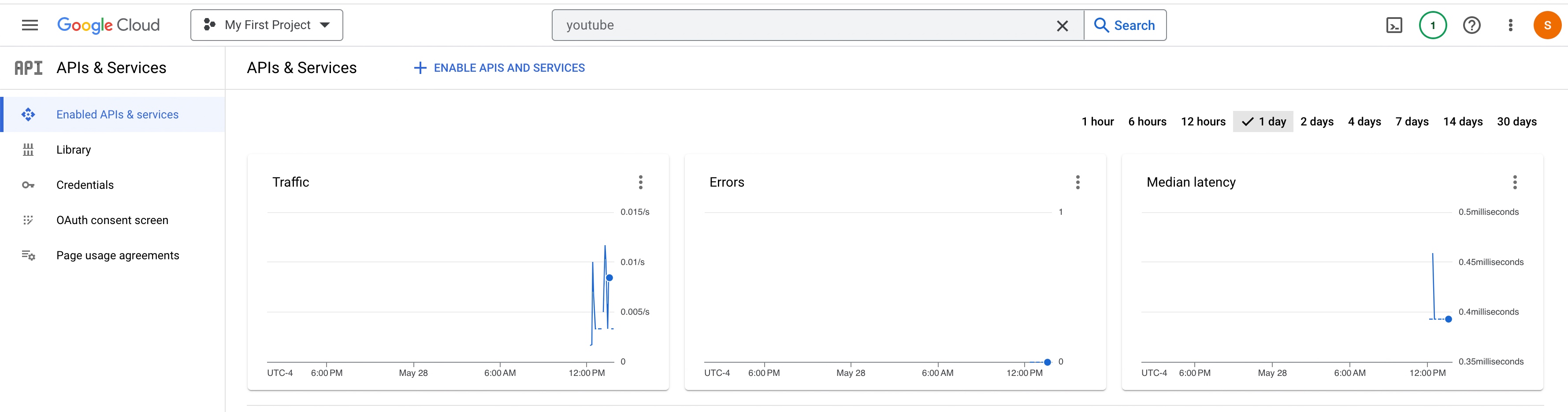
Please find the YouTube API usage –


So, finally, we’ve done it.

I know that this post is relatively bigger than my earlier post. But, I think, you can get all the details once you go through it.

You will get the complete codebase in the following GitHub link.

I’ll bring some more exciting topics in the coming days from the Python verse. Please share & subscribe to my post & let me know your feedback.

Till then, Happy Avenging! 🙂

Note: All the data & scenarios posted here are representational data & scenarios & available over the internet & for educational purposes only. Some of the images (except my photo) we’ve used are available over the net. We don’t claim ownership of these images. There is always room for improvement & especially in the prediction quality. Sample video taken from Santrel Media & you would find the link over here.