Validating source data against RAG-response using Open AI, GloVe, FAISS using Python

Today, I’ll be presenting another exciting capability of architecture in the world of LLMs, where you need to answer one crucial point & that is how valid the response generated by these LLMs is against your data. This response is critical when discussing business growth & need to take the right action at the right time.

Why not view the demo before going through it?

Demo

Isn’t it exciting? Great! Let us understand this in detail.

The first dotted box (extreme-left) represents the area that talks about the data ingestion from different sources, including third-party PDFs. It is expected that organizations should have ready-to-digest data sources. Examples: Data Lake, Data Mart, One Lake, or any other equivalent platforms. Those PDFs will provide additional insights beyond the conventional advanced analytics.

You need to have some kind of OCR solution that will extract all the relevant information in the form of text from the documents. 

The next important part is how you define the chunking & embedding of data chunks into Vector DB. Chunking & indexing strategies, along with the overlapping chain, play a crucial importance in tying that segregated piece of context into a single context that will be fed into the source for your preferred LLMs.

This system employs a vector similarity search to browse through unstructured information and concurrently accesses the database to retrieve the context, ensuring that the responses are not only comprehensive but also anchored in validated knowledge.

This approach is particularly vital for addressing multi-hop questions, where a single query can be broken down into multiple sub-questions and may require information from numerous documents to generate an accurate answer.


pip install openai==0.27.8
pip install pandas==2.0.3
pip install tensorflow==2.11.1
pip install faiss-cpu==1.7.4
pip install gensim==4.3.2

Let us understand the key class & snippets.

  • clsFeedVectorDB.py (This is the main class that will invoke the Faiss framework to contextualize the docs inside the vector DB with the source file name to validate the answer from Gen AI using Globe.6B embedding models.)

Let us understand some of the key snippets from the above script (Full scripts will be available in the GitHub Repo) –

# Sample function to convert text to a vector
def text2Vector(self, text):
    # Encode the text using the tokenizer
    words = [word for word in text.lower().split() if word in self.model]

    # If no words in the model, return a zero vector
    if not words:
        return np.zeros(self.model.vector_size)

    # Compute the average of the word vectors
    vector = np.mean([self.model[word] for word in words], axis=0)
    return vector.reshape(1, -1)

This code is for a function called “text2Vector” that takes some text as input and converts it into a numerical vector. Let me break it down step by step:

  • It starts by taking some text as input, and this text is expected to be a sentence or a piece of text.
  • The text is then split into individual words, and each word is converted to lowercase.
  • It checks if each word is present in a pre-trained language model (probably a word embedding model like Word2Vec or GloVe). If a word is not in the model, it’s ignored.
  • If none of the words from the input text are found in the model, the function returns a vector filled with zeros. This vector has the same size as the word vectors in the model.
  • If there are words from the input text in the model, the function calculates the average vector of these words. It does this by taking the word vectors for each word found in the model and computing their mean (average). This results in a single vector that represents the input text.
  • Finally, the function reshapes this vector into a 2D array with one row and as many columns as there are elements in the vector. The reason for this reshaping is often related to compatibility with other parts of the code or libraries used in the project.

So, in simple terms, this function takes a piece of text, looks up the word vectors for the words in that text, and calculates the average of those vectors to create a single numerical representation of the text. If none of the words are found in the model, it returns a vector of zeros.

    def genData(self):
        try:
            basePath = self.basePath
            modelFileName = self.modelFileName
            vectorDBPath = self.vectorDBPath
            vectorDBFileName = self.vectorDBFileName

            # Create a FAISS index
            dimension = int(cf.conf['NO_OF_MODEL_DIM'])  # Assuming 100-dimensional vectors 
            index = faiss.IndexFlatL2(dimension)

            print('*' * 240)
            print('Vector Index Your Data for Retrieval:')
            print('*' * 240)

            FullVectorDBname = vectorDBPath + vectorDBFileName
            indexFile = str(vectorDBPath) + str(vectorDBFileName) + '.index'

            print('File: ', str(indexFile))

            data = {}
            # List all files in the specified directory
            files = os.listdir(basePath)

            # Filter out files that are not text files
            text_files = [file for file in files if file.endswith('.txt')]

            # Read each text file
            for file in text_files:
                file_path = os.path.join(basePath, file)
                print('*' * 240)
                print('Processing File:')
                print(str(file_path))
                try:
                    # Attempt to open with utf-8 encoding
                    with open(file_path, 'r', encoding='utf-8') as file:
                        for line_number, line in enumerate(file, start=1):
                            # Assume each line is a separate document
                            vector = self.text2Vector(line)
                            vector = vector.reshape(-1)
                            index_id = index.ntotal

                            index.add(np.array([vector]))  # Adding the vector to the index
                            data[index_id] = {'text': line, 'line_number': line_number, 'file_name': file_path}  # Storing the line and file name
                except UnicodeDecodeError:
                    # If utf-8 fails, try a different encoding
                    try:
                        with open(file_path, 'r', encoding='ISO-8859-1') as file:
                            for line_number, line in enumerate(file, start=1):
                                # Assume each line is a separate document
                                vector = self.text2Vector(line)
                                vector = vector.reshape(-1)
                                index_id = index.ntotal
                                index.add(np.array([vector]))  # Adding the vector to the index
                                data[index_id] = {'text': line, 'line_number': line_number, 'file_name': file_path}  # Storing the line and file name
                    except Exception as e:
                        print(f"Could not read file {file}: {e}")
                        continue

                print('*' * 240)

            # Save the data dictionary using pickle
            dataCache = vectorDBPath + modelFileName
            with open(dataCache, 'wb') as f:
                pickle.dump(data, f)

            # Save the index and data for later use
            faiss.write_index(index, indexFile)

            print('*' * 240)

            return 0

        except Exception as e:
            x = str(e)
            print('Error: ', x)

            return 1
  • This code defines a function called genData, and its purpose is to prepare and store data for later retrieval using a FAISS index. Let’s break down what it does step by step:
  • It starts by assigning several variables, such as basePath, modelFileName, vectorDBPath, and vectorDBFileName. These variables likely contain file paths and configuration settings.
  • It creates a FAISS index with a specified dimension (assuming 100-dimensional vectors in this case) using faiss.IndexFlatL2. FAISS is a library for efficient similarity search and clustering of high-dimensional data.
  • It prints the file name and lines where the index will be stored. It initializes an empty dictionary called data to store information about the processed text data.
  • It lists all the files in a directory specified by basePath. It filters out only the files that have a “.txt” extension as text files.
  • It then reads each of these text files one by one. For each file:
  1. It attempts to open the file with UTF-8 encoding.
    • It reads the file line by line.
    • For each line, it calls a function text2Vector to convert the text into a numerical vector representation. This vector is added to the FAISS index.
    • It also stores some information about the line, such as the line number and the file name, in the data dictionary.
    • If there is an issue with UTF-8 encoding, it tries to open the file with a different encoding, “ISO-8859-1”. The same process of reading and storing data continues.
  • If there are any exceptions (errors) during this process, it prints an error message but continues processing other files.
  • Once all the files are processed, it saves the data dictionary using the pickle library to a file specified by dataCache.
  • It also saves the FAISS index to a file specified by indexFile.
  • Finally, it returns 0 if the process completes successfully or 1 if there was an error during execution.

In summary, this function reads text files, converts their contents into numerical vectors, and builds a FAISS index for efficient similarity search. It also saves the processed data and the index for later use. If there are any issues during the process, it prints error messages but continues processing other files.

  • clsRAGOpenAI.py (This is the main class that will invoke the RAG class, which will get the contexts with references including source files, line numbers, and source texts. This will help the customer to validate the source against the OpenAI response to understand & control the data bias & other potential critical issues.)

Let us understand some of the key snippets from the above script (Full scripts will be available in the GitHub Repo) –

def ragAnswerWithHaystackAndGPT3(self, queryVector, k, question):
    modelName = self.modelName
    maxToken = self.maxToken
    temp = self.temp

    # Assuming getTopKContexts is a method that returns the top K contexts
    contexts = self.getTopKContexts(queryVector, k)
    messages = []

    # Add contexts as system messages
    for file_name, line_number, text in contexts:
        messages.append({"role": "system", "content": f"Document: {file_name} \nLine Number: {line_number} \nContent: {text}"})

    prompt = self.generateOpenaiPrompt(queryVector, k)
    prompt = prompt + "Question: " + str(question) + ". \n Answer based on the above documents."

    # Add user question
    messages.append({"role": "user", "content": prompt})

    # Create chat completion
    completion = client.chat.completions.create(
    model=modelName,
    messages=messages,
    temperature = temp,
    max_tokens = maxToken
    )

    # Assuming the last message in the response is the answer
    last_response = completion.choices[0].message.content
    source_refernces = ['FileName: ' + str(context[0]) + ' - Line Numbers: ' + str(context[1]) + ' - Source Text (Reference): ' + str(context[2]) for context in contexts]

    return last_response, source_refernces
  • This code defines a function called ragAnswerWithHaystackAndGPT3. Its purpose is to use a combination of the Haystack search method and OpenAI’s GPT-3 model to generate an answer to a user’s question. Let’s break down what it does step by step:
  • It starts by assigning several variables, such as modelName, maxToken, and temp. These variables likely contain model-specific information and settings for GPT-3.
  • It calls a method getTopKContexts to retrieve the top K contexts (which are likely documents or pieces of text) related to the user’s query. These contexts are stored in the contexts variable.
  • It initializes an empty list called messages to store messages that will be used in the conversation with the GPT-3 model.
  • It iterates through each context and adds them as system messages to the messages list. These system messages provide information about the documents or sources being used in the conversation.
  • It creates a prompt that combines the query, retrieved contexts, and the user’s question. This prompt is then added as a user message to the messages list. It effectively sets up the conversation for GPT-3, where the user’s question is followed by context.
  • It makes a request to the GPT-3 model using the client.chat.completions.create method, passing in the model name, the constructed messages, and other settings such as temperature and maximum tokens.
  • After receiving a response from GPT-3, it assumes that the last message in the response contains the answer generated by the model.
  • It also constructs source_references, which is a list of references to the documents or sources used in generating the answer. This information includes the file name, line numbers, and source text for each context.
  • Finally, it returns the generated answer (last_response) and the source references to the caller.

In summary, this function takes a user’s query, retrieves relevant contexts or documents, sets up a conversation with GPT-3 that includes the query and contexts, and then uses GPT-3 to generate an answer. It also provides references to the sources used in generating the answer.

    def getTopKContexts(self, queryVector, k):
        try:
            distances, indices = index.search(queryVector, k)
            resDict = [(data[i]['file_name'], data[i]['line_number'], data[i]['text']) for i in indices[0]]
            return resDict
        except Exception as e:
            x = str(e)
            print('Error: ', x)

            return x

This code defines a function called getTopKContexts. Its purpose is to retrieve the top K relevant contexts or pieces of information from a pre-built index based on a query vector. Here’s a breakdown of what it does:

  1. It takes two parameters as input: queryVector, which is a numerical vector representing a query, and k, which specifies how many relevant contexts to retrieve.
  2. Inside a try-except block, it attempts the following steps:
    • It uses the index.search method to find the top K closest contexts to the given queryVector. This method returns two arrays: distances (measuring how similar the contexts are to the query) and indices (indicating the positions of the closest contexts in the data).
    • It creates a list called “resDict", which contains tuples for each of the top K contexts. Each tuple contains three pieces of information: the file name (file_name), the line number (line_number), and the text content (text) of the context. These details are extracted from a data dictionary.
  3. If the process completes successfully, it returns the list of top K contexts (resDict) to the caller.
  4. If there’s an exception (an error) during this process, it captures the error message as a string (x), prints the error message, and then returns the error message itself.

In summary, this function takes a query vector and finds the K most relevant contexts or pieces of information based on their similarity to the query. It returns these contexts as a list of tuples containing file names, line numbers, and text content. If there’s an error, it prints an error message and returns the error message string.

def generateOpenaiPrompt(self, queryVector, k):
    contexts = self.getTopKContexts(queryVector, k)
    template = ct.templateVal_1
    prompt = template
    for file_name, line_number, text in contexts:
        prompt += f"Document: {file_name}\n Line Number: {line_number} \n Content: {text}\n\n"
    return prompt

This code defines a function called generateOpenaiPrompt. Its purpose is to create a prompt or a piece of text that combines a template with information from the top K relevant contexts retrieved earlier. Let’s break down what it does:

  1. It starts by calling the getTopKContexts function to obtain the top K relevant contexts based on a given queryVector.
  2. It initializes a variable called template with a predefined template value (likely defined elsewhere in the code).
  3. It sets the prompt variable to the initial template.
  4. Then, it enters a loop where it iterates through each of the relevant contexts retrieved earlier (contexts are typically documents or text snippets).
  5. For each context, it appends information to the prompt. Specifically, it adds lines to the prompt that include:
    • The document’s file name (Document: [file_name]).
    • The line number within the document (Line Number: [line_number]).
    • The content of the context itself (Content: [text]).
  6. It adds some extra spacing (newlines) between each context to ensure readability.
  7. Finally, it returns the complete – prompt, which is a combination of the template and information from the relevant contexts.

In summary, this function takes a query vector, retrieves relevant contexts, and creates a prompt by combining a template with information from these contexts. This prompt can then be used as input for an AI model or system, likely for generating responses or answers based on the provided context.

Let us understand the directory structure of this entire application –
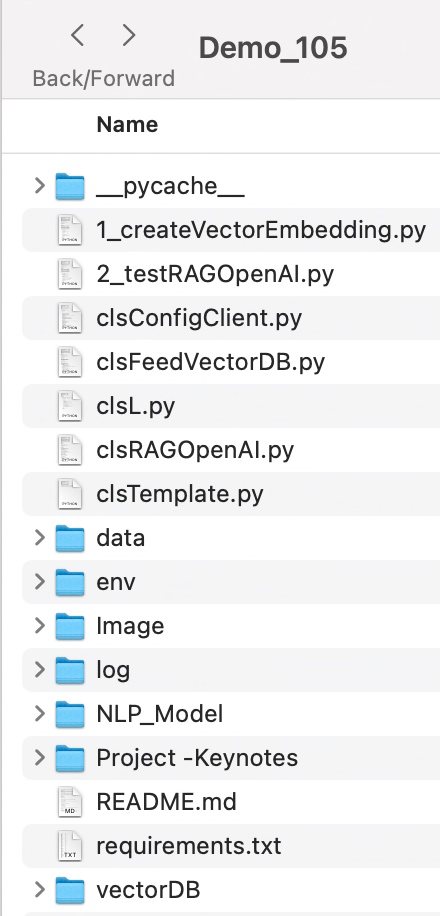

To learn more about this package, please visit the following GitHub link.

So, finally, we’ve done it. I know that this post is relatively smaller than my earlier post. But, I think, you can get a good hack to improve some of your long-running jobs by applying this trick.

I’ll bring some more exciting topics in the coming days from the Python verse. Please share & subscribe to my post & let me know your feedback.

Till then, Happy Avenging! 🙂

Live visual reading using Convolutional Neural Network (CNN) through Python-based machine-learning application.

This week we’re planning to touch on one of the exciting posts of visually reading characters from WebCAM & predict the letters using CNN methods. Before we dig deep, why don’t we see the demo run first?

Demo

Isn’t it fascinating? As we can see, the computer can record events and read like humans. And, thanks to the brilliant packages available in Python, which can help us predict the correct letter out of an Image.


What do we need to test it out?

  1. Preferably an external WebCAM.
  2. A moderate or good Laptop to test out this.
  3. Python 
  4. And a few other packages that we’ll mention next block.

What Python packages do we need?

Some of the critical packages that we must need to test out this application are –

cmake==3.22.1
dlib==19.19.0
face-recognition==1.3.0
face-recognition-models==0.3.0
imutils==0.5.3
jsonschema==4.4.0
keras==2.7.0
Keras-Preprocessing==1.1.2
matplotlib==3.5.1
matplotlib-inline==0.1.3
oauthlib==3.1.1
opencv-contrib-python==4.1.2.30
opencv-contrib-python-headless==4.4.0.46
opencv-python==4.5.5.62
opencv-python-headless==4.5.5.62
pickleshare==0.7.5
Pillow==9.0.0
python-dateutil==2.8.2
requests==2.27.1
requests-oauthlib==1.3.0
scikit-image==0.19.1
scikit-learn==1.0.2
tensorboard==2.7.0
tensorboard-data-server==0.6.1
tensorboard-plugin-wit==1.8.1
tensorflow==2.7.0
tensorflow-estimator==2.7.0
tensorflow-io-gcs-filesystem==0.23.1
tqdm==4.62.3

What is CNN?

In deep learning, a convolutional neural network (CNN/ConvNet) is a class of deep neural networks most commonly applied to analyze visual imagery.

Different Steps of CNN

We can understand from the above picture that a CNN generally takes an image as input. The neural network analyzes each pixel separately. The weights and biases of the model are then tweaked to detect the desired letters (In our use case) from the image. Like other algorithms, the data also has to pass through pre-processing stage. However, a CNN needs relatively less pre-processing than most other Deep Learning algorithms.

If you want to know more about this, there is an excellent article on CNN with some on-point animations explaining this concept. Please read it here.

Where do we get the data sets for our testing?

For testing, we are fortunate enough to have Kaggle with us. We have received a wide variety of sample data, which you can get from here.


Our use-case:

Architecture

From the above diagram, one can see that the python application will consume a live video feed of any random letters (both printed & handwritten) & predict the character as part of the machine learning model that we trained.


Code:

  1. clsConfig.py (Configuration file for the entire application.)


################################################
#### Written By: SATYAKI DE ####
#### Written On: 15-May-2020 ####
#### Modified On: 28-Dec-2021 ####
#### ####
#### Objective: This script is a config ####
#### file, contains all the keys for ####
#### Machine-Learning & streaming dashboard.####
#### ####
################################################
import os
import platform as pl
class clsConfig(object):
Curr_Path = os.path.dirname(os.path.realpath(__file__))
os_det = pl.system()
if os_det == "Windows":
sep = '\\'
else:
sep = '/'
conf = {
'APP_ID': 1,
'ARCH_DIR': Curr_Path + sep + 'arch' + sep,
'PROFILE_PATH': Curr_Path + sep + 'profile' + sep,
'LOG_PATH': Curr_Path + sep + 'log' + sep,
'REPORT_PATH': Curr_Path + sep + 'report',
'FILE_NAME': Curr_Path + sep + 'Data' + sep + 'A_Z_Handwritten_Data.csv',
'SRC_PATH': Curr_Path + sep + 'data' + sep,
'APP_DESC_1': 'Old Video Enhancement!',
'DEBUG_IND': 'N',
'INIT_PATH': Curr_Path,
'SUBDIR': 'data',
'SEP': sep,
'testRatio':0.2,
'valRatio':0.2,
'epochsVal':8,
'activationType':'relu',
'activationType2':'softmax',
'numOfClasses':26,
'kernelSize':(3, 3),
'poolSize':(2, 2),
'filterVal1':32,
'filterVal2':64,
'filterVal3':128,
'stridesVal':2,
'monitorVal':'val_loss',
'paddingVal1':'same',
'paddingVal2':'valid',
'reshapeVal':28,
'reshapeVal1':(28,28),
'patienceVal1':1,
'patienceVal2':2,
'sleepTime':3,
'sleepTime1':6,
'factorVal':0.2,
'learningRateVal':0.001,
'minDeltaVal':0,
'minLrVal':0.0001,
'verboseFlag':0,
'modeInd':'auto',
'shuffleVal':100,
'DenkseVal1':26,
'DenkseVal2':64,
'DenkseVal3':128,
'predParam':9,
'word_dict':{0:'A',1:'B',2:'C',3:'D',4:'E',5:'F',6:'G',7:'H',8:'I',9:'J',10:'K',11:'L',12:'M',13:'N',14:'O',15:'P',16:'Q',17:'R',18:'S',19:'T',20:'U',21:'V',22:'W',23:'X', 24:'Y',25:'Z'},
'width':640,
'height':480,
'imgSize': (32,32),
'threshold': 0.45,
'imgDimension': (400, 440),
'imgSmallDim': (7, 7),
'imgMidDim': (28, 28),
'reshapeParam1':1,
'reshapeParam2':28,
'colorFeed':(0,0,130),
'colorPredict':(0,25,255)
}

view raw

clsConfig.py

hosted with ❤ by GitHub

Important parameters that we need to follow from the above snippets are –

'testRatio':0.2,
'valRatio':0.2,
'epochsVal':8,
'activationType':'relu',
'activationType2':'softmax',
'numOfClasses':26,
'kernelSize':(3, 3),
'poolSize':(2, 2),
'word_dict':{0:'A',1:'B',2:'C',3:'D',4:'E',5:'F',6:'G',7:'H',8:'I',9:'J',10:'K',11:'L',12:'M',13:'N',14:'O',15:'P',16:'Q',17:'R',18:'S',19:'T',20:'U',21:'V',22:'W',23:'X', 24:'Y',25:'Z'},

Since we have 26 letters, we have classified it as 26 in the numOfClasses.

Since we are talking about characters, we had to come up with a process of identifying each character as numbers & then processing our entire logic. Hence, the above parameter named word_dict captured all the characters in a python dictionary & stored them. Moreover, the application translates the final number output to more appropriate characters as the prediction.

2. clsAlphabetReading.py (Main training class to teach the model to predict alphabets from visual reader.)


###############################################
#### Written By: SATYAKI DE ####
#### Written On: 17-Jan-2022 ####
#### Modified On 17-Jan-2022 ####
#### ####
#### Objective: This python script will ####
#### teach & perfect the model to read ####
#### visual alphabets using Convolutional ####
#### Neural Network (CNN). ####
###############################################
from keras.datasets import mnist
import matplotlib.pyplot as plt
import cv2
import numpy as np
from keras.models import Sequential
from keras.layers import Dense, Flatten, Conv2D, MaxPool2D, Dropout
from tensorflow.keras.optimizers import SGD, Adam
from keras.callbacks import ReduceLROnPlateau, EarlyStopping
from keras.utils.np_utils import to_categorical
import pandas as p
import numpy as np
from sklearn.model_selection import train_test_split
from keras.utils import np_utils
import matplotlib.pyplot as plt
from tqdm import tqdm_notebook
from sklearn.utils import shuffle
import pickle
import os
import platform as pl
from clsConfig import clsConfig as cf
class clsAlphabetReading:
def __init__(self):
self.sep = str(cf.conf['SEP'])
self.Curr_Path = str(cf.conf['INIT_PATH'])
self.fileName = str(cf.conf['FILE_NAME'])
self.testRatio = float(cf.conf['testRatio'])
self.valRatio = float(cf.conf['valRatio'])
self.epochsVal = int(cf.conf['epochsVal'])
self.activationType = str(cf.conf['activationType'])
self.activationType2 = str(cf.conf['activationType2'])
self.numOfClasses = int(cf.conf['numOfClasses'])
self.kernelSize = cf.conf['kernelSize']
self.poolSize = cf.conf['poolSize']
self.filterVal1 = int(cf.conf['filterVal1'])
self.filterVal2 = int(cf.conf['filterVal2'])
self.filterVal3 = int(cf.conf['filterVal3'])
self.stridesVal = int(cf.conf['stridesVal'])
self.monitorVal = str(cf.conf['monitorVal'])
self.paddingVal1 = str(cf.conf['paddingVal1'])
self.paddingVal2 = str(cf.conf['paddingVal2'])
self.reshapeVal = int(cf.conf['reshapeVal'])
self.reshapeVal1 = cf.conf['reshapeVal1']
self.patienceVal1 = int(cf.conf['patienceVal1'])
self.patienceVal2 = int(cf.conf['patienceVal2'])
self.sleepTime = int(cf.conf['sleepTime'])
self.sleepTime1 = int(cf.conf['sleepTime1'])
self.factorVal = float(cf.conf['factorVal'])
self.learningRateVal = float(cf.conf['learningRateVal'])
self.minDeltaVal = int(cf.conf['minDeltaVal'])
self.minLrVal = float(cf.conf['minLrVal'])
self.verboseFlag = int(cf.conf['verboseFlag'])
self.modeInd = str(cf.conf['modeInd'])
self.shuffleVal = int(cf.conf['shuffleVal'])
self.DenkseVal1 = int(cf.conf['DenkseVal1'])
self.DenkseVal2 = int(cf.conf['DenkseVal2'])
self.DenkseVal3 = int(cf.conf['DenkseVal3'])
self.predParam = int(cf.conf['predParam'])
self.word_dict = cf.conf['word_dict']
def applyCNN(self, X_Train, Y_Train_Catg, X_Validation, Y_Validation_Catg):
try:
testRatio = self.testRatio
epochsVal = self.epochsVal
activationType = self.activationType
activationType2 = self.activationType2
numOfClasses = self.numOfClasses
kernelSize = self.kernelSize
poolSize = self.poolSize
filterVal1 = self.filterVal1
filterVal2 = self.filterVal2
filterVal3 = self.filterVal3
stridesVal = self.stridesVal
monitorVal = self.monitorVal
paddingVal1 = self.paddingVal1
paddingVal2 = self.paddingVal2
reshapeVal = self.reshapeVal
patienceVal1 = self.patienceVal1
patienceVal2 = self.patienceVal2
sleepTime = self.sleepTime
sleepTime1 = self.sleepTime1
factorVal = self.factorVal
learningRateVal = self.learningRateVal
minDeltaVal = self.minDeltaVal
minLrVal = self.minLrVal
verboseFlag = self.verboseFlag
modeInd = self.modeInd
shuffleVal = self.shuffleVal
DenkseVal1 = self.DenkseVal1
DenkseVal2 = self.DenkseVal2
DenkseVal3 = self.DenkseVal3
model = Sequential()
model.add(Conv2D(filters=filterVal1, kernel_size=kernelSize, activation=activationType, input_shape=(28,28,1)))
model.add(MaxPool2D(pool_size=poolSize, strides=stridesVal))
model.add(Conv2D(filters=filterVal2, kernel_size=kernelSize, activation=activationType, padding = paddingVal1))
model.add(MaxPool2D(pool_size=poolSize, strides=stridesVal))
model.add(Conv2D(filters=filterVal3, kernel_size=kernelSize, activation=activationType, padding = paddingVal2))
model.add(MaxPool2D(pool_size=poolSize, strides=stridesVal))
model.add(Flatten())
model.add(Dense(DenkseVal2,activation = activationType))
model.add(Dense(DenkseVal3,activation = activationType))
model.add(Dense(DenkseVal1,activation = activationType2))
model.compile(optimizer = Adam(learning_rate=learningRateVal), loss='categorical_crossentropy', metrics=['accuracy'])
reduce_lr = ReduceLROnPlateau(monitor=monitorVal, factor=factorVal, patience=patienceVal1, min_lr=minLrVal)
early_stop = EarlyStopping(monitor=monitorVal, min_delta=minDeltaVal, patience=patienceVal2, verbose=verboseFlag, mode=modeInd)
fittedModel = model.fit(X_Train, Y_Train_Catg, epochs=epochsVal, callbacks=[reduce_lr, early_stop], validation_data = (X_Validation,Y_Validation_Catg))
return (model, fittedModel)
except Exception as e:
x = str(e)
model = Sequential()
print('Error: ', x)
return (model, model)
def trainModel(self, debugInd, var):
try:
sep = self.sep
Curr_Path = self.Curr_Path
fileName = self.fileName
epochsVal = self.epochsVal
valRatio = self.valRatio
predParam = self.predParam
testRatio = self.testRatio
reshapeVal = self.reshapeVal
numOfClasses = self.numOfClasses
sleepTime = self.sleepTime
sleepTime1 = self.sleepTime1
shuffleVal = self.shuffleVal
reshapeVal1 = self.reshapeVal1
# Dictionary for getting characters from index values
word_dict = self.word_dict
print('File Name: ', str(fileName))
# Read the data
df_HW_Alphabet = p.read_csv(fileName).astype('float32')
# Sample Data
print('Sample Data: ')
print(df_HW_Alphabet.head())
# Split data the (x – Our data) & (y – the prdict label)
x = df_HW_Alphabet.drop('0',axis = 1)
y = df_HW_Alphabet['0']
# Reshaping the data in csv file to display as an image
X_Train, X_Test, Y_Train, Y_Test = train_test_split(x, y, test_size = testRatio)
X_Train, X_Validation, Y_Train, Y_Validation = train_test_split(X_Train, Y_Train, test_size = valRatio)
X_Train = np.reshape(X_Train.values, (X_Train.shape[0], reshapeVal, reshapeVal))
X_Test = np.reshape(X_Test.values, (X_Test.shape[0], reshapeVal, reshapeVal))
X_Validation = np.reshape(X_Validation.values, (X_Validation.shape[0], reshapeVal, reshapeVal))
print("Train Data Shape: ", X_Train.shape)
print("Test Data Shape: ", X_Test.shape)
print("Validation Data shape: ", X_Validation.shape)
# Plotting the number of alphabets in the dataset
Y_Train_Num = np.int0(y)
count = np.zeros(numOfClasses, dtype='int')
for i in Y_Train_Num:
count[i] +=1
alphabets = []
for i in word_dict.values():
alphabets.append(i)
fig, ax = plt.subplots(1,1, figsize=(7,7))
ax.barh(alphabets, count)
plt.xlabel("Number of elements ")
plt.ylabel("Alphabets")
plt.grid()
plt.show(block=False)
plt.pause(sleepTime)
plt.close()
# Shuffling the data
shuff = shuffle(X_Train[:shuffleVal])
# Model reshaping the training & test dataset
X_Train = X_Train.reshape(X_Train.shape[0],X_Train.shape[1],X_Train.shape[2],1)
print("Shape of Train Data: ", X_Train.shape)
X_Test = X_Test.reshape(X_Test.shape[0], X_Test.shape[1], X_Test.shape[2],1)
print("Shape of Test Data: ", X_Test.shape)
X_Validation = X_Validation.reshape(X_Validation.shape[0], X_Validation.shape[1], X_Validation.shape[2],1)
print("Shape of Validation data: ", X_Validation.shape)
# Converting the labels to categorical values
Y_Train_Catg = to_categorical(Y_Train, num_classes = numOfClasses, dtype='int')
print("Shape of Train Labels: ", Y_Train_Catg.shape)
Y_Test_Catg = to_categorical(Y_Test, num_classes = numOfClasses, dtype='int')
print("Shape of Test Labels: ", Y_Test_Catg.shape)
Y_Validation_Catg = to_categorical(Y_Validation, num_classes = numOfClasses, dtype='int')
print("Shape of validation labels: ", Y_Validation_Catg.shape)
model, history = self.applyCNN(X_Train, Y_Train_Catg, X_Validation, Y_Validation_Catg)
print('Model Summary: ')
print(model.summary())
# Displaying the accuracies & losses for train & validation set
print("Validation Accuracy :", history.history['val_accuracy'])
print("Training Accuracy :", history.history['accuracy'])
print("Validation Loss :", history.history['val_loss'])
print("Training Loss :", history.history['loss'])
# Displaying the Loss Graph
plt.figure(1)
plt.plot(history.history['loss'])
plt.plot(history.history['val_loss'])
plt.legend(['training','validation'])
plt.title('Loss')
plt.xlabel('epoch')
plt.show(block=False)
plt.pause(sleepTime1)
plt.close()
# Dsiplaying the Accuracy Graph
plt.figure(2)
plt.plot(history.history['accuracy'])
plt.plot(history.history['val_accuracy'])
plt.legend(['training','validation'])
plt.title('Accuracy')
plt.xlabel('epoch')
plt.show(block=False)
plt.pause(sleepTime1)
plt.close()
# Making the model to predict
pred = model.predict(X_Test[:predParam])
print('Test Details::')
print('X_Test: ', X_Test.shape)
print('Y_Test_Catg: ', Y_Test_Catg.shape)
try:
score = model.evaluate(X_Test, Y_Test_Catg, verbose=0)
print('Test Score = ', score[0])
print('Test Accuracy = ', score[1])
except Exception as e:
x = str(e)
print('Error: ', x)
# Displaying some of the test images & their predicted labels
fig, ax = plt.subplots(3,3, figsize=(8,9))
axes = ax.flatten()
for i in range(9):
axes[i].imshow(np.reshape(X_Test[i], reshapeVal1), cmap="Greys")
pred = word_dict[np.argmax(Y_Test_Catg[i])]
print('Prediction: ', pred)
axes[i].set_title("Test Prediction: " + pred)
axes[i].grid()
plt.show(block=False)
plt.pause(sleepTime1)
plt.close()
fileName = Curr_Path + sep + 'Model' + sep + 'model_trained_' + str(epochsVal) + '.p'
print('Model Name: ', str(fileName))
pickle_out = open(fileName, 'wb')
pickle.dump(model, pickle_out)
pickle_out.close()
return 0
except Exception as e:
x = str(e)
print('Error: ', x)
return 1

Some of the key snippets from the above scripts are –

x = df_HW_Alphabet.drop('0',axis = 1)
y = df_HW_Alphabet['0']

In the above snippet, we have split the data into images & their corresponding labels.

X_Train, X_Test, Y_Train, Y_Test = train_test_split(x, y, test_size = testRatio)
X_Train, X_Validation, Y_Train, Y_Validation = train_test_split(X_Train, Y_Train, test_size = valRatio)

X_Train = np.reshape(X_Train.values, (X_Train.shape[0], reshapeVal, reshapeVal))
X_Test = np.reshape(X_Test.values, (X_Test.shape[0], reshapeVal, reshapeVal))
X_Validation = np.reshape(X_Validation.values, (X_Validation.shape[0], reshapeVal, reshapeVal))


print("Train Data Shape: ", X_Train.shape)
print("Test Data Shape: ", X_Test.shape)
print("Validation Data shape: ", X_Validation.shape)

We are splitting the data into Train, Test & Validation sets to get more accurate predictions and reshaping the raw data into the image by consuming the 784 data columns to 28×28 pixel images.

Since we are talking about characters, we had to come up with a process of identifying The following snippet will plot the character equivalent number into a matplotlib chart & showcase the overall distribution trend after splitting.

Y_Train_Num = np.int0(y)
count = np.zeros(numOfClasses, dtype='int')
for i in Y_Train_Num:
    count[i] +=1

alphabets = []
for i in word_dict.values():
    alphabets.append(i)

fig, ax = plt.subplots(1,1, figsize=(7,7))
ax.barh(alphabets, count)

plt.xlabel("Number of elements ")
plt.ylabel("Alphabets")
plt.grid()
plt.show(block=False)
plt.pause(sleepTime)
plt.close()

Note that we have tweaked the plt.show property with (block=False). This property will enable us to continue execution without human interventions after the initial pause.

# Model reshaping the training & test dataset
X_Train = X_Train.reshape(X_Train.shape[0],X_Train.shape[1],X_Train.shape[2],1)
print("Shape of Train Data: ", X_Train.shape)

X_Test = X_Test.reshape(X_Test.shape[0], X_Test.shape[1], X_Test.shape[2],1)
print("Shape of Test Data: ", X_Test.shape)

X_Validation = X_Validation.reshape(X_Validation.shape[0], X_Validation.shape[1], X_Validation.shape[2],1)
print("Shape of Validation data: ", X_Validation.shape)

# Converting the labels to categorical values
Y_Train_Catg = to_categorical(Y_Train, num_classes = numOfClasses, dtype='int')
print("Shape of Train Labels: ", Y_Train_Catg.shape)

Y_Test_Catg = to_categorical(Y_Test, num_classes = numOfClasses, dtype='int')
print("Shape of Test Labels: ", Y_Test_Catg.shape)

Y_Validation_Catg = to_categorical(Y_Validation, num_classes = numOfClasses, dtype='int')
print("Shape of validation labels: ", Y_Validation_Catg.shape)

In the above diagram, the application did reshape all three categories of data before calling the primary CNN function.

model = Sequential()

model.add(Conv2D(filters=filterVal1, kernel_size=kernelSize, activation=activationType, input_shape=(28,28,1)))
model.add(MaxPool2D(pool_size=poolSize, strides=stridesVal))

model.add(Conv2D(filters=filterVal2, kernel_size=kernelSize, activation=activationType, padding = paddingVal1))
model.add(MaxPool2D(pool_size=poolSize, strides=stridesVal))

model.add(Conv2D(filters=filterVal3, kernel_size=kernelSize, activation=activationType, padding = paddingVal2))
model.add(MaxPool2D(pool_size=poolSize, strides=stridesVal))

model.add(Flatten())

model.add(Dense(DenkseVal2,activation = activationType))
model.add(Dense(DenkseVal3,activation = activationType))

model.add(Dense(DenkseVal1,activation = activationType2))

model.compile(optimizer = Adam(learning_rate=learningRateVal), loss='categorical_crossentropy', metrics=['accuracy'])
reduce_lr = ReduceLROnPlateau(monitor=monitorVal, factor=factorVal, patience=patienceVal1, min_lr=minLrVal)
early_stop = EarlyStopping(monitor=monitorVal, min_delta=minDeltaVal, patience=patienceVal2, verbose=verboseFlag, mode=modeInd)


fittedModel = model.fit(X_Train, Y_Train_Catg, epochs=epochsVal, callbacks=[reduce_lr, early_stop],  validation_data = (X_Validation,Y_Validation_Catg))

return (model, fittedModel)

In the above snippet, the convolution layers are followed by maxpool layers, which reduce the number of features extracted. The output of the maxpool layers and convolution layers are flattened into a vector of a single dimension and supplied as an input to the Dense layer—the CNN model prepared for training the model using the training dataset.

We have used optimization parameters like Adam, RMSProp & the application we trained for eight epochs for better accuracy & predictions.

# Displaying the accuracies & losses for train & validation set
print("Validation Accuracy :", history.history['val_accuracy'])
print("Training Accuracy :", history.history['accuracy'])
print("Validation Loss :", history.history['val_loss'])
print("Training Loss :", history.history['loss'])

# Displaying the Loss Graph
plt.figure(1)
plt.plot(history.history['loss'])
plt.plot(history.history['val_loss'])
plt.legend(['training','validation'])
plt.title('Loss')
plt.xlabel('epoch')
plt.show(block=False)
plt.pause(sleepTime1)
plt.close()

# Dsiplaying the Accuracy Graph
plt.figure(2)
plt.plot(history.history['accuracy'])
plt.plot(history.history['val_accuracy'])
plt.legend(['training','validation'])
plt.title('Accuracy')
plt.xlabel('epoch')
plt.show(block=False)
plt.pause(sleepTime1)
plt.close()

Also, we have captured the validation Accuracy & Loss & plot them into two separate graphs for better understanding.

try:
    score = model.evaluate(X_Test, Y_Test_Catg, verbose=0)
    print('Test Score = ', score[0])
    print('Test Accuracy = ', score[1])
except Exception as e:
    x = str(e)
    print('Error: ', x)

Also, the application is trying to get the accuracy of the model that we trained & validated with the training & validation data. This time we have used test data to predict the confidence score.

# Displaying some of the test images & their predicted labels
fig, ax = plt.subplots(3,3, figsize=(8,9))
axes = ax.flatten()

for i in range(9):
    axes[i].imshow(np.reshape(X_Test[i], reshapeVal1), cmap="Greys")
    pred = word_dict[np.argmax(Y_Test_Catg[i])]
    print('Prediction: ', pred)
    axes[i].set_title("Test Prediction: " + pred)
    axes[i].grid()
plt.show(block=False)
plt.pause(sleepTime1)
plt.close()

Finally, the application testing with some random test data & tried to plot the output & prediction assessment.

Testing with Random Test Data
fileName = Curr_Path + sep + 'Model' + sep + 'model_trained_' + str(epochsVal) + '.p'
print('Model Name: ', str(fileName))

pickle_out = open(fileName, 'wb')
pickle.dump(model, pickle_out)
pickle_out.close()

As a part of the last step, the application will generate the models using a pickle package & save them under a specific location, which the reader application will use.

3. trainingVisualDataRead.py (Main application that will invoke the training class to predict alphabet through WebCam using Convolutional Neural Network (CNN).)


###############################################
#### Written By: SATYAKI DE ####
#### Written On: 17-Jan-2022 ####
#### Modified On 17-Jan-2022 ####
#### ####
#### Objective: This is the main calling ####
#### python script that will invoke the ####
#### clsAlhpabetReading class to initiate ####
#### teach & perfect the model to read ####
#### visual alphabets using Convolutional ####
#### Neural Network (CNN). ####
###############################################
# We keep the setup code in a different class as shown below.
import clsAlphabetReading as ar
from clsConfig import clsConfig as cf
import datetime
import logging
###############################################
### Global Section ###
###############################################
# Instantiating all the three classes
x1 = ar.clsAlphabetReading()
###############################################
### End of Global Section ###
###############################################
def main():
try:
# Other useful variables
debugInd = 'Y'
var = datetime.datetime.now().strftime("%Y-%m-%d_%H-%M-%S")
var1 = datetime.datetime.now()
print('Start Time: ', str(var))
# End of useful variables
# Initiating Log Class
general_log_path = str(cf.conf['LOG_PATH'])
# Enabling Logging Info
logging.basicConfig(filename=general_log_path + 'restoreVideo.log', level=logging.INFO)
print('Started Transformation!')
# Execute all the pass
r1 = x1.trainModel(debugInd, var)
if (r1 == 0):
print('Successfully Visual Alphabet Training Completed!')
else:
print('Failed to complete the Visual Alphabet Training!')
var2 = datetime.datetime.now()
c = var2 – var1
minutes = c.total_seconds() / 60
print('Total difference in minutes: ', str(minutes))
print('End Time: ', str(var1))
except Exception as e:
x = str(e)
print('Error: ', x)
if __name__ == "__main__":
main()

And the core snippet from the above script is –

x1 = ar.clsAlphabetReading()

Instantiate the main class.

r1 = x1.trainModel(debugInd, var)

The python application will invoke the class & capture the returned value inside the r1 variable.

4. readingVisualData.py (Reading the model to predict Alphabet using WebCAM.)


###############################################
#### Written By: SATYAKI DE ####
#### Written On: 18-Jan-2022 ####
#### Modified On 18-Jan-2022 ####
#### ####
#### Objective: This python script will ####
#### scan the live video feed from the ####
#### web-cam & predict the alphabet that ####
#### read it. ####
###############################################
# We keep the setup code in a different class as shown below.
from clsConfig import clsConfig as cf
import datetime
import logging
import cv2
import pickle
import numpy as np
###############################################
### Global Section ###
###############################################
sep = str(cf.conf['SEP'])
Curr_Path = str(cf.conf['INIT_PATH'])
fileName = str(cf.conf['FILE_NAME'])
epochsVal = int(cf.conf['epochsVal'])
numOfClasses = int(cf.conf['numOfClasses'])
word_dict = cf.conf['word_dict']
width = int(cf.conf['width'])
height = int(cf.conf['height'])
imgSize = cf.conf['imgSize']
threshold = float(cf.conf['threshold'])
imgDimension = cf.conf['imgDimension']
imgSmallDim = cf.conf['imgSmallDim']
imgMidDim = cf.conf['imgMidDim']
reshapeParam1 = int(cf.conf['reshapeParam1'])
reshapeParam2 = int(cf.conf['reshapeParam2'])
colorFeed = cf.conf['colorFeed']
colorPredict = cf.conf['colorPredict']
###############################################
### End of Global Section ###
###############################################
def main():
try:
# Other useful variables
debugInd = 'Y'
var = datetime.datetime.now().strftime("%Y-%m-%d_%H-%M-%S")
var1 = datetime.datetime.now()
print('Start Time: ', str(var))
# End of useful variables
# Initiating Log Class
general_log_path = str(cf.conf['LOG_PATH'])
# Enabling Logging Info
logging.basicConfig(filename=general_log_path + 'restoreVideo.log', level=logging.INFO)
print('Started Live Streaming!')
cap = cv2.VideoCapture(0)
cap.set(3, width)
cap.set(4, height)
fileName = Curr_Path + sep + 'Model' + sep + 'model_trained_' + str(epochsVal) + '.p'
print('Model Name: ', str(fileName))
pickle_in = open(fileName, 'rb')
model = pickle.load(pickle_in)
while True:
status, img = cap.read()
if status == False:
break
img_copy = img.copy()
img = cv2.cvtColor(img, cv2.COLOR_BGR2RGB)
img = cv2.resize(img, imgDimension)
img_copy = cv2.GaussianBlur(img_copy, imgSmallDim, 0)
img_gray = cv2.cvtColor(img_copy, cv2.COLOR_BGR2GRAY)
bin, img_thresh = cv2.threshold(img_gray, 100, 255, cv2.THRESH_BINARY_INV)
img_final = cv2.resize(img_thresh, imgMidDim)
img_final = np.reshape(img_final, (reshapeParam1,reshapeParam2,reshapeParam2,reshapeParam1))
img_pred = word_dict[np.argmax(model.predict(img_final))]
# Extracting Probability Values
Predict_X = model.predict(img_final)
probVal = round(np.amax(Predict_X) * 100)
cv2.putText(img, "Live Feed : (" + str(probVal) + "%) ", (20,25), cv2.FONT_HERSHEY_TRIPLEX, 0.7, color = colorFeed)
cv2.putText(img, "Prediction: " + img_pred, (20,410), cv2.FONT_HERSHEY_DUPLEX, 1.3, color = colorPredict)
cv2.imshow("Original Image", img)
if cv2.waitKey(1) & 0xFF == ord('q'):
r1=0
break
if (r1 == 0):
print('Successfully Alphabets predicted!')
else:
print('Failed to predict alphabet!')
var2 = datetime.datetime.now()
c = var2 – var1
minutes = c.total_seconds() / 60
print('Total Run Time in minutes: ', str(minutes))
print('End Time: ', str(var1))
except Exception as e:
x = str(e)
print('Error: ', x)
if __name__ == "__main__":
main()

And the key snippet from the above code is –

cap = cv2.VideoCapture(0)
cap.set(3, width)
cap.set(4, height)

The application is reading the live video data from WebCAM. Also, set out the height & width for the video output.

fileName = Curr_Path + sep + 'Model' + sep + 'model_trained_' + str(epochsVal) + '.p'
print('Model Name: ', str(fileName))

pickle_in = open(fileName, 'rb')
model = pickle.load(pickle_in)

The application reads the model output generated as part of the previous script using the pickle package.

while True:
    status, img = cap.read()

    if status == False:
        break

The application will read the WebCAM & it exits if there is an end of video transmission or some kind of corrupt video frame.

img_copy = img.copy()

img = cv2.cvtColor(img, cv2.COLOR_BGR2RGB)
img = cv2.resize(img, imgDimension)

img_copy = cv2.GaussianBlur(img_copy, imgSmallDim, 0)
img_gray = cv2.cvtColor(img_copy, cv2.COLOR_BGR2GRAY)
bin, img_thresh = cv2.threshold(img_gray, 100, 255, cv2.THRESH_BINARY_INV)

img_final = cv2.resize(img_thresh, imgMidDim)
img_final = np.reshape(img_final, (reshapeParam1,reshapeParam2,reshapeParam2,reshapeParam1))


img_pred = word_dict[np.argmax(model.predict(img_final))]

We have initially cloned the original video frame & then it converted from BGR2GRAYSCALE while applying the threshold on it doe better prediction outcomes. Then the image has resized & reshaped for model input. Finally, the np.argmax function extracted the class index with the highest predicted probability. Furthermore, it is translated using the word_dict dictionary to an Alphabet & displayed on top of the Live View.

# Extracting Probability Values
Predict_X = model.predict(img_final)
probVal = round(np.amax(Predict_X) * 100)

Also, derive the confidence score of that probability & display that on top of the Live View.

if cv2.waitKey(1) & 0xFF == ord('q'):
    r1=0
    break

The above code will let the developer exit from this application by pressing the “Esc” or “q”-key from the keyboard & the program will terminate.


So, we’ve done it.

You will get the complete codebase in the following Github link.

I’ll bring some more exciting topic in the coming days from the Python verse. Please share & subscribe my post & let me know your feedback.

Till then, Happy Avenging! 😀

Note: All the data & scenario posted here are representational data & scenarios & available over the internet & for educational purpose only. Some of the images (except my photo) that we’ve used are available over the net. We don’t claim the ownership of these images. There is an always room for improvement & especially the prediction quality of Alphabet.