Inside NullClaw—Security, Swappable Architecture, and Hybrid Memory at the Edge

A common misunderstanding is that smaller software must be less capable. The source materials present the opposite argument. NullClaw is described as small not because it removes architectural discipline, but because it reduces avoidable overhead.

The framework is presented as a 678 KB binary with approximately 1 MB peak memory, yet it still supports modular providers, communication channels, memory backends, tunnels, observability, and direct hardware peripherals. The key architectural idea is not minimalism as limitation. It is minimalism as control.

Security Flow

The main reasons the Claw-family ecosystem dependency-heavy model is described as having a large attack surface, including more than 500,000 lines of code and a plugin marketplace associated with the source, with a 10.8% malware rate. The document also references CVE-2026-25253, described as a dynamic token leak that exposed more than 40,000 active instances.

NullClaw’s security model is framed as layered and local-first:

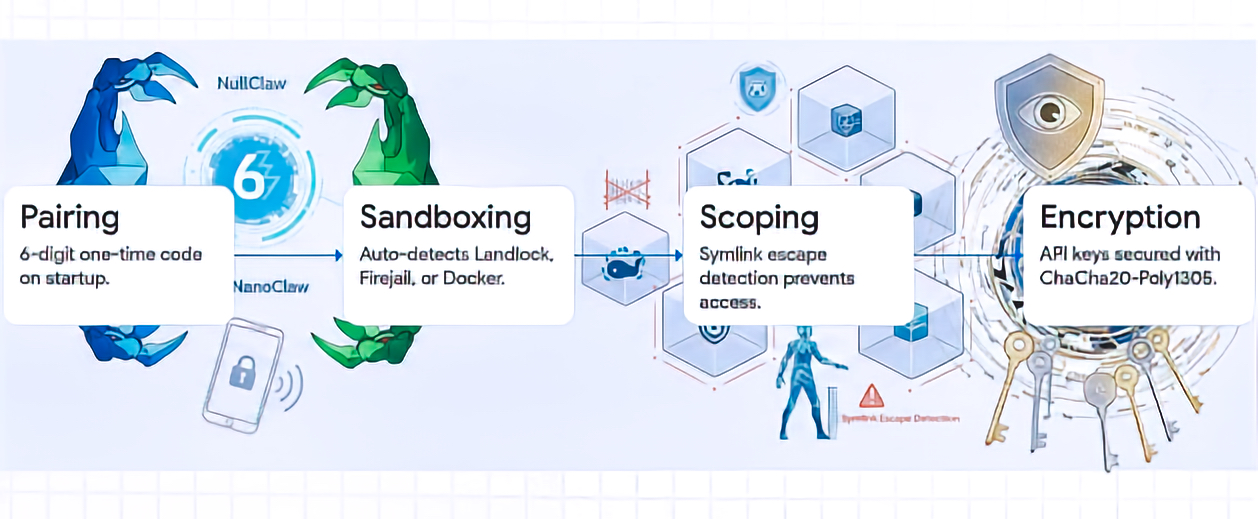
  • PIN-pairing authentication for initial bearer token exchange:
    • NullClaw uses a 6-digit one-time pairing code, exchanged through POST /pair, to obtain a bearer token. The docs call it a “pairing code,” not necessarily a persistent PIN. Pairing codes are single-use and expire after a configurable period; bearer tokens persist until revoked.
  • ChaCha20-Poly1305 encryption for API keys and sensitive credentials:
    • NullClaw documents API-key encryption at rest using ChaCha20-Poly1305 AEAD, with encrypted fields using an enc2:prefix. It also notes that decrypted values are used at runtime and are not written back in plaintext.
  • Memory zeroing for specific private-key material:
    • This is documented specifically for Nostr private keys: they are encrypted at rest, decrypted only while the channel runs, and zeroed on channel stop. I would avoid implying that every secret or every private key in every subsystem is zeroed unless you verify that in code or docs.
  • Kernel-level sandboxing through Landlock, Firejail, Bubblewrap, or Docker:
    • NullClaw supports Landlock, Firejail, Bubblewrap, and Docker. However, only Landlock is specifically kernel-level LSM. Firejail uses seccomp and namespaces, Bubblewrap uses user namespaces, and Docker uses container isolation. Better wording: “OS-level or container-based sandboxing through Landlock, Firejail, Bubblewrap, or Docker.”
  • Filesystem scoping through workspace_only and path-resolution checks:
    • The docs state that file operations are restricted to ~/.nullclaw/workspace/ by default with workspace_only = true, and path validation includes null-byte blocking, absolute path resolution, workspace-boundary checks, additional allowed paths, and symlink escape detection through realpath resolution.
  • Marketplace-free deployment to reduce centralized plugin supply-chain exposure:
    • This is a reasonable architectural interpretation, but I would not present it as an officially documented NullClaw security control. The docs support adjacent ideas—static binary, no runtime/framework overhead, pluggable systems, no lock-in, and configurable providers/tools—but I did not find official wording that frames “marketplace-free deployment” as a security layer or supply-chain mitigation.

The principle is straightforward: fewer moving parts can mean fewer places for vulnerabilities to hide. For technical readers, the security value comes from auditability, scoped execution, deterministic behavior, local secret protection, and a reduced dependency chain.

The NullClaw’s vtable interface architecture is a way to preserve modularity without returning to heavy runtime dependencies. In practice, this means subsystems can be swapped through configuration rather than by changing the core code.

SubsystemSource-Based Examples
AI providersOpenRouter, Anthropic, Ollama, DeepSeek, Groq, Venice
Communication channelsTelegram, Discord, Nostr, Signal, WhatsApp
Unified memorySQLite Hybrid, Markdown, Redis, PostgreSQL, ClickHouse
TunnelsCloudflare, Tailscale, ngrok, custom tunnels
ObservabilityPrometheus, OpenTelemetry, multi-logging
Hardware peripheralsArduino, Raspberry Pi GPIO, STM32/Nucleo

This means an organization can change the “brain,” messaging channel, memory layer, or deployment route without rebuilding the whole system.

The design reflects interface-based modularity: concrete implementations depend inward on stable boundaries. The source emphasizes that this keeps the agent provider-agnostic and reduces vendor lock-in. It also notes an important constraint: strict manual memory management creates risk when ownership rules are violated.

Retrieval-Augmented Generation, or RAG, is often associated with external vector databases and heavier cloud infrastructure; however, RAG does not require that architecture. NullClaw uses a SQLite-backed local memory layer that combines semantic and lexical retrieval, allowing the agent to retrieve information by both meaning and exact wording.

NullClaw’s hybrid memory strategy uses two retrieval signals:

  • Vector subsystem: Stores embeddings as BLOBs in SQLite and uses cosine similarity to capture semantic intent.
  • Keyword subsystem: Uses SQLite FTS5 virtual tables with BM25 scoring to preserve exact identifiers, names, IDs, commands, and domain-specific terminology.

Conceptually, the default weighted merge can be expressed as:

S_hybrid = (0.7 × S_vector_normalized) + (0.3 × S_keyword_normalized)

This should be understood as a weighted blend of normalized retrieval scores, because vector similarity and BM25 scores are not naturally on the same scale. In particular, SQLite FTS5’s BM25 ranking gives better matches numerically lower scores, so keyword scores need to be transformed or normalized before being combined with cosine similarity.

The value of this hybrid approach is that the agent can retrieve both the meaning and the exact wording of prior information. For example, it can understand the intent of a question while still recognizing a specific product name, ticket number, file path, command, or technical identifier.

When NullClaw uses its default SQLite memory backend, the memory engine can run locally with the agent. This reduces dependency on a separate vector database service and can lower network overhead and infrastructure complexity, especially in local-first or edge-oriented deployments.

The Claw-family evolution can be framed as a movement from screen-based chatbot interaction toward agents that operate closer to the “point of action.” ROSClaw extends this direction by integrating the OpenClaw agent runtime with ROS 2, enabling foundation models to interact with ROS-enabled robots through a structured executive layer. NullClaw extends the edge-computing side of this evolution by providing lightweight agent infrastructure with peripheral interfaces for Serial, Arduino, Raspberry Pi GPIO, and STM32/Nucleo platforms.

This matters because an autonomous agent running on low-cost edge hardware is no longer limited to a conversational interface. It can become part of a local physical workflow: reading sensor inputs, interacting with device interfaces, managing hardware-adjacent tasks, and supporting robotics or IoT scenarios where reasoning, action, safety controls, and local execution need to operate close to the device.

This can be translated into a practical decision model:

Decision QuestionSource-Grounded Direction
Do you require massive pre-built ecosystems and visual GUIs?Consider OpenClaw, while accepting hardware bloat and securing through containers.
Are you operating in a regulated industry requiring strict audit logs?Consider NanoClaw or Motis, prioritizing compliance and observability.
Are you deploying on edge devices or requiring 24/7 low-power background operations?Consider ZeroClaw or NullClaw, prioritizing resource efficiency and compiled binaries.

Zig 0.16.0 is described as mandatory for NullClaw builds. The $5 ARM/RISC-V tier is positioned as a baseline for cloud-routed workflows where heavy inference is offloaded. For local LLM throughput, the source references workstation-class options such as Apple M4 Max and RTX 4090 Mobile configurations.

The recommendation is favorable to NullClaw for security-sensitive local deployments and edge-based automation, but it should not be presented as a universal replacement for all agent platforms.

The stated advantages include:

  • Extreme resource efficiency, including a small static binary and low memory footprint.
  • Sub-2 millisecond startup on Apple Silicon, according to the project’s benchmark claims.
  • Hardened local-security controls, including pairing, sandboxing, allowlists, workspace scoping, and encrypted secrets.
  • Low-cost edge deployment potential.
  • Static binary portability across ARM, x86, and RISC-V.
  • A pluggable architecture across providers, channels, tools, memory, tunnels, peripherals, observers, and runtimes.

The stated limitations include:

  • Core CLI/config-first management, with graphical setup and orchestration support handled separately through the beta NullHub layer.
  • Not primarily positioned as a mature, visual, enterprise-grade swarm-orchestration platform out of the box, even though it supports subagents, named agent profiles, routing, and A2A interoperability.
  • An evolving ecosystem compared with larger, more mature agent frameworks.
  • Documentation is available, but advanced customization may still require comfort with the codebase, configuration model, and Zig-based implementation.
  • Zig 0.16.0 is required for building from source or contributing, although users who install a ready-to-run binary may not need Zig expertise.

This makes NullClaw strongest where the constraints are clear: small footprint, low power, security sensitivity, local control, portability, and edge deployment. It may be less suitable where teams need a polished visual administration layer, large pre-built marketplace ecosystems, mature enterprise governance tooling, or visual multi-agent orchestration available out of the box.

In this post, we’ve observed NullClaw positioning itself in a solid footprint within the field of efficiency-first AI architecture. Its value is not simply that it is small. Its value is that its smallness enables different operating assumptions: fast event-driven startup, lower hardware barriers, smaller security surfaces, local memory, and deployment closer to physical systems.

The broader lesson is that autonomous AI infrastructure is maturing. The future described is not one monolithic agent framework. It is a specialized ecosystem where architecture follows context: OpenClaw for breadth, NanoClaw and Motis for regulated observability, ZeroClaw for compiled edge performance, and NullClaw for the smallest viable autonomous footprint.


So, we’ve done it. 🙂

I hope you all like this effort & let me know your feedback. I’ll be back with another topic. Until then, Happy Avenging!

Creating a local LLM Cluster Server using Apple Silicon GPU

Today, we’re going to discuss creating a local LLM server and then utilizing it to execute various popular LLM models. We will club the local Apple GPUs together via a new framework that binds all the available Apple Silicon devices into one big LLM server. This enables people to run many large models, which was otherwise not possible due to the lack of GPUs.

This is certainly a new way; One can create virtual computation layers by adding nodes to the resource pool, increasing the computation capacity.

Why not witness a small demo to energize ourselves –

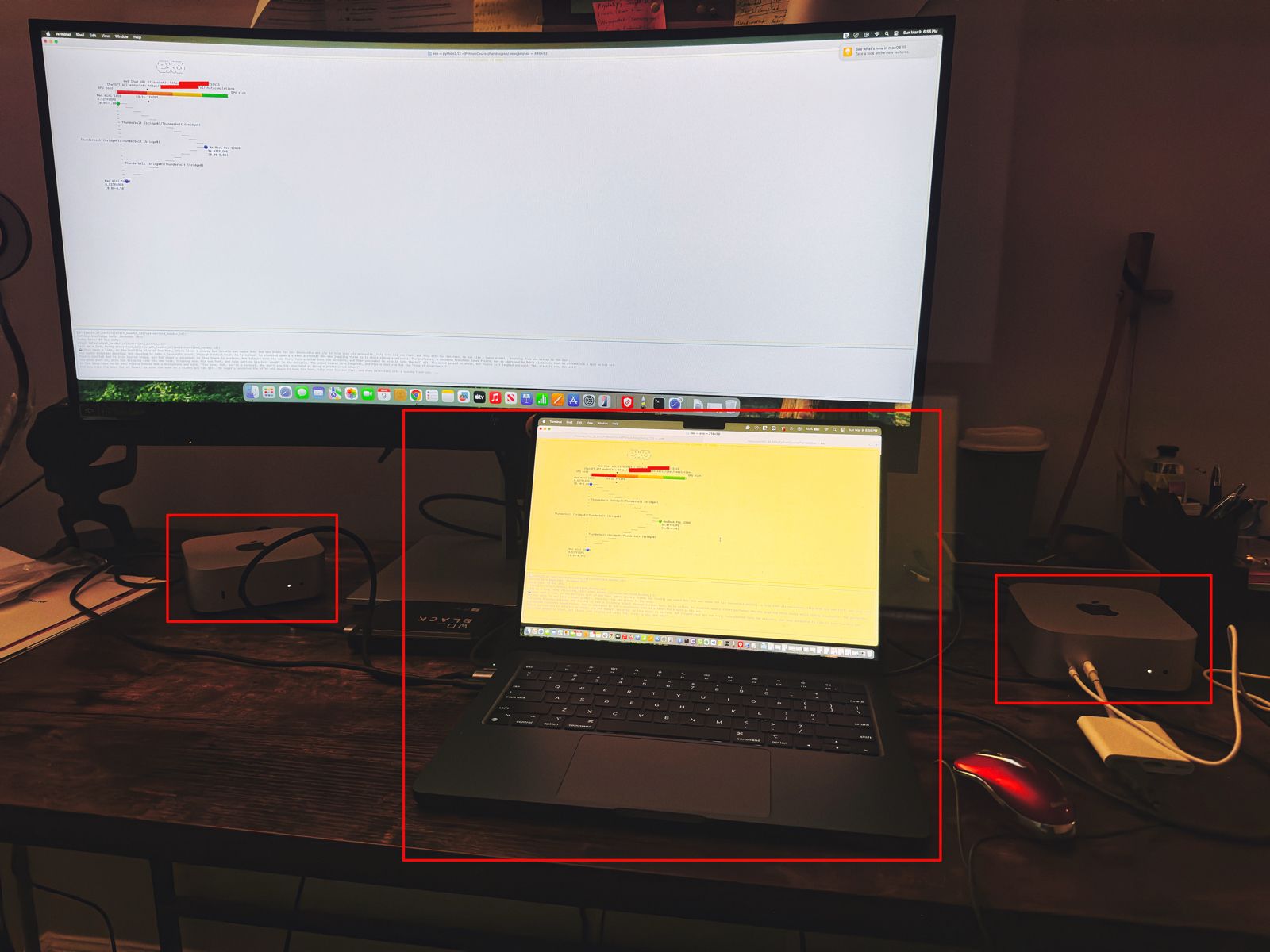
Let us understand the scenario. I’ve one Mac Book Pro M4 & 2 Mac Mini Pro M4 (Base models). So, I want to add them & expose them as a cluster as follows –

As you can see, I’ve connected my MacBook Pro with both the Mac Mini using high-speed thunderbolt cables for better data transmissions. And, I’ll be using an open-source framework called “Exo” to create it.

Also, you can see that my total computing capacity is 53.11 TFlops, which is slightly more than the last category.

“Exo” is an open-source framework that helps you merge all your available devices into a large cluster of available resources. This extracts all the computing juice needed to handle complex tasks, including the big LLMs, which require very expensive GPU-based servers.

For more information on “Exo”, please refer to the following link.

In our previous diagram, we can see that the framework also offers endpoints.

  • One option is a local ChatGPT interface, where any question you ask will receive a response from models by combining all available computing power.
  • The other endpoint offers users a choice of any standard LLM API endpoint, which helps them integrate it into their solutions.

Let us see, how the devices are connected together –


To proceed with this, you need to have at least Python 3.12, Anaconda or Miniconda & Xcode installed in all of your machines. Also, you need to install some Apple-specific MLX packages or libraries to get the best performance.

Depending on your choice, you need to use the following link to download Anaconda or Miniconda.

You can download the following link to download the Python 3.12. However, I’ve used Python 3.13 on some machines & some machines, I’ve used Python 3.12. And it worked without any problem.

Sometimes, after installing Anaconda or Miniconda, the environment may not implicitly be activated after successful installation. In that case, you may need to use the following commands in the terminal -> source ~/.bash_profile

To verify, whether the conda has been successfully installed & activated, you need to type the following command –

(base) satyaki_de@Satyakis-MacBook-Pro-Max Pandas % conda --version
conda 24.11.3
(base) satyaki_de@Satyakis-MacBook-Pro-Max Pandas % 

Once you verify it. Now, we need to install the following supplemental packages in all the machines as –

satyaki_de@Satyakis-MacBook-Pro-Max Pandas % 
satyaki_de@Satyakis-MacBook-Pro-Max Pandas % conda install anaconda::m4
Channels:
 - defaults
 - anaconda
Platform: osx-arm64
Collecting package metadata (repodata.json): done
Solving environment: done

## Package Plan ##

  environment location: /opt/anaconda3

  added / updated specs:
    - anaconda::m4


The following packages will be downloaded:

    package                    |            build
    ---------------------------|-----------------
    m4-1.4.18                  |       h1230e6a_1         202 KB  anaconda
    ------------------------------------------------------------
                                           Total:         202 KB

The following NEW packages will be INSTALLED:

  m4                 anaconda/osx-arm64::m4-1.4.18-h1230e6a_1 


Proceed ([y]/n)? y


Downloading and Extracting Packages:
                                                                                                                                                                                                                      
Preparing transaction: done
Verifying transaction: done
Executing transaction: done

Also, you can use this package to install in your machines –

(base) satyakidemini2@Satyakis-Mac-mini-2 exo % 
(base) satyakidemini2@Satyakis-Mac-mini-2 exo % pip install mlx
Collecting mlx
  Downloading mlx-0.23.2-cp312-cp312-macosx_14_0_arm64.whl.metadata (5.3 kB)
Downloading mlx-0.23.2-cp312-cp312-macosx_14_0_arm64.whl (27.6 MB)
   ━━━━━━━━━━━━━━━━━━━━━━━━━━━━━━━━━━━━━━━━ 27.6/27.6 MB 8.8 MB/s eta 0:00:00
Installing collected packages: mlx
Successfully installed mlx-0.23.2
(base) satyakidemini2@Satyakis-Mac-mini-2 exo % 

Till now, we’ve installed all the important packages. Now, we need to setup the final “eco” framework in all the machines like our previous steps.

Now, we’ll first clone the “eco” framework by the following commands –

(base) satyaki_de@Satyakis-MacBook-Pro-Max Pandas % 
(base) satyaki_de@Satyakis-MacBook-Pro-Max Pandas % git clone https://github.com/exo-explore/exo.git
Cloning into 'exo'...
remote: Enumerating objects: 9736, done.
remote: Counting objects: 100% (411/411), done.
remote: Compressing objects: 100% (148/148), done.
remote: Total 9736 (delta 333), reused 263 (delta 263), pack-reused 9325 (from 3)
Receiving objects: 100% (9736/9736), 12.18 MiB | 8.41 MiB/s, done.
Resolving deltas: 100% (5917/5917), done.
Updating files: 100% (178/178), done.
Filtering content: 100% (9/9), 3.16 MiB | 2.45 MiB/s, done.
(base) satyaki_de@Satyakis-MacBook-Pro-Max Pandas % 

And, the content of the “Exo” folder should look like this –

total 28672
drwx------  1 satyaki_de  staff  1048576 Mar  9 17:06 docs
-rwx------  1 satyaki_de  staff     1337 Mar  9 17:06 configure_mlx.sh
-rwx------  1 satyaki_de  staff    11107 Mar  9 17:06 README.md
-rwx------  1 satyaki_de  staff    35150 Mar  9 17:06 LICENSE
drwx------  1 satyaki_de  staff  1048576 Mar  9 17:06 examples
drwx------  1 satyaki_de  staff  1048576 Mar  9 17:06 exo
drwx------  1 satyaki_de  staff  1048576 Mar  9 17:06 extra
drwx------  1 satyaki_de  staff  1048576 Mar  9 17:06 scripts
-rwx------  1 satyaki_de  staff      390 Mar  9 17:06 install.sh
-rwx------  1 satyaki_de  staff      792 Mar  9 17:06 format.py
drwx------  1 satyaki_de  staff  1048576 Mar  9 17:06 test
-rwx------  1 satyaki_de  staff     2476 Mar  9 17:06 setup.py
drwx------  1 satyaki_de  staff  1048576 Mar  9 17:10 build
drwx------  1 satyaki_de  staff  1048576 Mar  9 17:17 exo.egg-info

Similar commands need to fire to other devices. Here, I’m showing one Mac-Mini examples –

(base) satyakidemini2@Satyakis-Mac-mini-2 Pandas % 
(base) satyakidemini2@Satyakis-Mac-mini-2 Pandas % git clone https://github.com/exo-explore/exo.git
Cloning into 'exo'...
remote: Enumerating objects: 9736, done.
remote: Counting objects: 100% (424/424), done.
remote: Compressing objects: 100% (146/146), done.
remote: Total 9736 (delta 345), reused 278 (delta 278), pack-reused 9312 (from 4)
Receiving objects: 100% (9736/9736), 12.18 MiB | 6.37 MiB/s, done.
Resolving deltas: 100% (5920/5920), done.
(base) satyakidemini2@Satyakis-Mac-mini-2 Pandas % 

After that, I’ll execute the following sets of commands to install the framework –

(base) satyaki_de@Satyakis-MacBook-Pro-Max Pandas % cd exo
(base) satyaki_de@Satyakis-MacBook-Pro-Max exo % 
(base) satyaki_de@Satyakis-MacBook-Pro-Max exo % conda create --name exo1 python=3.13
WARNING: A conda environment already exists at '/opt/anaconda3/envs/exo1'

Remove existing environment?
This will remove ALL directories contained within this specified prefix directory, including any other conda environments.

 (y/[n])? y

Channels:
 - defaults
Platform: osx-arm64
Collecting package metadata (repodata.json): done
Solving environment: done

## Package Plan ##

  environment location: /opt/anaconda3/envs/exo1

  added / updated specs:
    - python=3.13


The following NEW packages will be INSTALLED:

  bzip2              pkgs/main/osx-arm64::bzip2-1.0.8-h80987f9_6 
  ca-certificates    pkgs/main/osx-arm64::ca-certificates-2025.2.25-hca03da5_0 
  expat              pkgs/main/osx-arm64::expat-2.6.4-h313beb8_0 
  libcxx             pkgs/main/osx-arm64::libcxx-14.0.6-h848a8c0_0 
  libffi             pkgs/main/osx-arm64::libffi-3.4.4-hca03da5_1 
  libmpdec           pkgs/main/osx-arm64::libmpdec-4.0.0-h80987f9_0 
  ncurses            pkgs/main/osx-arm64::ncurses-6.4-h313beb8_0 
  openssl            pkgs/main/osx-arm64::openssl-3.0.16-h02f6b3c_0 
  pip                pkgs/main/osx-arm64::pip-25.0-py313hca03da5_0 
  python             pkgs/main/osx-arm64::python-3.13.2-h4862095_100_cp313 
  python_abi         pkgs/main/osx-arm64::python_abi-3.13-0_cp313 
  readline           pkgs/main/osx-arm64::readline-8.2-h1a28f6b_0 
  setuptools         pkgs/main/osx-arm64::setuptools-75.8.0-py313hca03da5_0 
  sqlite             pkgs/main/osx-arm64::sqlite-3.45.3-h80987f9_0 
  tk                 pkgs/main/osx-arm64::tk-8.6.14-h6ba3021_0 
  tzdata             pkgs/main/noarch::tzdata-2025a-h04d1e81_0 
  wheel              pkgs/main/osx-arm64::wheel-0.45.1-py313hca03da5_0 
  xz                 pkgs/main/osx-arm64::xz-5.6.4-h80987f9_1 
  zlib               pkgs/main/osx-arm64::zlib-1.2.13-h18a0788_1 


Proceed ([y]/n)? y


Downloading and Extracting Packages:

Preparing transaction: done
Verifying transaction: done
Executing transaction: done
#
# To activate this environment, use
#
#     $ conda activate exo1
#
# To deactivate an active environment, use
#
#     $ conda deactivate

(base) satyaki_de@Satyakis-MacBook-Pro-Max exo % conda activate exo1
(exo1) satyaki_de@Satyakis-MacBook-Pro-Max exo % 
(exo1) satyaki_de@Satyakis-MacBook-Pro-Max exo % ls -lrt
total 24576
drwx------  1 satyaki_de  staff  1048576 Mar  9 17:06 docs
-rwx------  1 satyaki_de  staff     1337 Mar  9 17:06 configure_mlx.sh
-rwx------  1 satyaki_de  staff    11107 Mar  9 17:06 README.md
-rwx------  1 satyaki_de  staff    35150 Mar  9 17:06 LICENSE
drwx------  1 satyaki_de  staff  1048576 Mar  9 17:06 examples
drwx------  1 satyaki_de  staff  1048576 Mar  9 17:06 exo
drwx------  1 satyaki_de  staff  1048576 Mar  9 17:06 extra
drwx------  1 satyaki_de  staff  1048576 Mar  9 17:06 scripts
-rwx------  1 satyaki_de  staff      390 Mar  9 17:06 install.sh
-rwx------  1 satyaki_de  staff      792 Mar  9 17:06 format.py
drwx------  1 satyaki_de  staff  1048576 Mar  9 17:06 test
-rwx------  1 satyaki_de  staff     2476 Mar  9 17:06 setup.py
(exo1) satyaki_de@Satyakis-MacBook-Pro-Max exo % 
(exo1) satyaki_de@Satyakis-MacBook-Pro-Max exo % pip install .
Processing /Volumes/WD_BLACK/PythonCourse/Pandas/exo
  Preparing metadata (setup.py) ... done
Collecting tinygrad@ git+https://github.com/tinygrad/tinygrad.git@ec120ce6b9ce8e4ff4b5692566a683ef240e8bc8 (from exo==0.0.1)
  Cloning https://github.com/tinygrad/tinygrad.git (to revision ec120ce6b9ce8e4ff4b5692566a683ef240e8bc8) to /private/var/folders/26/dj11b57559b8r8rl6ztdpc840000gn/T/pip-install-q18fzk3r/tinygrad_7917114c483a4d9c83c795b69dbeb5c7
  Running command git clone --filter=blob:none --quiet https://github.com/tinygrad/tinygrad.git /private/var/folders/26/dj11b57559b8r8rl6ztdpc840000gn/T/pip-install-q18fzk3r/tinygrad_7917114c483a4d9c83c795b69dbeb5c7
  Running command git rev-parse -q --verify 'sha^ec120ce6b9ce8e4ff4b5692566a683ef240e8bc8'
  Running command git fetch -q https://github.com/tinygrad/tinygrad.git ec120ce6b9ce8e4ff4b5692566a683ef240e8bc8
  Running command git checkout -q ec120ce6b9ce8e4ff4b5692566a683ef240e8bc8
  Resolved https://github.com/tinygrad/tinygrad.git to commit ec120ce6b9ce8e4ff4b5692566a683ef240e8bc8
  Preparing metadata (setup.py) ... done
Collecting aiohttp==3.10.11 (from exo==0.0.1)
.
.
(Installed many more dependant packages)
.
.
Downloading propcache-0.3.0-cp313-cp313-macosx_11_0_arm64.whl (44 kB)
Building wheels for collected packages: exo, nuitka, numpy, uuid, tinygrad
  Building wheel for exo (setup.py) ... done
  Created wheel for exo: filename=exo-0.0.1-py3-none-any.whl size=901357 sha256=5665297f8ea09d06670c9dea91e40270acc4a3cf99a560bf8d268abb236050f7
  Stored in directory: /private/var/folders/26/dj118r8rl6ztdpc840000gn/T/pip-ephem-wheel-cache-0k8zloo3/wheels/b6/91/fb/c1c7d8ca90cf16b9cd8203c11bb512614bee7f6d34
  Building wheel for nuitka (pyproject.toml) ... done
  Created wheel for nuitka: filename=nuitka-2.5.1-cp313-cp313-macosx_11_0_arm64.whl size=3432720 sha256=ae5a280a1684fde98c334516ee8a99f9f0acb6fc2f625643b7f9c5c0887c2998
  Stored in directory: /Users/satyaki_de/Library/Caches/pip/wheels/f6/c9/53/9e37c6fb34c27e892e8357aaead46da610f82117ab2825
  Building wheel for numpy (pyproject.toml) ... done
  Created wheel for numpy: filename=numpy-2.0.0-cp313-cp313-macosx_15_0_arm64.whl size=4920701 sha256=f030b0aa51ec6628f708fab0af14ff765a46d210df89aa66dd8d9482e59b5
  Stored in directory: /Users/satyaki_de/Library/Caches/pip/wheels/e0/d3/66/30d07c18e56ac85e8d3ceaf22f093a09bae124a472b85d1
  Building wheel for uuid (setup.py) ... done
  Created wheel for uuid: filename=uuid-1.30-py3-none-any.whl size=6504 sha256=885103a90d1dc92d9a75707fc353f4154597d232f2599a636de1bc6d1c83d
  Stored in directory: /Users/satyaki_de/Library/Caches/pip/wheels/cc/9d/72/13ff6a181eacfdbd6d761a4ee7c5c9f92034a9dc8a1b3c
  Building wheel for tinygrad (setup.py) ... done
  Created wheel for tinygrad: filename=tinygrad-0.10.0-py3-none-any.whl size=1333964 sha256=1f08c5ce55aa3c87668675beb80810d609955a81b99d416459d2489b36a
  Stored in directory: /Users/satyaki_de/Library/Caches/pip/wheels/c7/bd/02/bd91c1303002619dad23f70f4c1f1c15d0c24c60b043e
Successfully built exo nuitka numpy uuid tinygrad
Installing collected packages: uuid, sentencepiece, nvidia-ml-py, zstandard, uvloop, urllib3, typing-extensions, tqdm, tinygrad, scapy, safetensors, regex, pyyaml, pygments, psutil, protobuf, propcache, prometheus-client, pillow, packaging, ordered-set, numpy, multidict, mlx, mdurl, MarkupSafe, idna, grpcio, fsspec, frozenlist, filelock, charset-normalizer, certifi, attrs, annotated-types, aiohappyeyeballs, aiofiles, yarl, requests, pydantic-core, opencv-python, nuitka, markdown-it-py, Jinja2, grpcio-tools, aiosignal, rich, pydantic, huggingface-hub, aiohttp, tokenizers, aiohttp_cors, transformers, mlx-lm, exo
Successfully installed Jinja2-3.1.4 MarkupSafe-3.0.2 aiofiles-24.1.0 aiohappyeyeballs-2.5.0 aiohttp-3.10.11 aiohttp_cors-0.7.0 aiosignal-1.3.2 annotated-types-0.7.0 attrs-25.1.0 certifi-2025.1.31 charset-normalizer-3.4.1 exo-0.0.1 filelock-3.17.0 frozenlist-1.5.0 fsspec-2025.3.0 grpcio-1.67.0 grpcio-tools-1.67.0 huggingface-hub-0.29.2 idna-3.10 markdown-it-py-3.0.0 mdurl-0.1.2 mlx-0.22.0 mlx-lm-0.21.1 multidict-6.1.0 nuitka-2.5.1 numpy-2.0.0 nvidia-ml-py-12.560.30 opencv-python-4.10.0.84 ordered-set-4.1.0 packaging-24.2 pillow-10.4.0 prometheus-client-0.20.0 propcache-0.3.0 protobuf-5.28.1 psutil-6.0.0 pydantic-2.9.2 pydantic-core-2.23.4 pygments-2.19.1 pyyaml-6.0.2 regex-2024.11.6 requests-2.32.3 rich-13.7.1 safetensors-0.5.3 scapy-2.6.1 sentencepiece-0.2.0 tinygrad-0.10.0 tokenizers-0.20.3 tqdm-4.66.4 transformers-4.46.3 typing-extensions-4.12.2 urllib3-2.3.0 uuid-1.30 uvloop-0.21.0 yarl-1.18.3 zstandard-0.23.0
(exo1) satyaki_de@Satyakis-MacBook-Pro-Max exo % 

And, you need to perform the same process in other available devices as well.

Now, we’re ready to proceed with the final command –

(.venv) (exo1) satyaki_de@Satyakis-MacBook-Pro-Max exo % exo
/opt/anaconda3/envs/exo1/lib/python3.13/site-packages/google/protobuf/runtime_version.py:112: UserWarning: Protobuf gencode version 5.27.2 is older than the runtime version 5.28.1 at node_service.proto. Please avoid checked-in Protobuf gencode that can be obsolete.
  warnings.warn(
None of PyTorch, TensorFlow >= 2.0, or Flax have been found. Models won't be available and only tokenizers, configuration and file/data utilities can be used.
Selected inference engine: None

  _____  _____  
 / _ \ \/ / _ \ 
|  __/>  < (_) |
 \___/_/\_\___/ 
    
Detected system: Apple Silicon Mac
Inference engine name after selection: mlx
Using inference engine: MLXDynamicShardInferenceEngine with shard downloader: SingletonShardDownloader
[60771, 54631, 54661]
Chat interface started:
 - http://127.0.0.1:52415
 - http://XXX.XXX.XX.XX:52415
 - http://XXX.XXX.XXX.XX:52415
 - http://XXX.XXX.XXX.XXX:52415
ChatGPT API endpoint served at:
 - http://127.0.0.1:52415/v1/chat/completions
 - http://XXX.XXX.X.XX:52415/v1/chat/completions
 - http://XXX.XXX.XXX.XX:52415/v1/chat/completions
 - http://XXX.XXX.XXX.XXX:52415/v1/chat/completions
has_read=True, has_write=True
╭────────────────────────────────────────────────────────────────────────────────────────────── Exo Cluster (2 nodes) ───────────────────────────────────────────────────────────────────────────────────────────────╮
Received exit signal SIGTERM...
Thank you for using exo.

  _____  _____  
 / _ \ \/ / _ \ 
|  __/>  < (_) |
 \___/_/\_\___/ 
    

Note that I’ve masked the IP addresses for security reasons.


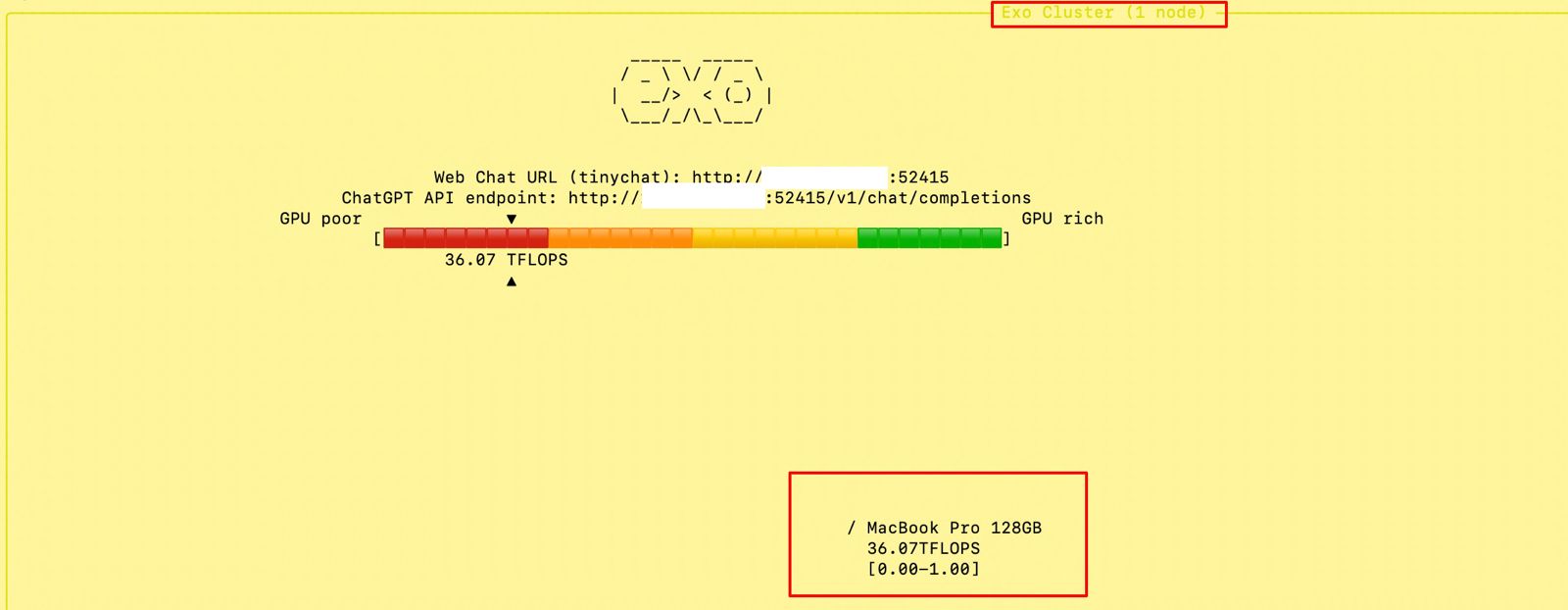
At the beginning, if we trigger the main MacBook Pro Max, the “Exo” screen should looks like this –

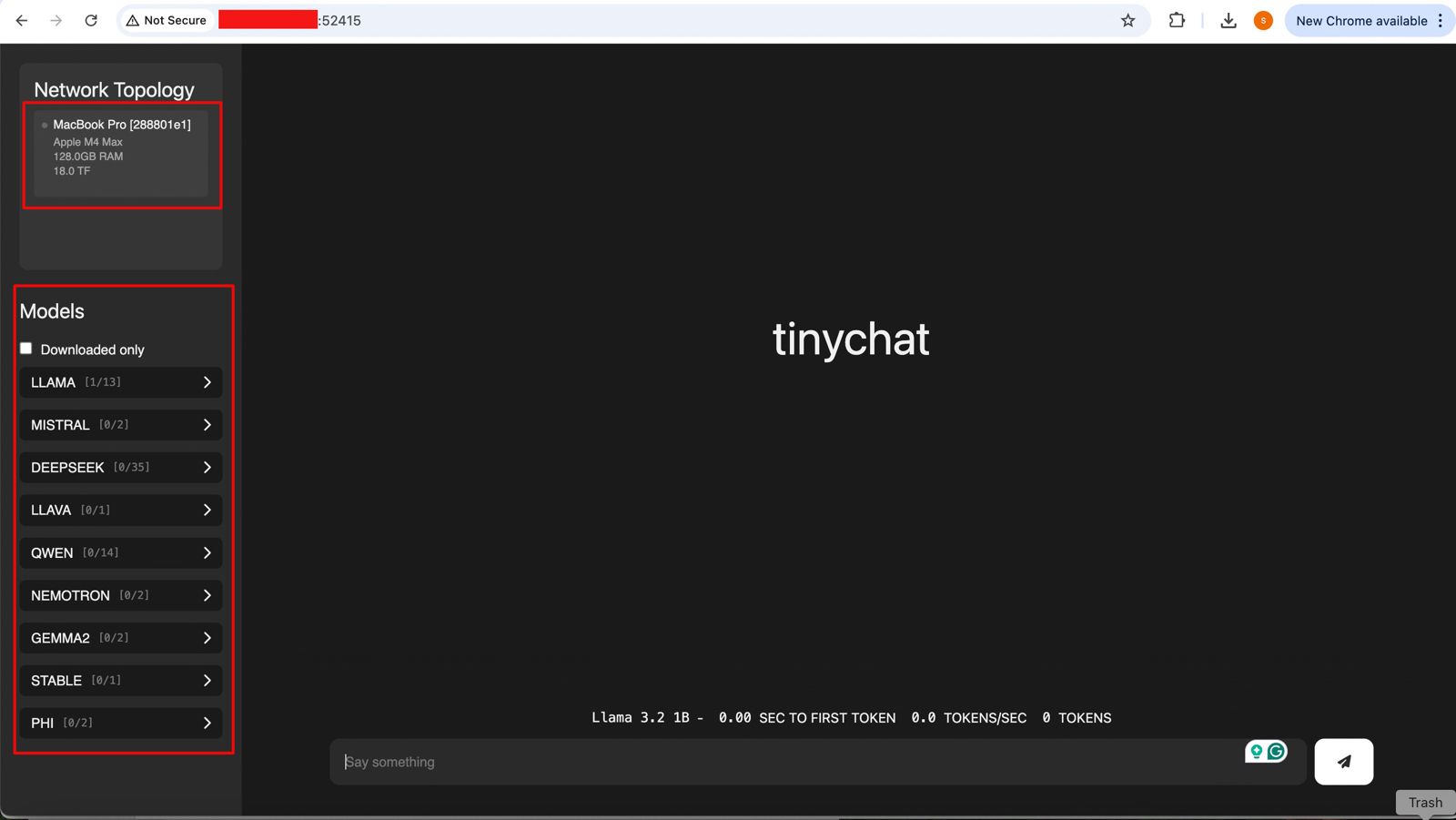
And if you open the URL, you will see the following ChatGPT-like interface –

Connecting without the Thunderbolt bridge with the relevant port or a hub may cause performance degradation. Hence, how you connect will play a major role in the success of this intention. However, this is certainly a great idea to proceed with.


So, we’ve done it.

We’ll cover the detailed performance testing, Optimized configurations & many other useful details in our next post.

Till then, Happy Avenging! 🙂