Today, we’re going to discuss creating a local LLM server and then utilizing it to execute various popular LLM models. We will club the local Apple GPUs together via a new framework that binds all the available Apple Silicon devices into one big LLM server. This enables people to run many large models, which was otherwise not possible due to the lack of GPUs.
This is certainly a new way; One can create virtual computation layers by adding nodes to the resource pool, increasing the computation capacity.
Why not witness a small demo to energize ourselves –
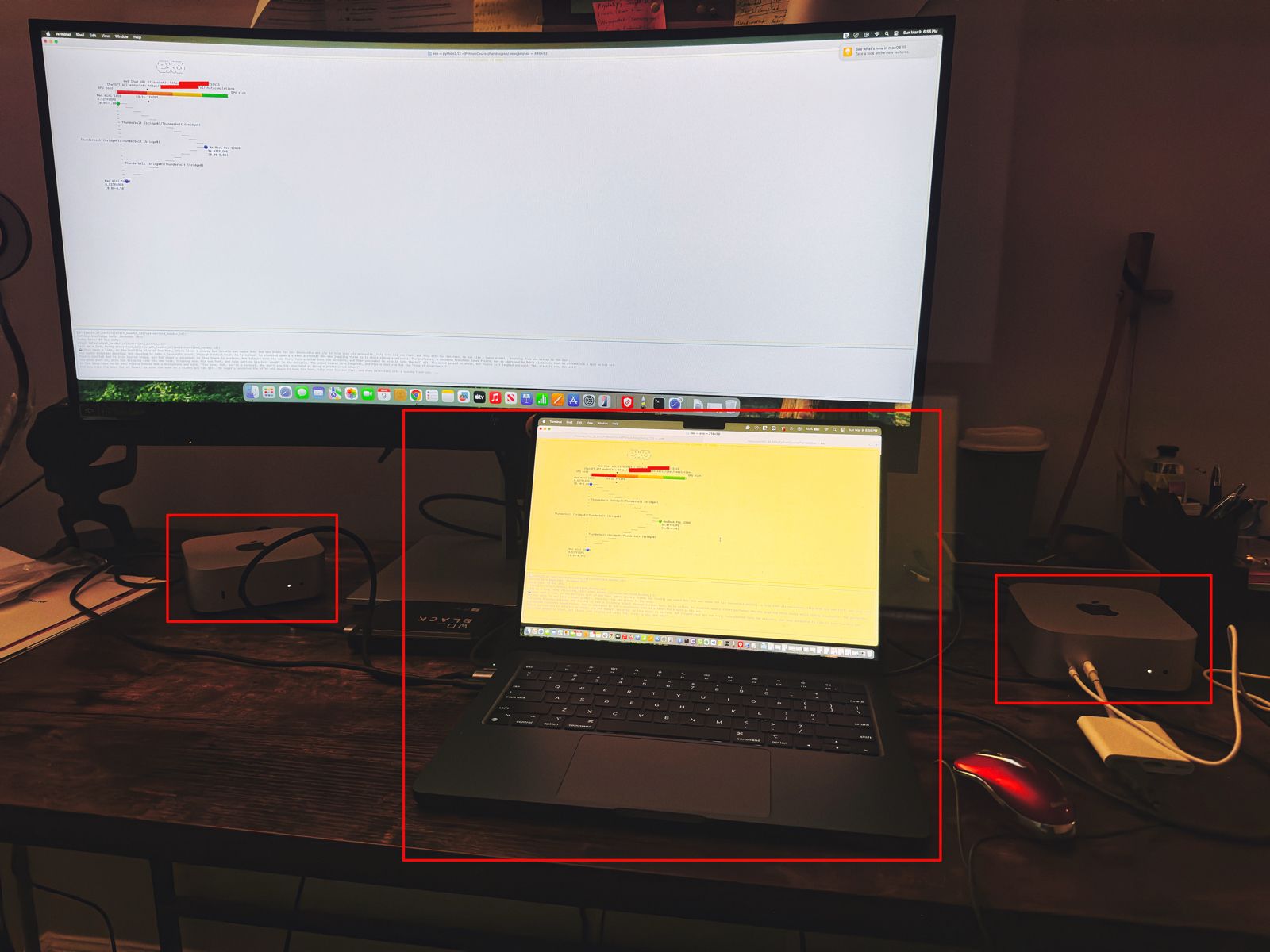
Let us understand the scenario. I’ve one Mac Book Pro M4 & 2 Mac Mini Pro M4 (Base models). So, I want to add them & expose them as a cluster as follows –

As you can see, I’ve connected my MacBook Pro with both the Mac Mini using high-speed thunderbolt cables for better data transmissions. And, I’ll be using an open-source framework called “Exo” to create it.
Also, you can see that my total computing capacity is 53.11 TFlops, which is slightly more than the last category.
What is Exo?
“Exo” is an open-source framework that helps you merge all your available devices into a large cluster of available resources. This extracts all the computing juice needed to handle complex tasks, including the big LLMs, which require very expensive GPU-based servers.
For more information on “Exo”, please refer to the following link.
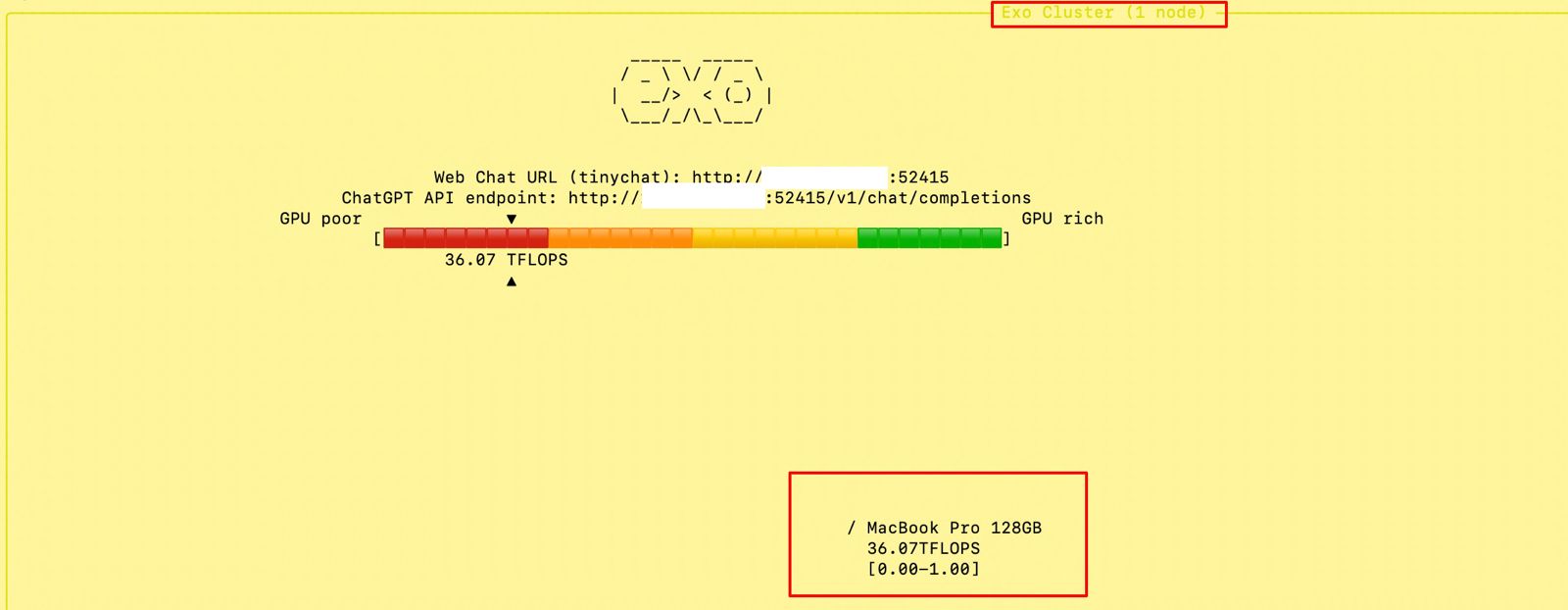
In our previous diagram, we can see that the framework also offers endpoints.
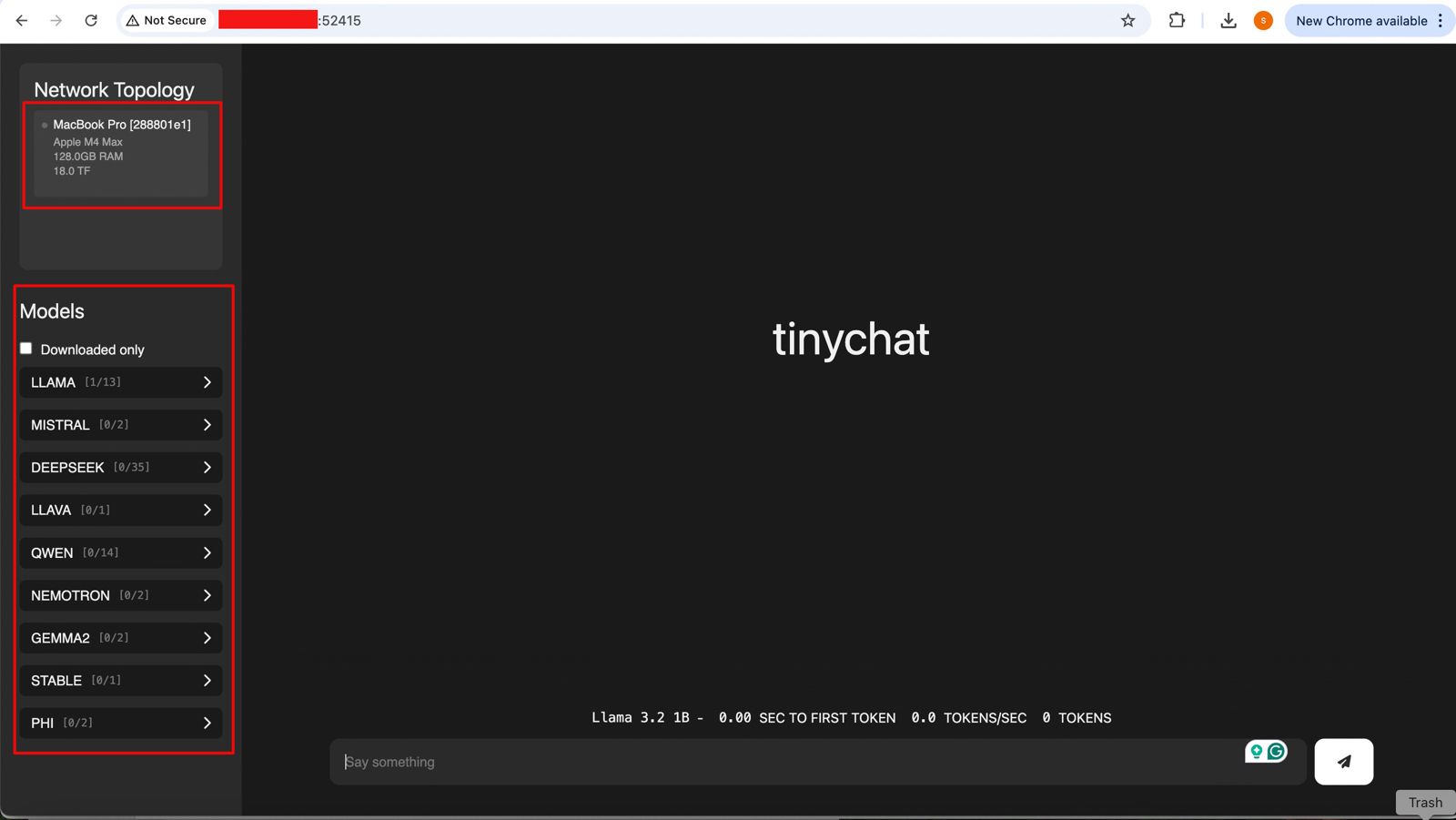
- One option is a local ChatGPT interface, where any question you ask will receive a response from models by combining all available computing power.
- The other endpoint offers users a choice of any standard LLM API endpoint, which helps them integrate it into their solutions.
Let us see, how the devices are connected together –
How to establish the Cluster?
To proceed with this, you need to have at least Python 3.12, Anaconda or Miniconda & Xcode installed in all of your machines. Also, you need to install some Apple-specific MLX packages or libraries to get the best performance.
Depending on your choice, you need to use the following link to download Anaconda or Miniconda.
You can download the following link to download the Python 3.12. However, I’ve used Python 3.13 on some machines & some machines, I’ve used Python 3.12. And it worked without any problem.
Sometimes, after installing Anaconda or Miniconda, the environment may not implicitly be activated after successful installation. In that case, you may need to use the following commands in the terminal -> source ~/.bash_profile
To verify, whether the conda has been successfully installed & activated, you need to type the following command –
(base) satyaki_de@Satyakis-MacBook-Pro-Max Pandas % conda --version
conda 24.11.3
(base) satyaki_de@Satyakis-MacBook-Pro-Max Pandas %
(base) satyaki_de@Satyakis-MacBook-Pro-Max Pandas %
Once you verify it. Now, we need to install the following supplemental packages in all the machines as –
satyaki_de@Satyakis-MacBook-Pro-Max Pandas %
satyaki_de@Satyakis-MacBook-Pro-Max Pandas %
satyaki_de@Satyakis-MacBook-Pro-Max Pandas % conda install anaconda::m4
Channels:
 - defaults
 - anaconda
Platform: osx-arm64
Collecting package metadata (repodata.json): done
Solving environment: done

## Package Plan ##

  environment location: /opt/anaconda3

  added / updated specs:
    - anaconda::m4


The following packages will be downloaded:

    package                    |            build
    ---------------------------|-----------------
    m4-1.4.18                  |       h1230e6a_1         202 KB  anaconda
    ------------------------------------------------------------
                                           Total:         202 KB

The following NEW packages will be INSTALLED:

  m4                 anaconda/osx-arm64::m4-1.4.18-h1230e6a_1


Proceed ([y]/n)? y


Downloading and Extracting Packages:

Preparing transaction: done
Verifying transaction: done
Executing transaction: done
Also, you can use this package to install in your machines –
(base) satyakidemini2@Satyakis-Mac-mini-2 exo %
(base) satyakidemini2@Satyakis-Mac-mini-2 exo % pip install mlx
Collecting mlx
  Downloading mlx-0.23.2-cp312-cp312-macosx_14_0_arm64.whl.metadata (5.3 kB)
Downloading mlx-0.23.2-cp312-cp312-macosx_14_0_arm64.whl (27.6 MB)
   ━━━━━━━━━━━━━━━━━━━━━━━━━━━━━━━━━━━━━━━━ 27.6/27.6 MB 8.8 MB/s eta 0:00:00
Installing collected packages: mlx
Successfully installed mlx-0.23.2
(base) satyakidemini2@Satyakis-Mac-mini-2 exo %
(base) satyakidemini2@Satyakis-Mac-mini-2 exo %
Main Setup:
Till now, we’ve installed all the important packages. Now, we need to setup the final “eco” framework in all the machines like our previous steps.
Now, we’ll first clone the “eco” framework by the following commands –
(base) satyaki_de@Satyakis-MacBook-Pro-Max Pandas %
(base) satyaki_de@Satyakis-MacBook-Pro-Max Pandas %
(base) satyaki_de@Satyakis-MacBook-Pro-Max Pandas % git clone https://github.com/exo-explore/exo.git
Cloning into 'exo'...
remote: Enumerating objects: 9736, done.
remote: Counting objects: 100% (411/411), done.
remote: Compressing objects: 100% (148/148), done.
remote: Total 9736 (delta 333), reused 263 (delta 263), pack-reused 9325 (from 3)
Receiving objects: 100% (9736/9736), 12.18 MiB | 8.41 MiB/s, done.
Resolving deltas: 100% (5917/5917), done.
Updating files: 100% (178/178), done.
Filtering content: 100% (9/9), 3.16 MiB | 2.45 MiB/s, done.
(base) satyaki_de@Satyakis-MacBook-Pro-Max Pandas %
(base) satyaki_de@Satyakis-MacBook-Pro-Max Pandas %
And, the content of the “Exo” folder should look like this –
total 28672
drwx------  1 satyaki_de  staff  1048576 Mar  9 17:06 docs
-rwx------  1 satyaki_de  staff     1337 Mar  9 17:06 configure_mlx.sh
-rwx------  1 satyaki_de  staff    11107 Mar  9 17:06 README.md
-rwx------  1 satyaki_de  staff    35150 Mar  9 17:06 LICENSE
drwx------  1 satyaki_de  staff  1048576 Mar  9 17:06 examples
drwx------  1 satyaki_de  staff  1048576 Mar  9 17:06 exo
drwx------  1 satyaki_de  staff  1048576 Mar  9 17:06 extra
drwx------  1 satyaki_de  staff  1048576 Mar  9 17:06 scripts
-rwx------  1 satyaki_de  staff      390 Mar  9 17:06 install.sh
-rwx------  1 satyaki_de  staff      792 Mar  9 17:06 format.py
drwx------  1 satyaki_de  staff  1048576 Mar  9 17:06 test
-rwx------  1 satyaki_de  staff     2476 Mar  9 17:06 setup.py
drwx------  1 satyaki_de  staff  1048576 Mar  9 17:10 build
drwx------  1 satyaki_de  staff  1048576 Mar  9 17:17 exo.egg-info
Similar commands need to fire to other devices. Here, I’m showing one Mac-Mini examples –
(base) satyakidemini2@Satyakis-Mac-mini-2 Pandas %
(base) satyakidemini2@Satyakis-Mac-mini-2 Pandas % git clone https://github.com/exo-explore/exo.git
Cloning into 'exo'...
remote: Enumerating objects: 9736, done.
remote: Counting objects: 100% (424/424), done.
remote: Compressing objects: 100% (146/146), done.
remote: Total 9736 (delta 345), reused 278 (delta 278), pack-reused 9312 (from 4)
Receiving objects: 100% (9736/9736), 12.18 MiB | 6.37 MiB/s, done.
Resolving deltas: 100% (5920/5920), done.
(base) satyakidemini2@Satyakis-Mac-mini-2 Pandas %
After that, I’ll execute the following sets of commands to install the framework –
(base) satyaki_de@Satyakis-MacBook-Pro-Max Pandas % cd exo
(base) satyaki_de@Satyakis-MacBook-Pro-Max exo %
(base) satyaki_de@Satyakis-MacBook-Pro-Max exo %
(base) satyaki_de@Satyakis-MacBook-Pro-Max exo % conda create --name exo1 python=3.13
WARNING: A conda environment already exists at '/opt/anaconda3/envs/exo1'

Remove existing environment?
This will remove ALL directories contained within this specified prefix directory, including any other conda environments.

 (y/[n])? y

Channels:
 - defaults
Platform: osx-arm64
Collecting package metadata (repodata.json): done
Solving environment: done

## Package Plan ##

  environment location: /opt/anaconda3/envs/exo1

  added / updated specs:
    - python=3.13


The following NEW packages will be INSTALLED:

  bzip2              pkgs/main/osx-arm64::bzip2-1.0.8-h80987f9_6
  ca-certificates    pkgs/main/osx-arm64::ca-certificates-2025.2.25-hca03da5_0
  expat              pkgs/main/osx-arm64::expat-2.6.4-h313beb8_0
  libcxx             pkgs/main/osx-arm64::libcxx-14.0.6-h848a8c0_0
  libffi             pkgs/main/osx-arm64::libffi-3.4.4-hca03da5_1
  libmpdec           pkgs/main/osx-arm64::libmpdec-4.0.0-h80987f9_0
  ncurses            pkgs/main/osx-arm64::ncurses-6.4-h313beb8_0
  openssl            pkgs/main/osx-arm64::openssl-3.0.16-h02f6b3c_0
  pip                pkgs/main/osx-arm64::pip-25.0-py313hca03da5_0
  python             pkgs/main/osx-arm64::python-3.13.2-h4862095_100_cp313
  python_abi         pkgs/main/osx-arm64::python_abi-3.13-0_cp313
  readline           pkgs/main/osx-arm64::readline-8.2-h1a28f6b_0
  setuptools         pkgs/main/osx-arm64::setuptools-75.8.0-py313hca03da5_0
  sqlite             pkgs/main/osx-arm64::sqlite-3.45.3-h80987f9_0
  tk                 pkgs/main/osx-arm64::tk-8.6.14-h6ba3021_0
  tzdata             pkgs/main/noarch::tzdata-2025a-h04d1e81_0
  wheel              pkgs/main/osx-arm64::wheel-0.45.1-py313hca03da5_0
  xz                 pkgs/main/osx-arm64::xz-5.6.4-h80987f9_1
  zlib               pkgs/main/osx-arm64::zlib-1.2.13-h18a0788_1


Proceed ([y]/n)? y


Downloading and Extracting Packages:

Preparing transaction: done
Verifying transaction: done
Executing transaction: done
#
# To activate this environment, use
#
#     $ conda activate exo1
#
# To deactivate an active environment, use
#
#     $ conda deactivate

(base) satyaki_de@Satyakis-MacBook-Pro-Max exo % conda activate exo1
(exo1) satyaki_de@Satyakis-MacBook-Pro-Max exo %
(exo1) satyaki_de@Satyakis-MacBook-Pro-Max exo % ls -lrt
total 24576
drwx------  1 satyaki_de  staff  1048576 Mar  9 17:06 docs
-rwx------  1 satyaki_de  staff     1337 Mar  9 17:06 configure_mlx.sh
-rwx------  1 satyaki_de  staff    11107 Mar  9 17:06 README.md
-rwx------  1 satyaki_de  staff    35150 Mar  9 17:06 LICENSE
drwx------  1 satyaki_de  staff  1048576 Mar  9 17:06 examples
drwx------  1 satyaki_de  staff  1048576 Mar  9 17:06 exo
drwx------  1 satyaki_de  staff  1048576 Mar  9 17:06 extra
drwx------  1 satyaki_de  staff  1048576 Mar  9 17:06 scripts
-rwx------  1 satyaki_de  staff      390 Mar  9 17:06 install.sh
-rwx------  1 satyaki_de  staff      792 Mar  9 17:06 format.py
drwx------  1 satyaki_de  staff  1048576 Mar  9 17:06 test
-rwx------  1 satyaki_de  staff     2476 Mar  9 17:06 setup.py
(exo1) satyaki_de@Satyakis-MacBook-Pro-Max exo %
(exo1) satyaki_de@Satyakis-MacBook-Pro-Max exo %
(exo1) satyaki_de@Satyakis-MacBook-Pro-Max exo % pip install .
Processing /Volumes/WD_BLACK/PythonCourse/Pandas/exo
  Preparing metadata (setup.py) ... done
Collecting tinygrad@ git+https://github.com/tinygrad/tinygrad.git@ec120ce6b9ce8e4ff4b5692566a683ef240e8bc8 (from exo==0.0.1)
  Cloning https://github.com/tinygrad/tinygrad.git (to revision ec120ce6b9ce8e4ff4b5692566a683ef240e8bc8) to /private/var/folders/26/dj11b57559b8r8rl6ztdpc840000gn/T/pip-install-q18fzk3r/tinygrad_7917114c483a4d9c83c795b69dbeb5c7
  Running command git clone --filter=blob:none --quiet https://github.com/tinygrad/tinygrad.git /private/var/folders/26/dj11b57559b8r8rl6ztdpc840000gn/T/pip-install-q18fzk3r/tinygrad_7917114c483a4d9c83c795b69dbeb5c7
  Running command git rev-parse -q --verify 'sha^ec120ce6b9ce8e4ff4b5692566a683ef240e8bc8'
  Running command git fetch -q https://github.com/tinygrad/tinygrad.git ec120ce6b9ce8e4ff4b5692566a683ef240e8bc8
  Running command git checkout -q ec120ce6b9ce8e4ff4b5692566a683ef240e8bc8
  Resolved https://github.com/tinygrad/tinygrad.git to commit ec120ce6b9ce8e4ff4b5692566a683ef240e8bc8
  Preparing metadata (setup.py) ... done
Collecting aiohttp==3.10.11 (from exo==0.0.1)
.
.
(Installed many more dependant packages)
.
.
Downloading propcache-0.3.0-cp313-cp313-macosx_11_0_arm64.whl (44 kB)
Building wheels for collected packages: exo, nuitka, numpy, uuid, tinygrad
  Building wheel for exo (setup.py) ... done
  Created wheel for exo: filename=exo-0.0.1-py3-none-any.whl size=901357 sha256=5665297f8ea09d06670c9dea91e40270acc4a3cf99a560bf8d268abb236050f7
  Stored in directory: /private/var/folders/26/dj118r8rl6ztdpc840000gn/T/pip-ephem-wheel-cache-0k8zloo3/wheels/b6/91/fb/c1c7d8ca90cf16b9cd8203c11bb512614bee7f6d34
  Building wheel for nuitka (pyproject.toml) ... done
  Created wheel for nuitka: filename=nuitka-2.5.1-cp313-cp313-macosx_11_0_arm64.whl size=3432720 sha256=ae5a280a1684fde98c334516ee8a99f9f0acb6fc2f625643b7f9c5c0887c2998
  Stored in directory: /Users/satyaki_de/Library/Caches/pip/wheels/f6/c9/53/9e37c6fb34c27e892e8357aaead46da610f82117ab2825
  Building wheel for numpy (pyproject.toml) ... done
  Created wheel for numpy: filename=numpy-2.0.0-cp313-cp313-macosx_15_0_arm64.whl size=4920701 sha256=f030b0aa51ec6628f708fab0af14ff765a46d210df89aa66dd8d9482e59b5
  Stored in directory: /Users/satyaki_de/Library/Caches/pip/wheels/e0/d3/66/30d07c18e56ac85e8d3ceaf22f093a09bae124a472b85d1
  Building wheel for uuid (setup.py) ... done
  Created wheel for uuid: filename=uuid-1.30-py3-none-any.whl size=6504 sha256=885103a90d1dc92d9a75707fc353f4154597d232f2599a636de1bc6d1c83d
  Stored in directory: /Users/satyaki_de/Library/Caches/pip/wheels/cc/9d/72/13ff6a181eacfdbd6d761a4ee7c5c9f92034a9dc8a1b3c
  Building wheel for tinygrad (setup.py) ... done
  Created wheel for tinygrad: filename=tinygrad-0.10.0-py3-none-any.whl size=1333964 sha256=1f08c5ce55aa3c87668675beb80810d609955a81b99d416459d2489b36a
  Stored in directory: /Users/satyaki_de/Library/Caches/pip/wheels/c7/bd/02/bd91c1303002619dad23f70f4c1f1c15d0c24c60b043e
Successfully built exo nuitka numpy uuid tinygrad
Installing collected packages: uuid, sentencepiece, nvidia-ml-py, zstandard, uvloop, urllib3, typing-extensions, tqdm, tinygrad, scapy, safetensors, regex, pyyaml, pygments, psutil, protobuf, propcache, prometheus-client, pillow, packaging, ordered-set, numpy, multidict, mlx, mdurl, MarkupSafe, idna, grpcio, fsspec, frozenlist, filelock, charset-normalizer, certifi, attrs, annotated-types, aiohappyeyeballs, aiofiles, yarl, requests, pydantic-core, opencv-python, nuitka, markdown-it-py, Jinja2, grpcio-tools, aiosignal, rich, pydantic, huggingface-hub, aiohttp, tokenizers, aiohttp_cors, transformers, mlx-lm, exo
Successfully installed Jinja2-3.1.4 MarkupSafe-3.0.2 aiofiles-24.1.0 aiohappyeyeballs-2.5.0 aiohttp-3.10.11 aiohttp_cors-0.7.0 aiosignal-1.3.2 annotated-types-0.7.0 attrs-25.1.0 certifi-2025.1.31 charset-normalizer-3.4.1 exo-0.0.1 filelock-3.17.0 frozenlist-1.5.0 fsspec-2025.3.0 grpcio-1.67.0 grpcio-tools-1.67.0 huggingface-hub-0.29.2 idna-3.10 markdown-it-py-3.0.0 mdurl-0.1.2 mlx-0.22.0 mlx-lm-0.21.1 multidict-6.1.0 nuitka-2.5.1 numpy-2.0.0 nvidia-ml-py-12.560.30 opencv-python-4.10.0.84 ordered-set-4.1.0 packaging-24.2 pillow-10.4.0 prometheus-client-0.20.0 propcache-0.3.0 protobuf-5.28.1 psutil-6.0.0 pydantic-2.9.2 pydantic-core-2.23.4 pygments-2.19.1 pyyaml-6.0.2 regex-2024.11.6 requests-2.32.3 rich-13.7.1 safetensors-0.5.3 scapy-2.6.1 sentencepiece-0.2.0 tinygrad-0.10.0 tokenizers-0.20.3 tqdm-4.66.4 transformers-4.46.3 typing-extensions-4.12.2 urllib3-2.3.0 uuid-1.30 uvloop-0.21.0 yarl-1.18.3 zstandard-0.23.0
(exo1) satyaki_de@Satyakis-MacBook-Pro-Max exo %
And, you need to perform the same process in other available devices as well.
Now, we’re ready to proceed with the final command –
(.venv) (exo1) satyaki_de@Satyakis-MacBook-Pro-Max exo % exo
/opt/anaconda3/envs/exo1/lib/python3.13/site-packages/google/protobuf/runtime_version.py:112: UserWarning: Protobuf gencode version 5.27.2 is older than the runtime version 5.28.1 at node_service.proto. Please avoid checked-in Protobuf gencode that can be obsolete.
  warnings.warn(
None of PyTorch, TensorFlow >= 2.0, or Flax have been found. Models won't be available and only tokenizers, configuration and file/data utilities can be used.
None of PyTorch, TensorFlow >= 2.0, or Flax have been found. Models won't be available and only tokenizers, configuration and file/data utilities can be used.
Selected inference engine: None

  _____  _____
 / _ \ \/ / _ \
|  __/>  < (_) |
 \___/_/\_\___/

Detected system: Apple Silicon Mac
Inference engine name after selection: mlx
Using inference engine: MLXDynamicShardInferenceEngine with shard downloader: SingletonShardDownloader
[60771, 54631, 54661]
Chat interface started:
 - http://127.0.0.1:52415
 - http://XXX.XXX.XX.XX:52415
 - http://XXX.XXX.XXX.XX:52415
 - http://XXX.XXX.XXX.XXX:52415
ChatGPT API endpoint served at:
 - http://127.0.0.1:52415/v1/chat/completions
 - http://XXX.XXX.X.XX:52415/v1/chat/completions
 - http://XXX.XXX.XXX.XX:52415/v1/chat/completions
 - http://XXX.XXX.XXX.XXX:52415/v1/chat/completions
has_read=True, has_write=True
╭────────────────────────────────────────────────────────────────────────────────────────────── Exo Cluster (2 nodes) ───────────────────────────────────────────────────────────────────────────────────────────────╮
Received exit signal SIGTERM...
Thank you for using exo.

  _____  _____
 / _ \ \/ / _ \
|  __/>  < (_) |
 \___/_/\_\___/
Note that I’ve masked the IP addresses for security reasons.
Run Time:
At the beginning, if we trigger the main MacBook Pro Max, the “Exo” screen should looks like this –
And if you open the URL, you will see the following ChatGPT-like interface –
Connecting without the Thunderbolt bridge with the relevant port or a hub may cause performance degradation. Hence, how you connect will play a major role in the success of this intention. However, this is certainly a great idea to proceed with.
So, we’ve done it.
We’ll cover the detailed performance testing, Optimized configurations & many other useful details in our next post.
Till then, Happy Avenging! 🙂
Note: All the data & scenarios posted here are representational data & scenarios & available over the internet & for educational purposes only. There is always room for improvement in this kind of model & the solution associated with it. I’ve shown the basic ways to achieve the same for educational purposes only.
