This site mainly deals with various use cases demonstrated using Python, Data Science, Cloud basics, SQL Server, Oracle, Teradata along with SQL & their implementation. Expecting yours active participation & time. This blog can be access from your TP, Tablet & mobile also. Please provide your feedback.
This is a continuation of my previous post, which can be found here.
Let us recap the key takaways from our previous post –
Enterprise AI, utilizing the Model Context Protocol (MCP), leverages an open standard that enables AI systems to securely and consistently access enterprise data and tools. MCP replaces brittle “N×M” integrations between models and systems with a standardized client–server pattern: an MCP host (e.g., IDE or chatbot) runs an MCP client that communicates with lightweight MCP servers, which wrap external systems via JSON-RPC. Servers expose three assets—Resources (data), Tools (actions), and Prompts (templates)—behind permissions, access control, and auditability. This design enables real-time context, reduces hallucinations, supports model- and cloud-agnostic interoperability, and accelerates “build once, integrate everywhere” deployment. A typical flow (e.g., retrieving a customer’s latest order) encompasses intent parsing, authorized tool invocation, query translation/execution, and the return of a normalized JSON result to the model for natural-language delivery. Performance introduces modest overhead (RPC hops, JSON (de)serialization, network transit) and scale considerations (request volume, significant results, context-window pressure). Mitigations include in-memory/semantic caching, optimized SQL with indexing, pagination, and filtering, connection pooling, and horizontal scaling with load balancing. In practice, small latency costs are often outweighed by the benefits of higher accuracy, stronger governance, and a decoupled, scalable architecture.
How does MCP compare with other AI integration approaches?
Compared to other approaches, the Model Context Protocol (MCP) offers a uniquely standardized and secure framework for AI-tool integration, shifting from brittle, custom-coded connections to a universal plug-and-play model. It is not a replacement for underlying systems, such as APIs or databases, but instead acts as an intelligent, secure abstraction layer designed explicitly for AI agents.
MCP vs. Custom API integrations:
This approach was the traditional method for AI integration before standards like MCP emerged.
Custom API integrations (traditional): Each AI application requires a custom-built connector for every external system it needs to access, leading to an N x M integration problem (the number of connectors grows exponentially with the number of models and systems). This approach is resource-intensive, challenging to maintain, and prone to breaking when underlying APIs change.
MCP: The standardized protocol eliminates the N x M problem by creating a universal interface. Tool creators build a single MCP server for their system, and any MCP-compatible AI agent can instantly access it. This process decouples the AI model from the underlying implementation details, drastically reducing integration and maintenance costs.
For more detailed information, please refer to the following link.
MCP vs. Retrieval-Augmented Generation (RAG):
RAG is a technique that retrieves static documents to augment an LLM’s knowledge, while MCP focuses on live interactions. They are complementary, not competing.
RAG:
Focus: Retrieving and summarizing static, unstructured data, such as documents, manuals, or knowledge bases.
Best for: Providing background knowledge and general information, as in a policy lookup tool or customer service bot.
Data type: Unstructured, static knowledge.
MCP:
Focus: Accessing and acting on real-time, structured, and dynamic data from databases, APIs, and business systems.
Best for: Agentic use cases involving real-world actions, like pulling live sales reports from a CRM or creating a ticket in a project management tool.
Data type: Structured, real-time, and dynamic data.
MCP vs. LLM plugins and extensions:
Before MCP, platforms like OpenAI offered proprietary plugin systems to extend LLM capabilities.
LLM plugins:
Proprietary: Tied to a specific AI vendor (e.g., OpenAI).
Limited: Rely on the vendor’s API function-calling mechanism, which focuses on call formatting but not standardized execution.
Centralized: Managed by the AI vendor, creating a risk of vendor lock-in.
MCP:
Open standard: Based on a public, interoperable protocol (JSON-RPC 2.0), making it model-agnostic and usable across different platforms.
Infrastructure layer: Provides a standardized infrastructure for agents to discover and use any compliant tool, regardless of the underlying LLM.
Decentralized: Promotes a flexible ecosystem and reduces the risk of vendor lock-in.
How enterprise AI with MCP has opened up a specific Architecture pattern for Azure, AWS & GCP?
Microsoft Azure:
The “agent factory” pattern: Azure focuses on providing managed services for building and orchestrating AI agents, tightly integrated with its enterprise security and governance features. The MCP architecture is a core component of the Azure AI Foundry, serving as a secure, managed “agent factory.”
Azure architecture pattern with MCP:
AI orchestration layer: The Azure AI Agent Service, within Azure AI Foundry, acts as the central host and orchestrator. It provides the control plane for creating, deploying, and managing multiple specialized agents, and it natively supports the MCP standard.
AI model layer: Agents in the Foundry can be powered by various models, including those from Azure OpenAI Service, commercial models from partners, or open-source models.
MCP server and tool layer: MCP servers are deployed using serverless functions, such as Azure Functions or Azure Logic Apps, to wrap existing enterprise systems. These servers expose tools for interacting with enterprise data sources like SharePoint, Azure AI Search, and Azure Blob Storage.
Data and security layer: Data is secured using Microsoft Entra ID (formerly Azure AD) for authentication and access control, with robust security policies enforced via Azure API Management. Access to data sources, such as databases and storage, is managed securely through private networks and Managed Identity.
Amazon Web Services (AWS):
The “composable serverless agent” pattern: AWS emphasizes a modular, composable, and serverless approach, leveraging its extensive portfolio of services to build sophisticated, flexible, and scalable AI solutions. The MCP architecture here aligns with the principle of creating lightweight, event-driven services that AI agents can orchestrate.
AWS architecture pattern with MCP:
The AI orchestration layer, which includesAmazon Bedrock Agents or custom agent frameworks deployed via AWS Fargate or Lambda, acts as the MCP hosts. Bedrock Agents provide built-in orchestration, while custom agents offer greater flexibility and customization options.
AI model layer: The models are sourced from Amazon Bedrock, which provides a wide selection of foundation models.
MCP server and tool layer: MCP servers are deployed as serverless AWS Lambda functions. AWS offers pre-built MCP servers for many of its services, including the AWS Serverless MCP Server for managing serverless applications and the AWS Lambda Tool MCP Server for invoking existing Lambda functions as tools.
Data and security layer: Access is tightly controlled using AWS Identity and Access Management (IAM) roles and policies, with fine-grained permissions for each MCP server. Private data sources like databases (Amazon DynamoDB) and storage (Amazon S3) are accessed securely within a Virtual Private Cloud (VPC).
Google Cloud Platform (GCP):
The “unified workbench” pattern: GCP focuses on providing a unified, open, and data-centric platform for AI development. The MCP architecture on GCP integrates natively with the Vertex AI platform, treating MCP servers as first-class tools that can be dynamically discovered and used within a single workbench.
GCP architecture pattern with MCP:
AI orchestration layer: The Vertex AI Agent Builder serves as the central environment for building and managing conversational AI and other agents. It orchestrates workflows and manages tool invocation for agents.
AI model layer: Agents use foundation models available through the Vertex AI Model Garden or the Gemini API.
MCP server and tool layer: MCP servers are deployed as containerized microservices on Cloud Run or managed by services like App Engine. These servers contain tools that interact with GCP services, such as BigQuery, Cloud Storage, and Cloud SQL. GCP offers pre-built MCP server implementations, such as the GCP MCP Toolbox, for integration with its databases.
Data and security layer:Vertex AI Vector Search and other data sources are encapsulated within the MCP server tools to provide contextual information. Access to these services is managed by Identity and Access Management (IAM) and secured through virtual private clouds. The MCP server can leverage Vertex AI Context Caching for improved performance.
Note that all the native technology is referred to in each respective cloud. Hence, some of the better technologies can be used in place of the tool mentioned here. This is more of a concept-level comparison rather than industry-wise implementation approaches.
We’ll go ahead and conclude this post here & continue discussing on a further deep dive in the next post.
Till then, Happy Avenging! 🙂
Note: All the data & scenarios posted here are representational data & scenarios & available over the internet & for educational purposes only. There is always room for improvement in this kind of model & the solution associated with it. I’ve shown the basic ways to achieve the same for educational purposes only.
Today, We will be discussing some of the better use-cases where we want to implement better solutions, which helps our entire Microservice/API integration painless.
As we drive towards more & more real-time applications such as mobile apps, IoT, and bots, we are engaging more microservice/API components in our technology stack. Moreover, We have witnessed that on many occasions, a full grown microservice environment leads to many unforeseen scenarios, which was not predicted or captured correctly.
To understand how a mesh-API architecture looks like, let us take one sample example for our case. Furthermore, what kind of problem we might face & how we can address.
Let us consider Airline online check-in as an example here.
There are following components are taking place irrespective of any airline ->
Filling-up primary information such as First Name, Last Name, Address, Contact details, Passport & Booking No.
We will have to choose a seat.
We will need to provide the input for a meal (However, this is optional as the domestic flight may or may not have this based on the distance & budget)
Finally, generations of Boarding-Pass.
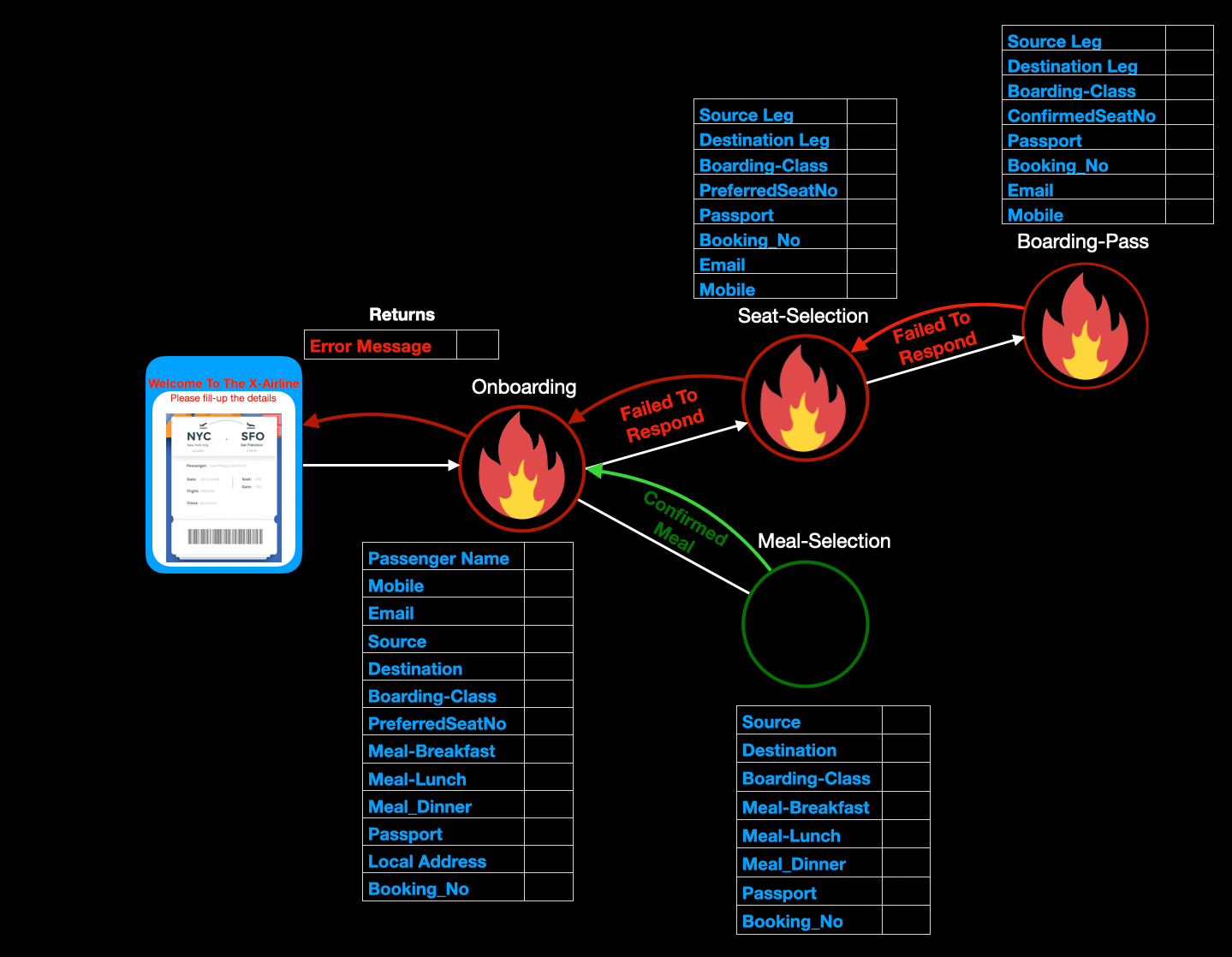
If we decoupled our application here, we could create four inter-connected microservices to cater to our requirements. And this is shown in the given diagram –
Normal Microservice operations
From the above diagram, we can see that customer invokes a couple of related but independent services to finish the process of generating a Boarding-Pass. As per the diagram, initial requests reach the main Onboarding API & that results in cascading service calls & their successful response. In a developer’s term, this one we call it a “Happy Scenario!”
Nevertheless, developers do not always get this kind of rosy scenario. Sometimes, we encountered a scenario like this –
Cascading failure in microservice framework
Suppose we see an issue with our Boarding-pass generation service, which may encounter some network or any fatal issue, which leads to a chain of failure to its parent services. Moreover, the result will be disastrous.
How can we handle such scenarios? There are a few guidelines that we can explore.
Time-Out trigger while calling any service/s
Building Asynchronous service
Implementation of Circuit-Breaker
We can also use the standard workflow management or custom build workflow manager to improve that further (We will discuss this later in this blog).
We understood that our parent service should not wait for a longer time, where there is a significant delay from the child service. Otherwise, it will have a cascading effect & bring down the entire array of services and it.
However, the use of Circuit-Breaker is an advanced & better way to handle such scenarios. To keep this post small, We are not going to share all the codebase here. We will examine mainly two base codes.
Please find the current directory structure –
Current directory structure
Let us consider implementing without the Circuit-Breaker. We have created the following functions & a custom Python library deployed for this demo. However, We will not discuss anything in this library today. We will release it in PyPi & share the post the update & detail functionality here later. This library is a Python-based lightweight workflow manager, which will continuously monitor any failed service & when connected – it will trigger it when connected.
Use of Python-based Workflow Manager
From the above diagram, we can see that if we force “time-out” while calling our services, we can use this lightweight framework later whenever that service wake-up or establish a connection.
Please find the WhatsApp delivery through our microservice framework using this lightweight workflow framework.
Sending WhatsApp message using Python-based Workflow Manager
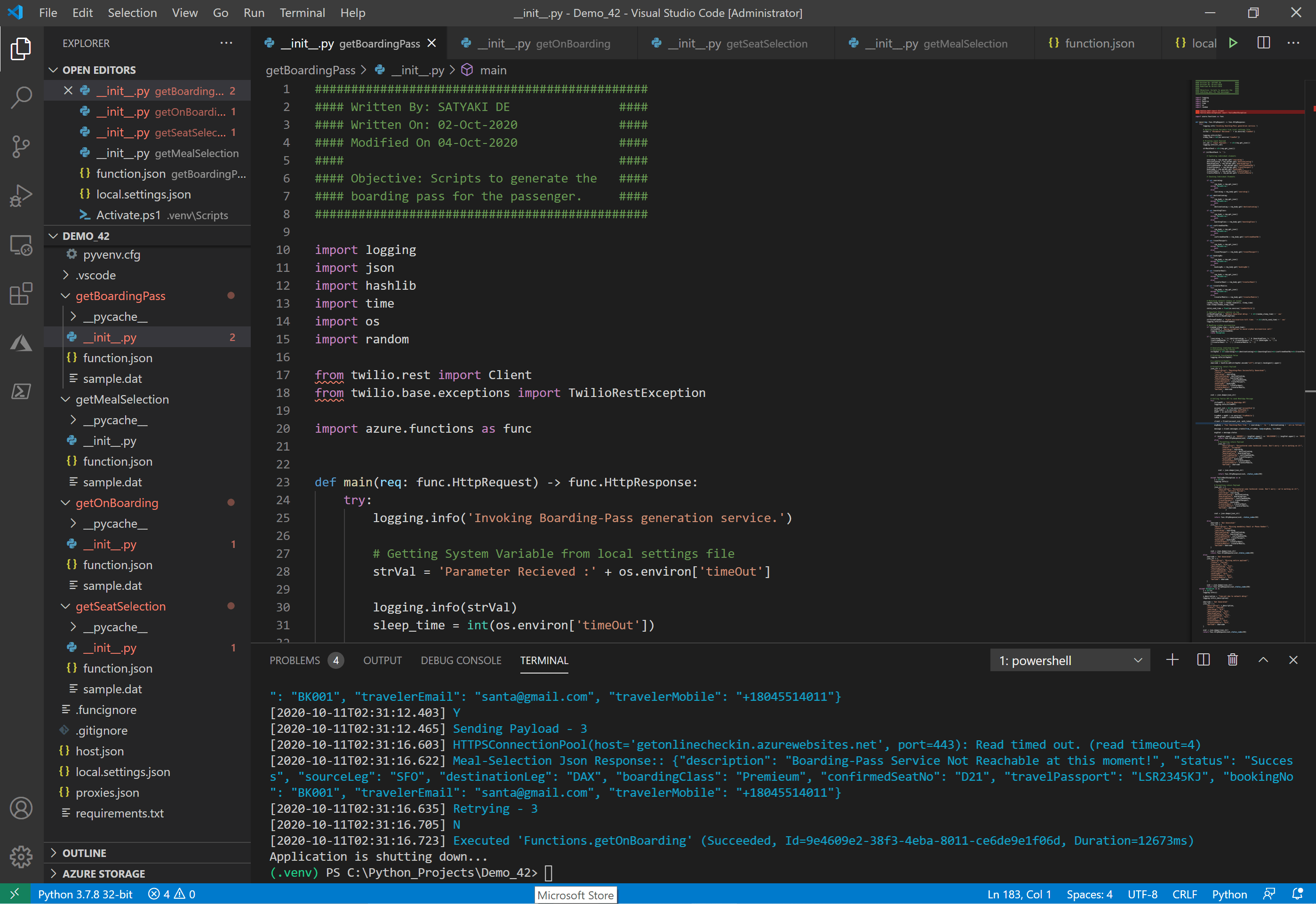
We have used Visual studio code editor for this entire development of azure functions. And, the screen should look something like this –
Development Editor
We’ll discuss one the following two services –
getSeatSelection
getBoardingPass
We will also discuss the first script twice – one is with the standard time-out approach & another with the circuit-breaker.
getSeatSelection( This Microservice receives the inputs from its parent microservice & confirm the preferred seat-no selected by the passengers. )
##############################################
#### Written By: SATYAKI DE               ####
#### Written On: 05-Oct-2020              ####
#### Modified On 05-Oct-2020              ####
####                                      ####
#### Objective: Scripts to choose the     ####
#### seat for the passenger.              ####
##############################################

import logging
import json
import time
import os
import ssl
import requests

import azure.functions as func

def callService(inputJson, urlPost, retryNo, eventFlag, maxRetryNo, maxTimeOut):
    # Invoking getBoardingPass API
    try:
        # Bypassing SSL Authentication
        try:
            _create_unverified_https_context = ssl._create_unverified_context
        except AttributeError:
            # Legacy python that doesn't verify HTTPS certificates by default
            pass
        else:
            # Handle target enviornment that doesn't support HTTPS verification
            ssl._create_default_https_context = _create_unverified_https_context

        # Providing the url bearer token
        url = urlPost

        json_data = inputJson
        headers = {'content-type': "application/json", 'cache-control': "no-cache"}

        # Failed case retry
        retries = retryNo
        success = False

        return_description = 'N/A'
        statusVal = 'Failed'

        try:
            while not success:
                try:
                    # Getting response from web service
                    try:
                        strCheckMsg = 'Sending Payload - ' + str(retries)
                        logging.info(strCheckMsg)

                        response = requests.request("POST", url, data=json_data, headers=headers, verify=False, timeout=maxTimeOut)

                        resp_dict = json.loads(response.text)

                        statusVal = resp_dict['status']
                        return_description = resp_dict['description']

                        logging.info(statusVal)

                    except Exception as e:
                        x = str(e)
                        logging.info(x)
                        success = False

                    if (eventFlag == 'Boarding-Pass'):
                        str_R = "Boarding-Pass Json Response:: " + str(response.text)
                    else:
                        str_R = "Invalid flag options "

                    logging.info((str_R))

                    if len(response.text) > 80:
                        if str(response.status_code)[:1] == '2':
                            success = True
                        else:
                            wait = retries * 2
                            str_R1 = "retries Fail! Waiting " + str(wait) + " seconds and retrying!"
                            logging.info(str_R1)
                            time.sleep(wait)
                            retries += 1

                        # Checking maximum retries
                        if retries >= maxRetryNo:
                            success = True
                            raise  Exception
                    else:
                        if str(response.status_code)[:1] == '2':
                            success = True
                        else:
                            # Checking maximum entries
                            if retries >= maxRetryNo:
                                success = True
                                raise  Exception

                            retries += 1
                except:
                    strVal = 'Retrying - ' + str(retries)
                    logging.info(strVal)
                    # Checking maximum entries
                    if retries >= maxRetryNo:
                        success = True
                        raise  Exception

                    retries += 1

            selection_flag = 'Y'

            # Forming return JSON
            jsonRet = {
                "eventFlag": eventFlag,
                "status":statusVal,
                "description":return_description,
                "computeFlag":selection_flag
            }

            xval = json.dumps(jsonRet)

            return xval

        except (ConnectionError, TimeoutError, InterruptedError) as e:
            str_R8 = "Response from Server: " + str(response)
            logging.info(str_R8)

            str_R9 = "Sending payload to Webservice!"
            logging.info(str_R9)
            selection_flag = 'N'

            # Forming return JSON
            jsonRet = {
                "eventFlag": eventFlag,
                "status":"Lost",
                "description":"Timed-Out or Connection Error or any I/O issue preventing the process. We're working on this!",
                "computeFlag":selection_flag
            }

            xval = json.dumps(jsonRet)

            return xval

        except ValueError as e:
            x = str(e)
            logging.info(x)

            selection_flag = 'N'

            # Forming return JSON
            jsonRet = {
                "eventFlag": eventFlag,
                "status":"Failed",
                "description":"Please check the internal parameters compatibility with it's data-type!",
                "computeFlag":selection_flag
            }

            xval = json.dumps(jsonRet)

            return xval

        except Exception as e:
            x = str(e)
            logging.info(x)

            selection_flag = 'N'

            # Forming return JSON
            jsonRet = {
                "eventFlag": eventFlag,
                "status":"Accepted",
                "description":"Maximum rerties to the Boarding-Pass service is now reached. We're working offline to get that for you. Please rerty after 4 hours in case if you haven't received it or you can directly call customer care number!",
                "computeFlag":selection_flag
            }

            xval = json.dumps(jsonRet)

            return xval


    except Exception as e:
        x = str(e)
        logging.info(x)

        selection_flag = 'N'

        # Forming return JSON
        jsonRet = {
            "eventFlag": eventFlag,
            "status":"Failed",
            "description":"DevOps Engineer is looking into this. Please try after some time!",
            "computeFlag":selection_flag
        }

        xval = json.dumps(jsonRet)

        return xval

def main(req: func.HttpRequest) -> func.HttpResponse:
    logging.info('Invoking Seat-Selection generation service.')

    # Getting System Variable from local settings file
    strVal = 'Parameter Recieved :' + os.environ['maxRetry']

    logging.info(strVal)

    # Capturing parameters from local settings
    max_retries = int(os.environ['maxRetry'])
    c_url = os.environ['cUrlBP']

    # Printing input Payload
    str_val = 'Input Payload:: ' + str(req.get_json())
    logging.info(str_val)

    strMainCheck = str(req.get_json())

    # variable
    x_status = 'Success'

    if (strMainCheck != ''):

        # Capturing individual elements

        sourceLeg = req.params.get('sourceLeg')
        destinationLeg = req.params.get('destinationLeg')
        boardingClass = req.params.get('boardingClass')
        preferredSeatNo = req.params.get('preferredSeatNo')
        travelPassport = req.params.get('travelPassport')
        bookingNo = req.params.get('bookingNo')
        travelerEmail = req.params.get('travelerEmail')
        travelerMobile = req.params.get('travelerMobile')

        # Checking Individual Elements

        if not sourceLeg:
            try:
                req_body = req.get_json()
            except ValueError:
                pass
            else:
                sourceLeg = req_body.get('sourceLeg')

        if not destinationLeg:
            try:
                req_body = req.get_json()
            except ValueError:
                pass
            else:
                destinationLeg = req_body.get('destinationLeg')

        if not boardingClass:
            try:
                req_body = req.get_json()
            except ValueError:
                pass
            else:
                boardingClass = req_body.get('boardingClass')

        if not preferredSeatNo:
            try:
                req_body = req.get_json()
            except ValueError:
                pass
            else:
                preferredSeatNo = req_body.get('preferredSeatNo')

        if not travelPassport:
            try:
                req_body = req.get_json()
            except ValueError:
                pass
            else:
                travelPassport = req_body.get('travelPassport')

        if not bookingNo:
            try:
                req_body = req.get_json()
            except ValueError:
                pass
            else:
                bookingNo = req_body.get('bookingNo')

        if not travelerEmail:
            try:
                req_body = req.get_json()
            except ValueError:
                pass
            else:
                travelerEmail = req_body.get('travelerEmail')

        if not travelerMobile:
            try:
                req_body = req.get_json()
            except ValueError:
                pass
            else:
                travelerMobile = req_body.get('travelerMobile')


        if (
            (sourceLeg != '') & (destinationLeg != '') & (boardingClass != '') &
            (preferredSeatNo != '') & (travelPassport != '') & (bookingNo != '') &
            ((travelerEmail != '') | (travelerMobile != ''))
            ):

            x_description = "Seat-Selection Successfully Processed!"

            # Preparing Payload for boarding-pass
            json_str_boarding = {
                "sourceLeg": sourceLeg,
                "destinationLeg": destinationLeg,
                "boardingClass": boardingClass,
                "confirmedSeatNo": preferredSeatNo,
                "travelPassport": travelPassport,
                "bookingNo": bookingNo,
                "travelerEmail": travelerEmail,
                "travelerMobile": travelerMobile
                        }

            jsonBoardingInput = json.dumps(json_str_boarding)

            eventFlag = 'Boarding-Pass'
            retryNoBase = 1
            maxTimeOut = 2.5

            # Invoking getBoardingPass API
            microCallsBP = callService(jsonBoardingInput, c_url, retryNoBase, eventFlag, max_retries, maxTimeOut)

            # Extracting seat_selection_flag
            resp_dict = json.loads(microCallsBP)
            x_status = resp_dict['status']
            x_description = resp_dict['description']

            # Capturing description value based on the logic
            logging.info(x_description)

            # Formatting return Payload
            json_str = {
                "description": x_description,
                "status": x_status,
                "sourceLeg": sourceLeg,
                "destinationLeg": destinationLeg,
                "boardingClass": boardingClass,
                "confirmedSeatNo": preferredSeatNo,
                "travelPassport": travelPassport,
                "bookingNo": bookingNo,
                "travelerEmail": travelerEmail,
                "travelerMobile": travelerMobile
                        }

            xval = json.dumps(json_str)

            return func.HttpResponse(xval, status_code=200)
        else:
            json_str = {
                "description": "Missing mandatory Email or Phone Number!",
                "status": "Failed",
                "sourceLeg": sourceLeg,
                "destinationLeg": destinationLeg,
                "boardingClass": boardingClass,
                "confirmedSeatNo": preferredSeatNo,
                "travelPassport": travelPassport,
                "bookingNo": bookingNo,
                "travelerEmail": travelerEmail,
                "travelerMobile": travelerMobile
            }

            xval = json.dumps(json_str)
            return func.HttpResponse(xval,status_code=200)
    else:
        json_str = {
            "description": "Missing entire payload!",
            "status": "Failed",
            "sourceLeg": "N/A",
            "destinationLeg": "N/A",
            "boardingClass": "N/A",
            "confirmedSeatNo": "N/A",
            "travelPassport": "N/A",
            "bookingNo": "N/A",
            "travelerEmail": "N/A",
            "travelerMobile": "N/A"
        }

        xval = json.dumps(json_str)
        return func.HttpResponse(xval,status_code=200)
There are a few key snippets that we would like to discuss here.
# Getting response from web service
try:
    strCheckMsg = 'Sending Payload - ' + str(retries)
    logging.info(strCheckMsg)

    response = requests.request("POST", url, data=json_data, headers=headers, verify=False, timeout=maxTimeOut)

    resp_dict = json.loads(response.text)

    statusVal = resp_dict['status']
    return_description = resp_dict['description']

    logging.info(statusVal)

except Exception as e:
    x = str(e)
    logging.info(x)
    success = False
From the above snippet, we can see that we are using time-out based on our understanding of response time or the max SLA agreed upon for that particular service.
If we get the response, we are capturing the status as well as the description from its child service & capturing it in our log, which will look something like this –
Azure Monitor of Seat-Selection service
2. getBoardingPass ( This Microservice receives the input from its parent service & confirm the autogenerated boarding pass shared with their WhatsApp number.)
We tried to create a random wait time, which will produce a sudden network latency or mimicking potential network/time-out/connection issues. Also, we want to finish this thread to avoid any unwanted WhatsApp message trigger via Twilio-API.
And, when we want to test the parent Seat-Selection service through postman, it will show the following response –
Seat-Selection Microservice response
We must have noticed that since the boarding pass also captured the seat details; hence, we are addressing them together here.
For successful execution, we can see a similar message –
Seat-Selection service success status
However, if we want to handle this better, we can use “Circuit-Breaker.”
Let us understand what this is. Since our childhood, we all know that when there is an electricity fluctuation happens frequently, to prevent all the electrical appliances, we deploy this small device that will disconnect the power between our house’s primary grid with all the appliances at our home. It will prevent these devices from getting exposed.
The same concept has been implemented for Microservice architecture as well.
For Normal operation without any issue
The above diagram shows that using a circuit breaker will continue all its previous parent services in everyday activities without any issues.
Basic concept of the Circuit Breaker in Microservice
The above diagram shows that it will stop all the parent services if the child service is not responding based on the threshold count.
Circuit breaker with partially allow case
The above diagram shows that once there is a “STOP” event captured. It will wait for a few seconds before it will allow a few services to test whether the impacted service is ready to consume further requests or not. This way, it can control the threading bottleneck.
The next diagram will give us the distinct state of a “Circuit Breaker.”
States of a Circuit Breaker
The above diagram shows that using a circuit breaker will prevent all its previous parent services. It will maintain a threshold of failures & successful data points. It will allow services to invoke the impacted service either entirely, partially, or even completely block it depending on the situation.
Let us revise the code & review it together –
3. getSeatSelection ( This Microservice receives the inputs from its parent microservice & confirm the preferred seat-no selected by the passengers – using Circuit-Breaker. )
##############################################
#### Written By: SATYAKI DE               ####
#### Written On: 05-Oct-2020              ####
#### Modified On 05-Oct-2020              ####
####                                      ####
#### Objective: Scripts to choose the     ####
#### seat for the passenger.              ####
##############################################

import logging
import json
import time
import os
import ssl
import requests

import azure.functions as func

from circuitbreaker import CircuitBreaker

class BoardingPassCircuitBreaker(CircuitBreaker):
    FAILURE_THRESHOLD = 10
    RECOVERY_TIMEOUT = 60
    EXPECTED_EXCEPTION = TimeoutError

@BoardingPassCircuitBreaker()
def callService(inputJson, urlPost, retryNo, eventFlag, maxRetryNo, maxTimeOut):
    # Invoking getBoardingPass API
    try:
        # Bypassing SSL Authentication
        try:
            _create_unverified_https_context = ssl._create_unverified_context
        except AttributeError:
            # Legacy python that doesn't verify HTTPS certificates by default
            pass
        else:
            # Handle target enviornment that doesn't support HTTPS verification
            ssl._create_default_https_context = _create_unverified_https_context

        # Providing the url bearer token
        url = urlPost

        json_data = inputJson
        headers = {'content-type': "application/json", 'cache-control': "no-cache"}

        # Failed case retry
        retries = retryNo
        success = False

        return_description = 'N/A'
        statusVal = 'Failed'

        try:
            while not success:
                try:
                    # Getting response from web service
                    try:
                        strCheckMsg = 'Sending Payload - ' + str(retries)
                        logging.info(strCheckMsg)

                        response = requests.request("POST", url, data=json_data, headers=headers, verify=False, timeout=maxTimeOut)

                        resp_dict = json.loads(response.text)

                        statusVal = resp_dict['status']
                        return_description = resp_dict['description']

                        logging.info(statusVal)

                    except Exception as e:
                        x = str(e)
                        logging.info(x)
                        success = False

                    if (eventFlag == 'Boarding-Pass'):
                        str_R = "Boarding-Pass Json Response:: " + str(response.text)
                    else:
                        str_R = "Invalid flag options "

                    logging.info((str_R))

                    if len(response.text) > 80:
                        if str(response.status_code)[:1] == '2':
                            success = True
                        else:
                            wait = retries * 2
                            str_R1 = "retries Fail! Waiting " + str(wait) + " seconds and retrying!"
                            logging.info(str_R1)
                            time.sleep(wait)
                            retries += 1

                        # Checking maximum retries
                        if retries >= maxRetryNo:
                            success = True
                            raise  Exception
                    else:
                        if str(response.status_code)[:1] == '2':
                            success = True
                        else:
                            # Checking maximum entries
                            if retries >= maxRetryNo:
                                success = True
                                raise  Exception

                            retries += 1
                except:
                    strVal = 'Retrying - ' + str(retries)
                    logging.info(strVal)
                    # Checking maximum entries
                    if retries >= maxRetryNo:
                        success = True
                        raise  Exception

                    retries += 1

            selection_flag = 'Y'

            # Forming return JSON
            jsonRet = {
                "eventFlag": eventFlag,
                "status":statusVal,
                "description":return_description,
                "computeFlag":selection_flag
            }

            xval = json.dumps(jsonRet)

            return xval

        except (ConnectionError, TimeoutError, InterruptedError) as e:
            str_R8 = "Response from Server: " + str(response)
            logging.info(str_R8)

            str_R9 = "Sending payload to Webservice!"
            logging.info(str_R9)
            selection_flag = 'N'

            # Forming return JSON
            jsonRet = {
                "eventFlag": eventFlag,
                "status":"Lost",
                "description":"Timed-Out or Connection Error or any I/O issue preventing the process. We're working on this!",
                "computeFlag":selection_flag
            }

            xval = json.dumps(jsonRet)

            return xval

        except ValueError as e:
            x = str(e)
            logging.info(x)

            selection_flag = 'N'

            # Forming return JSON
            jsonRet = {
                "eventFlag": eventFlag,
                "status":"Failed",
                "description":"Please check the internal parameters compatibility with it's data-type!",
                "computeFlag":selection_flag
            }

            xval = json.dumps(jsonRet)

            return xval

        except Exception as e:
            x = str(e)
            logging.info(x)

            selection_flag = 'N'

            # Forming return JSON
            jsonRet = {
                "eventFlag": eventFlag,
                "status":"Accepted",
                "description":"Maximum rerties to the Boarding-Pass service is now reached. We're working offline to get that for you. Please rerty after 4 hours in case if you haven't received it or you can directly call customer care number!",
                "computeFlag":selection_flag
            }

            xval = json.dumps(jsonRet)

            return xval


    except Exception as e:
        x = str(e)
        logging.info(x)

        selection_flag = 'N'

        # Forming return JSON
        jsonRet = {
            "eventFlag": eventFlag,
            "status":"Failed",
            "description":"DevOps Engineer is looking into this. Please try after some time!",
            "computeFlag":selection_flag
        }

        xval = json.dumps(jsonRet)

        return xval

def main(req: func.HttpRequest) -> func.HttpResponse:
    logging.info('Invoking Seat-Selection generation service.')

    # Getting System Variable from local settings file
    strVal = 'Parameter Recieved :' + os.environ['maxRetry']

    logging.info(strVal)

    # Capturing parameters from local settings
    max_retries = int(os.environ['maxRetry'])
    c_url = os.environ['cUrlBP']

    # Printing input Payload
    str_val = 'Input Payload:: ' + str(req.get_json())
    logging.info(str_val)

    strMainCheck = str(req.get_json())

    # variable
    x_status = 'Success'

    if (strMainCheck != ''):

        # Capturing individual elements

        sourceLeg = req.params.get('sourceLeg')
        destinationLeg = req.params.get('destinationLeg')
        boardingClass = req.params.get('boardingClass')
        preferredSeatNo = req.params.get('preferredSeatNo')
        travelPassport = req.params.get('travelPassport')
        bookingNo = req.params.get('bookingNo')
        travelerEmail = req.params.get('travelerEmail')
        travelerMobile = req.params.get('travelerMobile')

        # Checking Individual Elements

        if not sourceLeg:
            try:
                req_body = req.get_json()
            except ValueError:
                pass
            else:
                sourceLeg = req_body.get('sourceLeg')

        if not destinationLeg:
            try:
                req_body = req.get_json()
            except ValueError:
                pass
            else:
                destinationLeg = req_body.get('destinationLeg')

        if not boardingClass:
            try:
                req_body = req.get_json()
            except ValueError:
                pass
            else:
                boardingClass = req_body.get('boardingClass')

        if not preferredSeatNo:
            try:
                req_body = req.get_json()
            except ValueError:
                pass
            else:
                preferredSeatNo = req_body.get('preferredSeatNo')

        if not travelPassport:
            try:
                req_body = req.get_json()
            except ValueError:
                pass
            else:
                travelPassport = req_body.get('travelPassport')

        if not bookingNo:
            try:
                req_body = req.get_json()
            except ValueError:
                pass
            else:
                bookingNo = req_body.get('bookingNo')

        if not travelerEmail:
            try:
                req_body = req.get_json()
            except ValueError:
                pass
            else:
                travelerEmail = req_body.get('travelerEmail')

        if not travelerMobile:
            try:
                req_body = req.get_json()
            except ValueError:
                pass
            else:
                travelerMobile = req_body.get('travelerMobile')


        if (
            (sourceLeg != '') & (destinationLeg != '') & (boardingClass != '') &
            (preferredSeatNo != '') & (travelPassport != '') & (bookingNo != '') &
            ((travelerEmail != '') | (travelerMobile != ''))
            ):

            x_description = "Seat-Selection Successfully Processed!"

            # Preparing Payload for boarding-pass
            json_str_boarding = {
                "sourceLeg": sourceLeg,
                "destinationLeg": destinationLeg,
                "boardingClass": boardingClass,
                "confirmedSeatNo": preferredSeatNo,
                "travelPassport": travelPassport,
                "bookingNo": bookingNo,
                "travelerEmail": travelerEmail,
                "travelerMobile": travelerMobile
                        }

            jsonBoardingInput = json.dumps(json_str_boarding)

            eventFlag = 'Boarding-Pass'
            retryNoBase = 1
            maxTimeOut = 2.5

            # Invoking getBoardingPass API
            microCallsBP = callService(jsonBoardingInput, c_url, retryNoBase, eventFlag, max_retries, maxTimeOut)

            # Extracting seat_selection_flag
            resp_dict = json.loads(microCallsBP)
            x_status = resp_dict['status']
            x_description = resp_dict['description']

            # Capturing description value based on the logic
            logging.info(x_description)

            # Formatting return Payload
            json_str = {
                "description": x_description,
                "status": x_status,
                "sourceLeg": sourceLeg,
                "destinationLeg": destinationLeg,
                "boardingClass": boardingClass,
                "confirmedSeatNo": preferredSeatNo,
                "travelPassport": travelPassport,
                "bookingNo": bookingNo,
                "travelerEmail": travelerEmail,
                "travelerMobile": travelerMobile
                        }

            xval = json.dumps(json_str)

            return func.HttpResponse(xval, status_code=200)
        else:
            json_str = {
                "description": "Missing mandatory Email or Phone Number!",
                "status": "Failed",
                "sourceLeg": sourceLeg,
                "destinationLeg": destinationLeg,
                "boardingClass": boardingClass,
                "confirmedSeatNo": preferredSeatNo,
                "travelPassport": travelPassport,
                "bookingNo": bookingNo,
                "travelerEmail": travelerEmail,
                "travelerMobile": travelerMobile
            }

            xval = json.dumps(json_str)
            return func.HttpResponse(xval,status_code=200)
    else:
        json_str = {
            "description": "Missing entire payload!",
            "status": "Failed",
            "sourceLeg": "N/A",
            "destinationLeg": "N/A",
            "boardingClass": "N/A",
            "confirmedSeatNo": "N/A",
            "travelPassport": "N/A",
            "bookingNo": "N/A",
            "travelerEmail": "N/A",
            "travelerMobile": "N/A"
        }

        xval = json.dumps(json_str)
        return func.HttpResponse(xval,status_code=200)
Let us review the key snippets –
from circuitbreaker import CircuitBreaker

class BoardingPassCircuitBreaker(CircuitBreaker):
    FAILURE_THRESHOLD = 10
    RECOVERY_TIMEOUT = 60
    EXPECTED_EXCEPTION = TimeoutError

@BoardingPassCircuitBreaker()
def callService(inputJson, urlPost, retryNo, eventFlag, maxRetryNo, maxTimeOut):
    # Invoking getBoardingPass API
    try:
	    <Code>

            # Forming return JSON
            jsonRet = {
                "eventFlag": eventFlag,
                "status":statusVal,
                "description":return_description,
                "computeFlag":selection_flag
            }

            xval = json.dumps(jsonRet)

            return xval


    except Exception as e:
        x = str(e)
        logging.info(x)

        selection_flag = 'N'

        # Forming return JSON
        jsonRet = {
            "eventFlag": eventFlag,
            "status":"Failed",
            "description":"DevOps Engineer is looking into this. Please try after some time!",
            "computeFlag":selection_flag
        }

        xval = json.dumps(jsonRet)

        return xval
We have put the microservice call into a function & then mark it as a circuit-breaker method. Also, we have enforced some custom settings in our main circuit-breaker class as well.
Moreover, here are some of our main API sample outputs, i.e., “getOnBoarding,” depending on the child-services’ availability.
Please click the above image gallery to see all the combinations of responses.
Finally, here is the WhatsApp message if that call successful. We have used Twilio API to exchange the text.
Boarding Pass delivery to Passenger WhatsApp No
Please find the dependent package from requirements.txt ->






You must be logged in to post a comment.