AGENTIC AI IN THE ENTERPRISE: STRATEGY, ARCHITECTURE, AND IMPLEMENTATION – PART 5

This is a continuation of my previous post, which can be found here. This will be our last post of this series.

Let us recap the key takaways from our previous post –

Two cloud patterns show how MCP standardizes safe AI-to-system work. Azure “agent factory”: You ask in Teams; Azure AI Foundry dispatches a specialist agent (HR/Sales). The agent calls a specific MCP server (Functions/Logic Apps) for CRM, SharePoint, or SQL via API Management. Entra ID enforces access; Azure Monitor audits. AWS “composable serverless agents”: In Bedrock, domain agents (Financial/IT Ops) invoke Lambda-based MCP tools for DynamoDB, S3, or CloudWatch through API Gateway with IAM and optional VPC. In both, agents never hold credentials; tools map one-to-one to systems, improving security, clarity, scalability, and compliance.

In this post, we’ll discuss the GCP factory pattern.

The GCP “unified workbench” pattern prioritizes a unified, data-centric platform for AI development, integrating seamlessly with Vertex AI and Google’s expertise in AI and data analytics. This approach is well-suited for AI-first companies and data-intensive organizations that want to build agents that leverage cutting-edge research tools.

Let’s explore the following diagram based on this –

Imagine Mia, a clinical operations lead, opens a simple app and asks: “Which clinics had the longest wait times this week? Give me a quick summary I can share.”

  • The app quietly sends Mia’s request to Vertex AI Agent Builder—think of it as the switchboard operator.
  • Vertex AI picks the Data Analysis agent (the “specialist” for questions like Mia’s).
  • That agent doesn’t go rummaging through databases. Instead, it uses a safe, preapproved tool—an MCP Server—to query BigQuery, where the data lives.
  • The tool fetches results and returns them to Mia—no passwords in the open, no risky shortcuts—just the answer, fast and safely.

Now meet Ravi, a developer who asks: “Show me the latest app metrics and confirm yesterday’s patch didn’t break the login table.”

  • The app routes Ravi’s request to Vertex AI.
  • Vertex AI chooses the Developer agent.
  • That agent calls a different tool—an MCP Server designed for Cloud SQL—to check the login table and run a safe query.
  • Results come back with guardrails intact. If the agent ever needs files, there’s also a Cloud Storage tool ready to fetch or store documents.

Let us understand how the underlying flow of activities took place –

  • User Interface:
    • Entry point: Vertex AI console or a custom app.
    • Sends a single request; no direct credentials or system access exposed to the user.
  • Orchestration: Vertex AI Agent Builder (MCP Host)
    • Routes the request to the most suitable agent:
      • Agent A (Data Analysis) for analytics/BI-style questions.
      • Agent B (Developer) for application/data-ops tasks.
  • Tooling via MCP Servers on Cloud Run
    • Each MCP Server is a purpose-built adapter with least-privilege access to exactly one service:
      • Server1 → BigQuery (analytics/warehouse) — used by Agent A in this diagram.
      • Server2 → Cloud Storage (GCS) (files/objects) — available when file I/O is needed.
      • Server3 → Cloud SQL (relational DB) — used by Agent B in this diagram.
    • Agents never hold database credentials; they request actions from the right tool.
  • Enterprise Systems
    • BigQueryCloud Storage, and Cloud SQL are the systems of record that the tools interact with.
  • Security, Networking, and Observability
    • GCP IAM: AuthN/AuthZ for Vertex AI and each MCP Server (fine-grained roles, least privilege).
    • GCP VPC: Private network paths for all Cloud Run MCP Servers (isolation, egress control).
    • Cloud Monitoring: Metrics, logs, and alerts across agents and tools (auditability, SLOs).
  • Return Path
    • Results flow back from the service → MCP Server → Agent → Vertex AI → UI.
    • Policies and logs track who requested what, when, and how.
  • One entry point for questions.
  • Clear accountability: specialists (agents) act within guardrails.
  • Built-in safety (IAM/VPC) and visibility (Monitoring) for trust.
  • Separation of concerns: agents decide what to do; tools (MCP Servers) decide how to do it.
  • Scalable: add a new tool (e.g., Pub/Sub or Vertex AI Feature Store) without changing the UI or agents.
  • Auditable & maintainable: each tool maps to one service with explicit IAM and VPC controls.

So, we’ve concluded the series with the above post. I hope you like it.

I’ll bring some more exciting topics in the coming days from the new advanced world of technology.

Till then, Happy Avenging! 🙂

AGENTIC AI IN THE ENTERPRISE: STRATEGY, ARCHITECTURE, AND IMPLEMENTATION – PART 3

This is a continuation of my previous post, which can be found here.

Let us recap the key takaways from our previous post –

Enterprise AI, utilizing the Model Context Protocol (MCP), leverages an open standard that enables AI systems to securely and consistently access enterprise data and tools. MCP replaces brittle “N×M” integrations between models and systems with a standardized client–server pattern: an MCP host (e.g., IDE or chatbot) runs an MCP client that communicates with lightweight MCP servers, which wrap external systems via JSON-RPC. Servers expose three assets—Resources (data), Tools (actions), and Prompts (templates)—behind permissions, access control, and auditability. This design enables real-time context, reduces hallucinations, supports model- and cloud-agnostic interoperability, and accelerates “build once, integrate everywhere” deployment. A typical flow (e.g., retrieving a customer’s latest order) encompasses intent parsing, authorized tool invocation, query translation/execution, and the return of a normalized JSON result to the model for natural-language delivery. Performance introduces modest overhead (RPC hops, JSON (de)serialization, network transit) and scale considerations (request volume, significant results, context-window pressure). Mitigations include in-memory/semantic caching, optimized SQL with indexing, pagination, and filtering, connection pooling, and horizontal scaling with load balancing. In practice, small latency costs are often outweighed by the benefits of higher accuracy, stronger governance, and a decoupled, scalable architecture.

Compared to other approaches, the Model Context Protocol (MCP) offers a uniquely standardized and secure framework for AI-tool integration, shifting from brittle, custom-coded connections to a universal plug-and-play model. It is not a replacement for underlying systems, such as APIs or databases, but instead acts as an intelligent, secure abstraction layer designed explicitly for AI agents.

This approach was the traditional method for AI integration before standards like MCP emerged.

  • Custom API integrations (traditional): Each AI application requires a custom-built connector for every external system it needs to access, leading to an N x M integration problem (the number of connectors grows exponentially with the number of models and systems). This approach is resource-intensive, challenging to maintain, and prone to breaking when underlying APIs change.
  • MCP: The standardized protocol eliminates the N x M problem by creating a universal interface. Tool creators build a single MCP server for their system, and any MCP-compatible AI agent can instantly access it. This process decouples the AI model from the underlying implementation details, drastically reducing integration and maintenance costs.

For more detailed information, please refer to the following link.

RAG is a technique that retrieves static documents to augment an LLM’s knowledge, while MCP focuses on live interactions. They are complementary, not competing. 

  • RAG:
    • Focus: Retrieving and summarizing static, unstructured data, such as documents, manuals, or knowledge bases.
    • Best for: Providing background knowledge and general information, as in a policy lookup tool or customer service bot.
    • Data type: Unstructured, static knowledge.
  • MCP:
    • Focus: Accessing and acting on real-time, structured, and dynamic data from databases, APIs, and business systems.
    • Best for: Agentic use cases involving real-world actions, like pulling live sales reports from a CRM or creating a ticket in a project management tool.
    • Data type: Structured, real-time, and dynamic data.

Before MCP, platforms like OpenAI offered proprietary plugin systems to extend LLM capabilities.

  • LLM plugins:
    • Proprietary: Tied to a specific AI vendor (e.g., OpenAI).
    • Limited: Rely on the vendor’s API function-calling mechanism, which focuses on call formatting but not standardized execution.
    • Centralized: Managed by the AI vendor, creating a risk of vendor lock-in.
  • MCP:
    • Open standard: Based on a public, interoperable protocol (JSON-RPC 2.0), making it model-agnostic and usable across different platforms.
    • Infrastructure layer: Provides a standardized infrastructure for agents to discover and use any compliant tool, regardless of the underlying LLM.
    • Decentralized: Promotes a flexible ecosystem and reduces the risk of vendor lock-in. 

The “agent factory” pattern: Azure focuses on providing managed services for building and orchestrating AI agents, tightly integrated with its enterprise security and governance features. The MCP architecture is a core component of the Azure AI Foundry, serving as a secure, managed “agent factory.” 

  • AI orchestration layer: The Azure AI Agent Service, within Azure AI Foundry, acts as the central host and orchestrator. It provides the control plane for creating, deploying, and managing multiple specialized agents, and it natively supports the MCP standard.
  • AI model layer: Agents in the Foundry can be powered by various models, including those from Azure OpenAI Service, commercial models from partners, or open-source models.
  • MCP server and tool layer: MCP servers are deployed using serverless functions, such as Azure Functions or Azure Logic Apps, to wrap existing enterprise systems. These servers expose tools for interacting with enterprise data sources like SharePoint, Azure AI Search, and Azure Blob Storage.
  • Data and security layer: Data is secured using Microsoft Entra ID (formerly Azure AD) for authentication and access control, with robust security policies enforced via Azure API Management. Access to data sources, such as databases and storage, is managed securely through private networks and Managed Identity. 

The “composable serverless agent” pattern: AWS emphasizes a modular, composable, and serverless approach, leveraging its extensive portfolio of services to build sophisticated, flexible, and scalable AI solutions. The MCP architecture here aligns with the principle of creating lightweight, event-driven services that AI agents can orchestrate. 

  • The AI orchestration layer, which includes Amazon Bedrock Agents or custom agent frameworks deployed via AWS Fargate or Lambda, acts as the MCP hosts. Bedrock Agents provide built-in orchestration, while custom agents offer greater flexibility and customization options.
  • AI model layer: The models are sourced from Amazon Bedrock, which provides a wide selection of foundation models.
  • MCP server and tool layer: MCP servers are deployed as serverless AWS Lambda functions. AWS offers pre-built MCP servers for many of its services, including the AWS Serverless MCP Server for managing serverless applications and the AWS Lambda Tool MCP Server for invoking existing Lambda functions as tools.
  • Data and security layer: Access is tightly controlled using AWS Identity and Access Management (IAM) roles and policies, with fine-grained permissions for each MCP server. Private data sources like databases (Amazon DynamoDB) and storage (Amazon S3) are accessed securely within a Virtual Private Cloud (VPC). 

The “unified workbench” pattern: GCP focuses on providing a unified, open, and data-centric platform for AI development. The MCP architecture on GCP integrates natively with the Vertex AI platform, treating MCP servers as first-class tools that can be dynamically discovered and used within a single workbench. 

  • AI orchestration layer: The Vertex AI Agent Builder serves as the central environment for building and managing conversational AI and other agents. It orchestrates workflows and manages tool invocation for agents.
  • AI model layer: Agents use foundation models available through the Vertex AI Model Garden or the Gemini API.
  • MCP server and tool layer: MCP servers are deployed as containerized microservices on Cloud Run or managed by services like App Engine. These servers contain tools that interact with GCP services, such as BigQueryCloud Storage, and Cloud SQL. GCP offers pre-built MCP server implementations, such as the GCP MCP Toolbox, for integration with its databases.
  • Data and security layer: Vertex AI Vector Search and other data sources are encapsulated within the MCP server tools to provide contextual information. Access to these services is managed by Identity and Access Management (IAM) and secured through virtual private clouds. The MCP server can leverage Vertex AI Context Caching for improved performance.

Note that all the native technology is referred to in each respective cloud. Hence, some of the better technologies can be used in place of the tool mentioned here. This is more of a concept-level comparison rather than industry-wise implementation approaches.


We’ll go ahead and conclude this post here & continue discussing on a further deep dive in the next post.

Till then, Happy Avenging! 🙂

Python-based dash framework visualizing real-time covid-19 trend.

Hi Team,

We’ll enhance our last post on Covid-19 prediction & try to capture them in a real-time dashboard, where the values in the visual display points will be affected as soon as the source data changes. In short, this is genuinely a real-time visual dashboard displaying all the graphs, trends depending upon the third-party API source data change.

However, I would like to share the run before we dig deep into this.

Demo Run

Architecture:

Let us understand the architecture for this solution –

Streaming Architecture

From the above diagram, one can see that we’re maintaining a similar approach compared to our last initiative. However, we’ve used a different framework to display the data live.

To achieve this, we’ve used a compelling python-based framework called Dash. Other than that, we’ve used Ably, Plotly & Prophet API.

If you need to know more about our last post, please visit this link.


Package Installation:

Let us understand the sample packages that require for this task.

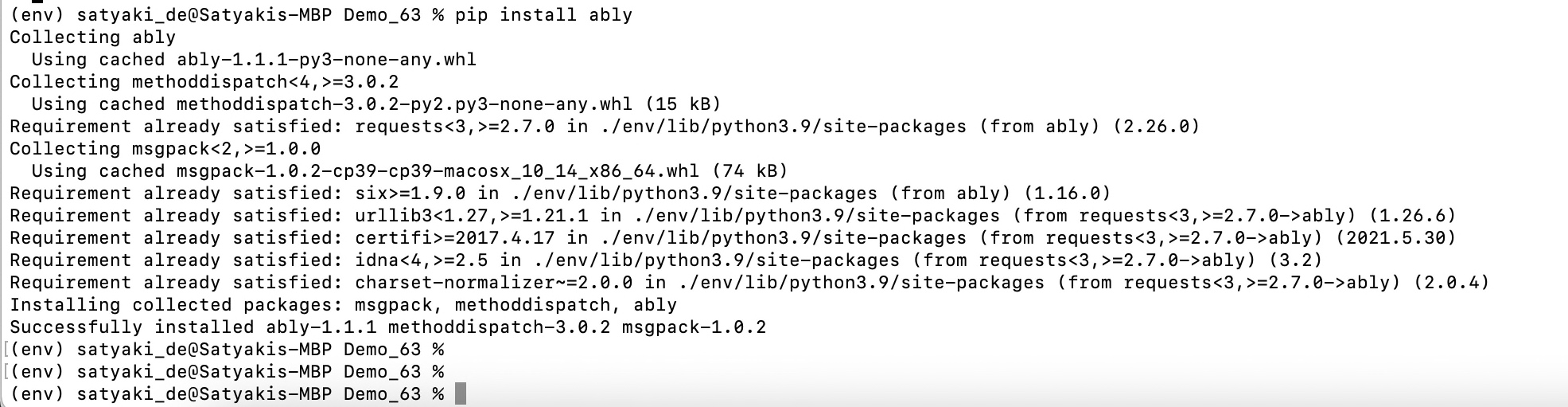
Step – 1:

Installing Packages

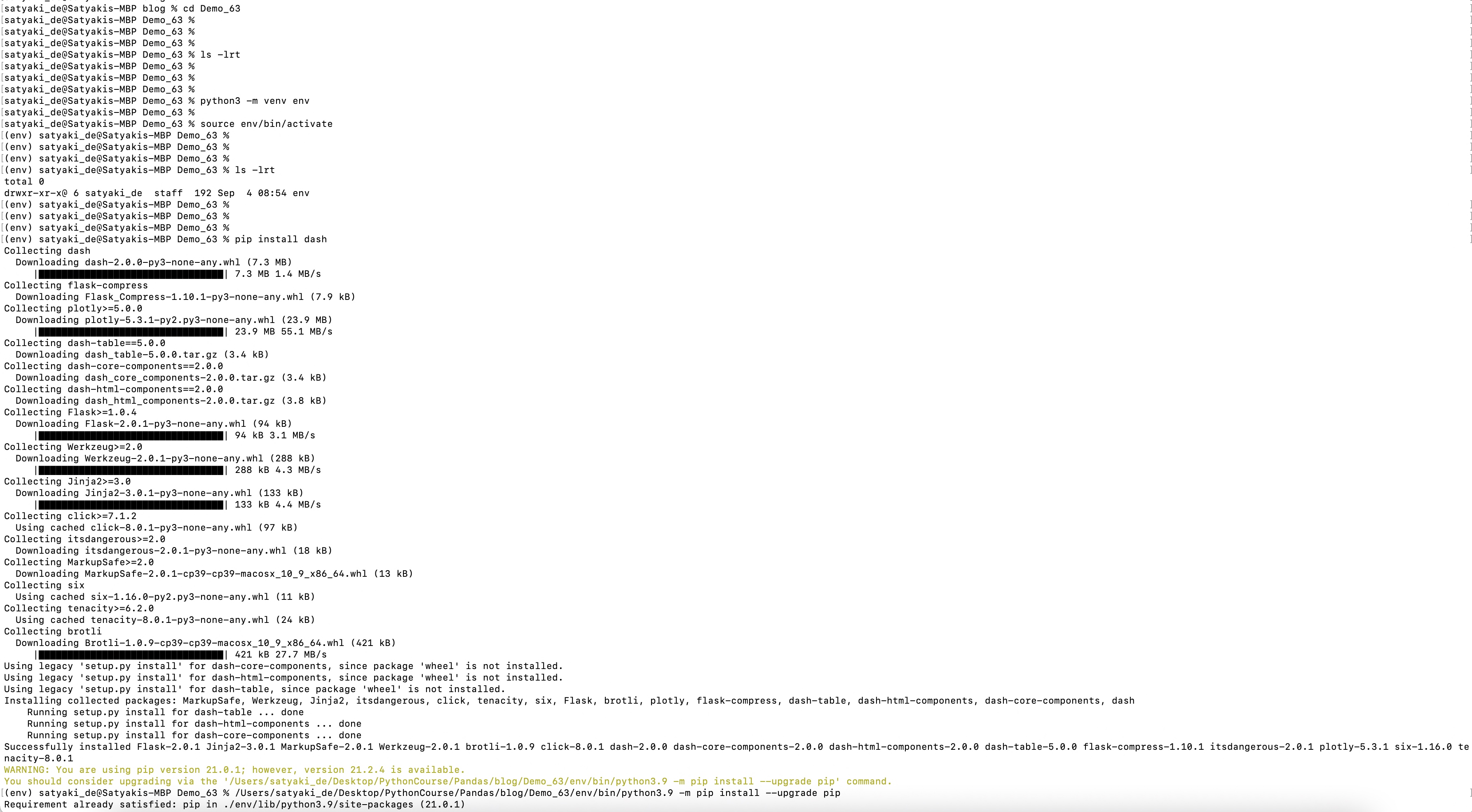
Step – 2:

Installing Packages – Continue

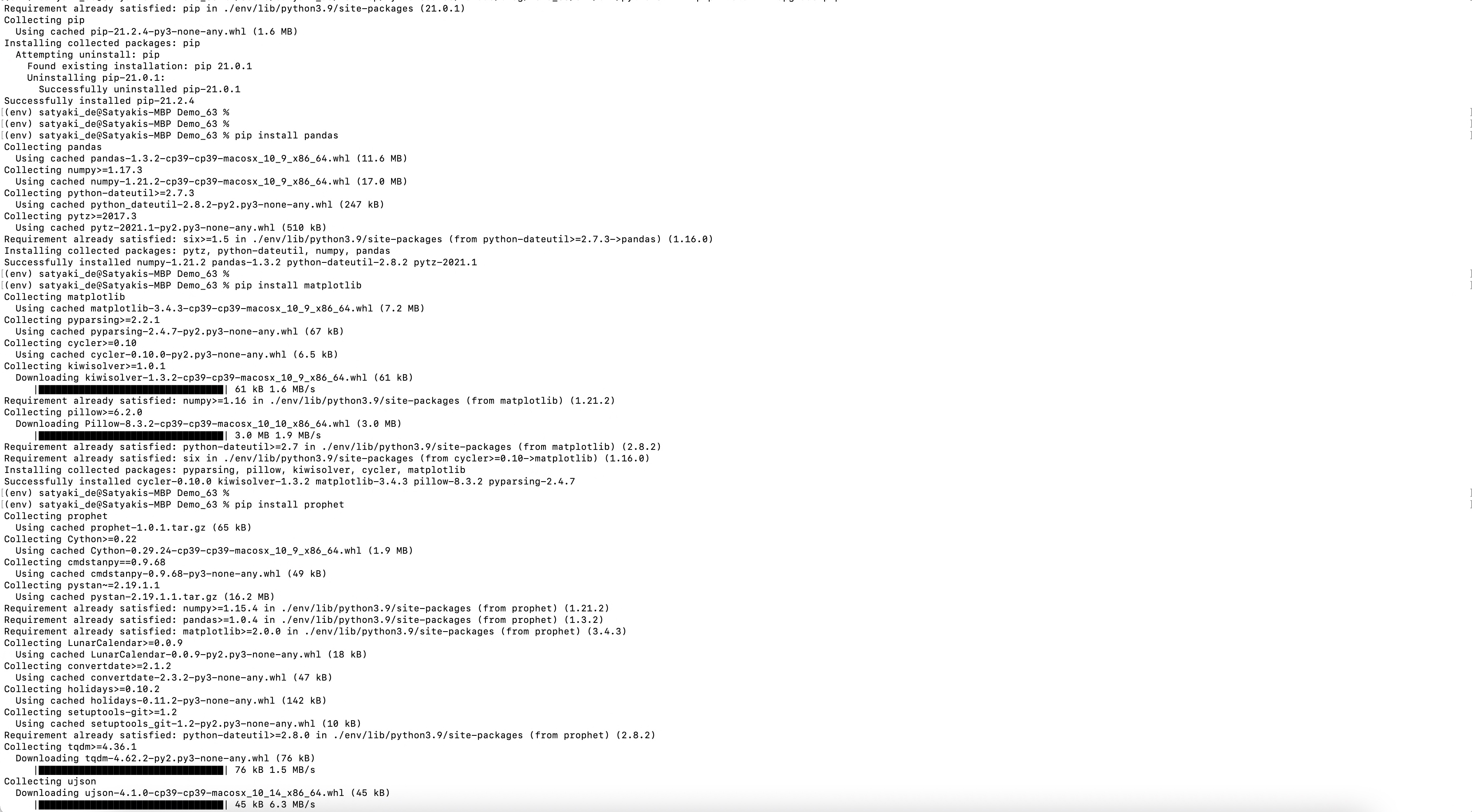
Step – 3:

Installing Packages – Continue

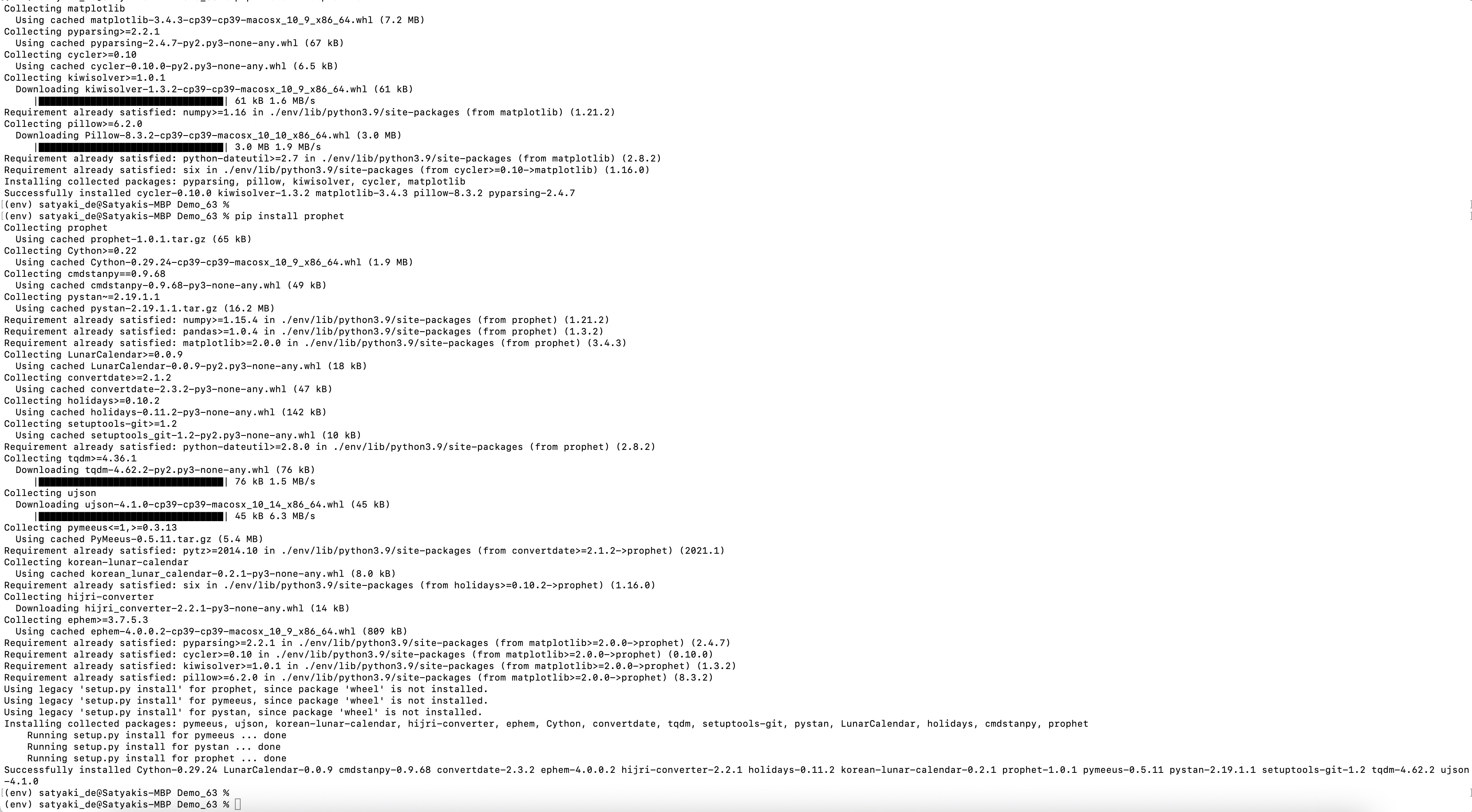
Step – 4:

Installing Packages – Final

And, here is the command to install those packages –

pip install pandas
pip install plotly
pip install prophet
pip install dash
pip install pandas
pip install ably

Code:

Since this is an extension to our previous post, we’re not going to discuss other scripts, which we’ve already discussed over there. Instead, we will talk about the enhanced scripts & the new scripts that require for this use case.

1. clsConfig.py ( This native Python script contains the configuration entries. )


################################################
#### Written By: SATYAKI DE ####
#### Written On: 15-May-2020 ####
#### Modified On: 09-Sep-2021 ####
#### ####
#### Objective: This script is a config ####
#### file, contains all the keys for ####
#### Machine-Learning & streaming dashboard.####
#### ####
################################################
import os
import platform as pl
class clsConfig(object):
Curr_Path = os.path.dirname(os.path.realpath(__file__))
os_det = pl.system()
if os_det == "Windows":
sep = '\\'
else:
sep = '/'
conf = {
'APP_ID': 1,
'ARCH_DIR': Curr_Path + sep + 'arch' + sep,
'PROFILE_PATH': Curr_Path + sep + 'profile' + sep,
'LOG_PATH': Curr_Path + sep + 'log' + sep,
'REPORT_PATH': Curr_Path + sep + 'report',
'FILE_NAME': Curr_Path + sep + 'data' + sep + 'TradeIn.csv',
'SRC_PATH': Curr_Path + sep + 'data' + sep,
'APP_DESC_1': 'Dash Integration with Ably!',
'DEBUG_IND': 'N',
'INIT_PATH': Curr_Path,
'SUBDIR' : 'data',
'ABLY_ID': 'XXX2LL.93kdkiU2:Kdsldoeie737484E',
"URL":"https://corona-api.com/countries/",
"appType":"application/json",
"conType":"keep-alive",
"limRec": 10,
"CACHE":"no-cache",
"MAX_RETRY": 3,
"coList": "DE, IN, US, CA, GB, ID, BR",
"FNC": "NewConfirmed",
"TMS": "ReportedDate",
"FND": "NewDeaths",
"FinData": "Cache.csv"
}

view raw

clsConfig.py

hosted with ❤ by GitHub

A few of the new entries, which are essential to this task are -> ABLY_ID & FinData.

2. clsPublishStream.py ( This script will publish the data transformed for Covid-19 predictions from the third-party sources. )


###############################################################
#### ####
#### Written By: Satyaki De ####
#### Written Date: 26-Jul-2021 ####
#### Modified Date: 08-Sep-2021 ####
#### ####
#### Objective: This script will publish real-time ####
#### streaming data coming out from a hosted API ####
#### sources using another popular third-party service ####
#### named Ably. Ably mimics pubsub Streaming concept, ####
#### which might be extremely useful for any start-ups. ####
#### ####
###############################################################
from ably import AblyRest
import logging
import json
from random import seed
from random import random
import json
import math
import random
from clsConfig import clsConfig as cf
# Global Section
logger = logging.getLogger('ably')
logger.addHandler(logging.StreamHandler())
ably_id = str(cf.conf['ABLY_ID'])
ably = AblyRest(ably_id)
channel = ably.channels.get('sd_channel')
# End Of Global Section
class clsPublishStream:
def __init__(self):
self.fnc = cf.conf['FNC']
def pushEvents(self, srcDF, debugInd, varVa, flg):
try:
# JSON data
# This is the default data for all the identified category
# we've prepared. You can extract this dynamically. Or, By
# default you can set their base trade details.
json_data = [{'Year_Mon': '201911', 'Brazil': 0.0, 'Canada': 0.0, 'Germany': 0.0, 'India': 0.0, 'Indonesia': 0.0, 'UnitedKingdom': 0.0, 'UnitedStates': 0.0, 'Status': flg},
{'Year_Mon': '201912', 'Brazil': 0.0, 'Canada': 0.0, 'Germany': 0.0, 'India': 0.0, 'Indonesia': 0.0, 'UnitedKingdom': 0.0, 'UnitedStates': 0.0, 'Status': flg}]
jdata = json.dumps(json_data)
# Publish a message to the sd_channel channel
channel.publish('event', jdata)
# Capturing the inbound dataframe
iDF = srcDF
# Adding new selected points
covid_dict = iDF.to_dict('records')
jdata_fin = json.dumps(covid_dict)
# Publish rest of the messages to the sd_channel channel
channel.publish('event', jdata_fin)
jdata_fin = ''
return 0
except Exception as e:
x = str(e)
print(x)
logging.info(x)
return 1

We’ve already discussed this script. The only new line that appears here is –

json_data = [{'Year_Mon': '201911', 'Brazil': 0.0, 'Canada': 0.0, 'Germany': 0.0, 'India': 0.0, 'Indonesia': 0.0, 'UnitedKingdom': 0.0, 'UnitedStates': 0.0, 'Status': flg},
            {'Year_Mon': '201912', 'Brazil': 0.0, 'Canada': 0.0, 'Germany': 0.0, 'India': 0.0, 'Indonesia': 0.0, 'UnitedKingdom': 0.0, 'UnitedStates': 0.0, 'Status': flg}]

This statement is more like a dummy feed, which creates the basic structure of your graph.

3. clsStreamConsume.py ( This script will consume the stream from Ably Queue configuration entries. )


##############################################
#### Written By: SATYAKI DE ####
#### Written On: 26-Jul-2021 ####
#### Modified On 08-Sep-2021 ####
#### ####
#### Objective: Consuming Streaming data ####
#### from Ably channels published by the ####
#### callPredictCovidAnalysisRealtime.py ####
#### ####
##############################################
import json
from clsConfig import clsConfig as cf
import requests
import logging
import time
import pandas as p
import clsL as cl
from ably import AblyRest
# Initiating Log class
l = cl.clsL()
class clsStreamConsume:
def __init__(self):
self.ably_id = str(cf.conf['ABLY_ID'])
self.fileName = str(cf.conf['FinData'])
def conStream(self, varVa, debugInd):
try:
ably_id = self.ably_id
fileName = self.fileName
var = varVa
debug_ind = debugInd
# Fetching the data
client = AblyRest(ably_id)
channel = client.channels.get('sd_channel')
message_page = channel.history()
# Counter Value
cnt = 0
# Declaring Global Data-Frame
df_conv = p.DataFrame()
for i in message_page.items:
print('Last Msg: {}'.format(i.data))
json_data = json.loads(i.data)
# Converting JSON to Dataframe
df = p.json_normalize(json_data)
df.columns = df.columns.map(lambda x: x.split(".")[-1])
if cnt == 0:
df_conv = df
else:
d_frames = [df_conv, df]
df_conv = p.concat(d_frames)
cnt += 1
# Resetting the Index Value
df_conv.reset_index(drop=True, inplace=True)
# This will check whether the current load is happening
# or not. Based on that, it will capture the old events
# from cache.
if df_conv.empty:
df_conv = p.read_csv(fileName, index = True)
else:
l.logr(fileName, debug_ind, df_conv, 'log')
return df_conv
except Exception as e:
x = str(e)
print(x)
logging.info(x)
# This will handle the error scenaio as well.
# Based on that, it will capture the old events
# from cache.
try:
df_conv = p.read_csv(fileName, index = True)
except:
df = p.DataFrame()
return df

We’ve already discussed this script in one of my earlier posts, which you will get here.

So, I’m not going to discuss all the steps in detail.

The only added part was to introduce some temporary local caching mechanism.

if df_conv.empty:
    df_conv = p.read_csv(fileName, index = True)
else:
    l.logr(fileName, debug_ind, df_conv, 'log')

4. callPredictCovidAnalysisRealtime.py ( Main calling script to fetch the COVID-19 data from the third-party source & then publish it to the Ably message queue after transforming the data & adding the prediction using Facebook’s prophet API. )


##############################################
#### Written By: SATYAKI DE ####
#### Written On: 26-Jul-2021 ####
#### Modified On 26-Jul-2021 ####
#### ####
#### Objective: Calling multiple API's ####
#### that including Prophet-API developed ####
#### by Facebook for future prediction of ####
#### Covid-19 situations in upcoming days ####
#### for world's major hotspots. ####
##############################################
import json
import clsCovidAPI as ca
from clsConfig import clsConfig as cf
import datetime
import logging
import clsL as cl
import math as m
import clsPublishStream as cps
import clsForecast as f
from prophet import Prophet
from prophet.plot import plot_plotly, plot_components_plotly
import matplotlib.pyplot as plt
import pandas as p
import datetime as dt
import time
# Disbling Warning
def warn(*args, **kwargs):
pass
import warnings
warnings.warn = warn
# Initiating Log class
l = cl.clsL()
# Helper Function that removes underscores
def countryDet(inputCD):
try:
countryCD = inputCD
if str(countryCD) == 'DE':
cntCD = 'Germany'
elif str(countryCD) == 'BR':
cntCD = 'Brazil'
elif str(countryCD) == 'GB':
cntCD = 'UnitedKingdom'
elif str(countryCD) == 'US':
cntCD = 'UnitedStates'
elif str(countryCD) == 'IN':
cntCD = 'India'
elif str(countryCD) == 'CA':
cntCD = 'Canada'
elif str(countryCD) == 'ID':
cntCD = 'Indonesia'
else:
cntCD = 'N/A'
return cntCD
except:
cntCD = 'N/A'
return cntCD
def lookupCountry(row):
try:
strCD = str(row['CountryCode'])
retVal = countryDet(strCD)
return retVal
except:
retVal = 'N/A'
return retVal
def adjustTrend(row):
try:
flTrend = float(row['trend'])
flTrendUpr = float(row['trend_upper'])
flTrendLwr = float(row['trend_lower'])
retVal = m.trunc((flTrend + flTrendUpr + flTrendLwr)/3)
if retVal < 0:
retVal = 0
return retVal
except:
retVal = 0
return retVal
def ceilTrend(row, colName):
try:
flTrend = str(row[colName])
if flTrend.find('.'):
if float(flTrend) > 0:
retVal = m.trunc(float(flTrend)) + 1
else:
retVal = m.trunc(float(flTrend))
else:
retVal = float(flTrend)
if retVal < 0:
retVal = 0
return retVal
except:
retVal = 0
return retVal
def plot_picture(inputDF, debug_ind, var, countryCD, stat):
try:
iDF = inputDF
# Lowercase the column names
iDF.columns = [c.lower() for c in iDF.columns]
# Determine which is Y axis
y_col = [c for c in iDF.columns if c.startswith('y')][0]
# Determine which is X axis
x_col = [c for c in iDF.columns if c.startswith('ds')][0]
# Data Conversion
iDF['y'] = iDF[y_col].astype('float')
iDF['ds'] = iDF[x_col].astype('datetime64[ns]')
# Forecast calculations
# Decreasing the changepoint_prior_scale to 0.001 to make the trend less flexible
m = Prophet(n_changepoints=20, yearly_seasonality=True, changepoint_prior_scale=0.001)
#m = Prophet(n_changepoints=20, yearly_seasonality=True, changepoint_prior_scale=0.04525)
#m = Prophet(n_changepoints=['2021-09-10'])
m.fit(iDF)
forecastDF = m.make_future_dataframe(periods=365)
forecastDF = m.predict(forecastDF)
l.logr('15.forecastDF_' + var + '_' + countryCD + '.csv', debug_ind, forecastDF, 'log')
df_M = forecastDF[['ds', 'trend', 'trend_lower', 'trend_upper']]
l.logr('16.df_M_' + var + '_' + countryCD + '.csv', debug_ind, df_M, 'log')
# Getting Full Country Name
cntCD = countryDet(countryCD)
# Draw forecast results
df_M['Country'] = cntCD
l.logr('17.df_M_C_' + var + '_' + countryCD + '.csv', debug_ind, df_M, 'log')
df_M['AdjustTrend'] = df_M.apply(lambda row: adjustTrend(row), axis=1)
l.logr('20.df_M_AdjustTrend_' + var + '_' + countryCD + '.csv', debug_ind, df_M, 'log')
return df_M
except Exception as e:
x = str(e)
print(x)
df = p.DataFrame()
return df
def countrySpecificDF(counryDF, val):
try:
countryName = val
df = counryDF
df_lkpFile = df[(df['CountryCode'] == val)]
return df_lkpFile
except:
df = p.DataFrame()
return df
def toNum(row, colName):
try:
flTrend = str(row[colName])
flTr, subpart = flTrend.split(' ')
retVal = int(flTr.replace('-',''))
return retVal
except:
retVal = 0
return retVal
def extractPredictedDF(OrigDF, MergePredictedDF, colName):
try:
iDF_1 = OrigDF
iDF_2 = MergePredictedDF
dt_format = '%Y-%m-%d'
iDF_1_max_group = iDF_1.groupby(["Country"] , as_index=False)["ReportedDate"].max()
iDF_2['ReportedDate'] = iDF_2.apply(lambda row: toNum(row, 'ds'), axis=1)
col_one_list = iDF_1_max_group['Country'].tolist()
col_two_list = iDF_1_max_group['ReportedDate'].tolist()
print('col_one_list: ', str(col_one_list))
print('col_two_list: ', str(col_two_list))
cnt_1_x = 1
cnt_1_y = 1
cnt_x = 0
df_M = p.DataFrame()
for i in col_one_list:
str_countryVal = str(i)
cnt_1_y = 1
for j in col_two_list:
intReportDate = int(str(j).strip().replace('-',''))
if cnt_1_x == cnt_1_y:
print('str_countryVal: ', str(str_countryVal))
print('intReportDate: ', str(intReportDate))
iDF_2_M = iDF_2[(iDF_2['Country'] == str_countryVal) & (iDF_2['ReportedDate'] > intReportDate)]
# Merging with the previous Country Code data
if cnt_x == 0:
df_M = iDF_2_M
else:
d_frames = [df_M, iDF_2_M]
df_M = p.concat(d_frames)
cnt_x += 1
cnt_1_y += 1
cnt_1_x += 1
df_M.drop(columns=['ReportedDate'], axis=1, inplace=True)
df_M.rename(columns={'ds':'ReportedDate'}, inplace=True)
df_M.rename(columns={'AdjustTrend':colName}, inplace=True)
return df_M
except:
df = p.DataFrame()
return df
def toPivot(inDF, colName):
try:
iDF = inDF
iDF_Piv = iDF.pivot_table(colName, ['ReportedDate'], 'Country')
iDF_Piv.reset_index( drop=False, inplace=True )
list1 = ['ReportedDate']
iDF_Arr = iDF['Country'].unique()
list2 = iDF_Arr.tolist()
listV = list1 + list2
iDF_Piv.reindex([listV], axis=1)
return iDF_Piv
except Exception as e:
x = str(e)
print(x)
df = p.DataFrame()
return df
def toAgg(inDF, var, debugInd, flg):
try:
iDF = inDF
colName = "ReportedDate"
list1 = list(iDF.columns.values)
list1.remove(colName)
list1 = ["Brazil", "Canada", "Germany", "India", "Indonesia", "UnitedKingdom", "UnitedStates"]
iDF['Year_Mon'] = iDF[colName].apply(lambda x:x.strftime('%Y%m'))
iDF.drop(columns=[colName], axis=1, inplace=True)
ColNameGrp = "Year_Mon"
print('List1 Aggregate:: ', str(list1))
print('ColNameGrp :: ', str(ColNameGrp))
iDF_T = iDF[["Year_Mon", "Brazil", "Canada", "Germany", "India", "Indonesia", "UnitedKingdom", "UnitedStates"]]
iDF_T.fillna(0, inplace = True)
print('iDF_T:: ')
print(iDF_T)
iDF_1_max_group = iDF_T.groupby(ColNameGrp, as_index=False)[list1].sum()
iDF_1_max_group['Status'] = flg
return iDF_1_max_group
except Exception as e:
x = str(e)
print(x)
df = p.DataFrame()
return df
def publishEvents(inDF1, inDF2, inDF3, inDF4, var, debugInd):
try:
# Original Covid Data from API
iDF1 = inDF1
iDF2 = inDF2
NC = 'NewConfirmed'
ND = 'NewDeaths'
iDF1_PV = toPivot(iDF1, NC)
iDF1_PV['ReportedDate'] = p.to_datetime(iDF1_PV['ReportedDate'])
l.logr('57.iDF1_PV_' + var + '.csv', debugInd, iDF1_PV, 'log')
iDF2_PV = toPivot(iDF2, ND)
iDF2_PV['ReportedDate'] = p.to_datetime(iDF2_PV['ReportedDate'])
l.logr('58.iDF2_PV_' + var + '.csv', debugInd, iDF2_PV, 'log')
# Predicted Covid Data from Facebook API
iDF3 = inDF3
iDF4 = inDF4
iDF3_PV = toPivot(iDF3, NC)
l.logr('59.iDF3_PV_' + var + '.csv', debugInd, iDF3_PV, 'log')
iDF4_PV = toPivot(iDF4, ND)
l.logr('60.iDF4_PV_' + var + '.csv', debugInd, iDF4_PV, 'log')
# Now aggregating data based on year-month only
iDF1_Agg = toAgg(iDF1_PV, var, debugInd, NC)
l.logr('61.iDF1_Agg_' + var + '.csv', debugInd, iDF1_Agg, 'log')
iDF2_Agg = toAgg(iDF2_PV, var, debugInd, ND)
l.logr('62.iDF2_Agg_' + var + '.csv', debugInd, iDF2_Agg, 'log')
iDF3_Agg = toAgg(iDF3_PV, var, debugInd, NC)
l.logr('63.iDF3_Agg_' + var + '.csv', debugInd, iDF3_Agg, 'log')
iDF4_Agg = toAgg(iDF4_PV, var, debugInd, ND)
l.logr('64.iDF4_Agg_' + var + '.csv', debugInd, iDF4_Agg, 'log')
# Initiating Ably class to push events
x1 = cps.clsPublishStream()
# Pushing both the Historical Confirmed Cases
retVal_1 = x1.pushEvents(iDF1_Agg, debugInd, var, NC)
if retVal_1 == 0:
print('Successfully historical event pushed!')
else:
print('Failed to push historical events!')
# Pushing both the Historical Death Cases
retVal_3 = x1.pushEvents(iDF2_Agg, debugInd, var, ND)
if retVal_3 == 0:
print('Successfully historical event pushed!')
else:
print('Failed to push historical events!')
time.sleep(5)
# Pushing both the New Confirmed Cases
retVal_2 = x1.pushEvents(iDF3_Agg, debugInd, var, NC)
if retVal_2 == 0:
print('Successfully predicted event pushed!')
else:
print('Failed to push predicted events!')
# Pushing both the New Death Cases
retVal_4 = x1.pushEvents(iDF4_Agg, debugInd, var, ND)
if retVal_4 == 0:
print('Successfully predicted event pushed!')
else:
print('Failed to push predicted events!')
return 0
except Exception as e:
x = str(e)
print(x)
return 1
def main():
try:
var1 = datetime.datetime.now().strftime("%Y-%m-%d_%H-%M-%S")
print('*' *60)
DInd = 'Y'
NC = 'New Confirmed'
ND = 'New Dead'
SM = 'data process Successful!'
FM = 'data process Failure!'
print("Calling the custom Package for large file splitting..")
print('Start Time: ' + str(var1))
countryList = str(cf.conf['coList']).split(',')
# Initiating Log Class
general_log_path = str(cf.conf['LOG_PATH'])
# Enabling Logging Info
logging.basicConfig(filename=general_log_path + 'CovidAPI.log', level=logging.INFO)
# Create the instance of the Covid API Class
x1 = ca.clsCovidAPI()
# Let's pass this to our map section
retDF = x1.searchQry(var1, DInd)
retVal = int(retDF.shape[0])
if retVal > 0:
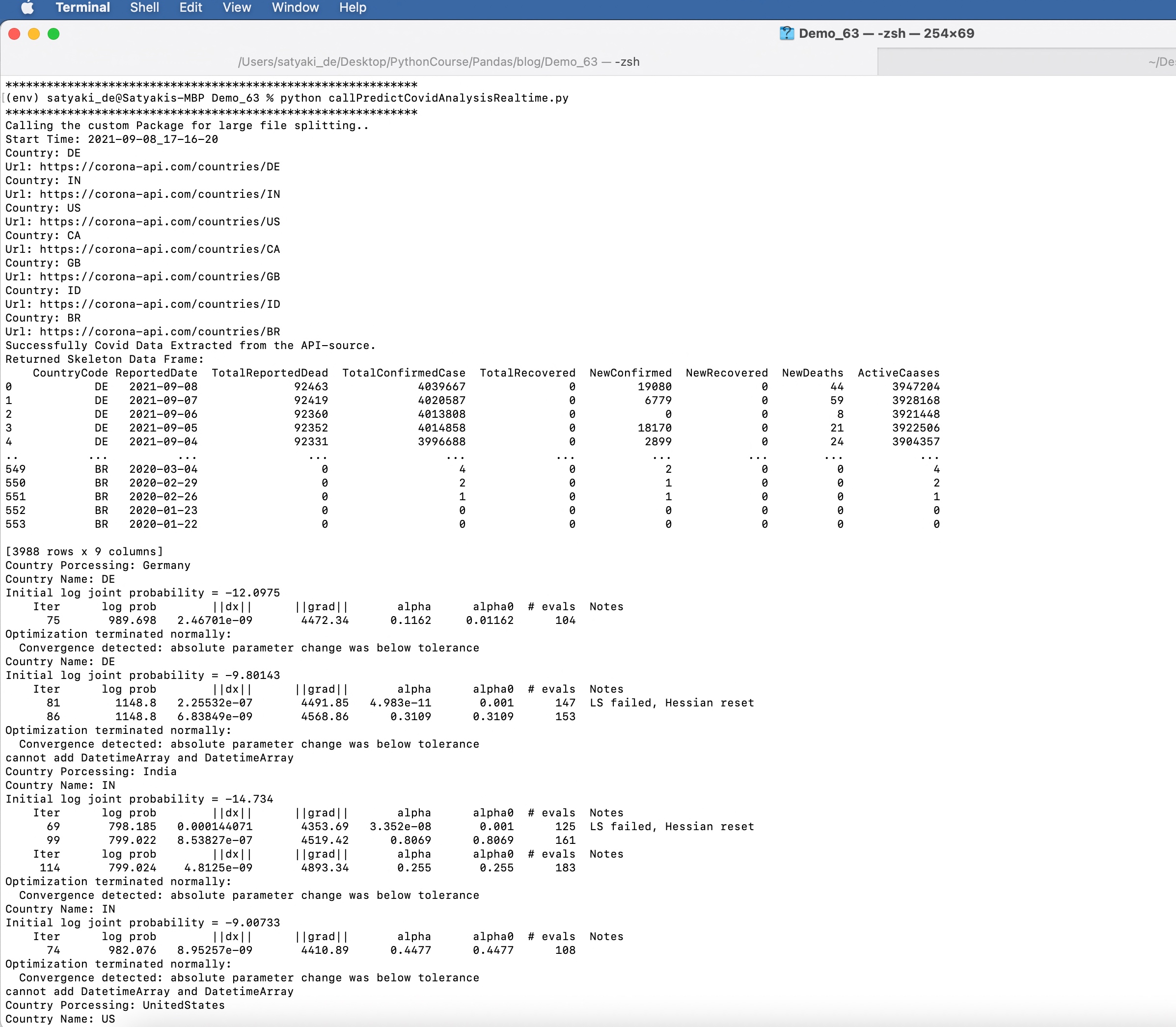
print('Successfully Covid Data Extracted from the API-source.')
else:
print('Something wrong with your API-source!')
# Extracting Skeleton Data
df = retDF[['data.code', 'date', 'deaths', 'confirmed', 'recovered', 'new_confirmed', 'new_recovered', 'new_deaths', 'active']]
df.columns = ['CountryCode', 'ReportedDate', 'TotalReportedDead', 'TotalConfirmedCase', 'TotalRecovered', 'NewConfirmed', 'NewRecovered', 'NewDeaths', 'ActiveCaases']
df.dropna()
print('Returned Skeleton Data Frame: ')
print(df)
l.logr('5.df_' + var1 + '.csv', DInd, df, 'log')
# Due to source data issue, application will perform of
# avg of counts based on dates due to multiple entries
g_df = df.groupby(["CountryCode", "ReportedDate"] , as_index=False)["TotalReportedDead","TotalConfirmedCase","TotalRecovered","NewConfirmed","NewRecovered","NewDeaths","ActiveCaases"].mean()
g_df['TotalReportedDead_M'] = g_df.apply(lambda row: ceilTrend(row, 'TotalReportedDead'), axis=1)
g_df['TotalConfirmedCase_M'] = g_df.apply(lambda row: ceilTrend(row, 'TotalConfirmedCase'), axis=1)
g_df['TotalRecovered_M'] = g_df.apply(lambda row: ceilTrend(row, 'TotalRecovered'), axis=1)
g_df['NewConfirmed_M'] = g_df.apply(lambda row: ceilTrend(row, 'NewConfirmed'), axis=1)
g_df['NewRecovered_M'] = g_df.apply(lambda row: ceilTrend(row, 'NewRecovered'), axis=1)
g_df['NewDeaths_M'] = g_df.apply(lambda row: ceilTrend(row, 'NewDeaths'), axis=1)
g_df['ActiveCaases_M'] = g_df.apply(lambda row: ceilTrend(row, 'ActiveCaases'), axis=1)
# Dropping old columns
g_df.drop(columns=['TotalReportedDead', 'TotalConfirmedCase', 'TotalRecovered', 'NewConfirmed', 'NewRecovered', 'NewDeaths', 'ActiveCaases'], axis=1, inplace=True)
# Renaming the new columns to old columns
g_df.rename(columns={'TotalReportedDead_M':'TotalReportedDead'}, inplace=True)
g_df.rename(columns={'TotalConfirmedCase_M':'TotalConfirmedCase'}, inplace=True)
g_df.rename(columns={'TotalRecovered_M':'TotalRecovered'}, inplace=True)
g_df.rename(columns={'NewConfirmed_M':'NewConfirmed'}, inplace=True)
g_df.rename(columns={'NewRecovered_M':'NewRecovered'}, inplace=True)
g_df.rename(columns={'NewDeaths_M':'NewDeaths'}, inplace=True)
g_df.rename(columns={'ActiveCaases_M':'ActiveCaases'}, inplace=True)
l.logr('5.g_df_' + var1 + '.csv', DInd, g_df, 'log')
# Working with forecast
# Create the instance of the Forecast API Class
x2 = f.clsForecast()
# Fetching each country name & then get the details
cnt = 6
cnt_x = 0
cnt_y = 0
df_M_Confirmed = p.DataFrame()
df_M_Deaths = p.DataFrame()
for i in countryList:
try:
cntryIndiv = i.strip()
cntryFullName = countryDet(cntryIndiv)
print('Country Porcessing: ' + str(cntryFullName))
# Creating dataframe for each country
# Germany Main DataFrame
dfCountry = countrySpecificDF(g_df, cntryIndiv)
l.logr(str(cnt) + '.df_' + cntryIndiv + '_' + var1 + '.csv', DInd, dfCountry, 'log')
# Let's pass this to our map section
retDFGenNC = x2.forecastNewConfirmed(dfCountry, DInd, var1)
statVal = str(NC)
a1 = plot_picture(retDFGenNC, DInd, var1, cntryIndiv, statVal)
# Merging with the previous Country Code data
if cnt_x == 0:
df_M_Confirmed = a1
else:
d_frames = [df_M_Confirmed, a1]
df_M_Confirmed = p.concat(d_frames)
cnt_x += 1
retDFGenNC_D = x2.forecastNewDead(dfCountry, DInd, var1)
statVal = str(ND)
a2 = plot_picture(retDFGenNC_D, DInd, var1, cntryIndiv, statVal)
# Merging with the previous Country Code data
if cnt_y == 0:
df_M_Deaths = a2
else:
d_frames = [df_M_Deaths, a2]
df_M_Deaths = p.concat(d_frames)
cnt_y += 1
# Printing Proper message
if (a1 + a2) == 0:
oprMsg = cntryFullName + ' ' + SM
print(oprMsg)
else:
oprMsg = cntryFullName + ' ' + FM
print(oprMsg)
# Resetting the dataframe value for the next iteration
dfCountry = p.DataFrame()
cntryIndiv = ''
oprMsg = ''
cntryFullName = ''
a1 = 0
a2 = 0
statVal = ''
cnt += 1
except Exception as e:
x = str(e)
print(x)
l.logr('49.df_M_Confirmed_' + var1 + '.csv', DInd, df_M_Confirmed, 'log')
l.logr('50.df_M_Deaths_' + var1 + '.csv', DInd, df_M_Deaths, 'log')
# Removing unwanted columns
df_M_Confirmed.drop(columns=['trend', 'trend_lower', 'trend_upper'], axis=1, inplace=True)
df_M_Deaths.drop(columns=['trend', 'trend_lower', 'trend_upper'], axis=1, inplace=True)
l.logr('51.df_M_Confirmed_' + var1 + '.csv', DInd, df_M_Confirmed, 'log')
l.logr('52.df_M_Deaths_' + var1 + '.csv', DInd, df_M_Deaths, 'log')
# Creating original dataframe from the source API
df_M_Confirmed_Orig = g_df[['CountryCode', 'ReportedDate','NewConfirmed']]
df_M_Deaths_Orig = g_df[['CountryCode', 'ReportedDate','NewDeaths']]
# Transforming Country Code
df_M_Confirmed_Orig['Country'] = df_M_Confirmed_Orig.apply(lambda row: lookupCountry(row), axis=1)
df_M_Deaths_Orig['Country'] = df_M_Deaths_Orig.apply(lambda row: lookupCountry(row), axis=1)
# Dropping unwanted column
df_M_Confirmed_Orig.drop(columns=['CountryCode'], axis=1, inplace=True)
df_M_Deaths_Orig.drop(columns=['CountryCode'], axis=1, inplace=True)
# Reordering columns
df_M_Confirmed_Orig = df_M_Confirmed_Orig.reindex(['ReportedDate','Country','NewConfirmed'], axis=1)
df_M_Deaths_Orig = df_M_Deaths_Orig.reindex(['ReportedDate','Country','NewDeaths'], axis=1)
l.logr('53.df_M_Confirmed_Orig_' + var1 + '.csv', DInd, df_M_Confirmed_Orig, 'log')
l.logr('54.df_M_Deaths_Orig_' + var1 + '.csv', DInd, df_M_Deaths_Orig, 'log')
# Filter out only the predicted data
filterDF_1 = extractPredictedDF(df_M_Confirmed_Orig, df_M_Confirmed, 'NewConfirmed')
l.logr('55.filterDF_1_' + var1 + '.csv', DInd, filterDF_1, 'log')
filterDF_2 = extractPredictedDF(df_M_Confirmed_Orig, df_M_Confirmed, 'NewDeaths')
l.logr('56.filterDF_2_' + var1 + '.csv', DInd, filterDF_2, 'log')
# Calling the final publish events
retVa = publishEvents(df_M_Confirmed_Orig, df_M_Deaths_Orig, filterDF_1, filterDF_2, var1, DInd)
if retVa == 0:
print('Successfully stream processed!')
else:
print('Failed to process stream!')
var2 = datetime.datetime.now().strftime("%Y-%m-%d_%H-%M-%S")
print('End Time: ' + str(var2))
print('*' *60)
except Exception as e:
x = str(e)
print(x)
if __name__ == "__main__":
main()

Let us understand the enhancement part of this script –

We’ve taken out the plotly part as we will use a separate dashboard script to visualize the data trend.

However, we need to understand the initial consumed data from API & how we transform the data, which will be helpful for visualization.

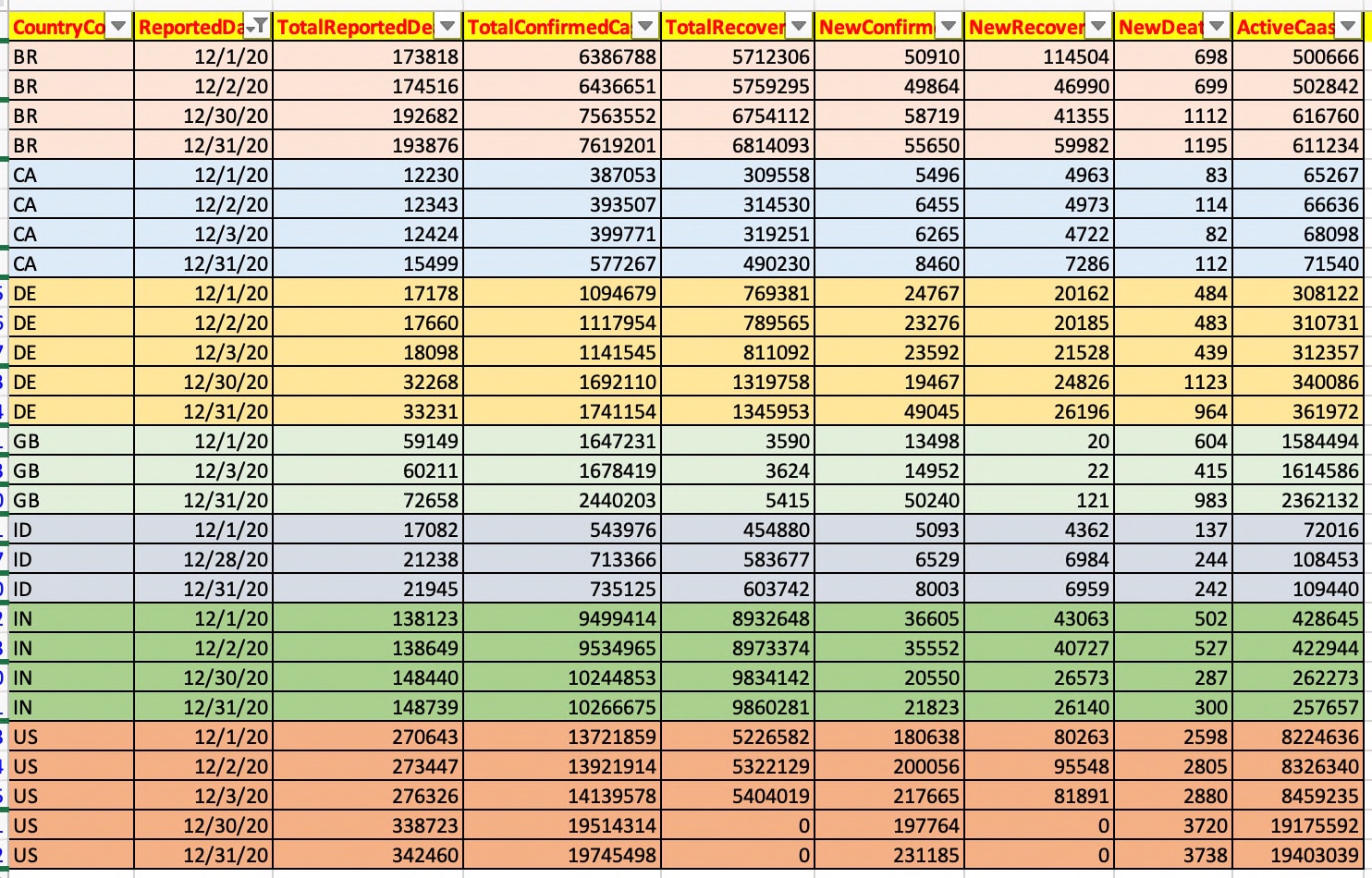
The initial captured data should look like this after extracting only the relevant elements from the API response.

Initial Data from API

As you can see that based on the country & reported date, our application is consuming attributes like Total-Reported-Death, Total-Recovered, New-death, New-Confirmed & so on.

From this list, we’ve taken two attributes for our use cases & they are New-Death & New-Confirmed. Also, we’re predicting the Future-New-Death & Future-New-Confirmed based on the historical data using Facebook’s prophet API.

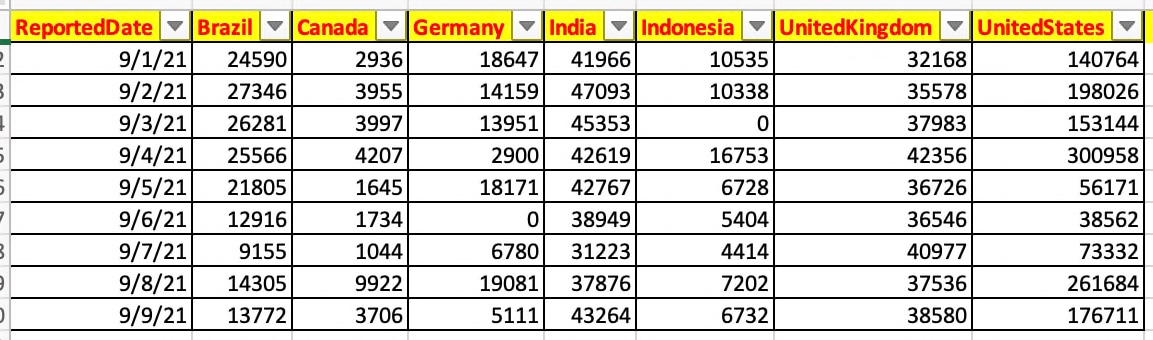
And, we would be transposing them & extract the countries & put them as columns for better representations.

Transposed Data

Hence, here is the code that we should be exploring –

def toPivot(inDF, colName):
    try:
        iDF = inDF

        iDF_Piv = iDF.pivot_table(colName, ['ReportedDate'], 'Country')
        iDF_Piv.reset_index( drop=False, inplace=True )

        list1 = ['ReportedDate']

        iDF_Arr = iDF['Country'].unique()
        list2 = iDF_Arr.tolist()

        listV = list1 + list2

        iDF_Piv.reindex([listV], axis=1)

        return iDF_Piv
    except Exception as e:
        x = str(e)
        print(x)

        df = p.DataFrame()

        return df

Now, using the pivot_table function, we’re transposing the row values into the columns. And, later we’ve realigned the column heading as per our desired format.

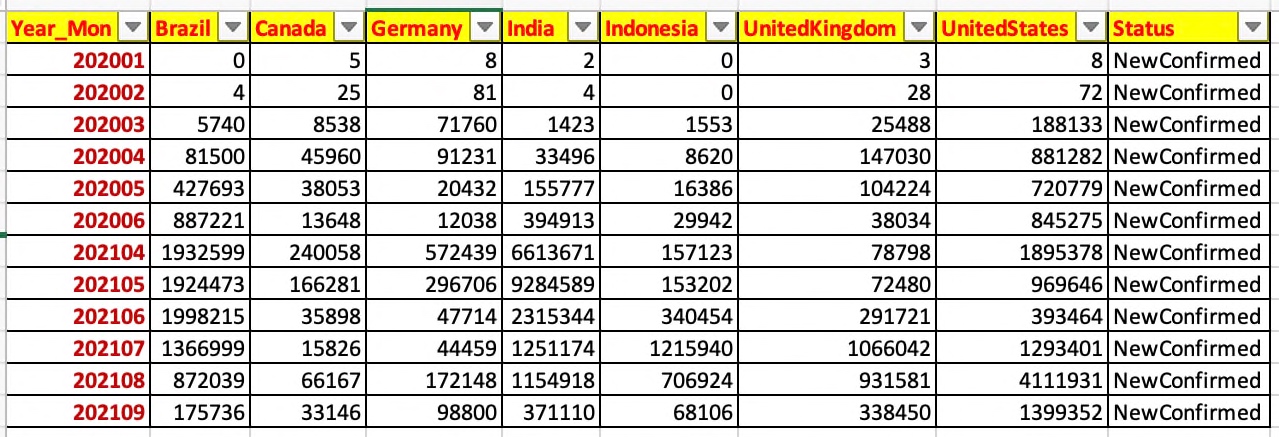
However, we still have the data as per individual daily dates in this case. We want to eliminate that by removing the daypart & then aggregate them by month as shown below –

Aggregated Data

And, here is the code for that –

def toAgg(inDF, var, debugInd, flg):
    try:
        iDF = inDF
        colName = "ReportedDate"

        list1 = list(iDF.columns.values)
        list1.remove(colName)

        list1 = ["Brazil", "Canada", "Germany", "India", "Indonesia", "UnitedKingdom", "UnitedStates"]

        iDF['Year_Mon'] = iDF[colName].apply(lambda x:x.strftime('%Y%m'))
        iDF.drop(columns=[colName], axis=1, inplace=True)

        ColNameGrp = "Year_Mon"
        print('List1 Aggregate:: ', str(list1))
        print('ColNameGrp :: ', str(ColNameGrp))

        iDF_T = iDF[["Year_Mon", "Brazil", "Canada", "Germany", "India", "Indonesia", "UnitedKingdom", "UnitedStates"]]
        iDF_T.fillna(0, inplace = True)
        print('iDF_T:: ')
        print(iDF_T)

        iDF_1_max_group = iDF_T.groupby(ColNameGrp, as_index=False)[list1].sum()
        iDF_1_max_group['Status'] = flg

        return iDF_1_max_group
    except Exception as e:
        x = str(e)
        print(x)

        df = p.DataFrame()

        return df

From the above snippet we can conclude that the application is taking out the daypart & then aggregate it based on the Year_Mon attribute.

The following snippet will push the final transformed data to Ably queue –

x1 = cps.clsPublishStream()

# Pushing both the Historical Confirmed Cases
retVal_1 = x1.pushEvents(iDF1_Agg, debugInd, var, NC)

if retVal_1 == 0:
    print('Successfully historical event pushed!')
else:
    print('Failed to push historical events!')

5. dashboard_realtime.py ( Main calling script to consume the data from Ably queue & then visualize the trend. )


##############################################
#### Written By: SATYAKI DE ####
#### Written On: 08-Sep-2021 ####
#### Modified On 08-Sep-2021 ####
#### ####
#### Objective: This is the main script ####
#### to invoke dashboard after consuming ####
#### streaming real-time predicted data ####
#### using Facebook API & Ably message Q. ####
#### ####
#### This script will show the trend ####
#### comparison between major democracies ####
#### of the world. ####
#### ####
##############################################
import datetime
import dash
from dash import dcc
from dash import html
import plotly
from dash.dependencies import Input, Output
from ably import AblyRest
from clsConfig import clsConfig as cf
import pandas as p
# Main Class to consume streaming
import clsStreamConsume as ca
import numpy as np
# Create the instance of the Covid API Class
x1 = ca.clsStreamConsume()
external_stylesheets = ['https://codepen.io/chriddyp/pen/bWLwgP.css'%5D
app = dash.Dash(__name__, external_stylesheets=external_stylesheets)
app.layout = html.Div(
html.Div([
html.H1("Covid-19 Trend Dashboard",
className='text-center text-primary mb-4'),
html.H5(children='''
Dash: Covid-19 Trend – (Present Vs Future)
'''),
html.P("Covid-19: New Confirmed Cases:",
style={"textDecoration": "underline"}),
dcc.Graph(id='live-update-graph-1'),
html.P("Covid-19: New Death Cases:",
style={"textDecoration": "underline"}),
dcc.Graph(id='live-update-graph-2'),
dcc.Interval(
id='interval-component',
interval=5*1000, # in milliseconds
n_intervals=0
)
], className="row", style={'marginBottom': 10, 'marginTop': 10})
)
def to_OptimizeString(row):
try:
x_str = str(row['Year_Mon'])
dt_format = '%Y%m%d'
finStr = x_str + '01'
strReportDate = datetime.datetime.strptime(finStr, dt_format)
return strReportDate
except Exception as e:
x = str(e)
print(x)
dt_format = '%Y%m%d'
var = '20990101'
strReportDate = datetime.strptime(var, dt_format)
return strReportDate
def fetchEvent(var1, DInd):
try:
# Let's pass this to our map section
iDF_M = x1.conStream(var1, DInd)
# Converting Year_Mon to dates
iDF_M['Year_Mon_Mod']= iDF_M.apply(lambda row: to_OptimizeString(row), axis=1)
# Dropping old columns
iDF_M.drop(columns=['Year_Mon'], axis=1, inplace=True)
#Renaming new column to old column
iDF_M.rename(columns={'Year_Mon_Mod':'Year_Mon'}, inplace=True)
return iDF_M
except Exception as e:
x = str(e)
print(x)
iDF_M = p.DataFrame()
return iDF_M
# Multiple components can update everytime interval gets fired.
@app.callback(Output('live-update-graph-1', 'figure'),
Input('interval-component', 'n_intervals'))
def update_graph_live(n):
try:
var1 = datetime.datetime.now().strftime("%Y-%m-%d_%H-%M-%S")
print('*' *60)
DInd = 'Y'
# Let's pass this to our map section
retDF = fetchEvent(var1, DInd)
# Create the graph with subplots
#fig = plotly.tools.make_subplots(rows=2, cols=1, shared_xaxes=True, vertical_spacing=0.3, horizontal_spacing=0.2)
fig = plotly.tools.make_subplots(rows=2, cols=1, vertical_spacing=0.3, horizontal_spacing=0.2)
# Routing data to dedicated DataFrame
retDFNC = retDF.loc[(retDF['Status'] == 'NewConfirmed')]
# Adding different chart into one dashboard
# First Use Case – New Confirmed
fig.append_trace({'x':retDFNC.Year_Mon,'y':retDFNC.Brazil,'type':'scatter','name':'Brazil'},1,1)
fig.append_trace({'x':retDFNC.Year_Mon,'y':retDFNC.Canada,'type':'scatter','name':'Canada'},1,1)
fig.append_trace({'x':retDFNC.Year_Mon,'y':retDFNC.Germany,'type':'scatter','name':'Germany'},1,1)
fig.append_trace({'x':retDFNC.Year_Mon,'y':retDFNC.India,'type':'scatter','name':'India'},1,1)
fig.append_trace({'x':retDFNC.Year_Mon,'y':retDFNC.Indonesia,'type':'scatter','name':'Indonesia'},1,1)
fig.append_trace({'x':retDFNC.Year_Mon,'y':retDFNC.UnitedKingdom,'type':'scatter','name':'United Kingdom'},1,1)
fig.append_trace({'x':retDFNC.Year_Mon,'y':retDFNC.UnitedStates,'type':'scatter','name':'United States'},1,1)
return fig
except Exception as e:
x = str(e)
print(x)
# Create the graph with subplots
fig = plotly.tools.make_subplots(rows=2, cols=1, vertical_spacing=0.2)
fig['layout']['margin'] = {
'l': 30, 'r': 10, 'b': 30, 't': 10
}
fig['layout']['legend'] = {'x': 0, 'y': 1, 'xanchor': 'left'}
return fig
# Multiple components can update everytime interval gets fired.
@app.callback(Output('live-update-graph-2', 'figure'),
Input('interval-component', 'n_intervals'))
def update_graph_live(n):
try:
var1 = datetime.datetime.now().strftime("%Y-%m-%d_%H-%M-%S")
print('*' *60)
DInd = 'Y'
# Let's pass this to our map section
retDF = fetchEvent(var1, DInd)
# Create the graph with subplots
#fig = plotly.tools.make_subplots(rows=2, cols=1, shared_xaxes=True, vertical_spacing=0.3, horizontal_spacing=0.2)
fig = plotly.tools.make_subplots(rows=2, cols=1, vertical_spacing=0.3, horizontal_spacing=0.2)
# Routing data to dedicated DataFrame
retDFND = retDF.loc[(retDF['Status'] == 'NewDeaths')]
# Adding different chart into one dashboard
# Second Use Case – New Confirmed
fig.append_trace({'x':retDFND.Year_Mon,'y':retDFND.Brazil,'type':'bar','name':'Brazil'},1,1)
fig.append_trace({'x':retDFND.Year_Mon,'y':retDFND.Canada,'type':'bar','name':'Canada'},1,1)
fig.append_trace({'x':retDFND.Year_Mon,'y':retDFND.Germany,'type':'bar','name':'Germany'},1,1)
fig.append_trace({'x':retDFND.Year_Mon,'y':retDFND.India,'type':'bar','name':'India'},1,1)
fig.append_trace({'x':retDFND.Year_Mon,'y':retDFND.Indonesia,'type':'bar','name':'Indonesia'},1,1)
fig.append_trace({'x':retDFND.Year_Mon,'y':retDFND.UnitedKingdom,'type':'bar','name':'United Kingdom'},1,1)
fig.append_trace({'x':retDFND.Year_Mon,'y':retDFND.UnitedStates,'type':'bar','name':'United States'},1,1)
return fig
except Exception as e:
x = str(e)
print(x)
# Create the graph with subplots
fig = plotly.tools.make_subplots(rows=2, cols=1, vertical_spacing=0.2)
fig['layout']['margin'] = {
'l': 30, 'r': 10, 'b': 30, 't': 10
}
fig['layout']['legend'] = {'x': 0, 'y': 1, 'xanchor': 'left'}
return fig
if __name__ == '__main__':
app.run_server(debug=True)

Let us explore the critical snippet as this is a brand new script –

external_stylesheets = ['https://codepen.io/chriddyp/pen/bWLwgP.css']

app = dash.Dash(__name__, external_stylesheets=external_stylesheets)

app.layout = html.Div(
    html.Div([
        html.H1("Covid-19 Trend Dashboard",
                        className='text-center text-primary mb-4'),
        html.H5(children='''
            Dash: Covid-19 Trend - (Present Vs Future)
        '''),
        html.P("Covid-19: New Confirmed Cases:",
               style={"textDecoration": "underline"}),
        dcc.Graph(id='live-update-graph-1'),
        html.P("Covid-19: New Death Cases:",
               style={"textDecoration": "underline"}),
        dcc.Graph(id='live-update-graph-2'),
        dcc.Interval(
            id='interval-component',
            interval=5*1000, # in milliseconds
            n_intervals=0
        )
    ], className="row", style={'marginBottom': 10, 'marginTop': 10})
)

You need to understand the basics of HTML as this framework works seamlessly with it. To know more about the supported HTML, one needs to visit the following link.

def to_OptimizeString(row):
    try:
        x_str = str(row['Year_Mon'])

        dt_format = '%Y%m%d'
        finStr = x_str + '01'

        strReportDate = datetime.datetime.strptime(finStr, dt_format)

        return strReportDate

    except Exception as e:
        x = str(e)
        print(x)

        dt_format = '%Y%m%d'
        var = '20990101'

        strReportDate = datetime.strptime(var, dt_format)

        return strReportDate

The application is converting Year-Month combinations from string to date for better projection.

Also, we’ve implemented a dashboard that will refresh every five milliseconds.

def fetchEvent(var1, DInd):
    try:
        # Let's pass this to our map section
        iDF_M = x1.conStream(var1, DInd)

        # Converting Year_Mon to dates
        iDF_M['Year_Mon_Mod']= iDF_M.apply(lambda row: to_OptimizeString(row), axis=1)

        # Dropping old columns
        iDF_M.drop(columns=['Year_Mon'], axis=1, inplace=True)

        #Renaming new column to old column
        iDF_M.rename(columns={'Year_Mon_Mod':'Year_Mon'}, inplace=True)

        return iDF_M

    except Exception as e:
        x = str(e)
        print(x)

        iDF_M = p.DataFrame()

        return iDF_M

The application will consume all the events from the Ably Queue using the above snippet.

@app.callback(Output('live-update-graph-1', 'figure'),
              Input('interval-component', 'n_intervals'))
def update_graph_live(n):

We’ve implemented the callback mechanism to get the latest data from the Queue & then update the graph accordingly & finally share the updated chart & return that to our method, which is calling it.

# Routing data to dedicated DataFrame
retDFNC = retDF.loc[(retDF['Status'] == 'NewConfirmed')]

Based on the flag, we’re pushing the data into our target dataframe, from where the application will consume the data into the charts.

fig.append_trace({'x':retDFNC.Year_Mon,'y':retDFNC.Brazil,'type':'scatter','name':'Brazil'},1,1)
fig.append_trace({'x':retDFNC.Year_Mon,'y':retDFNC.Canada,'type':'scatter','name':'Canada'},1,1)
fig.append_trace({'x':retDFNC.Year_Mon,'y':retDFNC.Germany,'type':'scatter','name':'Germany'},1,1)
fig.append_trace({'x':retDFNC.Year_Mon,'y':retDFNC.India,'type':'scatter','name':'India'},1,1)
fig.append_trace({'x':retDFNC.Year_Mon,'y':retDFNC.Indonesia,'type':'scatter','name':'Indonesia'},1,1)
fig.append_trace({'x':retDFNC.Year_Mon,'y':retDFNC.UnitedKingdom,'type':'scatter','name':'United Kingdom'},1,1)
fig.append_trace({'x':retDFNC.Year_Mon,'y':retDFNC.UnitedStates,'type':'scatter','name':'United States'},1,1)

Different country’s KPI elements are fetched & mapped into their corresponding axis to project the graph with visual details.

Same approach goes for the other graph as well.


Run:

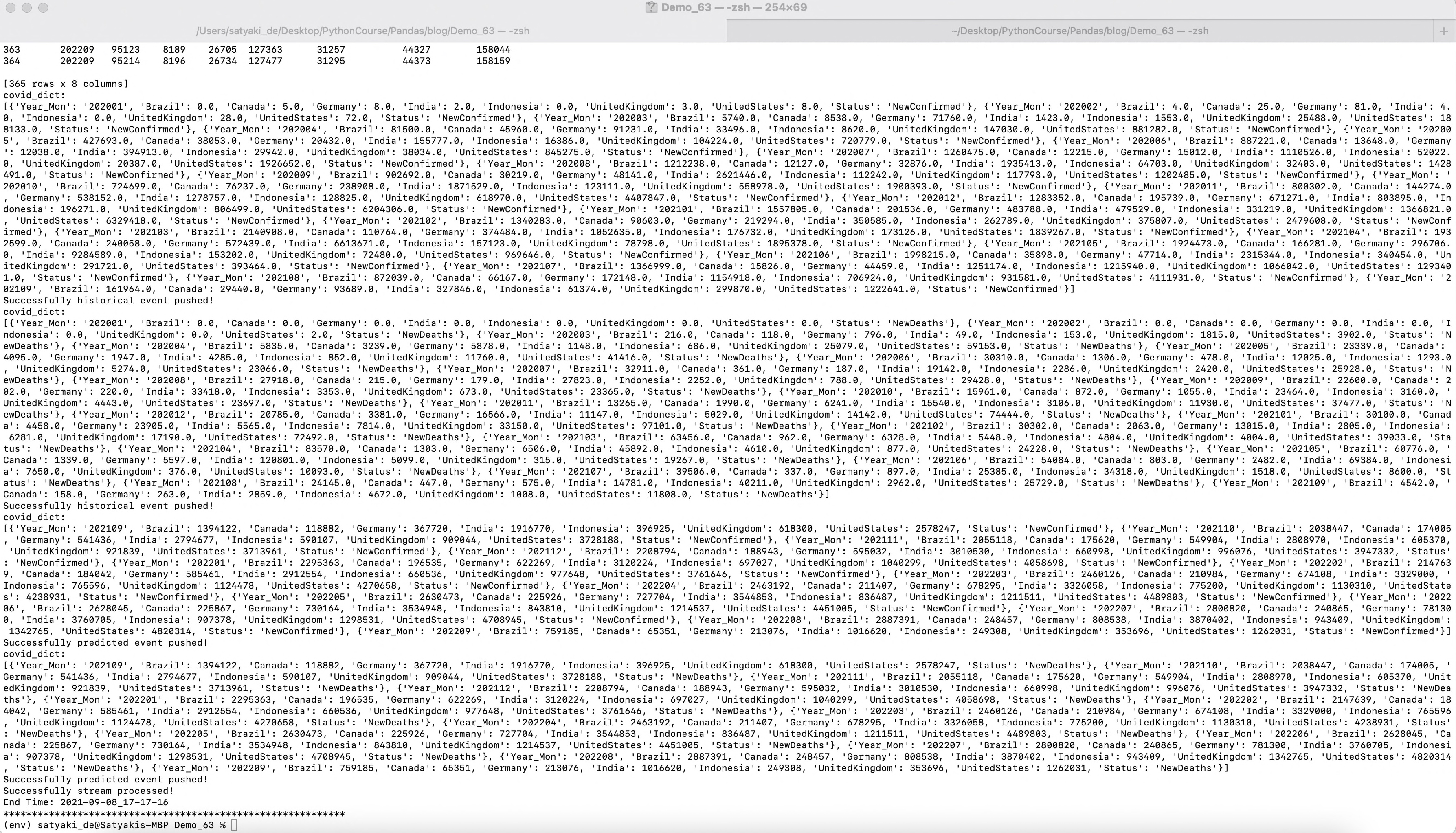
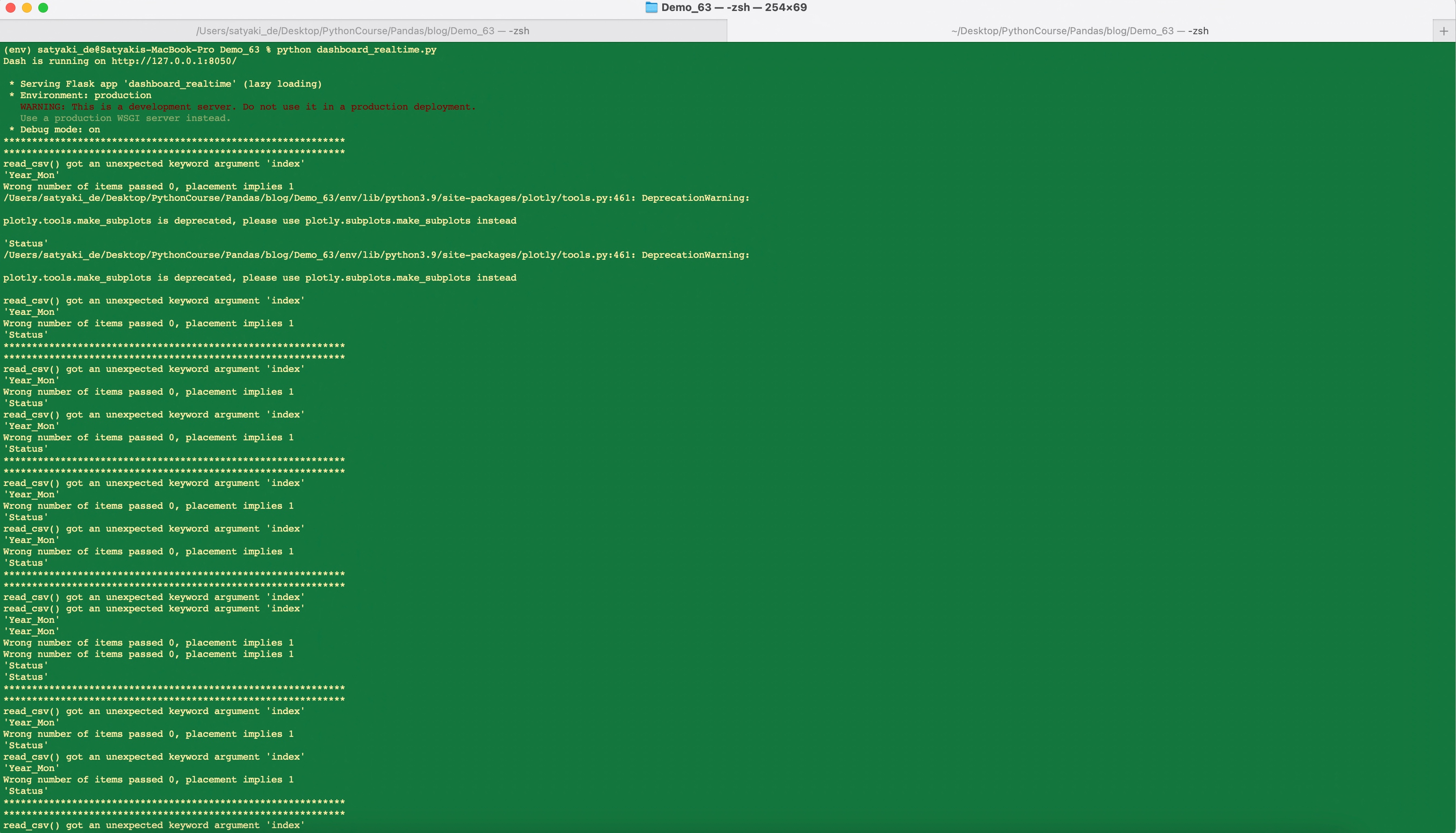
Let us run the application –

Run – Beginning
Run – Finishing Stage

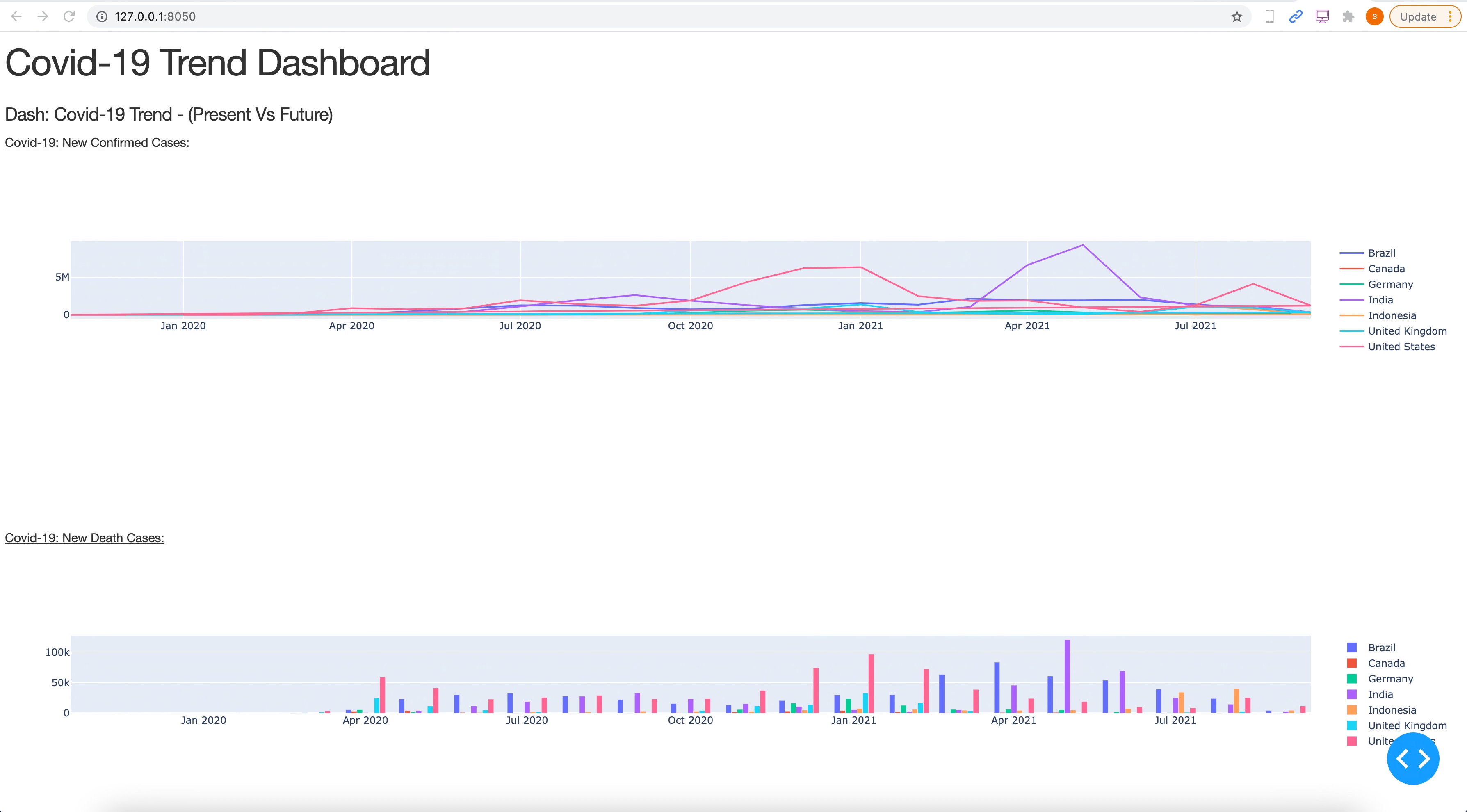
Dashboard:

Dashboard Job Run
Dashboard Visualization

So, we’ve done it.

You will get the complete codebase in the following Github link.

I’ll bring some more exciting topic in the coming days from the Python verse.

Till then, Happy Avenging! 😀


Note: All the data & scenario posted here are representational data & scenarios & available over the internet & for educational purpose only.

One more thing you need to understand is that this prediction based on limited data points. The actual event may happen differently. Ideally, countries are taking a cue from this kind of analysis & are initiating appropriate measures to avoid the high-curve. And, that is one of the main objective of time series analysis.

There is always a room for improvement of this kind of models & the solution associated with it. I’ve shown the basic ways to achieve the same for the education purpose only.