This site mainly deals with various use cases demonstrated using Python, Data Science, Cloud basics, SQL Server, Oracle, Teradata along with SQL & their implementation. Expecting yours active participation & time. This blog can be access from your TP, Tablet & mobile also. Please provide your feedback.
In the rapidly evolving landscape of artificial intelligence, Sarvam AI has emerged as a pioneering force in developing language technologies for Indian languages. This article series aims to provide an in-depth look at Sarvam AI’s Indic APIs, exploring their features, performance, and potential impact on the Indian tech ecosystem.
This LLM aims to bridge the language divide in India’s digital landscape by providing powerful, accessible AI tools for Indic languages.
The importance of Indic language processing:
India has 22 official languages and hundreds of dialects, presenting a unique challenge for technology adoption and digital inclusion. Even though all the government work happens in both the official language along with English language.
Developers can fine-tune the models for specific domains or use cases, improving accuracy for specialized applications.
Supported languages and use cases:
As of 2024, Sarvam AI’s Indic APIs support the following languages:
Hindi
Bengali
Tamil
Telugu
Marathi
Gujarati
Kannada
Malayalam
Punjabi
Odia
Before delving into the details, I strongly recommend taking a look at the demo.
Isn’t this exciting? Let us understand the flow of events in the following diagram –
The application interacts with Sarvam AI’s API. After interpreting the initial audio inputs from the computer, it uses Sarvam AI’s API to get the answer based on the selected Indic language, Bengali.
clsSarvamAI.py (This script will capture the audio input in Indic languages & then provide an LLM response in the form of audio in Indic languages. In this post, we’ll discuss part of the code. In the next part, we’ll be discussing the next important methods. Note that we’re only going to discuss a few important functions here.)
definitializeMicrophone(self):try:forindex,nameinenumerate(sr.Microphone.list_microphone_names()):print(f"Microphone with name \"{name}\" found (device_index={index})")returnsr.Microphone()exceptExceptionas e:x=str(e)print('Error: <<Initiating Microphone>>: ',x)return''defrealTimeTranslation(self):try:WavFile=self.WavFilerecognizer=sr.Recognizer()try:microphone=self.initializeMicrophone()exceptExceptionas e:print(f"Error initializing microphone: {e}")returnwithmicrophoneas source:print("Adjusting for ambient noise. Please wait...")recognizer.adjust_for_ambient_noise(source,duration=5)print("Microphone initialized. Start speaking...")try:while True:try:print("Listening...")audio=recognizer.listen(source,timeout=5,phrase_time_limit=5)print("Audio captured. Recognizing...") #var=datetime.datetime.now().strftime("%Y-%m-%d_%H-%M-%S") #print('Before Audio Time: ',str(var))self.createWavFile(audio,WavFile)try:text=recognizer.recognize_google(audio,language="bn-BD") # Bengalilanguagecodesentences=text.split('।') # Bengalifullstopprint('Sentences: ')print(sentences)print('*'*120)ifnot text:print("No speech detected. Please try again.")continueifstr(text).lower() =='টাটা':raiseBreakOuterLoop("Based on User Choice!")asyncio.run(self.processAudio(audio))exceptsr.UnknownValueError:print("Google Speech Recognition could not understand audio")exceptsr.RequestErroras e:print(f"Could not request results from Google Speech Recognition service; {e}")exceptsr.WaitTimeoutError:print("No speech detected within the timeout period. Listening again...")except BreakOuterLoop:raiseexceptExceptionas e:print(f"An unexpected error occurred: {e}")time.sleep(1) # ShortpausebeforenextiterationexceptBreakOuterLoopas e:print(f"Exited : {e}") # Removingthetemporaryaudiofilethatwasgeneratedatthebeginingos.remove(WavFile)return0exceptExceptionas e:x=str(e)print('Error: <<Real-time Translation>>: ',x)return1
initializeMicrophone:
Purpose:
This method is responsible for setting up and initializing the microphone for audio input.
What it Does:
It attempts to list all available microphones connected to the system.
It prints the microphone’s name and corresponding device index (a unique identifier) for each microphone.
If successful, it returns a microphone object (sr.Microphone()), which can be used later to capture audio.
If this process encounters an error (e.g., no microphones being found or an internal error), it catches the exception, prints an error message, and returns an empty string (“).
The “initializeMicrophone” Method finds all microphones connected to the computer and prints their names. If it finds a microphone, it prepares to use it for recording. If something goes wrong, it tells you what went wrong and stops the process.
realTimeTranslation:
Purpose: This Method uses the microphone to handle real-time speech translation from a user. It captures spoken audio, converts it into text, and processes it further.
What it Does:
Initializes a recognizer object (sr.Recognizer()) for speech recognition.
Call initializeMicrophone to set up the microphone. If initialization fails, an error message is printed, and the process is stopped.
Once the microphone is set up successfully, it adjusts for ambient noise to enhance accuracy.
Enters a loop to continuously listen for audio input from the user:
It waits for the user to speak and captures the audio.
Converts the captured audio to text using Google’s Speech Recognition service, specifying Bengali as the language.
If text is successfully captured and recognized:
Splits the text into sentences using the Bengali full-stop character.
Prints the sentences.
It checks if the text is a specific word (“টাটা”), and if so, it raises an exception to stop the loop (indicating that the user wants to exit).
Otherwise, it processes the audio asynchronously with processAudio.
If no speech is detected or an error occurs, it prints the relevant message and continues listening.
If the user decides to exit or if an error occurs, it breaks out of the loop, deletes any temporary audio files created, and returns a status code (0 for success, 1 for failure).
The “realTimeTranslation” method continuously listens to the microphone for the user to speak. It captures what is said and tries to understand it using Google’s service, specifically for the Bengali language. It then splits what was said into sentences and prints them out. If the user says “টাটা” (which means “goodbye” in Bengali), it stops listening and exits. If it cannot understand the user or if there is a problem, it will let the user know and try again. It will print an error and stop the process if something goes wrong.
Let’s wait for the next part & enjoy this part.
Note: All the data & scenarios posted here are representational data & scenarios & available over the internet & for educational purposes only. There is always room for improvement in this kind of model & the solution associated with it. I’ve shown the basic ways to achieve the same for educational purposes only.
Today, I’ll be presenting another exciting capability of architecture in the world of LLMs, where you need to answer one crucial point & that is how valid the response generated by these LLMs is against your data. This response is critical when discussing business growth & need to take the right action at the right time.
Why not view the demo before going through it?
Demo
Isn’t it exciting? Great! Let us understand this in detail.
Flow of Architecture:
The first dotted box (extreme-left) represents the area that talks about the data ingestion from different sources, including third-party PDFs. It is expected that organizations should have ready-to-digest data sources. Examples: Data Lake, Data Mart, One Lake, or any other equivalent platforms. Those PDFs will provide additional insights beyond the conventional advanced analytics.
You need to have some kind of OCR solution that will extract all the relevant information in the form of text from the documents.
The next important part is how you define the chunking & embedding of data chunks into Vector DB. Chunking & indexing strategies, along with the overlapping chain, play a crucial importance in tying that segregated piece of context into a single context that will be fed into the source for your preferred LLMs.
This system employs a vector similarity search to browse through unstructured information and concurrently accesses the database to retrieve the context, ensuring that the responses are not only comprehensive but also anchored in validated knowledge.
This approach is particularly vital for addressing multi-hop questions, where a single query can be broken down into multiple sub-questions and may require information from numerous documents to generate an accurate answer.
clsFeedVectorDB.py (This is the main class that will invoke the Faiss framework to contextualize the docs inside the vector DB with the source file name to validate the answer from Gen AI using Globe.6B embedding models.)
Let us understand some of the key snippets from the above script (Full scripts will be available in the GitHub Repo) –
# Samplefunctiontoconverttexttoavectordeftext2Vector(self,text): # Encode the text using the tokenizerwords = [wordforwordintext.lower().split()ifwordinself.model] # Ifnowordsinthemodel, returnazerovectorifnot words:returnnp.zeros(self.model.vector_size) # Computetheaverageofthewordvectorsvector=np.mean([self.model[word] forwordinwords],axis=0)returnvector.reshape(1,-1)
This code is for a function called “text2Vector” that takes some text as input and converts it into a numerical vector. Let me break it down step by step:
It starts by taking some text as input, and this text is expected to be a sentence or a piece of text.
The text is then split into individual words, and each word is converted to lowercase.
It checks if each word is present in a pre-trained language model (probably a word embedding model like Word2Vec or GloVe). If a word is not in the model, it’s ignored.
If none of the words from the input text are found in the model, the function returns a vector filled with zeros. This vector has the same size as the word vectors in the model.
If there are words from the input text in the model, the function calculates the average vector of these words. It does this by taking the word vectors for each word found in the model and computing their mean (average). This results in a single vector that represents the input text.
Finally, the function reshapes this vector into a 2D array with one row and as many columns as there are elements in the vector. The reason for this reshaping is often related to compatibility with other parts of the code or libraries used in the project.
So, in simple terms, this function takes a piece of text, looks up the word vectors for the words in that text, and calculates the average of those vectors to create a single numerical representation of the text. If none of the words are found in the model, it returns a vector of zeros.
defgenData(self):try:basePath=self.basePathmodelFileName=self.modelFileNamevectorDBPath=self.vectorDBPathvectorDBFileName=self.vectorDBFileName # CreateaFAISSindexdimension=int(cf.conf['NO_OF_MODEL_DIM']) # Assuming100-dimensionalvectorsindex=faiss.IndexFlatL2(dimension)print('*'*240)print('Vector Index Your Data for Retrieval:')print('*'*240)FullVectorDBname=vectorDBPath+vectorDBFileNameindexFile=str(vectorDBPath) +str(vectorDBFileName) +'.index'print('File: ',str(indexFile))data={} # Listallfilesinthespecifieddirectoryfiles=os.listdir(basePath) # Filteroutfilesthatarenottextfilestext_files= [fileforfileinfilesiffile.endswith('.txt')] # Readeachtextfileforfilein text_files:file_path=os.path.join(basePath,file)print('*'*240)print('Processing File:')print(str(file_path))try: # Attempttoopenwithutf-8encodingwithopen(file_path,'r',encoding='utf-8') as file:forline_number,lineinenumerate(file,start=1): # Assumeeachlineisaseparatedocumentvector=self.text2Vector(line)vector=vector.reshape(-1)index_id=index.ntotalindex.add(np.array([vector])) # Addingthevectortotheindexdata[index_id] ={'text':line,'line_number':line_number,'file_name':file_path} # Storingthelineandfilenameexcept UnicodeDecodeError: # Ifutf-8fails,tryadifferentencodingtry:withopen(file_path,'r',encoding='ISO-8859-1') as file:forline_number,lineinenumerate(file,start=1): # Assumeeachlineisaseparatedocumentvector=self.text2Vector(line)vector=vector.reshape(-1)index_id=index.ntotalindex.add(np.array([vector])) # Addingthevectortotheindexdata[index_id] ={'text':line,'line_number':line_number,'file_name':file_path} # StoringthelineandfilenameexceptExceptionas e:print(f"Could not read file {file}: {e}")continueprint('*'*240) # SavethedatadictionaryusingpickledataCache=vectorDBPath+modelFileNamewithopen(dataCache,'wb') as f:pickle.dump(data,f) # Savetheindexanddataforlaterusefaiss.write_index(index,indexFile)print('*'*240)return0exceptExceptionas e:x=str(e)print('Error: ',x)return1
This code defines a function called genData, and its purpose is to prepare and store data for later retrieval using a FAISS index. Let’s break down what it does step by step:
It starts by assigning several variables, such as basePath, modelFileName, vectorDBPath, and vectorDBFileName. These variables likely contain file paths and configuration settings.
It creates a FAISS index with a specified dimension (assuming 100-dimensional vectors in this case) using faiss.IndexFlatL2. FAISS is a library for efficient similarity search and clustering of high-dimensional data.
It prints the file name and lines where the index will be stored. It initializes an empty dictionary called data to store information about the processed text data.
It lists all the files in a directory specified by basePath. It filters out only the files that have a “.txt” extension as text files.
It then reads each of these text files one by one. For each file:
It attempts to open the file with UTF-8 encoding.
It reads the file line by line.
For each line, it calls a function text2Vector to convert the text into a numerical vector representation. This vector is added to the FAISS index.
It also stores some information about the line, such as the line number and the file name, in the data dictionary.
If there is an issue with UTF-8 encoding, it tries to open the file with a different encoding, “ISO-8859-1”. The same process of reading and storing data continues.
If there are any exceptions (errors) during this process, it prints an error message but continues processing other files.
Once all the files are processed, it saves the data dictionary using the pickle library to a file specified by dataCache.
It also saves the FAISS index to a file specified by indexFile.
Finally, it returns 0 if the process completes successfully or 1 if there was an error during execution.
In summary, this function reads text files, converts their contents into numerical vectors, and builds a FAISS index for efficient similarity search. It also saves the processed data and the index for later use. If there are any issues during the process, it prints error messages but continues processing other files.
clsRAGOpenAI.py (This is the main class that will invoke the RAG class, which will get the contexts with references including source files, line numbers, and source texts. This will help the customer to validate the source against the OpenAI response to understand & control the data bias & other potential critical issues.)
Let us understand some of the key snippets from the above script (Full scripts will be available in the GitHub Repo) –
defragAnswerWithHaystackAndGPT3(self,queryVector,k,question):modelName=self.modelNamemaxToken=self.maxTokentemp=self.temp # AssuminggetTopKContextsisamethodthatreturnsthetopKcontextscontexts=self.getTopKContexts(queryVector,k)messages= [] # Addcontextsas system messagesforfile_name,line_number,textin contexts:messages.append({"role":"system","content":f"Document: {file_name} \nLine Number: {line_number} \nContent: {text}"})prompt=self.generateOpenaiPrompt(queryVector,k)prompt=prompt+"Question: "+str(question) +". \n Answer based on the above documents." # Adduserquestionmessages.append({"role":"user","content":prompt}) # Createchatcompletioncompletion=client.chat.completions.create(model=modelName,messages=messages,temperature=temp,max_tokens=maxToken ) # Assumingthelastmessageintheresponseistheanswerlast_response=completion.choices[0].message.contentsource_refernces= ['FileName: '+str(context[0]) +' - Line Numbers: '+str(context[1]) +' - Source Text (Reference): '+str(context[2]) forcontextincontexts]returnlast_response,source_refernces
This code defines a function called ragAnswerWithHaystackAndGPT3. Its purpose is to use a combination of the Haystack search method and OpenAI’s GPT-3 model to generate an answer to a user’s question. Let’s break down what it does step by step:
It starts by assigning several variables, such as modelName, maxToken, and temp. These variables likely contain model-specific information and settings for GPT-3.
It calls a method getTopKContexts to retrieve the top K contexts (which are likely documents or pieces of text) related to the user’s query. These contexts are stored in the contexts variable.
It initializes an empty list called messages to store messages that will be used in the conversation with the GPT-3 model.
It iterates through each context and adds them as system messages to the messages list. These system messages provide information about the documents or sources being used in the conversation.
It creates a prompt that combines the query, retrieved contexts, and the user’s question. This prompt is then added as a user message to the messages list. It effectively sets up the conversation for GPT-3, where the user’s question is followed by context.
It makes a request to the GPT-3 model using the client.chat.completions.create method, passing in the model name, the constructed messages, and other settings such as temperature and maximum tokens.
After receiving a response from GPT-3, it assumes that the last message in the response contains the answer generated by the model.
It also constructs source_references, which is a list of references to the documents or sources used in generating the answer. This information includes the file name, line numbers, and source text for each context.
Finally, it returns the generated answer (last_response) and the source references to the caller.
In summary, this function takes a user’s query, retrieves relevant contexts or documents, sets up a conversation with GPT-3 that includes the query and contexts, and then uses GPT-3 to generate an answer. It also provides references to the sources used in generating the answer.
This code defines a function called getTopKContexts. Its purpose is to retrieve the top K relevant contexts or pieces of information from a pre-built index based on a query vector. Here’s a breakdown of what it does:
It takes two parameters as input: queryVector, which is a numerical vector representing a query, and k, which specifies how many relevant contexts to retrieve.
Inside a try-except block, it attempts the following steps:
It uses the index.search method to find the top K closest contexts to the given queryVector. This method returns two arrays: distances (measuring how similar the contexts are to the query) and indices (indicating the positions of the closest contexts in the data).
It creates a list called “resDict", which contains tuples for each of the top K contexts. Each tuple contains three pieces of information: the file name (file_name), the line number (line_number), and the text content (text) of the context. These details are extracted from a data dictionary.
If the process completes successfully, it returns the list of top K contexts (resDict) to the caller.
If there’s an exception (an error) during this process, it captures the error message as a string (x), prints the error message, and then returns the error message itself.
In summary, this function takes a query vector and finds the K most relevant contexts or pieces of information based on their similarity to the query. It returns these contexts as a list of tuples containing file names, line numbers, and text content. If there’s an error, it prints an error message and returns the error message string.
defgenerateOpenaiPrompt(self,queryVector,k):contexts=self.getTopKContexts(queryVector,k)template=ct.templateVal_1prompt=templateforfile_name,line_number,textin contexts:prompt+=f"Document: {file_name}\n Line Number: {line_number} \n Content: {text}\n\n"returnprompt
This code defines a function called generateOpenaiPrompt. Its purpose is to create a prompt or a piece of text that combines a template with information from the top K relevant contexts retrieved earlier. Let’s break down what it does:
It starts by calling the getTopKContexts function to obtain the top K relevant contexts based on a given queryVector.
It initializes a variable called template with a predefined template value (likely defined elsewhere in the code).
It sets the prompt variable to the initial template.
Then, it enters a loop where it iterates through each of the relevant contexts retrieved earlier (contexts are typically documents or text snippets).
For each context, it appends information to the prompt. Specifically, it adds lines to the prompt that include:
The document’s file name (Document: [file_name]).
The line number within the document (Line Number: [line_number]).
The content of the context itself (Content: [text]).
It adds some extra spacing (newlines) between each context to ensure readability.
Finally, it returns the complete – prompt, which is a combination of the template and information from the relevant contexts.
In summary, this function takes a query vector, retrieves relevant contexts, and creates a prompt by combining a template with information from these contexts. This prompt can then be used as input for an AI model or system, likely for generating responses or answers based on the provided context.
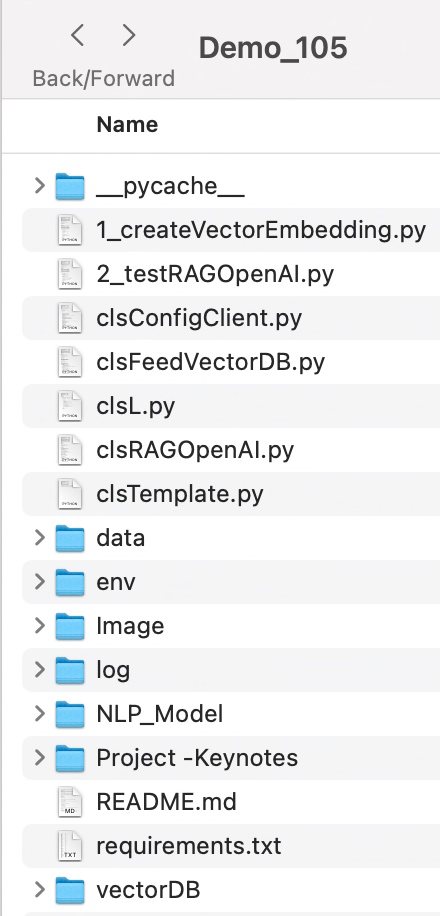
Let us understand the directory structure of this entire application –
To learn more about this package, please visit the following GitHub link.
So, finally, we’ve done it. I know that this post is relatively smaller than my earlier post. But, I think, you can get a good hack to improve some of your long-running jobs by applying this trick.
I’ll bring some more exciting topics in the coming days from the Python verse. Please share & subscribe to my post & let me know your feedback.
Till then, Happy Avenging! 🙂
Note: All the data & scenarios posted here are representational data & scenarios & available over the internet & for educational purposes only. Some of the images (except my photo) we’ve used are available over the net. We don’t claim ownership of these images. There is always room for improvement & especially in the prediction quality.
Today, I’m very excited to demonstrate an effortless & new way to extract the transcript from YouTube videos & then answer the questions based on the topics selected by the users. In this post, I plan to deal with the user inputs to consider the case first & then it can summarize the video content through useful advanced analytics with the help of the LangChain & OpenAI-based model.
In this post, I’ve directly subscribed to OpenAI & I’m not using OpenAI from Azure. However, I’ll explore that in the future as well. Before I explain the process to invoke this new library, why not view the demo first & then discuss it?
Demo
Isn’t it very exciting? This will lead to a whole new ballgame, where one can get critical decision-making information from these human sources along with their traditional advanced analytical data.
How will it help?
Let’s say as per your historical data & analytics, the dashboard is recommending prod-A, prod-B & prod-C as the top three products for potential top-performing brands. Whereas, you are getting some alerts from the TV news on prod-B due to the recent incidents. So, in that case, you don’t want to continue with the prod-B investment. You may find a new product named prod-Z. That may reduce the risk of your investment.
What is LangChain?
LangChain is a framework for developing applications powered by language models. We believe that the most powerful and differentiated applications will not only call out to a language model but will also be:
Data-aware: connect a language model to other sources of data
Agentic: allow a language model to interact with its environment
The LangChain framework works around these principles.
To know more about this, please click the following link.
As you can see, this is one of the critical components in our solution, which will bind the OpenAI bot & it will feed the necessary data to provide the correct response.
What is FAISS?
Faiss is a library for efficient similarity search and clustering of dense vectors. It contains algorithms that search in sets of vectors of any size, up to ones that do not fit in RAM. It also has supporting code for evaluation and parameter tuning.
Faiss developed using C++ with complete wrappers for Python—some of the most beneficial algorithms available both on CPU & in GPU as well. Facebook AI Research develops it.
To know more about this, please click the following link.
FLOW OF EVENTS:
Let us look at the flow diagram as it captures the sequence of events that unfold as part of the process.
Here are the steps that will follow in sequence –
The application will first get the topic on which it needs to look from YouTube & find the top 5 videos using the YouTube data-API.
Once the application returns a list of websites from the above step, LangChain will drive the application will extract the transcripts from the video & then optimize the response size in smaller chunks to address the costly OpenAI calls. During this time, it will invoke FAISS to create document DBs.
Finally, it will send those chunks to OpenAI for the best response based on your supplied template that performs the final analysis with small data required for your query & gets the appropriate response with fewer costs.
CODE:
Why don’t we go through the code made accessible due to this new library for this particular use case?
clsConfigClient.py (This is the main calling Python script for the input parameters.)
This file contains hidden or bidirectional Unicode text that may be interpreted or compiled differently than what appears below. To review, open the file in an editor that reveals hidden Unicode characters. Learn more about bidirectional Unicode characters
From the above code snippet, one can understand that we need both the API keys for YouTube & OpenAI. And they have separate costs & usage, which I’ll share later in the post. Also, notice that the temperature sets to 0.2 ( range between 0 to 1). That means our AI bot will be consistent in response. And our application will use the GPT-3.5-turbo model for its analytic response.
clsTemplate.py (Contains all the templates for OpenAI.)
This file contains hidden or bidirectional Unicode text that may be interpreted or compiled differently than what appears below. To review, open the file in an editor that reveals hidden Unicode characters. Learn more about bidirectional Unicode characters
The above code is self-explanatory. Here, we’re keeping the correct instructions for our OpenAI to respond within these guidelines.
clsVideoContentScrapper.py (Main class to extract the transcript from the YouTube videos & then answer the questions based on the topics selected by the users.)
This file contains hidden or bidirectional Unicode text that may be interpreted or compiled differently than what appears below. To review, open the file in an editor that reveals hidden Unicode characters. Learn more about bidirectional Unicode characters
The above code will fetch the most relevant YouTube URLs & bind them into a list along with the channel names & then share the lists with the main functions.
The provided Python code defines a function createDBFromYoutubeVideoUrl which appears to create a database of text documents from the transcript of a YouTube video. Here’s the explanation in simple English:
The function createDBFromYoutubeVideoUrl has defined with one argument: video_url.
The function uses a try-except block to handle any potential exceptions or errors that may occur.
Inside the try block, the following steps are going to perform:
First, it creates a YoutubeLoader object from the provided video_url. This object is likely responsible for interacting with the YouTube video specified by the URL.
The loader object then loads the transcript of the video. This object is the text version of everything spoken in the video.
It then creates a RecursiveCharacterTextSplitter object with a specified chunk_size of 1000 and chunk_overlap of 100. This object may split the transcript into smaller chunks (documents) of text for easier processing or analysis. Each piece will be around 1000 characters long, and there will overlap of 100 characters between consecutive chunks.
The split_documents method of the text_splitter object will split the transcript into smaller documents. These documents are stored in the docs variable.
The FAISS.from_documents method is then called with docs and embeddings as arguments to create a FAISS (Facebook AI Similarity Search) index. This index is a database used for efficient similarity search and clustering of high-dimensional vectors, which in this case, are the embeddings of the documents. The FAISS index is stored in the db variable.
Finally, the db variable is returned, representing the created database from the video transcript.
4. If an exception occurs during the execution of the try block, the code execution moves to the except block:
Here, it first converts the exception e to a string x.
Then it prints an error message.
Finally, it returns an empty string as an indication of the error.
defgetResponseFromQuery(self,db,query,k=4):try:""" gpt-3.5-turbo can handle up to 4097 tokens. Setting the chunksize to 1000 and k to 4 maximizesthenumberoftokenstoanalyze.""" mod_name = self.model_nametemp_val=self.temp_valdocs=db.similarity_search(query,k=k)docs_page_content="".join([d.page_contentfordindocs])chat=ChatOpenAI(model_name=mod_name,temperature=temp_val) # Templatetouseforthesystemmessageprompttemplate=ct.templateVal_1system_message_prompt=SystemMessagePromptTemplate.from_template(template) # Humanquestionprompthuman_template="Answer the following question: {question}"human_message_prompt=HumanMessagePromptTemplate.from_template(human_template)chat_prompt=ChatPromptTemplate.from_messages( [system_message_prompt,human_message_prompt] )chain=LLMChain(llm=chat,prompt=chat_prompt)response=chain.run(question=query,docs=docs_page_content)response=response.replace("\n","")returnresponse,docsexceptExceptionas e:x=str(e)print('Error: ',x)return'',''
The Python function getResponseFromQuery is designed to search a given database (db) for a specific query and then generate a response using a language model (possibly GPT-3.5-turbo). The answer is based on the content found and the particular question. Here is a simple English summary:
The function getResponseFromQuery takes three parameters: db, query, and k. The k parameter is optional and defaults to 4 if not provided. db is the database to search, the query is the question or prompts to analyze, and k is the number of similar items to return.
The function initiates a try-except block for handling any errors that might occur.
Inside the try block:
The function retrieves the model name and temperature value from the instance of the class this function is a part of.
The function then searches the db database for documents similar to the query and saves these in docs.
It concatenates the content of the returned documents into a single string docs_page_content.
It creates a ChatOpenAI object with the model name and temperature value.
It creates a system message prompt from a predefined template.
It creates a human message prompt, which is the query.
It combines these two prompts to form a chat prompt.
An LLMChain object is then created using the ChatOpenAI object and the chat prompt.
This LLMChain object is used to generate a response to the query using the content of the documents found in the database. The answer is then formatted by replacing all newline characters with empty strings.
Finally, the function returns this response along with the original documents.
If any error occurs during these operations, the function goes to the except block where:
The error message is printed.
The function returns two empty strings to indicate an error occurred, and no response or documents could be produced.
defextractContentInText(self,topic,query):try:discussedTopic= []strKeyText=''cnt=0max_cnt=self.max_cnturlList,channelList=self.topFiveURLFromYouTube(youtube,q=topic,part='id,snippet',maxResults=max_cnt,type='video')print('Returned List: ')print(urlList)print()forvideo_urlin urlList:print('Processing Video: ')print(video_url)db=self.createDBFromYoutubeVideoUrl(video_url)response,docs=self.getResponseFromQuery(db,query)iflen(response) >0:strKeyText='As per the topic discussed in '+channelList[cnt] +', 'discussedTopic.append(strKeyText+response)cnt+=1returndiscussedTopicexceptExceptionas e:discussedTopic= []x=str(e)print('Error: ',x)returndiscussedTopic
This Python function, extractContentInText, is aimed to extract relevant content from the transcripts of top YouTube videos on a specific topic and generate responses to a given query. Here’s a simple English translation:
The function extractContentInText is defined with topic and query as parameters.
It begins with a try-except block to catch and handle any possible exceptions.
In the try block:
It initializes several variables: an empty list discussedTopic to store the extracted information, an empty string strKeyText to keep specific parts of the content, a counter cnt initialized at 0, and max_cnt retrieved from the self-object to specify the maximum number of YouTube videos to consider.
It calls the topFiveURLFromYouTube function (defined previously) to get the URLs of the top videos on the given topic from YouTube. It also retrieves the list of channel names associated with these videos.
It prints the returned list of URLs.
Then, it starts a loop over each URL in the urlList.
For each URL, it prints the URL, then creates a database from the transcript of the YouTube video using the function createDBFromYoutubeVideoUrl.
It then uses the getResponseFromQuery function to get a response to the query based on the content of the database.
If the length of the response is greater than 0 (meaning there is a response), it forms a string strKeyText to indicate the channel that the topic was discussed on and then appends the answer to this string. This entire string is then added to the discussedTopic list.
It increments the counter cnt by one after each iteration.
Finally, it returns the discussedTopic list, which now contains relevant content extracted from the videos.
If any error occurs during these operations, the function goes into the except block:
It first resets discussedTopic to an empty list.
Then it converts the exception e to a string and prints the error message.
Lastly, it returns the empty discussedTopic list, indicating that no content could be extracted due to the error.
testLangChain.py (Main Python script to extract the transcript from the YouTube videos & then answer the questions based on the topics selected by the users.)
This file contains hidden or bidirectional Unicode text that may be interpreted or compiled differently than what appears below. To review, open the file in an editor that reveals hidden Unicode characters. Learn more about bidirectional Unicode characters
defmain():try:var=datetime.datetime.now().strftime("%Y-%m-%d_%H-%M-%S")print('*'*120)print('Start Time: '+str(var))print('*'*120) #query="What are they saying about Microsoft?"print('Please share your topic!')inputTopic=input('User: ')print('Please ask your questions?')inputQry=input('User: ')print()retList=cVCScrapper.extractContentInText(inputTopic,inputQry)cnt=0fordiscussedTopicin retList:finText=str(cnt+1) +') '+discussedTopicprint()print(textwrap.fill(finText,width=150))cnt+=1r1=len(retList)ifr1>0:print()print('Successfully Scrapped!')else:print()print('Failed to Scrappe!')print('*'*120)var1=datetime.datetime.now().strftime("%Y-%m-%d_%H-%M-%S")print('End Time: '+str(var1))exceptExceptionas e:x=str(e)print('Error: ',x)if__name__=="__main__":main()
The above main application will capture the topics from the user & then will give the user a chance to ask specific questions on the topics, invoking the main class to extract the transcript from YouTube & then feed it as a source using ChainLang & finally deliver the response. If there is no response, then it will skip the overall options.
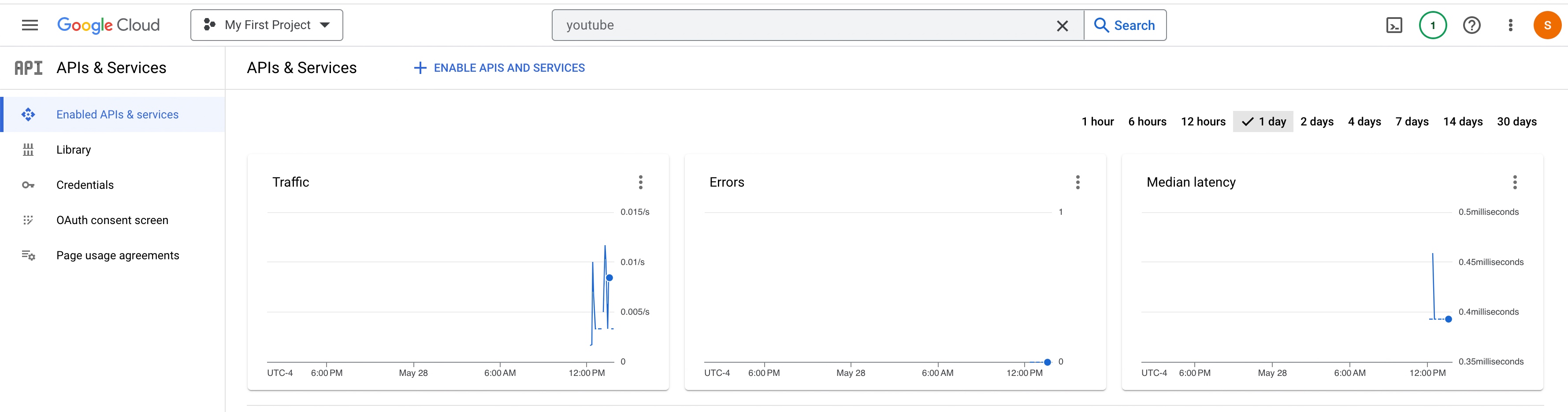
USAGE & COST FACTOR:
Please find the OpenAI usage –
Please find the YouTube API usage –
So, finally, we’ve done it.
I know that this post is relatively bigger than my earlier post. But, I think, you can get all the details once you go through it.
You will get the complete codebase in the following GitHub link.
I’ll bring some more exciting topics in the coming days from the Python verse. Please share & subscribe to my post & let me know your feedback.
Till then, Happy Avenging! 🙂
Note: All the data & scenarios posted here are representational data & scenarios & available over the internet & for educational purposes only. Some of the images (except my photo) we’ve used are available over the net. We don’t claim ownership of these images. There is always room for improvement & especially in the prediction quality. Sample video taken from Santrel Media & you would find the link over here.
Today, I will discuss our Virtual personal assistant (SJ) with a combination of AI-driven APIs, which is now operational in Python. We will use the three most potent APIs using OpenAI, Rev-AI & Pyttsx3. Why don’t we see the demo first?
Great! Let us understand we can leverage this by writing a tiny snippet using this new AI model.
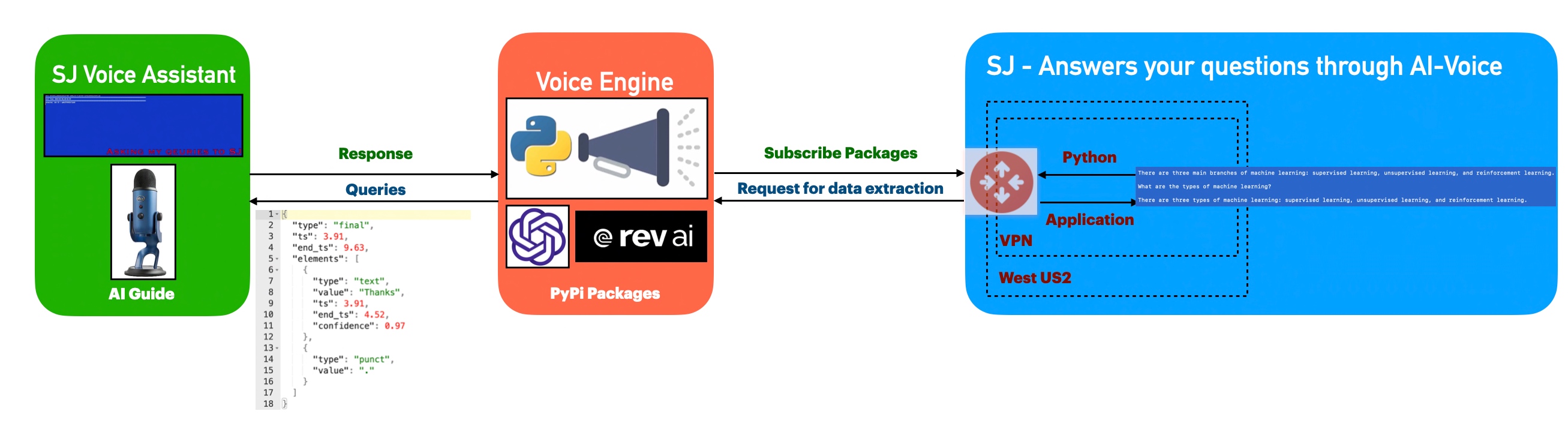
Architecture:
Let us understand the flow of events –
The application first invokes the API to capture the audio spoken through the audio device & then translate that into text, which is later parsed & shared as input by the openai for the response of the posted queries. Once, OpenAI shares the response, the python-based engine will take the response & using pyttsx3 to convert them to voice.
Python Packages:
Following are the python packages that are necessary to develop this brilliant use case –
Let us now understand the code. For this use case, we will only discuss three python scripts. However, we need more than these three. However, we have already discussed them in some of the early posts. Hence, we will skip them here.
clsConfigClient.py (Main configuration file)
This file contains hidden or bidirectional Unicode text that may be interpreted or compiled differently than what appears below. To review, open the file in an editor that reveals hidden Unicode characters. Learn more about bidirectional Unicode characters
Note that, all the API-key are not real. You need to generate your own key.
clsText2Voice.py (The python script that will convert text to voice)
This file contains hidden or bidirectional Unicode text that may be interpreted or compiled differently than what appears below. To review, open the file in an editor that reveals hidden Unicode characters. Learn more about bidirectional Unicode characters
The code is a function that generates speech audio from a given string using the Pyttsx3 library in Python. The function sets the speech rate and pitch using the “speedSpeech” and “speedPitch” properties of the calling object, initializes the Pyttsx3 engine, sets the speech rate and pitch on the engine, speaks the given string, and waits for the speech to finish. The function returns 0 after the speech is finished.
clsChatEngine.py (This python script will invoke the ChatGPT OpenAI class to initiate the response of the queries in python.)
This file contains hidden or bidirectional Unicode text that may be interpreted or compiled differently than what appears below. To review, open the file in an editor that reveals hidden Unicode characters. Learn more about bidirectional Unicode characters
The code is a function that uses OpenAI’s ChatGPT model to generate text based on a given prompt text. The function takes the text to be completed as input and uses an API key stored in the OPENAI_API_KEY property of the calling object to request OpenAI’s API. If the request is successful, the function returns the top completion generated by the model, as stored in the text field of the first item in the choices list of the API response.
The function includes error handling for IOError and Exception. If an IOError occurs, the function checks if the error number is errno.EPIPE and, if it is, returns without doing anything. If an Exception occurs, the function converts the error message to a string and prints it, then returns the string.
clsVoice2Text.py (This python script will invoke the Rev-AI class to initiate the transformation of audio into the text.)
This file contains hidden or bidirectional Unicode text that may be interpreted or compiled differently than what appears below. To review, open the file in an editor that reveals hidden Unicode characters. Learn more about bidirectional Unicode characters
The code is a python function called processVoice() that processes a user’s voice input using the Rev.AI API. The function takes in one argument, “var,” which is not used in the code.
Let us understand the code –
First, the function sets several variables, including the Rev.AI API access token, the sample rate, and the chunk size for the audio input.
Then, it creates a media configuration object for raw microphone input.
A RevAiStreamingClient object is created using the access token and the media configuration.
The code opens the microphone input using a statement and the microphone stream class.
Within the statement, the code starts the server connection and a thread that sends microphone audio to the server.
The code then iterates through the responses from the server, normalizing the JSON response and storing the values in a pandas data-frame.
If the “confidence” column exists in the data-frame, the code joins all the values to form the final text and raises an exception.
If there is an exception, the WebSocket connection is ended, and the final text is returned.
If there is any error, the WebSocket connection is also ended, and an empty string or the error message is returned.
clsMicrophoneStream.py (This python script invoke the rev_ai template to capture the chunk voice data & stream it to the service for text translation & return the response to app.)
This file contains hidden or bidirectional Unicode text that may be interpreted or compiled differently than what appears below. To review, open the file in an editor that reveals hidden Unicode characters. Learn more about bidirectional Unicode characters
This code is a part of a context manager class (clsMicrophoneStream) and implements the __enter__ method of the class. The method sets up a PyAudio object and opens an audio stream using the PyAudio object. The audio stream is configured to have the following properties:
Format: 16-bit integer (paInt16)
Channels: 1 (mono)
Rate: The rate specified in the instance of the ms.clsMicrophoneStream class.
Input: True, meaning the audio stream is an input stream, not an output stream.
Frames per buffer: The chunk specified in the instance of the ms.clsMicrophoneStream class.
Stream callback: The method self._fill_buffer will be called when the buffer needs more data.
The self.closed attribute is set to False to indicate that the stream is open. The method returns the instance of the class (self).
The exit method implements the “exit” behavior of a Python context manager. It is automatically called when the context manager is exited using the statement.
The method stops and closes the audio stream, sets the closed attribute to True, and places None in the buffer. The terminate method of the PyAudio interface is then called to release any resources used by the audio stream.
The _fill_buffer method is a callback function that runs asynchronously to continuously collect data from the audio stream and add it to the buffer.
The _fill_buffer method takes four arguments:
in_data: the raw audio data collected from the audio stream.
frame_count: the number of frames of audio data that was collected.
time_info: information about the timing of the audio data.
status_flags: flags that indicate the status of the audio stream.
The method adds the collected in_data to the buffer using the put method of the buffer object. It returns a tuple of None and pyaudio.paContinue to indicate that the audio stream should continue.
defgenerator(self):whilenotself.closed: ###################################################################### ### Useablockingget() toensurethere's at least one chunk of #### ### data,andstopiterationifthechunkisNone,indicatingthe #### ### endoftheaudiostream. #### ######################################################################chunk=self._buff.get()ifchunkis None:returndata= [chunk] ########################################################## ### Nowconsumewhateverotherdata's still buffered. #### ##########################################################while True:try:chunk=self._buff.get(block=False)ifchunkis None:returndata.append(chunk)exceptqueue.Empty:breakyieldb''.join(data)
The logic of the code “def generator(self):” is as follows:
The function generator is an infinite loop that runs until self.closed is True. Within the loop, it uses a blocking get() method of the buffer object (self._buff) to retrieve a chunk of audio data. If the retrieved chunk is None, it means the end of the audio stream has been reached, and the function returns.
If the retrieved chunk is not None, it appends it to the data list. The function then enters another inner loop that continues to retrieve chunks from the buffer using the non-blocking get() method until there are no more chunks left. Finally, the function yields the concatenated chunks of data as a single-byte string.
SJVoiceAssistant.py (Main calling python script)
This file contains hidden or bidirectional Unicode text that may be interpreted or compiled differently than what appears below. To review, open the file in an editor that reveals hidden Unicode characters. Learn more about bidirectional Unicode characters
defmain():try:spFlag=Truevar=datetime.datetime.now().strftime("%Y-%m-%d_%H-%M-%S")print('*'*120)print('Start Time: '+str(var))print('*'*120)exitComment='THANKS.'while True:try:finalText=''ifspFlag== True:finalText=x4.processVoice(var)else:passval=finalText.upper().strip()print('Main Return: ',val)print('Exit Call: ',exitComment)print('Length of Main Return: ',len(val))print('Length of Exit Call: ',len(exitComment))ifval== exitComment:breakeliffinalText=='':spFlag=Trueelse:print('spFlag::',spFlag)print('Inside: ',finalText)resVal=x2.findFromSJ(finalText)print('ChatGPT Response:: ')print(resVal)resAud=x3.getAudio(resVal)spFlag=FalseexceptExceptionas e:passvar1=datetime.datetime.now().strftime("%Y-%m-%d_%H-%M-%S")print('*'*120)print('End Time: '+str(var1))print('SJ Voice Assistant exited successfully!')print('*'*120)exceptExceptionas e:x=str(e)print('Error: ',x)
The code is a Python script that implements a voice-based chatbot (likely named “SJ Voice Assistant”). The code performs the following operations:
Initialize the string “exitComment” to “THANKS.” and set the “spFlag” to True.
Start an infinite loop until a specific condition breaks the loop.
In the loop, try to process the input voice with a function called “processVoice()” from an object “x4”. Store the result in “finalText.”
Convert “finalText” to upper case, remove leading/trailing whitespaces, and store it in “val.” Print “Main Return” and “Exit Call” with their length.
If “val” equals “exitComment,” break the loop. Suppose “finalText” is an empty string; set “spFlag” to True. Otherwise, perform further processing: a. Call the function “findFromSJ()” from an object “x2” with the input “finalText.” Store the result in “resVal.” b. Call the function “getAudio()” from an object “x3” with the input “resVal.” Store the result in “resAud.” Set “spFlag” to False.
If an exception occurs, catch it and pass (do nothing).
Finally the application will exit by displaying the following text – “SJ Voice Assistant exited successfully!”
If an exception occurs outside the loop, catch it and print the error message.
So, finally, we’ve done it.
I know that this post is relatively bigger than my earlier post. But, I think, you can get all the details once you go through it.
You will get the complete codebase in the following GitHub link.
I’ll bring some more exciting topics in the coming days from the Python verse. Please share & subscribe to my post & let me know your feedback.
Till then, Happy Avenging! 🙂
Note: All the data & scenarios posted here are representational data & scenarios & available over the internet & for educational purposes only. Some of the images (except my photo) we’ve used are available over the net. We don’t claim ownership of these images. There is always room for improvement & especially in the prediction quality.
Today, I’ll be using another exciting installment of Computer Vision. Today, our focus will be to get a sense of visual counting. Let me explain. This post will demonstrate how to count the number of stacked-up coins using computer vision. And, we’re going to add more coins to see the number changes.
Why don’t we see the demo first before jumping into the technical details?
Demo
Isn’t it exciting?
Architecture:
Let us understand the architecture –
From the above diagram, one can notice that as raw video feed captured from a specific location at a measured distance. The python-based intelligent application will read the numbers & project on top of the video feed for human validations.
Let me share one more perspective of how you can configure this experiment with another diagram that I prepared for this post.
Setup Process
From the above picture, one can see that a specific distance exists between the camera & the stacked coins as that will influence the single coin width.
You can see how that changed with the following pictures –
This entire test will depend upon many factors to consider to get effective results. I provided the basic demo. However, to make it robust & dynamic, one can dynamically diagnose the distance & individual coin width before starting this project. I felt that part should be machine learning to correctly predict the particular coin width depending upon the length & number of coins stacked. I leave it to you to explore that part.
Then how does the Aruco marker comes into the picture?
Let’s read it from the primary source side –
From: Source
Please refer to the following link if you want to know more.
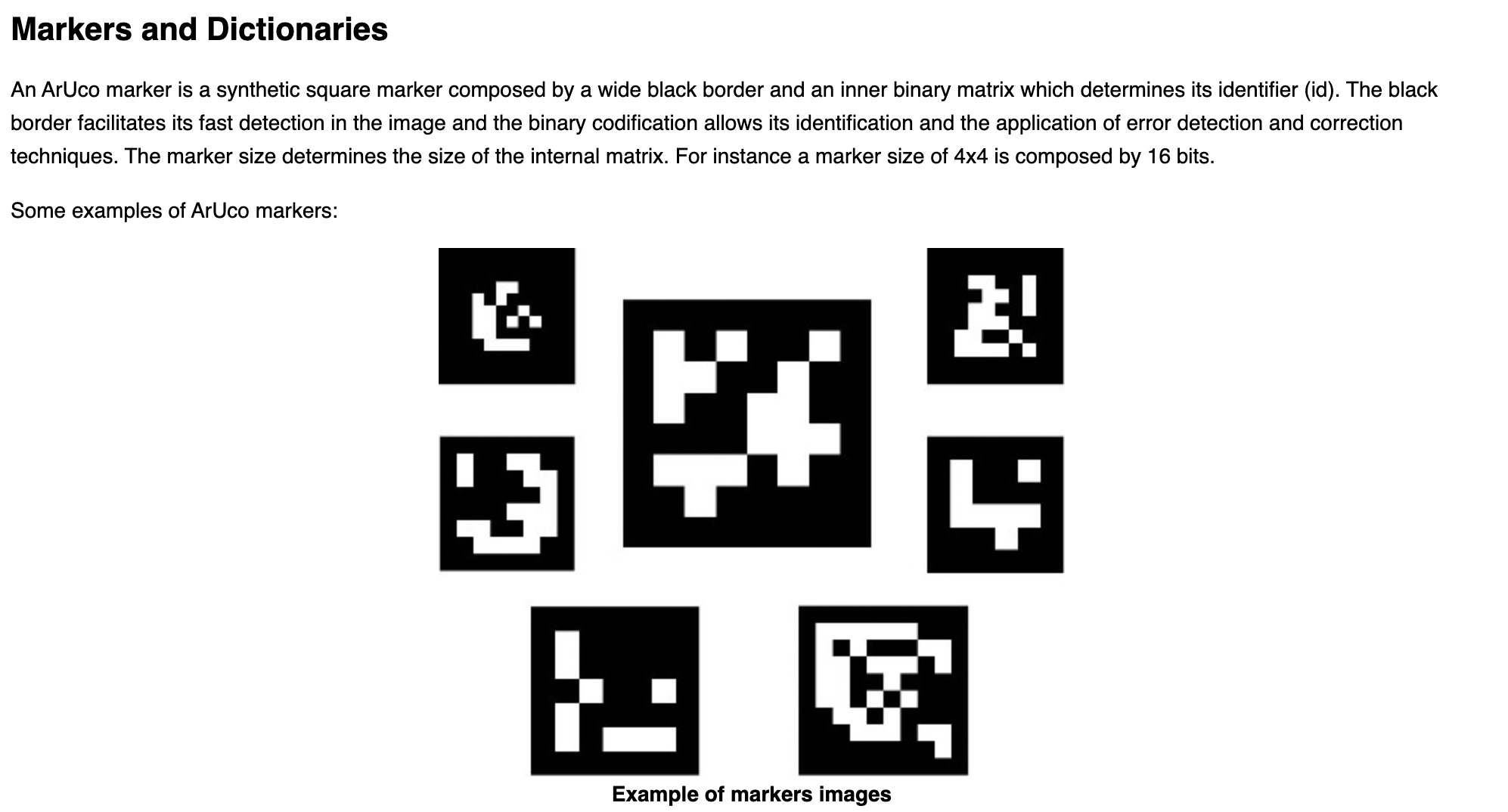
For our use case, we’ll be using the following aruco marker –
Marker
How will this help us? Because we know the width & height of it. And depending upon the placement & overall pixel area size, our application can then identify the pixel to centimeter ratio & which will enable us to predict any other objects’ height & width. Once we have that, the application will divide that by the calculated width we observed for each coin from this distance. And, then the application will be able to predict the actual counts in real-time.
How can you identify the individual width?
My easy process would be to put ten quarter dollars stacked up & then you will get the height from the Computer vision. You have to divide that height by 10 to get the individual width of the coin until you build the model to predict the correct width depending upon the distance.
CODE:
Let us understand the code now –
clsConfig.py (Configuration file for the entire application.)
This file contains hidden or bidirectional Unicode text that may be interpreted or compiled differently than what appears below. To review, open the file in an editor that reveals hidden Unicode characters. Learn more about bidirectional Unicode characters
PIC_TO_CM_MAP is the total length of the Aruco marker in centimeters involving all four sides.
CONTOUR_AREA will change depending upon the minimum size you want to identify as part of the contour.
COIN_DEF_HEIGHT needs to be revised as part of the previous steps explained.
clsAutoDetector.py (This python script will detect the contour.)
This file contains hidden or bidirectional Unicode text that may be interpreted or compiled differently than what appears below. To review, open the file in an editor that reveals hidden Unicode characters. Learn more about bidirectional Unicode characters
Key snippets from the above script are as follows –
# Find contours
conts, Oth = cv2.findContours(maskImage, cv2.RETR_EXTERNAL, cv2.CHAIN_APPROX_SIMPLE)

objectsConts = []

for cnt in conts:
    area = cv2.contourArea(cnt)
    if area > cntArea:
        objectsConts.append(cnt)
Depending upon the supplied contour area, this script will identify & mark the contour of every frame captured through WebCam.
clsCountRealtime.py (This is the main class to calculate the number of stacked coins after reading using computer vision.)
This file contains hidden or bidirectional Unicode text that may be interpreted or compiled differently than what appears below. To review, open the file in an editor that reveals hidden Unicode characters. Learn more about bidirectional Unicode characters
It displays both the height, width & total number of coins on top of the live video.
if cv2.waitKey(1) & 0xFF == ord('q'):
    break
The above line will help the developer exit from the visual application by pressing the escape or ‘q’ key in Macbook.
visualDataRead.py (Main calling function.)
This file contains hidden or bidirectional Unicode text that may be interpreted or compiled differently than what appears below. To review, open the file in an editor that reveals hidden Unicode characters. Learn more about bidirectional Unicode characters
# Execute all the pass
r1 = x1.learnStats(debugInd, var)

if (r1 == 0):
    print('Successfully counts number of stcaked coins!')
else:
    print('Failed to counts number of stcaked coins!')
The above code invokes the learnStats function to calculate the count of stacked coins.
FOLDER STRUCTURE:
Folder Details
So, we’ve done it.
You will get the complete codebase in the following Github link.
I’ll bring some more exciting topic in the coming days from the Python verse. Please share & subscribe my post & let me know your feedback.
Till then, Happy Avenging! 😀
Note: All the data & scenario posted here are representational data & scenarios & available over the internet & for educational purpose only. Some of the images (except my photo) that we’ve used are available over the net. We don’t claim the ownership of these images. There is an always room for improvement & especially the prediction quality.
Today, We’re going to discuss the way to send SMS through popular 3rd-party API (Twilio) using Python 3.7.
Before that, you need to register with Twilio. By default, they will give you some credit in order to explore their API.
And, then you can get a virtual number from them, which will be used to exchange SMS between your trusted numbers for trial Account.
The basic architecture can be depicted are as follows –
How to get a verified number for your trial account?
Here is the way, you have to do that –
You can create your own trial account by using this link.
Apart from that, you need to download & install Ngrok. This is available for multi-platform. For our case, we’re using Windows.
The purpose is to run your local web service through a global API like interface. I’ll explain that later.
You need to register & install that on your computer –
Once, you download & install you need to use the global link of any running local server application like this –
This is the dummy link. I’ll hide the original link. However, every time when you restart the application, you’ll get a new link. So, you will be safe anyway. 🙂
Once, you get the link, you have to update that global link under the messaging section. Remember that, you have to keep the “/sms” part after that.
Let’s see our sample code. here, I would be integrating my custom developed BOT developed in Python. However, I’ll be only calling that library. We’re not going post any script or explain that over here.
1. serverSms.py ( This script is a server script, which is using flask framework & it will respond to the user’s text message by my custom developed BOT using Python)
# /usr/bin/env python
##############################################
#### Written By: SATYAKI DE               ####
#### Written On: 03-Nov-2019              ####
####                                      ####
#### Objective: This script will respond  ####
#### by BOT created by me. And, reply to  ####
#### sender about their queries.          ####
#### We're using Twillio API for this.    ####
####                                      ####
##############################################

from flask import Flask, request, redirect
from twilio import twiml
from twilio.twiml.messaging_response import Message, MessagingResponse
import logging
from flask import request
from SDChatbots.clsTalk2Bot import clsTalk2Bot

app = Flask(__name__)

@app.route("/sms", methods=['GET', 'POST'])
def sms_ahoy_reply():
    """Respond to incoming messages with a friendly SMS."""
    # Start our response
    # resp = twiml.Response()
    message_body = request.form['Body']

    print(message_body)
    logging.info(message_body)

    y = clsTalk2Bot()
    ret_val = y.TalkNow(message_body)
    zMsg = str(ret_val)
    print('Response: ', str(zMsg))

    resp = MessagingResponse()

    # Add a message
    resp.message(zMsg)

    return str(resp)

if __name__ == "__main__":
    app.run(debug=True)
Key lines from the above scripts are –
@app.route("/sms", methods=['GET', 'POST'])
The route is a way to let your application understand to trigger the appropriate functionalities inside your API.
message_body = request.form['Body']
Here, the application is capturing the incoming SMS & print that in your server log. We’ll see that when we run our application.
y = clsTalk2Bot()ret_val = y.TalkNow(message_body)zMsg = str(ret_val)
Now, the application is calling my developed python BOT & retrieve the response & convert it as a string before pushing the response SMS to the user, who originally send the SMS.
resp = MessagingResponse() --This is for Python 3.7 +# Add a messageresp.message(zMsg)return str(resp)
Finally, you are preparing the return SMS & send it back to the user.
For the old version, the following line might work –
resp=twiml.Response()
But, just check with the Twilio API.
Let’s run our server application. You will see the following screen –
Let’s see, if one someone ask some question. How the application will respond –
And, let’s explore how our server application is receiving it & the response from the server –
Note that, we’ll be only sending the text to SMS, not the statistics sent by my BOT marked in RED. 😀
Let’s check the response from the BOT –
Yes! We did it. 😀
But, make sure you are regularly checking your billing as this will cost you money. Always, check the current balance –
You can check the usage from the following tab –
You can create a billing alarm to monitor your usage –
Let me know, how do you like it.
So, we’ll come out with another exciting post in the coming days!
N.B.: This is demonstrated for RnD/study purposes. All the data posted here are representational data & available over the internet.









You must be logged in to post a comment.