
Today, we’ll discuss another topic in our two-part series. We will understand the importance of the MCP protocol for communicating between agents.
This will be an in-depth highly technical as well as depicting using easy-to-understand visuals.
But, before that, let us understand the demo first.
Isn’t it exciting?
MCP Protocol:
Let us first understand in easy language about the MCP protocol.
MCP (Multi-Agent Communication Protocol) is a custom message exchange system that facilitates structured and scalable communication among multiple AI agents operating within an application. These agents collaborate asynchronously or in real-time to complete complex tasks by sharing results, context, and commands through a common messaging layer.
How MCP Protocol Helps:
| Feature | Benefit |
|---|---|
| Agent-Oriented Architecture | Each agent handles a focused task, improving modularity and scalability. |
| Event-Driven Message Passing | Agents communicate based on triggers, not polling—leading to faster and efficient responses. |
| Structured Communication Format | All messages follow a standard format (e.g., JSON) with metadata for sender, recipient, type, and payload. |
| State Preservation | Agents maintain context across messages using memory (e.g., ConversationBufferMemory) to ensure coherence. |
How It Works (Step-by-Step):
- 📥 User uploads or streams a video.
- 🧑💻 MCP Protocol triggers the Transcription Agent to start converting audio into text.
- 🌐 Translation Agent receives this text (if a different language is needed).
- 🧾 Summarization Agent receives the translated or original transcript and generates a concise summary.
- 📚 Research Agent checks for references or terminology used in the video.
- 📄 Documentation Agent compiles the output into a structured report.
- 🔁 All communication between agents flows through MCP, ensuring consistent message delivery and coordination.
Now, let us understand the solution that we intend to implement for our solutions:
This app provides live summarization and contextual insights from videos such as webinars, interviews, or YouTube recordings using multiple cooperating AI agents. These agents may include:
- Transcription Agent: Converts spoken words to text.
- Translation Agent: Translates text to different languages (if needed).
- Summarization Agent: Generates concise summaries.
- Research Agent: Finds background or supplementary data related to the discussion.
- Documentation Agent: Converts outputs into structured reports or learning materials.
We need to understand one more thing before deep diving into the code. Part of your conversation may be mixed, like part Hindi & part English. So, in that case, it will break the sentences into chunks & then convert all of them into the same language. Hence, the following rules are applied while translating the sentences –

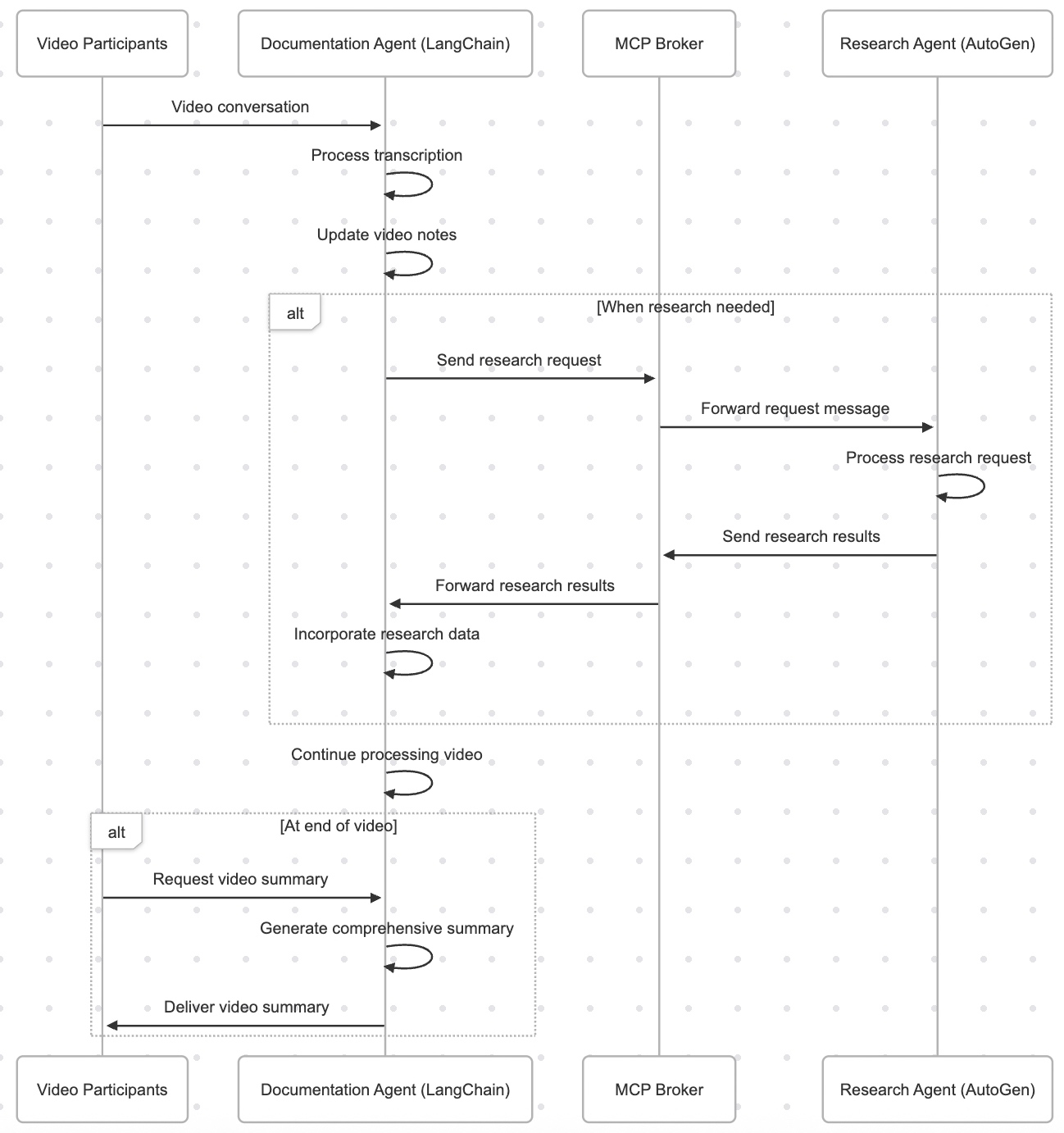
Now, we will go through the basic frame of the system & try to understand how it fits all the principles that we discussed above for this particular solution mapped against the specific technology –
- Documentation Agent built with the LangChain framework
- Research Agent built with the AutoGen framework
- MCP Broker for seamless communication between agents
Process Flow:
Let us understand from the given picture the flow of the process that our app is trying to implement –

Great! So, now, we’ll focus on some of the key Python scripts & go through their key features.
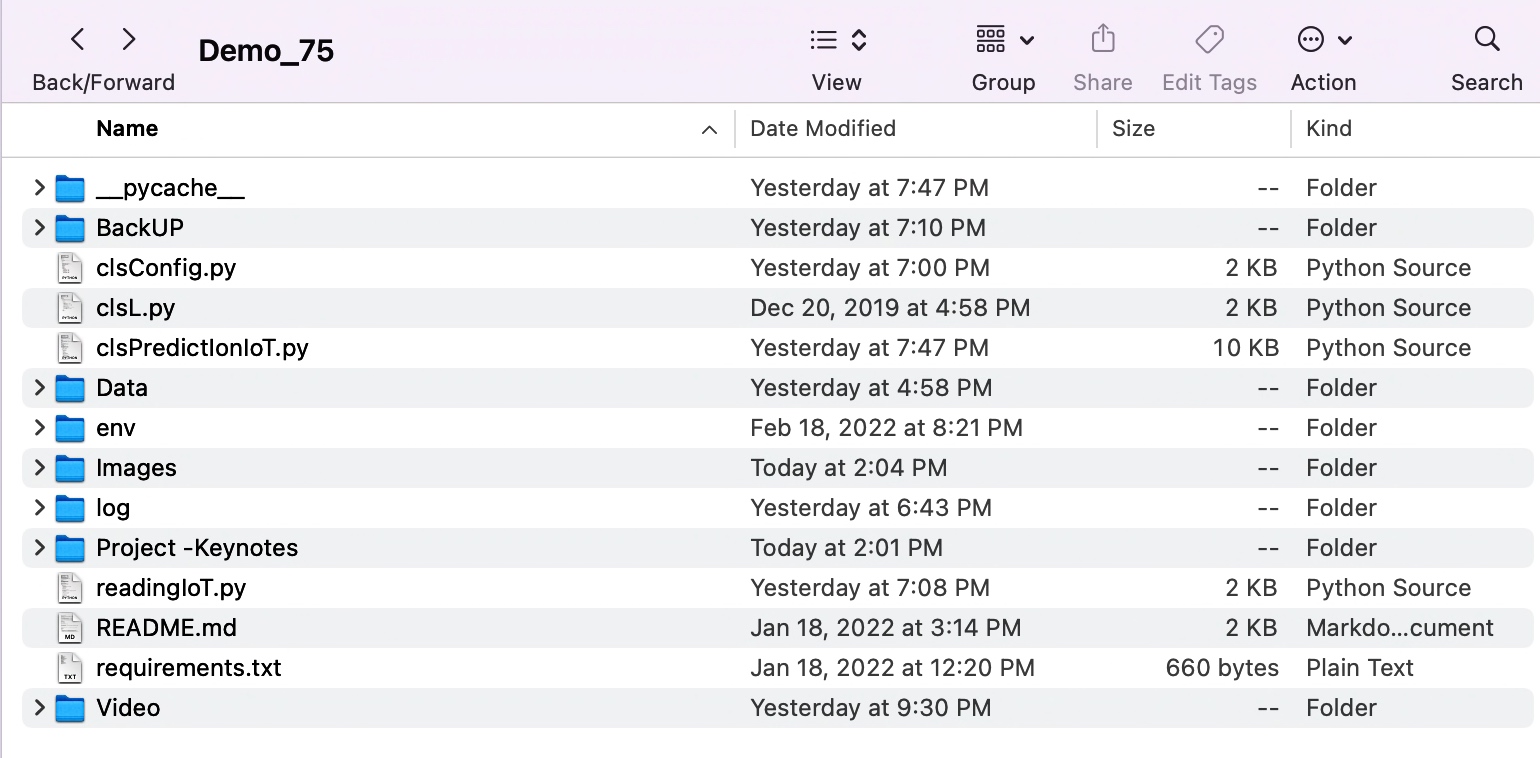
But, before that, we share the group of scripts that belong to specific tasks.
Message-Chaining Protocol (MCP) Implementation:
- clsMCPMessage.py
- clsMCPBroker.py
YouTube Transcript Extraction:
- clsYouTubeVideoProcessor.py
Language Detection:
- clsLanguageDetector.py
Translation Services & Agents:
- clsTranslationAgent.py
- clsTranslationService.py
Documentation Agent:
- clsDocumentationAgent.py
Research Agent:
- clsResearchAgent.py
Now, we’ll review some of the script in this post, along with the next post, as a continuation from this post.
CODE:
- clsMCPMessage.py (This is one of the main or key scripts that will help enable implementation of the MCP protocols)
class clsMCPMessage(BaseModel):
    """Message format for MCP protocol"""
    id: str = Field(default_factory=lambda: str(uuid.uuid4()))
    timestamp: float = Field(default_factory=time.time)
    sender: str
    receiver: str
    message_type: str  # "request", "response", "notification"
    content: Dict[str, Any]
    reply_to: Optional[str] = None
    conversation_id: str
    metadata: Dict[str, Any] = {}

class clsMCPBroker:
    """Message broker for MCP protocol communication between agents"""

    def __init__(self):
        self.message_queues: Dict[str, queue.Queue] = {}
        self.subscribers: Dict[str, List[str]] = {}
        self.conversation_history: Dict[str, List[clsMCPMessage]] = {}

    def register_agent(self, agent_id: str) -> None:
        """Register an agent with the broker"""
        if agent_id not in self.message_queues:
            self.message_queues[agent_id] = queue.Queue()
            self.subscribers[agent_id] = []

    def subscribe(self, subscriber_id: str, publisher_id: str) -> None:
        """Subscribe an agent to messages from another agent"""
        if publisher_id in self.subscribers:
            if subscriber_id not in self.subscribers[publisher_id]:
                self.subscribers[publisher_id].append(subscriber_id)

    def publish(self, message: clsMCPMessage) -> None:
        """Publish a message to its intended receiver"""
        # Store in conversation history
        if message.conversation_id not in self.conversation_history:
            self.conversation_history[message.conversation_id] = []
        self.conversation_history[message.conversation_id].append(message)

        # Deliver to direct receiver
        if message.receiver in self.message_queues:
            self.message_queues[message.receiver].put(message)

        # Deliver to subscribers of the sender
        for subscriber in self.subscribers.get(message.sender, []):
            if subscriber != message.receiver:  # Avoid duplicates
                self.message_queues[subscriber].put(message)

    def get_message(self, agent_id: str, timeout: Optional[float] = None) -> Optional[clsMCPMessage]:
        """Get a message for the specified agent"""
        try:
            return self.message_queues[agent_id].get(timeout=timeout)
        except (queue.Empty, KeyError):
            return None

    def get_conversation_history(self, conversation_id: str) -> List[clsMCPMessage]:
        """Get the history of a conversation"""
        return self.conversation_history.get(conversation_id, [])
Imagine a system where different virtual agents (like robots or apps) need to talk to each other. To do that, they send messages back and forth—kind of like emails or text messages. This code is responsible for:
- Making sure those messages are properly written (like filling out all parts of a form).
- Making sure messages are delivered to the right people.
- Keeping a record of conversations so you can go back and review what was said.
This part (clsMCPMessage) is like a template or a form that every message needs to follow. Each message has:
- ID: A unique number so every message is different (like a serial number).
- Time Sent: When the message was created.
- Sender & Receiver: Who sent the message and who is supposed to receive it.
- Type of Message: Is it a request, a response, or just a notification?
- Content: The actual information or question the message is about.
- Reply To: If this message is answering another one, this tells which one.
- Conversation ID: So we know which group of messages belongs to the same conversation.
- Extra Info (Metadata): Any other small details that might help explain the message.
This (clsMCPBroker) is the system (or “post office”) that makes sure messages get to where they’re supposed to go. Here’s what it does:
1. Registering an Agent
- Think of this like signing up a new user in the system.
- Each agent gets their own personal mailbox (called a “message queue”) so others can send them messages.
2. Subscribing to Another Agent
- If Agent A wants to receive copies of messages from Agent B, they can “subscribe” to B.
- This is like signing up for B’s newsletter—whenever B sends something, A gets a copy.
3. Sending a Message
- When someone sends a message:
- It is saved into a conversation history (like keeping emails in your inbox).
- It is delivered to the main person it was meant for.
- And, if anyone subscribed to the sender, they get a copy too—unless they’re already the main receiver (to avoid sending duplicates).
4. Receiving Messages
- Each agent can check their personal mailbox to see if they got any new messages.
- If there are no messages, they’ll either wait for some time or move on.
5. Viewing Past Conversations
- You can look up all messages that were part of a specific conversation.
- This is helpful for remembering what was said earlier.
In systems where many different smart tools or services need to work together and communicate, this kind of communication system makes sure everything is:
- Organized
- Delivered correctly
- Easy to trace back when needed
So, in this post, we’ll finish it here. We’ll cover the rest of the post in the next post.
I’ll bring some more exciting topics in the coming days from the Python verse.
Till then, Happy Avenging! 🙂
Note: All the data & scenarios posted here are representational data & scenarios & available over the internet & for educational purposes only. There is always room for improvement in this kind of model & the solution associated with it. I’ve shown the basic ways to achieve the same for educational purposes only.













You must be logged in to post a comment.