Building an Azure Function using Python (Crossover between Reality Stone & Time Stone in Python Verse)

Hi Guys!

Today, we’ll be discussing a preview features from Microsoft Azure. Building an Azure function using Python on it’s Linux/Ubuntu VM. Since this is a preview feature, we cannot implement this to production till now. However, my example definitely has more detailed steps & complete code guide compared to whatever available over the internet.

In this post, I will take one of my old posts & enhance it as per this post. Hence, I’ll post those modified scripts. However, I won’t discuss the logic in details as most of these scripts have cosmetic changes to cater to this requirement.

In this post, we’ll only show Ubuntu run & there won’t be Windows or MAC comparison.

Initial Environment Preparation:

  1. Set-up new virtual machine on Azure.
  2. Set-up Azure function environments on that server.

Set-up new virtual machine on Azure:

I’m not going into the details of how to create Ubuntu VM on Microsoft Azure. You can refer the steps in more information here.

After successful creation, the VM will look like this –

Azure VM - Ubuntu

Detailed information you can get after clicking this hyperlink over the name of the VM.

Azure-VM Basic Details

You have to open port 7071 for application testing from the local using postman.

You can get it from the network option under VM as follows –

Network-Configuration

Make sure that you are restricting these ports to specific network & not open to ALL traffic.

So, your VM is ready now.

To update Azure CLI, you need to use the following commands –

sudo apt-get update && sudo apt-get install –only-upgrade -y azure-cli

Set-up Azure function environments on that server:

To set-up the environment, you don’t have to go for Python installation as by default Ubuntu in Microsoft Azure comes up with desired Python version, i.e., Python3.6. However, to run the python application, you need to install the following app –

  1. Microsoft SDK. You will get the details from this link.
  2. Installing node-js. You will get the details from this link.
  3. You need to install a docker. However, as per Microsoft official version, this is not required. But, you can create a Docker container to distribute the python function in Azure application. I would say you can install this just in case if you want to continue with this approach. You will get the details over here. If you want to know details about the Docker. And, how you want to integrate python application. You can refer to this link.
  4. Your desired python packages. In this case, we’ll be modifying this post – “Encryption/Decryption, JSON, API, Flask Framework in Python (Crossover between Reality Stone & Time Stone in Python Verse).” We’ll be modifying a couple of lines only to cater to this functionality & deploying the same as an Azure function.
  5. Creating an Azure function template on Ubuntu. The essential detail you’ll get it from here. However, over there, it was not shown in detailed steps of python packages & how you can add all the dependencies to publish it in details. It was an excellent post to start-up your knowledge.

Let’s see these components status & very brief details –

Microsoft SDK:

To check the dot net version. You need to type the following commands in Ubuntu –

dotnet –info

And, the output will look like this –

DotNet-Version

Node-Js:

Following is the way to verify your node-js version & details –

node -v

npm -v

And, the output looks like this –

Node-Js

Docker:

Following is the way to test your docker version –

docker -v

And, the output will look like this –

Docker-Version

Python Packages:

Following are the python packages that we need to run & publish that in Azure cloud as an Azure function –

pip freeze | grep -v “pkg-resources” > requirements.txt

And, the output is –

Requirements

You must be wondered that why have I used this grep commands here. I’ve witnessed that on many occassion in Microsoft Azure’s Linux VM it produces one broken package called resource=0.0.0, which will terminate the deployment process. Hence, this is very crucial to eliminate those broken packages.

Now, we’re ready for our python scripts. But, before that, let’s see the directory structure over here –

Win_Vs_Ubuntu-Cloud

Creating an Azure Function Template on Ubuntu: 

Before we post our python scripts, we’ll create these following components, which is essential for our Python-based Azure function –

  • Creating a group:

              Creating a group either through Azure CLI or using a docker, you can proceed. The commands for Azure CLI is as follows –

az group create –name “rndWestUSGrp” –location westus

It is advisable to use double quotes for parameters value. Otherwise, you might land-up getting the following error – “Error: “resourceGroupName” should satisfy the constraint – “Pattern”: /^[-w._]+$/“.

I’m sure. You don’t want to face that again. And, here is the output –

CreateDeploymentGroup

Note that, here I haven’t used the double-quotes. But, to avoid any unforeseen issues – you should use double-quotes. You can refer the docker command from the above link, which I’ve shared earlier.

Now, you need to create one storage account where the metadata information of your function will be stored. You will create that as follows –

az storage account create –name cryptpy2019 –location westus –resource-group rndWestUSGrp –sku Standard_LRS

And, the output will look like this –

AccountCreate_1

Great. Now, we’ll create a virtual environment for Python3.6.

python3.6 -m venv .env
source .env/bin/activate

Python-VM

Now, we’ll create a local function project.

func init encPro

And, the output you will get is as follows –

Local-Function

Inside this directory, you’ll see the following files –

Local-Function-Details

You need to edit the host.json with these default lines –

{
 “version”: “2.0”,
 “extensionBundle”: {
                                       “id”: “Microsoft.Azure.Functions.ExtensionBundle”,
                                       “version”: “[1.*, 2.0.0)”
                                     }
}

And, the final content of these two files (excluding the requirements.txt) will look like this –

Configuration

Finally, we’ll create the template function by this following command –

func new

This will follow with steps finish it. You need to choose Python as your programing language. You need to choose an HTTP trigger template. Once you created that successfully, you’ll see the following files –

func_New

Note that, our initial function name is -> getVal.

By default, Azure will generate some default code inside the __init__.py. The details of those two files can be found here.

Since we’re ready with our environment setup. We can now discuss our Python scripts –

1. clsConfigServer.pyΒ (This script contains all the parameters of the server.)

###########################################
#### Written By: SATYAKI DE        ########
#### Written On: 10-Feb-2019       ########
####                               ########
#### Objective: Parameter File     ########
###########################################

import os
import platform as pl

# Checking with O/S system
os_det = pl.system()

class clsConfigServer(object):
    Curr_Path = os.path.dirname(os.path.realpath(__file__))

    if os_det == "Windows":
        config = {
            'FILE': 'acct_addr_20180112.csv',
            'SRC_FILE_PATH': Curr_Path + '\\' + 'src_file\\',
            'PROFILE_FILE_PATH': Curr_Path + '\\' + 'profile\\',
            'HOST_IP_ADDR': '0.0.0.0',
            'DEF_SALT': 'iooquzKtqLwUwXG3rModqj_fIl409vemWg9PekcKh2o=',
            'ACCT_NBR_SALT': 'iooquzKtqLwUwXG3rModqj_fIlpp1vemWg9PekcKh2o=',
            'NAME_SALT': 'iooquzKtqLwUwXG3rModqj_fIlpp1026Wg9PekcKh2o=',
            'PHONE_SALT': 'iooquzKtqLwUwXG3rMM0F5_fIlpp1026Wg9PekcKh2o=',
            'EMAIL_SALT': 'iooquzKtqLwU0653rMM0F5_fIlpp1026Wg9PekcKh2o='
        }
    else:
        config = {
            'FILE': 'acct_addr_20180112.csv',
            'SRC_FILE_PATH': Curr_Path + '/' + 'src_file/',
            'PROFILE_FILE_PATH': Curr_Path + '/' + 'profile/',
            'HOST_IP_ADDR': '0.0.0.0',
            'DEF_SALT': 'iooquzKtqLwUwXG3rModqj_fIl409vemWg9PekcKh2o=',
            'ACCT_NBR_SALT': 'iooquzKtqLwUwXG3rModqj_fIlpp1vemWg9PekcKh2o=',
            'NAME_SALT': 'iooquzKtqLwUwXG3rModqj_fIlpp1026Wg9PekcKh2o=',
            'PHONE_SALT': 'iooquzKtqLwUwXG3rMM0F5_fIlpp1026Wg9PekcKh2o=',
            'EMAIL_SALT': 'iooquzKtqLwU0653rMM0F5_fIlpp1026Wg9PekcKh2o='
        }

2. clsEnDec.pyΒ (This script is a lighter version of encryption & decryption of our previously discussed scenario. Hence, we won’t discuss in details. You can refer my earlier post to understand the logic of this script.)

###########################################
#### Written By: SATYAKI DE        ########
#### Written On: 25-Jan-2019       ########
#### Package Cryptography needs to ########
#### install in order to run this  ########
#### script.                       ########
####                               ########
#### Objective: This script will   ########
#### encrypt/decrypt based on the  ########
#### hidden supplied salt value.   ########
###########################################

from cryptography.fernet import Fernet
import logging

from getVal.clsConfigServer import clsConfigServer as csf

class clsEnDec(object):

    def __init__(self):
        # Calculating Key
        self.token = str(csf.config['DEF_SALT'])

    def encrypt_str(self, data, token):
        try:
            # Capturing the Salt Information
            t1 = self.token
            t2 = token

            if t2 == '':
                salt = t1
            else:
                salt = t2

            logging.info("Encrypting the value!")

            # Checking Individual Types inside the Dataframe
            cipher = Fernet(salt)
            encr_val = str(cipher.encrypt(bytes(data,'utf8'))).replace("b'","").replace("'","")

            strV1 = "Encrypted value:: " + str(encr_val)
            logging.info(strV1)

            return encr_val

        except Exception as e:
            x = str(e)
            print(x)
            encr_val = ''

            return encr_val

    def decrypt_str(self, data, token):
        try:
            # Capturing the Salt Information
            t1 = self.token
            t2 = token

            if t2 == '':
                salt = t1
            else:
                salt = t2

            logging.info("Decrypting the value!")

            # Checking Individual Types inside the Dataframe
            cipher = Fernet(salt)
            decr_val = str(cipher.decrypt(bytes(data,'utf8'))).replace("b'","").replace("'","")

            strV2 = "Decrypted value:: " + str(decr_val)
            logging.info(strV2)

            return decr_val

        except Exception as e:
            x = str(e)
            print(x)
            decr_val = ''

            return decr_val

3. clsFlask.pyΒ (This is the main server script that will the encrypt/decrypt class from our previous scenario. This script will capture the requested JSON from the client, who posted from the clients like another python script or third-party tools like Postman.)

###########################################
#### Written By: SATYAKI DE            ####
#### Written On: 25-Jan-2019           ####
#### Package Flask package needs to    ####
#### install in order to run this      ####
#### script.                           ####
####                                   ####
#### Objective: This script will       ####
#### encrypt/decrypt based on the      ####
#### supplied salt value. Also,        ####
#### this will capture the individual  ####
#### element & stored them into JSON   ####
#### variables using flask framework.  ####
###########################################

from getVal.clsConfigServer import clsConfigServer as csf
from getVal.clsEnDec import clsEnDecAuth

getVal = clsEnDec()

import logging

class clsFlask(object):
    def __init__(self):
        self.xtoken = str(csf.config['DEF_SALT'])

    def getEncryptProcess(self, dGroup, input_data, dTemplate):
        try:
            # It is sending default salt value
            xtoken = self.xtoken

            # Capturing the individual element
            dGroup = dGroup
            input_data = input_data
            dTemplate = dTemplate

            # This will check the mandatory json elements
            if ((dGroup != '') & (dTemplate != '')):

                # Based on the Group & Element it will fetch the salt
                # Based on the specific salt it will encrypt the data
                if ((dGroup == 'GrDet') & (dTemplate == 'subGrAcct_Nbr')):
                    xtoken = str(csf.config['ACCT_NBR_SALT'])

                    strV1 = "xtoken: " + str(xtoken)
                    logging.info(strV1)
                    strV2 = "Flask Input Data: " + str(input_data)
                    logging.info(strV2)

                    #x = cen.clsEnDecAuth()
                    ret_val = getVal.encrypt_str(input_data, xtoken)
                elif ((dGroup == 'GrDet') & (dTemplate == 'subGrName')):
                    xtoken = str(csf.config['NAME_SALT'])

                    strV1 = "xtoken: " + str(xtoken)
                    logging.info(strV1)
                    strV2 = "Flask Input Data: " + str(input_data)
                    logging.info(strV2)

                    #x = cen.clsEnDecAuth()
                    ret_val = getVal.encrypt_str(input_data, xtoken)
                elif ((dGroup == 'GrDet') & (dTemplate == 'subGrPhone')):
                    xtoken = str(csf.config['PHONE_SALT'])

                    strV1 = "xtoken: " + str(xtoken)
                    logging.info(strV1)
                    strV2 = "Flask Input Data: " + str(input_data)
                    logging.info(strV2)

                    #x = cen.clsEnDecAuth()
                    ret_val = getVal.encrypt_str(input_data, xtoken)
                elif ((dGroup == 'GrDet') & (dTemplate == 'subGrEmail')):
                    xtoken = str(csf.config['EMAIL_SALT'])

                    strV1 = "xtoken: " + str(xtoken)
                    logging.info(strV1)
                    strV2 = "Flask Input Data: " + str(input_data)
                    logging.info(strV2)

                    #x = cen.clsEnDecAuth()
                    ret_val = getVal.encrypt_str(input_data, xtoken)
                else:
                    ret_val = ''
            else:
                ret_val = ''

            # Return value
            return ret_val

        except Exception as e:
            ret_val = ''
            # Return the valid json Error Response
            return ret_val

    def getDecryptProcess(self, dGroup, input_data, dTemplate):
        try:
            xtoken = self.xtoken

            # Capturing the individual element
            dGroup = dGroup
            input_data = input_data
            dTemplate = dTemplate

            # This will check the mandatory json elements
            if ((dGroup != '') & (dTemplate != '')):

                # Based on the Group & Element it will fetch the salt
                # Based on the specific salt it will decrypt the data
                if ((dGroup == 'GrDet') & (dTemplate == 'subGrAcct_Nbr')):
                    xtoken = str(csf.config['ACCT_NBR_SALT'])

                    strV1 = "xtoken: " + str(xtoken)
                    logging.info(strV1)
                    strV2 = "Flask Input Data: " + str(input_data)
                    logging.info(strV2)

                    #x = cen.clsEnDecAuth()
                    ret_val = getVal.decrypt_str(input_data, xtoken)
                elif ((dGroup == 'GrDet') & (dTemplate == 'subGrName')):
                    xtoken = str(csf.config['NAME_SALT'])

                    strV1 = "xtoken: " + str(xtoken)
                    logging.info(strV1)
                    strV2 = "Flask Input Data: " + str(input_data)
                    logging.info(strV2)

                    #x = cen.clsEnDecAuth()
                    ret_val = getVal.decrypt_str(input_data, xtoken)
                elif ((dGroup == 'GrDet') & (dTemplate == 'subGrPhone')):
                    xtoken = str(csf.config['PHONE_SALT'])

                    strV1 = "xtoken: " + str(xtoken)
                    logging.info(strV1)
                    strV2 = "Flask Input Data: " + str(input_data)
                    logging.info(strV2)

                    #x = cen.clsEnDecAuth()
                    ret_val = getVal.decrypt_str(input_data, xtoken)
                elif ((dGroup == 'GrDet') & (dTemplate == 'subGrEmail')):
                    xtoken = str(csf.config['EMAIL_SALT'])

                    strV1 = "xtoken: " + str(xtoken)
                    logging.info(strV1)
                    strV2 = "Flask Input Data: " + str(input_data)
                    logging.info(strV2)

                    #x = cen.clsEnDecAuth()
                    ret_val = getVal.decrypt_str(input_data, xtoken)
                else:
                    ret_val = ''
            else:
                ret_val = ''

            # Return value
            return ret_val

        except Exception as e:
            ret_val = ''
            # Return the valid Error Response
            return ret_val

4. __init__.pyΒ (This autogenerated script contains the primary calling methods of encryption & decryption based on the element header & values after enhanced as per the functionality.)

###########################################
#### Written By: SATYAKI DE            ####
#### Written On: 08-Jun-2019           ####
#### Package Flask package needs to    ####
#### install in order to run this      ####
#### script.                           ####
####                                   ####
#### Objective: Main Calling scripts.  ####
#### This is an autogenrate scripts.   ####
#### However, to meet the functionality####
#### we've enhanced as per our logic.  ####
###########################################
__all__ = ['clsFlask']

import logging
import azure.functions as func
import json

from getVal.clsFlask import clsFlask

getVal = clsFlask()

def main(req: func.HttpRequest) -> func.HttpResponse:
    logging.info('Python Encryption function processed a request.')

    str_val = 'Input Payload:: ' + str(req.get_json())
    str_1 = str(req.get_json())

    logging.info(str_val)

    ret_val = {}
    DataIn = ''
    dGroup = ''
    dTemplate = ''
    flg = ''

    if (str_1 != ''):
        try:
            req_body = req.get_json()
            dGroup = req_body.get('dataGroup')

            try:
                DataIn = req_body.get('data')
                strV15 = 'If Part:: ' + str(DataIn)

                logging.info(strV15)

                if ((DataIn == '') | (DataIn == None)):
                    raise ValueError

                flg = 'Y'
            except ValueError:
                DataIn = req_body.get('edata')
                strV15 = 'Else Part:: ' + str(DataIn)
                logging.info(strV15)
                flg = 'N'
            except:
                DataIn = req_body.get('edata')
                strV15 = 'Else Part:: ' + str(DataIn)
                logging.info(strV15)
                flg = 'N'

            dTemplate = req_body.get('dataTemplate')

        except ValueError:
            pass

    strV5 = "Encrypt Decrypt Flag:: " + flg
    logging.info(strV5)

    if (flg == 'Y'):

        if ((DataIn != '') & ((dGroup != '') & (dTemplate != ''))):

            logging.info("Encryption Started!")
            ret_val = getVal.getEncryptProcess(dGroup, DataIn, dTemplate)
            strVal2 = 'Return Payload:: ' + str(ret_val)
            logging.info(strVal2)

            xval = json.dumps(ret_val)

            return func.HttpResponse(xval)
        else:
            return func.HttpResponse(
                 "Please pass a data in the request body",
                 status_code=400
            )
    else:

        if ((DataIn != '') & ((dGroup != '') & (dTemplate != ''))):

            logging.info("Decryption Started!")
            ret_val2 = getVal.getDecryptProcess(dGroup, DataIn, dTemplate)
            strVal3 = 'Return Payload:: ' + str(ret_val)
            logging.info(strVal3)

            xval1 = json.dumps(ret_val2)

            return func.HttpResponse(xval1)
        else:
            return func.HttpResponse(
                "Please pass a data in the request body",
                status_code=400
            )

In this script, based on the value of an flg variable, we’re calling our encryption or decryption methods. And, the value of the flg variable is set based on the following logic –

try:
    DataIn = req_body.get('data')
    strV15 = 'If Part:: ' + str(DataIn)

    logging.info(strV15)

    if ((DataIn == '') | (DataIn == None)):
        raise ValueError

    flg = 'Y'
except ValueError:
    DataIn = req_body.get('edata')
    strV15 = 'Else Part:: ' + str(DataIn)
    logging.info(strV15)
    flg = 'N'
except:
    DataIn = req_body.get('edata')
    strV15 = 'Else Part:: ' + str(DataIn)
    logging.info(strV15)
    flg = 'N'

So, if the application gets the “data” element then – it will consider the data needs to be encrypted; otherwise, it will go for decryption. And, based on that – it is setting the value.

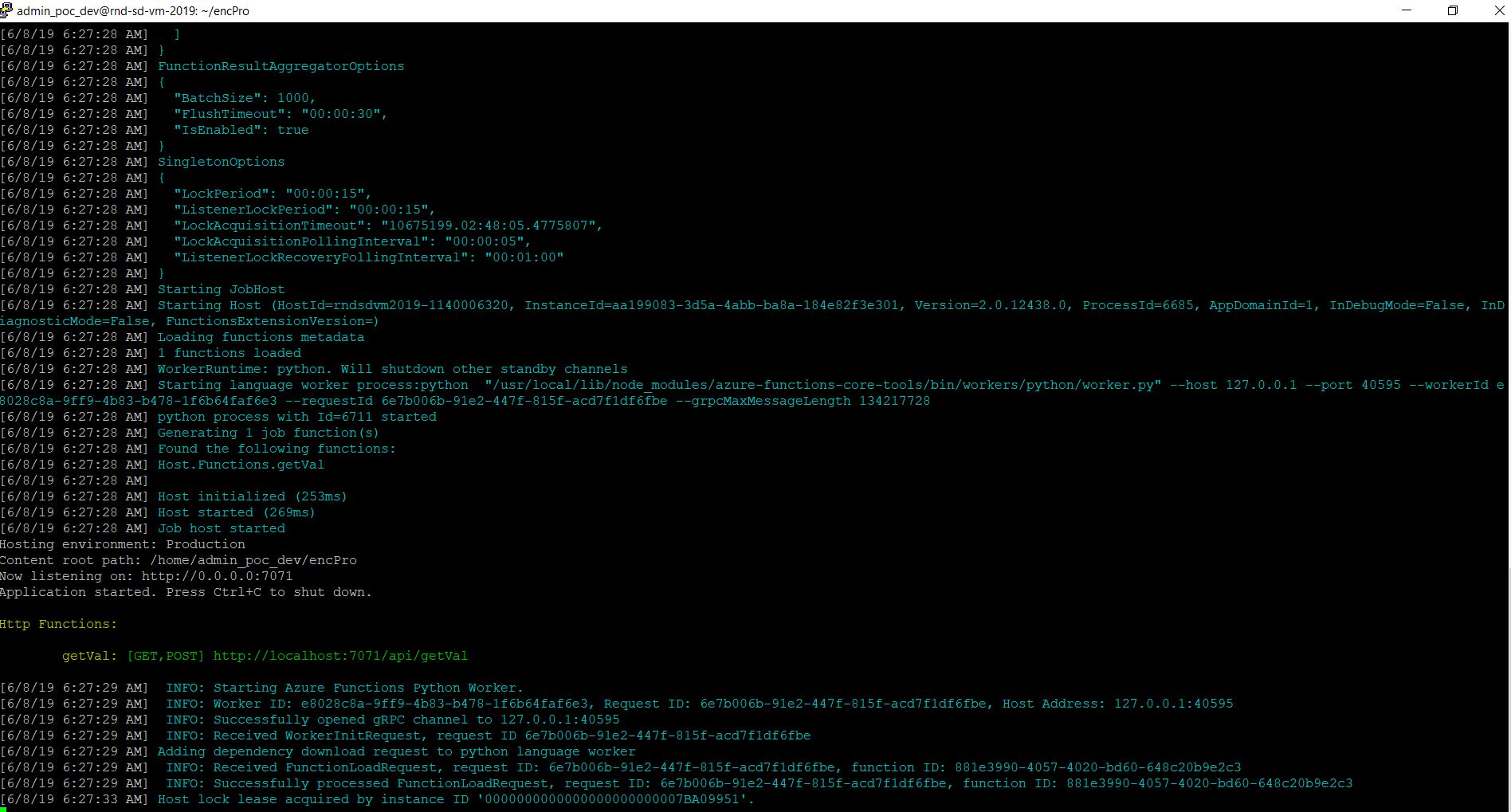
Now, we’re ready to locally run our application –

func host start

And, the output will look like this –
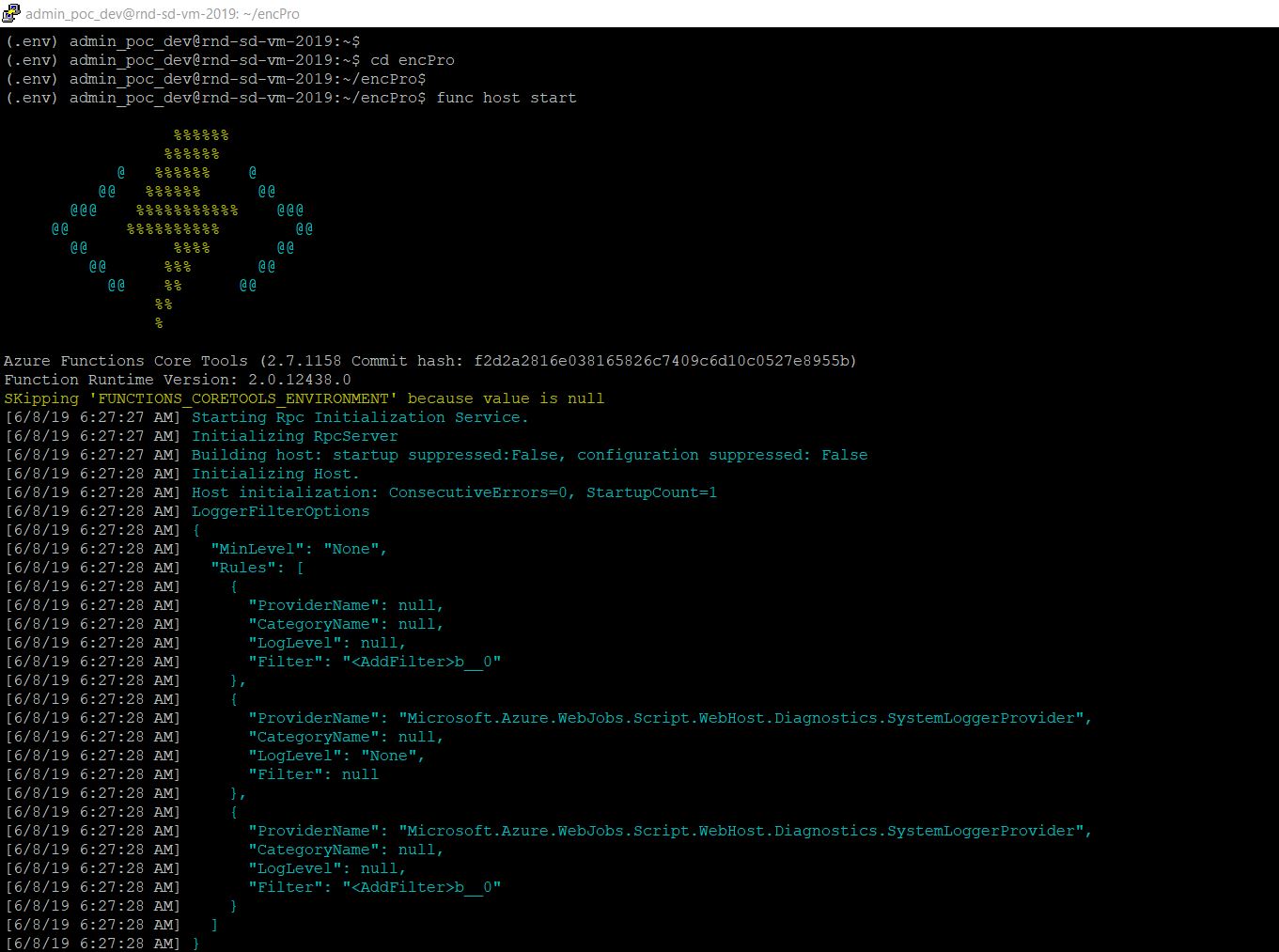
StartingAzureFunction-Python
StartingAzureFunction-Python 2

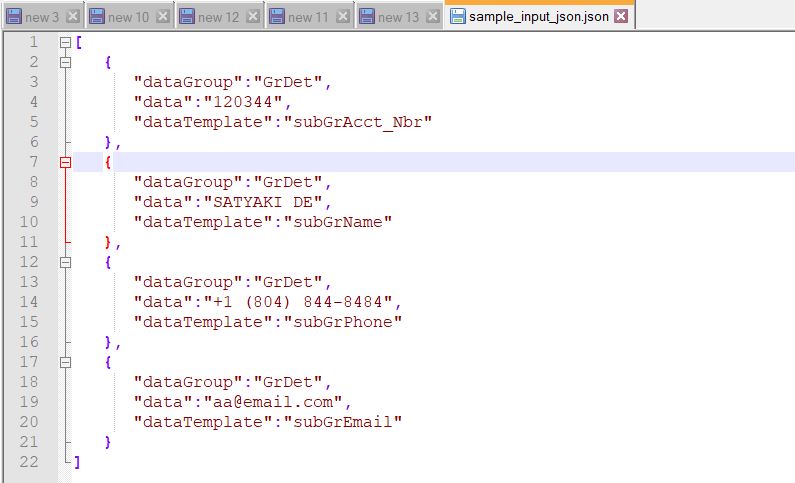
Let’s test it from postman –

Encrypt:

Postman-Encrypt

Decrypt:

Postman-Decrypt

Great. Now, we’re ready to publish this application to Azure cloud.

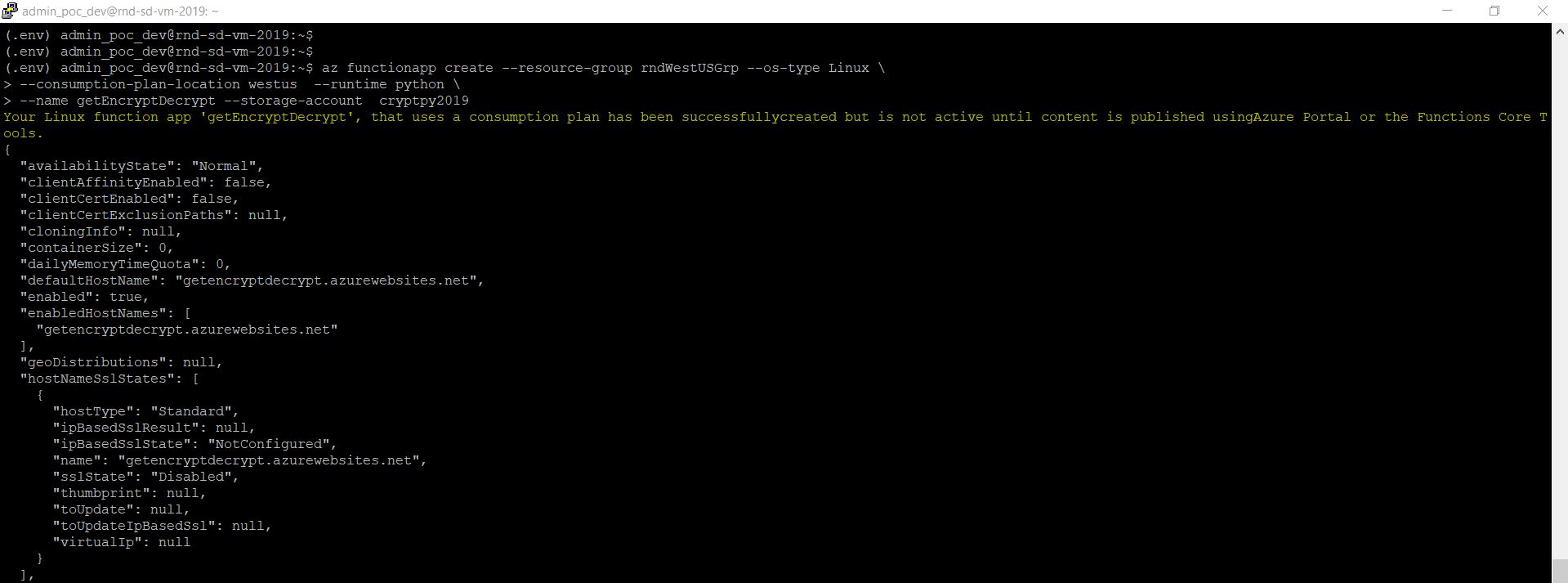
As in our earlier steps, we’ve already built our storage account for the metadata. Please scroll to top to view that again. Now, using that information, we’ll make the function app with a more meaningful name –

az functionapp create –resource-group rndWestUSGrp –os-type Linux \
–consumption-plan-location westus –runtime python \
–name getEncryptDecrypt –storage-account cryptpy2019
CreatingFunctionPython

Let’s publish the function –

sudo func azure functionapp publish “getEncryptDecrypt” –build-native-deps

On many occassion, without the use of “–build-native-deps” might leads to failure. Hence, I’ve added that to avoid such scenarios.

Publishing-Function

Now, we need to test our first published complex Azure function with Python through postman –

Encrypt:

PubishedFuncPostmanEncrypt

Decrypt:

PubishedFuncPostmanDecrypt

Wonderful! So, it is working.

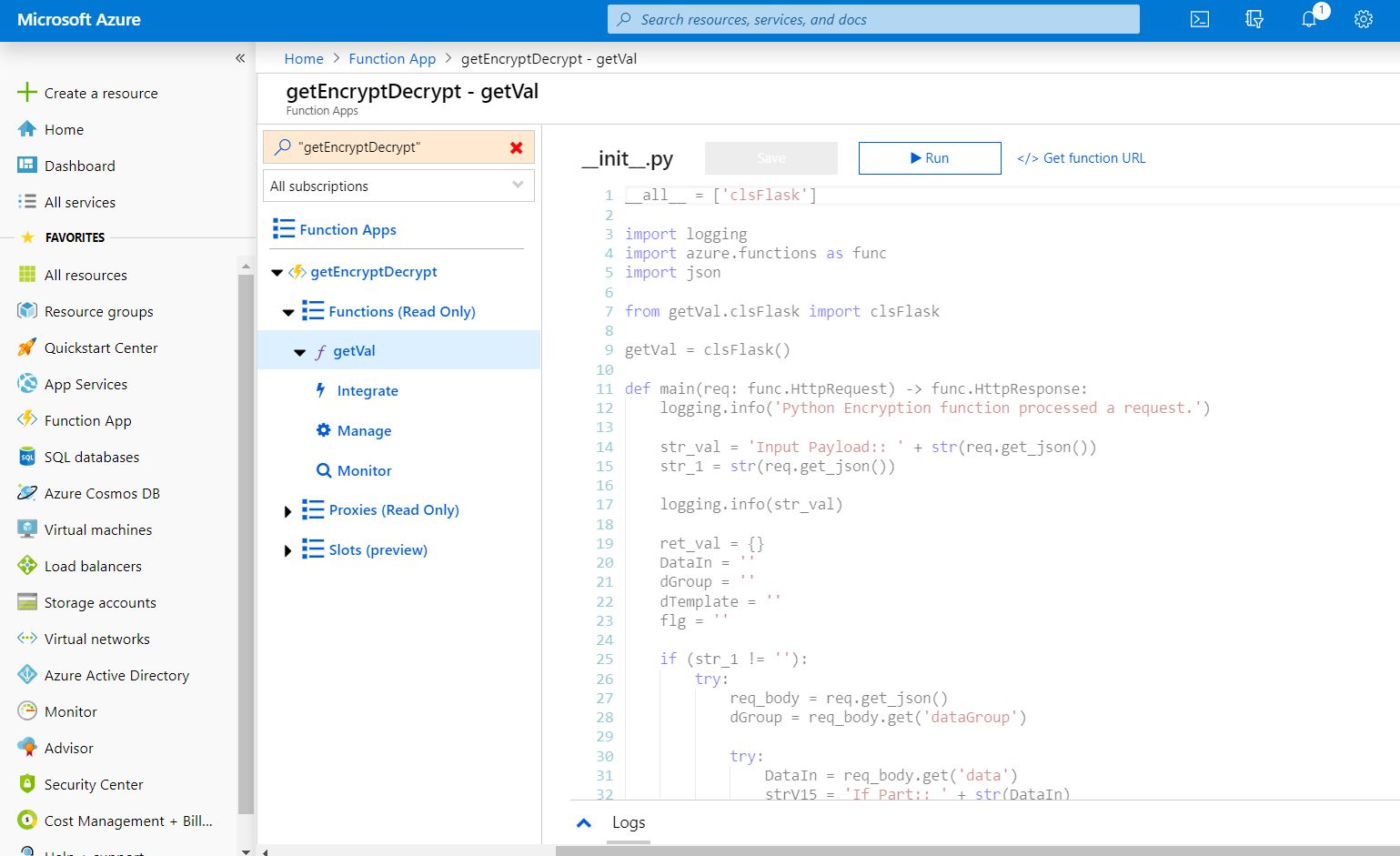
You can see the function under the Azure portal –
Deployed-Function

Let’s see some other important features of this function –

Monitor: You can monitor two ways. One is by clicking the monitor options you will get the individual requests level details & also get to see the log information over here –

Function-Monitor-Details-1

Clicking Application Insights will give you another level of detailed logs, which can be very useful for debugging. We’ll touch this at the end of this post with a very brief discussion.

Function-Monitor-Details-3.JPG

As you can see, clicking individual lines will show the details further.

Let’s quickly check the application insights –

Application-Insights-1

Application Insights will give you a SQL like an interface where you can get the log details of all your requests.

Application-Insights-2

You can expand the individual details for further information.

Application-Insights-3

You can change the parameter name & other details & click the run button to get all the log details for your debugging purpose.

So, finally, we’ve achieved our goal. This is relatively long posts. But, I’m sure this will help you to create your first python-based function on the Azure platform.

Hope, you will like this approach. Let me know your comment on the same.

I’ll bring some more exciting topic in the coming days from the Python verse.

Till then, Happy Avenging! πŸ˜€

Note: All the data posted here are representational data & available over the internet.

Combining the NoSQL(Cosmos DB) & traditional Azure RDBMS in Azure (Time stone solo from Python verse)

Hi Guys!

Today, our main objective is to extend our last post & blending two different kinds of data using Python.

Please refer the earlier post if you didn’t go through it – “Building Azure cosmos application.“.

What is the Objective?

In this post, our objective is to combine traditional RDBMS from the cloud with Azure’s NO SQL, which is, in this case, is Cosmos DB. And, try to forecast some kind of blended information, which can be aggregated further.

Examining Source Data.

No SQL Data from Cosmos:

Let’s check one more time the No SQL data created in our last post.

CosmosData

Total, we’ve created 6 records in our last post.

As you can see in red marked areas. From item, one can check the total number of records created. You can also filter out specific record using the Edit Filter blue color button highlighted with blue box & you need to provide the “WHERE CLAUSE” inside it.

Azure SQL DB:

Let’s create some data in Azure SQL DB.

But, before that, you need to create SQL DB in the Azure cloud. Here is the official Microsoft link to create DB in Azure. You can refer to it here.

I won’t discuss the detailed steps of creating DB here.

From Azure portal, it looks like –

Azure SQL DB Main Screen

Let’s see how the data looks like in Azure DB. For our case, we’ll be using the hrMaster DB.

Let’s create the table & some sample data aligned as per our cosmos data.

Azure SQL DB

We will join both the data based on subscriberId & then extract our required columns in our final output.

CombinedData

Good. Now, we’re ready for python scripts.

Python Scripts:

In this installment, we’ll be reusing the following python scripts, which is already discussed in my earlier post β€“

  • clsL.py
  • clsColMgmt.py
  • clsCosmosDBDet.py

So, I’m not going to discuss these scripts.

Before we discuss our scripts, let’s look out the directory structures –

Win_Vs_MAC

Here is the detailed directory structure between the Windows & MAC O/S.

1. clsConfig.pyΒ (This script will create the split csv files or final merge file after the corresponding process. However, this can be used as usual verbose debug logging as well. Hence, the name comes into the picture.)

##############################################
#### Written By: SATYAKI DE               ####
#### Written On: 25-May-2019              ####
#### Updated On: 02-Jun-2019              ####
####                                      ####
#### Objective: This script is a config   ####
#### file, contains all the keys for      ####
#### azure cosmos db. Application will    ####
#### process these information & perform  ####
#### various CRUD operation on Cosmos DB. ####
##############################################

import os
import platform as pl

class clsConfig(object):
    Curr_Path = os.path.dirname(os.path.realpath(__file__))
    db_name = 'rnd-de01-usw2-vfa-cdb'
    db_link = 'dbs/' + db_name
    CONTAINER1 = "RealtimeEmail"
    CONTAINER2 = "RealtimeTwitterFeedback"
    CONTAINER3 = "RealtimeHR"

    os_det = pl.system()
    if os_det == "Windows":
        sep = '\\'
    else:
        sep = '/'

    config = {
        'SERVER': 'xxxx-xxx.database.windows.net',
        'DATABASE_1': 'SalesForceMaster',
        'DATABASE_2': 'hrMaster',
        'DATABASE_3': 'statMaster',
        'USERNAME': 'admin_poc_dev',
        'PASSWORD': 'xxxxx',
        'DRIVER': '{ODBC Driver 17 for SQL Server}',
        'ENV': 'pocdev-saty',
        'ENCRYPT_FLAG': "yes",
        'TRUST_FLAG': "no",
        'TIMEOUT_LIMIT': "30",
        'PROCSTAT': "'Y'",
        'APP_ID': 1,
        'EMAIL_SRC_JSON_FILE': Curr_Path + sep + 'src_file' + sep + 'srcEmail.json',
        'TWITTER_SRC_JSON_FILE': Curr_Path + sep + 'src_file' + sep + 'srcTwitter.json',
        'HR_SRC_JSON_FILE': Curr_Path + sep + 'src_file' + sep + 'srcHR.json',
        'COSMOSDB_ENDPOINT': 'https://rnd-de01-usw2-vfa-cdb.documents.azure.com:443/',
        'CONFIG_TABLE': 'ETL_CONFIG_TAB',
        'COSMOS_PRIMARYKEY': "XXXXXXXXXXXXXXXXXXXXXXXXXXXXXXXXXXXXXXXXXXXXXXXXXXXXXXXXXXXXIsI00AxKXXXXXgg==",
        'ARCH_DIR': Curr_Path + sep + 'arch' + sep,
        'COSMOSDB': db_name,
        'COSMOS_CONTAINER1': CONTAINER1,
        'COSMOS_CONTAINER2': CONTAINER2,
        'COSMOS_CONTAINER3': CONTAINER3,
        'CONFIG_ORIG': 'Config_orig.csv',
        'ENCRYPT_CSV': 'Encrypt_Config.csv',
        'DECRYPT_CSV': 'Decrypt_Config.csv',
        'PROFILE_PATH': Curr_Path + sep + 'profile' + sep,
        'LOG_PATH': Curr_Path + sep + 'log' + sep,
        'REPORT_PATH': Curr_Path + sep + 'report',
        'APP_DESC_1': 'Feedback Communication',
        'DEBUG_IND': 'N',
        'INIT_PATH': Curr_Path,
        'SQL_QRY_1': "SELECT c.subscriberId, c.sender, c.orderNo, c.orderDate, c.items.orderQty  FROM RealtimeEmail c",
        'SQL_QRY_2': "SELECT c.twitterId, c.Twit, c.DateCreated, c.Country FROM RealtimeTwitterFeedback c WHERE c.twitterId=@CrVal",
        'DB_QRY': "SELECT * FROM c",
        'AZURE_SQL_1': "SELECT DISTINCT subscriberId, state, country, annualIncome, customerType FROM dbo.onboardCustomer",
        'COLLECTION_QRY': "SELECT * FROM r",
        'database_link': db_link,
        'collection_link_1': db_link + '/colls/' + CONTAINER1,
        'collection_link_2': db_link + '/colls/' + CONTAINER2,
        'collection_link_3': db_link + '/colls/' + CONTAINER3,
        'options': {
            'offerThroughput': 1000,
            'enableCrossPartitionQuery': True,
            'maxItemCount': 2
        }
    }

Here, we’ve added a couple of more entries compared to the last time, which points the detailed configuration for Azure SQL DB.

‘SERVER’: ‘xxxx-xxx.database.windows.net’,
‘DATABASE_1’: ‘SalesForceMaster’,
‘DATABASE_2’: ‘hrMaster’,
‘DATABASE_3’: ‘statMaster’,
‘USERNAME’: ‘admin_poc_dev’,
‘PASSWORD’: ‘xxxxx’,
‘DRIVER’: ‘{ODBC Driver 17 for SQL Server}’,
‘ENV’: ‘pocdev-saty’,
‘ENCRYPT_FLAG’: “yes”,
‘TRUST_FLAG’: “no”,
‘TIMEOUT_LIMIT’: “30”,
‘PROCSTAT’: “‘Y'”, 

Here, you need to supply your DB credentials accordingly.

2. clsDBLookup.pyΒ (This script will look into the Azure SQL DB & fetch data from the traditional RDBMS of Azure environment.)

#####################################################
#### Written By: SATYAKI DE                      ####
#### Written On: 25-May-2019                     ####
####                                             ####
#### Objective: This script will check &         ####
#### test the connection with the Azure          ####
#### SQL DB & it will fetch all the records      ####
#### name resied under the same DB of a table.   ####
#####################################################

import pyodbc as py
import pandas as p
from clsConfig import clsConfig as cdc

class clsDBLookup(object):
    def __init__(self, lkpTableName = ''):
        self.server = cdc.config['SERVER']
        self.database = cdc.config['DATABASE_1']
        self.database1 = cdc.config['DATABASE_2']
        self.database2 = cdc.config['DATABASE_3']
        self.username = cdc.config['USERNAME']
        self.password = cdc.config['PASSWORD']
        self.driver = cdc.config['DRIVER']
        self.env = cdc.config['ENV']
        self.encrypt_flg = cdc.config['ENCRYPT_FLAG']
        self.trust_flg = cdc.config['TRUST_FLAG']
        self.timeout_limit = cdc.config['TIMEOUT_LIMIT']
        self.lkpTableName = cdc.config['CONFIG_TABLE']
        self.ProcStat = cdc.config['PROCSTAT']
        self.AppId = cdc.config['APP_ID']

    def LookUpData(self):
        try:
            # Assigning all the required values
            server = self.server
            database = self.database1
            username = self.username
            password = self.password
            driver = self.driver
            env = self.env
            encrypt_flg = self.encrypt_flg
            trust_flg = self.trust_flg
            timout_limit = self.timeout_limit
            lkpTableName = self.lkpTableName
            ProcStat = self.ProcStat
            AppId = self.AppId

            # Creating secure connection
            str_conn = 'Driver=' + driver + ';Server=tcp:' + server + ',1433;' \
                       'Database=' + database + ';Uid=' + username + '@' + env + ';' \
                       'Pwd=' + password + ';Encrypt=' + encrypt_flg + ';' \
                       'TrustServerCertificate=' + trust_flg + ';Connection Timeout=' + timout_limit + ';'

            db_con_azure = py.connect(str_conn)

            query = " SELECT [ruleId] as ruleId, [ruleName] as ruleName, [ruleSQL] as ruleSQL, " \
                    " [ruleFlag] as ruleFlag, [appId] as appId, [DBType] as DBType, " \
                    " [DBName] as DBName FROM [dbo][" + lkpTableName + "] WHERE ruleFLag = " + ProcStat + " " \
                    " and appId = " + AppId + " ORDER BY ruleId "

            df = p.read_sql(query, db_con_azure)

            # Closing the connection
            db_con_azure.close()

            return df
        except Exception as e:
            x = str(e)
            print(x)
            df = p.DataFrame()

            return df

    def azure_sqldb_read(self, sql):
        try:
            # Assigning all the required values
            server = self.server
            database = self.database1
            username = self.username
            password = self.password
            driver = self.driver
            env = self.env
            encrypt_flg = self.encrypt_flg
            trust_flg = self.trust_flg
            timout_limit = self.timeout_limit
            lkpTableName = self.lkpTableName
            ProcStat = self.ProcStat
            AppId = self.AppId

            # Creating secure connection
            str_conn = 'Driver=' + driver + ';Server=tcp:' + server + ',1433;' \
                       'Database=' + database + ';Uid=' + username + '@' + env + ';' \
                       'Pwd=' + password + ';Encrypt=' + encrypt_flg + ';' \
                       'TrustServerCertificate=' + trust_flg + ';Connection Timeout=' + timout_limit + ';'

            # print("Connection Details:: ", str_conn)
            db_con_azure = py.connect(str_conn)

            query = sql

            df = p.read_sql(query, db_con_azure)

            # Closing the connection
            db_con_azure.close()

            return df
        except Exception as e:
            x = str(e)
            print(x)
            df = p.DataFrame()

            return df

Major lines to discuss –

azure_sqldb_read(self, sql):

Getting the source SQL supplied from the configuration script.

db_con_azure = py.connect(str_conn)

query = sql

df = p.read_sql(query, db_con_azure)

After creating a successful connection, our application will read the SQL & fetch the data & store that into a pandas dataframe and return the output to the primary calling function.

3. callCosmosAPI.pyΒ (This is the main script, which will call all the methods to blend the data. Hence, the name comes into the picture.)

##############################################
#### Written By: SATYAKI DE               ####
#### Written On: 25-May-2019              ####
#### Modified On 02-Jun-2019              ####
####                                      ####
#### Objective: Main calling scripts.     ####
##############################################

import clsColMgmt as cm
import clsCosmosDBDet as cmdb
from clsConfig import clsConfig as cf
import pandas as p
import clsLog as cl
import logging
import datetime
import json
import clsDBLookup as dbcon

# Disbling Warning
def warn(*args, **kwargs):
    pass

import warnings
warnings.warn = warn

def getDate(row):
    try:
        d1 = row['orderDate']
        d1_str = str(d1)
        d1_dt_part, sec = d1_str.split('.')
        dt_part1 = d1_dt_part.replace('T', ' ')

        return dt_part1
    except Exception as e:
        x = str(e)
        print(x)
        dt_part1 = ''

        return dt_part1

# Lookup functions from
# Azure cloud SQL DB

var = datetime.datetime.now().strftime("%Y-%m-%d_%H-%M-%S")

def main():
    try:
        df_ret = p.DataFrame()
        df_ret_2 = p.DataFrame()
        df_ret_2_Mod = p.DataFrame()

        debug_ind = 'Y'

        # Initiating Log Class
        l = cl.clsLog()

        general_log_path = str(cf.config['LOG_PATH'])

        # Enabling Logging Info
        logging.basicConfig(filename=general_log_path + 'consolidated.log', level=logging.INFO)

        # Moving previous day log files to archive directory
        arch_dir = cf.config['ARCH_DIR']
        log_dir = cf.config['LOG_PATH']

        print("Archive Directory:: ", arch_dir)
        print("Log Directory::", log_dir)

        print("*" * 157)
        print("Testing COSMOS DB Connection!")
        print("*" * 157)

        # Checking Cosmos DB Azure
        y = cmdb.clsCosmosDBDet()
        ret_val = y.test_db_con()

        if ret_val == 0:
            print()
            print("Cosmos DB Connection Successful!")
            print("*" * 157)
        else:
            print()
            print("Cosmos DB Connection Failure!")
            print("*" * 157)
            raise Exception

        print("*" * 157)

        # Accessing from Azure SQL DB
        x1 = dbcon.clsDBLookup()
        act_df = x1.azure_sqldb_read(cf.config['AZURE_SQL_1'])

        print("Azure SQL DB::")
        print(act_df)
        print()

        print("-" * 157)

        # Calling the function 1
        print("RealtimeEmail::")

        # Fetching First collection data to dataframe
        print("Fethcing Comos Collection Data!")

        sql_qry_1 = cf.config['SQL_QRY_1']
        msg = "Documents generatd based on unique key"
        collection_flg = 1

        x = cm.clsColMgmt()
        df_ret = x.fetch_data(sql_qry_1, msg, collection_flg)

        l.logr('1.EmailFeedback_' + var + '.csv', debug_ind, df_ret, 'log')
        print('RealtimeEmail Data::')
        print(df_ret)
        print()

        # Checking execution status
        ret_val = int(df_ret.shape[0])

        if ret_val == 0:
            print("Cosmos DB Hans't returned any rows. Please check your queries!")
            print("*" * 157)
        else:
            print("Successfully fetched!")
            print("*" * 157)

        # Calling the 2nd Collection
        print("RealtimeTwitterFeedback::")

        # Fetching First collection data to dataframe
        print("Fethcing Cosmos Collection Data!")

        # Query using parameters
        sql_qry_2 = cf.config['SQL_QRY_2']
        msg_2 = "Documents generated based on RealtimeTwitterFeedback feed!"
        collection_flg = 2

        val = 'crazyGo'
        param_det = [{"name": "@CrVal", "value": val}]
        add_param = 2

        x1 = cm.clsColMgmt()
        df_ret_2 = x1.fetch_data(sql_qry_2, msg_2, collection_flg, add_param, param_det)

        l.logr('2.TwitterFeedback_' + var + '.csv', debug_ind, df_ret, 'log')
        print('Realtime Twitter Data:: ')
        print(df_ret_2)
        print()

        # Checking execution status
        ret_val_2 = int(df_ret_2.shape[0])

        if ret_val_2 == 0:
            print("Cosmos DB hasn't returned any rows. Please check your queries!")
            print("*" * 157)
        else:
            print("Successfuly row feteched!")
            print("*" * 157)

        # Merging NoSQL Data (Cosmos DB) with Relational DB (Azure SQL DB)
        df_Fin_temp = p.merge(df_ret, act_df, on='subscriberId', how='inner')

        df_fin = df_Fin_temp[['orderDate', 'orderNo', 'sender', 'state', 'country', 'customerType']]

        print("Initial Combined Data (From Cosmos & Azure SQL DB) :: ")
        print(df_fin)

        l.logr('3.InitCombine_' + var + '.csv', debug_ind, df_fin, 'log')

        # Transforming the orderDate as per standard format
        df_fin['orderDateM'] = df_fin.apply(lambda row: getDate(row), axis=1)

        # Dropping the old column & renaming the new column to old column
        df_fin.drop(columns=['orderDate'], inplace=True)
        df_fin.rename(columns={'orderDateM': 'orderDate'}, inplace=True)

        print("*" * 157)
        print()
        print("Final Combined & Transformed result:: ")
        print(df_fin)

        l.logr('4.Final_Combine_' + var + '.csv', debug_ind, df_fin, 'log')
        print("*" * 157)

    except ValueError:
        print("No relevant data to proceed!")

    except Exception as e:
        print("Top level Error: args:{0}, message{1}".format(e.args, e.message))

if __name__ == "__main__":
    main()

The key lines from this script –

def getDate(row):
    try:
        d1 = row['orderDate']
        d1_str = str(d1)
        d1_dt_part, sec = d1_str.split('.')
        dt_part1 = d1_dt_part.replace('T', ' ')

        return dt_part1
    except Exception as e:
        x = str(e)
        print(x)
        dt_part1 = ''

        return dt_part1

This function converts NoSQL date data type more familiar format.

NoSQL Date:
NoSQL_Date
Transformed Date:
Transformed Date
# Accessing from Azure SQL DB
x1 = dbcon.clsDBLookup()
act_df = x1.azure_sqldb_read(cf.config['AZURE_SQL_1'])

print("Azure SQL DB::")
print(act_df)
print()

Above lines are calling the Azure SQL DB method to retrieve the RDBMS data into our dataframe.

# Merging NoSQL Data (Cosmos DB) with Relational DB (Azure SQL DB)
df_Fin_temp = p.merge(df_ret, act_df, on='subscriberId', how='inner')

df_fin = df_Fin_temp[['orderDate', 'orderNo', 'sender', 'state', 'country', 'customerType']]

In these above lines, we’re joining the data retrieved from two different kinds of the database to prepare our initial combined dataframe. Also, we’ve picked only the desired column, which will be useful for us.

# Transforming the orderDate as per standard format
df_fin['orderDateM'] = df_fin.apply(lambda row: getDate(row), axis=1)

# Dropping the old column & renaming the new column to old column
df_fin.drop(columns=['orderDate'], inplace=True)
df_fin.rename(columns={'orderDateM': 'orderDate'}, inplace=True)

In the above lines, we’re transforming our date field, as shown above in one of our previous images by calling the getDate method.

Let’s see the directory structure of our program –

Win_Vs_MAC

Let’s see how it looks when it runs –

Windows:

Win_Run_1
Win_Run_2

MAC:

MAC_Run_1
MAC_Run_2

So, finally, we’ve successfully blended the data & make more meaningful data projection.

Following python packages are required to run this application –

pip install azure

pip install azure-cosmos

pip install pandas

pip install requests

pip install pyodbc

This application tested on Python3.7.1 & Python3.7.2 as well. As per Microsoft, their official supported version is Python3.5.

I hope you’ll like this effort.

Wait for the next installment. Till then, Happy Avenging. πŸ˜€

[Note:Β All the sample data are available/prepared in the public domain for research & study.]

The advanced concept of Pandas & Numpy with an aggregate & lookup of file logging (A crossover over of Space Stone & Soul Stone from the Python verse)

Today, we’ll be implementing the advanced concept of Pandas & Numpy & how one can aggregate data & produce meaningful data insights into your business, which makes an impact on your overall profit.

First, let us understand the complexity of the problem & what we’re looking to achieve here. For that, you need to view the source data & lookup data & how you want to process the data.

Source Data:

sourcedata-e1554702920904-1

The above picture is a sample data-set from a Bank (Data available on U.S public forum), which captures the information of the customer’s current account balance.Β Let’s look into the look-up files sample data –

First File:

LookUp_1_Actual

Second File:

LookUp_2So, one can clearly see, Bank is trying to get a number of stories based on the existing data.

Challenges:

The first lookup file contains data in a manner where the column of our source file is row here. Hence, you need to somehow bring the source data as per the lookup file to get the other relevant information & then joining that with the second lookup file to bring all the data point for your storyline.

Look-Up Configuration:

In order to match the look-up data with our source data, we’ll be adding two new columns, which will help the application to process the correct row out of the entries provided in the look-up file 1.

LookUp_1

As you can see from the above picture, that two new columns i.e. Category & Stat have added in this context. Here, the category contains metadata information. If a column has a significant number of unique values, then we’re marking it as ‘D in the category.Β In this case, the bank doesn’t offer any scheme based on the customer’s name. Hence, these fields are marked with ‘I. For the Gender column, the application has less number of unique records i.e. either ‘Male‘ or ‘Female‘. As a result, we provided two corresponding entries. Remember, DateJoined is a key column here. Even though we marked its category as ‘I‘, which denote no transformation requires – ‘K‘ will denote that it is the driving column apart from one of the surrogate key [PKEY] that we’ll be generating during our application transformation process. I’ll discuss that in the respective snippet discussion.

Our Goal:

Based on the source data, We need to find the following story & published that in an excel sheet separately.

  1. The country, Gender wise Bank’s contribution.
  2. The country, Job-wise Bank’s contribution.
  3. The country & Age range wise Saving trends & Bank’s contribution.

A little note on Bank’s Contribution:

Let us explain, what exactly means by Bank’s contribution. Sometimes, bank want’s to encourage savings to an individual client based on all the available factors. So, let’s assume that – Bank contribute $1 for every $150 saving of a person. Again this $1 may vary based on the Age Range & gender to promote a specific group. Also, when someone opens any savings account with the bank, by default bank contributed a sum of $100 at the time when they open an account for a short period of time as part of their promotion strategy. These details you will get it from first lookup file. Second lookup file contains the age range category base on the Group that is available in First Lookup file.

Python Scripts:

In this installment, we’ll be reusing the following python scripts, which is already discussed in my earlier post

  • clsFindFile.py
  • clsL.py

So, I’m not going to discuss these scripts.Β 

1. clsParam.pyΒ (This script will create the split csv files or final merge file after the corresponding process. However, this can be used as normal verbose debug logging as well. Hence, the name comes into the picture.)Β 

 1
 2
 3
 4
 5
 6
 7
 8
 9
10
11
12
13
14
15
16
17
18
19
20
21
22
23
24
25
26
27
28
29
30
31
32
###########################################
#### Written By: SATYAKI DE        ########
#### Written On: 04-Apr-2019       ########
###########################################

import os
import platform as pl

class clsParam(object):
    os_det = pl.system()
    dir_sep = ''

    if os_det == "Windows":
        dir_sep = "\\"
    else:
        dir_sep = '/'

    config = {
        'MAX_RETRY' : 5,
        'PATH' : os.path.dirname(os.path.realpath(__file__)) + dir_sep,
        'SRC_DIR' : os.path.dirname(os.path.realpath(__file__)) + dir_sep + 'src_files' + dir_sep,
        'FIN_DIR': os.path.dirname(os.path.realpath(__file__)) + dir_sep + 'finished' + dir_sep,
        'LKP_DIR': os.path.dirname(os.path.realpath(__file__)) + dir_sep + 'lkp_files' + dir_sep,
        'LOG_DIR': os.path.dirname(os.path.realpath(__file__)) + dir_sep + 'log' + dir_sep,
        'LKP_FILE': 'DataLookUp',
        'LKP_CATG_FILE': 'CategoryLookUp',
        'LKP_FILE_DIR_NM': 'lkp_files',
        'SRC_FILE_DIR_NM': 'src_files',
        'FIN_FILE_DIR_NM': 'finished',
        'LOG_FILE_DIR_NM': 'log',
        'DEBUG_IND': 'Y'
    }


2. clsLookUpDataRead.pyΒ (This script will look into the lookup file & this will generate the combined lookup result as we’ve two different lookup files. Hence, the name comes into the picture.)Β 

  1
  2
  3
  4
  5
  6
  7
  8
  9
 10
 11
 12
 13
 14
 15
 16
 17
 18
 19
 20
 21
 22
 23
 24
 25
 26
 27
 28
 29
 30
 31
 32
 33
 34
 35
 36
 37
 38
 39
 40
 41
 42
 43
 44
 45
 46
 47
 48
 49
 50
 51
 52
 53
 54
 55
 56
 57
 58
 59
 60
 61
 62
 63
 64
 65
 66
 67
 68
 69
 70
 71
 72
 73
 74
 75
 76
 77
 78
 79
 80
 81
 82
 83
 84
 85
 86
 87
 88
 89
 90
 91
 92
 93
 94
 95
 96
 97
 98
 99
100
101
102
103
104
105
106
107
108
109
110
111
112
113
114
115
116
117
118
119
120
121
122
123
124
125
126
127
128
129
###########################################
#### Written By: SATYAKI DE        ########
#### Written On: 04-Apr-2019       ########
###########################################

import pandas as p
import clsFindFile as c
import clsL as log
from clsParam import clsParam as cf
import datetime

# Disbling Warnings
def warn(*args, **kwargs):
    pass
import warnings
warnings.warn = warn

class clsLookUpDataRead(object):

    def __init__(self, lkpFilename):
        self.lkpFilename = lkpFilename

        self.lkpCatgFilename = cf.config['LKP_CATG_FILE']
        self.path = cf.config['PATH']
        self.subdir = str(cf.config['LOG_FILE_DIR_NM'])

        # To disable logging info
        self.Ind = cf.config['DEBUG_IND']
        self.var = datetime.datetime.now().strftime(".%H.%M.%S")

    def getNaN2Null(self, row):
        try:
            str_val = ''
            str_val = str(row['Group']).replace('nan', '').replace('NaN','')

            return str_val
        except:
            str_val = ''

            return str_val

    def ReadTable(self):
        # Assigning Logging Info
        lkpF = []
        lkpF_2 = []
        var = self.var
        Ind = self.Ind
        subdir = self.subdir

        # Initiating Logging Instances
        clog = log.clsL()

        try:

            # Assinging Lookup file name
            lkpFilename = self.lkpFilename

            # Fetching the actual look-up file name
            f = c.clsFindFile(lkpFilename, str(cf.config['LKP_FILE_DIR_NM']))
            lkp_file_list = list(f.find_file())

            # Ideally look-up will be only one file
            # Later it will be converted to table
            for i in range(len(lkp_file_list)):
                lkpF = lkp_file_list[i]

            # Fetching the content of the look-up file
            df_lkpF = p.read_csv(lkpF, index_col=False)

            # Fetching Category LookUp File
            LkpCatgFileName = self.lkpCatgFilename

            f1 = c.clsFindFile(LkpCatgFileName, str(cf.config['LKP_FILE_DIR_NM']))
            lkp_file_list_2 = list(f1.find_file())

            # Ideally look-up will be only one file
            # Later it will be converted to table
            for j in range(len(lkp_file_list_2)):
                lkpF_2 = lkp_file_list_2[j]

            # Fetching the content of the look-up file
            df_lkpF_2 = p.read_csv(lkpF_2, index_col=False)

            # Changing both the column data type as same type
            df_lkpF['Group_1'] = df_lkpF['Group'].astype(str)
            df_lkpF_2['Group_1'] = df_lkpF_2['Group'].astype(str)

            # Dropping the old column
            df_lkpF.drop(['Group'], axis=1, inplace=True)
            df_lkpF_2.drop(['Group'], axis=1, inplace=True)

            # Renaming the changed data type column with the old column name
            df_lkpF.rename(columns={'Group_1':'Group'}, inplace=True)
            df_lkpF_2.rename(columns={'Group_1': 'Group'}, inplace=True)

            # Merging two lookup dataframes to form Final Consolidated Dataframe
            df_Lkp_Merge = p.merge(
                                    df_lkpF[['TableName', 'ColumnOrder', 'ColumnName', 'MappedColumnName',
                                             'Category', 'Stat', 'Group', 'BankContribution']],
                                    df_lkpF_2[['StartAgeRange', 'EndAgeRange', 'Group']],
                                    on=['Group'], how='left')

            # Converting NaN to Nul or empty string
            df_Lkp_Merge['GroupNew'] = df_Lkp_Merge.apply(lambda row: self.getNaN2Null(row), axis=1)

            # Dropping the old column & renaming the new column
            df_Lkp_Merge.drop(['Group'], axis=1, inplace=True)
            df_Lkp_Merge.rename(columns={'GroupNew': 'Group'}, inplace=True)

            clog.logr('1.df_Lkp_Merge' + var + '.csv', Ind, df_Lkp_Merge, subdir)

            return df_Lkp_Merge

        except(FileNotFoundError, IOError) as s:
            y = str(s)
            print(y)

            # Declaring Empty Dataframe
            df_error = p.DataFrame()

            return df_error
        except Exception as e:
            x = str(e)
            print(x)

            # Declaring Empty Dataframe
            df_error = p.DataFrame()

            return df_error


Key lines from this script –

# Fetching the actual look-up file name
f = c.clsFindFile(lkpFilename, str(cf.config['LKP_FILE_DIR_NM']))
lkp_file_list = list(f.find_file())

# Ideally look-up will be only one file
# Later it will be converted to table
for i in range(len(lkp_file_list)):
lkpF = lkp_file_list[i]

# Fetching the content of the look-up file
df_lkpF = p.read_csv(lkpF, index_col=False)

Here, the application will try to find out the lookup file based on the file name pattern & directory path. And, then load the data into the dataframe.

# Fetching Category LookUp File
LkpCatgFileName = self.lkpCatgFilename

f1 = c.clsFindFile(LkpCatgFileName, str(cf.config['LKP_FILE_DIR_NM']))
lkp_file_list_2 = list(f1.find_file())

# Ideally look-up will be only one file
# Later it will be converted to table
for j in range(len(lkp_file_list_2)):
lkpF_2 = lkp_file_list_2[j]

# Fetching the content of the look-up file
df_lkpF_2 = p.read_csv(lkpF_2, index_col=False)

In this step, the second lookup file will be loaded into the second dataframe.

# Changing both the column data type as same type
df_lkpF['Group_1'] = df_lkpF['Group'].astype(str)
df_lkpF_2['Group_1'] = df_lkpF_2['Group'].astype(str)

# Dropping the old column
df_lkpF.drop(['Group'], axis=1, inplace=True)
df_lkpF_2.drop(['Group'], axis=1, inplace=True)

# Renaming the changed data type column with the old column name
df_lkpF.rename(columns={'Group_1':'Group'}, inplace=True)
df_lkpF_2.rename(columns={'Group_1': 'Group'}, inplace=True)

It is always better to cast the same datatype for those columns, which will be used part of the joining key. The above snippet does exactly that.

# Merging two lookup dataframes to form Final Consolidated Dataframe
df_Lkp_Merge = p.merge(
df_lkpF[['TableName', 'ColumnOrder', 'ColumnName', 'MappedColumnName',
'Category', 'Stat', 'Group', 'BankContribution']],
df_lkpF_2[['StartAgeRange', 'EndAgeRange', 'Group']],
on=['Group'], how='left')

In this step, the first lookup file will be left join with the second lookup file based on Group column.

# Converting NaN to Nul or empty string
df_Lkp_Merge['GroupNew'] = df_Lkp_Merge.apply(lambda row: self.getNaN2Null(row), axis=1)

# Dropping the old column & renaming the new column
df_Lkp_Merge.drop(['Group'], axis=1, inplace=True)
df_Lkp_Merge.rename(columns={'GroupNew': 'Group'}, inplace=True)

Once merge is done, key columns need to suppress ‘NaN’ values to Null for better data process.

3. clsPivotLookUp.pyΒ (This script will actually contain the main logic to process & merge the data between source & lookup files & create group data & based on that data point will be produced & captured in the excel. Hence, the name comes into the picture.)Β 

  1
  2
  3
  4
  5
  6
  7
  8
  9
 10
 11
 12
 13
 14
 15
 16
 17
 18
 19
 20
 21
 22
 23
 24
 25
 26
 27
 28
 29
 30
 31
 32
 33
 34
 35
 36
 37
 38
 39
 40
 41
 42
 43
 44
 45
 46
 47
 48
 49
 50
 51
 52
 53
 54
 55
 56
 57
 58
 59
 60
 61
 62
 63
 64
 65
 66
 67
 68
 69
 70
 71
 72
 73
 74
 75
 76
 77
 78
 79
 80
 81
 82
 83
 84
 85
 86
 87
 88
 89
 90
 91
 92
 93
 94
 95
 96
 97
 98
 99
100
101
102
103
104
105
106
107
108
109
110
111
112
113
114
115
116
117
118
119
120
121
122
123
124
125
126
127
128
129
130
131
132
133
134
135
136
137
138
139
140
141
142
143
144
145
146
147
148
149
150
151
152
153
154
155
156
157
158
159
160
161
162
163
164
165
166
167
168
169
170
171
172
173
174
175
176
177
178
179
180
181
182
183
184
185
186
187
188
189
190
191
192
193
194
195
196
197
198
199
200
201
202
203
204
205
206
207
208
209
210
211
212
213
214
215
216
217
218
219
220
221
222
223
224
225
226
227
228
229
230
231
232
233
234
235
236
237
238
239
240
241
242
243
244
245
246
247
248
249
250
251
252
253
254
255
256
257
258
259
260
261
262
263
264
265
266
267
268
269
270
271
272
273
274
275
276
277
278
279
280
281
282
283
284
285
286
287
288
289
290
291
292
293
294
295
296
297
298
299
300
301
302
303
304
305
306
307
308
309
310
311
312
313
314
315
316
317
318
319
320
321
322
323
324
325
326
327
328
329
330
331
332
333
334
335
336
337
338
339
340
341
342
343
344
345
346
347
348
349
350
351
352
353
354
355
356
357
358
359
360
361
362
363
364
365
366
367
368
369
370
371
372
373
374
375
376
377
378
379
380
381
382
383
384
385
386
387
388
389
390
391
392
393
394
395
396
397
398
399
400
401
402
403
404
405
406
407
408
409
410
411
412
413
414
415
416
417
418
419
420
421
422
423
424
425
426
427
428
429
430
431
432
433
434
435
436
437
438
439
440
441
442
443
444
445
446
447
448
449
450
451
452
453
454
455
456
457
458
459
460
461
462
463
464
465
466
467
468
469
470
471
472
473
474
475
476
477
478
479
480
481
482
483
484
485
486
487
488
489
490
491
492
493
494
495
496
497
498
499
500
501
502
503
504
505
###########################################
#### Written By: SATYAKI DE        ########
#### Written On: 04-Apr-2019       ########
###########################################

import pandas as p
import numpy as np
import clsFindFile as c
import clsL as log
import datetime
from clsParam import clsParam as cf
from pandas import ExcelWriter

# Disbling Warnings
def warn(*args, **kwargs):
    pass
import warnings
warnings.warn = warn

class clsPivotLookUp(object):

    def __init__(self, srcFilename, tgtFileName, df_lkpF):
        self.srcFilename = srcFilename
        self.tgtFileName = tgtFileName
        self.df_lkpF = df_lkpF
        self.lkpCatgFilename = cf.config['LKP_CATG_FILE']

        self.path = cf.config['PATH']
        self.subdir = str(cf.config['LOG_FILE_DIR_NM'])
        self.subdir_2 = str(cf.config['FIN_FILE_DIR_NM'])
        # To disable logging info
        self.Ind = cf.config['DEBUG_IND']
        self.report_path = cf.config['FIN_DIR']

    def dfs_tabs(self, df_list, sheet_list, file_name):
        try:
            cnt = 0
            number_rows = 0

            writer = p.ExcelWriter(file_name, engine='xlsxwriter')

            for dataframe, sheet in zip(df_list, sheet_list):
                number_rows = int(dataframe.shape[0])
                number_cols = int(dataframe.shape[1])

                if cnt == 0:
                    dataframe.to_excel(writer, sheet_name=sheet, startrow=7, startcol=5)
                else:
                    dataframe.to_excel(writer, sheet_name=sheet, startrow=5, startcol=0)

                # Get the xlsxwriter workbook & worksheet objects
                workbook = writer.book
                worksheet = writer.sheets[sheet]
                worksheet.set_zoom(90)

                if cnt == 0:
                    worksheet.set_column('A:E', 4)
                    worksheet.set_column('F:F', 20)
                    worksheet.set_column('G:G', 10)
                    worksheet.set_column('H:J', 20)

                    # Insert an Image
                    worksheet.insert_image('E1', 'Logo.png', {'x_scale':0.6, 'y_scale':0.8})

                    # Add a number format for cells with money.
                    money_fmt = workbook.add_format({'num_format': '$#,##0', 'border': 1})
                    worksheet.set_column('H:H', 20, money_fmt)

                    # Define our range for color formatting
                    color_range = "F9:F{}".format(number_rows * 2 + 1)

                    # Add a format. Red fill with the dark red text
                    red_format = workbook.add_format({'bg_color':'#FEC7CE', 'font_color':'#0E0E08', 'border':1})

                    # Add a format. Green fill with the dark green text
                    green_format = workbook.add_format({'bg_color': '#D0FCA4', 'font_color': '#0E0E08', 'border': 1})

                    # Add a format. Cyan fill with the dark green text
                    mid_format = workbook.add_format({'bg_color': '#6FC2D8', 'font_color': '#0E0E08', 'border': 1})

                    # Add a format. Other fill with the dark green text
                    oth_format = workbook.add_format({'bg_color': '#AFC2D8', 'font_color': '#0E0E08', 'border': 1})

                    worksheet.conditional_format(color_range, {'type':'cell',
                                                               'criteria':'equal to',
                                                               'value':'"England"',
                                                               'format': green_format})

                    worksheet.conditional_format(color_range, {'type': 'cell',
                                                               'criteria': 'equal to',
                                                               'value': '"Northern Ireland"',
                                                               'format': mid_format})

                    worksheet.conditional_format(color_range, {'type': 'cell',
                                                               'criteria': 'equal to',
                                                               'value': '"Scotland"',
                                                               'format': red_format})

                    worksheet.conditional_format(color_range, {'type': 'cell',
                                                               'criteria': 'equal to',
                                                               'value': '"Wales"',
                                                               'format': oth_format})
                else:
                    first_row = 5
                    first_col = 0
                    last_row = first_row + (number_rows * 2)
                    last_col = number_cols - 1

                    if cnt == 1:
                        worksheet.set_column('A:D', 20)
                    else:
                        worksheet.set_column('A:E', 20)
                        worksheet.set_column('F:F', 20)


                    # Add a number format for cells with money.
                    # money_fmt = workbook.add_format({'num_format': '$#,##0', 'bold': True, 'border':1})
                    money_fmt = workbook.add_format({'num_format': '$#,##0', 'border': 1})

                    # Amount columns
                    if cnt == 1:
                        worksheet.set_row(6, 0, money_fmt)
                        worksheet.set_column('C:C', 20, money_fmt)
                    else:
                        worksheet.set_row(6, 0, money_fmt)
                        worksheet.set_column('D:F', 20, money_fmt)

                    # Insert an Image
                    worksheet.insert_image('B1', 'Logo.png', {'x_scale': 0.5, 'y_scale': 0.5})

                    # Add a format. Red fill with the dark red text
                    red_format = workbook.add_format({'bg_color': '#FEC7CE', 'font_color': '#0E0E08'})

                    # Add a format. Green fill with the dark green text
                    green_format = workbook.add_format({'bg_color': '#D0FCA4', 'font_color': '#0E0E08'})

                    # Add a format. Cyan fill with the dark green text
                    mid_format = workbook.add_format({'bg_color': '#6FC2D8', 'font_color': '#0E0E08'})

                    # Add a format. Other fill with the dark green text
                    oth_format = workbook.add_format({'bg_color': '#AFC2D8', 'font_color': '#0E0E08'})

                    # Fill colour based on formula
                    worksheet.conditional_format(first_row,
                                                 first_col,
                                                 last_row,
                                                 last_col,
                                                 {'type': 'formula',
                                                  'criteria': '=INDIRECT("A"&ROW())="England"',
                                                  'format': green_format})

                    worksheet.conditional_format(first_row,
                                                 first_col,
                                                 last_row,
                                                 last_col,
                                                 {'type': 'formula',
                                                  'criteria': '=INDIRECT("A"&ROW())="Northern Ireland"',
                                                  'format': mid_format})

                    worksheet.conditional_format(first_row,
                                                 first_col,
                                                 last_row,
                                                 last_col,
                                                 {'type': 'formula',
                                                  'criteria': '=INDIRECT("A"&ROW())="Scotland"',
                                                  'format': red_format})

                    worksheet.conditional_format(first_row,
                                                 first_col,
                                                 last_row,
                                                 last_col,
                                                 {'type': 'formula',
                                                  'criteria': '=INDIRECT("A"&ROW())="Wales"',
                                                  'format': oth_format})

                cnt += 1

            writer.save()
            writer.close()

            return 0
        except Exception as e:
            x = str(e)
            print(x)

            return 1

    def getIntVal(self, row):
        try:
            int_val = 0
            int_val = int(row['MCategory'])

            return int_val
        except:
            int_val = 0

            return int_val

    def getSavingsAmount(self, row):
        try:
            savings = 0.0
            savings = float(row['Balance']) - float(row['BankContribution'])

            return savings
        except:
            savings = 0

            return savings

    def getNaN2Zero_StartAgeRange(self, row):
        try:
            int_AgeRange = 0
            str_StartAgeRange = ''

            str_StartAgeRange = str(row['StartAgeRange']).replace('nan','').replace('NaN','')

            if (len(str_StartAgeRange) > 0):
                int_AgeRange = int(float(str_StartAgeRange))
            else:
                int_AgeRange = 0

            return int_AgeRange
        except:
            int_AgeRange = 0

            return int_AgeRange

    def getNaN2Zero_EndAgeRange(self, row):
        try:
            int_AgeRange = 0
            str_EndAgeRange = ''

            str_EndAgeRange = str(row['EndAgeRange']).replace('nan','').replace('NaN','')

            if (len(str_EndAgeRange) > 0):
                int_AgeRange = int(float(str_EndAgeRange))
            else:
                int_AgeRange = 0

            return int_AgeRange
        except:
            int_AgeRange = 0

            return int_AgeRange


    def parse_and_write_csv(self):

        # Assigning Logging Info
        Ind = self.Ind
        subdir = self.subdir
        subdir_2 = self.subdir_2
        lkpF = []
        lkpF_2 = []
        report_path = self.report_path

        #Initiating Logging Instances
        clog = log.clsL()

        if Ind == 'Y':
            print('Logging Enabled....')
        else:
            print('Logging Not Enabled....')

        # Assigning Source File Basic Name
        srcFileInit = self.srcFilename
        tgtFileName = self.tgtFileName
        df_lkpF = self.df_lkpF

        try:

            # Fetching the actual source file name
            d = c.clsFindFile(self.srcFilename, str(cf.config['SRC_FILE_DIR_NM']))
            src_file_list = d.find_file()

            # Ideally look-up will be only one file
            # Later it will be converted to table
            for i in range(len(src_file_list)):

                # Handling Multiple source files
                var = datetime.datetime.now().strftime(".%H.%M.%S")
                print('Target File Extension will contain the following:: ', var)

                srcF = src_file_list[i]

                # Reading Source File
                df = p.read_csv(srcF, index_col=False)

                # Adding a new surrogate key to the existing records
                df = df.assign(PKEY=[1 + i for i in range(len(df))])[['PKEY'] + df.columns.tolist()]

                clog.logr('2.DF_Assign' + var + '.csv', Ind, df, subdir)

                # Fetching only relevant rows from the Look-up Files
                # based on Filters with 'I' or No Token
                # 'K' for Key columns with No Token
                # 'D' for Single column Token
                df_lkpFile = df_lkpF[(df_lkpF['TableName'] == srcFileInit) &
                                     ((df_lkpF['Category'] == 'I') | (df_lkpF['Category'] == 'K'))]

                # Fetching the unique records from Look-up table
                id_list1 = list(df_lkpFile['ColumnName'].drop_duplicates())
                id_list2 = ['PKEY']

                id_list = id_list2 + id_list1

                # Pivoting part of the source file data to be join for merge
                df_melt = df.melt(id_vars=id_list, var_name='ColumnName')

                # Changing the generated column Value to Category for upcoming Merge
                # df_melt = df_tmp_melt.rename_by_col_index(idx_np,'Category')
                # df_melt.rename(columns={'value': 'Category'}, inplace=True)
                df_melt.rename(columns={'value': 'MCategory'}, inplace=True)

                #df_melt.to_csv(path+'1.DF_Melt.csv')
                clog.logr('3.DF_Melt' + var + '.csv', Ind, df_melt, subdir)

                # Now fetching look-up file one more time
                # filtering with the only Table Name
                # For merge with our temporary df_melt
                # to get the relevant lookup
                # information

                df_lkpFinFile = df_lkpF[(df_lkpF['TableName'] == srcFileInit) &
                                        ((df_lkpF['Category'] == 'D') | (df_lkpF['Category'] == 'Male') |
                                        (df_lkpF['Category'] == 'K') | (df_lkpF['Category'] == 'Female'))]

                clog.logr('4.DF_Finlkp' + var + '.csv', Ind, df_lkpFinFile, subdir)

                # Merging two files based on Keys
                # df_fin = df_melt.merge(df_lkpFinFile, on=['ColumnName', 'Category'], how='left')
                df_fin = df_melt.merge(df_lkpFinFile, on=['ColumnName'], how='left')

                clog.logr('5.DF_FIN_Basic_Merge' + var + '.csv', Ind, df_fin, subdir)

                df_fin2 = df_fin[((df_fin['MCategory'] == 'I') & (df_fin['Category'] == df_fin['MCategory'])) |
                                 ((df_fin['MCategory'] == 'Male') & (df_fin['Category'] == df_fin['MCategory'])) |
                                 ((df_fin['MCategory'] == 'Female') & (df_fin['Category'] == df_fin['MCategory'])) |
                                 (df_fin['MCategory'] == 'NaN') |
                                 (df_fin['MCategory'] == 'D') |
                                 (
                                     (df_fin['MCategory'] != 'I') & (df_fin['MCategory'] != 'Male') &
                                     (df_fin['MCategory'] != 'Female') & (df_fin['MCategory'] != 'D') &
                                     (df_fin['MCategory'] != 'NaN')
                                 )]

                clog.logr('6.Merge_After_Filter' + var + '.csv', Ind, df_fin2, subdir)

                # Identifying Integer Column for next step
                df_fin2['Catg'] = df_fin2.apply(lambda row: self.getIntVal(row), axis=1)
                df_fin2['StAge'] = df_fin2.apply(lambda row: self.getNaN2Zero_StartAgeRange(row), axis=1)
                df_fin2['EnAge'] = df_fin2.apply(lambda row: self.getNaN2Zero_EndAgeRange(row), axis=1)

                # Dropping the old Columns
                df_fin2.drop(['Category'], axis=1, inplace=True)
                df_fin2.drop(['StartAgeRange'], axis=1, inplace=True)
                df_fin2.drop(['EndAgeRange'], axis=1, inplace=True)

                # Renaming the new columns
                df_fin2.rename(columns={'Catg': 'Category'}, inplace=True)
                df_fin2.rename(columns={'StAge': 'StartAgeRange'}, inplace=True)
                df_fin2.rename(columns={'EnAge': 'EndAgeRange'}, inplace=True)

                clog.logr('7.Catg' + var + '.csv', Ind, df_fin2, subdir)

                # Handling special cases when Category from source & lookup file won't match
                # alternative way to implement left outer join due to specific data scenarios
                df_fin2['Flag'] = np.where(((df_fin2.StartAgeRange == 0) | (df_fin2.EndAgeRange == 0)) |
                                           (((df_fin2.StartAgeRange > 0) & (df_fin2.EndAgeRange > 0)) &
                                            ((df_fin2.Category >= df_fin2.StartAgeRange)
                                              & (df_fin2.Category <= df_fin2.EndAgeRange))), 'Y', 'N')

                clog.logr('8.After_Special_Filter' + var + '.csv', Ind, df_fin2, subdir)

                # Removing data where Flag is set to Y
                newDF = df_fin2[(df_fin2['Flag'] == 'Y')]

                clog.logr('9.Flag_Filter' + var + '.csv', Ind, newDF, subdir)

                # Need to drop column called ColumnName
                newDF.drop(['TableName'], axis=1, inplace=True)
                newDF.drop(['ColumnOrder'], axis=1, inplace=True)
                newDF.drop(['ColumnName'], axis=1, inplace=True)
                newDF.drop(['Category'], axis=1, inplace=True)
                newDF.drop(['Flag'], axis=1, inplace=True)
                newDF.drop(['Group'], axis=1, inplace=True)

                # Need to rename MappedColumnName to ColumnName
                newDF.rename(columns={'MappedColumnName': 'ColumnName'}, inplace=True)

                clog.logr('10.newDF' + var + '.csv', Ind, newDF, subdir)

                df_short = newDF[['PKEY', 'BankContribution', 'StartAgeRange', 'EndAgeRange']]

                clog.logr('11.df_short' + var + '.csv', Ind, df_short, subdir)

                # Aggregating information
                grouped = df_short.groupby(['PKEY'])
                dfGroup = grouped.aggregate(np.sum)

                clog.logr('12.dfGroup' + var + '.csv', Ind, dfGroup, subdir)

                # Let's merge to get evrything in row level
                df_rowlvl = df.merge(dfGroup, on=['PKEY'], how='inner')

                clog.logr('13.Rowlvl_Merge' + var + '.csv', Ind, df_rowlvl, subdir)

                # Dropping PKEY & Unnamed columns from the csv
                df_rowlvl.drop(['PKEY'], axis=1, inplace=True)

                clog.logr('14.Final_DF' + var + '.csv', Ind, df_rowlvl, subdir)

                ##############################################################
                #### Country & Gender wise Bank's Contribution           #####
                ##############################################################
                dfCountryGender = df_rowlvl[['Region', 'Gender', 'BankContribution']]

                grouped_CG = dfCountryGender.groupby(['Region', 'Gender'])
                dCountryGen = grouped_CG.aggregate(np.sum)

                print("-" * 60)
                print("Country & Gender wise Bank's Contribution")
                print("-" * 60)
                print(dCountryGen)

                clog.logr('15.dCountryGen' + var + '.csv', Ind, dCountryGen, subdir)

                ###############################################################
                ###### End Of Country & Gender wise Bank's Contribution  ######
                ###############################################################

                ##############################################################
                #### Country & Job wise Bank's Contribution              #####
                ##############################################################

                dfCountryJob = df_rowlvl[['Region', 'Job Classification', 'BankContribution']]

                grouped_CJ = dfCountryJob.groupby(['Region', 'Job Classification'])
                dCountryJob = grouped_CJ.aggregate(np.sum)

                print("-" * 60)
                print("Country & Job wise Bank's Contribution")
                print("-" * 60)
                print(dCountryJob)

                clog.logr('16.dCountryJob' + var + '.csv', Ind, dCountryJob, subdir)

                ###############################################################
                ###### End Of Country & Job wise Bank's Contribution     ######
                ###############################################################

                ##############################################################
                #### Country & Age wise Savings & Bank's Contribution    #####
                ##############################################################

                dfCountryAge = df_rowlvl[['Region', 'StartAgeRange', 'EndAgeRange', 'Balance', 'BankContribution']]
                dfCountryAge['SavingsAmount'] = dfCountryAge.apply(lambda row: self.getSavingsAmount(row), axis=1)

                grouped_CA = dfCountryAge.groupby(['Region', 'StartAgeRange', 'EndAgeRange'])
                dCountryAge = grouped_CA.aggregate(np.sum)

                print("-" * 60)
                print("Country & Job wise Bank's Contribution")
                print("-" * 60)
                print(dCountryAge)

                clog.logr('17.dCountryAge' + var + '.csv', Ind, dCountryAge, subdir)

                ##############################################################
                #### End Of Country & Age wise Savings & Bank's          #####
                #### Contribution                                        #####
                ##############################################################

                print('Writing to file!!')

                # Avoiding Index column of dataframe while copying to csv
                # df_token.to_csv(tgtFileName, index=False)
                # For Target File Ind should be always Yes/Y
                Ind = 'Y'

                FtgtFileName = tgtFileName + var + '.csv'
                clog.logr(FtgtFileName, Ind, df_rowlvl, subdir_2)

                ##############################################################
                ##### Writing to Excel File with Different Tabular Sheet #####
                ##############################################################
                dfs = [dCountryGen, dCountryJob, dCountryAge]
                sheets = ['Country-Gender-Stats', 'Country-Job-Stats', 'Country-Age-Stats']

                x = self.dfs_tabs(dfs, sheets, report_path+tgtFileName + var + '.xlsx')

                ##############################################################
                #####             End Of Excel Sheet Writing             #####
                ##############################################################

                # Resetting the Filename after every iteration
                # in case of Mulriple source file exists
                FtgtFileName = ""

            return 0

        except Exception as e:
            x = str(e)
            print(x)
            return 9


Key snippets from this script –

# Adding a new surrogate key to the existing records
df = df.assign(PKEY=[1 + i for i in range(len(df))])[['PKEY'] + df.columns.tolist()]

This is extremely crucial as the application will create its own unique key irrespective of data files, which will be used for most of the places for the data process.

df_lkpFile = df_lkpF[(df_lkpF['TableName'] == srcFileInit) &
((df_lkpF['Category'] == 'I') | (df_lkpF['Category'] == 'K'))]

# Fetching the unique records from Look-up table
id_list1 = list(df_lkpFile['ColumnName'].drop_duplicates())
id_list2 = ['PKEY']

id_list = id_list2 + id_list1

This steps will capture all the columns except our key columns in our source table, which will convert columns to rows & then it will be used to join with our look-up table.

# Pivoting part of the source file data to be join for merge
df_melt = df.melt(id_vars=id_list, var_name='ColumnName')

As in the above step, the application is converting key columns of our source file to rows.

df_lkpFinFile = df_lkpF[(df_lkpF['TableName'] == srcFileInit) &
((df_lkpF['Category'] == 'D') | (df_lkpF['Category'] == 'Male') |
(df_lkpF['Category'] == 'K') | (df_lkpF['Category'] == 'Female'))]

In this step, the application will consider all the rows based on source file name pattern & based on certain data, which will be used for lookup join.

df_fin = df_melt.merge(df_lkpFinFile, on=['ColumnName'], how='left')

In this step, the application will join the transformed data of source file with our lookup file.

df_fin2 = df_fin[((df_fin['MCategory'] == 'I') & (df_fin['Category'] == df_fin['MCategory'])) |
((df_fin['MCategory'] == 'Male') & (df_fin['Category'] == df_fin['MCategory'])) |
((df_fin['MCategory'] == 'Female') & (df_fin['Category'] == df_fin['MCategory'])) |
(df_fin['MCategory'] == 'NaN') |
(df_fin['MCategory'] == 'D') |
(
(df_fin['MCategory'] != 'I') & (df_fin['MCategory'] != 'Male') &
(df_fin['MCategory'] != 'Female') & (df_fin['MCategory'] != 'D') &
(df_fin['MCategory'] != 'NaN')
)]

This step brings the data, which will look like –

Imp_Step_1

# Identifying Integer Column for next step
df_fin2['Catg'] = df_fin2.apply(lambda row: self.getIntVal(row), axis=1)
df_fin2['StAge'] = df_fin2.apply(lambda row: self.getNaN2Zero_StartAgeRange(row), axis=1)
df_fin2['EnAge'] = df_fin2.apply(lambda row: self.getNaN2Zero_EndAgeRange(row), axis=1)

# Dropping the old Columns
df_fin2.drop(['Category'], axis=1, inplace=True)
df_fin2.drop(['StartAgeRange'], axis=1, inplace=True)
df_fin2.drop(['EndAgeRange'], axis=1, inplace=True)

# Renaming the new columns
df_fin2.rename(columns={'Catg': 'Category'}, inplace=True)
df_fin2.rename(columns={'StAge': 'StartAgeRange'}, inplace=True)
df_fin2.rename(columns={'EnAge': 'EndAgeRange'}, inplace=True)

Now, the application will remove NaN from these key columns for important upcoming step.

After this step, the new data looks like –

Imp_Step_2

So, now, it will be easier to filter out these data based on age range against customer age int the next step as follows –

# Handling special cases when Category from source & lookup file won't match
# alternative way to implement left outer join due to specific data scenarios
df_fin2['Flag'] = np.where(((df_fin2.StartAgeRange == 0) | (df_fin2.EndAgeRange == 0)) |
(((df_fin2.StartAgeRange > 0) & (df_fin2.EndAgeRange > 0)) &
((df_fin2.Category >= df_fin2.StartAgeRange)
& (df_fin2.Category <= df_fin2.EndAgeRange))), 'Y', 'N')

After this, new data looks like –

Imp_Step_3

Finally, filter out only records with ‘Y’. And, the data looks like as follows –

Imp_Step_4

Now, the application needs to consolidate Bank Contribution, Start & End Age Range & needs to re-pivot the data to make it a single row per customer. The data should look like this –

Imp_Step_5

Once this is done, our application is ready for all the aggregated data points.

Hence, three different categories of data transformations are self-explanatory –

Data Point – 1:

##############################################################
#### Country & Gender wise Bank's Contribution #####
##############################################################
dfCountryGender = df_rowlvl[['Region', 'Gender', 'BankContribution']]

grouped_CG = dfCountryGender.groupby(['Region', 'Gender'])
dCountryGen = grouped_CG.aggregate(np.sum)

print("-" * 60)
print("Country & Gender wise Bank's Contribution")
print("-" * 60)
print(dCountryGen)

clog.logr('15.dCountryGen' + var + '.csv', Ind, dCountryGen, subdir)

###############################################################
###### End Of Country & Gender wise Bank's Contribution ######
###############################################################

Data Point – 2:

##############################################################
#### Country & Job wise Bank's Contribution #####
##############################################################

dfCountryJob = df_rowlvl[['Region', 'Job Classification', 'BankContribution']]

grouped_CJ = dfCountryJob.groupby(['Region', 'Job Classification'])
dCountryJob = grouped_CJ.aggregate(np.sum)

print("-" * 60)
print("Country & Job wise Bank's Contribution")
print("-" * 60)
print(dCountryJob)

clog.logr('16.dCountryJob' + var + '.csv', Ind, dCountryJob, subdir)

###############################################################
###### End Of Country & Job wise Bank's Contribution ######
###############################################################

Data Point – 3:

##############################################################
#### Country & Age wise Savings & Bank's Contribution #####
##############################################################

dfCountryAge = df_rowlvl[['Region', 'StartAgeRange', 'EndAgeRange', 'Balance', 'BankContribution']]
dfCountryAge['SavingsAmount'] = dfCountryAge.apply(lambda row: self.getSavingsAmount(row), axis=1)

grouped_CA = dfCountryAge.groupby(['Region', 'StartAgeRange', 'EndAgeRange'])
dCountryAge = grouped_CA.aggregate(np.sum)

print("-" * 60)
print("Country & Job wise Bank's Contribution")
print("-" * 60)
print(dCountryAge)

clog.logr('17.dCountryAge' + var + '.csv', Ind, dCountryAge, subdir)

##############################################################
#### End Of Country & Age wise Savings & Bank's #####
#### Contribution #####
##############################################################

Finally, these datasets will invoke an excel generator function to capture all these data into different sheets & beautify the report are as follows –

##############################################################
##### Writing to Excel File with Different Tabular Sheet #####
##############################################################
dfs = [dCountryGen, dCountryJob, dCountryAge]
sheets = ['Country-Gender-Stats', 'Country-Job-Stats', 'Country-Age-Stats']

x = self.dfs_tabs(dfs, sheets, report_path+tgtFileName + var + '.xlsx')

##############################################################
##### End Of Excel Sheet Writing #####
##############################################################

Key snippets from this function –

writer = p.ExcelWriter(file_name, engine='xlsxwriter')

This step will initiate the excel engine.

for dataframe, sheet in zip(df_list, sheet_list):
number_rows = int(dataframe.shape[0])
number_cols = int(dataframe.shape[1])

In this step, the application will unpack one by one sheet & produce the result into excel.

if cnt == 0:
dataframe.to_excel(writer, sheet_name=sheet, startrow=7, startcol=5)
else:
dataframe.to_excel(writer, sheet_name=sheet, startrow=5, startcol=0)

In this step, this will create the data starting from row 7 into the first sheet, whereas the remaining two sheets will capture data from row 5.

worksheet.set_column('A:E', 4)
worksheet.set_column('F:F', 20)
worksheet.set_column('G:G', 10)
worksheet.set_column('H:J', 20)

This will set the length of these columns.

# Insert an Image
worksheet.insert_image('E1', 'Logo.png', {'x_scale':0.6, 'y_scale':0.8})

In this case, the application will insert my blog logo on top of every page of this excel.

# Add a number format for cells with money.
money_fmt = workbook.add_format({'num_format': '$#,##0', 'border': 1})
worksheet.set_column('H:H', 20, money_fmt)

Also, for the column with monetary information, it will generate a specific format.

# Define our range for color formatting
color_range = "F9:F{}".format(number_rows * 2 + 1)

# Add a format. Red fill with the dark red text
red_format = workbook.add_format({'bg_color':'#FEC7CE', 'font_color':'#0E0E08', 'border':1})

# Add a format. Green fill with the dark green text
green_format = workbook.add_format({'bg_color': '#D0FCA4', 'font_color': '#0E0E08', 'border': 1})

# Add a format. Cyan fill with the dark green text
mid_format = workbook.add_format({'bg_color': '#6FC2D8', 'font_color': '#0E0E08', 'border': 1})

# Add a format. Other fill with the dark green text
oth_format = workbook.add_format({'bg_color': '#AFC2D8', 'font_color': '#0E0E08', 'border': 1})

worksheet.conditional_format(color_range, {'type':'cell',
'criteria':'equal to',
'value':'"England"',
'format': green_format})

worksheet.conditional_format(color_range, {'type': 'cell',
'criteria': 'equal to',
'value': '"Northern Ireland"',
'format': mid_format})

worksheet.conditional_format(color_range, {'type': 'cell',
'criteria': 'equal to',
'value': '"Scotland"',
'format': red_format})

worksheet.conditional_format(color_range, {'type': 'cell',
'criteria': 'equal to',
'value': '"Wales"',
'format': oth_format})

In this step, the application will color-code individual start cell to highlight specific category for better decision making visually.

4. callPivotLookUp.pyΒ (This script will call the main pivot script & process the data as per business requirement. Hence, the name comes into the picture.)

 1
 2
 3
 4
 5
 6
 7
 8
 9
10
11
12
13
14
15
16
17
18
19
20
21
22
23
24
25
26
27
28
29
30
31
32
33
34
35
36
37
38
39
40
41
42
43
44
45
46
47
48
49
50
51
52
53
54
55
56
57
58
59
60
61
62
63
64
65
66
67
68
69
70
71
72
73
74
75
76
77
78
79
80
81
82
83
84
#####################################################
### Objective: Purpose of this Library is to call ###
### the parse_and_write_csv method to produce the ###
### tokenized columns based on the look-up file.  ###
###                                               ###
### Arguments are as follows:                     ###
### Source File, Target File & Lookup Files.      ###
###                                               ###
#####################################################

import clsPivotLookUp as ct
from clsParam import clsParam as cf
import sys
import pandas as p
import clsLookUpDataRead as cl

def main():
    print("Calling the custom Package..")

    cnt_lkp = 0

    try:
        #Default Look up table
        Lkp_Filename = cf.config['LKP_FILE']

        # Adding New DB Table for Lookup
        x = cl.clsLookUpDataRead(Lkp_Filename)
        df_lkpF = x.ReadTable()

        cnt_lkp = df_lkpF.shape[0]

        if cnt_lkp > 0:
            df_lkpF_copy = df_lkpF.copy()

            # Getting all the unique file names
            df_list_F1 = list(df_lkpF_copy['TableName'].drop_duplicates())

            # File list which has Tokenization
            df_lkpF_Int = df_lkpF[(df_lkpF['Group'].str.len() >= 1)]
            df_list_F2 = list(df_lkpF_Int['TableName'].drop_duplicates())

            for i in df_list_F1:
                if i in df_list_F2:
                    try:
                        inputFile = i

                        print("*"*30)
                        print("Reading from " + inputFile + ".csv")
                        print("*" * 30)

                        srcFileName = inputFile
                        tarFileName = srcFileName + '_processed'

                        x = ct.clsPivotLookUp(srcFileName, tarFileName, df_lkpF)

                        ret_val = x.parse_and_write_csv()

                        if ret_val == 0:
                            print("Writing to file -> (" + tarFileName + ".csv) Status: ", ret_val)
                        else:
                            if ret_val == 5:
                                print("File IO Error! Please check your directory whether the file exists with data!")
                            else:
                                print("Data Processing Issue!")

                        print("*" * 30)
                        print("Operation done for " + srcFileName + "!")
                        print("*" *30)
                    except Exception as e:
                        x = str(e)
                        srcFileName = inputFile
                        print('Check the status of ' + srcFileName + ' ' + x)
                else:
                    pass
        else:
            print("No Matching Data to process!")
    except Exception as e:
        x = str(e)
        print(x)

        print("No Matching Data to process!")

if __name__ == "__main__":
    main()


And, the key snippet from here –

# Getting all the unique file names
df_list_F1 = list(df_lkpF_copy['TableName'].drop_duplicates())

# File list which has Tokenization
df_lkpF_Int = df_lkpF[(df_lkpF['Group'].str.len() >= 1)]
df_list_F2 = list(df_lkpF_Int['TableName'].drop_duplicates())

This will identify all the source files, which as similar kind of cases & process them one by one.

x = ct.clsPivotLookUp(srcFileName, tarFileName, df_lkpF)
ret_val = x.parse_and_write_csv()

if ret_val == 0:
print("Writing to file -> (" + tarFileName + ".csv) Status: ", ret_val)
else:
if ret_val == 5:
print("File IO Error! Please check your directory whether the file exists with data!")
else:
print("Data Processing Issue!")

This will call the main application class & based on the return result – it will capture the status of success or failure.

Let’s check the directory of both the Windows & MAC.

Windows:

Win_Dir

MAC:

MAC_Dir

Let’s check the run process –

Windows:

Win_Run_1

Win_Run_2

MAC:

MAC_Run_1

MAC_Run_2

Let’s see – how it looks in Excel –

Windows:

Win_Sheet_1

Win_Sheet_2

Win_Sheet_3

MAC:

MAC_Sheet_1

MAC_Sheet_2

MAC_Sheet_3

So, finally, we’ve achieved our target.Β 

Horray! We’ve done it! πŸ˜€

I hope you’ll like this effort.Β 

Wait for the next installment. Till then, Happy Avenging. πŸ™‚

[Note: All the sample data are available in public domain for research & study.]


Improvement of Pandas data processing performance using Multi-threading with the Queue (Another crossover of Space Stone, Reality Stone & Power Stone)

Today, we’ll discuss how to improve your panda’s data processing power using Multi-threading. Note that, we are not going to use any third party python package. Also, we’ll be using a couple of python scripts, which we’ve already discussed in our previous posts. Hence, this time, I won’t post them here.

Please refer the following scripts –

a. callClient.py
b. callRunServer.py
c. clsConfigServer.py
d. clsEnDec.py
e. clsFlask.py
f. clsL.py
g. clsParam.py
h. clsSerial.py
i. clsWeb.py

Please find the above scripts described here with details.

So, today, we’ll be looking into how the multi-threading really helps the application to gain some performance over others.

Let’s go through our existing old sample files –

Sample Data

And, we’ve four columns that are applicable for encryption. This file contains 10K records. That means the application will make 40K calls to the server for a different kind of encryption for each column.

Now, if you are going with the serial approach, which I’ve already discussed here,Β will take significant time for data processing. However, if we could club a few rows as one block & in this way we can create multiple blocks out of our data csv like this –

Data_Blocks

As you can see that blocks are marked with a different color. So, now if you send each block of data in parallel & send the data for encryption. Ideally, you will be able to process data much faster than the usual serial process. And, this what we would be looking for with the help of python’s multi-threading & queue. Without the queue, this program won’t be possible as the queue maintains the data & process integrity.

One more thing we would like to explain here. Whenever this application is sending the block of data. It will be posting that packed into a (key, value) dictionary randomly. Key will be the thread name. The reason, we’re not expecting data after process might arrive in some random order wrapped with the dictionary as well. Once the application received all the dictionary with dataframe with encrypted/decrypted data, the data will be rearranged based on the key & then joined back with the rest of the data.

Let’s see one sample way of sending & receiving random thread –

Data Packing

The left-hand side, the application is splitting the recordset into small chunks of a group. Once, those group created, using python multi-threading the application is now pushing them into the queue for the producer to produce the encrypted/decrypted value. Similar way, after processing the application will push the final product into the queue for consuming the final output.

This is the pictorial representation of dictionary ordering based on the key-value & then the application will extract the entire data to form the target csv file.

Final_Data_Sort

Let’s explore the script –

1. clsParallel.pyΒ (This script will consume the split csv files & send the data blocks in the form of the dictionary using multi-threading to the API for encryption in parallel. Hence, the name comes into the picture.)

  1
  2
  3
  4
  5
  6
  7
  8
  9
 10
 11
 12
 13
 14
 15
 16
 17
 18
 19
 20
 21
 22
 23
 24
 25
 26
 27
 28
 29
 30
 31
 32
 33
 34
 35
 36
 37
 38
 39
 40
 41
 42
 43
 44
 45
 46
 47
 48
 49
 50
 51
 52
 53
 54
 55
 56
 57
 58
 59
 60
 61
 62
 63
 64
 65
 66
 67
 68
 69
 70
 71
 72
 73
 74
 75
 76
 77
 78
 79
 80
 81
 82
 83
 84
 85
 86
 87
 88
 89
 90
 91
 92
 93
 94
 95
 96
 97
 98
 99
100
101
102
103
104
105
106
107
108
109
110
111
112
113
114
115
116
117
118
119
120
121
122
123
124
125
126
127
128
129
130
131
132
133
134
135
136
137
138
139
140
141
142
143
144
145
146
147
148
149
150
151
152
153
154
155
156
157
158
159
160
161
162
163
164
165
166
167
168
169
170
171
172
173
174
175
176
177
178
179
180
181
182
183
184
185
186
187
188
189
190
191
192
193
194
195
196
197
198
199
200
201
202
203
204
205
206
207
208
209
210
211
212
213
214
215
216
217
218
219
220
221
222
223
224
225
226
227
228
229
230
231
232
233
234
235
236
237
238
239
240
241
242
243
244
245
246
247
248
249
250
251
252
253
254
255
256
257
258
259
260
261
262
263
264
265
266
267
268
269
270
271
272
273
274
275
276
277
278
279
280
281
282
283
284
285
286
287
288
289
290
291
292
293
294
295
296
297
298
299
300
301
302
303
304
305
306
307
308
309
310
311
312
313
314
315
316
317
318
319
320
321
322
323
324
325
326
327
328
329
330
331
332
333
334
335
336
337
338
339
340
341
342
343
344
345
346
347
348
349
350
351
352
353
354
355
356
357
358
359
360
361
362
363
364
365
366
367
368
369
370
371
372
373
374
375
376
377
378
379
380
381
382
383
384
385
386
387
388
389
390
391
392
393
394
395
396
397
398
399
400
401
402
403
404
405
406
407
408
409
410
411
412
413
414
415
416
417
418
419
420
421
422
423
424
425
426
427
428
429
430
431
432
433
434
435
436
437
438
439
440
441
442
443
444
445
446
447
448
449
450
451
452
453
454
455
456
457
458
459
460
461
462
463
464
465
466
467
468
469
470
471
472
473
474
475
476
477
478
479
480
481
482
483
484
485
486
487
488
489
490
491
492
493
494
495
496
497
498
499
500
501
502
503
504
505
506
507
508
509
510
511
512
513
514
515
516
517
518
519
import pandas as p
import clsWeb as cw
import datetime
from clsParam import clsParam as cf
import threading
from queue import Queue
import gc
import signal
import time
import os

# Declaring Global Variable
q = Queue()
m = Queue()
tLock = threading.Lock()
threads = []

fin_dict = {}
fin_dict_1 = {}
stopping = threading.Event()

# Disbling Warnings
def warn(*args, **kwargs):
    pass
import warnings
warnings.warn = warn

class clsParallel(object):
    def __init__(self):
        self.path = cf.config['PATH']
        self.EncryptMode = str(cf.config['ENCRYPT_MODE'])
        self.DecryptMode = str(cf.config['DECRYPT_MODE'])
        self.num_worker_threads = int(cf.config['NUM_OF_THREAD'])
        

    # Lookup Methods for Encryption
    def encrypt_acctNbr(self, row):
        # Declaring Local Variable
        en_AcctNbr = ''
        json_source_str = ''

        # Capturing essential values
        EncryptMode = self.EncryptMode
        lkp_acctNbr = row['Acct_Nbr']
        str_acct_nbr = str(lkp_acctNbr)
        fil_acct_nbr = str_acct_nbr.strip()

        # Forming JSON String for this field
        json_source_str = '{"dataGroup":"GrDet","data":"' + fil_acct_nbr + '","dataTemplate":"subGrAcct_Nbr"}'

        # Identifying Length of the field
        len_acct_nbr = len(fil_acct_nbr)

        # This will trigger the service if it has valid data
        if len_acct_nbr > 0:
            x = cw.clsWeb(json_source_str)
            en_AcctNbr = x.getResponse(EncryptMode)
        else:
            en_AcctNbr = ''

        return en_AcctNbr

    def encrypt_Name(self, row):
        # Declaring Local Variable
        en_AcctName = ''

        # Capturing essential values
        EncryptMode = self.EncryptMode
        lkp_acctName = row['Name']
        str_acct_name = str(lkp_acctName)
        fil_acct_name = str_acct_name.strip()

        # Forming JSON String for this field
        json_source_str = '{"dataGroup":"GrDet","data":"' + fil_acct_name + '","dataTemplate":"subGrName"}'

        # Identifying Length of the field
        len_acct_nbr = len(fil_acct_name)

        # This will trigger the service if it has valid data
        if len_acct_nbr > 0:
            x = cw.clsWeb(json_source_str)
            en_AcctName = x.getResponse(EncryptMode)
        else:
            en_AcctName = ''

        return en_AcctName

    def encrypt_Phone(self, row):
        # Declaring Local Variable
        en_Phone = ''

        # Capturing essential values
        EncryptMode = self.EncryptMode
        lkp_phone = row['Phone']
        str_phone = str(lkp_phone)
        fil_phone = str_phone.strip()

        # Forming JSON String for this field
        json_source_str = '{"dataGroup":"GrDet","data":"' + fil_phone + '","dataTemplate":"subGrPhone"}'

        # Identifying Length of the field
        len_acct_nbr = len(fil_phone)

        # This will trigger the service if it has valid data
        if len_acct_nbr > 0:
            x = cw.clsWeb(json_source_str)
            en_Phone = x.getResponse(EncryptMode)
        else:
            en_Phone = ''

        return en_Phone

    def encrypt_Email(self, row):
        # Declaring Local Variable
        en_Email = ''

        # Capturing essential values
        EncryptMode = self.EncryptMode
        lkp_email = row['Email']
        str_email = str(lkp_email)
        fil_email = str_email.strip()

        # Forming JSON String for this field
        json_source_str = '{"dataGroup":"GrDet","data":"' + fil_email + '","dataTemplate":"subGrEmail"}'

        # Identifying Length of the field
        len_acct_nbr = len(fil_email)

        # This will trigger the service if it has valid data
        if len_acct_nbr > 0:
            x = cw.clsWeb(json_source_str)
            en_Email = x.getResponse(EncryptMode)
        else:
            en_Email = ''

        return en_Email

    # Lookup Methods for Decryption
    def decrypt_acctNbr(self, row):
        # Declaring Local Variable
        de_AcctNbr = ''
        json_source_str = ''

        # Capturing essential values
        EncryptMode = self.DecryptMode
        lkp_acctNbr = row['Acct_Nbr']
        str_acct_nbr = str(lkp_acctNbr)
        fil_acct_nbr = str_acct_nbr.strip()

        # Forming JSON String for this field
        json_source_str = '{"dataGroup":"GrDet","data":"' + fil_acct_nbr + '","dataTemplate":"subGrAcct_Nbr"}'

        # Identifying Length of the field
        len_acct_nbr = len(fil_acct_nbr)

        # This will trigger the service if it has valid data
        if len_acct_nbr > 0:
            x = cw.clsWeb(json_source_str)
            de_AcctNbr = x.getResponse(EncryptMode)
        else:
            de_AcctNbr = ''

        return de_AcctNbr

    def decrypt_Name(self, row):
        # Declaring Local Variable
        de_AcctName = ''

        # Capturing essential values
        EncryptMode = self.DecryptMode
        lkp_acctName = row['Name']
        str_acct_name = str(lkp_acctName)
        fil_acct_name = str_acct_name.strip()

        # Forming JSON String for this field
        json_source_str = '{"dataGroup":"GrDet","data":"' + fil_acct_name + '","dataTemplate":"subGrName"}'

        # Identifying Length of the field
        len_acct_nbr = len(fil_acct_name)

        # This will trigger the service if it has valid data
        if len_acct_nbr > 0:
            x = cw.clsWeb(json_source_str)
            de_AcctName = x.getResponse(EncryptMode)
        else:
            de_AcctName = ''

        return de_AcctName

    def decrypt_Phone(self, row):
        # Declaring Local Variable
        de_Phone = ''

        # Capturing essential values
        EncryptMode = self.DecryptMode
        lkp_phone = row['Phone']
        str_phone = str(lkp_phone)
        fil_phone = str_phone.strip()

        # Forming JSON String for this field
        json_source_str = '{"dataGroup":"GrDet","data":"' + fil_phone + '","dataTemplate":"subGrPhone"}'

        # Identifying Length of the field
        len_acct_nbr = len(fil_phone)

        # This will trigger the service if it has valid data
        if len_acct_nbr > 0:
            x = cw.clsWeb(json_source_str)
            de_Phone = x.getResponse(EncryptMode)
        else:
            de_Phone = ''

        return de_Phone

    def decrypt_Email(self, row):
        # Declaring Local Variable
        de_Email = ''

        # Capturing essential values
        EncryptMode = self.DecryptMode
        lkp_email = row['Email']
        str_email = str(lkp_email)
        fil_email = str_email.strip()

        # Forming JSON String for this field
        json_source_str = '{"dataGroup":"GrDet","data":"' + fil_email + '","dataTemplate":"subGrEmail"}'

        # Identifying Length of the field
        len_acct_nbr = len(fil_email)

        # This will trigger the service if it has valid data
        if len_acct_nbr > 0:
            x = cw.clsWeb(json_source_str)
            de_Email = x.getResponse(EncryptMode)
        else:
            de_Email = ''

        return de_Email

    def getEncrypt(self, df_dict):
        try:
            df_input = p.DataFrame()
            df_fin = p.DataFrame()

            # Assigning Target File Basic Name
            for k, v in df_dict.items():
                Thread_Name = k
                df_input = v

            # Checking total count of rows
            count_row = int(df_input.shape[0])
            # print('Part number of records to process:: ', count_row)

            if count_row > 0:

                # Deriving rows
                df_input['Encrypt_Acct_Nbr'] = df_input.apply(lambda row: self.encrypt_acctNbr(row), axis=1)
                df_input['Encrypt_Name'] = df_input.apply(lambda row: self.encrypt_Name(row), axis=1)
                df_input['Encrypt_Phone'] = df_input.apply(lambda row: self.encrypt_Phone(row), axis=1)
                df_input['Encrypt_Email'] = df_input.apply(lambda row: self.encrypt_Email(row), axis=1)

                # Dropping original columns
                df_input.drop(['Acct_Nbr', 'Name', 'Phone', 'Email'], axis=1, inplace=True)

                # Renaming new columns with the old column names
                df_input.rename(columns={'Encrypt_Acct_Nbr':'Acct_Nbr'}, inplace=True)
                df_input.rename(columns={'Encrypt_Name': 'Name'}, inplace=True)
                df_input.rename(columns={'Encrypt_Phone': 'Phone'}, inplace=True)
                df_input.rename(columns={'Encrypt_Email': 'Email'}, inplace=True)

                # New Column List Orders
                column_order = ['Acct_Nbr', 'Name', 'Acct_Addr_1', 'Acct_Addr_2', 'Phone', 'Email', 'Serial_No']
                df_fin = df_input.reindex(column_order, axis=1)

                fin_dict[Thread_Name] = df_fin

            return 0
        except Exception as e:
            df_error = p.DataFrame({'Acct_Nbr':str(e), 'Name':'', 'Acct_Addr_1':'', 'Acct_Addr_2':'', 'Phone':'', 'Email':'', 'Serial_No':''})
            fin_dict[Thread_Name] = df_error

            return 1

    def getEncryptWQ(self):
        item_dict = {}
        item = ''

        while True:
            try:
                #item_dict = q.get()
                item_dict = q.get_nowait()

                for k, v in item_dict.items():
                    # Assigning Target File Basic Name
                    item = str(k)

                if ((item == 'TEND') | (item == '')):
                    break

                if ((item != 'TEND') | (item != '')):
                    self.getEncrypt(item_dict)

                q.task_done()
            except Exception:
                break

    def getEncryptParallel(self, df_payload):
        start_pos = 0
        end_pos = 0
        l_dict = {}
        c_dict = {}
        min_val_list = {}
        cnt = 0
        num_worker_threads = self.num_worker_threads
        split_df = p.DataFrame()
        df_ret = p.DataFrame()

        # Assigning Target File Basic Name
        df_input = df_payload

        # Checking total count of rows
        count_row = df_input.shape[0]
        print('Total number of records to process:: ', count_row)

        interval = int(count_row / num_worker_threads) + 1
        actual_worker_task = int(count_row / interval) + 1

        for i in range(actual_worker_task):
            t = threading.Thread(target=self.getEncryptWQ)
            t.start()
            threads.append(t)
            name = str(t.getName())

            if ((start_pos + interval) < count_row):
                end_pos = start_pos + interval
            else:
                end_pos = start_pos + (count_row - start_pos)

            split_df = df_input.iloc[start_pos:end_pos]
            l_dict[name] = split_df

            if ((start_pos > count_row) | (start_pos == count_row)):
                break
            else:
                start_pos = start_pos + interval

            q.put(l_dict)
            cnt += 1

        # block until all tasks are done
        q.join()

        # stop workers
        for i in range(actual_worker_task):
            c_dict['TEND'] = p.DataFrame()
            q.put(c_dict)

        for t in threads:
            t.join()

        for k, v in fin_dict.items():
            min_val_list[int(k.replace('Thread-',''))] = v

        min_val = min(min_val_list, key=int)

        for k, v in sorted(fin_dict.items(), key=lambda k:int(k[0].replace('Thread-',''))):
            if int(k.replace('Thread-','')) == min_val:
                df_ret = fin_dict[k]
            else:
                d_frames = [df_ret, fin_dict[k]]
                df_ret = p.concat(d_frames)

        # Releasing Memory
        del[[split_df]]
        gc.collect()

        return df_ret

    def getDecrypt(self, df_encrypted_dict):
        try:
            df_input = p.DataFrame()
            df_fin = p.DataFrame()

            # Assigning Target File Basic Name
            for k, v in df_encrypted_dict.items():
                Thread_Name = k
                df_input = v

            # Checking total count of rows
            count_row = int(df_input.shape[0])

            if count_row > 0:

                # Deriving rows
                df_input['Decrypt_Acct_Nbr'] = df_input.apply(lambda row: self.decrypt_acctNbr(row), axis=1)
                df_input['Decrypt_Name'] = df_input.apply(lambda row: self.decrypt_Name(row), axis=1)
                df_input['Decrypt_Phone'] = df_input.apply(lambda row: self.decrypt_Phone(row), axis=1)
                df_input['Decrypt_Email'] = df_input.apply(lambda row: self.decrypt_Email(row), axis=1)

                # Dropping original columns
                df_input.drop(['Acct_Nbr', 'Name', 'Phone', 'Email'], axis=1, inplace=True)

                # Renaming new columns with the old column names
                df_input.rename(columns={'Decrypt_Acct_Nbr':'Acct_Nbr'}, inplace=True)
                df_input.rename(columns={'Decrypt_Name': 'Name'}, inplace=True)
                df_input.rename(columns={'Decrypt_Phone': 'Phone'}, inplace=True)
                df_input.rename(columns={'Decrypt_Email': 'Email'}, inplace=True)

                # New Column List Orders
                column_order = ['Acct_Nbr', 'Name', 'Acct_Addr_1', 'Acct_Addr_2', 'Phone', 'Email']
                df_fin = df_input.reindex(column_order, axis=1)

                fin_dict_1[Thread_Name] = df_fin

            return 0

        except Exception as e:
            df_error = p.DataFrame({'Acct_Nbr': str(e), 'Name': '', 'Acct_Addr_1': '', 'Acct_Addr_2': '', 'Phone': '', 'Email': ''})
            fin_dict_1[Thread_Name] = df_error

            return 1

    def getDecryptWQ(self):
        item_dict = {}
        item = ''

        while True:
            try:
                #item_dict = q.get()
                item_dict = m.get_nowait()

                for k, v in item_dict.items():
                    # Assigning Target File Basic Name
                    item = str(k)

                if ((item == 'TEND') | (item == '')):
                    return True
                    #break

                if ((item != 'TEND') | (item != '')):
                    self.getDecrypt(item_dict)

                m.task_done()
            except Exception:
                break


    def getDecryptParallel(self, df_payload):
        start_pos = 0
        end_pos = 0
        l_dict_1 = {}
        c_dict_1 = {}
        cnt = 0
        num_worker_threads = self.num_worker_threads
        split_df = p.DataFrame()
        df_ret_1 = p.DataFrame()

        min_val_list = {}

        # Assigning Target File Basic Name
        df_input_1 = df_payload

        # Checking total count of rows
        count_row = df_input_1.shape[0]
        print('Total number of records to process:: ', count_row)

        interval = int(count_row / num_worker_threads) + 1
        actual_worker_task = int(count_row / interval) + 1

        for i in range(actual_worker_task):
            t_1 = threading.Thread(target=self.getDecryptWQ)
            t_1.start()
            threads.append(t_1)
            name = str(t_1.getName())

            if ((start_pos + interval) < count_row):
                end_pos = start_pos + interval
            else:
                end_pos = start_pos + (count_row - start_pos)

            split_df = df_input_1.iloc[start_pos:end_pos]
            l_dict_1[name] = split_df

            if ((start_pos > count_row) | (start_pos == count_row)):
                break
            else:
                start_pos = start_pos + interval

            m.put(l_dict_1)
            cnt += 1

        # block until all tasks are done
        m.join()

        # stop workers
        for i in range(actual_worker_task):
            c_dict_1['TEND'] = p.DataFrame()
            m.put(c_dict_1)

        for t_1 in threads:
            t_1.join()

        for k, v in fin_dict_1.items():
            min_val_list[int(k.replace('Thread-',''))] = v

        min_val = min(min_val_list, key=int)

        for k, v in sorted(fin_dict_1.items(), key=lambda k:int(k[0].replace('Thread-',''))):
            if int(k.replace('Thread-','')) == min_val:
                df_ret_1 = fin_dict_1[k]
            else:
                d_frames = [df_ret_1, fin_dict_1[k]]
                df_ret_1 = p.concat(d_frames)

        # Releasing Memory
        del[[split_df]]
        gc.collect()

        return df_ret_1

Let’s explain the key snippet from the code. For your information, we’re not going to describe all the encryption methods such as –

# Encryption Method
encrypt_acctNbr

encrypt_Name
encrypt_Phone
encrypt_Email

# Decryption Method
decrypt_acctNbr
decrypt_Name
decrypt_Phone
decrypt_Email

As we’ve already described the logic of these methods in our previous post.

# Checking total count of rows
count_row = df_input.shape[0]
print('Total number of records to process:: ', count_row)

interval = int(count_row / num_worker_threads) + 1
actual_worker_task = int(count_row / interval) + 1

Fetching the total number of rows from the dataframe. Based on the row count, the application will derive the actual number of threads that will be used for parallelism.

for i in range(actual_worker_task):
    t = threading.Thread(target=self.getEncryptWQ)
    t.start()
    threads.append(t)
    name = str(t.getName())

    if ((start_pos + interval) < count_row):
        end_pos = start_pos + interval
    else:
        end_pos = start_pos + (count_row - start_pos)

    split_df = df_input.iloc[start_pos:end_pos]
    l_dict[name] = split_df

    if ((start_pos > count_row) | (start_pos == count_row)):
        break
    else:
        start_pos = start_pos + interval

    q.put(l_dict)
    cnt += 1

Here, the application is splitting the data into multiple groups of smaller data packs & then combining them into (key, value) dictionary & finally placed them into the individual queue.

# block until all tasks are done
q.join()

This will join the queue process. This will ensure that queues are free after consuming the data.

# stop workers
for i in range(actual_worker_task):
    c_dict['TEND'] = p.DataFrame()
    q.put(c_dict)

for t in threads:
    t.join()

The above lines are essential. As this will help the process to identify that no more data are left to send at the queue. And, the main thread will wait until all the threads are done.

for k, v in fin_dict.items():
    min_val_list[int(k.replace('Thread-',''))] = v

min_val = min(min_val_list, key=int)

Once, all the jobs are done. The application will find the minimum thread value & based on that we can sequence all the data chunks as explained in our previous image & finally clubbed them together to form the complete csv.

for k, v in sorted(fin_dict.items(), key=lambda k:int(k[0].replace('Thread-',''))):
    if int(k.replace('Thread-','')) == min_val:
        df_ret = fin_dict[k]
    else:
        d_frames = [df_ret, fin_dict[k]]
        df_ret = p.concat(d_frames)

As already explained, using the starting point of our data dictionary element, the application is clubbing the data back to the main csv.

Next method, which we’ll be explaining is –

getEncryptWQ

Please find the key lines –

while True:
    try:
        #item_dict = q.get()
        item_dict = q.get_nowait()

        for k, v in item_dict.items():
            # Assigning Target File Basic Name
            item = str(k)

        if ((item == 'TEND') | (item == '')):
            break

        if ((item != 'TEND') | (item != '')):
            self.getEncrypt(item_dict)

        q.task_done()
    except Exception:
        break

This method will consume the data & processing it for encryption or decryption. This will continue to do the work until or unless it receives the key value as TEND or the queue is empty.

Let’s compare the statistics between Windows & MAC.

Let’s see the file structure first –

Windows (16 GB – Core 2) VsΒ Mac (10 GB – Core 2):

Win_Vs_MAC

Windows (16 GB – Core 2):

Performance_Stats_Windows

Mac (10 GB – Core 2):

Performance_Stats_MAC

Find the complete directory from both the machine.
Windows (16 GB – Core 2):

Win_Files

Mac (10 GB – Core 2):

MAC_Files

Here is the final output –

Sample_OUTPut

So, we’ve achieved our target goal.

Let me know – how do you like this post. Please share your suggestion & comments.

I’ll be back with another installment from the Python verse.

Till then – Happy Avenging!

Encryption/Decryption, JSON, API, Flask Framework in Python (Crossover between Reality Stone & Time Stone in Python Verse)

Hi Guys,

Today, we’ll be looking into another exciting installment of cross-over between Reality Stone & Timestone from the python verse.

We’ll be exploring Encryption/Decryption implemented using the Flask Framework Server component. We would like to demonstrate this Encrypt/Decrypt features as Server API & then we can call it from clients like Postman to view the response.

So, here are primary focus will be implementing this in Server-side rather than the client-side.

However, there is a catch. We would like to implement different kind of encryption or decryption based on our source data.

Let’s look into the sample data first –

sample_data_csv.jpg

As you can see, we intend to encrypt Account Number encryption with different salt compared to Name or Phone or Email. Hence, we would be using different salt to encrypt our sample data & get the desired encrypt/decrypt output.

From the above data, we can create the following types of JSON payload –

Sample_JSon_Test_Data

Let’s explore –

Before we start, we would like to show you the directory structure of Windows & MAC as we did the same in my earlier post as well.

windows_vs_mac.jpg

Following are the scripts that we’re using to develop this server applications & they are as follows –

1. clsConfigServer.pyΒ (This script contains all the parameters of the server.)

 1
 2
 3
 4
 5
 6
 7
 8
 9
10
11
12
13
14
15
16
17
18
19
20
21
22
23
24
25
26
27
28
29
30
31
32
33
34
35
36
37
38
39
40
###########################################
#### Written By: SATYAKI DE        ########
#### Written On: 10-Feb-2019       ########
####                               ########
#### Objective: Parameter File     ########
###########################################

import os
import platform as pl

# Checking with O/S system
os_det = pl.system()

class clsConfigServer(object):
    Curr_Path = os.path.dirname(os.path.realpath(__file__))

    if os_det == "Windows":
        config = {
            'FILE': 'acct_addr_20180112.csv',
            'SRC_FILE_PATH': Curr_Path + '\\' + 'src_file\\',
            'PROFILE_FILE_PATH': Curr_Path + '\\' + 'profile\\',
            'HOST_IP_ADDR': '0.0.0.0',
            'DEF_SALT': 'iooquzKtqLwUwXG3rModqj_fIl409vemWg9PekcKh2o=',
            'ACCT_NBR_SALT': 'iooquzKtqLwUwXG3rModqj_fIlpp1vemWg9PekcKh2o=',
            'NAME_SALT': 'iooquzKtqLwUwXG3rModqj_fIlpp1026Wg9PekcKh2o=',
            'PHONE_SALT': 'iooquzKtqLwUwXG3rMM0F5_fIlpp1026Wg9PekcKh2o=',
            'EMAIL_SALT': 'iooquzKtqLwU0653rMM0F5_fIlpp1026Wg9PekcKh2o='
        }
    else:
        config = {
            'FILE': 'acct_addr_20180112.csv',
            'SRC_FILE_PATH': Curr_Path + '/' + 'src_file/',
            'PROFILE_FILE_PATH': Curr_Path + '/' + 'profile/',
            'HOST_IP_ADDR': '0.0.0.0',
            'DEF_SALT': 'iooquzKtqLwUwXG3rModqj_fIl409vemWg9PekcKh2o=',
            'ACCT_NBR_SALT': 'iooquzKtqLwUwXG3rModqj_fIlpp1vemWg9PekcKh2o=',
            'NAME_SALT': 'iooquzKtqLwUwXG3rModqj_fIlpp1026Wg9PekcKh2o=',
            'PHONE_SALT': 'iooquzKtqLwUwXG3rMM0F5_fIlpp1026Wg9PekcKh2o=',
            'EMAIL_SALT': 'iooquzKtqLwU0653rMM0F5_fIlpp1026Wg9PekcKh2o='
        }

Key things to monitor –

'ACCT_NBR_SALT': 'iooquzKtqLwUwXG3rModqj_fIlpp1vemWg9PekcKh2o=',
'NAME_SALT': 'iooquzKtqLwUwXG3rModqj_fIlpp1026Wg9PekcKh2o=',
'PHONE_SALT': 'iooquzKtqLwUwXG3rMM0F5_fIlpp1026Wg9PekcKh2o=',
'EMAIL_SALT': 'iooquzKtqLwU0653rMM0F5_fIlpp1026Wg9PekcKh2o='

As mentioned, the different salt key’s defined for different kind of data.

2. clsEnDec.pyΒ (This script is a lighter version of encryption & decryption of our previously discussed script. Hence, we won’t discuss in details. You can refer my earlier post to understand the logic of this script.)

 1
 2
 3
 4
 5
 6
 7
 8
 9
10
11
12
13
14
15
16
17
18
19
20
21
22
23
24
25
26
27
28
29
30
31
32
33
34
35
36
37
38
39
40
41
42
43
44
45
46
47
48
49
50
51
52
53
54
55
###########################################
#### Written By: SATYAKI DE        ########
#### Written On: 25-Jan-2019       ########
#### Package Cryptography needs to ########
#### install in order to run this  ########
#### script.                       ########
####                               ########
#### Objective: This script will   ########
#### encrypt/decrypt based on the  ########
#### hidden supplied salt value.   ########
###########################################

from cryptography.fernet import Fernet

class clsEnDec(object):

    def __init__(self, token):
        # Calculating Key
        self.token = token

    def encrypt_str(self, data):
        try:
            # Capturing the Salt Information
            salt = self.token

            # Checking Individual Types inside the Dataframe
            cipher = Fernet(salt)
            encr_val = str(cipher.encrypt(bytes(data,'utf8'))).replace("b'","").replace("'","")

            return encr_val

        except Exception as e:
            x = str(e)
            print(x)
            encr_val = ''

            return encr_val

    def decrypt_str(self, data):
        try:
            # Capturing the Salt Information
            salt = self.token

            # Checking Individual Types inside the Dataframe
            cipher = Fernet(salt)
            decr_val = str(cipher.decrypt(bytes(data,'utf8'))).replace("b'","").replace("'","")

            return decr_val

        except Exception as e:
            x = str(e)
            print(x)
            decr_val = ''

            return decr_val

3. clsFlask.pyΒ (This is the main server script that will the encrypt/decrypt class from our previous script. This script will capture the requested JSON from the client, who posted from the clients like another python script or third-party tools like Postman.)

  1
  2
  3
  4
  5
  6
  7
  8
  9
 10
 11
 12
 13
 14
 15
 16
 17
 18
 19
 20
 21
 22
 23
 24
 25
 26
 27
 28
 29
 30
 31
 32
 33
 34
 35
 36
 37
 38
 39
 40
 41
 42
 43
 44
 45
 46
 47
 48
 49
 50
 51
 52
 53
 54
 55
 56
 57
 58
 59
 60
 61
 62
 63
 64
 65
 66
 67
 68
 69
 70
 71
 72
 73
 74
 75
 76
 77
 78
 79
 80
 81
 82
 83
 84
 85
 86
 87
 88
 89
 90
 91
 92
 93
 94
 95
 96
 97
 98
 99
100
101
102
103
104
105
106
107
108
109
110
111
112
113
114
115
116
117
118
119
120
121
122
123
124
###########################################
#### Written By: SATYAKI DE            ####
#### Written On: 25-Jan-2019           ####
#### Package Flask package needs to    ####
#### install in order to run this      ####
#### script.                           ####
####                                   ####
#### Objective: This script will       ####
#### encrypt/decrypt based on the      ####
#### supplied salt value. Also,        ####
#### this will capture the individual  ####
#### element & stored them into JSON   ####
#### variables using flask framework.  ####
###########################################

from clsConfigServer import clsConfigServer as csf
import clsEnDec as cen

class clsFlask(object):
    def __init__(self):
        self.xtoken = str(csf.config['DEF_SALT'])

    def getEncryptProcess(self, dGroup, input_data, dTemplate):
        try:
            # It is sending default salt value
            xtoken = self.xtoken

            # Capturing the individual element
            dGroup = dGroup
            input_data = input_data
            dTemplate = dTemplate

            # This will check the mandatory json elements
            if ((dGroup != '') & (dTemplate != '')):

                # Based on the Group & Element it will fetch the salt
                # Based on the specific salt it will encrypt the data
                if ((dGroup == 'GrDet') & (dTemplate == 'subGrAcct_Nbr')):
                    xtoken = str(csf.config['ACCT_NBR_SALT'])
                    print("xtoken: ", xtoken)
                    print("Flask Input Data: ", input_data)
                    x = cen.clsEnDec(xtoken)
                    ret_val = x.encrypt_str(input_data)
                elif ((dGroup == 'GrDet') & (dTemplate == 'subGrName')):
                    xtoken = str(csf.config['NAME_SALT'])
                    print("xtoken: ", xtoken)
                    print("Flask Input Data: ", input_data)
                    x = cen.clsEnDec(xtoken)
                    ret_val = x.encrypt_str(input_data)
                elif ((dGroup == 'GrDet') & (dTemplate == 'subGrPhone')):
                    xtoken = str(csf.config['PHONE_SALT'])
                    print("xtoken: ", xtoken)
                    print("Flask Input Data: ", input_data)
                    x = cen.clsEnDec(xtoken)
                    ret_val = x.encrypt_str(input_data)
                elif ((dGroup == 'GrDet') & (dTemplate == 'subGrEmail')):
                    xtoken = str(csf.config['EMAIL_SALT'])
                    print("xtoken: ", xtoken)
                    print("Flask Input Data: ", input_data)
                    x = cen.clsEnDec(xtoken)
                    ret_val = x.encrypt_str(input_data)
                else:
                    ret_val = ''
            else:
                ret_val = ''

            # Return value
            return ret_val

        except Exception as e:
            ret_val = ''
            # Return the valid json Error Response
            return ret_val

    def getDecryptProcess(self, dGroup, input_data, dTemplate):
        try:
            xtoken = self.xtoken

            # Capturing the individual element
            dGroup = dGroup
            input_data = input_data
            dTemplate = dTemplate

            # This will check the mandatory json elements
            if ((dGroup != '') & (dTemplate != '')):

                # Based on the Group & Element it will fetch the salt
                # Based on the specific salt it will decrypt the data
                if ((dGroup == 'GrDet') & (dTemplate == 'subGrAcct_Nbr')):
                    xtoken = str(csf.config['ACCT_NBR_SALT'])
                    print("xtoken: ", xtoken)
                    print("Flask Input Data: ", input_data)
                    x = cen.clsEnDec(xtoken)
                    ret_val = x.decrypt_str(input_data)
                elif ((dGroup == 'GrDet') & (dTemplate == 'subGrName')):
                    xtoken = str(csf.config['NAME_SALT'])
                    print("xtoken: ", xtoken)
                    print("Flask Input Data: ", input_data)
                    x = cen.clsEnDec(xtoken)
                    ret_val = x.decrypt_str(input_data)
                elif ((dGroup == 'GrDet') & (dTemplate == 'subGrPhone')):
                    xtoken = str(csf.config['PHONE_SALT'])
                    print("xtoken: ", xtoken)
                    print("Flask Input Data: ", input_data)
                    x = cen.clsEnDec(xtoken)
                    ret_val = x.decrypt_str(input_data)
                elif ((dGroup == 'GrDet') & (dTemplate == 'subGrEmail')):
                    xtoken = str(csf.config['EMAIL_SALT'])
                    print("xtoken: ", xtoken)
                    print("Flask Input Data: ", input_data)
                    x = cen.clsEnDec(xtoken)
                    ret_val = x.decrypt_str(input_data)
                else:
                    ret_val = ''
            else:
                ret_val = ''

            # Return value
            return ret_val

        except Exception as e:
            ret_val = ''
            # Return the valid Error Response
            return ret_val

Key lines to check –

# This will check the mandatory json elements
if ((dGroup != '') & (dTemplate != '')):

Encrypt & Decrypt will only work on the data when the key element contains valid values. In this case, we are looking for values stored in dGroup & dTemplate, which will denote the specific encryption type.

# Based on the Group & Element it will fetch the salt
# Based on the specific salt it will encrypt the data
if ((dGroup == 'GrDet') & (dTemplate == 'subGrAcct_Nbr')):
    xtoken = str(csf.config['ACCT_NBR_SALT'])
    print("xtoken: ", xtoken)
    print("Flask Input Data: ", input_data)
    x = cen.clsEnDec(xtoken)
    ret_val = x.encrypt_str(input_data)
elif ((dGroup == 'GrDet') & (dTemplate == 'subGrName')):
    xtoken = str(csf.config['NAME_SALT'])
    print("xtoken: ", xtoken)
    print("Flask Input Data: ", input_data)
    x = cen.clsEnDec(xtoken)
    ret_val = x.encrypt_str(input_data)
elif ((dGroup == 'GrDet') & (dTemplate == 'subGrPhone')):
    xtoken = str(csf.config['PHONE_SALT'])
    print("xtoken: ", xtoken)
    print("Flask Input Data: ", input_data)
    x = cen.clsEnDec(xtoken)
    ret_val = x.encrypt_str(input_data)
elif ((dGroup == 'GrDet') & (dTemplate == 'subGrEmail')):
    xtoken = str(csf.config['EMAIL_SALT'])
    print("xtoken: ", xtoken)
    print("Flask Input Data: ", input_data)
    x = cen.clsEnDec(xtoken)
    ret_val = x.encrypt_str(input_data)

Here, as you can see that based on dGroup & dTemplate, the application is using specific salt to encrypt or decrypt the corresponding data. Highlighted dark brown showed a particular salt against dGroup & dTemplate.

4. callRunServer.pyΒ (This script will create an instance of Flask Server & serve encrypt/decrypt facilities & act as an endpoint or server API & provide the response made to it by clients such as another python or any third-party application.)

  1
  2
  3
  4
  5
  6
  7
  8
  9
 10
 11
 12
 13
 14
 15
 16
 17
 18
 19
 20
 21
 22
 23
 24
 25
 26
 27
 28
 29
 30
 31
 32
 33
 34
 35
 36
 37
 38
 39
 40
 41
 42
 43
 44
 45
 46
 47
 48
 49
 50
 51
 52
 53
 54
 55
 56
 57
 58
 59
 60
 61
 62
 63
 64
 65
 66
 67
 68
 69
 70
 71
 72
 73
 74
 75
 76
 77
 78
 79
 80
 81
 82
 83
 84
 85
 86
 87
 88
 89
 90
 91
 92
 93
 94
 95
 96
 97
 98
 99
100
101
102
103
104
105
106
107
108
109
110
111
112
113
############################################
#### Written By: SATYAKI DE             ####
#### Written On: 10-Feb-2019            ####
#### Package Flask package needs to     ####
#### install in order to run this       ####
#### script.                            ####
####                                    ####
#### Objective: This script will        ####
#### initiate the encrypt/decrypt class ####
#### based on client supplied data.     ####
#### Also, this will create an instance ####
#### of the server & create an endpoint ####
#### or API using flask framework.      ####
############################################

from flask import Flask
from flask import jsonify
from flask import request
from flask import abort
from clsConfigServer import clsConfigServer as csf
import clsFlask as clf

app = Flask(__name__)

@app.route('/process/getEncrypt', methods=['POST'])
def getEncrypt():
    try:
        # If the server application doesn't have
        # valid json, it will throw 400 error
        if not request.get_json:
            abort(400)

        # Capturing the individual element
        content = request.get_json()

        dGroup = content['dataGroup']
        input_data = content['data']
        dTemplate = content['dataTemplate']

        # For debug purpose only
        print("-" * 157)
        print("Group: ", dGroup)
        print("Data: ", input_data)
        print("Template: ", dTemplate)
        print("-" * 157)

        ret_val = ''

        if ((dGroup != '') & (dTemplate != '')):
            y = clf.clsFlask()
            ret_val = y.getEncryptProcess(dGroup, input_data, dTemplate)
        else:
            abort(500)

        return jsonify({'status': 'success', 'encrypt_val': ret_val})
    except Exception as e:
        x = str(e)
        return jsonify({'status': 'error', 'detail': x})


@app.route('/process/getDecrypt', methods=['POST'])
def getDecrypt():
    try:
        # If the server application doesn't have
        # valid json, it will throw 400 error
        if not request.get_json:
            abort(400)

        # Capturing the individual element
        content = request.get_json()

        dGroup = content['dataGroup']
        input_data = content['data']
        dTemplate = content['dataTemplate']

        # For debug purpose only
        print("-" * 157)
        print("Group: ", dGroup)
        print("Data: ", input_data)
        print("Template: ", dTemplate)
        print("-" * 157)

        ret_val = ''

        if ((dGroup != '') & (dTemplate != '')):
            y = clf.clsFlask()
            ret_val = y.getDecryptProcess(dGroup, input_data, dTemplate)
        else:
            abort(500)

        return jsonify({'status': 'success', 'decrypt_val': ret_val})
    except Exception as e:
        x = str(e)
        return jsonify({'status': 'error', 'detail': x})


def main():
    try:
        print('Starting Encrypt/Decrypt Application!')

        # Calling Server Start-Up Script
        app.run(debug=True, host=str(csf.config['HOST_IP_ADDR']))
        ret_val = 0

        if ret_val == 0:
            print("Finished Returning Message!")
        else:
            raise IOError
    except Exception as e:
        print("Server Failed To Start!")

if __name__ == '__main__':
    main()


Keycode to discuss –

Encrypt:

@app.route('/process/getEncrypt', methods=['POST'])
def getEncrypt():

Decrypt:

@app.route('/process/getDecrypt', methods=['POST'])
def getDecrypt():

Based on the path & method, this will trigger either encrypt or decrypt methods.

# If the server application doesn't have
# valid json, it will throw 400 error
if not request.get_json:
    abort(400)

As the comments suggested, this will check whether the sample data send to the server application is a valid JSON or not. And, based on that, it will proceed or abort the request & send the response back to the client.

# Capturing the individual element
content = request.get_json()

dGroup = content['dataGroup']
input_data = content['data']
dTemplate = content['dataTemplate']

Here, the application is capturing the json into individual elements.

if ((dGroup != '') & (dTemplate != '')):
    y = clf.clsFlask()
    ret_val = y.getEncryptProcess(dGroup, input_data, dTemplate)
else:
    abort(500)

The server will process only when both the dGroup & dTemplate will contains no null values. The same logic is applicable for both the encrypt & decrypt process.

    return jsonify({'status': 'success', 'encrypt_val': ret_val})
except Exception as e:
    x = str(e)
    return jsonify({'status': 'error', 'detail': x})

If the process is successful, then it will send a json response, or else it will return json with error details. Similar logic is applicable for decrypt as well.

app.run(debug=True, host=str(csf.config['HOST_IP_ADDR']))

Based on the supplied IP address from our configuration file, this server will create an instance on that specific IP address when triggers. Please refer clsConfigServer.py for particular parameter values.

Let’s run the server application & see the debug encrypt & decrypt screen looks from the server-side –

Windows (64 bit):

windows_debug_encrypt.jpg

And, we’re using Postman Third-party app to invoke this & please find the authentication details & JSON Payload for encrypting are as follows –

postman_windows_auth.jpg

Postman_Windows_Encrypt

Let’s see the decrypt from the server-side & how it looks like from the Postman –

Windows_Debug_Decrypt

Postman_Windows_Decrypt

Mac (32 bit):

Let’s look from MAC’s perspective & how the encryption debug looks like from the server.

MAC_Debug_Encrypt

Please find the screen from postman along with the necessary authentication –

Postman_MAC_Auth

Postman_MAC_Encrypt

Let’s discover how the decrypt looks like both from server & Postman as well –

MAC_Debug_Decrypt

Postman_MAC_Decrypt

So, from this post, we’ve achieved our goal. We’ve successfully demonstrated of a creating a server component using Flask framework & we’ve incorporated our custom encryption/decryption script to create a simulated API for the third-party clients or any other application.

Hope, you will like this approach.

Let me know your comment on the same.

I’ll bring some more exciting topic in the coming days from the Python verse.

Till then, Happy Avenging!

Python Verse – Universe of Avengers in Computer Language World!

The last couple of years, I’ve been working on various technologies. And, one of the interesting languages that I came across is Python. It is extremely flexible for developers to learn & rapidly develop with very few lines of code compared to the other languages. There are major versions of python that I worked with. Among them, python 2.7 & current python 3.7.1 are very popular to developers & my personal favorite.

There are many useful packages that are available to reduce the burden of the developers. Among them, packages like “pandas”, “numpy”, “json”, “AES”, “threading” etc. are extremely useful & one can do lot’s of work with it.

I personally prefer Ubuntu or Mac version of python. However, I’ve worked on Windows version as well or developed python based framework & application, which works in all the major operating systems. If you take care few things from the beginning, then you don’t have to make much more changes of your python application in order to work in all the major operating systems. πŸ™‚

To me, Python Universe is nothing shorter than Marvel’s Universe of Avengers. In order to beat Supreme Villain Thanos (That Challenging & Complex Product with extremely tight timeline), you got to have 6 infinity stones to defeat him.

  1. Space Stone ( Pandas & Numpy )
  2. Reality Stone ( Json, SSL & Encryption/Decryption )
  3. Power Stone ( Multi-Threading/Multi-Processing )
  4. Mind Stone ( OS, Database, Directories & Files )
  5. Soul Stone ( Logging & Exception )
  6. Time Stone ( Cloud Interaction & Framework )

I’ll release a series of python based post in coming days, which might be useful for many peers or information seeker. Hopefully, this installment is a beginning & please follow my post. I hope, very soon you will get many such useful posts.

You get the latest version of Python from the official site given below –

Python Link (3.7.1)

Make sure you must install pip package along with python. I’m not going in details of how one should install python in either of Windows/Mac or Linux.

Just showing you how to install individual python packages.

Windows:

pip install pandas

Linux/Mac:

sudo python3.7 -m pip install pandas

From the second example, you can see that you can install packages to specific python version in case if you have multiple versions of python.

Note that: There might be slight variation based on different versions of Linux. Make sure you are using the correct syntax as per your flavor.

You can get plenty of good sites, where the detailed step-by-step process shared for each operating system.

Till then – Happy Avenging!